TikTok Discover API
Our TikTok Discover API allows you to scrape videos from TikTok Discover pages, such as TikTok Trends.
The API endpoint is https://serpapi.com/search?engine=tiktok_discover
Head to the playground for a live and interactive demo.
API parameters
Search query
q
Required
Parameter defines the keyword of the TikTok Discover page. It's the last part of the page URL, with spaces or hyphens between words. For example, tiktok trends (or tiktok-trends) for https://www.tiktok.com/discover/tiktok-trends. Only letters, numbers, spaces and hyphens are supported, as in the page URL: use whats trending, not what's trending?.
Localization
gl
Optional
Parameter defines the country to use for the TikTok Discover search. It's a two-letter country code. (e.g., us for the United States (default), uk for United Kingdom, or fr for France). Head to the Google countries page for a full list of supported countries.
Pagination
start
Optional
Parameter defines the result offset. It skips the given number of results. It's used for pagination. (e.g., 0 (default) is the first page of results, 16 is the 2nd page of results, 32 is the 3rd page of results, etc.).
num
Optional
Parameter defines the maximum number of results to return. (e.g., 16 (default) returns 16 results, 50 returns 50 results). It ranges from 1 to 100. A TikTok Discover page holds about 100 videos in total.
session_token
Optional
Parameter defines the token that keeps the same TikTok session between searches. TikTok orders the videos differently for each session, so without it, the next pages can repeat videos of the previous ones. It's returned in serpapi_pagination.session_token, and the links of serpapi_pagination already include it.
 SerpApi parameters
no_cache
Optional
Parameter will force SerpApi to fetch the TikTok Discover results even if a cached version is already present. A cache is served only if the query and all parameters are exactly the same. Cache expires after 1h. Cached searches are free, and are not counted towards your searches per month. It can be set to false (default) to allow results from the cache, or true to disallow results from the cache. no_cache and async parameters should not be used together.
async
Optional
Parameter defines the way you want to submit your search to SerpApi. It can be set to false (default) to open an HTTP connection and keep it open until you got your search results, or true to just submit your search to SerpApi and retrieve them later. In this case, you'll need to use our Searches Archive API to retrieve your results. async and no_cache parameters should not be used together. async should not be used on accounts with Ludicrous Speed enabled.
zero_trace
Optional
Enterprise only. Parameter enables ZeroTrace mode. It can be set to false (default) or true. Enable this mode to skip storing search parameters, search files, and search metadata on our servers. This may make debugging more difficult.
output
Optional
Parameter defines the format of the result. It can be set to json (default) to get a structured JSON of the results, html to get the raw HTML retrieved, or md to get a Markdown-formatted version optimized for LLMs and AI agents.
json_restrictor
Optional
Parameter defines the fields you want to include in the output, reducing payload size for faster response. See the JSON Restrictor documentation for more details.
API results
JSON results
JSON output includes structured data for Video Results.
A search status is accessible through search_metadata.status.
It flows this way: Processing -> Success || Error.
If a search has failed, error will contain an error message.
search_metadata.id is the search ID inside SerpApi.
HTML results
This API does not have a full HTML response, only text.
search_metadata.prettify_html_file contains a link to the prettified version of the result.
It is displayed in the playground.
Markdown results
Markdown output is optimized for LLMs and AI agents. It provides a curated view of the JSON results
in a token-efficient format using tables, markdown links, and YAML frontmatter.
To access, use the output=md parameter, the /search.md endpoint, or request header Accept: text/markdown.
API examples
Results for: tiktok trends
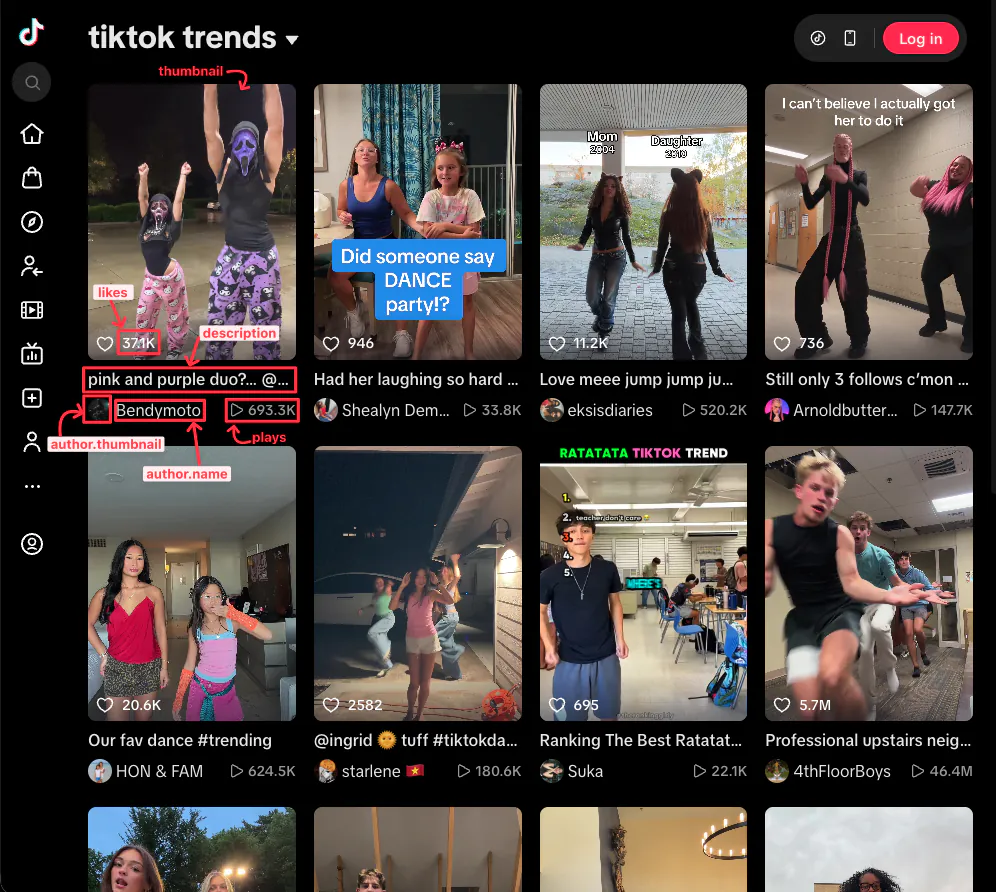
{
  ...
  "video_results": [
    {
      "position": 1,
      "id": "7696609917196651806",
      "link": "https://www.tiktok.com/@bendymoto/video/7696609917196651806",
      "description": "pink and purple duo?… @Larping Moto #fyp #trending #biketok #booktok #dance",
      "thumbnail": "https://p19-common-sign.tiktokcdn-us.com/tos-useast8-p-0068-tx2/oE4n8AMnRZ5IfWjjVtzjNaqIABffCaoAw4W7Q9~tplv-tiktokx-origin.image?dr=9636&x-expires=1793649600&x-signature=bQtxbbcnNgUeRVrfnu17cRyVJm4%3D&t=4d5b0474&ps=13740610&shp=81f88b70&shcp=0d52deaf&idc=useast5",
      "duration": 12,
      "published_date": "2026-10-14T19:37:31Z",
      "plays": 693300,
      "likes": 37100,
      "comments": 560,
      "shares": 1835,
      "bookmarks": 3844,
      "categories": [
        "Finger Dance & Basic Dance",
        "Singing & Dancing",
        "Talents"
      ],
      "hashtags": [
        {
          "id": "229207",
          "name": "fyp",
          "link": "https://www.tiktok.com/tag/fyp"
        },
        {
          "id": "20105",
          "name": "trending",
          "link": "https://www.tiktok.com/tag/trending"
        },
        {
          "id": "1611780226762757",
          "name": "biketok",
          "link": "https://www.tiktok.com/tag/biketok"
        },
        {
          "id": "1622962893630470",
          "name": "booktok",
          "link": "https://www.tiktok.com/tag/booktok"
        },
        {
          "id": "5054",
          "name": "dance",
          "link": "https://www.tiktok.com/tag/dance"
        }
      ],
      "mentions": [
        {
          "id": "7650322728524104718",
          "username": "larping.moto",
          "link": "https://www.tiktok.com/@larping.moto"
        }
      ],
      "author": {
        "id": "6746527092337624070",
        "username": "bendymoto",
        "name": "Bendymoto",
        "link": "https://www.tiktok.com/@bendymoto",
        "thumbnail": "https://p16-common-sign.tiktokcdn-us.com/tos-useast8-avt-0068-tx2/f16657730ed6234a5321bb895f0a8e2f~tplv-tiktokx-cropcenter:1080:1080.jpeg?dr=9640&refresh_token=b8a94012&x-expires=1793649600&x-signature=Q2Z2q4bCjo2BGbX4sHeFGjirTmQ%3D&t=4d5b0474&ps=13740610&shp=a5d48078&shcp=81f88b70&idc=useast5",
        "followers": 149200,
        "following": 65,
        "likes": 10000000,
        "videos": 95
      },
      "music": {
        "id": "7664187459340667656",
        "title": "original sound - P🐾",
        "author": "P🐾",
        "link": "https://www.tiktok.com/music/original-sound-p-7664187459340667656",
        "thumbnail": "https://p16-common-sign.tiktokcdn-us.com/tos-alisg-avt-0068/6435700600b6da25f7e7f79d108be049~tplv-tiktokx-cropcenter:1080:1080.jpeg?dr=9640&refresh_token=04293e26&x-expires=1793649600&x-signature=oXC1IHj20PE2Tyzlas0YpVZYEz0%3D&t=4d5b0474&ps=13740610&shp=a5d48078&shcp=81f88b70&idc=useast5",
        "duration": 12
      }
    },
    {
      "position": 2,
      "id": "7702286755461909791",
      "link": "https://www.tiktok.com/@shealynkd/video/7702286755461909791",
      "description": "Had her laughing so hard she couldn’t even DANCE! 🤣 #dance #momsoftiktok #trendingsong #trendingaudio #motherdaughter",
      "thumbnail": "https://p16-common-sign.tiktokcdn-us.com/tos-useast8-p-0068-tx2/ogQkrlAIELDA5V4FASBuPqBPeLGEREEiInQ2f3~tplv-tiktokx-dmt-logom:tos-useast8-i-0068-tx2/oYAEAeLeHIFVLIA1IogqjCoGAIUIqrAam1yeQA.image?dr=9634&x-expires=1793649600&x-signature=RILrBvOgVyrSWJR%2F7bEQ4RkFNgw%3D&t=4d5b0474&ps=13740610&shp=81f88b70&shcp=0d52deaf&idc=useast5",
      "duration": 15,
      "published_date": "2026-10-30T02:46:32Z",
      "plays": 33800,
      "likes": 946,
      "comments": 16,
      "shares": 9,
      "bookmarks": 83,
      "categories": [
        "Lip-sync",
        "Performance"
      ],
      "hashtags": [
        {
          "id": "5054",
          "name": "dance",
          "link": "https://www.tiktok.com/tag/dance"
        },
        {
          "id": "1609640694706182",
          "name": "momsoftiktok",
          "link": "https://www.tiktok.com/tag/momsoftiktok"
        },
        {
          "id": "379407",
          "name": "trendingsong",
          "link": "https://www.tiktok.com/tag/trendingsong"
        },
        {
          "id": "20055640",
          "name": "trendingaudio",
          "link": "https://www.tiktok.com/tag/trendingaudio"
        },
        {
          "id": "20364",
          "name": "motherdaughter",
          "link": "https://www.tiktok.com/tag/motherdaughter"
        }
      ],
      "author": {
        "id": "6812725080993350661",
        "username": "shealynkd",
        "name": "Shealyn Demint",
        "link": "https://www.tiktok.com/@shealynkd",
        "thumbnail": "https://p16-common-sign.tiktokcdn-us.com/tos-useast8-avt-0068-tx2/7553691d6b42083877e1c88e1da1b7bf~tplv-tiktokx-cropcenter:1080:1080.jpeg?dr=9640&refresh_token=c4db2bcb&x-expires=1793649600&x-signature=A1ja1zrO8cJuLDdvbnSVXUYckp4%3D&t=4d5b0474&ps=13740610&shp=a5d48078&shcp=81f88b70&idc=useast5",
        "followers": 1180,
        "following": 467,
        "likes": 10400,
        "videos": 69
      },
      "music": {
        "id": "6932540177864772357",
        "title": "original sound",
        "author": "Anthony Koz",
        "link": "https://www.tiktok.com/music/original-sound-6932540177864772357",
        "thumbnail": "https://p16-common-sign.tiktokcdn-us.com/tos-useast5-avt-0068-tx/573896eb877d01d0e3458679153c2fcd~tplv-tiktokx-cropcenter:1080:1080.jpeg?dr=9640&refresh_token=7c9aff4f&x-expires=1793649600&x-signature=4zHDZe562QWXN%2BbAdRN6prRIy7A%3D&t=4d5b0474&ps=13740610&shp=a5d48078&shcp=81f88b70&idc=useast5",
        "duration": 39
      }
    },
    ...
  ]
}
JSON structure overview
{
  ...
  "video_results": [
    {
      "position": "Integer - Position of the video on the page.",
      "id": "String - TikTok video ID. (Ex. 7698856276402425096)",
      "link": "String - Link to the video on TikTok.",
      "description": "String - Caption of the video, including its hashtags and mentions.",
      "thumbnail": "String - Link to the video cover image. Expires after about two days.",
      "duration": "Integer - Duration of the video in seconds. (Ex. 16)",
      "published_date": "String - Date the video was posted, in ISO 8601 format (UTC). (Ex. 2026-10-20T20:54:35Z)",
      "plays": "Integer - Number of times the video was played. (Ex. 244100)",
      "likes": "Integer - Number of likes. (Ex. 12700)",
      "comments": "Integer - Number of comments. (Ex. 61)",
      "shares": "Integer - Number of shares. (Ex. 912)",
      "bookmarks": "Integer - Number of times the video was added to favorites. (Ex. 2642)",
      "sponsored": "Boolean - Always true when present. Only present for sponsored videos.",
      "categories": [
        "String - Category TikTok assigned to the video. (Ex. Singing & Dancing)",
        ...
      ],
      "hashtags": [
        {
          "id": "String - TikTok hashtag ID. (Ex. 5054)",
          "name": "String - Hashtag without the leading '#'. (Ex. dance)",
          "link": "String - Link to the hashtag page on TikTok."
        },
        ...
      ],
      "mentions": [
        {
          "id": "String - TikTok user ID of the mentioned account.",
          "username": "String - Username of the mentioned account, without the leading '@'. (Ex. scuffers.co)",
          "link": "String - Link to the mentioned account on TikTok."
        },
        ...
      ],
      "author": {
        "id": "String - TikTok user ID of the author.",
        "username": "String - Username of the author, without the leading '@'. (Ex. angelaandchelsea)",
        "name": "String - Display name of the author. (Ex. angela and chelsea)",
        "link": "String - Link to the author's profile on TikTok.",
        "thumbnail": "String - Link to the author's profile picture. Expires after about two days.",
        "verified": "Boolean - Always true when present. Only present for verified accounts.",
        "followers": "Integer - Number of followers. (Ex. 251800)",
        "following": "Integer - Number of accounts the author follows. (Ex. 39)",
        "likes": "Integer - Total number of likes on the author's videos. (Ex. 14000000)",
        "videos": "Integer - Number of videos the author posted. (Ex. 159)"
      },
      "music": {
        "id": "String - TikTok music ID.",
        "title": "String - Title of the sound. (Ex. original sound)",
        "author": "String - Author of the sound.",
        "album": "String - Album of the sound. Only present for some licensed tracks.",
        "link": "String - Link to the sound page on TikTok.",
        "thumbnail": "String - Link to the sound cover image. Expires after about two days.",
        "duration": "Integer - Duration of the sound in seconds. (Ex. 16)",
        "original": "Boolean - Always true when present. Only present for sounds marked as original by TikTok."
      }
    },
    ...
  ],
  "serpapi_pagination": {
    "current": "Integer - Current page number.",
    "previous": "String - Link to the previous page of results. Only present when 'start' is greater than 0.",
    "next": "String - Link to the next page of results. Only present when TikTok has more videos for the keyword.",
    "session_token": "String - Token of the TikTok session of these results. Pass it with 'start' to get the other pages of the same session without repeated videos. The 'previous' and 'next' links already include it."
  }
}