Google Hotels Price Calendar API
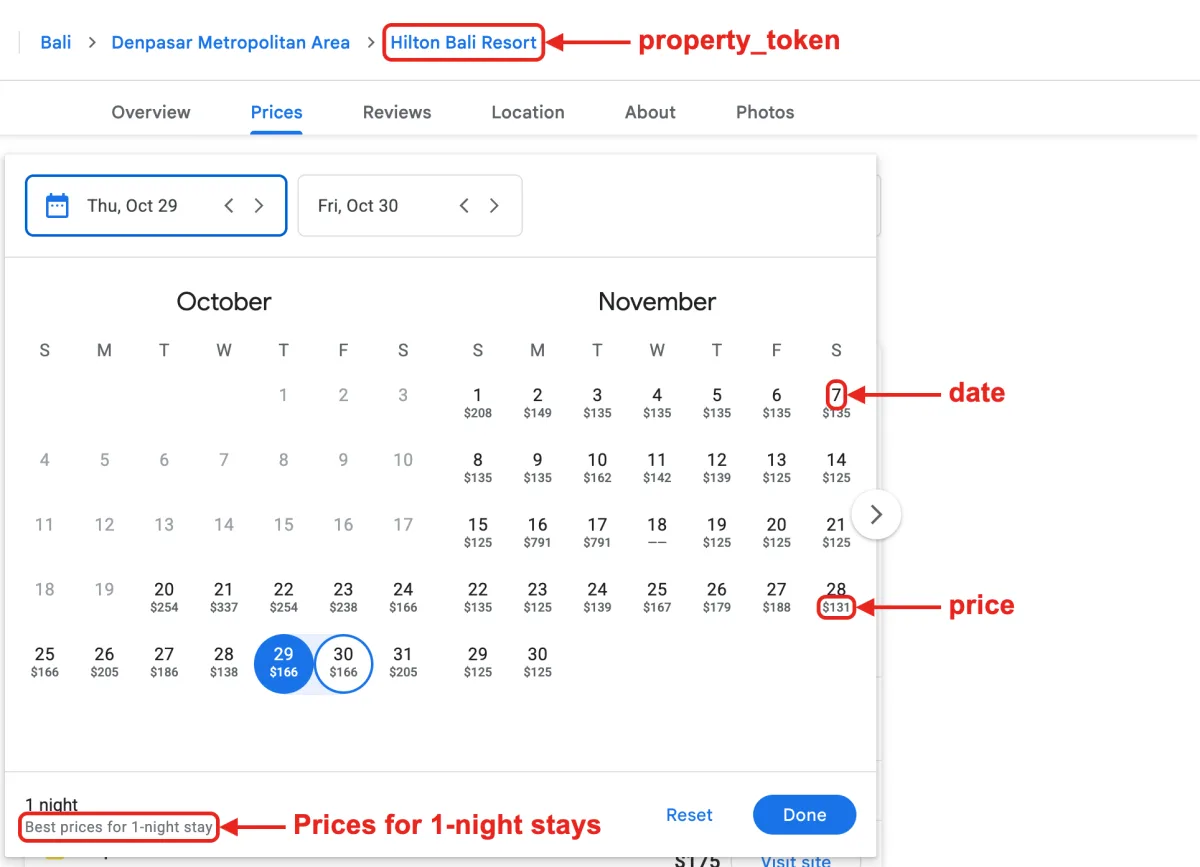
Our Google Hotels Price Calendar API retrieves a property’s nightly prices from the Google Hotels date picker. Each date shows the best available price for a one-night stay starting that day. To get started, use our Google Hotels API to find the property’s property_token.
Each price includes taxes and fees. When Google Hotels also provides a price excluding taxes and fees, it’s returned in before_taxes_fees. Future dates may be omitted if Google Hotels hasn’t listed prices for them yet.
The API endpoint is https://serpapi.com/search?engine=google_hotels_price_calendar
Head to the playground for a live and interactive demo.
API Parameters
Search Query
property_token
Required
Parameter defines the specific property. You can find property_token from Google Hotels API.
Advanced Parameters
start_date
Required
Parameter defines the first date of the price calendar. Each date has the best price of a 1-night stay starting that day. The format is YYYY-MM-DD. e.g. 2026-10-22
end_date
Required
Parameter defines the last date of the price calendar. It can't be more than 3 years from now. The format is YYYY-MM-DD. e.g. 2026-12-20
children_ages
Optional
Parameter defines the ages of children. The age range is from 1 to 17, with children who haven't reached 1 year old being considered as 1.
Example for single child only:5
Example for multiple children (separated by comma ,):5,8,10
The number of children's ages specified must match the children.
Localization
gl
Optional
Parameter defines the country to use for the Google Hotels search. It's a two-letter country code. (e.g., us for the United States, uk for United Kingdom, or fr for France) Head to the Google countries page for a full list of supported Google countries.
hl
Optional
Parameter defines the language to use for the Google Hotels search. It's a two-letter language code. (e.g., en for English, es for Spanish, or fr for French). Head to the Google languages page for a full list of supported Google languages.
currency
Optional
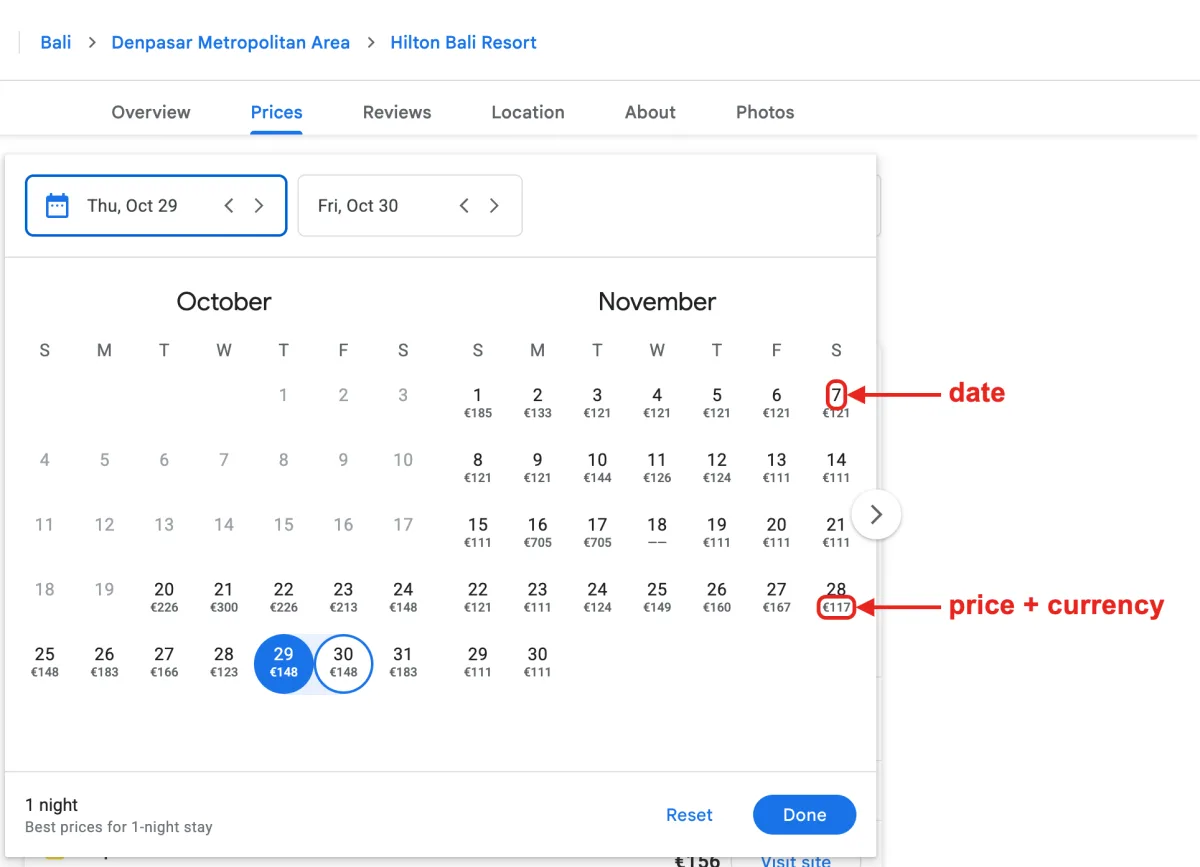
Parameter defines the currency of the returned prices. Default to USD. Head to the Google Travel Currencies page for a full list of supported currency codes.
 Serpapi Parameters
engine
Required
Set parameter to google_hotels_price_calendar to use the Google Hotels Price Calendar API engine.
no_cache
Optional
Parameter will force SerpApi to fetch the Google Hotels Price Calendar results even if a cached version is already present. A cache is served only if the query and all parameters are exactly the same. Cache expires after 1h. Cached searches are free, and are not counted towards your searches per month. It can be set to false (default) to allow results from the cache, or true to disallow results from the cache. no_cache and async parameters should not be used together.
async
Optional
Parameter defines the way you want to submit your search to SerpApi. It can be set to false (default) to open an HTTP connection and keep it open until you got your search results, or true to just submit your search to SerpApi and retrieve them later. In this case, you'll need to use our Searches Archive API to retrieve your results. async and no_cache parameters should not be used together. async should not be used on accounts with Ludicrous Speed enabled.
zero_trace
Optional
Enterprise only. Parameter enables ZeroTrace mode. It can be set to false (default) or true. Enable this mode to skip storing search parameters, search files, and search metadata on our servers. This may make debugging more difficult.
output
Optional
Parameter defines the format of the result. It can be set to json (default) to get a structured JSON of the results, html to get the raw HTML retrieved, or md to get a markdown-formatted version optimized for LLMs and AI agents.
json_restrictor
Optional
Parameter defines the fields you want to include in the output, reducing payload size for faster response. See the JSON Restrictor documentation for more details.
API Results
JSON Results
JSON output includes structured data for Prices.
A search status is accessible through search_metadata.status.
It flows this way: Processing -> Success || Error.
If a search has failed, error will contain an error message.
search_metadata.id is the search ID inside SerpApi.
HTML Results
This API does not have a full HTML response, only text.
search_metadata.prettify_html_file contains a link to the prettified version of the result.
It is displayed in the playground.
Markdown Results
Markdown output is optimized for LLMs and AI agents. It provides most of the same informational content as JSON
in a token-efficient format using tables, markdown links, and YAML frontmatter.
To access, use the output=md parameter, the /search.md endpoint, or request header Accept: text/markdown.
API Examples
Example with property_token: ChcI9uq9hrWO2OtjGgsvZy8xMjJ0YzFteBAB (Hilton Bali Resort)
{
  ...
  "prices": [
    {
      "date": "2026-10-21",
      "price": "$337",
      "extracted_price": 337,
      "before_taxes_fees": "$278",
      "extracted_before_taxes_fees": 278,
      "currency": "USD"
    },
    {
      "date": "2026-10-22",
      "price": "$239",
      "extracted_price": 239,
      "before_taxes_fees": "$217",
      "extracted_before_taxes_fees": 217,
      "currency": "USD"
    },
    {
      "date": "2026-10-23",
      "price": "$250",
      "extracted_price": 250,
      "before_taxes_fees": "$207",
      "extracted_before_taxes_fees": 207,
      "currency": "USD"
    },
    ...
  ]
}
Example with currency: EUR
The currency parameter allows getting the prices in a specific currency. Head to the Google Travel Currencies page for a full list of supported currency codes.
{
  ...
  "prices": [
    {
      "date": "2026-11-19",
      "price": "€107",
      "extracted_price": 107,
      "before_taxes_fees": "€95",
      "extracted_before_taxes_fees": 95,
      "currency": "EUR"
    },
    {
      "date": "2026-11-20",
      "price": "€117",
      "extracted_price": 117,
      "before_taxes_fees": "€96",
      "extracted_before_taxes_fees": 96,
      "currency": "EUR"
    },
    ...
  ]
}
JSON Structure Overview
{
  "prices": [
    {
      "date": "String - Check-in date of the 1-night stay in YYYY-MM-DD format",
      "price": "String - Best price of the 1-night stay with taxes and fees, formatted with currency",
      "extracted_price": "Numeric - Extracted best price of the 1-night stay with taxes and fees",
      "before_taxes_fees": "String - Price before taxes and fees formatted with currency, when Google Hotels shows it",
      "extracted_before_taxes_fees": "Numeric - Extracted price before taxes and fees",
      "currency": "String - Currency of the prices (e.g. USD)"
    },
    ...
  ]
}