Ruby
Ruby
 Golang
 .Net
.Net
 MCP
MCP
 C++
C++


Bing Web Search is the second most-popular search engine in the world, behind only Google. It can find pages across the internet, highlight trending topics, pull information from real-world locations, and much more. Bing's web index also powers the source links in Copilot, grounding data for the Foundry Agent Service in Azure, and other functionality across Microsoft products.
The Bing Search API from SerpApi gives you Bing's organic search results, inline advertisements, answer boxes, top stories, Copilot answers, and other features in a simple JSON format. SerpApi handles the proxy network, HTML parsing, captcha puzzles, and other challenges, so you can focus on your actual business or project.
Need a replacement for Microsoft's discontinued official APIs? Check out our migration guides for the Bing Search API, Bing Image Search API, and Bing News Search API.
What can you scrape from Bing Web Search?
Here's everything you can pull from Bing web searches with SerpApi:
- Organic results: The main list of links on each search result page. Each result includes a title, external link, position number, and text snippet. Some results may also have additional sublinks and other data.
- Ad results: The advertisements on the search page, if any exist. Each result includes the position, title, tracking link, description, and other information.
- Carousel results: The carousel results block and its contents, if one exists (usually near the top of the page).
- Top stories: News articles that appear at the top of certain queries, including each result's title, position, text snippet, external link, publishing time, and other information.
- Copilot answer: The AI-generated answer from Microsoft Copilot, if one exists. If you only want Copilot responses, check out the Bing Copilot API.
- Events results: Upcoming events based on the search query, with titles and calendar dates, if the events block is present on the page.
- Inline images: If any image results are included in the web search, you can access the titles, thumbnail URL, source, and Bing link for each result.
- Shopping results: Any shopping results in the page, which may include a product's title, external link, seller, price, installment plans, and other information.
- Inline videos: Results for videos, including each item's title, thumbnail image, view count, publish date, channel/creator, and other information.
- Knowledge graph: The information box that often appears for searches related to people and places.
- Local pack: Location results that appear for searches like "grocery stores near me." Each result may include a title, address, rating, opening hours, and other information.
- Recipes: The list of recipes that may appear on some searches, including the title and external link for each result.
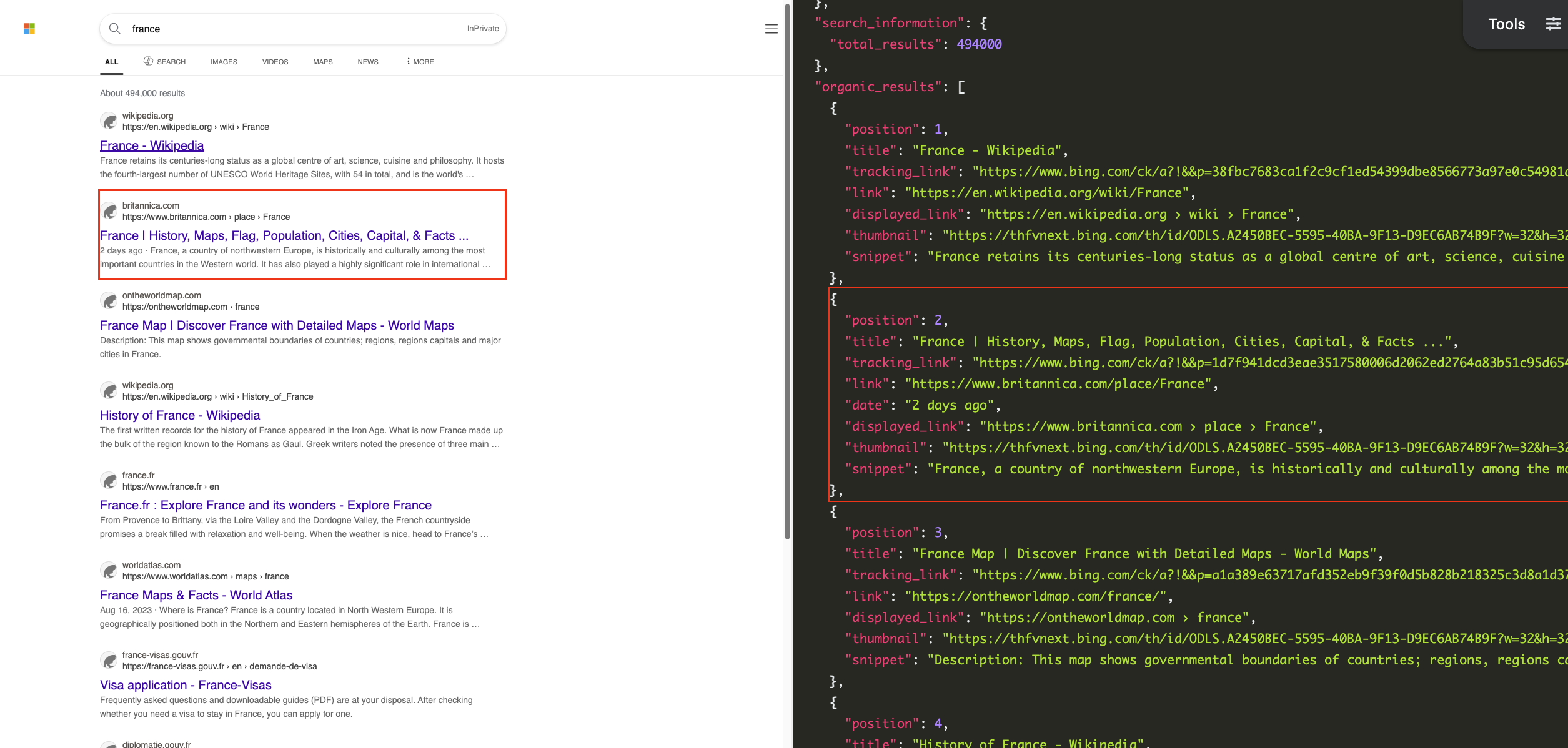
The results may also include Bing's suggested searches and refined searches for the query, provided as text strings and Bing URLs.
Scraping other Bing services
This article primarily covers Bing's traditional search results, but you can scrape other Bing services with SerpApi as well. We have tutorials for accessing Bing Images, Bing reverse image search, Copilot answers, Bing Maps, Bing News, Bing Videos, and Bing Shopping.
 James Collins
For more examples of projects you can build with these APIs, check out AI briefings with Claude and Bing News, and an AI-powered shopping catalog that uses the Copilot API.
Getting started with SerpApi
Before getting started with the Bing Search API, you need a free SerpApi account. That also includes access to other engines, like the Google Search API, DuckDuckGo Search API, and Yahoo Search API. You can upgrade to a paid account later if you need more search capacity, faster speeds, or other features.
First, you need to create an account and verify your email and other details. After that, get the API key from your account dashboard.
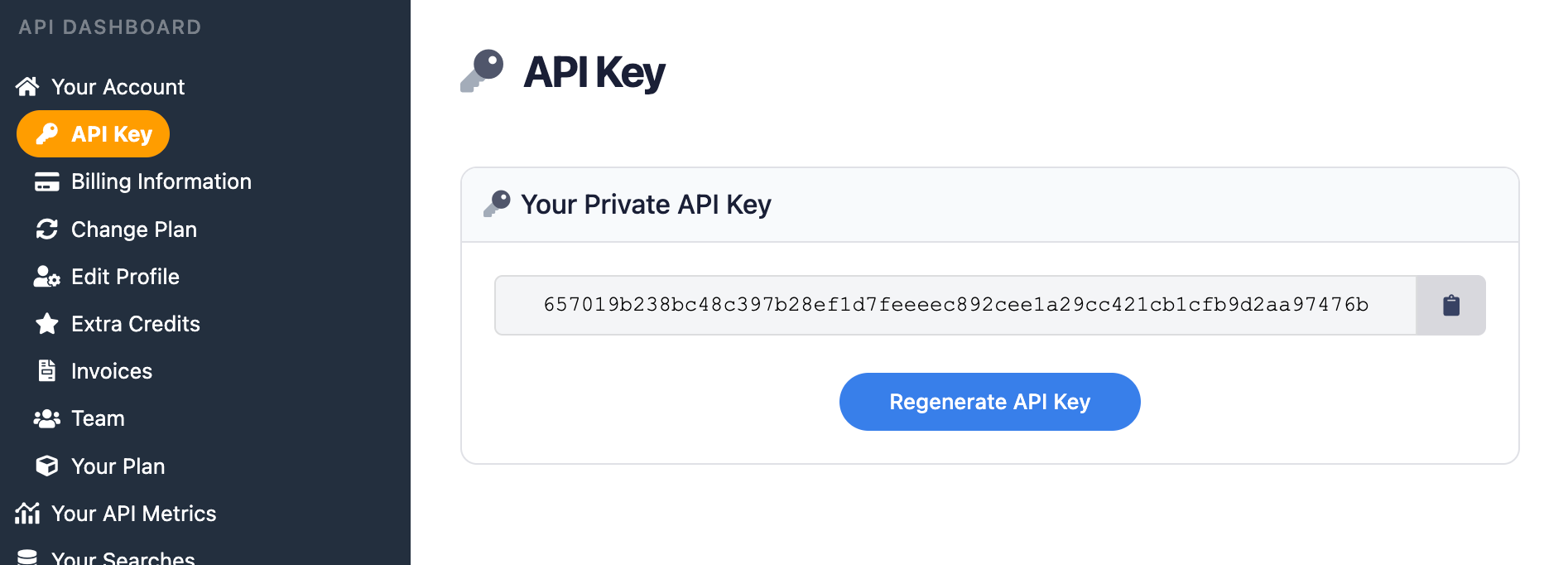
Make sure to store your API key in a safe location if you are sharing or publishing your code. If the key is leaked or stolen, you can make a new one from the SerpApi account dashboard.
Install the SerpApi library (optional)
You can use SerpApi's official libraries for Python, JavaScript, Ruby, Java, and other languages. They provide a simple wrapper around the API requests.
However, the libraries are not required. You can still make API calls with cURL, fetch() in Node.js, or anything else that can send GET requests and process a JSON response.
Review the Bing Search API documentation
Each API at SerpApi has extensive documentation that covers all the supported parameters and filters, code examples for popular languages, and example JSON responses. This post covers some of the basic usage for the Bing Search API, and you can find everything else at the documentation page.
 SerpApi
The only required parameter is q for the search query, but you can optionally specify the search region, pagination, search filters, and other settings.
How to scrape Bing Web Search results
If you have your API key, you're ready to start pulling data from Bing searches. The results will be identical across all libraries and GET requests, so use whichever method you want.
GET request
Here's how you can search for "Oregon" from the US region, using a regular GET request in any HTTP client:
https://serpapi.com/search.json?engine=bing&q=oregon&mkt=en-us&api_key=YOUR_KEY_GOES_HEREThis is the same search, but restricted to results from the English Wikipedia, using Bing's site search filter:
https://serpapi.com/search.json?engine=bing&q=oregon+site%3Aen.wikipedia.org&mkt=en-us&api_key=API_KEY_GOES_HERESerpApi's JSON Restrictor feature can be used to trim the API response to specific values. This is a search for "California" that only returns the title and external link for each result, with all other data excluded:
https://serpapi.com/search.json?engine=bing&q=california&mkt=en-us&json_restrictor=organic_results[]{title,link}&api_key=API_KEY_GOES_HEREThis can be useful if you need more efficient parsing, like when using an LLM with a limited context window.
Python
This searches for "Maine" with Bing and the official SerpApi Python library, then display the title and external link for each result:
import serpapi

client = serpapi.Client(api_key=YOUR_KEY_GOES_HERE)
response = client.search({
  "engine": "bing",
  "q": "maine",
  "mkt": "en-us"
})

for item in response["organic_results"]:
  print(f"{item['title']} - {item['link']}\n")
This will print all data for the Answer Box, if one was provided by Bing:
import serpapi

client = serpapi.Client(api_key=YOUR_KEY_GOES_HERE)
response = client.search({
  "engine": "bing",
  "q": "maine",
  "mkt": "en-us",
})

if "answer_box" in response:
    print(response["answer_box"])
else:
    print("No answer box!")
Ruby
Here's how you can search for "Florida" in the US region, with the SerpApi Ruby gem, then display the title and link for each result:
require "serpapi"

client = SerpApi::Client.new(
    engine: "bing",
    q: "florida",
    mkt: "en-us",
    api_key: YOUR_KEY_GOES_HERE
)

for result in client.search[:organic_results] do
    print "#{result[:title]} - #{result[:link]}\n\n"
end
This example prints each related search for the original "Florida" query, if Bing provides them:
require "serpapi"

client = SerpApi::Client.new(
    engine: "bing",
    q: "florida",
    mkt: "en-us",
    api_key: YOUR_KEY_GOES_HERE
)

if client.search.dig(:related_searches)
    for result in client.search[:related_searches] do
        print "#{result[:title]} - #{result[:link]}\n\n"
    end
else
    puts "No related searches!"
end
JavaScript and Node.js
Here's how you can use the SerpApi JavaScript library to search for "North Carolina," then display the title and external link for each result:
import { getJson } from 'serpapi';

const search = await getJson({
    engine: "bing",
    q: "north carolina",
    mkt: "en-us",
    api_key: YOUR_KEY_GOES_HERE
});

for (const item in search?.organic_results) {
    let thisItem = search.organic_results[item];
    console.log(`${thisItem.title} - ${thisItem.link}\n`);
}
This displays all events results for "Dallas concerts," if Bing provides them:
import { getJson } from 'serpapi';

const search = await getJson({
    engine: "bing",
    q: "dallas concerts",
    mkt: "en-us",
    api_key: YOUR_KEY_GOES_HERE
});

if (search?.events_results) {
    for (const item in search.events_results) {
        let thisItem = search.events_results[item];
        console.log(`${thisItem.title} - ${thisItem.location} - ${thisItem.link}\n`);
    }
} else {
    console.log("No events found!");
}
cURL
Here's how you can search for "Nevada" in the US region from cURL:
curl --get https://serpapi.com/search \
 -d api_key="YOUR_KEY_GOES_HERE" \
 -d engine="bing" \
 -d q="nevada" \
 -d mkt="en-us"
Other languages and no-code solutions
You can still use the API directly with GET requests, even if there isn't an official SerpApi integration for your preferred environment or language. SerpApi also works with Make.com, N8N, and other tools.
Conclusion
Bing Web Search can be a great resource for market analysis, web archival, SEO research, and many other use cases. With the Bing Search API from SerpApi, you can pull all those results into any automation or programming language.
If results from Bing aren't working well enough, SerpApi also offers a Google Search API, DuckDuckGo Search API, Yahoo Search API, Yandex Search API, and other engines. You can access them with the same account and search credits as Bing, and even run the same search across multiple engines to get more diverse results.
If you need help using SerpApi, please contact us.