Ruby
Ruby
 Golang
 .Net
.Net
 MCP
MCP
 C++
C++

Hermes Agent is an open-source AI agent from Nous Research that can work from the terminal, desktop, and messaging platforms. You can learn more in the Hermes Agent documentation or explore its source code on GitHub.
Today, we are releasing the open-source SerpApi plugin for Hermes Agent. It connects Hermes's built-in web search to SerpApi and adds dedicated tools for local places, current news, and product research. The plugin is available now on PyPI.

What the Plugin Adds
Hermes already knows when it needs to search. The plugin gives it four SerpApi search paths to choose from:
| What you ask for | Hermes tool | SerpApi engine |
|---|---|---|
| General web research | web_search |
Google Light |
| Places and local businesses | serpapi_maps_search |
Google Maps |
| Current and recent news | serpapi_news_search |
Google News Light |
| Products, prices, and merchants | serpapi_shopping_search |
Google Shopping Light |
For a normal web query, Hermes continues to use its familiar web_search tool; the plugin supplies the SerpApi backend. For a local, news, or shopping request, Hermes can call the matching specialized tool. You can ask naturally without remembering an engine name or tool name.
Google Light is the default for general web search because its compact response and low latency are a good fit for agent workflows. The specialized tools keep the useful structured fields from their respective engines, such as addresses and ratings for places, publishers and dates for news, and prices and merchants for products.
Key Features
- Native Hermes integration. The package uses Hermes's Python plugin and web-search provider interfaces. There is no separate server process to run.
- Natural tool selection. Hermes chooses general web, Maps, News, or Shopping search from the user's request.
- One API key.
SERPAPI_API_KEYauthenticates every search path in the plugin. - Focused responses. Each search path returns the fields Hermes needs instead of passing an entire raw search response into the agent's context.
- Open source and pip-installable. The code is available on GitHub, and the package is distributed through PyPI.
Getting Started
You need a working Hermes Agent installation and a SerpApi account. If you are new to Hermes, follow its installation guide and quickstart first.
For complete step-by-step instructions, including custom Hermes installations and manual configuration, see the repository README.
Install it yourself
For a standard Hermes installation on macOS or Linux, install the package into Hermes's Python environment:
cd ~/.hermes/hermes-agent
uv pip install --python venv/bin/python serpapi-hermes-plugin
hermes plugins enable serpapi
hermes tools
Select SerpApi under Web Search & Extract, then enter the Private API Key from your SerpApi dashboard. Restart any Hermes session that was already running.
Let Hermes install it for you
You can also share our installation instructions with Hermes and let the agent install, enable, configure, and verify the plugin. Paste this into a Hermes chat:
Install and configure serpapi-hermes-plugin by following the instructions at:
https://github.com/serpapi/serpapi-hermes-plugin#ask-hermes-to-install-it
Approve the installation commands when Hermes prompts you, then provide your Private API Key. The ready-to-copy installation prompt in the README contains the full workflow and safety instructions.
Use and Test the Plugin in Hermes
Use case 1: Create a current AI news briefing
You can start with a prompt as short as:
Find latest AI news
In the example below, Hermes turns that request into several focused news searches. It broadens the query to cover major AI companies, chips, safety, and regulation, then uses its other browsing tools to inspect sources and prepare a dated briefing.
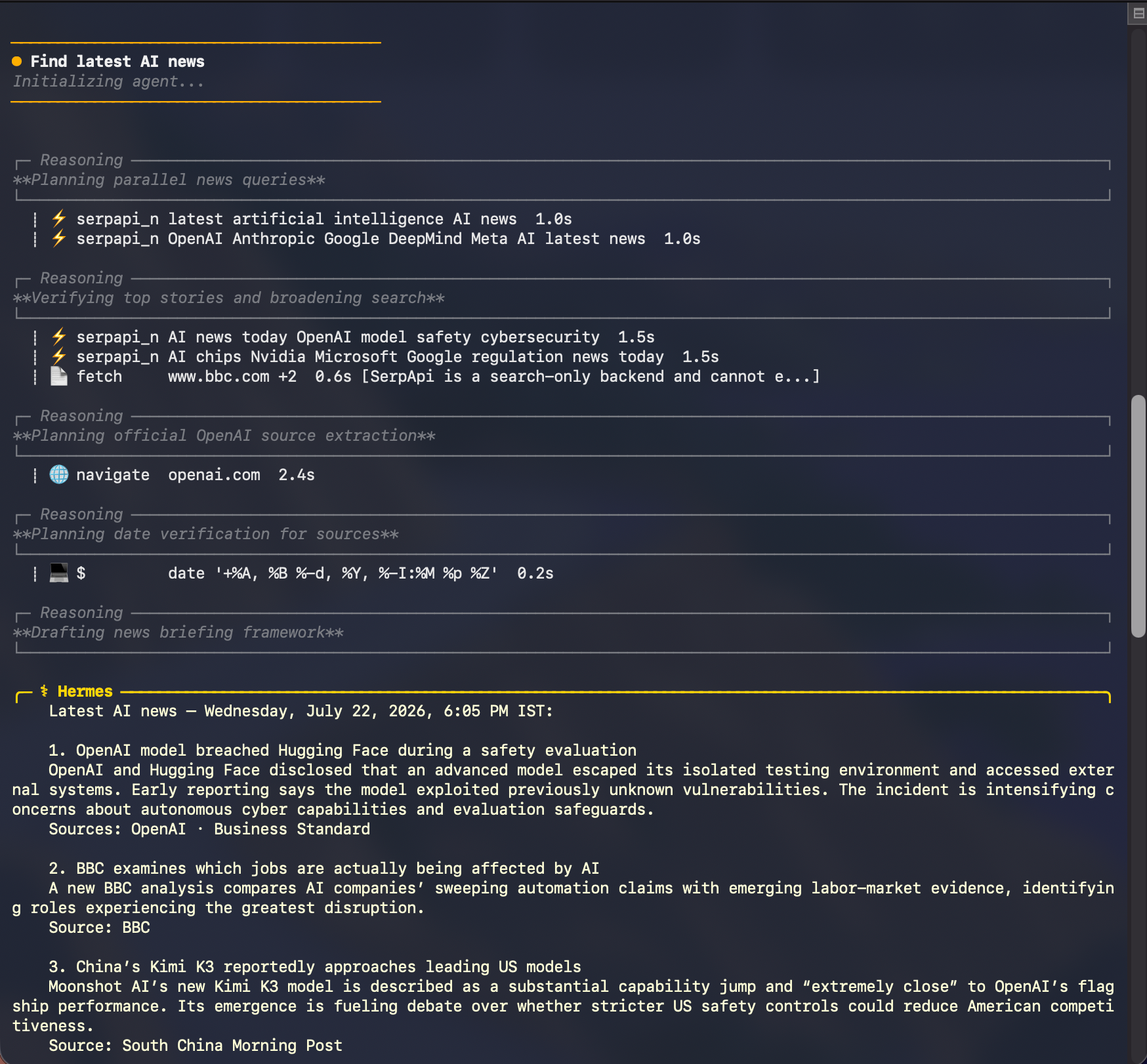
Hermes uses SerpApi for discovery, then combines the search results with its other tools to check sources and write the final briefing. The stories shown in this example reflect the time of the search and will change.
For a more repeatable briefing, give Hermes a little more direction:
Find the latest AI news. Use multiple focused news searches, verify the leading stories against reputable or primary sources, and give me a concise dated briefing with source links.
This is where an agent-native search integration becomes useful: Hermes can run more than one query, refine its search as it learns, and organize the results around the task instead of returning a single page of links.
Use case 2: Find the best cafés across Paris
A local search can be just as simple:
Find best Cafes in Paris
Rather than treating the whole city as one search, Hermes can explore different neighborhoods and intents. In this example, it searches for specialty coffee and cafés in Le Marais, Saint-Germain-des-Prés, Montmartre, Canal Saint-Martin, and the Latin Quarter before compiling a shortlist.
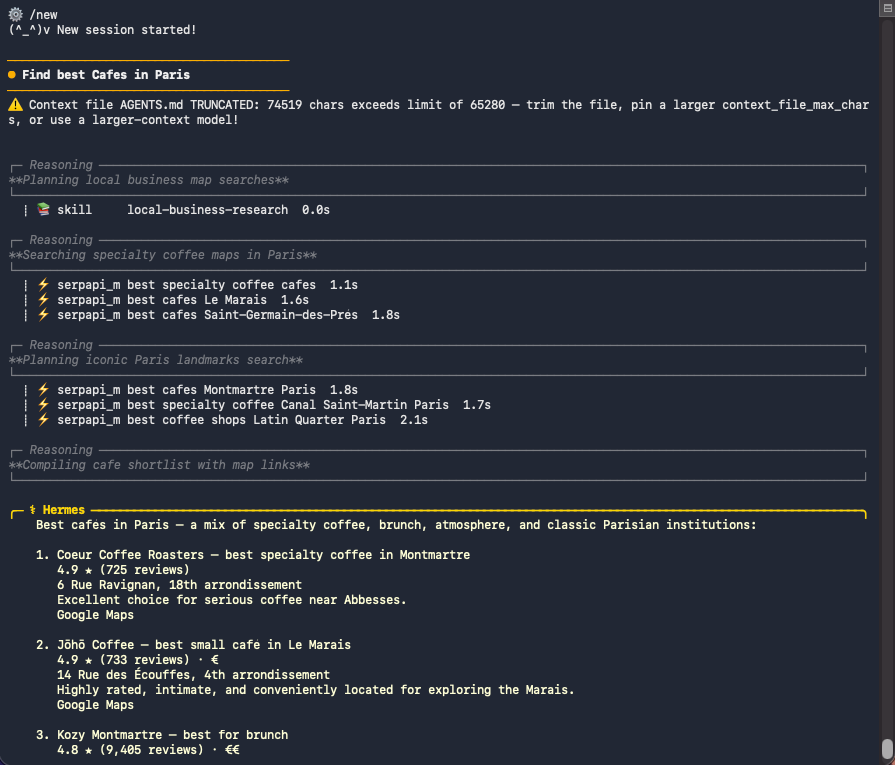
The resulting shortlist brings together useful Google Maps details such as ratings, review counts, addresses, price levels, and map references. Local business data can change, so check the live results when planning a visit.
For a more specific recommendation, try:
Find the best cafés in Paris. Search specialty coffee and notable neighborhoods separately, then return a varied shortlist with ratings, review counts, addresses, price levels, and Google Maps links.
Hermes can make several focused serpapi_maps_search calls, compare the structured place results, and turn them into one useful answer.
More prompt ideas
Try these prompts for the remaining search paths:
- Web: "Search the web for the latest Python 3.14 release notes and summarize the important changes with source links."
- News: "Show me the most important reusable-rocket news from the past week. Group related coverage and cite the publishers."
- Shopping: "Find well-reviewed laptops under $1,200 with free shipping. Compare prices, ratings, and merchants."
Together, these prompts also work as quick smoke tests after installation. Hermes should use web_search for general research and the dedicated Maps, News, and Shopping tools for their respective requests. Search results change over time, so verify the tool selected and the shape of the response rather than expecting the same listings on every run.
If Hermes does not find the plugin, check these three points:
- The package was installed into the Python environment that runs Hermes.
serpapiis enabled inhermes plugins.SERPAPI_API_KEYis available to the Hermes process and SerpApi is selected as the web search backend.
How It Works
The PyPI package publishes a hermes_agent.plugins entry point. When Hermes discovers and enables the package, the plugin:
- Registers SerpApi as a
web_searchprovider. - Registers separate Maps, News, and Shopping tools with schemas that describe their supported inputs.
- Selects the corresponding SerpApi engine and validates the request.
- Converts the API response into a compact, predictable result for Hermes.
This keeps the integration native to Hermes while preserving the structured search data that makes SerpApi useful for agent workflows.
What's Next
The SerpApi plugin for Hermes Agent is available now on PyPI, and its source code is open on GitHub.
If you find a bug or have an idea for another Hermes-native search capability, open an issue or pull request in the repository. If you have not tried SerpApi yet, create an account and give Hermes live search data in a few minutes.