Ruby
 Golang
 .Net
 MCP
 C++

DeepSeek has opened the web search infrastructure behind its models to developers. Its new Search and Fetch APIs give agents and retrieval-augmented generation (RAG) applications a way to find live web pages and turn them into model-ready context.
That inevitably raises a question for developers already using search and web extraction APIs: can DeepSeek Search and Fetch API replace SerpApi?
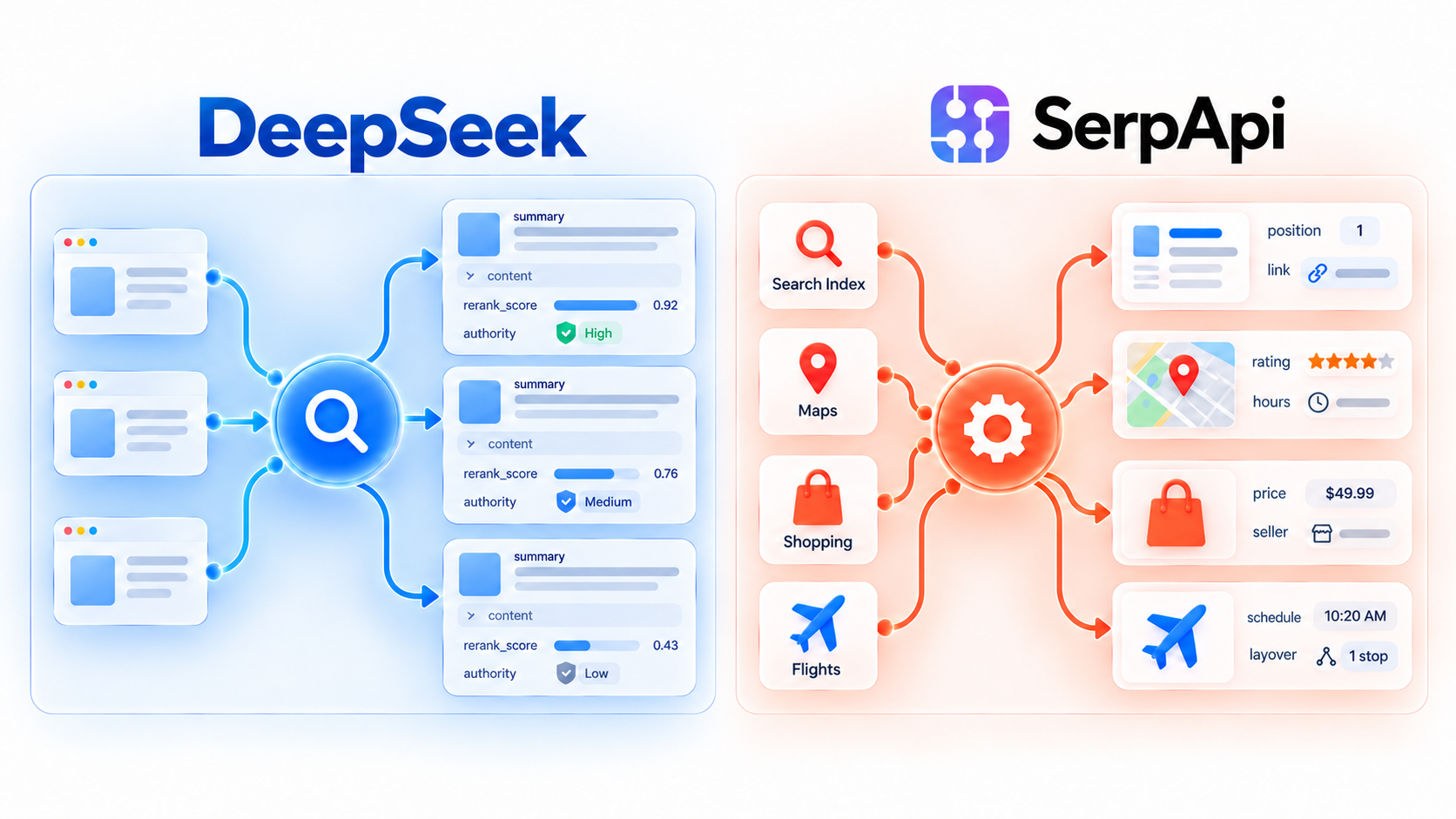
The short answer is that the two products have overlapping features, but they operate at different layers of the search stack. DeepSeek Search is an AI-native web retrieval API. It is designed to find relevant pages, rank them using signals such as relevance and authority, and return summaries that a language model can read directly. SerpApi provides structured search data. It gives applications access to results from Google, Bing, Baidu, Google Maps, Google Shopping, YouTube, Google Flights, and many other general and vertical search products.
Both can power AI agents, but they provide agents with different kinds of context. DeepSeek Search emphasizes ranked web pages and model-ready summaries, while SerpApi can provide source-specific, structured data such as flight options, local business details, and shopping results. The right choice depends on whether the agent needs general web evidence or data from a particular search product.
This blog will compare their features, pricing, rate limits, and best use cases.
What DeepSeek Released
DeepSeek introduced two endpoints for live web retrieval:
- Search API: finds web pages for a query and returns a ranked list of structured results.
- Fetch API: retrieves a specific public web page and returns its main content as Markdown.
A basic search request looks like this:
curl https://api.deepseek.com/v1/tools/search \
  -H "Authorization: Bearer $DEEPSEEK_API_KEY" \
  -H "Content-Type: application/json" \
  -d '{
    "query": "中国 AI 编程工具对比 2026",
    "count": 5,
    "need_content": true
  }'
The API returned the following result:
{
  "results": [
    {
      "title": "GLM、MiniMax、Kimi、豆包、千问,国产模型Coding Plan怎么选?一文全套短评",
      "site_name": "tencent.cn",
      "authority": 3,
      "rerank_score": 2.226604461669922,
      "date": "2026-03-02T16:00:00+00:00",
      "url": "https://cloud.tencent.cn/developer/article/2633452#1",
      "summary": "最近使用 Claude Code 编程,结合 Skills,完成一些新的项目,也趁此机会测试了国产模型编程方面的效果……"
    }
    ...
  ]
}
DeepSeek Search returns at most 50 results in one response, and its current documentation does not expose a pagination parameter.
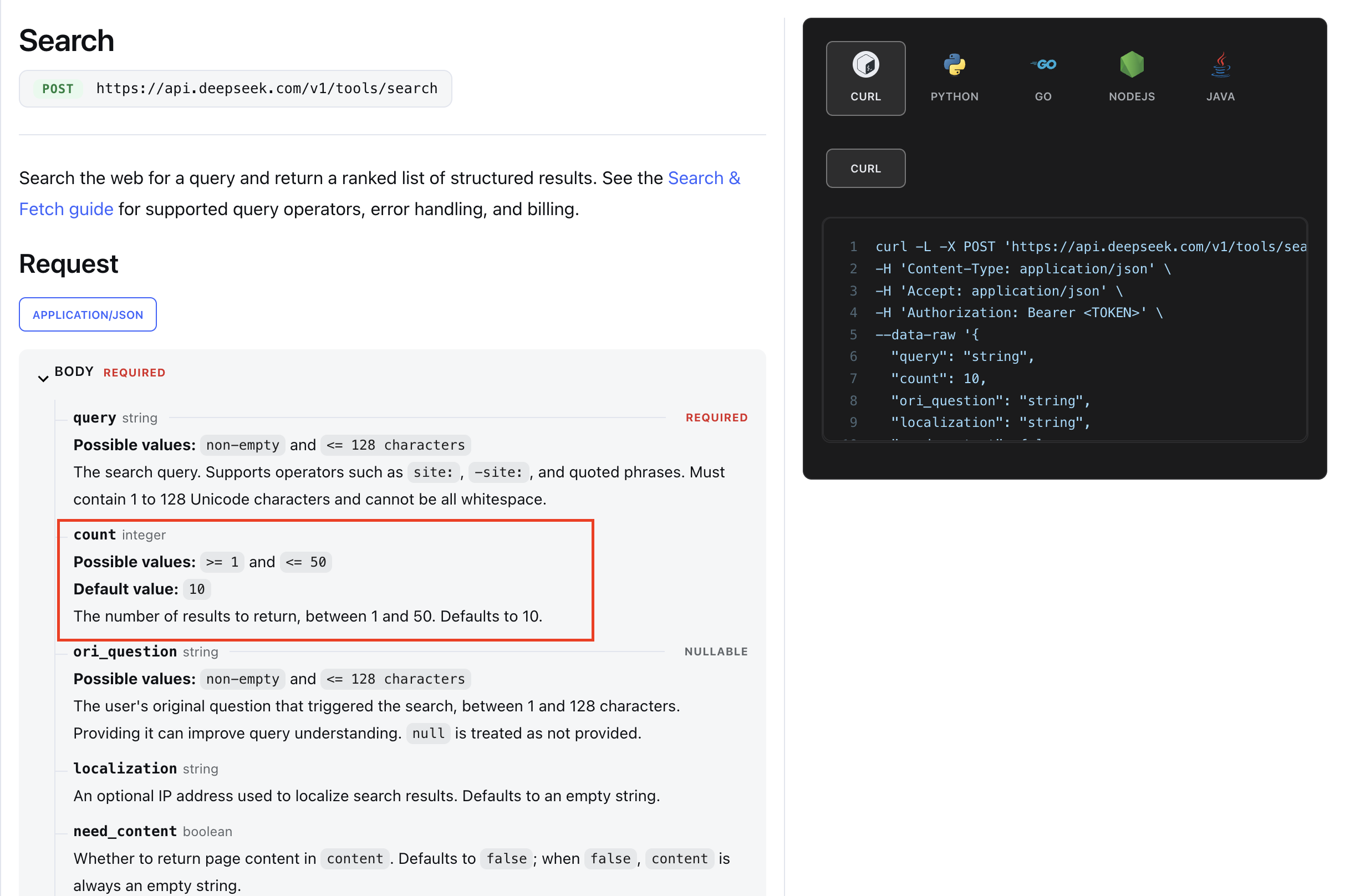
By contrast, SerpApi supports pagination on supported search engines. For example, Google Search responses can includeserpapi_pagination.next, and the start parameter can be used to request subsequent result pages. See SerpApi’s pagination documentation for examples.
How SerpApi Approaches Search
SerpApi takes a different approach. Instead of maintaining one general-purpose search index, it turns existing search engines and vertical search products into structured APIs.
A Google Search request, for example, can return separate sections for:
- Organic results
- Answer boxes
- Knowledge Graph data
- Local results
- News, images, and videos
- Shopping results
- Related questions and searches
- Ads and other result-page features
The same pattern extends beyond general web search. SerpApi provides dedicated APIs for products such as Google Maps, Google Shopping, Google Flights, Google Hotels, YouTube, Amazon, Apple App Store, and many others. Each API exposes fields specific to its source.
That difference becomes important when an agent needs reliable fields it can act on, not only prose it can read. A local-search workflow may need a business's rating, review count, address, phone number, opening hours, and location on a map. A flight-search workflow may need airports, departure times, layovers, duration, airline, carbon emissions, and price. Those are structured business fields, not just webpage summaries.
SerpApi lets developers define where a search is performed, which country and language it targets, and whether it runs on desktop or mobile. Engine-specific parameters can further filter or sort the results. These controls make searches more targeted and reproducible, rather than relying mainly on the caller's IP address.
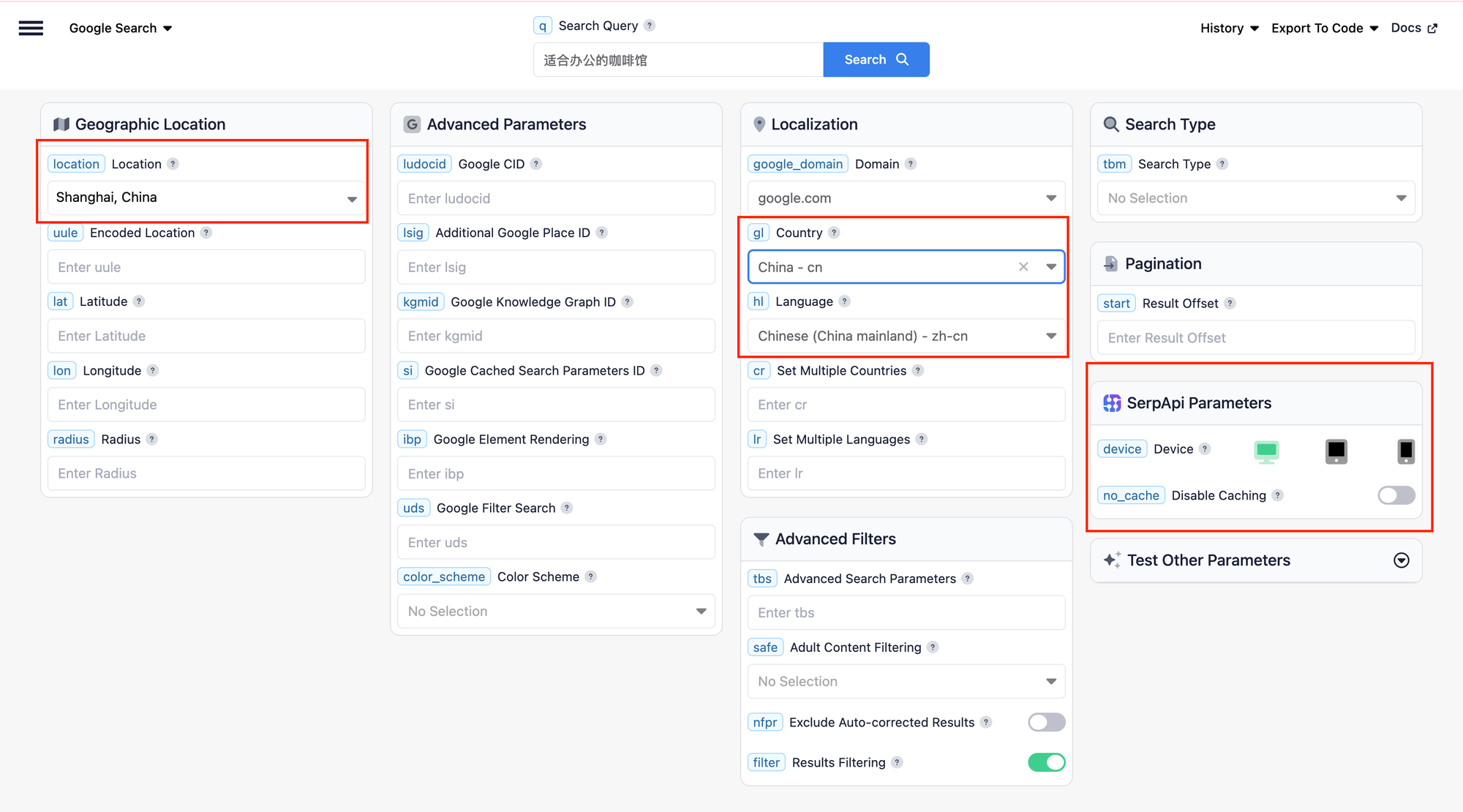
Many SerpApi engines also expose pagination. For Google Search, for example, the response can includeserpapi_pagination.next, while the start parameter can request subsequent result pages. The number of available pages still depends on what the underlying search engine serves, and each page is a separate SerpApi search. See the Google Search API documentationhttps://serpapi.com/search-api) for an example of the available parameters and response types.
The Core Difference: Web Retrieval vs. Search Product Data
The simplest way to distinguish the two products is to ask what the agent or application ultimately needs.
Both DeepSeek Search API and SerpApi can return relevant web pages that help a model answer a question. DeepSeek's distinction is that every result includes model-oriented retrieval signals: a long summary, optional page content, rerank_scoreand an authority tier. These fields can help an agent decide which sources to read first.
SerpApi's distinction is its breadth of sources and structured result types. An agent can search SerpApi's own web index or retrieve data from a particular engine or vertical product. Instead of flattening every result into generic text, SerpApi preserves source-specific fields. For example, a Maps result can include ratings and opening hours, while a Flights result can include prices, schedules, and layovers. SerpApi's Search Index documentation does not currently expose an equivalent to DeepSeek's authority field, but it provides pagination, localization, multiple content types, and source-specific controls.
SEO Use Case DeepSeek Does Not Cover: Cross-Border E-commerce Monitoring
A brand selling internationally needs data from the marketplaces and shopping engines where customers actually search, not just a list of relevant pages from the general web.
Consider a Chinese consumer-electronics brand expanding into the United States and Germany. It may need to track where its products appear for a keyword on Google Shopping, Amazon, and Walmart; compare prices and ratings with competitors; distinguish sponsored from organic listings; and repeat the same searches for different countries, languages, and devices.
SerpApi supports this type of workflow. Its dedicated Google Shopping, Amazon, and Walmart APIs contain source-specific fields such as product position, price, rating, review count, seller, and product identifiers. The application can store the structured responses and compare changes across markets and over time.
DeepSeek Search can still support market research by finding product reviews, news, or competitor websites. However, its results come from a general web index rather than a specified marketplace. Its rerank_score is not an Amazon product rank or a Google Shopping position, and it does not return a stable marketplace-specific product schema. DeepSeek Fetch API can read a known product page, but the application would still need to extract and normalize fields such as price, seller, and rating itself.
For marketplace rank tracking, international price monitoring, and cross-border competitor analysis, SerpApi therefore provides structured source data that DeepSeek Search and Fetch API cannot replace.
Developer Experience: Raw HTTP vs. Official Client Libraries
DeepSeek Search and Fetch are raw HTTP APIs, not language-specific SDKs. The documentation shows cURL and Pythonrequests, but they can be called from any language with an HTTP client. Without a dedicated SDK, teams may need to handle authentication, retries, errors, and response types themselves.
SerpApi supports raw HTTP and provides official client libraries for Ruby, Python, JavaScript/TypeScript, PHP, Go, Java, .NET, Swift, and C++. These libraries can reduce integration and maintenance work through language-native helpers for common API operations.
Search and Page Extraction
DeepSeek Fetch and SerpApi's Extract API have the most direct overlap in features. DeepSeek Fetch accepts a URL and returns its title and content as Markdown. Here is how both APIs can extract the same page:
# DeepSeek Fetch
curl https://api.deepseek.com/v1/tools/fetch \
  -H "Authorization: Bearer $DEEPSEEK_API_KEY" \
  -H "Content-Type: application/json" \
  -d '{"url":"https://cloud.tencent.cn/developer/article/2633452"}'

# SerpApi Extract with Markdown output
curl --get https://serpapi.com/search \
  --data-urlencode "engine=extract" \
  --data-urlencode "url=https://cloud.tencent.cn/developer/article/2633452" \
  --data-urlencode "output=md" \
  --data-urlencode "api_key=$SERPAPI_API_KEY"
DeepSeek Fetch returned a JSON object containing the page title and Markdown content. The response below is shortened:
{
  "title": "GLM、MiniMax、Kimi、豆包、千问,国产模型Coding Plan怎么选?一文全套短评",
  "content": "# GLM、MiniMax、Kimi、豆包、千问,国产模型Coding Plan怎么选?\n\n最近使用 Claude Code 编程,结合 Skills,完成一些新的项目……"
}
With the Extract API and output=mdSerpApi returned Markdown directly. This response is also shortened:
www.tangshuang.net

[社区首页](https://cloud.tencent.cn/developer) > [专栏](https://cloud.tencent.cn/developer/column)

# GLM、MiniMax、Kimi、豆包、千问,国产模型Coding Plan怎么选?一文全套短评

发布于 2026-03-03 16:09:25

Hello大家好呀!最近使用 Claude Code 编程,结合 Skills,完成一些新的项目,
也趁此机会测试了国产模型编程方面的效果……
From the responses above, we can see that DeepSeek focused more tightly on the article's main content. At the same time, SerpApi preserved more of the original page structure, including navigation links and page-level metadata. The difference here is the extraction scope, not just the output format: SerpApi can also return JSON, but in this test it retained a broader set of page elements than DeepSeek Fetch did.
SerpApi's Extract API also supports:
scrape,map, andcrawlmodes- JSON, Markdown, and HTML output
- Desktop, tablet, and mobile browser profiles
It follows robots.txt and uses the appropriate SerpApi engine when the URL is a supported search page, such as Google/Amazon or Bing/Baidu.
JSON for Code, Markdown for Models
DeepSeek Search and Fetch API are both JSON APIs. Search returns a results array, while Fetch returns title and content. Fetch API stores Markdown in the content field, but the response itself is still JSON. The current DeepSeek documentation does not describe a direct Markdown response mode for either API.
SerpApi offers several response formats. JSON remains useful when application code needs exact fields and a strict schema. When search results are sent directly to an LLM, however, Markdown can represent the same evidence with less formatting overhead.
JSON repeats field names for every result and adds braces, quotes, commas, and nested objects. SerpApi's Markdown output turns result arrays into tables, uses native Markdown links, and removes internal tracking fields, opaque tokens, and duplicated values. SerpApi reports roughly 50% average token savings compared with its JSON responses, although the result varies by API and query. Complex nested responses can see savings above 90%; use JSON when the application needs fields omitted from the curated Markdown view.
A Google Shopping experiment explains the difference. Across 12 queries, Markdown used 89.55% fewer input tokens on average. With a fixed 1,550-token budget, the JSON representation fit 16 products, while Markdown fit all 30. Markdown did not improve the model itself; it allowed it to compare more of the original evidence within the same context window.
Pricing and Rate Limits
DeepSeek's pricing is relatively low for a web search API:
| API | Price | Published rate limit |
|---|---|---|
| DeepSeek Search | $0.75 per 1,000 successful requests | 100 QPS per account |
| DeepSeek Fetch | $0.75 per 1,000 successful requests | 25 QPS per account(per-domain QPS limit is not publicly documented) |
SerpApi pricing is based on monthly plans. Each plan includes a monthly search quota and an hourly throughput limit.
| Plan | Monthly price | Searches per month | Throughput per hour |
|---|---|---|---|
| Free | $0 | 250 | 50 |
| Starter | $25 | 1,000 | 200 |
| Developer | $75 | 5,000 | 1,000 |
| Production | $150 | 15,000 | 3,000 |
| Big Data | $275 | 30,000 | 6,000 |
DeepSeek is much cheaper per request, but the cheapest request does not always produce the lowest total cost.
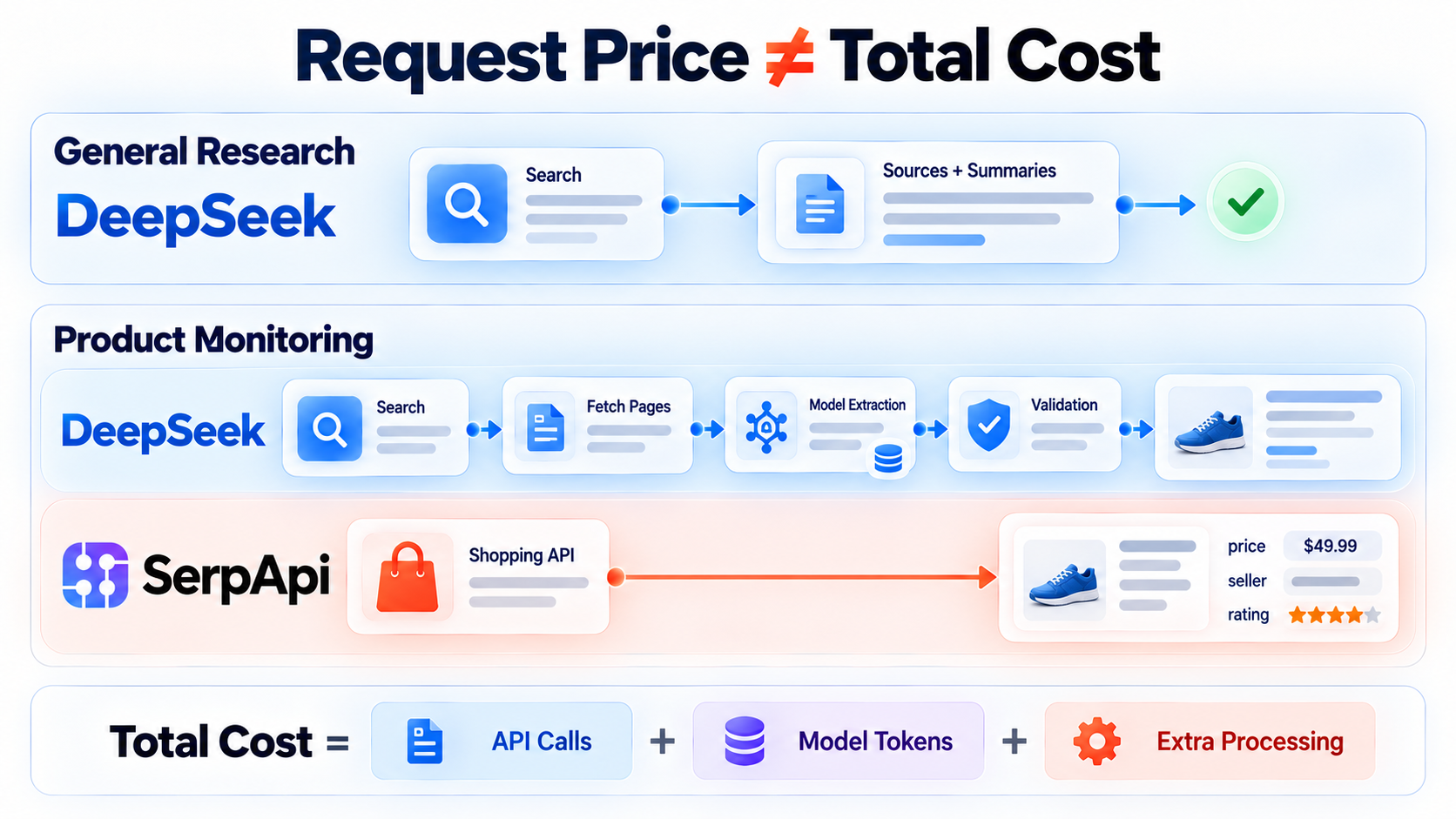
For general research, DeepSeek may return the sources and summaries an agent needs in one request. For product monitoring, SerpApi may cost more per request but return prices, sellers, and ratings directly, avoiding extra page fetches and model-based extraction.
The real cost therefore depends on the number of API calls, the model tokens consumed, and any additional processing required. We will compare these factors in the follow-up benchmark blog.
Choosing Between DeepSeek and SerpApi
Choose DeepSeek Search/Fetch API when:
- You need to search the general web and read a few relevant pages, rather than relying on a specific search engine/product such as Google Maps or Google Shopping.
- Built-in summaries,
rerank_score,authorityand optional page content are more useful than source-specific fields. - You want a low-cost API and do not need more than 50 results or pagination.
Typical uses include research assistants, technical-documentation discovery, and RAG source collection.
When SerpApi Is the Better Fit
SerpApi is a stronger fit when:
- You need results from a specific source, such as Google, Bing, Google Maps, Google Shopping, YouTube, or Google Flights.
- Your code needs structured fields such as prices, ratings, opening hours, or flight schedules.
- You need precise control over location, language, country, domain, or device.
- You are building rank tracking, price monitoring, local search, travel search, or marketplace research.
- You need features such as pagination, raw HTML, archived searches, asynchronous requests, or site crawling.
Use them together
A product does not have to use the same API for every search. It can route each request based on what the task requires:
1. Simple web research: Use DeepSeek Search when general web results are enough, and the task can be completed within its 50-result limit. Use DeepSeek Fetch API to read the most relevant pages.
2. Larger or more controlled searches: Use SerpApi when the product needs pagination, precise location or device settings, or results from a specific search engine.
3. Source-specific product features: Use SerpApi's structured JSON for current rankings, price monitoring, local search, travel search, or data from sources such as Google, Amazon, and Instagram.
4. AI analysis: DeepSeek's summaries and fetched content can be passed to a model. SerpApi results can also be requested as Markdown and sent directly to the model, without first converting a large JSON response into readable text. For example, a market-intelligence product could use DeepSeek to discover new competitors across the web, SerpApi to monitor their Amazon listings and Instagram profiles, and SerpApi's Markdown output to provide an AI agent with concise context for its final analysis.
At-a-glance comparison
| Capability | DeepSeek Search and Fetch API | SerpApi |
|---|---|---|
| Main focus | General-purpose web search and page retrieval | Engine-specific search across 100+ search engines and verticals |
| Search source | DeepSeek's general web index | The caller selects an engine, such as search_index, google, amazon, google_maps, or google_flights |
| Result structure | Web results with summaries and optional page content | Structured fields tailored to each search engine or vertical |
| Ranking signals | rerank_score and authority |
Result position and source-specific fields |
| Page retrieval | Search can include page content with need_content; Fetch reads one known URL and returns its title and main content; no documented site mapping or crawling |
Extract can scrape one page, map a site's URLs, or crawl up to 100 pages; crawl mode uses one credit per successfully extracted page |
| Pagination | No documented pagination; up to 50 results | Available on supported engines |
| Search controls | Localization IP and query operators | Location, country, language, domain, device, and source-specific parameters |
| Response formats | JSON; extracted page content is stored as Markdown inside the JSON response | JSON, Markdown, and HTML |
| Client libraries | Raw HTTP; no dedicated Search/Fetch SDK suite | Official libraries for nine languages |
| Pricing | $0.75 per 1,000 successful Search requests; $0.75 per 1,000 successful Fetch requests | Monthly plans: $0 for 250, $25 for 1,000, $75 for 5,000, $150 for 15,000, or $275 for 30,000 searches |
| Rate limits | Search: 100 QPS per account; Fetch: 25 QPS per account plus an unpublished per-domain limit | 50 to 6,000 searches per hour, depending on the plan; custom limits for Enterprise |
Conclusion
DeepSeek Search and Fetch API provide a low-cost way to find information across the general web and read selected pages. SerpApi covers a broader range of sources and use cases. It combines its own web index with APIs for specific search engines and vertical products, preserving fields such as prices, ratings, opening hours, and flight details. Its JSON, Markdown, and HTML responses also support both application code and AI workflows.
So, can DeepSeek Search and Fetch replace SerpApi?
DeepSeek can be simpler and less expensive. But it is not a like-for-like replacement when a product needs results from a specific source, pagination, precise localization, or source-specific structured fields.
The more useful question is not which API is universally better. It is whether the task needs compact general web retrieval or source-specific, structured search data. Some products will need both.
In the next blog, we will test both APIs on breaking news, local business search, product research, and technical research. We will compare relevance, latency, output size, rate-limit behavior, and the actual cost of completing each task.
#DeepSeek #Exract API