Ruby
Ruby
 Golang
 .Net
.Net
 MCP
MCP
 C++
C++


Bing's shopping results, also known as Microsoft Shopping, can search for products across many different retail stores and online sellers. That makes it a powerful tool for comparing prices and product research, comparable to Google Shopping. Microsoft also uses the same data for shopping features in Microsoft Outlook, the Microsoft Edge web browser, and MSN.
With the Bing Shopping API from SerpApi, those same search results are accessible in JSON format, and you can fetch additional information for each result with the Bing Product API. SerpApi handles the proxy network, HTML parsing, captcha puzzles, and other challenges, so you can spend more time on your actual business or project, instead of the scraping tools.
Check out our other Bing search APIs for for scraping organic search results, videos, images, and more!
What can you scrape from Bing Shopping?
Here's everything you can pull from Bing's shopping results using SerpApi:
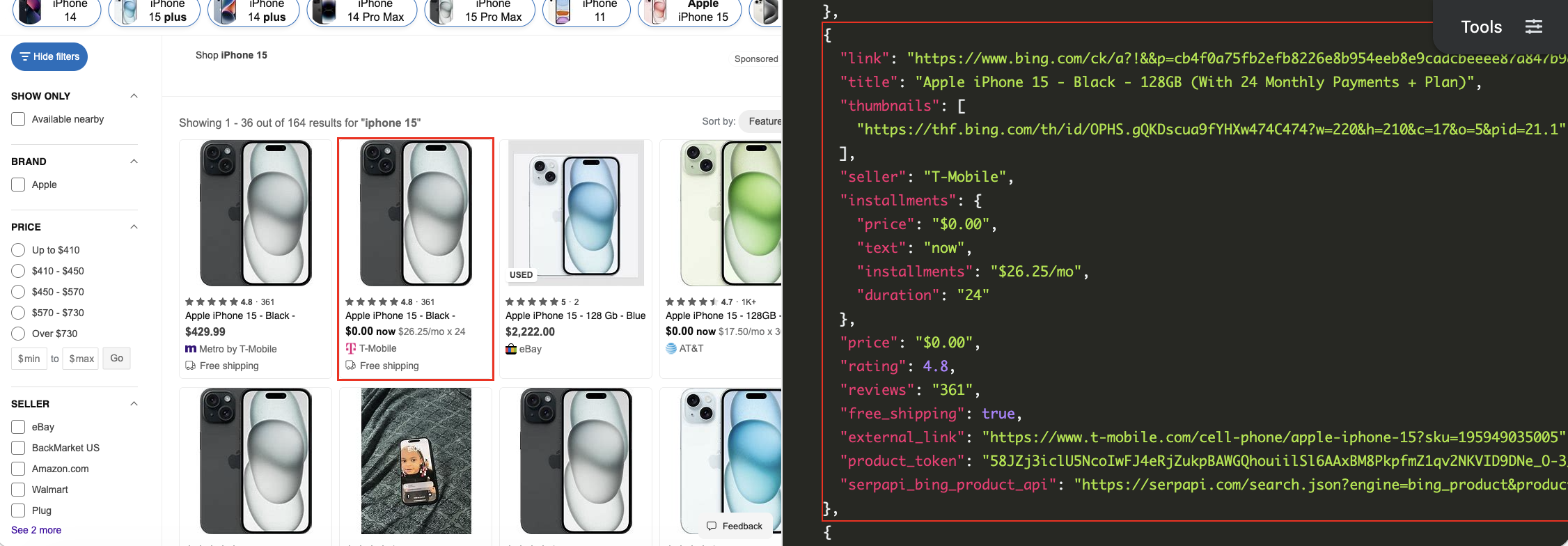
- Search results: The list of products that appear in a specified Bing shopping search. Each result includes a
product_tokenthat you can send to the Bing Product API for additional information. - Product title: The name of the product or product page.
- Price: The price of the product, in both the original text format and an extracted numerical value for simpler parsing. If there's a payment plan, this may include the initial price, monthly cost, and number of monthly payments.
- Seller: The store or seller for the product, like
Target,Sam's Club, orAmazon.com. - Reviews and ratings: The total number of reviews, and an average rating from 1-5 stars.
- Shipping information: If the product has free shipping available from the specified seller.
- Images: The thumbnail images used for the product's search result preview.
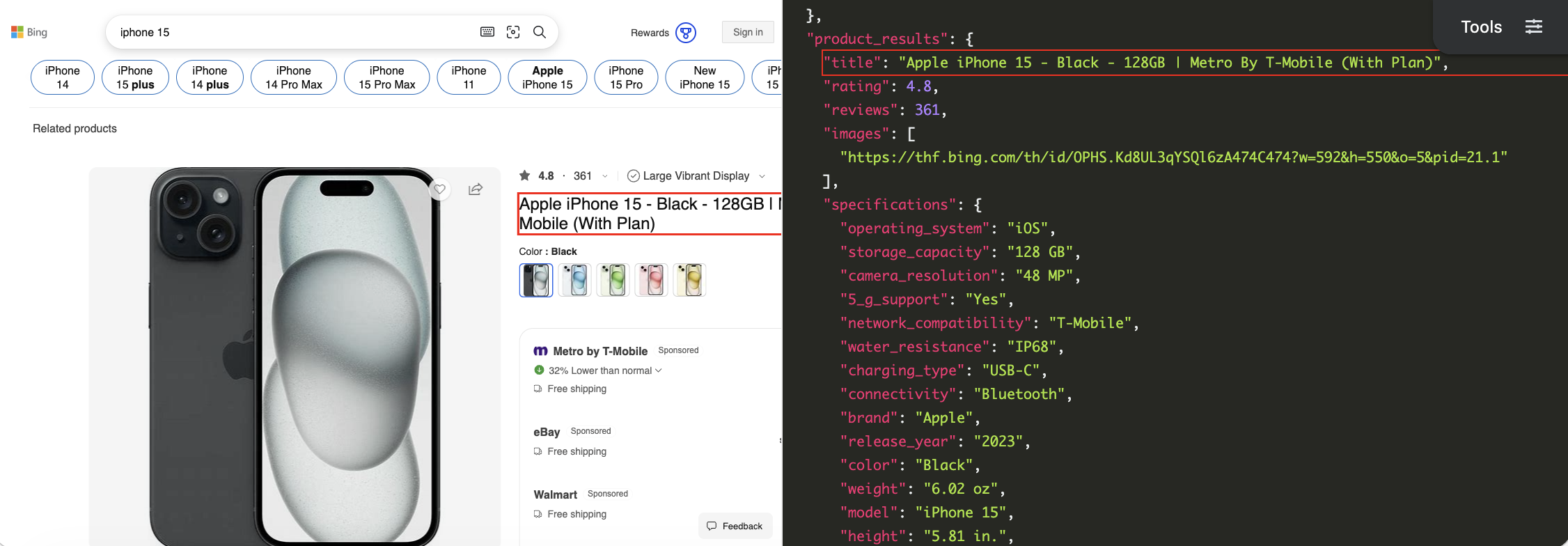
After you find a product through the search, you can fetch more detailed information from its individual product page. This data includes:
- Features and specifications: The color, model name, brand, release year, media genre, publisher, author, age rating, language, media format, hardware and software details, and other relevant information.
- Buying options: Each available seller for the product, which can also contain the price and shipping information. The API also specifies if one of the sellers is a paid advertisement.
- Variants: A list of all available variants of the product, such as different color options or storage capacities.
Getting started with SerpApi
You need a free SerpApi account to pull results from Bing Shopping. SerpApi also provides APIs for extracting data from Google Shopping, along with more general-purpose search engines like Google Search, Bing Search, DuckDuckGo, and others. You can upgrade to a paid account later if you need more search capacity, faster speeds, or other features.
If you haven't already, create an account and verify your email and other details. After that, you need to grab your API key, which can be found in your account dashboard.
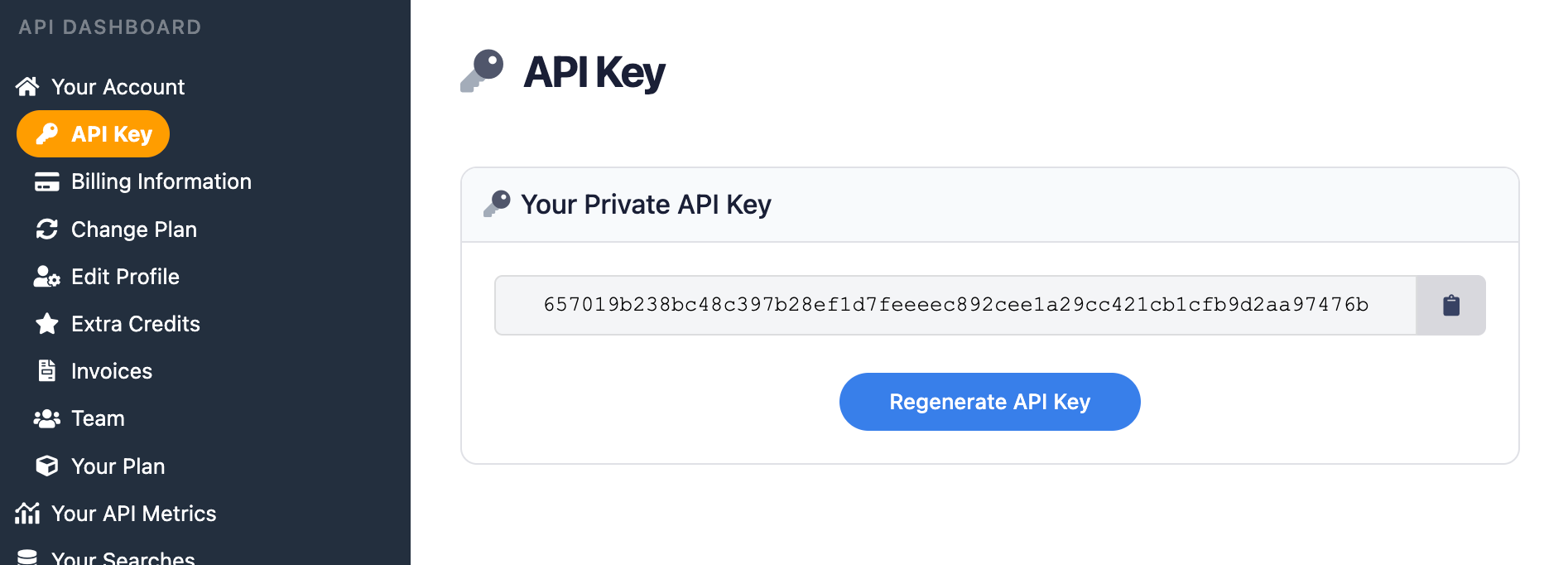
You should store your API key in a safe location if you are sharing or publishing your code. If the key is leaked or stolen, you can regenerate it from the SerpApi account dashboard.
Install the SerpApi library (optional)
You can use SerpApi's official libraries for Python, JavaScript, Ruby, Java, and other languages. They provide a simple wrapper around the API requests.
You can also use a simple GET request, using cURL, fetch() in Node.js, and other similar methods. This guide will cover both the GET method and several of the official integrations.
Review the Bing Shopping API documentation
Every API at SerpApi has extensive documentation that covers all the supported parameters and filters, code examples for popular languages, and example JSON responses. For this use case, check out the Bing Shopping API and Bing Product API.
The only required parameter for the main Bing Shopping API is the search query. Each product result in a search contains a product_token value, which you can then use as the input for the Bing Product API.
How to scrape Bing Shopping search results
If you have your API key, you're ready to start pulling data from Bing Shopping searches. No matter how you're accessing SerpApi, the API results will be identical.
GET request
Here's how to search for "the martian book" in Bing Shopping in a simple GET request, with no other settings specified:
https://serpapi.com/search.json?engine=bing_shopping&q=the+martian+book&api_key=API_KEY_GOES_HEREThis is the same search again, but using Canada (en-CA) as the region to check Canadian retail listings:
https://serpapi.com/search.json?engine=bing_shopping&q=the+martian+book&mkt=en-CA&api_key=API_KEY_GOES_HEREYou can also use SerpApi's JSON Restrictor feature to trim the API response to specific values. This searches for "the martian book" in Canada, and only returns the title, seller, and price for each item:
https://serpapi.com/search.json?engine=bing_shopping&q=the+martian+book&mkt=en-CA&json_restrictor=shopping_results[].{title,seller,price}&api_key=API_KEY_GOES_HEREThis can be helpful if you need more efficient parsing, or if you're using an LLM with a limited context window.
Python
This uses the official SerpApi Python library to search for "skyrim PS5" in the United States with Bing Shopping, and display the title, seller, and price for each item:
import serpapi

client = serpapi.Client(api_key=YOUR_KEY_GOES_HERE)
results = client.search({
  "engine": "bing_shopping",
  "q": "skyrim ps5",
  "mkt": "en-US"
})

for item in results["shopping_results"]:
  print(f"{item['title']} - Seller: {item['seller']} - Price: {item['price']}")
This iterates through all results on the first page to find the item with the lowest price, using the extracted_price key for each item:
import serpapi

client = serpapi.Client(api_key=YOUR_KEY_GOES_HERE)
results = client.search({
  "engine": "bing_shopping",
  "q": "skyrim ps5",
  "mkt": "en-US"
})

cheapestItem = ""

for item in results["shopping_results"]:
  # Create a starting point
  if not cheapestItem:
    cheapestItem = item
  else:
    # Replace the comparison point if this item is cheaper
    if item["extracted_price"] < cheapestItem["extracted_price"]:
      cheapestItem = item

print(cheapestItem)
Ruby
Here's how to extract shopping results for "doom 2016 ps4" in Canada, using the official Ruby gem for SerpApi:
require "serpapi"

client = SerpApi::Client.new(
    engine: "bing_shopping",
    q: "doom 2016 ps4",
    mkt: "en-CA",
    api_key: YOUR_KEY_GOES_HERE
)

for result in client.search[:shopping_results] do
    p result
end
This searches for "astro bot ps5" in the United States, iterates through all results on the first page, and displays the item with the lowest price:
require "serpapi"

client = SerpApi::Client.new(
    engine: "bing_shopping",
    q: "astro bot ps5",
    mkt: "en-US",
    api_key: YOUR_KEY_GOES_HERE
)

cheapestItem = ()

for item in client.search[:shopping_results] do
    if not cheapestItem
        # Create a starting point
        cheapestItem = item
    else
        # Replace the comparison point if this item is cheaper
        if item[:extracted_price] < cheapestItem[:extracted_price]
            cheapestItem = item
        end
    end
end

p cheapestItem
JavaScript and Node.js
Here's how to use Bing Shopping to search for "horizon zero dawn ps4" in the United States, using the official JavaScript library for SerpApi:
import { getJson } from 'serpapi';

const search = await getJson({
    engine: "bing_shopping",
    q: "horizon zero dawn ps4",
    mkt: "en-US",
    api_key: YOUR_KEY_GOES_HERE
});

search?.shopping_results?.forEach(function (item) {
    console.log(item);
});
You could also find the product with the lowest price by iterating over all results on the first page, and comparing the values of the extracted_price key on each product:
import { getJson } from 'serpapi';

const search = await getJson({
    engine: "bing_shopping",
    q: "horizon zero dawn ps4",
    mkt: "en-US",
    api_key: YOUR_KEY_GOES_HERE
});

let cheapestItem;

for (const item of search?.shopping_results) {
    if (!cheapestItem) {
        // Create a starting point
        cheapestItem = item;
    } else {
        // Replace the comparison point if this item is cheaper
        if (item?.extracted_price < cheapestItem?.extracted_price) {
            cheapestItem = item;
        }
    }
}

console.log(cheapestItem);
cURL
Here's how to search for "the martian book" with Bing Shopping in a cURL request:
curl --get https://serpapi.com/search \
 -d engine="bing_shopping" \
 -d q="the+martian+book" \
 -d api_key="YOUR_KEY_GOES_HERE"
Other languages and no-code solutions
You can still use the API directly with GET requests, even if there isn't an official SerpApi integration for your preferred environment or language. SerpApi also works with Make.com, N8N, and other tools.
How to scrape Bing Shopping product details
Each product result from the Bing Shopping API contains a product_token value, which you use as input for the Bing Product API to fetch additional details. As with the other APIs, the JSON results are identical across all GET methods and integrations.
GET request
This pulls all available information for an iPhone 17 listing from Best Buy:
https://serpapi.com/search.json?engine=bing_product&product_token=5di1LniclU5JboMwFFUPEzYoksdAFl64CZBIbYOaXIDBEKvEdj2ozVV7mhLgAtn8rzfpvb-Xt28mzVUrEcMkRnTT11EnBy-sY64RqrJSrzBfIQST8cT95W7ETOAJH9sZUZQRsttziHGOU5jRV4ghB2mO4ZZySBbzoXLXOYAgICQFCdlMUjHouhpOXSfssXVLQwpoQjGABGwfJh6anVZe_PoiyKUXPITC6mAy5aW_P7PnQ6uz0cppK9qpeY5ebBDji4zVbWi8qXrB_MhF-enznZ0PZbkvo9rqH7fwty_PhFoH9w_Q4WAy&api_key=API_KEY_GOES_HEREYou can also use SerpApi's JSON Restrictor feature to trim the API response to only the information you need. For example, adding &json_restrictor=variants to your request will only show the available colors and storage capacities.
Python
Here's how you can list all available purchase options for an iPhone 17 listing from Best Buy, using the SerpApi Python library. Each option shows the installment plan (if one is available) or the full retail price:
import serpapi

client = serpapi.Client(api_key=YOUR_KEY_GOES_HERE)
results = client.search({
  "engine": "bing_product",
  "product_token": "5di1LniclU5JboMwFFUPEzYoksdAFl64CZBIbYOaXIDBEKvEdj2ozVV7mhLgAtn8rzfpvb-Xt28mzVUrEcMkRnTT11EnBy-sY64RqrJSrzBfIQST8cT95W7ETOAJH9sZUZQRsttziHGOU5jRV4ghB2mO4ZZySBbzoXLXOYAgICQFCdlMUjHouhpOXSfssXVLQwpoQjGABGwfJh6anVZe_PoiyKUXPITC6mAy5aW_P7PnQ6uz0cppK9qpeY5ebBDji4zVbWi8qXrB_MhF-enznZ0PZbkvo9rqH7fwty_PhFoH9w_Q4WAy",
})

for option in results["buying_options"]:
    if "installments" in option:
        print(f"From {option['seller_name']}: {option['installments']['installments']} {option['installments']['duration']} months")
    else:
      print(f"From {option['seller_name']}: {option['price']}")
This fetches a listing for the Astro Bot video game and lists all available specifications, such as the ESRB rating, release year, and game platform:
import serpapi

client = serpapi.Client(api_key=YOUR_KEY_GOES_HERE)
results = client.search({
  "engine": "bing_product",
  "product_token": "NySbgXicdY1LDoJAEETjJbyBbIyJgj8WszB-0IVK1AsMTKNEnB57eqJe1dNIgIUL3VSnXnWl3q32XUjLhN0E2cvygoGssCloSTl2glnH9weTUrrn08tAA_wKbFRtg3AShKNxfxiOp02wlvZSh_2KRAUmsthnGdBG2d-1mUvnqBmeHLlcfbUjQmeWmnN-_ZvcoT4a1BYJVLVSv53IQXk8Q6hcykaeQXDJvNX-sBXHdRwvYi8hfNiG364sQPec_QDuelRS",
})

print(results["product_results"]["title"])
specifications = results["product_results"]["specifications"]
for feature in specifications:
    print(f"{feature}: {specifications[feature]}")
Ruby
Here's how you could pull a listing for The Martian on Blu-ray with the SerpApi Ruby gem, and display all available sellers with their respective prices:
require "serpapi"

client = SerpApi::Client.new(
    engine: "bing_product",
    product_token: "nAn7u3iclU5LboMwFFQPEzaokrEhmAULCjXJoglqcgEHHolVsF1_2uaqPU0pcIFs3tP8NPP7dPjM3Q3CkRsnuAxH9SUg6MXgwNjctiC5EWpDig3GUTqd8Hq-a1gIMuN9tyAcswiVJUWkfKFJVJUVSWmcFSxlaMuieDXvuL2tcUzolqYJTWapHtSFD8e-B7Pv7GpBhCZZFiGczeWFb0slHfy42ou1F_0LtVFev0on3P2RPQclT1pJqwx0c_MSPRsP0wu0UZ1vneZXyN3EBez4_pafdk1TNcHFqG-78uOHy0E-e_sHszlitA",
    api_key: YOUR_KEY_GOES_HERE
)

for option in client.search[:buying_options] do
    puts "From #{option[:seller_name]}: #{option[:price]}"
end
This example fetches a product listing for the Samsung Galaxy A57 phone and displays all the specifications, such as the storage capacity and 5G support:
require "serpapi"

client = SerpApi::Client.new(
    engine: "bing_product",
    product_token: "DQmPjnicdY1LDoJAEETjKTyBbIiJgEJYzIL4ARYKUS8wMA0ScXqcT5SrehqJsHChm-rUq67UazK9k5q29NnZdBVYVdNqkIqoEjiVDc68aOa6TtCLXZ87ASNwPyBlg126_soLQycM_MUYJFRdhnAgcYsFbbOqApky9bsWmXKNXMNTx6ZhX-1YohFbrhvd_Zs8ID8J5AolsM_K8HaWBvpjCYnMlFrQGojumbXLjntySvJ8k1uFxIca-e2qCfC5UW_J9FQg",
    api_key: YOUR_KEY_GOES_HERE
)

puts client.search[:product_results][:title]
specifications = client.search[:product_results][:specifications]
specifications.each { |key, v| puts "#{key}: #{v}" }
JavaScript and Node.js
Here is how you can pull a product listing for the Sony WH-1000XM6 headphones using the SerpApi JavaScript library, and show all available sellers with their prices:
import { getJson } from 'serpapi';

const search = await getJson({
    engine: "bing_product",
    product_token: "9UjB2niclU5LboMwEFUPEzZRJWM-xgsvCMUkizaoyQUImASVeFx_1HDVnqYEfIFuZvR-8-b3pfxmBuS0fdzToB9GK7RhphWy0QNsonyDcUjmsb2eJyVWIlrwofMoxDElGdrlZYloseNxlhYZxZRTwgnh3rxvzG0N4DSJSZSgLF6kaoRLMx77XuhDZ_zNlCJCw4iGSfg05a4tQFrxsJUbfC96CpUGp0ppBzv9558PkCcF0oAW3dK8Rs_aiXkFSkPnWquaq2B25gJ-_Hxnp31dv9XBRcOP8fz9yzIhX535AxDQXzI",
    api_key: YOUR_KEY_GOES_HERE
});

for (const option of search?.buying_options) {
    console.log(`${option.seller_name}: ${option.price}`);
}
This example shows all specifications for the Sony WH-1000XM6 headphones, using the same product listing:
import { getJson } from 'serpapi';

const search = await getJson({
    engine: "bing_product",
    product_token: "9UjB2niclU5LboMwEFUPEzZRJWM-xgsvCMUkizaoyQUImASVeFx_1HDVnqYEfIFuZvR-8-b3pfxmBuS0fdzToB9GK7RhphWy0QNsonyDcUjmsb2eJyVWIlrwofMoxDElGdrlZYloseNxlhYZxZRTwgnh3rxvzG0N4DSJSZSgLF6kaoRLMx77XuhDZ_zNlCJCw4iGSfg05a4tQFrxsJUbfC96CpUGp0ppBzv9558PkCcF0oAW3dK8Rs_aiXkFSkPnWquaq2B25gJ-_Hxnp31dv9XBRcOP8fz9yzIhX535AxDQXzI",
    api_key: YOUR_KEY_GOES_HERE
});

const specifications = search?.product_results?.specifications;
Object.entries(specifications).forEach(function ([key, v]) {
    console.log(`${key}: ${v}`);
})
cURL
This fetches information for a Samsung Galaxy A57 product page using cURL:
curl --get https://serpapi.com/search \
 -d engine="bing_product" \
 -d product_token="DQmPjnicdY1LDoJAEETjKTyBbIiJgEJYzIL4ARYKUS8wMA0ScXqcT5SrehqJsHChm-rUq67UazK9k5q29NnZdBVYVdNqkIqoEjiVDc68aOa6TtCLXZ87ASNwPyBlg126_soLQycM_MUYJFRdhnAgcYsFbbOqApky9bsWmXKNXMNTx6ZhX-1YohFbrhvd_Zs8ID8J5AolsM_K8HaWBvpjCYnMlFrQGojumbXLjntySvJ8k1uFxIca-e2qCfC5UW_J9FQg" \
 -d api_key="YOUR_KEY_GOES_HERE"
Other languages and no-code solutions
If there isn't an official SerpApi integration for your preferred language or environment, you can still use the API directly with GET requests. You can also use SerpApi with Make.com, N8N, and other tools.
Conclusion
Bing's shopping search combines product listings from Amazon, Best Buy, eBay, mobile carriers, Walmart, Target, and many other sellers. With the Bing Shopping API from SerpApi, you can access all of those results programmatically in simple JSON format, and then dive into the exact details with the Bing Product API.
These APIs can be incredibly powerful for automated price checks, competitor analysis, stock alerts, and many other use cases. You can even combine it with data from the Google Shopping API, or switch between them for different use cases or markets.
If you need help using SerpApi, please contact us.