Ruby
 Golang
 .NET
 MCP
 C++

What are people asking for an iPhone near New York City? To compare listings, you need more than a price: you need to know what the item is and where it's listed. The same fields can power a local listings dashboard or help you build a shortlist within a budget.
In this tutorial, we'll use the Facebook Marketplace API from SerpApi to search for iphone around New York City. Of course, you can search for anything in any location. We'll try the same request in the Playground, with cURL, and in Python and JavaScript. Then we'll narrow the search and fetch a second page.
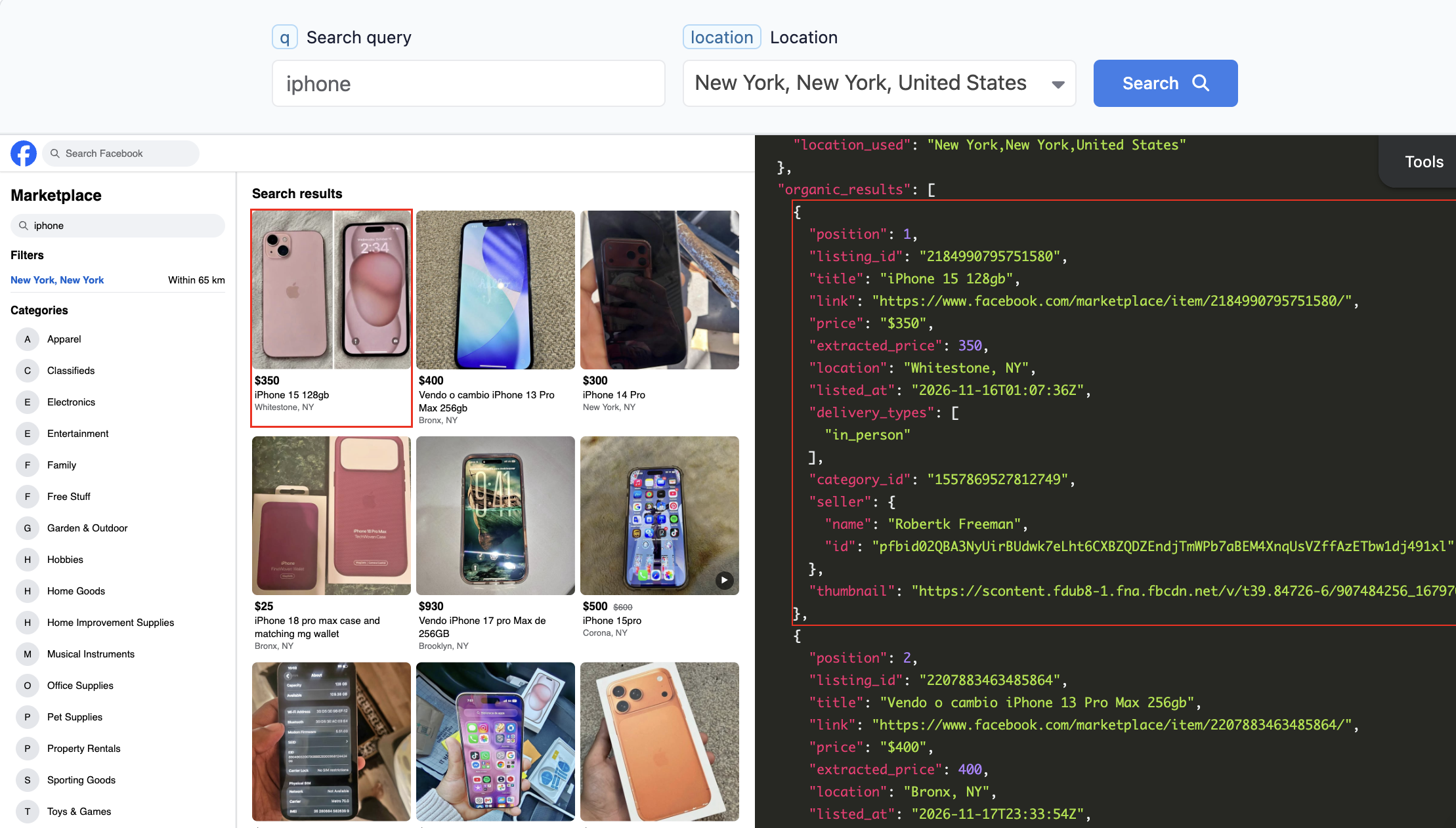
What data can you retrieve with the Facebook Marketplace API?
The JSON response puts the main listings in organic_results. Each entry is one listing, with fields you can display or use for comparisons.
- Listing identity:
titleis the listing's display title,listing_ididentifies it, andlinkpoints to the original listing. - Asking price:
priceis the display text, such as$110orFree;extracted_priceis the numeric value for comparisons, andold_pricecan show an earlier asking price. - Location and timing:
locationis the item's city, which can differ from the city you searched around, andlisted_atis the listing timestamp. - Delivery and item details:
delivery_typeslists delivery options as strings, anddetailscan include category-specific information such as vehicle mileage. - Broader matches:
relaxed_resultscan contain listings for similar searches or from farther away when Marketplace finds no primary matches.
See the Facebook Marketplace API documentation for the full response structure and request parameters.
How to use the Facebook Marketplace API
You can use this API with any programming language or any AI tools.
Try it in the playground
Open the documented New York iPhone example. It uses engine=facebook_marketplace, q=iphone, and location=New York, New York, United States.
Get your API key
Create a SerpApi account, then copy your key from Manage API Key. Replace the placeholder locally and run the following in the terminal you'll use for the examples:
export SERPAPI_API_KEY="YOUR_SERPAPI_API_KEY"Make a GET request
Send a GET request to this URL. You can replace the query (q) and the location:
https://serpapi.com/search?engine=facebook_marketplace&q=iphone&location=New%20York%2C%20New%20York%2C%20United%20States&api_key=YOUR_SERPAPI_API_KEY
Add output=md for the same search in Markdown:
https://serpapi.com/search?engine=facebook_marketplace&q=iphone&location=New%20York%2C%20New%20York%2C%20United%20States&api_key=YOUR_SERPAPI_API_KEY&output=md
Markdown output gives you a readable summary. Use JSON when your code needs exact fields such as extracted_price or serpapi_pagination.next_page_token. The SDK examples below use JSON.
cURL implementation
Here's the equivalent cURL request. --data-urlencode handles the spaces and commas in the city name:
curl --fail --get 'https://serpapi.com/search' \
  --data-urlencode 'engine=facebook_marketplace' \
  --data-urlencode 'q=iphone' \
  --data-urlencode 'location=New York, New York, United States' \
  --data-urlencode "api_key=$SERPAPI_API_KEY"
Besides engine and your api_key, send q or category to specify what to search for, and either location or both lat and lon to set the search center. Even if cURL reports HTTP success, check for a top-level error in the JSON before reading the listings.
Python implementation
Install the SerpApi Python SDK:
pip install serpapiSave this as main.py. It prints the title, displayed asking price, and city for up to five primary listings:
import os

import serpapi

client = serpapi.Client(api_key=os.environ["SERPAPI_API_KEY"], timeout=60)
params = {
    "engine": "facebook_marketplace",
    "q": "iphone duo",
    "location": "New York, New York, United States",
}

results = client.search(params)
if "error" in results:
    raise SystemExit("SerpApi returned an error for the Marketplace search.")

listings = results.get("organic_results", [])
if not listings:
    if results.get("relaxed_results"):
        print("No primary listings. Marketplace returned broader matches instead.")
    else:
        print("No listings returned.")

# I'm limiting to the top 5 results
for listing in listings[:5]:
    title = listing.get("title") or "Untitled listing"
    price = listing.get("price") or "Price not shown"
    city = listing.get("location") or "City not shown"
    print(f"{title} | {price} | {city}")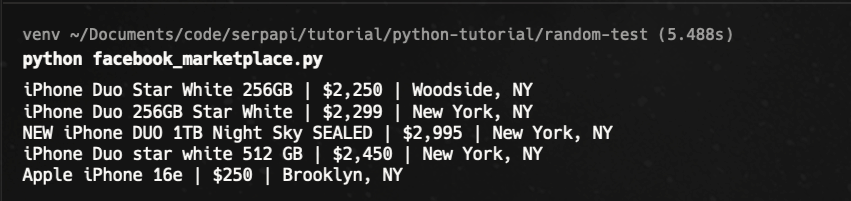
Run it in the terminal where you set SERPAPI_API_KEY:
python main.pyThe SDK returns a dictionary-like response, so you can read organic_results directly. HTTP and timeout failures surface as SDK exceptions. On a response without an error, the script reports empty results separately from broader matches so listings from farther away don't get mixed into your local comparison.
JavaScript implementation
Install the SerpApi JavaScript library in your project directory:
npm install serpapiSave this as main.js. It reads the same environment variable and prints the same three fields:
async function main() {
  const apiKey = process.env.SERPAPI_API_KEY;
  if (!apiKey) {
    console.error("Set SERPAPI_API_KEY before running this script.");
    process.exitCode = 1;
    return;
  }

  const { getJson } = await import("serpapi");
  const results = await getJson({
    api_key: apiKey,
    engine: "facebook_marketplace",
    q: "iphone",
    location: "New York, New York, United States",
  });

  if ("error" in results) {
    console.error("SerpApi returned an error for the Marketplace search.");
    process.exitCode = 1;
    return;
  }

  const listings = results.organic_results ?? [];
  if (listings.length === 0) {
    console.log(
      results.relaxed_results?.length
        ? "No primary listings. Marketplace returned broader matches instead."
        : "No listings returned."
    );
  }

  for (const listing of listings.slice(0, 5)) {
    const title = listing.title || "Untitled listing";
    const price = listing.price || "Price not shown";
    const city = listing.location || "City not shown";
    console.log(`${title} | ${price} | ${city}`);
  }
}

main().catch(() => {
  console.error("Could not load the SerpApi package or complete the request.");
  process.exitCode = 1;
});
Run it with Node.js:
node main.jsOther languages and no-code options
- Other languages: See SerpApi integrations for libraries including Go, Ruby, and PHP.
- Make: The SerpApi Make app documents a Universal Module for engines without a dedicated module, including Google and Bing in new scenarios. You supply the parameters and handle pagination yourself.
- n8n: The verified SerpApi node lists a subset of engines and documents the generic HTTP Request node as a fallback.
How to paginate the results
Pagination uses a token, not a page number:
- Read
serpapi_pagination.next_page_tokenfrom the last JSON response. A token can also be present when the page containsrelaxed_results. - Pass the token as
next_page_tokenon the next search and keep the original query, location, and any filters unchanged. - Stop if no token is returned. Each additional page is a separate request and can consume search credits.
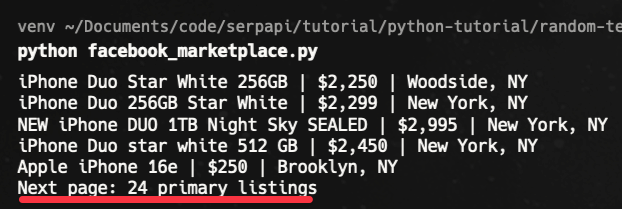
To fetch at most one extra page, append this to the Python example. It reuses client, params, and results from the first request:
token = results.get("serpapi_pagination", {}).get("next_page_token")
if not token:
    print("No next-page token returned.")
else:
    next_page = client.search({**params, "next_page_token": token})
    if "error" in next_page:
        raise SystemExit("SerpApi returned an error for the next page.")
    primary = len(next_page.get("organic_results", []))
    print(f"Next page: {primary} primary listings")
Here is the result:
Customize or filter the results
To make the New York search more useful for a local shortlist, shrink the search area, set a budget, and put the cheapest results first:
radius=16: Sets the search radius to 16 km (about 10 miles) around the chosen location. The default is 65 km.max_price=500: Sets the upper price filter in the listings' currency, so500means $500 for listings priced in US dollars.sort_by=price_ascend: Requests lowest price first instead of the defaultbest_matchorder.
curl --fail --get 'https://serpapi.com/search' \
  --data-urlencode 'engine=facebook_marketplace' \
  --data-urlencode 'q=iphone' \
  --data-urlencode 'location=New York, New York, United States' \
  --data-urlencode 'radius=16' \
  --data-urlencode 'max_price=500' \
  --data-urlencode 'sort_by=price_ascend' \
  --data-urlencode "api_key=$SERPAPI_API_KEY"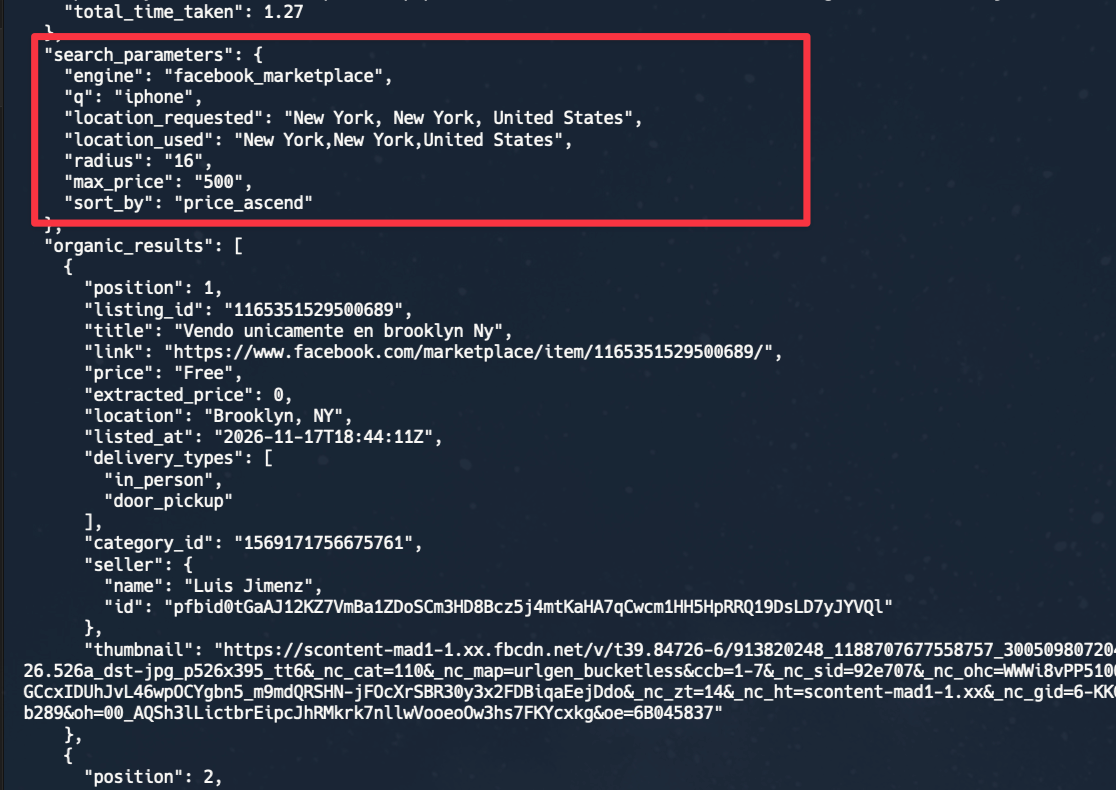
Conclusion
You can now retrieve local Marketplace listings, compare asking prices, and fetch another page without mixing broader matches into the primary results. Try changing the item or city in the SerpApi Playground and inspect the JSON before wiring it into your app.
If you're interested in scraping other Facebook page, we also have tutorial for scraping Facebook profile.
Frequently asked questions
Can I browse a category without a keyword?
Yes. Set a category such as category=electronics and a search location, and leave out q. You can combine q with most categories, but home-improvements and office-supplies cannot be used with q.
Can I search around GPS coordinates instead of a city?
Yes. Send lat and lon together and omit location. Use radius to specify the search radius in kilometers.
Does a sold listing show the final sale price?
Not necessarily. price is the amount displayed on the listing, not a verified transaction price. The availability=sold example in the docs also includes listings marked is_pending; check is_sold if you need listings marked as sold.