Ruby
 Golang
 .NET
 MCP
 C++

The beloved grocery store Trader Joe's stocks many unique products. If you want in-stock data in your own applications, for use of price tracking, dietary filtering, nutrition analysis, or a shopping tool, SerpApi has two APIs.
The Trader Joe’s Search API returns the products from a Trader Joe’s search, and the Trader Joe’s Product API returns a single product page with its description, ingredients, and nutrition facts. In this tutorial, we’ll use both with cURL, Python, and JavaScript, starting with a search for coffee.
What can you scrape from Trader Joe’s?
Between the two APIs, here is all the data you can pull:
- Search results: the title, product ID, link, thumbnail, category, price, and size for each product
- Result counts and pagination: the total number of matching products and ready-to-use links to other pages of results
- Store-specific results: only the products sold in one store, found by passing a store ID
- Filters: categories and characteristics such as organic, vegan, or gluten free. Also includes Trader Joe’s “fun tags” like Date Night or Cheese Board and new products
- Product details: price, size, availability, images, description, characteristics, and the “We Love This For…” occasions
- Ingredients and allergens: ingredient lists and allergen statements as arrays of strings
- Nutrition facts: serving size, servings per container, calories, and each nutrient’s amount and daily value, including products with more than one nutrition panel
Getting started with SerpApi
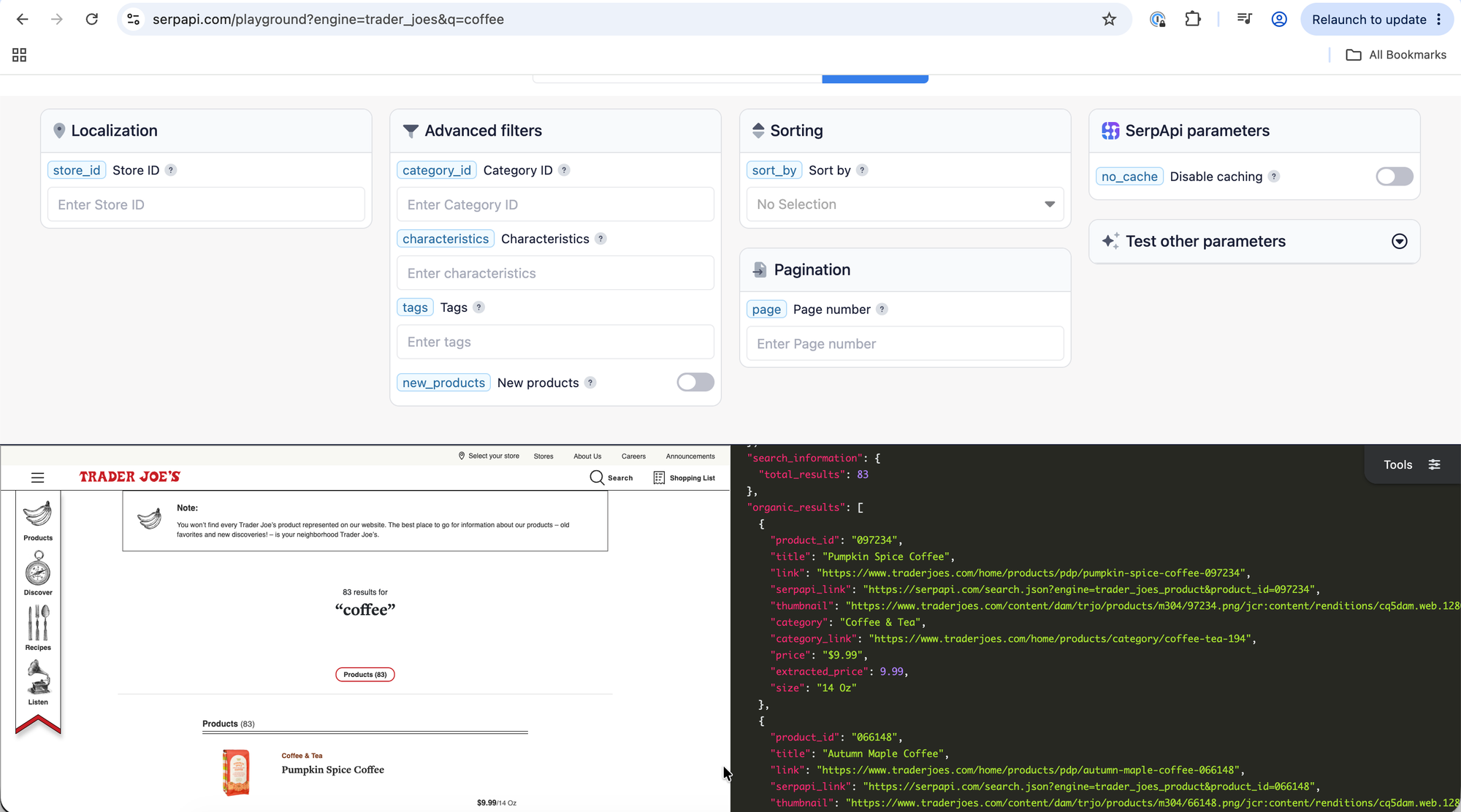
The easiest way to get a feel for the data is the Playground. Open it, search for coffee, and look at the organic_results array. Every parameter in this tutorial can be tried there first. The Product API has its own Playground.
To call the APIs from code, you need a SerpApi API key. Register for an account, then copy your private key from the API key management page.
Keep the key out of your source code. The examples below read it from an environment variable called SERPAPI_API_KEY.
You can store it in your local machine by running:
export SERPAPI_KEY="YOUR_API_KEY" for Mac/Linux or $env:SERPAPI_KEY="YOUR_API_KEY" for Windows.
Replace YOUR_SERPAPI_API_KEY with your own key copied from above. In the request URLs below, YOUR_SERPAPI_API_KEY is a placeholder too.
Finding store, category, and product IDs
A few Trader Joe’s parameters take IDs rather than names. Here is where to find each one:
- Store ID (
store_id): The Trader Joe’s stores page lists every store ID. You can also take it from the end of a store page URL on the Trader Joe’s store locator. For example,454inhttps://locations.traderjoes.com/tx/austin/454/is Austin - Northwest. - Category ID (
category_id): The categories page lists them all.194is Coffee & Tea. - Tags (
tags): The tags page lists the fun tags you can filter by. - Product ID (
product_id): The number at the end of a product page URL. Inhttps://www.traderjoes.com/home/products/pdp/cold-brew-coffee-black-080794, the product ID is080794. Every search result also includes aproduct_id, so you can get it straight from the Search API.
The product IDs in the documentation are strings with leading zeros (080794), so treat them as a blocks rather than numbers.
How to scrape Trader Joe’s search results
Let’s search for coffee. The only parameters you need are:
engine=trader_joesto select the Trader Joe’s Search API.q=coffeefor the search query. You can use anything you’d type into a regular Trader Joe’s search.api_keywith your private SerpApi API key.
GET request
You can run the search with a single GET request. JSON is the default output:
https://serpapi.com/search?engine=trader_joes&q=coffee&api_key=YOUR_SERPAPI_API_KEY
The response includes search_information and an organic_results array. Here is an abridged response:
{
  "search_information": {
    "total_results": 82
  },
  "organic_results": [
    {
      "product_id": "097234",
      "title": "Pumpkin Spice Coffee",
      "link": "https://www.traderjoes.com/home/products/pdp/pumpkin-spice-coffee-097234",
      "serpapi_link": "https://serpapi.com/search.json?engine=trader_joes_product&product_id=097234",
      "thumbnail": "https://www.traderjoes.com/content/dam/trjo/products/m304/97234.png/jcr:content/renditions/cq5dam.web.1280.1280",
      "category": "Coffee & Tea",
      "category_link": "https://www.traderjoes.com/home/products/category/coffee-tea-194",
      "price": "$9.99",
      "extracted_price": 9.99,
      "size": "14 Oz"
    }
  ]
}
A few fields are worth knowing about:
extracted_priceis the price as a number, so use it for calculations and sorting.priceis the text Trader Joe’s displays.sizetells you what the price is for, such as14 Ozor1 Each.serpapi_linkpoints to the same product in the Trader Joe’s Product API, which we’ll use later.priceis absent when Trader Joe’s shows the price as not available, so don’t assume every result has one.
Each response also has search_metadata.status, which goes from Processing to Success or Error. If a search fails, the response includes an error message. For all fields, see the Trader Joe’s Search API documentation.
Markdown output
Add output=md to get the same results as Markdown instead of JSON:
https://serpapi.com/search?engine=trader_joes&q=coffee&output=md&api_key=YOUR_SERPAPI_API_KEY
Markdown is a readable, token-efficient view that’s handy when you pass results to an LLM or an AI agent. Use JSON when you need exact field access, as in the code below. You can read more in the Markdown output documentation.
If your query has spaces or special characters, URL-encode it, for example q=cold+brew. The cURL and SDK examples below do this for you.
cURL
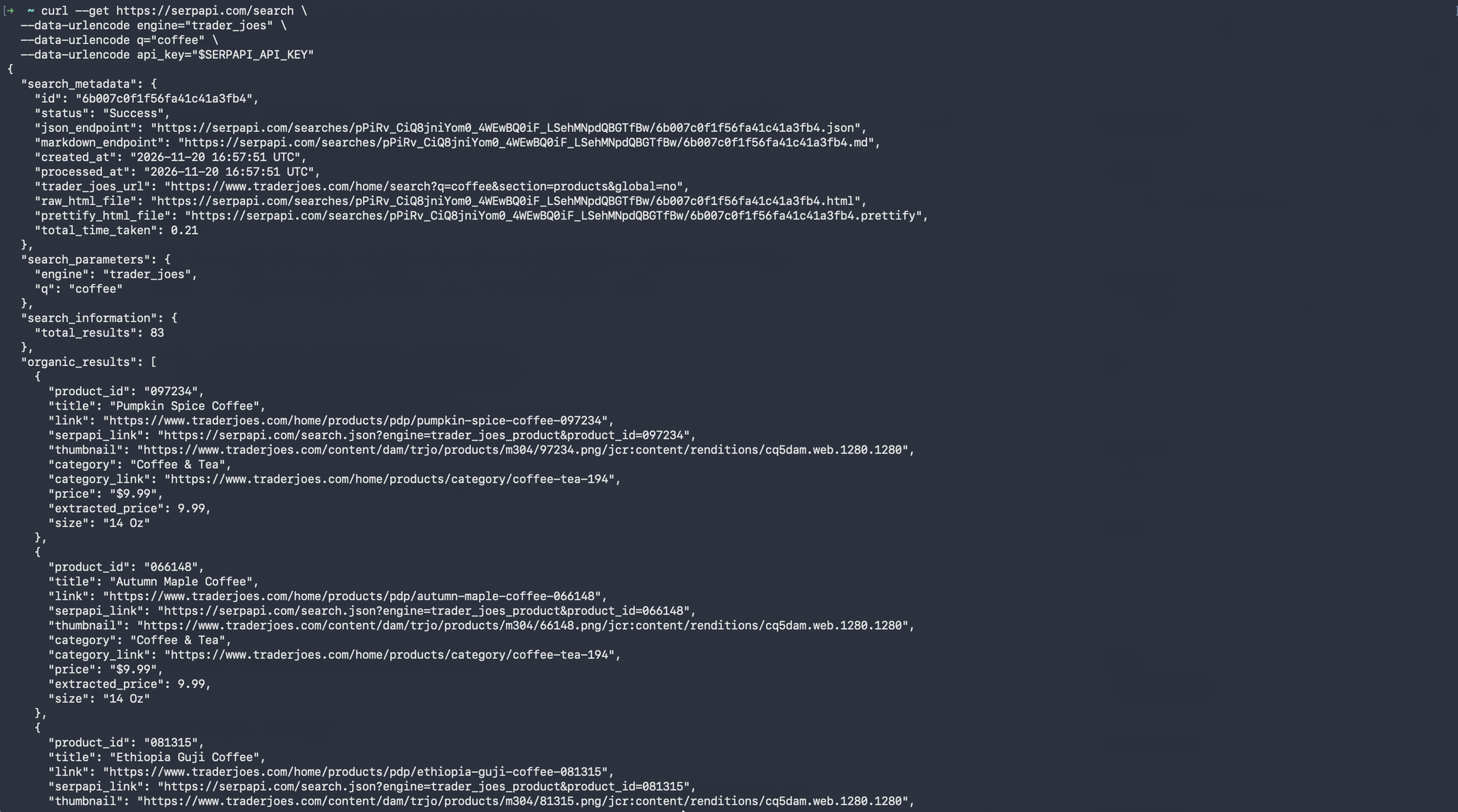
You can make the same request from the command line without installing a library. --data-urlencode takes care of encoding the values:
curl --get https://serpapi.com/search \
  --data-urlencode engine="trader_joes" \
  --data-urlencode q="coffee" \
  --data-urlencode api_key="$SERPAPI_API_KEY"
The result from above should look like:
Python
Install the official SerpApi Python library:
pip install serpapi
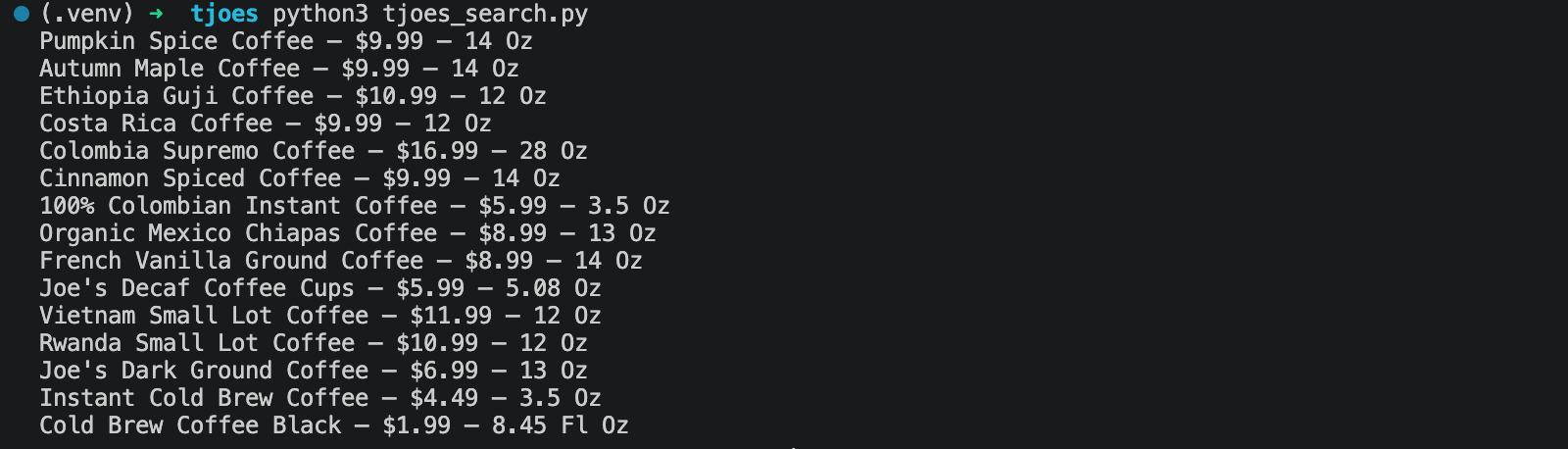
Create a tjoes_search.py file. This example runs the coffee search and prints the title, price, and size of each product:
import os
import sys

import serpapi

client = serpapi.Client(api_key=os.environ["SERPAPI_API_KEY"], timeout=60)
results = client.search({
    "engine": "trader_joes",
    "q": "coffee",
})

if "error" in results:
    sys.exit("SerpApi returned an error for this search.")

products = results.get("organic_results", [])
if not products:
    print("No products found.")

for product in products:
    print(f'{product.get("title")} — {product.get("price")} — {product.get("size")}')
Then run it:
python tjoes_search.py
The results should look like:
Optional: this example is deliberately short. For production code, you’ll want to handle the SDK’s documented exceptions (serpapi.HTTPError,serpapi.HTTPConnectionError, andserpapi.TimeoutError) as shown in the Python integration docs.
JavaScript
Install the official JavaScript package:
npm install serpapi
Create a tjoes_search.js file:
async function main() {
  const { getJson } = await import("serpapi");

  const apiKey = process.env.SERPAPI_API_KEY;
  if (!apiKey) {
    console.error("Set the SERPAPI_API_KEY environment variable first.");
    process.exit(1);
  }

  try {
    const results = await getJson({
      engine: "trader_joes",
      q: "coffee",
      api_key: apiKey,
    });

    if (results.error) {
      console.error("SerpApi returned an error for this search.");
      process.exit(1);
    }

    const products = results.organic_results ?? [];
    if (products.length === 0) {
      console.log("No products found.");
    }

    for (const product of products) {
      console.log(`${product.title} — ${product.price} — ${product.size}`);
    }
  } catch (error) {
    console.error("The request failed:", error.message);
    process.exit(1);
  }
}

main();
Run it with:
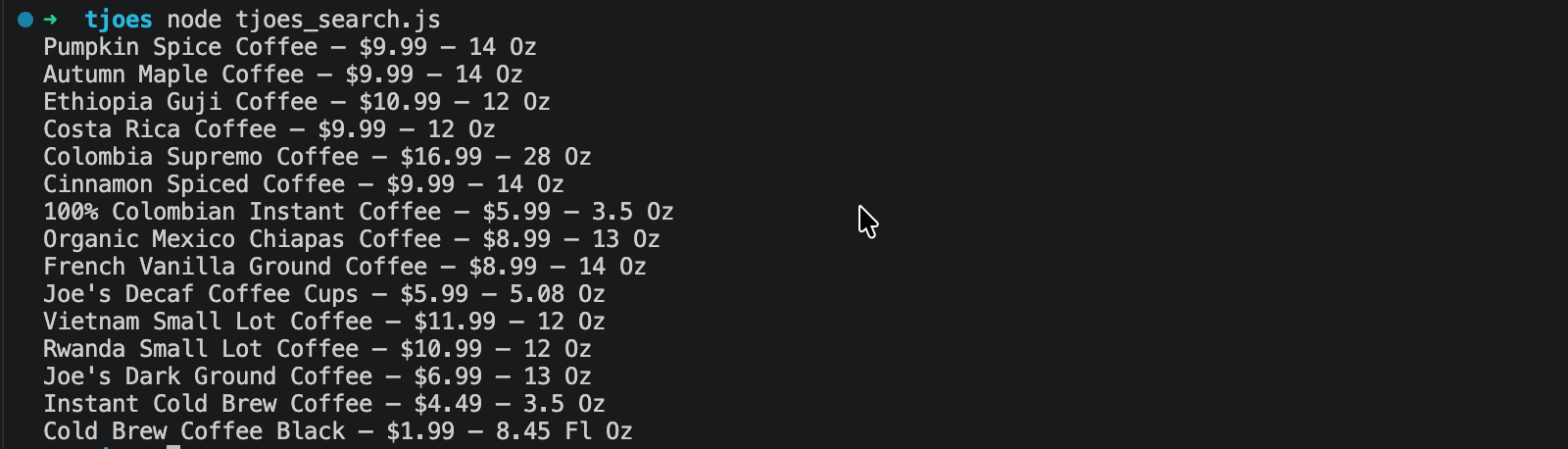
node tjoes_search.js
The results should look like:
Other languages and no-code tools
Any language that can send an HTTP GET request and parse JSON can use these APIs. Browse the official libraries on the integrations page. SerpApi also has apps for no-code tools such as Make and n8n. Check that the Trader Joe’s engines are available in the module you plan to use before building a workflow around them.
How to search a single Trader Joe’s store
Each Trader Joe’s store sells only part of the full product range. Add store_id to see only the products sold in one store, like on the Trader Joe’s website after you pick a store. This request searches for coffee in the Austin - Northwest store:
https://serpapi.com/search?engine=trader_joes&q=coffee&store_id=454&api_key=YOUR_SERPAPI_API_KEY
60 of the 82 coffee products are sold in that store, and search_information.total_results reflects the smaller number. The serpapi_link of each result now includes the store_id too, so a follow-up Product API call checks that same store.
In Python:
import os
import sys

import serpapi

client = serpapi.Client(api_key=os.environ["SERPAPI_API_KEY"], timeout=60)
results = client.search({
    "engine": "trader_joes",
    "q": "coffee",
    "store_id": "454",
})

if "error" in results:
    sys.exit("SerpApi returned an error for this search.")

print("Coffee products in store 454:", results["search_information"]["total_results"])
If you don’t set store_id, or if no store has the ID you passed, the API returns products sold in any store. So, double-check the ID if your total looks too high.
How to filter and sort Trader Joe’s results
You can combine several filters to narrow a search:
category_idlimits results to one category, such as194for Coffee & Tea.characteristicsis a comma-separated list the products must all have. Options arekosher,organic,gluten_free,vegan,antibiotic_free,dairy_free,grass_fed,vegetarian, andfair_trade.tagsis a comma-separated list of Trader Joe’s “fun tags” the products must all have, for exampledate_night,cheese_board.new_productsset totruereturns only the products Trader Joe’s marks as new. The default isfalse.sort_bychanges the order:price_low_to_high,price_high_to_low, orpopularity. Results are sorted by relevance by default.
This request finds organic products in the Coffee & Tea category, cheapest first:
https://serpapi.com/search?engine=trader_joes&q=coffee&category_id=194&characteristics=organic&sort_by=price_low_to_high&api_key=YOUR_SERPAPI_API_KEY
In Python:
import os
import sys

import serpapi

client = serpapi.Client(api_key=os.environ["SERPAPI_API_KEY"], timeout=60)
results = client.search({
    "engine": "trader_joes",
    "q": "coffee",
    "category_id": "194",
    "characteristics": "organic",
    "sort_by": "price_low_to_high",
})

if "error" in results:
    sys.exit("SerpApi returned an error for this search.")

for product in results.get("organic_results", []):
    print(product.get("extracted_price"), product.get("title"), product.get("size"))
How to paginate Trader Joe’s results
Trader Joe’s returns up to 15 results per page. Use the page parameter to move through them: page=1 is the default, and page=2 is the second page.
https://serpapi.com/search?engine=trader_joes&q=coffee&page=2&api_key=YOUR_SERPAPI_API_KEY
The response includes a serpapi_pagination object with the current page number, a ready-to-use link for the previous and next pages, and other_pages with links to the rest:
{
  "serpapi_pagination": {
    "current": 2,
    "previous": "https://serpapi.com/search.json?engine=trader_joes&page=1&q=coffee",
    "next": "https://serpapi.com/search.json?engine=trader_joes&page=3&q=coffee",
    "other_pages": {
      "1": "https://serpapi.com/search.json?engine=trader_joes&page=1&q=coffee",
      "3": "https://serpapi.com/search.json?engine=trader_joes&page=3&q=coffee"
    }
  }
}
A page after the last one has no products, and search_information.organic_results_state is set to Fully empty for it. Here is a Python loop that reuses the client and moves to the next page until it runs out of products:
import os
import sys

import serpapi

client = serpapi.Client(api_key=os.environ["SERPAPI_API_KEY"], timeout=60)
params = {
    "engine": "trader_joes",
    "q": "coffee",
    "page": 1,
}

while True:
    results = client.search(params)

    if "error" in results:
        sys.exit("SerpApi returned an error for this search.")

    products = results.get("organic_results", [])
    for product in products:
        print(product.get("product_id"), product.get("title"), product.get("price"))

    if not products or not results.get("serpapi_pagination", {}).get("next"):
        break

    params["page"] += 1
If using JavaScript, loop over page yourself in the same way.
How to save Trader Joe’s results to a CSV file
Search results are a list of similar records, so they fit neatly into rows. Every field we need is a plain string or number, so there is nothing to flatten. A missing price just becomes an empty cell. This example writes the first page of the coffee search to a UTF-8 CSV file:
import csv
import os
import sys

import serpapi

client = serpapi.Client(api_key=os.environ["SERPAPI_API_KEY"], timeout=60)
results = client.search({
    "engine": "trader_joes",
    "q": "coffee",
})

if "error" in results:
    sys.exit("SerpApi returned an error for this search.")

fields = ["product_id", "title", "category", "price", "extracted_price", "size", "link"]

with open("trader_joes_coffee.csv", "w", newline="", encoding="utf-8") as csv_file:
    writer = csv.DictWriter(csv_file, fieldnames=fields)
    writer.writeheader()
    for product in results.get("organic_results", []):
        writer.writerow({field: product.get(field) for field in fields})

print("Saved trader_joes_coffee.csv")
Product IDs have leading zeros, so open the file in a spreadsheet as text if you want to keep them.
How to reduce the response size
SerpApi’s JSON Restrictor returns only the fields you ask for, which makes responses smaller and easier to pass to an LLM. Both Trader Joe’s APIs accept the json_restrictor parameter. This example keeps only each product’s ID, title, and price:
import os
import sys

import serpapi

client = serpapi.Client(api_key=os.environ["SERPAPI_API_KEY"], timeout=60)
results = client.search({
    "engine": "trader_joes",
    "q": "coffee",
    "json_restrictor": "organic_results[].{product_id,title,extracted_price}",
})

if "error" in results:
    sys.exit("SerpApi returned an error for this search.")

for product in results.get("organic_results", []):
    print(product.get("product_id"), product.get("title"), product.get("extracted_price"))
Note: A repeated identical search is served from SerpApi’s cache for an hour, and cached searches are free. Set no_cache=true when you need fresh results immediately.How to scrape a Trader Joe’s product page
The search results give you a summary. To get the full product page, use the Trader Joe’s Product API. It takes a product ID and returns everything on the product page, including ingredients and nutrition facts.
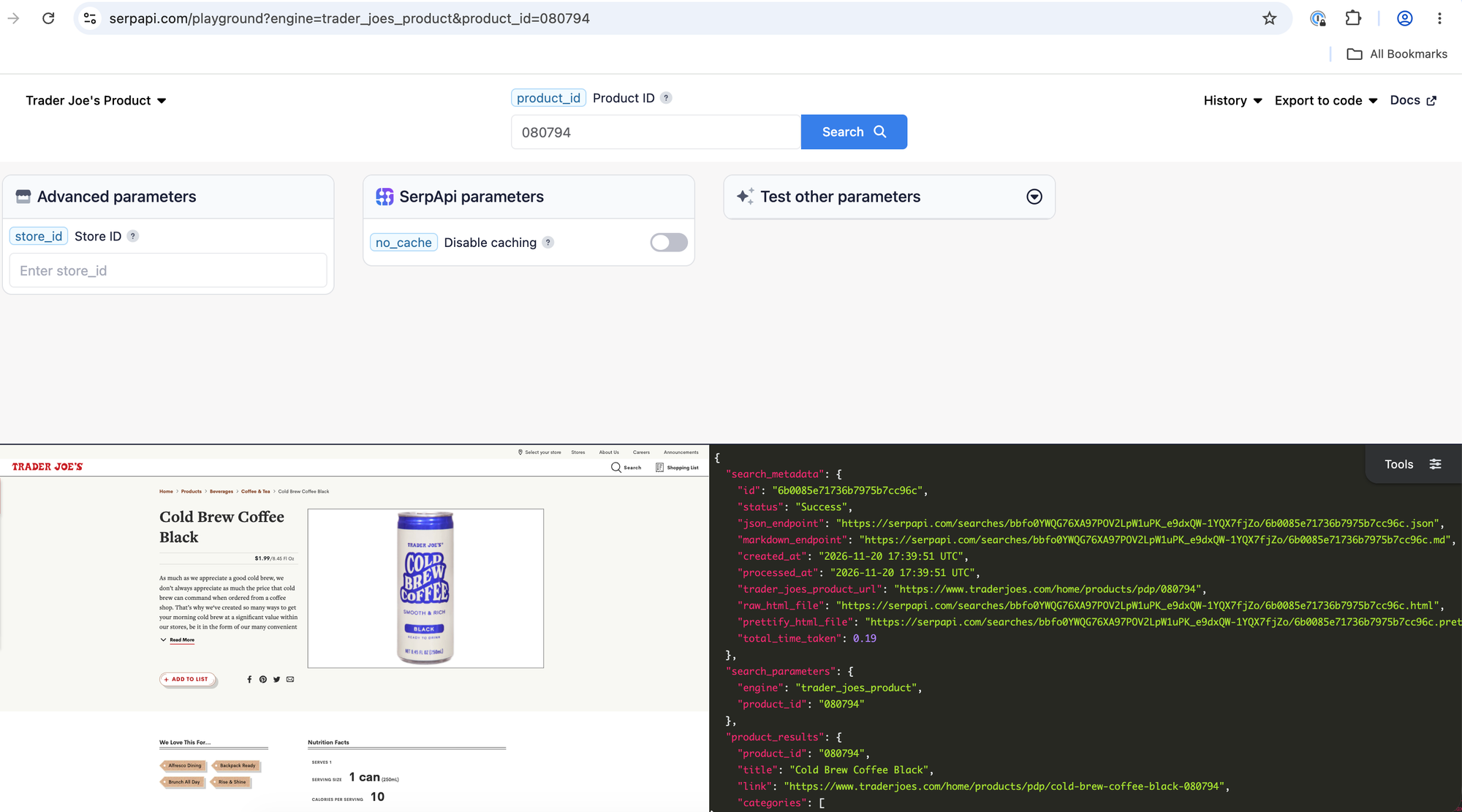
The required parameters are:
engine=trader_joes_productto select the Trader Joe’s Product API.product_id=080794for the product. That’s Cold Brew Coffee Black, the example from the documentation.api_keywith your private SerpApi API key.
GET request
https://serpapi.com/search?engine=trader_joes_product&product_id=080794&api_key=YOUR_SERPAPI_API_KEY
The product data lives under product_results. An abridged response from the documentation looks like this:
{
  "product_results": {
    "product_id": "080794",
    "title": "Cold Brew Coffee Black",
    "link": "https://www.traderjoes.com/home/products/pdp/cold-brew-coffee-black-080794",
    "categories": [
      { "name": "Products", "link": "https://www.traderjoes.com/home/products/category/products-2" },
      { "name": "Beverages", "link": "https://www.traderjoes.com/home/products/category/beverages-182" },
      { "name": "Coffee & Tea", "link": "https://www.traderjoes.com/home/products/category/coffee-tea-194" }
    ],
    "price": "$1.99",
    "extracted_price": 1.99,
    "size": "8.45 Fl Oz",
    "available": true,
    "images": [
      "https://www.traderjoes.com/content/dam/trjo/products/m304/80794.png"
    ],
    "fun_tags": ["Alfresco Dining", "Backpack Ready", "Brunch All Day", "Rise & Shine"],
    "ingredients": ["WATER", "ARABICA COFFEE", "NATURAL FLAVOR"],
    "allergens": ["MAY CONTAIN MILK."]
  }
}
The response also has a description and nutrition_facts, which we left out here. Some fields only show up when they apply to the product: characteristics (like Vegan or Kosher) and label (like LIMITED TIME), for example. And price isn’t returned when the product isn’t available. The documentation lists every field returned.
Like the Search API, the Product API supports Markdown with output=md:
https://serpapi.com/search?engine=trader_joes_product&product_id=080794&output=md&api_key=YOUR_SERPAPI_API_KEY
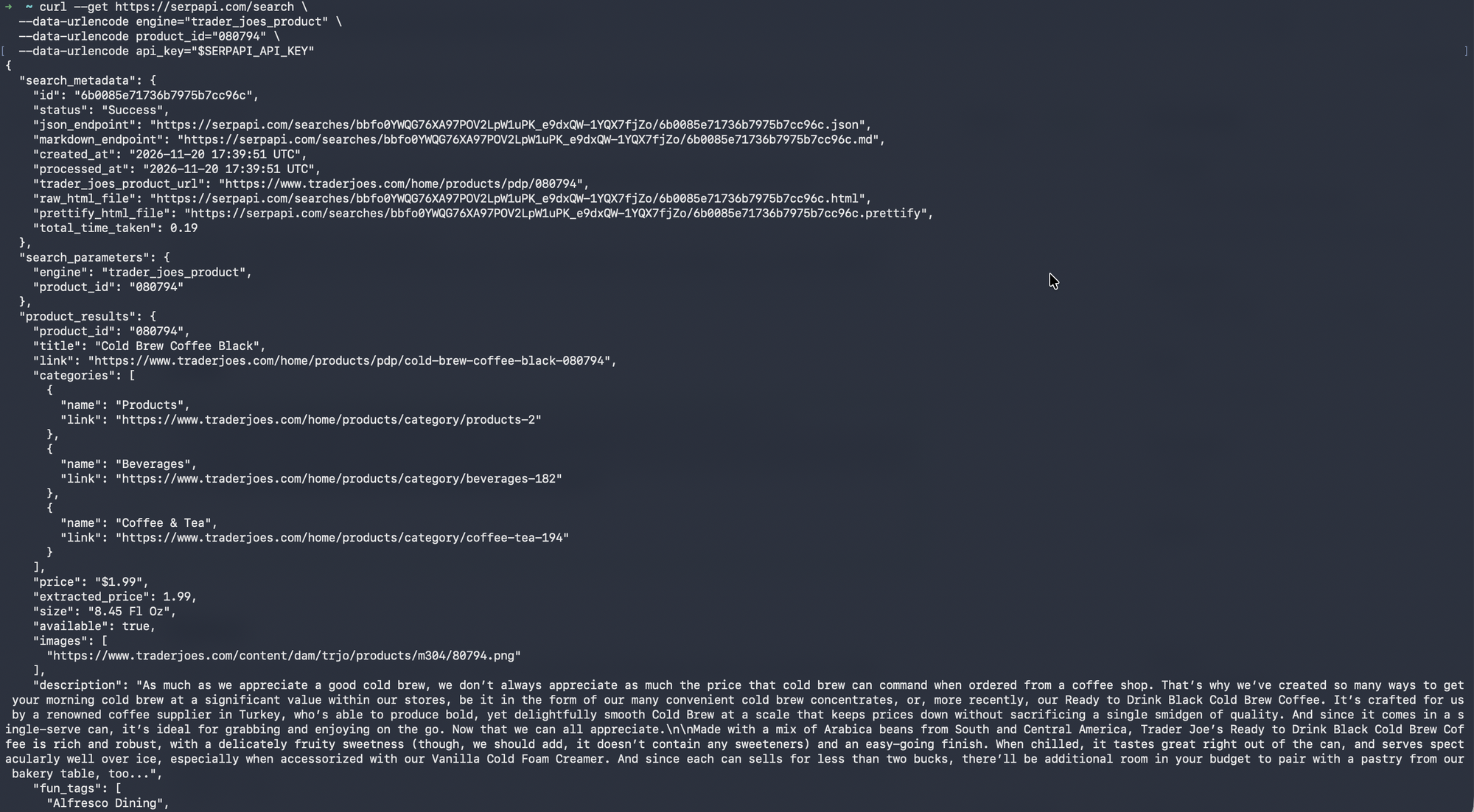
cURL
curl --get https://serpapi.com/search \
  --data-urlencode engine="trader_joes_product" \
  --data-urlencode product_id="080794" \
  --data-urlencode api_key="$SERPAPI_API_KEY"
The results should look like:
Python
Using the same serpapi library, create a tjoes_product.py file that prints a product’s title, price, size, and ingredients:
import os
import sys

import serpapi

client = serpapi.Client(api_key=os.environ["SERPAPI_API_KEY"], timeout=60)
results = client.search({
    "engine": "trader_joes_product",
    "product_id": "080794",
})

if "error" in results:
    sys.exit("SerpApi returned an error for this search.")

product = results.get("product_results", {})
print(f'{product.get("title")} — {product.get("price")} — {product.get("size")}')
print("Ingredients:", ", ".join(product.get("ingredients", [])))
Run it with python tjoes_product.py.
Results should look like:

JavaScript
Create a tjoes_product.js file:
async function main() {
  const { getJson } = await import("serpapi");

  const apiKey = process.env.SERPAPI_API_KEY;
  if (!apiKey) {
    console.error("Set the SERPAPI_API_KEY environment variable first.");
    process.exit(1);
  }

  try {
    const results = await getJson({
      engine: "trader_joes_product",
      product_id: "080794",
      api_key: apiKey,
    });

    if (results.error) {
      console.error("SerpApi returned an error for this search.");
      process.exit(1);
    }

    const product = results.product_results ?? {};
    console.log(`${product.title} — ${product.price} — ${product.size}`);
    console.log("Ingredients:", (product.ingredients ?? []).join(", "));
  } catch (error) {
    console.error("The request failed:", error.message);
    process.exit(1);
  }
}

main();
Run it with node tjoes_product.js.
Results should look like:

Putting the two APIs together
A common workflow is to search first and then fetch the details of each result. The product_id of every search result is the product_id the Product API expects, so you can chain the two. This example finds cookies at one store, then prints the ingredients of the first three:
import os
import sys

import serpapi

client = serpapi.Client(api_key=os.environ["SERPAPI_API_KEY"], timeout=60)
search = client.search({
    "engine": "trader_joes",
    "q": "cookies",
    "store_id": "454",
    "characteristics": "organic",
})

if "error" in search:
    sys.exit("SerpApi returned an error for this search.")

for result in search.get("organic_results", [])[:3]:
    details = client.search({
        "engine": "trader_joes_product",
        "product_id": result["product_id"],
        "store_id": "454",
    })

    if "error" in details:
        sys.exit("SerpApi returned an error for this product.")

    product = details.get("product_results", {})
    print(product.get("title"), "—", ", ".join(product.get("ingredients", [])))
Note: We changed the search query tocookiesascoffeedoes have any ingredients listed on their product pages.
Results should look like:

Conclusion
The Trader Joe’s Search API turns a product search into structured data with titles, prices, sizes, and categories. You can narrow it down to one store, filter by category, characteristics, and tags, sort by price or popularity, and page through the results. The Trader Joe’s Product API then adds the details of any single product such as its availability in a store, description, ingredients, allergens, and nutrition facts.
Try both in the Playground first: the Trader Joe’s Search API Playground and the Trader Joe’s Product API Playground.
If you want to scrape other stores' products, for example Walmart, check out our other article here:
 Artur Chukhrai