Ruby
Ruby
 Golang
 .Net
.Net
 MCP
MCP
 C++
C++


Bing Maps is one of the most comprehensive services for finding landmarks, local businesses, and other places anywhere in the world. It shares much of its data with Microsoft's enterprise maps service, Azure Maps, and serves as an alternative to Google Maps and Apple Maps.
With the Bing Maps API from SerpApi, search results from a given location are accessible in simple JSON format, ready for any programming language or environment. SerpApi handles the HTML parsing, proxy network, captcha puzzles, and other challenges, so you can focus on your actual business or project, instead of maintaining a scraping tool.
Check out our other Bing search APIs for for scraping organic search results, videos, images, and more!
What can you scrape from Bing Maps?
Here's everything you can pull from each search result in Bing Maps using SerpApi:
- Title: The name of the business, landmark, or other result.
- Location: The address for a given result, along with the latitude and longitude coordinates for GPS.
- Type: The type of location, such as "Museum," "Pizza restaurant," or "Library."
- Phone number: The contact phone number for calls, sometimes including the country code.
- Current status: The current open or closed status for the result. The next opening time is provided for closed locations, and the closing time is provided for open locations.
- Preview image: Bing's thumbnail image preview for a given result.
- Website: The listed website for a given result.
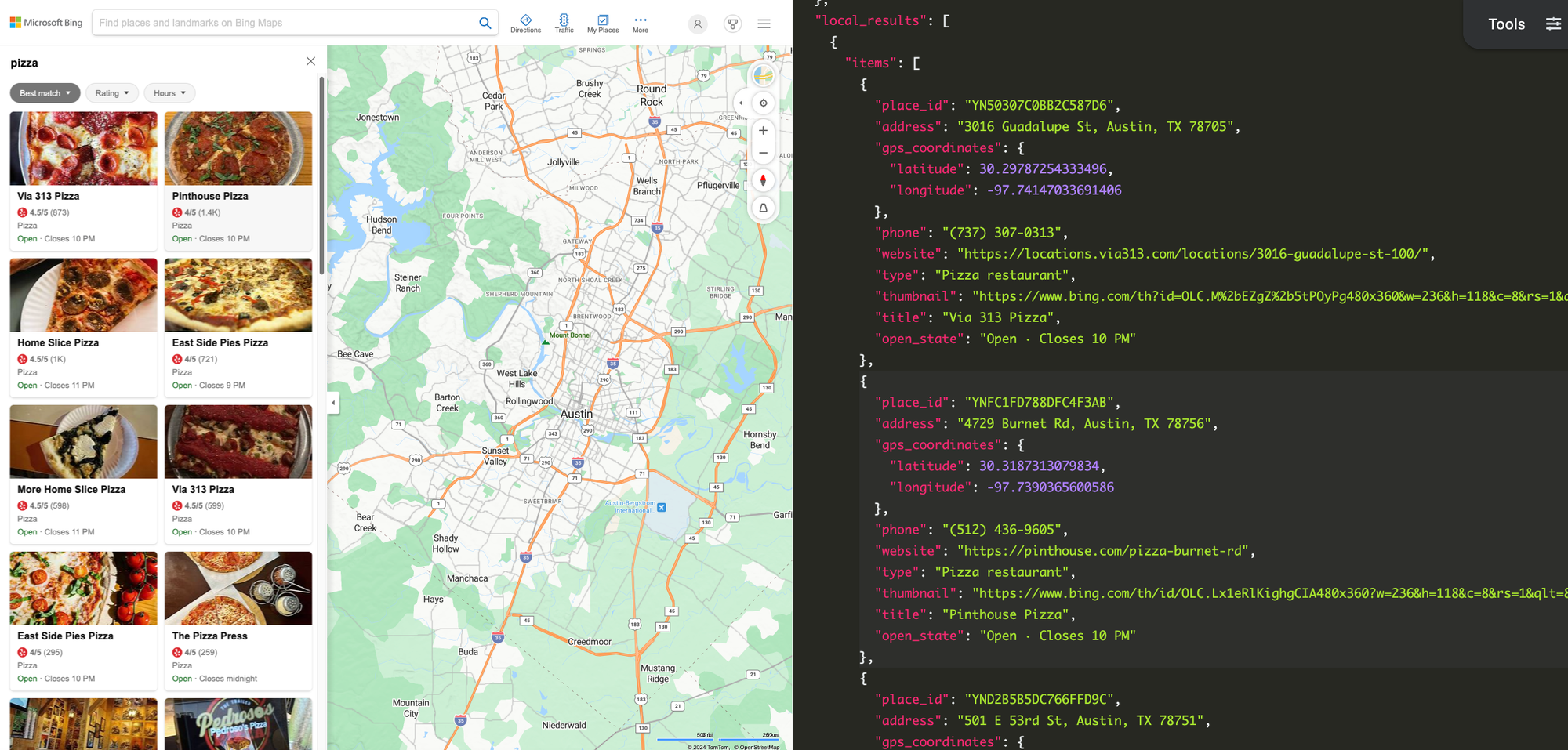
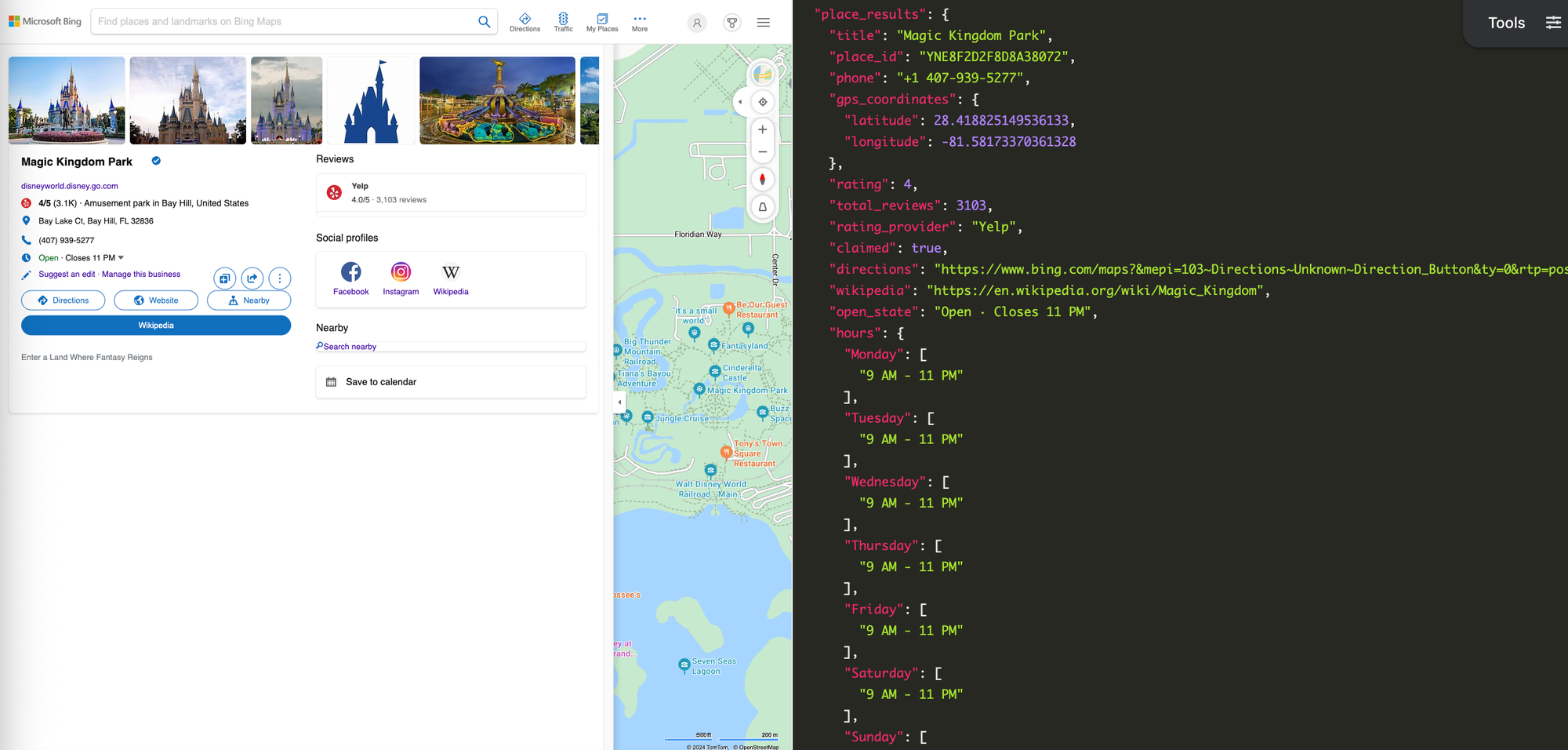
Each result also includes a place_ID value, which you can use to extract more information using an additional API call. That may include the following data, depending on the type of result:
- Reviews: The current average rating (out of 5 stars) and number of reviews across each available platform, such as Yelp, Tripadvisor, DoorDash, and Uber Eats. Some review snippets may also be included.
- Description: A snippet of the location's provided description.
- Directions: The link to find directions to the location using Bing Maps.
- Menu: If the location is a restaurant and has a web-accessible menu, it might be listed in Bing Maps.
- Wikipedia article: The article for the location on Wikipedia, if one exists.
- Operating hours: More detailed operating hours for each day of the week.
- Service options: For some businesses, this can include dine-in, takeout, and delivery information.
- Social media profiles: The pages for the location on Facebook, Instagram, LinkedIn, YouTube, and other platforms. This may also include the same Wikipedia article link.
- FAQ: Snippets of frequently asked questions and answers for the location, sourced from Tripadvisor and other platforms.
Getting started with SerpApi
Before getting started with the Bing Maps API, you need a free SerpApi account. That also gives you access to APIs for Google Maps, Apple Maps, and DuckDuckGo Maps, along with more general-purpose search engines like Google Search, Bing Search, DuckDuckGo, and others. You can upgrade to a paid account later if you need more search capacity, faster speeds, or other features.
First, you need to create an account and verify your email and other details. After that, get the API key from your account dashboard.
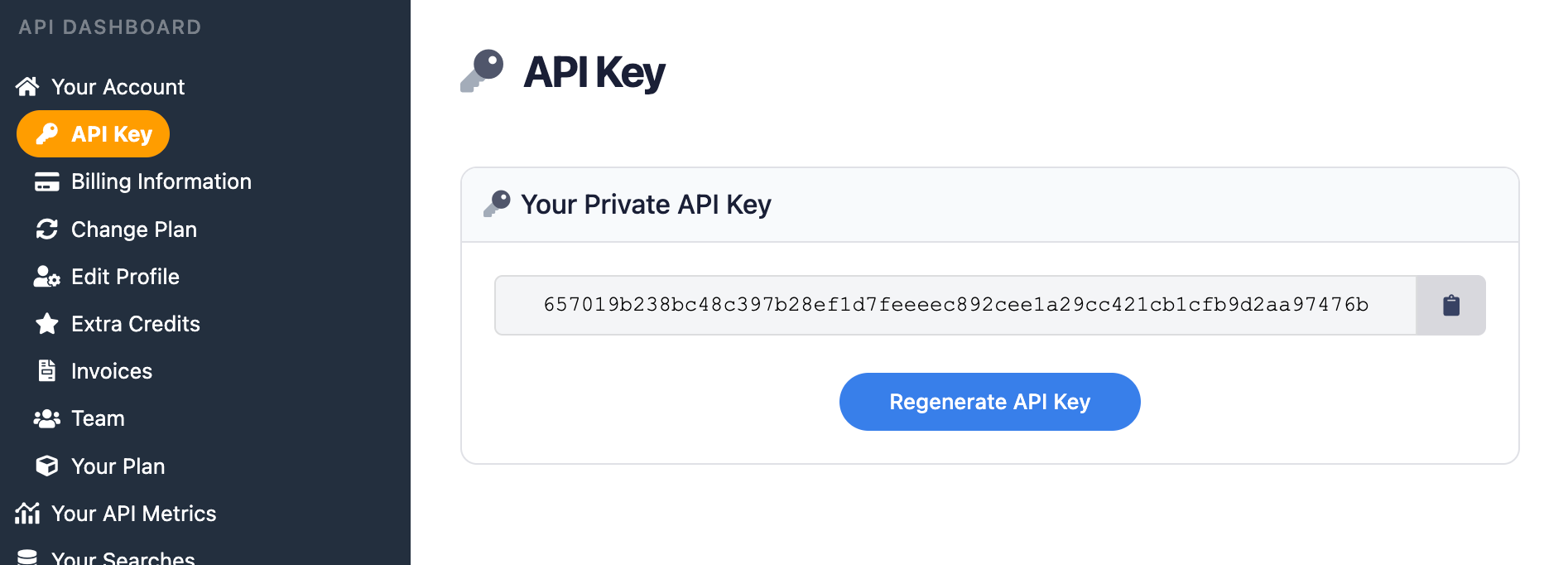
Remember to store your API key in a safe location if you are sharing or publishing your code. If the key is leaked or stolen, you can make a new one from the SerpApi account dashboard.
Install the SerpApi library (optional)
You can use SerpApi's official libraries for Python, JavaScript, Ruby, Java, and other languages. They provide a simple wrapper around the API requests.
The libraries are not strictly required, though. You can still make API calls with cURL, fetch() in Node.js, or anything else that can send GET requests and process a JSON response.
Review the Bing Maps API documentation
Each API at SerpApi has extensive documentation that covers all the supported parameters and filters, code examples for popular languages, and example JSON responses. We're covering some of the basic usage in this post, but you can see more details at the Bing Maps API documentation.
 SerpApi
The only required parameter is q for the search query, but you can optionally specify the starting coordinates, language, pagination, and other settings. The coordinates need to be set as the cp parameter in the following format:
latitude + ~ + longitude
If you have a place ID from a previous search, you can send that with the place_id parameter to receive more detailed information.
How to scrape Bing Maps search results
If you have your API key, you're ready to start pulling data from Bing Maps searches. No matter how you're accessing SerpApi, the API results will be identical.
GET request
This performs a search for "museum" near Raleigh, North Carolina, using the Bing Maps API in a simple GET request:
https://serpapi.com/search.json?engine=bing_maps&q=museum&cp=35.780547~-78.641759&api_key=API_KEY_GOES_HEREThat returned the North Carolina Museum of History as one of the results, with a place ID of YNEE83AA5F137C90BD. We can add that to another GET request to retrieve more details:
https://serpapi.com/search.json?engine=bing_maps&q=museum&cp=35.780547~-78.641759&place_id=YNEE83AA5F137C90BD&api_key=API_KEY_GOES_HEREYou can also use SerpApi's JSON Restrictor feature to trim the API response to specific values. This searches for "museum" and only returns the title and address for each result:
https://serpapi.com/search.json?engine=bing_maps&q=museum&cp=35.780547~-78.641759&json_restrictor=local_results[].items[]{title,address}&api_key=API_KEY_GOES_HEREThis can be helpful if you need more efficient parsing, or if you're using an LLM with a limited context window.
Python
This uses the official SerpApi Python library to search for "pizza restaurant" in New York City, then displays each result with its address and website:
import serpapi

client = serpapi.Client(api_key=YOUR_KEY_GOES_HERE)
results = client.search({
  "engine": "bing_maps",
  "cp": "40.709903~-74.001543",
  "q": "pizza restaurant"
})

for item in results["local_results"][0]["items"]:
    print(f"{item["title"]}\n====\n{item["address"]}\n{item["website"]}\n")
This performs a search for "museum" in New York City, then shows all available information about the first result using the returned place_id value:
import serpapi

# Run the first search and get the ID
client = serpapi.Client(api_key=YOUR_KEY_GOES_HERE)
initSearch = client.search({
  "engine": "bing_maps",
  "cp": "40.709903~-74.001543",
  "q": "museum"
})
firstId = initSearch["local_results"][0]["items"][0]["place_id"]

# Run the second search and print results
detailedSearch = client.search({
  "engine": "bing_maps",
  "cp": "40.709903~-74.001543",
  "q": "museum",
  "place_id": firstId
})
for key in detailedSearch["place_results"]:
    print(f"{key}: {detailedSearch["place_results"][key]}\n")
Ruby
Here's how to search for "museum" in London and display each result's address and website, using the official Ruby gem for SerpApi:
require "serpapi"

client = SerpApi::Client.new(
    engine: "bing_maps",
    q: "museum",
    cp: "51.507084~-0.127525",
    api_key: YOUR_KEY_GOES_HERE
)

for item in client.search[:local_results][0][:items] do
    puts "#{item[:title]}\n====\n#{item[:address]}\n#{item[:website]}\n\n"
end
This pulls the place ID from the first result for the "museum" search in London, and then displays all available information for that place with a second API request:
require "serpapi"

# Run the first search and get the ID
init_search = SerpApi::Client.new(
    engine: "bing_maps",
    q: "museum",
    cp: "51.507084~-0.127525",
    api_key: YOUR_KEY_GOES_HERE
)
first_id = init_search.search[:local_results][0][:items][0][:place_id]

# Run the second search and print results
details_search = SerpApi::Client.new(
    engine: "bing_maps",
    q: "museum",
    cp: "51.507084~-0.127525",
    place_id: first_id,
    api_key: YOUR_KEY_GOES_HERE
)
details_search.search[:place_results].each do |label, value|
  puts "#{label}: #{value}\n\n"
end
JavaScript and Node.js
This uses the official SerpApi JavaScript library to search Bing Maps for "Walmart" around Atlanta, and display the title, address, and open state for each result:
import { getJson } from 'serpapi';

const search = await getJson({
    engine: "bing_maps",
    q: "walmart",
    cp: "33.773936~-84.408599",
    api_key: YOUR_KEY_GOES_HERE
});

search.local_results[0].items.forEach(function (result) {
    console.log(`${result.title}\n====\n${result.address}\n${result.open_state}\n`);
})
This performs the same search, pulls the place ID for the first result, then makes another API call with the place_id specified to print all available information:
import { getJson } from 'serpapi';

// Run the first search and get the ID
const initSearch = await getJson({
    engine: "bing_maps",
    q: "walmart",
    cp: "33.773936~-84.408599",
    api_key: YOUR_KEY_GOES_HERE
});
const placeId = initSearch.local_results[0].items[0].place_id;

// Run the second search and print results
const detailsSearch = await getJson({
    engine: "bing_maps",
    q: "walmart",
    cp: "33.773936~-84.408599",
    place_id: placeId,
    api_key: YOUR_KEY_GOES_HERE
});
for (const label in detailsSearch.place_results) {
    console.log(`${label}: ${JSON.stringify(detailsSearch.place_results[label])}\n`);
}
cURL
Here's how to search for "McDonalds" near Los Angeles with Bing Maps in a cURL request:
curl --get https://serpapi.com/search \
 -d engine="bing_maps" \
 -d q="mcdonalds" \
 -d cp="34.061412~-118.248074" \
 -d api_key="YOUR_KEY_GOES_HERE"
Other languages and no-code solutions
You can still use the API directly with GET requests, even if there isn't an official SerpApi integration for your preferred environment or language. SerpApi also works with Make.com, N8N, and other tools.
Conclusion
Bing Maps can help you find local businesses, landmarks, and other places with a simple search. With the Bing Maps API from SerpApi, you can pull all those results into any automation or programming language.
If results from Bing aren't the best option, SerpApi also provides APIs for Google Maps, DuckDuckGo Maps, and Apple Maps. Those can also provide navigation directions, reviews, and uploaded photos, in addition to local results like Bing Maps.
If you need help using SerpApi, please contact us.