









 Ruby
Ruby
 Golang
 .Net
.Net
 MCP
MCP
 C++
C++

Apple Maps is one of the most widely-used mapping platforms in the world, deeply integrated into every iPhone, iPad, and Mac. With over a billion Apple devices in active use globally, Apple Maps accumulates an enormous amount of business data, user ratings, curated local guides, photos, and reviews, making it a valuable source for location intelligence, competitive research, and consumer applications.
SerpApi's new Apple Maps API lets you scrape this data via a simple JSON endpoint, handling all the complexity of interacting with Apple's infrastructure for you. Whether you're building a local business aggregator, a competitive analysis tool, or a location-aware AI agent, the Apple Maps API gives you fast, structured access to rich place data with a single request.
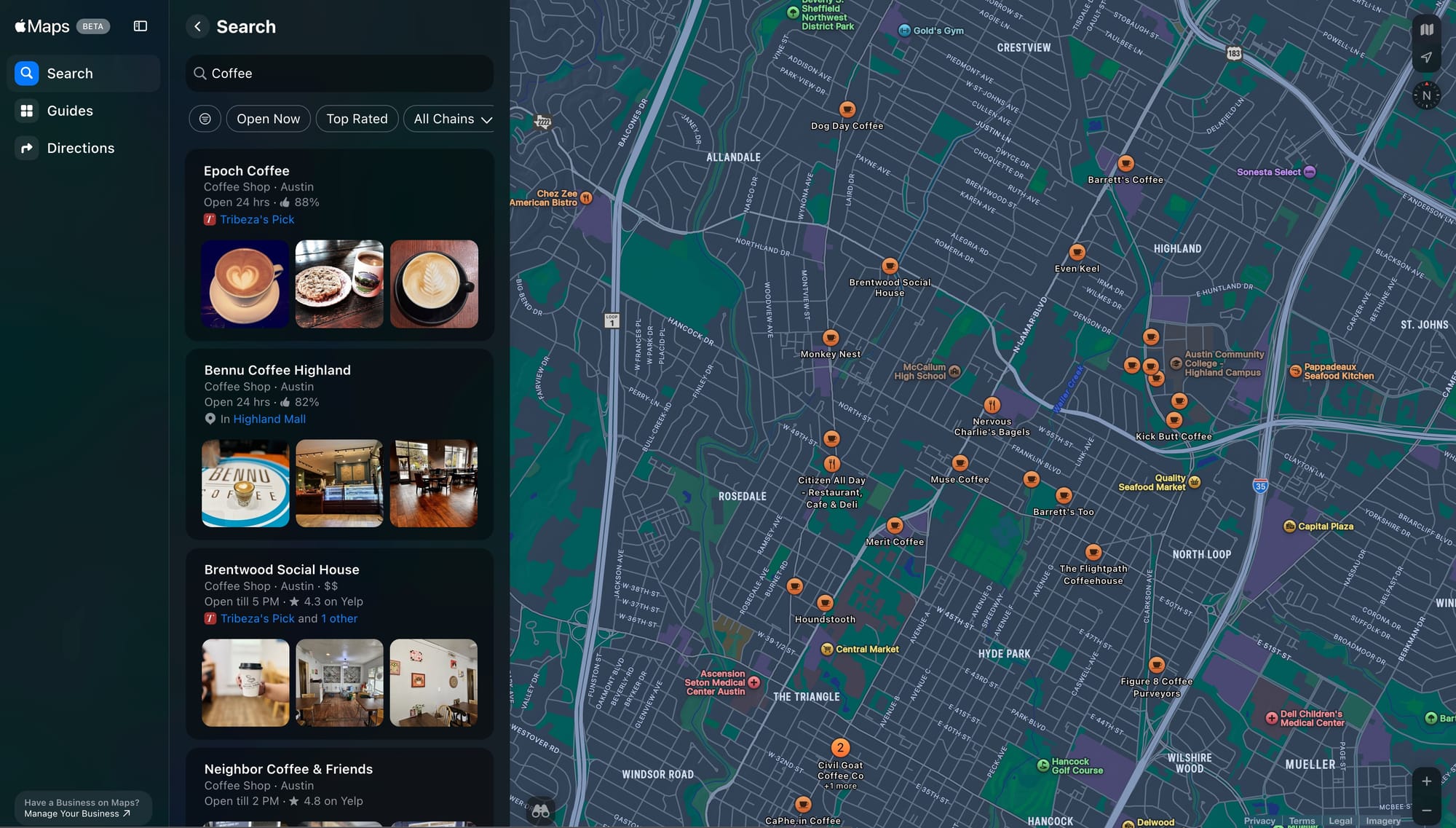
https://serpapi.com/search.json?engine=apple_maps&query=Coffee¢er=30.324639%2C-97.7304611&api_key=YOUR_API_KEYGet started with just a GET request
This post provides an overview of how to scrape Apple Maps using SerpApi. We'll walk through the main result types you'll encounter and explore the powerful refinement and filtering options available. To try things out yourself, head to the Playground, or check out the Documentation to see what's available.
 SerpApi
Apple Maps Search Results
The most common type of response you'll get from the Apple Maps API is a list of local results. These are returned when you search for a category or keyword (like "Coffee" or "Pizza") combined with a geographic area.
To run a local search, set engine to apple_maps, provide a query, and specify center (GPS coordinates in lat,lng format) and optionally span (the map area in degrees). For example, to find coffee shops near central Austin, TX:
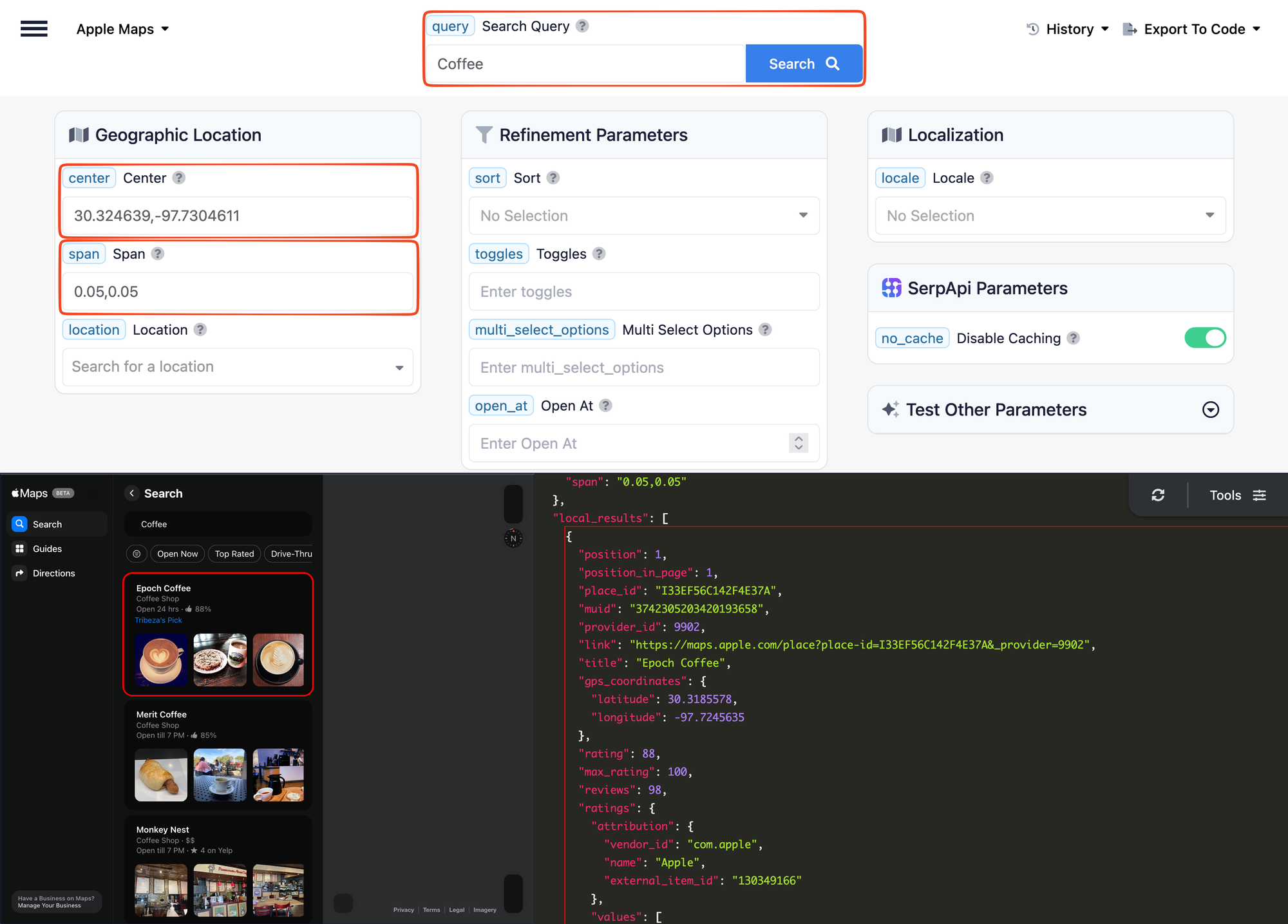
For these searches the API returns a local_results array containing nearby locations matching your query. Each result is packed with data:
- Basic info: title, address, phone, website, GPS coordinates
- Ratings: From Apple's native system (out of 100) or third-party providers like Yelp (out of 5), with category-specific scores
- Business details: amenities, price level, business type/category, operating hours, and more
- Media: Rich collection of photos from diverse sources
- Reviews: User review snippets with ratings, usernames, and links to full reviews aggregated from multiple providers
- Actions: Direct links to order online, view menus, or get delivery
Check out the Apple Maps Local Results documentation for more details.
 SerpApi
Apple Maps Guides
Alongside local results, Apple Maps also surfaces guide results, curated editorial collections from partner publishers and reviewers. Each guide includes a title, description, cover photo, publisher info, and references to the individual places it features. Place items also include a collection field listing any guides they appear in, giving you the relationship from both directions.
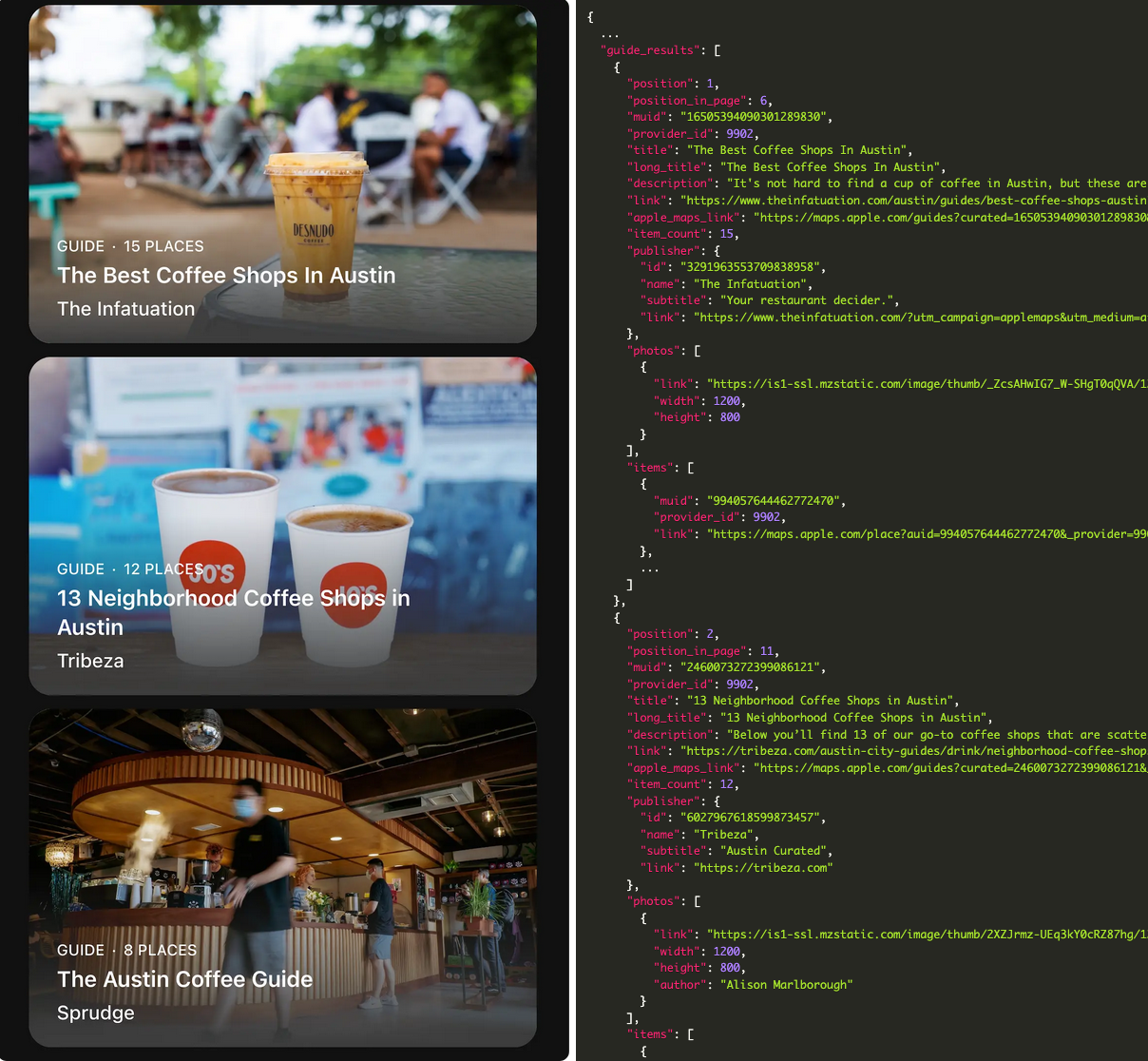
See the Apple Maps Guide Results documentation for more details.
 SerpApi
Filtering and Sorting
The API also exposes Apple Maps' native filtering UI as structured parameters. Search responses include a refinement object listing the available filters for that query.
Toggle filters are simple on/off switches like "Open Now", "Drive-Thru", and "Top Rated". Pass them via the toggles parameter as a comma-separated list.
Multi-select filters let you pick from lists of specific options like restaurant chains (Starbucks, Dunkin'), price tiers, amenities (Outdoor Seating, Accepts Apple Pay) and more. Pass them via multi_select_options.
You can also control sort order with sort (relevance, distance, or rating) and filter by opening time with open_at.
For example, to find only open coffee shops with a drive-thru near Austin, sorted by rating, you'd add toggles=OPEN_NOW,DRIVE_THRU and sort=ratings to your search. Try it in the Playground.
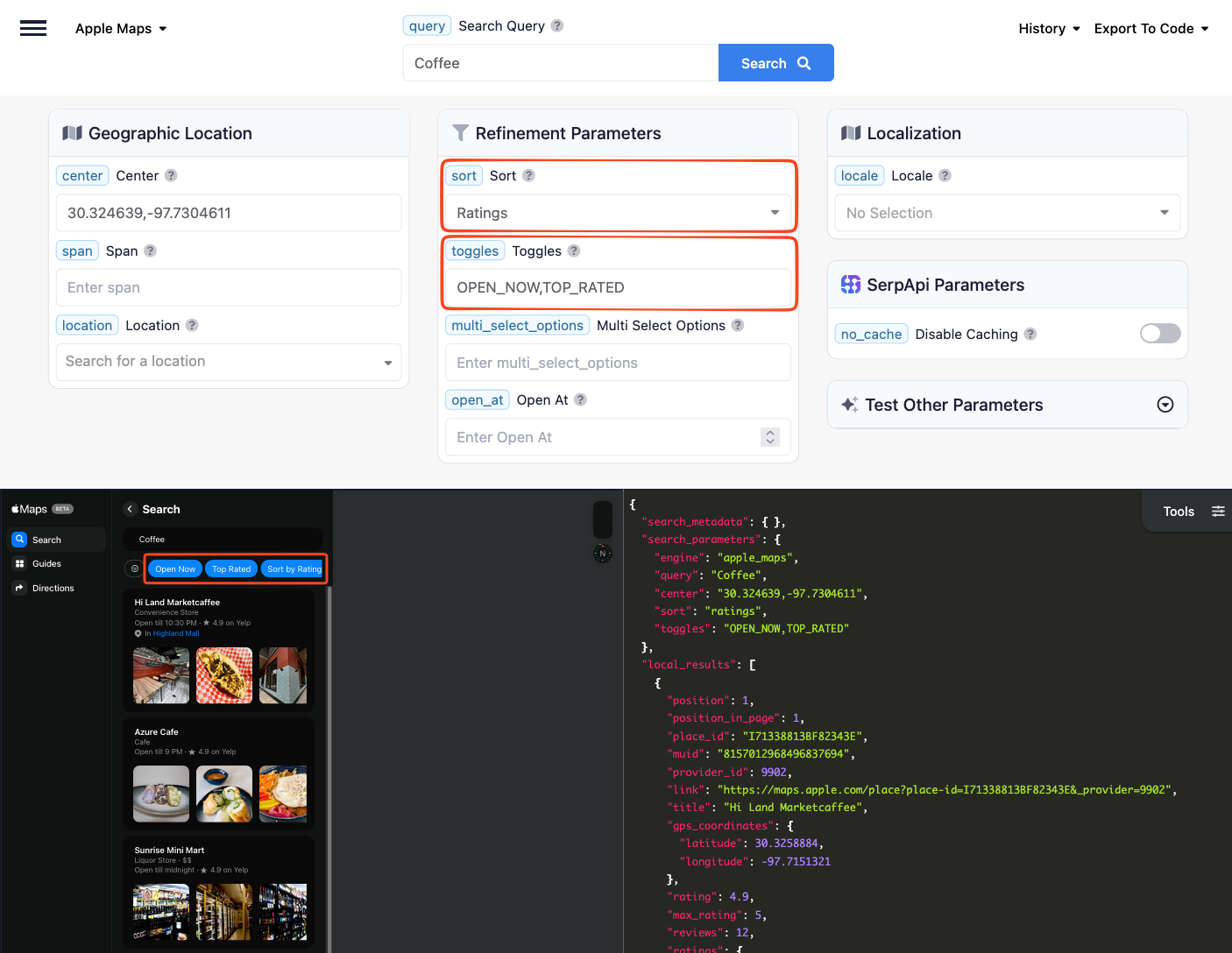
The available refinements vary by search, a "Coffee" search might surface chain filters for Starbucks and Dunkin', while a "Restaurants" search offers cuisine filters and Michelin star ratings. Check the Apple Maps Refinement documentation for details on how to use these powerful filtering options.
 SerpApi
Using The API
Our Apple Maps API is a standard REST endpoint that you can call from any language or tool that can make HTTP requests. We also have SDKs available for many languages that you can use to get up and running even faster. Here are a few ways to get started.
cURL
curl --get https://serpapi.com/search \
 -d api_key="YOUR_API_KEY" \
 -d engine="apple_maps" \
 -d center="30.324639,-97.7304611" \
 -d span="0.05,0.05" \
 -d query="Coffee"
JavaScript (fetch)
const params = new URLSearchParams({
    engine: "apple_maps",
    query: "Coffee",
    center: "30.324639,-97.7304611",
    span: "0.05,0.05",
    api_key: "YOUR_API_KEY",
});

const response = await fetch(`https://serpapi.com/search.json?${params}`);
const data = await response.json();

for (const place of data.local_results ?? []) {
    console.log(place.title, "|", place.address, "|", place.open_state);
}
Python SDK
import serpapi

client = serpapi.Client(api_key="YOUR_API_KEY")
results = client.search({
    "engine": "apple_maps",
    "query": "Coffee",
    "center": "30.324639,-97.7304611",
    "span": "0.05,0.05",
})

for place in results.get("local_results", []):
    print(place["title"], "|", place.get("address"), "|", place.get("open_state"))
JavaScript SDK
import { getJson } from "serpapi";

const results = await getJson({
    engine: "apple_maps",
    query: "Coffee",
    center: "30.324639,-97.7304611",
    span: "0.05,0.05",
    api_key: "YOUR_API_KEY",
});

for (const place of results.local_results ?? []) {
    console.log(place.title, "|", place.address, "|", place.open_state);
}
You should get an output something like:
Epoch Coffee | 221 W North Loop Blvd, Austin, TX 78751, United States | Open 24 hrs
Merit Coffee | 4615 N Lamar Blvd, Unit 303A, Austin, TX 78751, United States | Open till 7 PM
Bennu Coffee Highland | 109 Jacob Fontaine Ln, Unit 600, Austin, TX 78752, United States | Open 24 hrs
...
SDKs are also available for Ruby, Go, Rust, and more. See the integrations documentation for examples in your preferred language.
What Can You Build With It?
The combination of Apple Maps' rich data and SerpApi's structured API makes this a strong fit for a wide range of applications:
- Business intelligence: Aggregate ratings, amenities, hours, and business types across a city or region for competitive analysis or market mapping
- Local discovery apps: Power search experiences with nearby places. Narrowed down by what matters most to your users, opening hours, ratings, amenities, and more
- Review and reputation monitoring: Track ratings and review snippets for your own or competitors' locations, with cross-platform data from Apple, Yelp, and TripAdvisor in one response
- AI agents and tool use: Give LLMs and AI agents real-time access to local business data — let them answer questions like "find me a top-rated coffee shop open right now near downtown Austin" with structured, up-to-date results
- RAG and grounding: Use Apple Maps data as a grounding source for retrieval-augmented generation, providing AI applications with verified business details, ratings, and hours instead of relying on stale training data
- Travel and editorial platforms: Surface Apple Maps guide collections from trusted publishers to enrich travel content with professionally curated recommendations
- Real estate and neighborhood analysis: Enrich property data with nearby POI density, business type distribution, school locations, amenity availability, and much more
Try It Out!
The Apple Maps API is available now to all SerpApi users. To get started, create a free SerpApi account (the free tier includes 250 searches/month) and grab your API key from the Dashboard. Then visit the Playground to run your first search, or check out the full API documentation.
If you have any questions, feel free to reach out at contact@serpapi.com. We're excited to see what you build with the Apple Maps API!