Ruby
Ruby
 Golang
 .Net
.Net
 MCP
MCP
 C++
C++





This guide shows you how to scrape Google Maps data, including place results, ratings, reviews, opening hours, phone numbers, coordinates, and photos, without writing a parser or fighting CAPTCHAs. Whether you need to scrape data from Google Maps for lead lists, local SEO tracking, or market research, SerpApi's Google Maps Scraper API returns it all as structured JSON.
Below, we walk through how to scrape Google Maps step by step. First, in the no-code playground, then with Python and JavaScript, and finally, how to pull every photo for a place and its metadata.
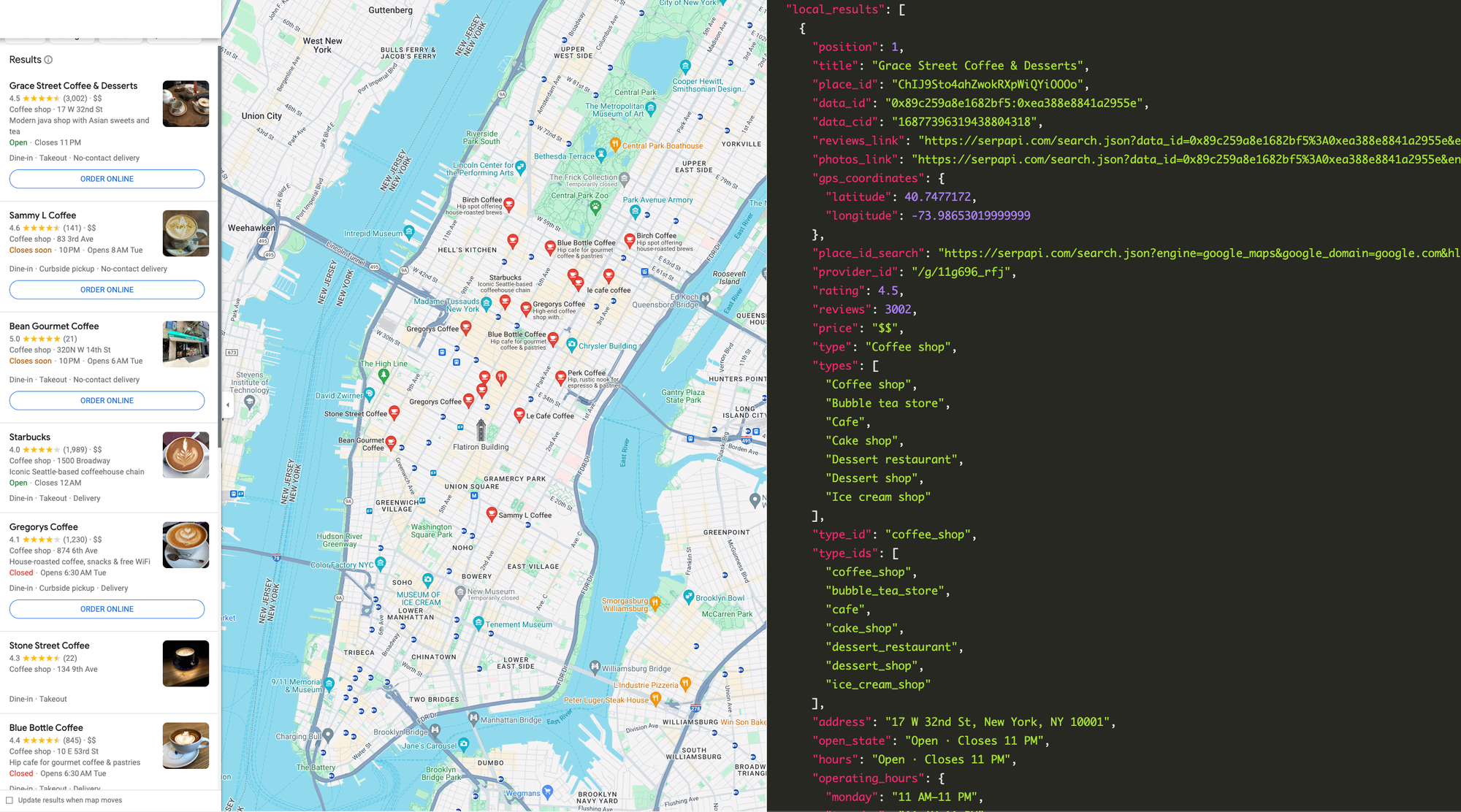
What type of data can I extract from the Google Maps Scraper API?
- Title: Name of the business entity
- GPS Coordinates: An accurate set of GPS coordinates of the business entity
- Rating: Rating of the business entity
- Reviews: Total number of reviews of the business entity
- Price: For some businesses (e.g., a restaurant), price indicates the estimated cost of a meal
- Type: The business entity type
- Address: Human-readable full address of the business entity
- Operating Hours: The opening and closing hours of the business from Monday to Sunday
- Phone: Phone number of the business entity
- Website: Website URL of the business entity
- Description: A short summary about the business entity
- Service Options: Indicate the business entity offers Dine In, Takeout, Delivery, and many others
- Order Online: Order URL of the business entity
- Menu: Menu URL of the business entity
- Thumbnail: Image of the business entity
- User Review: Featured review at the front page
- Amenities - Amenities of the business entity
- Photos: Get all user-posted photos with pagination. Refer to Google Maps Photos API
- Reviews: Get all the user reviews with pagination. Refer to Google Maps Reviews API
- Extensions: Highlights for the business entity (e.g. Fast service, Great coffee, Popular for Breakfast, Wheelchair accessible entrance and many more)
- People Also Search For: Popular search of a similar business entity
We also provide a few more Google Maps Scraper APIs, which are Google Maps Autocomplete API, Google Maps Contributor Reviews API and Google Maps Directions API.
How to Scrape Google Maps Data
Here is a step-by-step tutorial on using SerpApi’s Google Maps Scraper API to retrieve Google Maps data.
If you prefer video format, we have a dedicated video that shows how to do that:
Scrape Leads for Free using Google Maps Video Tutorial
SerpApi's Google Maps Playground
The playground is the most intuitive tool to get started (no sign-up required). You can feel no different from searching in Google Maps.
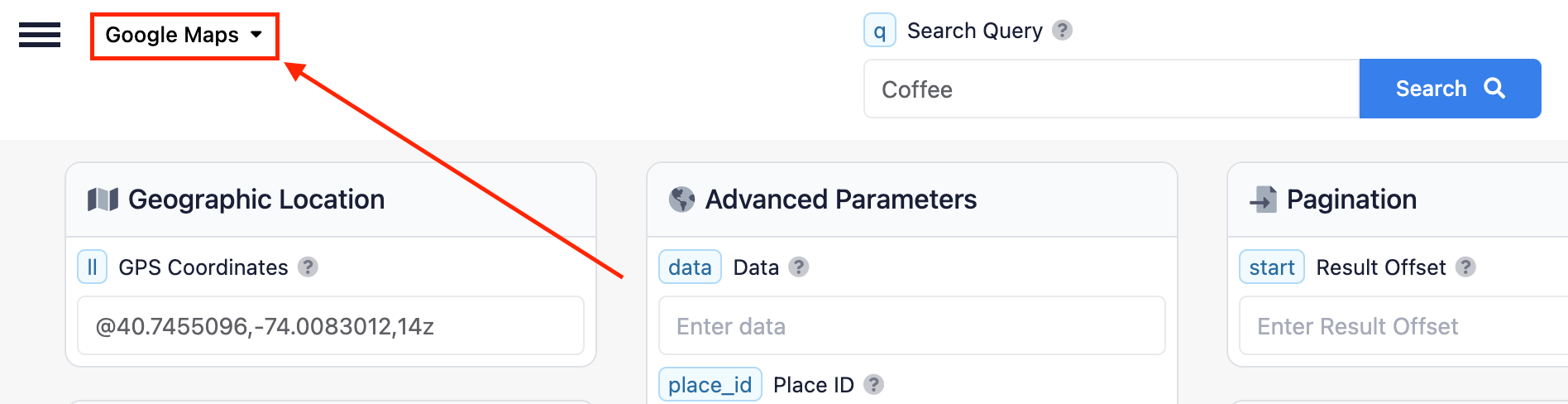
The link should direct you to Google Maps. Please verify that it is correctly set to Google Maps.
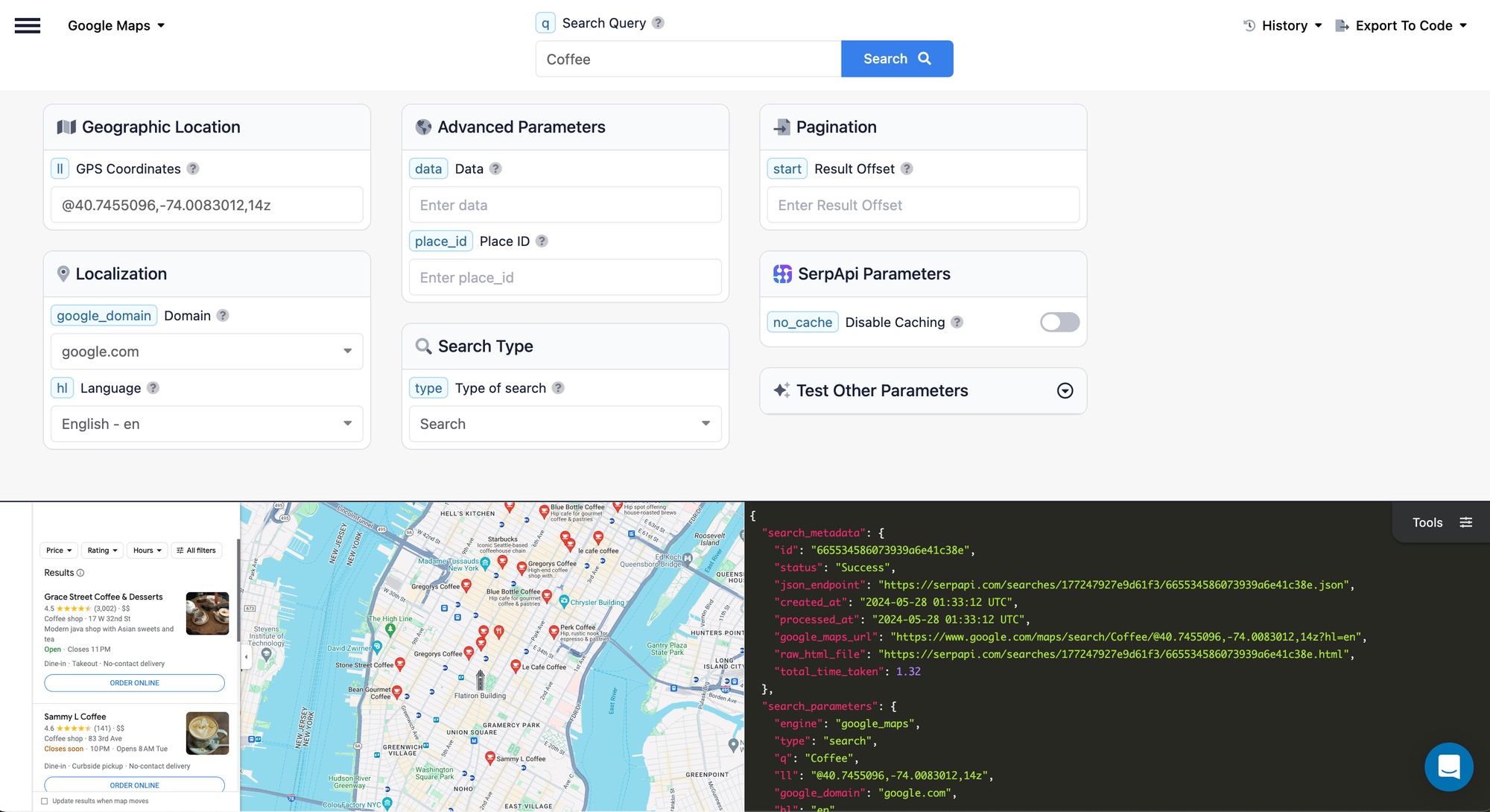
Enter the search query and GPS Coordinates to scrape
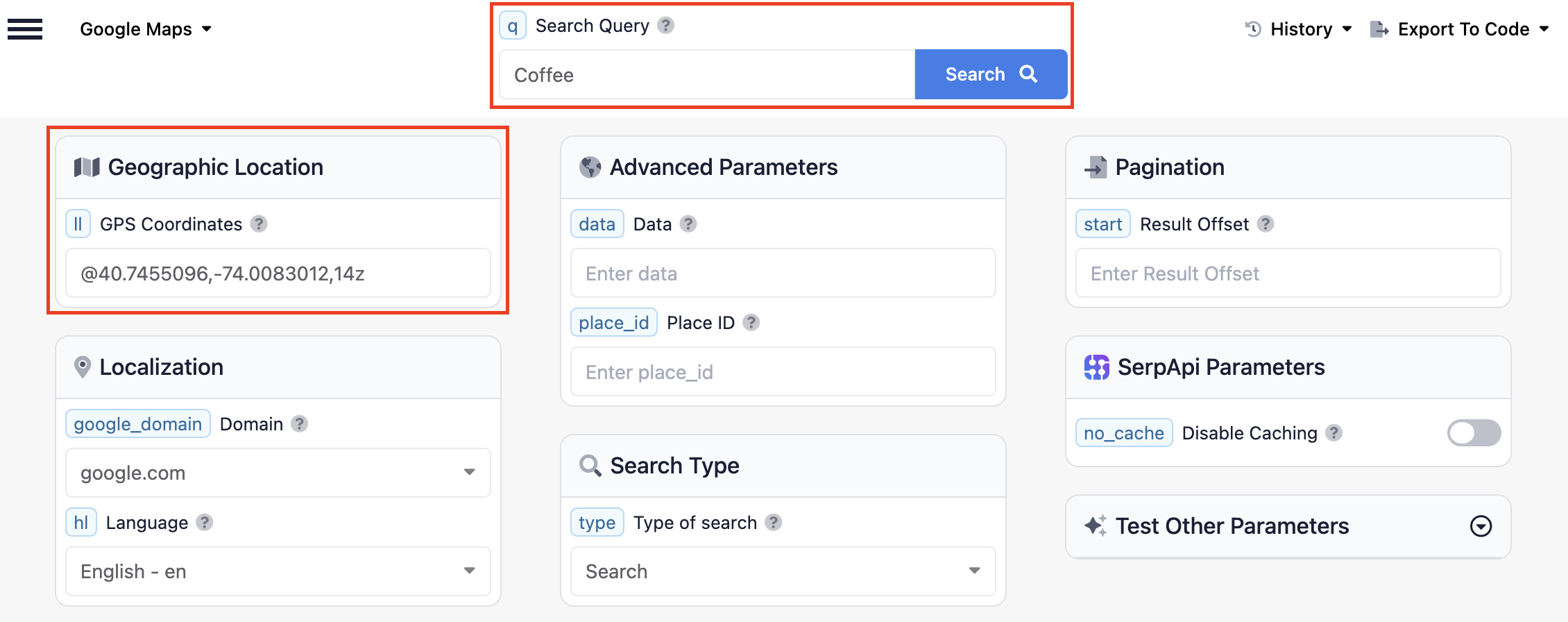
A search query can be anything you would usually search for in Google Maps. GPS Coordinates are optional; however, we recommend always searching with GPS Coordinates for more accurate results. You can find GPS www.gps-coordinates.net or read our detailed tutorial on How to Find the GPS Coordinates of any place with Google Maps.
The search would take an average of 2.5s (or less than 1 second if you are on the Ludicrous Speed or Ludicrous Speed Max plan).
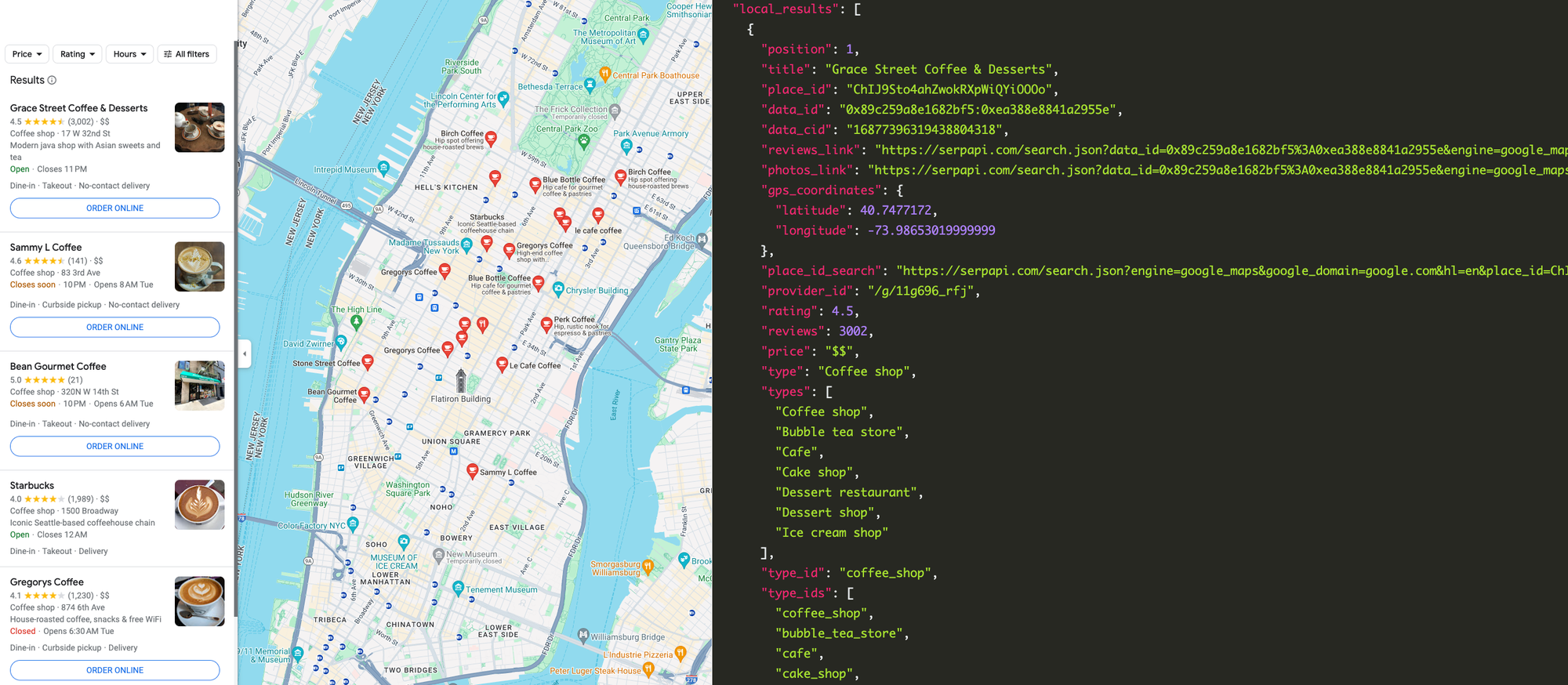
The results are presented in JSON format, with a preview on the right. The HTML preview on the left side can be useful for inspecting the data.
The JSON below shows the actual data from the search using our Google Maps API.
"local_results": [
    {
      "position": 1,
      "title": "Coffee &",
      "place_id": "ChIJf732s2-kIIYRfJH0710yoUU",
      "data_id": "0x8620a46fb3f6bd7f:0x45a1325deff4917c",
      "data_cid": "5017346838906573180",
      "reviews_link": "https://serpapi.com/search.json?data_id=0x8620a46fb3f6bd7f%3A0x45a1325deff4917c&engine=google_maps_reviews&hl=en",
      "photos_link": "https://serpapi.com/search.json?data_id=0x8620a46fb3f6bd7f%3A0x45a1325deff4917c&engine=google_maps_photos&hl=en",
      "gps_coordinates": {
        "latitude": 29.895196,
        "longitude": -90.1011485
      },
      "place_id_search": "https://serpapi.com/search.json?engine=google_maps&google_domain=google.com&hl=en&place_id=ChIJf732s2-kIIYRfJH0710yoUU",
      "rating": 4.4,
      "reviews": 1414,
      "price": "$",
      "type": "Coffee shop",
      "address": "5024 Westbank Expy, Marrero, LA 70072",
      "open_state": "Open ⋅ Closes 10 PM Mon",
      "hours": "Open ⋅ Closes 10 PM Mon",
      "operating_hours": {
        "sunday": "Open 24 hours",
        "monday": "12 AM–10 PM",
        "tuesday": "Open 24 hours",
        "wednesday": "Open 24 hours",
        "thursday": "Open 24 hours",
        "friday": "Open 24 hours",
        "saturday": "Open 24 hours"
      },
      "phone": "(504) 328-9494",
      "website": "https://coffeeandmarrero.com/",
      "description": "Lunch counter with breakfast & po' boys. Donuts & breakfast all day, plus Cajun lunch bites, all in a '70s-era diner with counter seating.",
      "service_options": {
        "dine_in": true,
        "curbside_pickup": true,
        "no_contact_delivery": true
      },
      "thumbnail": "https://lh5.googleusercontent.com/p/AF1QipMaNRM6n8PObw2w_06yuqtpEMhX2zKTYm1h68WR=w80-h106-k-no"
    },
    {
      "position": 2,
      "title": "Miss Ellie's Coffee",
      "place_id": "ChIJiS41zBaty4cRSXHxtMCSpv4",
      "data_id": "0x87cbad16cc352e89:0xfea692c0b4f17149",
      "data_cid": "18349515088134762825",
      "reviews_link": "https://serpapi.com/search.json?data_id=0x87cbad16cc352e89%3A0xfea692c0b4f17149&engine=google_maps_reviews&hl=en",
      "photos_link": "https://serpapi.com/search.json?data_id=0x87cbad16cc352e89%3A0xfea692c0b4f17149&engine=google_maps_photos&hl=en",
      "gps_coordinates": {
        "latitude": 35.2832303,
        "longitude": -94.37262199999999
      },
      "place_id_search": "https://serpapi.com/search.json?engine=google_maps&google_domain=google.com&hl=en&place_id=ChIJiS41zBaty4cRSXHxtMCSpv4",
      "rating": 4.4,
      "reviews": 10,
      "unclaimed_listing": true,
      "type": "Warehouse",
      "address": "5705 Steep Hill Rd, Fort Smith, AR 72916",
      "open_state": "Closed ⋅ Opens 8:30 AM Mon",
      "hours": "Closed ⋅ Opens 8:30 AM Mon",
      "operating_hours": {
        "sunday": "Closed",
        "monday": "8:30 AM–4:30 PM",
        "tuesday": "8:30 AM–4:30 PM",
        "wednesday": "8:30 AM–4:30 PM",
        "thursday": "8:30 AM–4:30 PM",
        "friday": "8:30 AM–4:30 PM",
        "saturday": "Closed"
      },
      "phone": "(800) 344-2739",
      "website": "http://www.coffee.org/",
      "thumbnail": "https://lh5.googleusercontent.com/p/AF1QipOgK4NZjQ8hnCvWe_uqaM8OMP-rWFQBhw5KqN23=w80-h142-k-no"
    },
    ...
 ]
Feel free to test additional variations of the search query to see whether the data meets your needs. You do have to register for a free SerpApi account to test the API more.
In the top-right corner, under "Export to Code", you can copy the JSON URL or follow the code to integrate with your workflow.
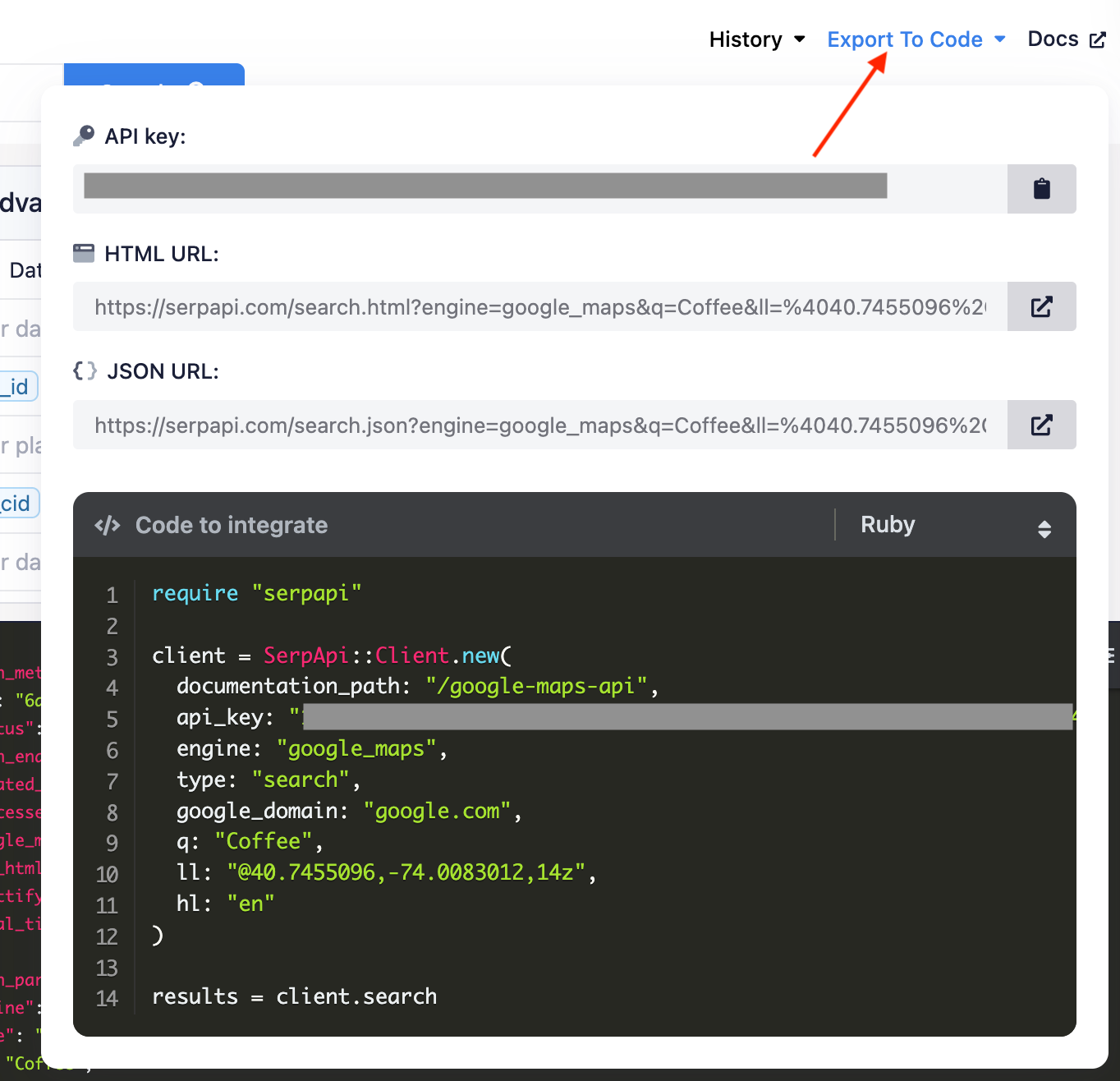
Python Tutorial
If you would like to dive straight into the code, this should help you get started extracting Google Maps data. We also support many other programming languages (e.g., Python, JavaScript, Java). Check out our integration guide.
First, you need to install the SerpApi client library (GitHub).
pip install serpapiSet up the SerpApi credentials and search.
import serpapi

client = serpapi.Client(api_key="YOUR_SERPAPI_API_KEY")
results = client.search({
  "engine": "google_maps",
  "type": "search",
  "google_domain": "google.com",
  "q": "Coffee",
  "ll": "@40.7455096,-74.0083012,14z",
  "hl": "en"
})
To retrieve the Google Maps local results for a given search query, you can use the following code:
local_results = results.get("local_results", [])You can store Google Maps local results JSON data in databases or export them to a CSV file.
import csv

header = ['position', 'title', 'place_id', 'data_id', 'address', 'rating', 'reviews', 'price', 'phone']

with open('google_maps_results.csv', 'w', encoding='UTF8', newline='') as f:
    writer = csv.writer(f)

    writer.writerow(header)

    for item in local_results:
        print(item)
        writer.writerow([item.get('position'), item.get('title'), item.get('place_id'), item.get('data_id'), item.get('address'), item.get('rating'), item.get('reviews'), item.get('price'), item.get('phone')])
For a more in-depth walkthrough, including pagination, extracting reviews, and more, read our full tutorial on Scrape Google Maps data and reviews using Python.
JavaScript Tutorial
First, you need to install our SerpApi package by running:
npm install serpapiCopy the full code below:
import { getJson } from "serpapi";

const API_KEY = process.env['API_KEY'] // Get your API_KEY from https://serpapi.com/manage-api-key

async function getReviews(dataId) {
  const response = await getJson("google_maps_reviews", {
    api_key: API_KEY,
    data_id: dataId
  })
  return response["reviews"]
}

async function getPhotos(dataId) {
  const response = await getJson("google_maps_photos", {
    api_key: API_KEY,
    data_id: dataId
  })
  return response["photos"]
}

async function getResults(query) {
  const response = await getJson("google_maps", {
    api_key: API_KEY,
    q: query,
    ll: "@40.7455096,-74.0083012,14z"
  })

  const localResults = response["local_results"]
  for (let i = 0; i < localResults.length; i++) {
    localResults[i]["reviews"] = await getReviews(localResults[i]["data_id"])
    localResults[i]["photos"] = await getPhotos(localResults[i]["data_id"])
  }

  return localResults
}

console.log(await getResults("Coffee"))
There are 3 important parts in the above. First we retrieve the search result using Google Maps API. Once we have the result, we can use data_id provided in the response to retrieve the reviews and photos of each restaurant.
Reviews API allow you to retrieve users' reviews of the restaurant or business, which consists of user profile, rating, date, images if any and etc. It can be useful if you want to analyse the overall customer satisfaction of the business. While Photos API allow you to retrieve user posted photos, thumbnail and full size image are available from the API.
Sample response from the above code:
{
  position: 1,
  title: 'Blue Bottle Coffee',
  place_id: 'ChIJfYfBk_tYwokRozvC5UCvOWM',
  data_id: '0x89c258fb93c1877d:0x6339af40e5c23ba3',
  data_cid: '7149938576694852515',
  reviews_link: 'https://serpapi.com/search.json?data_id=0x89c258fb93c1877d%3A0x6339af40e5c23ba3&engine=google_maps_reviews&hl=en',
  photos_link: 'https://serpapi.com/search.json?data_id=0x89c258fb93c1877d%3A0x6339af40e5c23ba3&engine=google_maps_photos&hl=en',
  gps_coordinates: { latitude: 40.7596054, longitude: -73.97548789999999 },
  place_id_search: 'https://serpapi.com/search.json?engine=google_maps&google_domain=google.com&hl=en&place_id=ChIJfYfBk_tYwokRozvC5UCvOWM',
  rating: 4.4,
  reviews: [
    {
      link: 'https://www.google.com/maps/reviews/data=!4m8!14m7!1m6!2m5!1sChdDSUhNMG9nS0VJQ0FnSUN1NW9yQzFRRRAB!2m1!1s0x0:0x6339af40e5c23ba3!3m1!1s2@1:CIHM0ogKEICAgICu5orC1QE%7CCgwIu9iElwYQuPaUzQE%7C?hl=en-US',
      user: [Object],
      rating: 5,
      date: '9 months ago',
      snippet: 'The cold brew with oat milk was really good. Smooth and not watery. I am not sure which oat milk they use but it was creamy. They do have a large seating table then some smaller tables on the back with one booth. They apparently only have one type of cup and lid for both iced and hot drinks. My issue is that the opening on the lids is not large enough for a straw. I like to use a straw for iced drinks. They have papers straws so you can squeeze them in. Just for 7 dollar iced coffee i would like at least a larger opening on the lid.',
      likes: 2,
      images: [{...}]
    },
    ...
  ],
  price: '$$',
  type: 'Coffee shop',
  address: '10 E 52nd St, New York, NY 10022',
  open_state: 'Closed ⋅ Opens 6:30 AM Mon',
  hours: 'Closed ⋅ Opens 6:30 AM Mon',
  operating_hours: {
    sunday: '8 AM–6 PM',
    monday: '6:30 AM–6 PM',
    tuesday: '6:30 AM–6 PM',
    wednesday: '6:30 AM–6 PM',
    thursday: '6:30 AM–6 PM',
    friday: '6:30 AM–6 PM',
    saturday: '8 AM–6 PM'
  },
  phone: '(510) 653-3394',
  website: 'https://bluebottlecoffee.com/',
  description: 'Hip cafe for gourmet coffee & pastries. Trendy cafe chain offering upscale coffee drinks & pastries, plus beans & brewing equipment.',
  service_options: { dine_in: true, takeout: true, delivery: true },
  thumbnail: 'https://lh5.googleusercontent.com/p/AF1QipOEYg1tmTlSwR5eMUy4jjbdWwJgMMUUM9wB1d5H=w92-h92-k-no',
  photos: [
    {
      thumbnail: 'https://lh5.googleusercontent.com/p/AF1QipO8aNgnjMg1iYJ3yJ8v-SiTk1oXPv97cW91nhj5=w203-h152-k-no',
      image: 'https://lh5.googleusercontent.com/p/AF1QipO8aNgnjMg1iYJ3yJ8v-SiTk1oXPv97cW91nhj5=w4032-h3024-k-no',
      photo_meta_serpapi_link: 'https://serpapi.com/search.json?data_id=AF1QipO8aNgnjMg1iYJ3yJ8v-SiTk1oXPv97cW91nhj5&engine=google_maps_photo_meta'
    },
    ...
  ]
}
How to Scrape Google Maps Photos
Every place in the Google Maps results has user-posted photos. We can extract it by using the data_id from a local result, then pass it to the Google Maps Photos API, paging until there are no more results.
For each place, the Google Maps Photos API returns:
- Thumbnail: a small preview image URL
- Image: the full-resolution image URL
- Photo Meta link: a
photo_meta_serpapi_linkyou can follow to pull that photo's metadata (see below) - Categories: the photo category tabs (e.g., Latest, Menu, By owner) with IDs you can pass back to filter photos
Results are paginated via serpapi_pagination, so you can page through every photo.
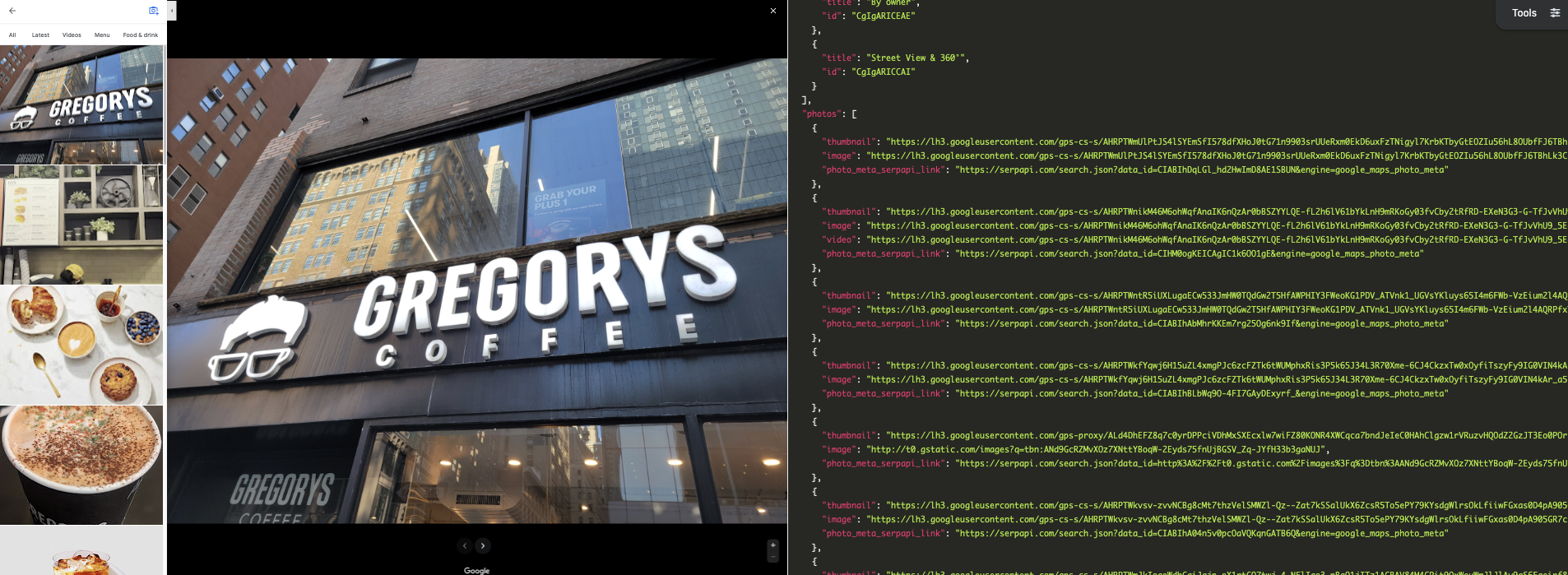
Get all photos for a place
We already pulled the place data_id in the Python tutorial above. They're in local_results. Let's reuse that and the same client, no need to search again:
places = [(p["title"], p["data_id"]) for p in results.get("local_results", [])]Add a helper that pages through one place's photos. A popular place can have thousands, so max_pages caps it. Each page is one API request, so this is what keeps the job from running away:
def get_all_photos(data_id, max_pages=5):
    photos = []
    params = {"engine": "google_maps_photos", "data_id": data_id, "hl": "en"}
    for _ in range(max_pages):
        page = client.search(params)
        photos.extend(page.get("photos", []))
        next_token = page.get("serpapi_pagination", {}).get("next_page_token")
        if not next_token:
            break
        params["next_page_token"] = next_token
    return photos
Run it across the places. Total requests = places processed x pages each, so slice places while testing to protect your quota:
photo_results = [
    {"title": title, "photos": get_all_photos(data_id, max_pages=5)}
    for title, data_id in places[:3]
]
Print the results to the terminal and/or save them to a file:
import json

print(json.dumps(photo_results, indent=2, ensure_ascii=False))

with open("google_maps_photos.json", "w", encoding="utf-8") as f:
    json.dump(photo_results, f, indent=2, ensure_ascii=False)
Each photo comes back with a thumbnail, a full-size image, and a photo_meta_serpapi_link:
{
  "thumbnail": "https://lh5.googleusercontent.com/p/AF1Qip...=w203-h114-k-no",
  "image": "https://lh5.googleusercontent.com/p/AF1Qip...=w5312-h2988-k-no",
  "photo_meta_serpapi_link": "https://serpapi.com/search.json?data_id=AF1Qip...&engine=google_maps_photo_meta"
}
Unlike scraping the Maps front-end yourself, the API returns full-resolution image links directly. No headless browser, no CSS selectors to maintain when Google changes its stucture.
Get the metadata behind a photo
The metadata behind a photo lets you know who posted a photo, when, and where. To extract that info, reuse the photo_results you already built above. Each photo have a photo_meta_serpapi_link. Pull the photo's data_id from that link (this is the photo's own ID, not the place's) and pass it to the Google Maps Photo Meta API.
For a single photo, it returns:
- User: the contributor's name, Google profile link, avatar, and user ID
- Location: latitude, longitude, place name, and place type
- Date: when the photo was posted
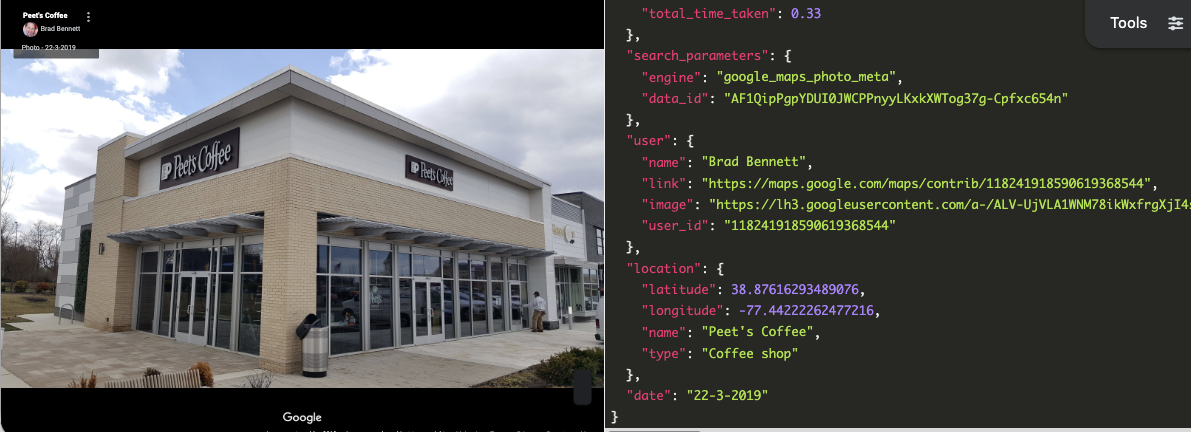
Each photo's data_id is embedded in its photo_meta_serpapi_link:
from urllib.parse import urlsplit, parse_qs

# Take any photo returned by the Photos API above
photo = photo_results[0]["photos"][0]
photo_data_id = parse_qs(urlsplit(photo["photo_meta_serpapi_link"]).query)["data_id"][0]

meta = client.search({
    "engine": "google_maps_photo_meta",
    "data_id": photo_data_id,
    "hl": "en",
})
The response gives you the contributor, the place, and the date the photo was posted:
{
  "user": {
    "name": "R",
    "link": "https://maps.google.com/maps/contrib/103419305671938156693",
    "image": "https://lh3.googleusercontent.com/a-/ACNPEu8...",
    "user_id": "103419305671938156693"
  },
  "location": {
    "latitude": 40.74573990219196,
    "longitude": -73.9882272348948,
    "name": "Stumptown Coffee Roasters",
    "type": "Coffee shop"
  },
  "date": "29-8-2022"
}
That's useful for attributing user-generated content, filtering photos by recency, or verifying a photo's location before you use it.
Common use cases
- Lead generation. Pull every dentist, plumber, or fitness studio in a city with name, phone, website, and category in one pass. A typical workflow scrapes Google Maps by ZIP code, enriches contacts, and pushes them into a CRM.
- Local SEO and rank tracking. Track where your business and your competitors rank for "near me" queries across different cities. Because the API accepts arbitrary
llcoordinates, you can simulate searches from anywhere. - Market research. Aggregate price tier, rating, and review counts for every restaurant in a metro area to identify gaps. The combined Google Maps + Reviews scraper gives you sentiment-grade input for analysis.
- Review monitoring. Run the Google Maps Reviews API on a schedule against your own and competitor place IDs. Push new reviews into Slack, a database, or a dashboard.
FAQs
Is it legal to extract data from Google Maps?
Scraping publicly available data is generally safe, provided the use cases are legal. Refer to our blog post (Scraping public pages is legal in the US) for more information.
Is there a free Google Maps scraper?
Yes. SerpApi's free plan includes 250 searches per month, no credit card required. That's enough to extract several thousand place results before you need to upgrade.
Why use SerpApi?
There are some common challenges when scraping huge amounts of data from Google Maps: bypassing CAPTCHAs, IP blocking, rate limits, session timeouts, dynamic web structure, pagination and infinite scrolling, data variability complexity, data parsing and labeling, and legal and ethical considerations. Fortunately, you don't need to tackle these problems yourself. SerpApi takes care of them and provides high-quality Google Maps Search Results APIs for your usage by using high-quality proxies. SerpApi saves you a lot of time so you can concentrate on your business, as scraping Google Maps data and other Google search results should be easy.
Am I able to get all of the businesses in a particular city/country?
Getting all the businesses in a specific city or country is possible through our API. But, you will still need a way to list all of the specific businesses. If you already have that list, you can just submit each business name as a search on our API. If not, you can search for that specific business in each city or local subdivision of the country using our API until you build up a list that you’re happy with.
Is there a no-code solution?
Yes, you don't need to write any code to scrape Google Maps. We have several no-code options, including Google Sheets, Make.com, n8n, and more. See our full guide to no-code Google Maps scraper options to find the best fit for your workflow.
Documentation
We strive to provide the best SERP scraper on the market. In addition to the Google Maps data scraper, you can find an abundance of Google APIs, Bing APIs, etc. Feel free to check out SerpApi for more details. If you have any questions, please feel free to contact us at contact@serpapi.com.