Ruby
Ruby
 Golang
 .Net
.Net
 MCP
MCP
 C++
C++

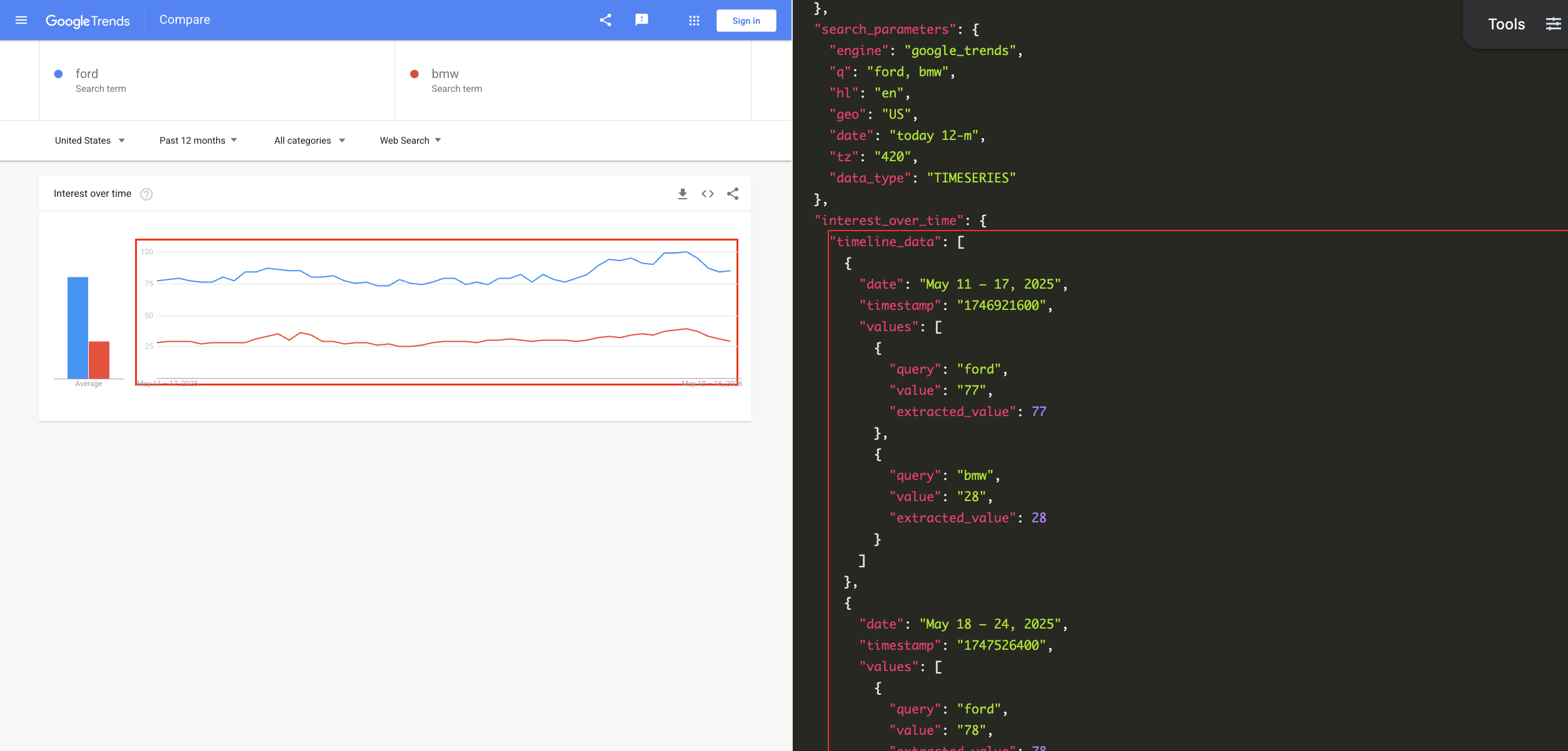
Google Trends allows you to check the popularity of top search queries in Google Search. It can help you discover new trending topics, compare the performance of keywords based on time and region, check which topics are popular at the moment, and much more. Google Search is the most widely-used search engine on Earth, so even the generalized data available through Google Trends is immensely valuable.
With the Google Trends API from SerpApi, you can pull results from Google Trends search pages, autocomplete results, and the 'Trending Now' page in simple JSON data. SerpApi handles the HTML parsing, proxy network, captcha puzzles, and other challenges, so you can spend more time on your actual project or business.
What can you scrape from Google Trends?
Here's everything you can pull from Google Trends using SerpApi:
- Interest over time: The popularity for a given search query over a period of time, or group of search queries, just like you'd see on the regular Google Trends search page. You can change the date range, category, time zone offset, region, and other settings. Each query has a 1-100 score.
- Interest by region: The popularity of a certain search query, or group of queries, with rankings for different regions. The regions can be countries, subregions (like U.S. states or Canadian providences), metro areas, or cities.
- Compared breakdown by region: When comparing multiple search queries in multiple regions, this is the data representing the percentage of searches for each region.
- Related queries: The list of related queries that appear under Google Trends search results.
- Related topics: The list of related topics that appear for Google Trends search results, categorized into "rising" and "top" results.
- Autocomplete results: The suggested searches that appear as you type in the main Google Trends search field, like the one on the Trends home page.
- Trending Now page: The list of trending searches from the Google Trends Trending Now page. You can specify a certain region, time range, category, and other settings.
Getting started with SerpApi
You need a free SerpApi account to obtain results from Google Trends. SerpApi also provides APIs for pulling data directly from Google Search, Bing, DuckDuckGo, and other engines. You can upgrade to a paid account later if you need more search capacity, faster speeds, or other features.
If you haven't already, create an account and verify your email and other details. After that, you need to grab your API key, which can be found in your account dashboard.
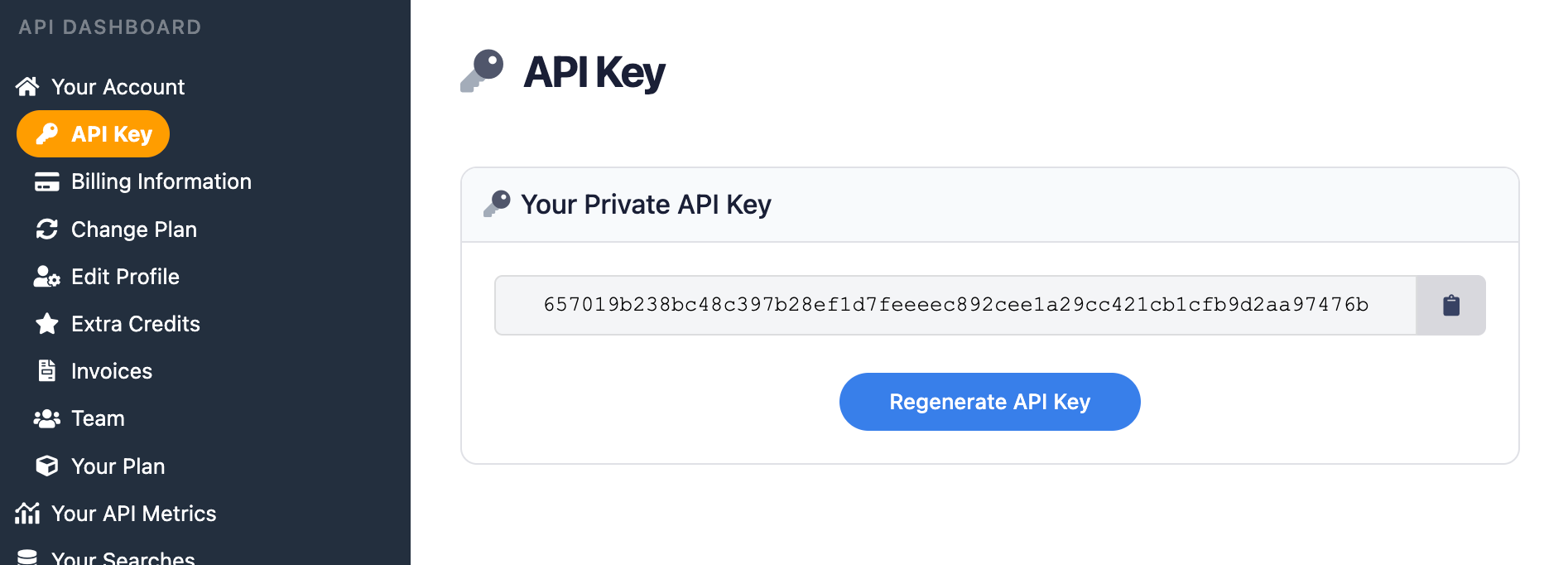
You should store your API key in a safe location if you are sharing or publishing your code. If the key is leaked or stolen, you can regenerate it from the SerpApi account dashboard.
Install the SerpApi library (optional)
You can use SerpApi's official libraries for Python, JavaScript, Ruby, Java, and other languages. They provide a simple wrapper around the API requests.
You can also use a simple GET request, using cURL, fetch() in Node.js, and other similar methods. This guide will cover both the GET method and several of the official integrations.
Review the Google Trends API documentation
Each API at SerpApi has extensive documentation, covering all the supported parameters and filters, code examples for popular languages, and example JSON responses. For Google Trends, check out the pages for the Google Trends API, Google Trends Autocomplete API, and Google Trends Trending Now API.
 SerpApi
The only required parameter for the main Google Trends API is the search query, or comma-separated list of search queries, that you want to check.
How to scrape Google Trends search results
If you have your API key, you're ready to start pulling data from Google Trends. No matter how you're accessing SerpApi, the API results will be identical.
GET request
This will search Google Trends for the queries "chrome" and "firefox" and return the scores for each term, over the default time period:
https://serpapi.com/search?engine=google_trends&q=chrome,firefox&api_key=API_KEY_GOES_HEREIf you wanted to compare the popularity across different countries, you could set the data_type parameter to GEO_MAP like this:
https://serpapi.com/search.json?engine=google_trends&q=chrome,firefox&data_type=GEO_MAP®ion=COUNTRY&api_key=API_KEY_GOES_HERESerpApi's JSON Restrictor feature can trim the API response to certain values. This would perform a search for "chrome" and "firefox" in the United States over the past 12 months, and filter the response to only the averages:
https://serpapi.com/search?engine=google_trends&q=chrome,firefox&geo=US&date=today%2012-m&json_restrictor=interest_over_time.averages&api_key=API_KEY_GOES_HEREThe JSON Restrictor might be helpful for more efficient parsing, or if you're using an LLM with a limited context window.
Python
SerpApi has an official library for Python with access to all APIs. This will pull Google Trends data in the United States for "chrome," "firefox," and the Opera web browser, with the topic code for Opera obtained through the Google Trends Autocomplete API:
import serpapi

client = serpapi.Client(api_key=YOUR_KEY_GOES_HERE)
results = client.search({
  "engine": "google_trends",
  "q": "chrome,firefox,/m/01z7gs",
  "geo": "US"
})

print(results["interest_over_time"])
This compares searches for "playstation 5," "xbox series x," and "nintendo switch 2" over the past three months, showing the average search volume for each query:
import serpapi

client = serpapi.Client(api_key=YOUR_KEY_GOES_HERE)
results = client.search({
  "engine": "google_trends",
  "q": "playstation 5,nintendo switch 2,xbox series x",
  "date": "today 3-m"
})

for item in results["interest_over_time"]["averages"]:
  print(f'{item["query"]} average: {item["value"]}')
You can check out more Python examples in our other blog post, including how SerpApi compares to PyTrends library.
Ruby
This example uses the official SerpApi Ruby gem to search for "microsoft edge" and "internet explorer" in Google Trends:
require "serpapi"

client = SerpApi::Client.new(
    engine: "google_trends",
    q: "microsoft edge, internet explorer",
    api_key: YOUR_KEY_GOES_HERE
)

results = client.search
p results
This checks for related queries to "walt disney world" and displays each one:
require "serpapi"

client = SerpApi::Client.new(
    engine: "google_trends",
    q: "walt disney world",
    data_type: "RELATED_QUERIES",
    api_key: YOUR_KEY_GOES_HERE
)

for result in client.search[:related_queries][:top] do
    p result[:query]
end
JavaScript and Node.js
This shows searches for the Apple Safari web browser over time, using the official SerpApi JavaScript library and the topic ID obtained with the Google Trends Autocomplete API:
import { getJson } from 'serpapi';

const search = await getJson({
    engine: "google_trends",
    q: "/m/0168s_",
    api_key: YOUR_KEY_GOES_HERE
});

search?.interest_over_time?.timeline_data.forEach(function (dateRange) {
    console.log(`${dateRange.date}: Score ${dateRange.values[0].value}`);
});
This compares the popularity of searches for "macbook pro" and "macbook air" over the last 12 months:
import { getJson } from 'serpapi';

const search = await getJson({
    engine: "google_trends",
    q: "macbook air,macbook pro",
    date: "today 12-m",
    api_key: YOUR_KEY_GOES_HERE
});

search?.interest_over_time?.timeline_data?.forEach(function (item) {
    console.log(`\nDate range: ${item.date}\n===`)
    item.values.forEach(function (result) {
        console.log(`${result.query} popularity: ${result.value}`);
    })
});
cURL
Here's how to pull Google Trends data for the "macbook air" search term across the last 12 months, in the "Interest over time" format:
curl --get https://serpapi.com/search \
 -d engine="google_trends" \
 -d q="macbook+air" \
 -d date="today+12-m" \
 -d data_type="TIMESERIES" \
 -d api_key="YOUR_KEY_GOES_HERE"
Other languages and no-code solutions
Even if an official SerpApi integration isn't available for your preferred language or environment, you can still use the API directly with GET requests. You can also use SerpApi with Make.com, N8N, and other tools.
How to scrape Google Trends autocomplete results
You can also fetch the list of autocomplete suggestions from the main Google Trends search box, using the Google Trends Autocomplete API. This is mainly helpful for finding an exact topic ID for use with the main Google Trends API, instead of a search term that could have multiple meanings.
Let's say you wanted to check Google Trends data for Vivaldi web browser, and exclude searches for Vivaldi the composer. Searching for "vivaldi" with the Autocomplete API returns topic IDs for both topics, as well as others:
{
  ...
  "search_parameters": {
    "engine": "google_trends_autocomplete",
    "q": "vivaldi",
    "hl": "en"
  },
  "suggestions": [
    {
      "q": "vivaldi",
      "title": "vivaldi",
      "type": "Search term",
      "link": "https://trends.google.com/trends/explore?q=vivaldi",
      ...
    },
    {
      "q": "/m/0pth",
      "title": "Antonio Vivaldi",
      "type": "Italian composer",
      "link": "https://trends.google.com/trends/explore?q=/m/0pth",
      ...
    },
    {
      "q": "/m/012r1xmq",
      "title": "Vivaldi",
      "type": "Web browser",
      "link": "https://trends.google.com/trends/explore?q=/m/012r1xmq",
      ...
    },
    {
      "q": "/g/11b73xfgd0",
      "title": "Vivaldi Technologies",
      "type": "Software developer",
      "link": "https://trends.google.com/trends/explore?q=/g/11b73xfgd0",
      ...
    },
    {
      "q": "/g/11fzz2bjz1",
      "title": "The Four Seasons : Summer",
      "type": "Book by Antonio Vivaldi",
      "link": "https://trends.google.com/trends/explore?q=/g/11fzz2bjz1",
      ...
    },
    {
      "q": "/g/11y6ktp5vz",
      "title": "The Instrumentalist",
      "type": "Novel by Harriet Constable",
      "link": "https://trends.google.com/trends/explore?q=/g/11y6ktp5vz",
      ...
    }
  ]
}
Here's how to pull a list of autocomplete results for "Apple" with a basic GET request, and display each one with its category and topic ID:
https://serpapi.com/search.json?engine=google_trends_autocomplete&q=apple&api_key=YOUR_KEY_GOES_HEREThis is how you can do it in Python, with the official SerpApi Python integration:
import serpapi

client = serpapi.Client(api_key=YOUR_KEY_GOES_HERE)
results = client.search({
  "engine": "google_trends_autocomplete",
  "q": "apple"
})
for item in results["suggestions"]:
    print(f"{item["title"]} - {item["type"]}: {item["q"]}")
Here's the same search in Ruby, with the SerpApi Ruby gem:
require "serpapi"

client = SerpApi::Client.new(
    engine: "google_trends_autocomplete",
    q: "apple",
    api_key: YOUR_KEY_GOES_HERE
)
for item in client.search[:suggestions] do
    puts "#{item[:title]} - #{item[:type]} - #{item[:q]}"
end
Finally, this is the same search in JavaScript with the Node.js runtime, using the official JavaScript library:
import { getJson } from 'serpapi';

const search = await getJson({
    engine: "google_trends_autocomplete",
    q: "apple",
    api_key: YOUR_KEY_GOES_HERE
});
search.suggestions.forEach(function (item) {
    console.log(`${item.title} - ${item.type} - ${item.q}`)
})
How to scrape the Trending Now page in Google Trends
Finally, you can pull the list of trending searches from the Google Trends Trending Now page with SerpApi, using the Google Trends Trending Now API. The JSON results will be identical for all integrations and GET methods, as with other APIs.
Video Tutorial:
GET request
This pulls the active trending topics in the United States, with no other settings specified:
https://serpapi.com/search.json?engine=google_trends_trending_now&geo=US&api_key=API_KEY_GOES_HEREIf you wanted to filter to only technology topics, use the Technology category from the categories list page, like this:
https://serpapi.com/search.json?engine=google_trends_trending_now&geo=US&category_id=18&api_key=API_KEY_GOES_HEREAs with the other APIs, you can use SerpApi's JSON Restrictor feature to trim the response to certain values, if you need more efficient parsing. Here's the list of trending topics in the US again, but with only the query strings and no other information:
https://serpapi.com/search.json?engine=google_trends_trending_now&geo=US&json_restrictor=trending_searches[].query&api_key=API_KEY_GOES_HEREPython
This fetches the current trending topics in Canada and displays each result:
import serpapi

client = serpapi.Client(api_key=YOUR_KEY_GOES_HERE)
results = client.search({
  "engine": "google_trends_trending_now",
  "geo": "CA"
})

for topic in results["trending_searches"]:
  print(topic["query"])
Ruby
This pulls the list of trending gaming topics, with the category ID from the categories list page, and displays each result:
require "serpapi"

client = SerpApi::Client.new(
    engine: "google_trends_trending_now",
    category_id: 6, # Gaming category ID
    api_key: YOUR_KEY_GOES_HERE
)

for result in client.search[:trending_searches] do
    p result[:query]
end
JavaScript and Node.js
This fetches the current trending topics in the United States, and displays each result with its search volume:
import { getJson } from 'serpapi';

const search = await getJson({
    engine: "google_trends_trending_now",
    geo: "US",
    api_key: YOUR_KEY_GOES_HERE
});

search?.trending_searches?.forEach(function (item) {
    console.log(`${item.query}: Volume ${item.search_volume}`);
});
cURL
This fetches the current trending topics in the United Kingdom:
curl --get https://serpapi.com/search \
 -d engine="google_trends_trending_now" \
 -d geo="GB" \
 -d api_key="YOUR_KEY_GOES_HERE"
Conclusion
With SerpApi, you compare search queries and topics with the Google Trends API, and identify new trends with the Google Trends Trending Now API. For searches that can have different meanings for the same word, you can use the Google Trends Autocomplete API to find the exact topic ID that you need.
These APIs are a powerful set of tools for keyword research, finding new opportunities for articles or videos, analyzing competitors, and much more. Best of all, they work in any programming language or workflow that accepts simple GET requests.
If you need help using SerpApi, please contact us.