Ruby
Ruby
 Golang
 .Net
.Net
 MCP
MCP
 C++
C++

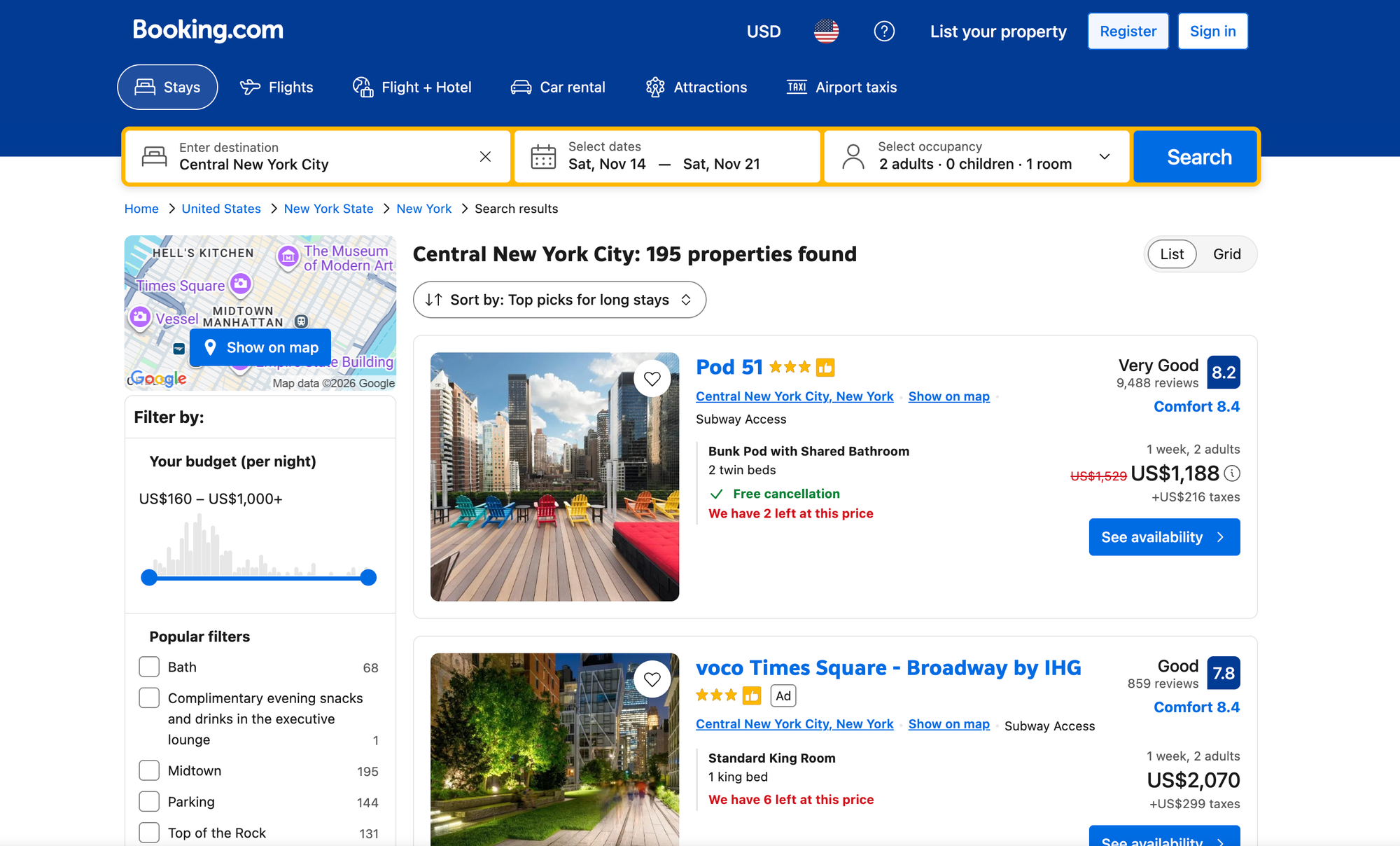
Say you want to track what a three-night stay in New York costs, or compare how hotels and vacation rentals are priced across a city. On Booking.com, you'd type a destination, pick your dates, and scroll. Manually extracting this data is slow and difficult to scale, especially across multiple destinations and date ranges. Replicating this process in code usually requires building and maintaining your own Booking.com scraper: rendering JavaScript pages, getting past anti-bot checks, fixing your parser when the HTML changes, and dealing with results that Booking.com ranks differently for every visitor.
SerpApi’s Booking.com Search API handles that for you and returns the results as structured JSON or Markdown. The same way you would do on manual search, you can search for a destination based on your travel dates, number of guests, and preferred currency. You’ll receive a list of properties with prices, review scores, room options, policies, and the filters Booking.com offers for that search. This data can be used to build a price tracker, market research dashboard, or travel assistant.
In this tutorial, you'll make your first request with cURL, Python, and JavaScript, then save the results to CSV, page through more properties, and filter by price and amenities.
What data can you retrieve with the Booking.com Search API?
Each search returns a properties array with the places to stay that Booking.com shows for your destination and dates. The most useful data includes:
- Property details:
name,type(such as Hotel or Apartment), and alinkto the listing on Booking.com. - Prices:
pricefor the whole stay,price_per_night,taxes_and_feesthat aren’t included in the price, and thecurrencythey’re in. - Reviews: the review score in
rating(out of 10) and the number ofreviews. - Location:
location(district and city) andgps_coordinateswith latitude and longitude. - Policies: whether the property offers
free_cancellation, plus the rooms recommended for your guests inrooms. - Filters: the
filtersarray lists the filters Booking.com offers for your search, which you can reuse in your next request (more on that below).
Prices depend on dates. If you don't set check_in_date and check_out_date, Booking.com returns properties without prices.
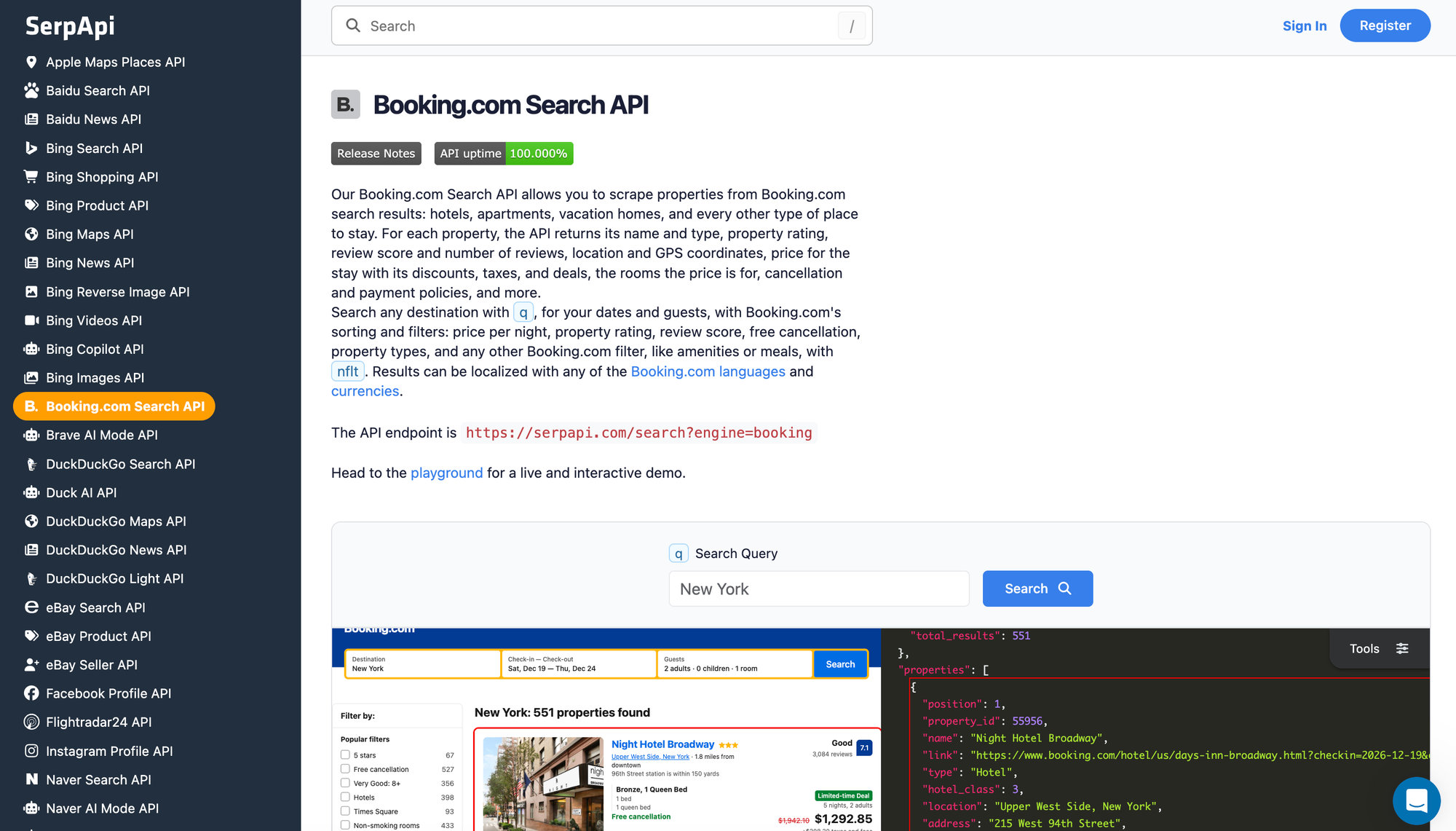
For the full list of fields and parameters, see the Booking.com Search API documentation.
How to scrape Booking.com hotel listings
You can call the Booking.com Search API from the playground, a plain GET request, cURL, Python, or JavaScript. Every method returns the same results.
Try it in the playground
The quickest way to explore the API is the SerpApi interactive playground. This example searches New York for a three-night stay:
engine:bookingq:New Yorkcheck_in_date:2026-11-22check_out_date:2026-11-25
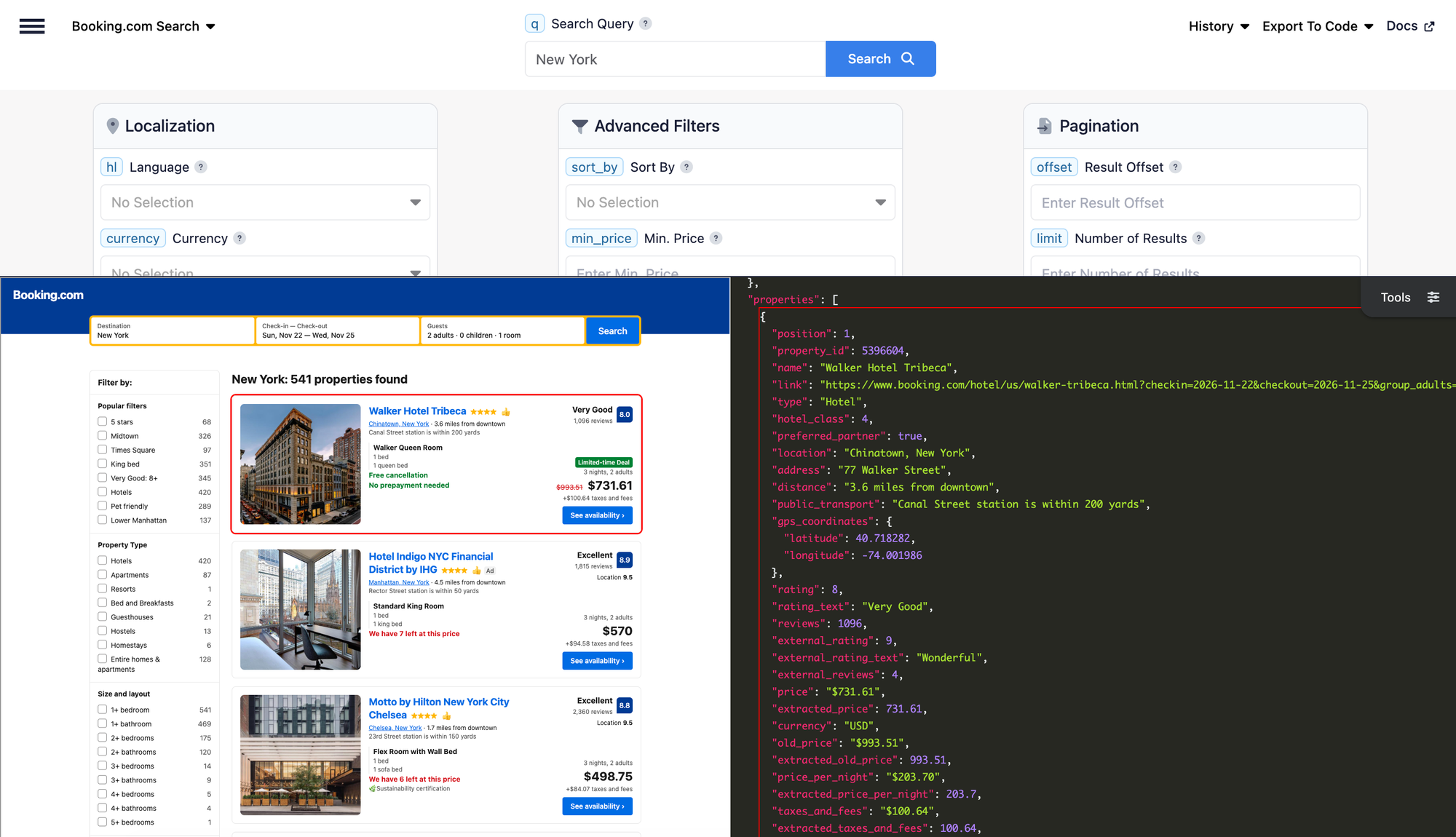
Run the search and look at the properties array: compare price with price_per_night and taxes_and_fees, open the rooms of a few properties, and scroll down to filters to see which neighborhoods, property types, and amenities you can filter by.
q parameter accepts a city, region, district, landmark, or airport (such as Paris, Tuscany, Manhattan, or Eiffel Tower). However, Booking.com doesn't return results for most street addresses.Get your API key
To call the API from your own code, register for a SerpApi account and copy your private API key from the API key page in your dashboard.
The examples below read the key from an environment variable. Set it in your terminal, replacing the placeholder with your real key:
export SERPAPI_API_KEY="YOUR_SERPAPI_API_KEY"
You should store your API key in a safe location if you're sharing or publishing your code. If it's ever leaked, you can generate a new one from the dashboard.
Make a GET request
The API endpoint is https://serpapi.com/search with engine=booking. Here's the same New York search as a plain GET request. JSON is the default output:
https://serpapi.com/search?engine=booking&q=New+York&check_in_date=2026-11-22&check_out_date=2026-11-25&api_key=YOUR_SERPAPI_API_KEY
To get Markdown instead, add output=md:
https://serpapi.com/search?engine=booking&q=New+York&check_in_date=2026-11-22&check_out_date=2026-11-25&api_key=YOUR_SERPAPI_API_KEY&output=md
Markdown output is a token-efficient format with tables, Markdown links, and YAML frontmatter, which works well when you pass results to an LLM or AI agent. Use JSON when your code needs exact field access, such as reading extracted_price or gps_coordinates.latitude. The rest of this tutorial uses JSON.
cURL implementation
Here's the equivalent request in cURL, using the environment variable you set earlier:
curl --get https://serpapi.com/search \
 -d engine="booking" \
 -d q="New+York" \
 -d check_in_date="2026-11-22" \
 -d check_out_date="2026-11-25" \
 -d api_key="YOUR_SERPAPI_API_KEY"
Here's what each parameter does:
engine=bookingselects the Booking.com Search API.qis the destination to search. It's required.check_in_dateandcheck_out_dateset the stay inYYYY-MM-DDformat. They're optional, but if you use them, they must be used together to get prices. The check-out date can be up to 90 nights after check-in.api_keyis your private SerpApi key. It's required.
By default, the search is for 2 adults in 1 room. You can change that with adults, children, children_ages, and rooms, all documented in the Booking.com Search API documentation.
Python implementation
We'll use the requests library. Install it first:
pip install requests
Create a file named main.py:
import os
import sys

import requests

SERPAPI_API_KEY = os.environ.get("SERPAPI_API_KEY")

if not SERPAPI_API_KEY:
    sys.exit("Set the SERPAPI_API_KEY environment variable first.")

params = {
    "engine": "booking",
    "q": "New York",
    "check_in_date": "2026-11-22",
    "check_out_date": "2026-11-25",
    "api_key": SERPAPI_API_KEY,
}


def fetch_properties(params):
    try:
        response = requests.get("https://serpapi.com/search", params=params, timeout=60)
    except requests.RequestException as error:
        # Only print the error type: the full message can contain the request URL and API key.
        sys.exit(f"Request failed: {type(error).__name__}")

    try:
        data = response.json()
    except ValueError:
        sys.exit(f"Unexpected response (HTTP {response.status_code}).")

    if response.status_code != 200 or data.get("error"):
        sys.exit(f"SerpApi error (HTTP {response.status_code}): {data.get('error', 'Unknown error')}")

    return data


data = fetch_properties(params)
properties = data.get("properties", [])

if not properties:
    print("The search succeeded, but no properties were returned.")
    sys.exit()

info = data.get("search_information", {})
print(f"Destination: {info.get('destination')} ({info.get('total_results', 'unknown')} properties found)\n")

for prop in properties[:5]:
    print(f"{prop.get('position')}. {prop.get('name')} ({prop.get('type')})")
    print(f"   Location: {prop.get('location')}")
    print(f"   Review score: {prop.get('rating', 'n/a')} {prop.get('rating_text', '')} from {prop.get('reviews', 0)} reviews")
    print(f"   Stay price: {prop.get('price', 'n/a')} ({prop.get('price_per_night', 'n/a')} per night)")
    print(f"   Free cancellation: {prop.get('free_cancellation', False)}\n")
Run it:
python main.py
The script prints the destination and the first five properties. A few notes on what you're seeing:
priceis the price of the whole stay. By default, it's in each property's currency, which is returned incurrency.price_per_nightis Booking.com's average nightly rate. It can exclude charges included inprice, so it isn't necessarily the stay price divided by the number of nights.ratingis the review score out of 10, andreviewsis the number of reviews behind it.
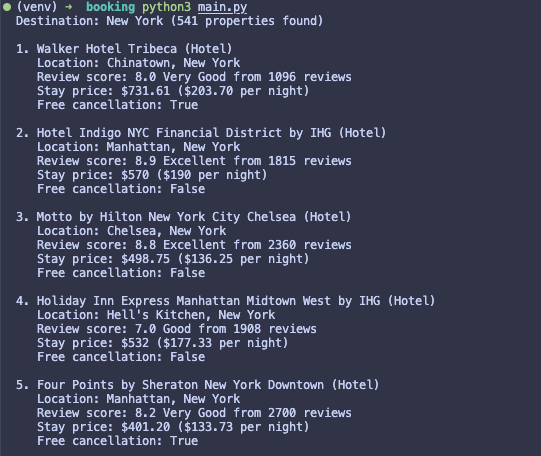
The script uses .get() for each field because optional fields such as price, rating, or deals aren't returned for every property. It also keeps three outcomes separate: a failed request or API error stops the script with a message, a successful search with no properties says so, and a successful search prints results. If a search fails, SerpApi returns a message in the error field.
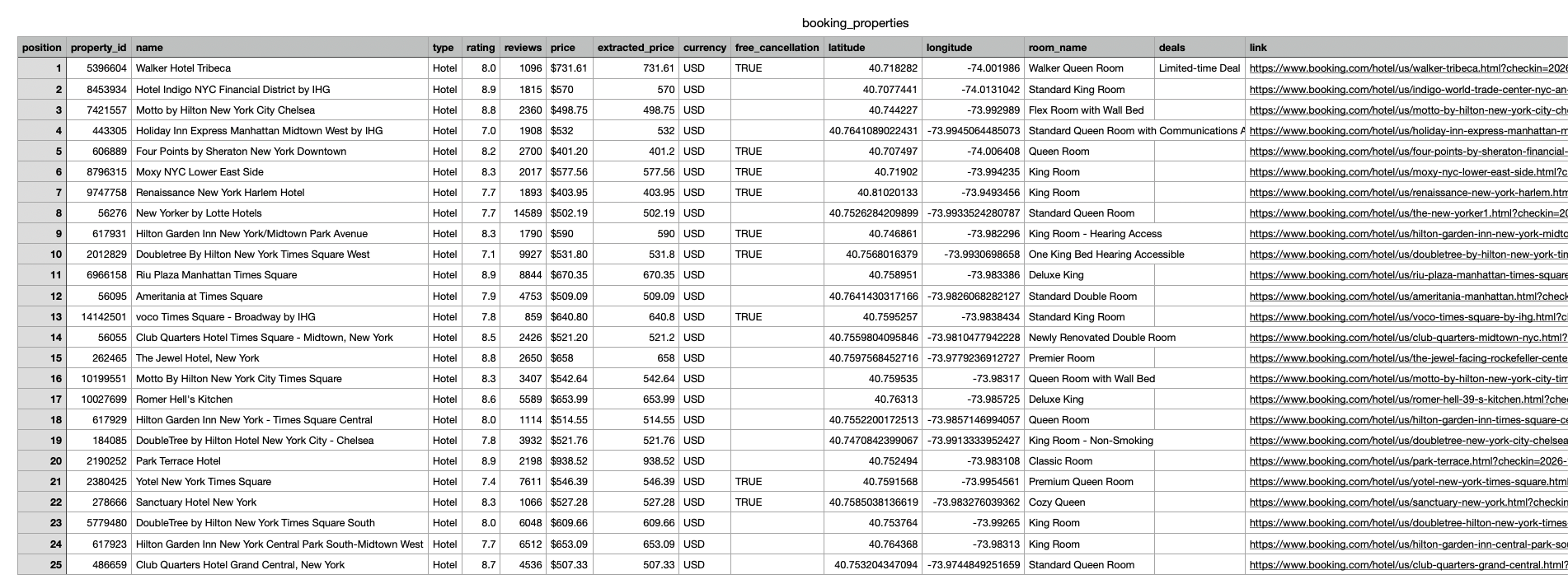
Export results to CSV
Property listings fit nicely into rows. To save them, add import csv to the imports at the top of main.py, then add this function below fetch_properties:
def save_csv(properties, filename="booking_properties.csv"):
    fieldnames = [
        "position", "property_id", "name", "type", "rating", "reviews",
        "price", "extracted_price", "currency", "free_cancellation",
        "latitude", "longitude", "room_name", "deals", "link",
    ]
    with open(filename, "w", newline="", encoding="utf-8") as file:
        writer = csv.DictWriter(file, fieldnames=fieldnames)
        writer.writeheader()
        for prop in properties:
            gps = prop.get("gps_coordinates", {})
            rooms = prop.get("rooms", [])
            writer.writerow({
                "position": prop.get("position"),
                "property_id": prop.get("property_id"),
                "name": prop.get("name"),
                "type": prop.get("type"),
                "rating": prop.get("rating"),
                "reviews": prop.get("reviews"),
                "price": prop.get("price"),
                "extracted_price": prop.get("extracted_price"),
                "currency": prop.get("currency"),
                "free_cancellation": prop.get("free_cancellation"),
                "latitude": gps.get("latitude"),
                "longitude": gps.get("longitude"),
                # Keep only the first recommended room and join deals into one cell.
                "room_name": rooms[0].get("name") if rooms else None,
                "deals": "; ".join(prop.get("deals", [])),
                "link": prop.get("link"),
            })
    print(f"Saved {len(properties)} properties to {filename}")
Finally, add this line at the end of the file, after the for loop:
save_csv(properties)
Run python main.py again to create booking_properties.csv. The nested gps_coordinates object becomes two columns, the deals array is joined into one cell, and only the first room from the rooms array is kept. Use extracted_price instead of price when you want to sort or compare numbers in a spreadsheet.
JavaScript implementation
For Node.js, we'll use SerpApi's official JavaScript library. Install it:
npm install serpapi
Create a file named main.cjs. The .cjs extension tells Node.js to treat it as a CommonJS module, so require works without extra configuration:
const { getJson } = require("serpapi");

const apiKey = process.env.SERPAPI_API_KEY;

if (!apiKey) {
  console.error("Set the SERPAPI_API_KEY environment variable first.");
  process.exit(1);
}

async function main() {
  let data;
  try {
    data = await getJson({
      engine: "booking",
      q: "New York",
      check_in_date: "2026-11-22",
      check_out_date: "2026-11-25",
      api_key: apiKey,
    });
  } catch (error) {
    // Redact the key in case the error message includes the request URL.
    console.error("Request failed:", String(error.message).replaceAll(apiKey, "[REDACTED]"));
    process.exit(1);
  }

  if (data.error) {
    console.error("SerpApi error:", data.error);
    process.exit(1);
  }

  const properties = data.properties || [];
  if (properties.length === 0) {
    console.log("The search succeeded, but no properties were returned.");
    return;
  }

  const info = data.search_information || {};
  console.log(`Destination: ${info.destination} (${info.total_results ?? "unknown"} properties found)\n`);

  for (const property of properties.slice(0, 5)) {
    console.log(`${property.position}. ${property.name} (${property.type})`);
    console.log(`   Location: ${property.location}`);
    console.log(`   Review score: ${property.rating ?? "n/a"} ${property.rating_text ?? ""} from ${property.reviews ?? 0} reviews`);
    console.log(`   Stay price: ${property.price ?? "n/a"} (${property.price_per_night ?? "n/a"} per night)`);
    console.log(`   Free cancellation: ${property.free_cancellation ?? false}\n`);
  }
}

main();
Run it:
node main.cjs
You'll see the same fields as the Python version. If you’d rather pass results straight to an LLM, use the output=md GET request shown earlier.
Other languages and no-code options
SerpApi has libraries for more programming languages, listed on the integrations page. Since the Booking.com Search API is a regular GET request with engine=booking, any HTTP client also works.
If you prefer no-code tools:
- SerpApi's Make.com app has native modules for some APIs and a Universal "Make an API Call" module where you set the request path and each parameter yourself. Pagination isn't automated in the Universal module.
- SerpApi's verified n8n node launched with 22 popular APIs. For APIs that aren't in the node, the announcement shows how to use n8n's HTTP Request node with the
engineparameter, for exampleengine=booking.
How to paginate the results
A search returns 25 properties by default. Here's how to get more:
offsetskips a number of results. With the default page size,offset=25is page 2 andoffset=50is page 3. It can go up to 1,000; beyond that, Booking.com returns the same properties.limitsets the number of properties per page, from 1 to 100. Booking.com sometimes returns a few extra properties, such as sponsored ones.session_tokenkeeps the same Booking.com visitor between requests. Booking.com ranks properties differently for each visitor, so without it, later pages can repeat properties from earlier ones. It's returned inserpapi_pagination.session_token.serpapi_pagination.nextis a ready-made link to the next page. It already includes the nextoffset, thesession_token, and your original parameters.
For example, the second page of the New York search looks like this, where SESSION_TOKEN_FROM_PAGE_1 is the serpapi_pagination.session_token value from the first response:
https://serpapi.com/search?engine=booking&q=New+York&check_in_date=2026-11-22&check_out_date=2026-11-25&offset=25&session_token=SESSION_TOKEN_FROM_PAGE_1&api_key=YOUR_SERPAPI_API_KEY
In code, the simplest approach is to follow the next link and add your API key to it. This paginate.py script fetches up to three pages, stops early when there’s no next page or a page comes back empty, and saves all properties to a JSON file:
import json
import os
import sys

import requests

SERPAPI_API_KEY = os.environ.get("SERPAPI_API_KEY")

if not SERPAPI_API_KEY:
    sys.exit("Set the SERPAPI_API_KEY environment variable first.")

MAX_PAGES = 3  # Each page is a separate search request.

params = {
    "engine": "booking",
    "q": "New York",
    "check_in_date": "2026-11-22",
    "check_out_date": "2026-11-25",
    "api_key": SERPAPI_API_KEY,
}

url = "https://serpapi.com/search"
all_properties = []

for page in range(1, MAX_PAGES + 1):
    try:
        response = requests.get(url, params=params, timeout=60)
    except requests.RequestException as error:
        sys.exit(f"Request for page {page} failed: {type(error).__name__}")

    try:
        data = response.json()
    except ValueError:
        sys.exit(f"Unexpected response on page {page} (HTTP {response.status_code}).")

    if response.status_code != 200 or data.get("error"):
        sys.exit(f"SerpApi error on page {page} (HTTP {response.status_code}): {data.get('error', 'Unknown error')}")

    properties = data.get("properties", [])
    all_properties.extend(properties)
    print(f"Page {page}: {len(properties)} properties")

    next_link = data.get("serpapi_pagination", {}).get("next")
    if not properties or not next_link:
        break

    # The next link already carries offset, session_token, and the original filters.
    url = next_link
    params = {"api_key": SERPAPI_API_KEY}

with open("booking_properties.json", "w", encoding="utf-8") as file:
    json.dump(all_properties, file, indent=2, ensure_ascii=False)

print(f"Saved {len(all_properties)} properties to booking_properties.json")
Run it with python paginate.py. Each page is a separate search and can use a search credit, so keep MAX_PAGES small while you're testing. If you need more properties per request, raise limit (up to 100) instead of fetching many small pages.
Customize or filter the results
The Booking.com Search API supports the sorting and filters you'd use on Booking.com itself. Here are three useful ones:
sort_by: Changes the order of results. The default ispopularity("Our top picks"). Other options includeprice(lowest first),bayesian_review_score(top reviewed),review_score_and_price, anddistance_from_search(distance from downtown).min_priceandmax_price: Limit the price per night, in the currency of the results. They must be used together with acurrencycode, such asUSDorEUR. See the Booking.com currencies page for supported codes.nflt: Applies any other Booking.com filter, such as amenities, meals, neighborhoods, or brands. It's a semicolon-separated list of filter values. You don't need to guess them: take thevaluefromfilters[].optionsin a previous response. For example, the documentation usesdi=1127for London's Theatreland neighborhood.
Here's a New York search for stays between 100 and 300 USD per night, sorted by lowest price, limited to properties with a filter value taken from the filters array:
https://serpapi.com/search?engine=booking&q=New+York&check_in_date=2026-11-22&check_out_date=2026-11-25¤cy=USD&min_price=100&max_price=300&sort_by=price&nflt=roomfacility%3D38&api_key=YOUR_SERPAPI_API_KEY
In this example, roomfacility=38 is the "Private bathroom" option from the documentation's New York sample. Note that nflt values need URL encoding (= becomes %3D and ; becomes %3B); requests and the JavaScript library handle that for you.
Other handy filters include free_cancellation=true, rating for a minimum review score (9, 8, 7, or 6), hotel_class for star ratings (for example, 4,5), and property_types (for example, 201,220 for apartments and vacation homes). You can also localize results with hl for the language and currency for prices, or set device=mobile to get Booking.com's mobile results, which can include mobile-only prices. See the Booking.com Search API documentation for the full list.
Conclusion
You can now scrape Booking.com hotel listings for any destination and dates, read their prices, review scores, rooms, and policies, save them to CSV, page through more results with session_token, and narrow searches with sorting and filters. You can also switch to Markdown output with output=md when the results are going to an LLM.
To compare Booking.com prices with other sources, see how to scrape Google Hotels data, scrape Airbnb data, and scrape Tripadvisor.
Frequently asked questions
Which parameters are required?
Only engine=booking, q (the destination), and api_key. Everything else is optional, but you'll usually want check_in_date and check_out_date, because Booking.com returns properties without prices when dates aren't set.
Why are prices in different currencies?
By default, currency is hotel_currency, so each property's price is in its own currency (for example, EUR in Paris). Set currency to a code such as USD to get all prices in one currency. The currency field on each property tells you which one was used.
Can I search flexible dates?
Yes. Set flex_window to 1, 2, 3, or 7 to let the check-in and check-out dates move up to that many days earlier or later for the best price of each property. Each property then includes the check_in_date and check_out_date of its price. flex_window must be used with both dates.
Is this the official Booking.com API?
No. The Booking.com Search API is a SerpApi API that returns Booking.com's public search results (the same properties, prices, and filters you see on Booking.com) as structured data. It's a separate product from the APIs Booking.com offers its own partners, and you only need a SerpApi API key to use it.
Does the Booking.com Search API support Markdown output?
Yes. Add output=md to get Markdown, which is useful for LLMs and AI agents. You can also use the /search.md endpoint or the Accept: text/markdown request header. See the Markdown output page for details.