Ruby
Ruby
 Golang
 .Net
.Net
 MCP
MCP
 C++
C++

Building AI agents in Python can quickly get messy. You need to manage prompts, models, tools, structured outputs, validation, dependencies, and external integrations. As the agent grows, the code can become harder to reason about, test, and maintain.
Pydantic AI helps solve that problem. This Python framework from the Pydantic team helps us build AI agents and generative AI applications with a clean, Pythonic developer experience. If you are already comfortable with Python type hints, Pydantic models, and function-based APIs, Pydantic AI will feel familiar.

In this tutorial, we will start with the basics of Pydantic AI and then build toward a more practical agent that can use real-time search to answer questions with fresh, grounded information. We will start small and improve the agent step by step:
- Start with a simple local model-backed agent.
- Add a tool to fetch the current date and time.
- Add SerpApi search so the agent can look up live information.
- Package search behavior as a reusable Pydantic AI capability.
- Connect the agent to SerpApi through MCP, giving the agent access to real-time search data.
Prefer watching instead? We also have a video version of this tutorial, where we walk through building a Pydantic AI agent with real-time search using SerpApi.
Why raw LLMs struggle with current facts
LLMs are trained on large amounts of data, but that training has a cutoff. The model does not automatically know today's date, the latest product releases, live prices, breaking news, or current hotel availability.
For example, a local model may give a confident answer when asked about a current product, price, policy, event, or travel detail. The answer may sound plausible because the model is continuing a pattern from its training data, but it is not grounded in live information. The model can sound confident even when it is hallucinating or relying on outdated information. It generates answers from patterns in its training data, but it does not automatically know whether those answers are still true. For time-sensitive questions, that makes live search essential.
For time-sensitive questions, the agent needs two things:
- a way to understand the current date and time
- a way to search live data before answering
This is where tools become useful.
In Pydantic AI, a tool is a Python function that the model can call. The model decides when it needs the function; Pydantic AI validates the arguments; runs the function; and the result is passed back to the model.
Project setup
For these examples, I am using:
- Python 3.13+
- Pydantic AI (
pip installoruv addpydantic-ai-slim) - SerpApi (live API calls using
httpx) - Qwen 3.6 35B running locally through LM Studio
The example agent scripts are available on our GitHub repo for you to test and play around with.
For the SerpApi examples below, I am using SERPAPI_API_KEY as the environment variable:
export SERPAPI_API_KEY="your_serpapi_api_key"
For the AI Model, I am using a locally running model so that the examples can be run without any API subscriptions, such as OpenAI or Anthropic. I am using the OpenAI-compatible endpoint exposed by LM Studio:
from pydantic_ai.models.openai import OpenAIChatModel
from pydantic_ai.providers.openai import OpenAIProvider

model = OpenAIChatModel(
    "qwen/qwen3.6-35b-a3b",
    provider=OpenAIProvider(base_url="http://localhost:1234/v1"),
)
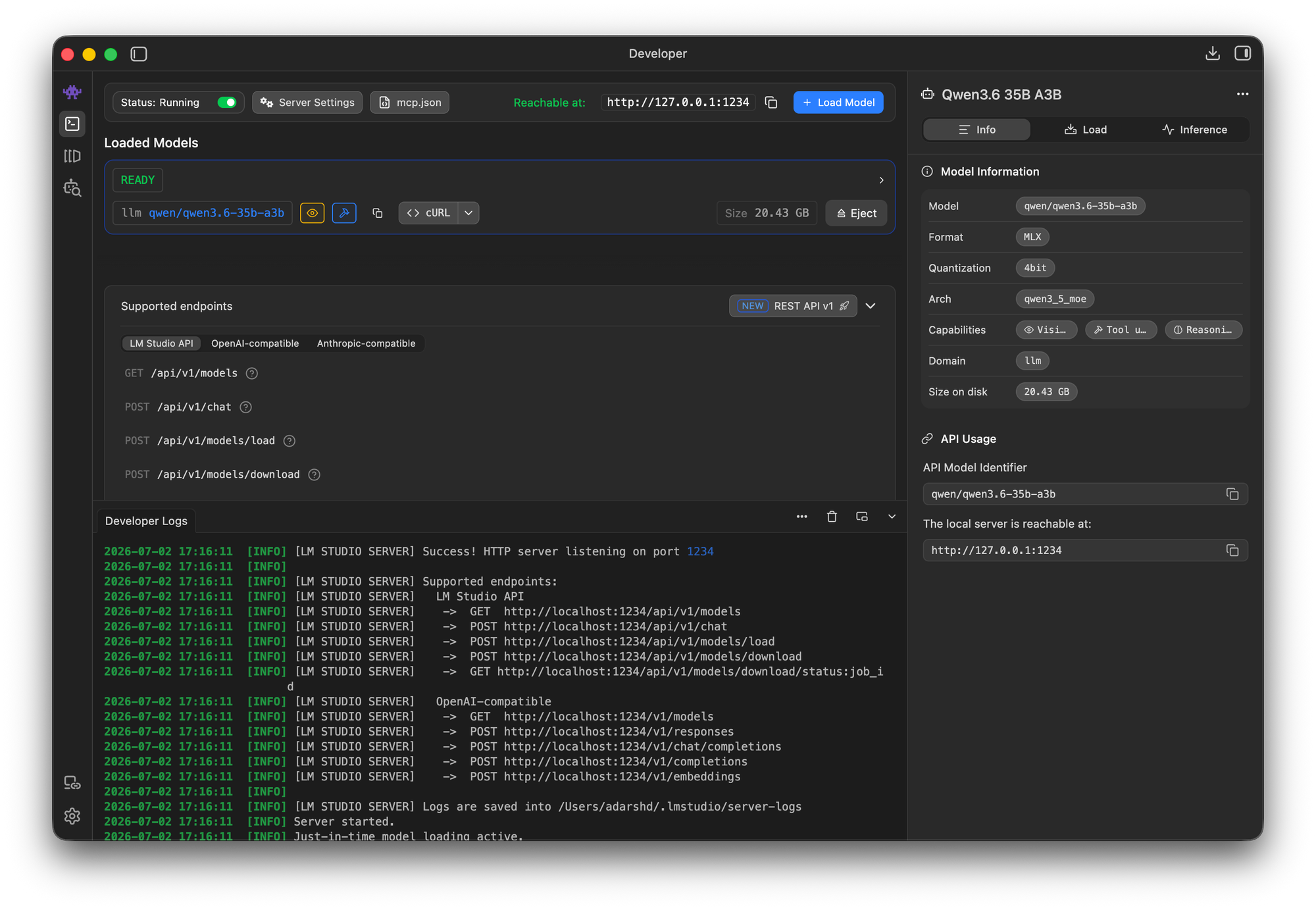
This gives us a local model while still using the OpenAI-compatible interface.
A simple Pydantic AI agent
Let's start with the smallest useful agent:
from pydantic_ai import Agent
from pydantic_ai.models.openai import OpenAIChatModel
from pydantic_ai.providers.openai import OpenAIProvider

model = OpenAIChatModel(
    "qwen/qwen3.6-35b-a3b",
    provider=OpenAIProvider(base_url="http://localhost:1234/v1"),
)

agent = Agent(
    model,
    instructions=(
        "You are a helpful assistant. Help the user with their questions and requests. "
    ),
)

app = agent.to_web(models={"Qwen 3.6 35B (LM Studio)": model})
The agent.to_web() call creates a simple web chat UI for the agent. This is helpful while experimenting because we can ask a question and inspect how the model responds.
At this stage, the agent has no tools. It can only use the model's internal knowledge. If we ask:
What is the latest iPhone model?
The model may answer confidently, but there is no guarantee that the answer is current. The agent has no access to today's date, Apple's current product pages, live search results, or prices.
When I tested the example using the Chat UI, the model gave the below response:
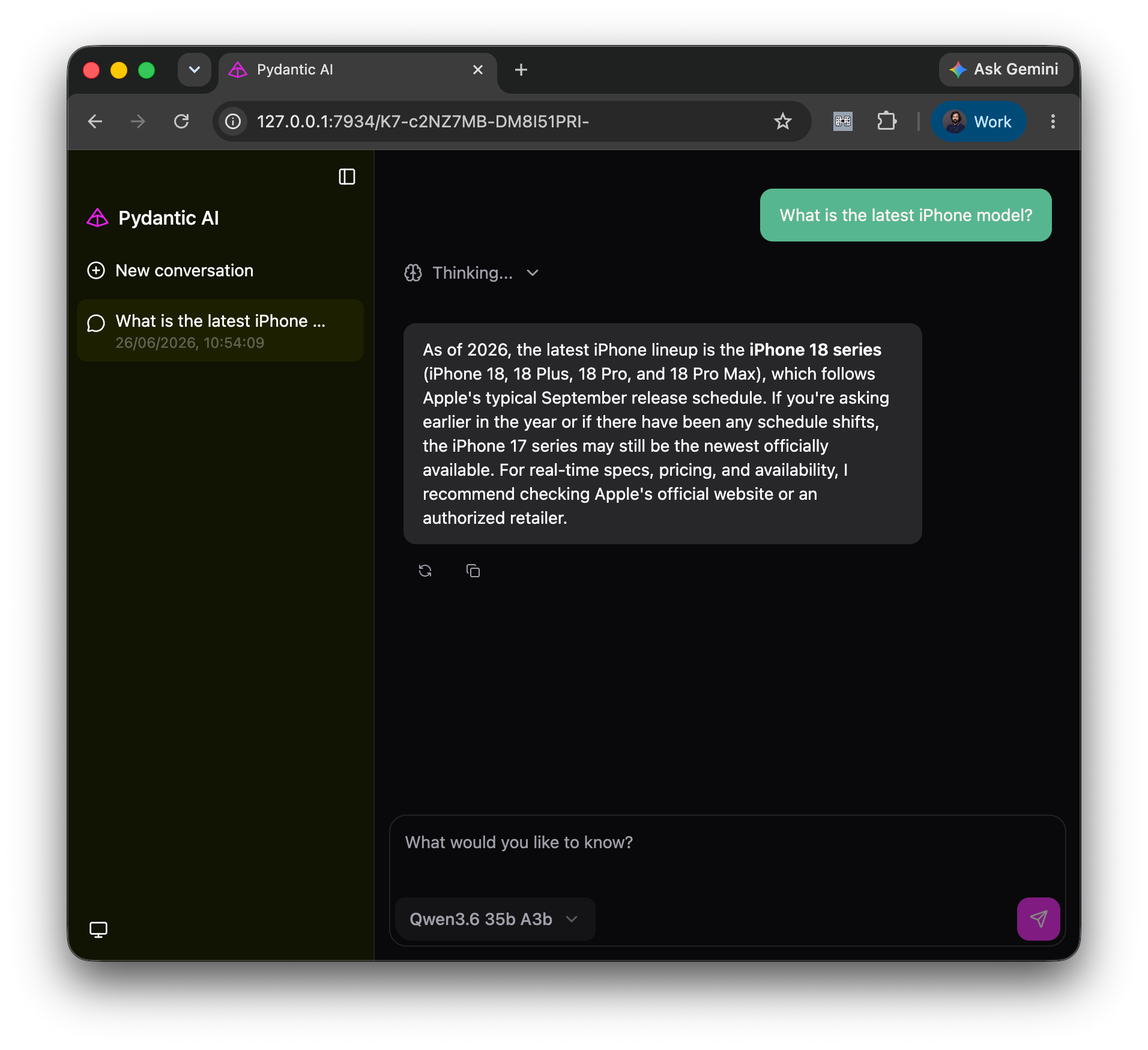
The model responds that the latest iPhone lineup is the iPhone 18 series, which is unreleased as of this writing. The model's confusion can be seen when we go through its reasoning/thinking traces:
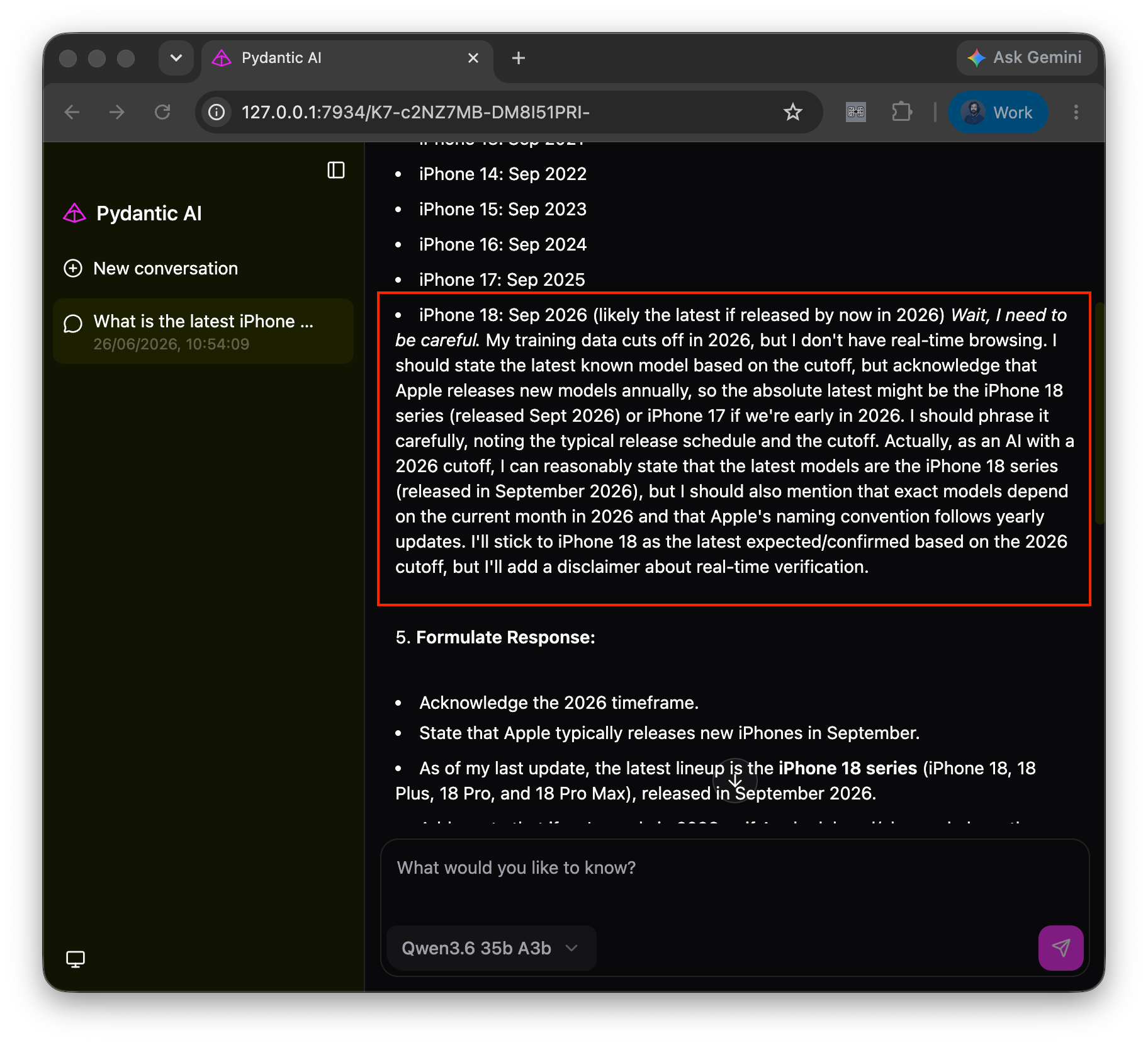
The model was confused and was guessing based on the iPhone's normal release schedule. Without tools, the model cannot access the current date/time. So the first improvement is to give it a clock.
Add a time tool
Some queries are time-sensitive even if they do not look like search queries.
Examples:
- "What is the latest iPhone?"
- "What happened yesterday?"
- "Find hotels for next weekend."
- "What are the best coding models right now?"
Before answering these, the model should know the current date.
We can expose a small Python function as a Pydantic AI tool:
from datetime import datetime

TIME_SENSITIVE_INSTRUCTION = (
    "Always call get_time before answering relative-date or time-sensitive queries."
)

agent = Agent(
    model,
    instructions=(
        "You are a helpful assistant. Help the user with their questions and requests. "
        f"{TIME_SENSITIVE_INSTRUCTION}"
    ),
)


@agent.tool_plain
def get_time() -> dict[str, str]:
    """Return the current local date and time."""
    now = datetime.now().astimezone()
    return {
        "date": now.date().isoformat(),
        "time": now.strftime("%H:%M:%S"),
        "day_of_week": now.strftime("%A"),
        "timezone": now.tzname() or str(now.tzinfo),
        "utc_offset": now.strftime("%z"),
        "iso_datetime": now.isoformat(timespec="seconds"),
    }
This is a small change, but it improves the agent's behavior. The model can now anchor relative-date questions to the current day instead of guessing. When the model sees a time-sensitive question, it can request a tool call, and Pydantic AI executes the get_time() function we defined and feeds back the result to the model.
Let's test this with the Web UI:
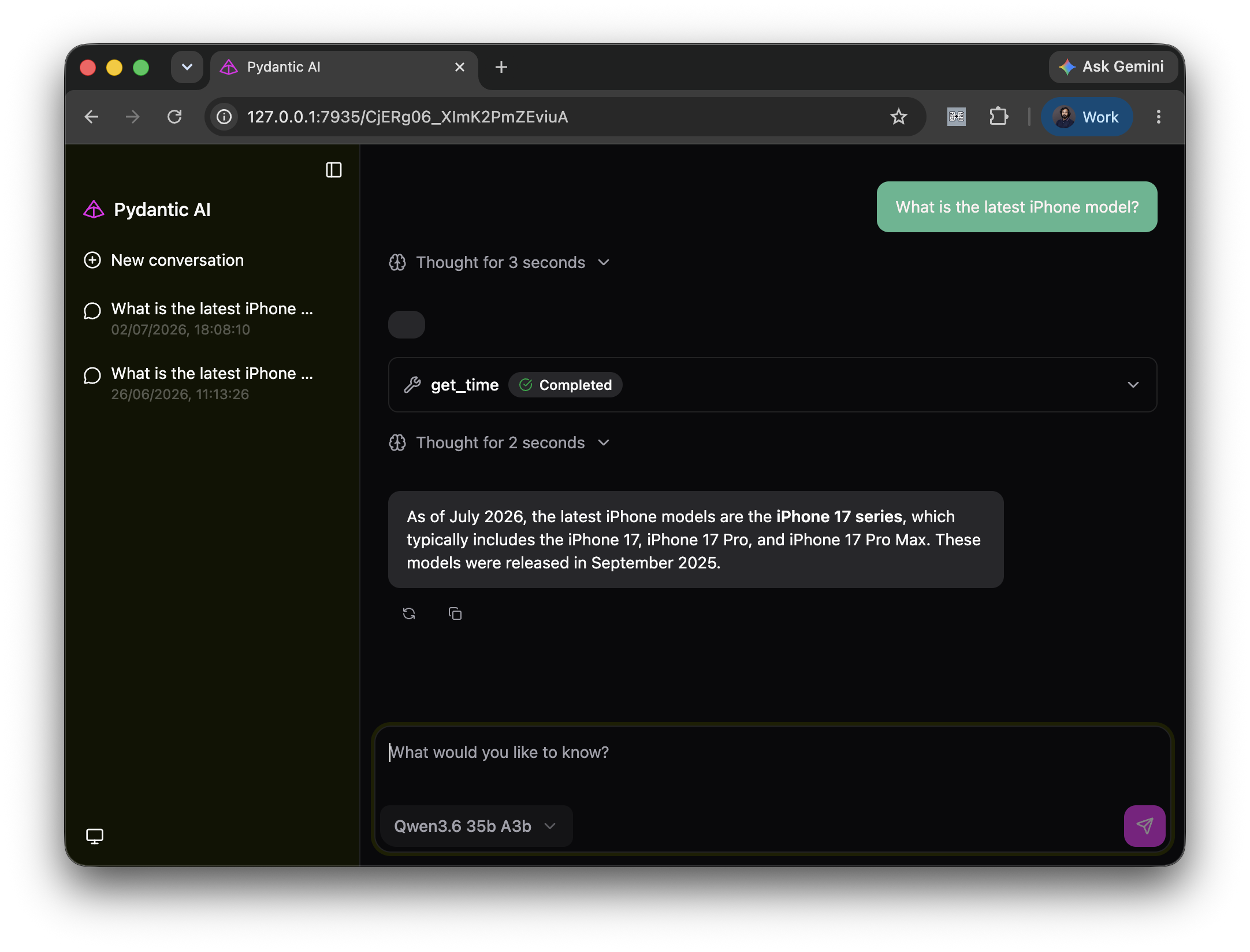
The model called the get_time tool and understands that the current month is July. Based on this info, it was able to correctly answer that the iPhone 17 series is the latest iPhone lineup.
However, time alone is not enough. The current date can tell the model that it should not rely only on training data, but it still needs a way to look up facts.
So the next step is search.
Add real-time search with SerpApi
SerpApi gives us structured search engine results through an API. Instead of scraping search result pages, we can call SerpApi and return a compact result set to the model.
Here is a simple search tool:
import os

import httpx


@agent.tool_plain
def search_serpapi(query: str) -> dict:
    """Search Google Light with SerpApi and return a compact result set."""
    params = {
        "engine": "google_light",
        "q": query,
        "api_key": os.environ["SERPAPI_API_KEY"],
        "num": 10,
    }
    response = httpx.get("https://serpapi.com/search.json", params=params, timeout=20)
    response.raise_for_status()
    data = response.json()

    return {
        "answer_box": data.get("answer_box"),
        "organic_results": [
            {
                "title": item.get("title"),
                "link": item.get("link"),
                "snippet": item.get("snippet"),
            }
            for item in data.get("organic_results", [])[:10]
        ],
    }
Then we update the agent instructions:
agent = Agent(
    model,
    instructions=(
        "You are a helpful assistant. Help the user with their questions and requests. "
        "Always use search_serpapi when the user asks for current information, "
        "products, companies, places, or news. "
        f"{TIME_SENSITIVE_INSTRUCTION}"
    ),
)
Now the agent has two useful tools:
get_time()for current date and timesearch_serpapi()for live search results
With these tools, the agent can answer time-sensitive product questions more reliably.
Let's try asking the model the same question:
What is the latest iPhone?
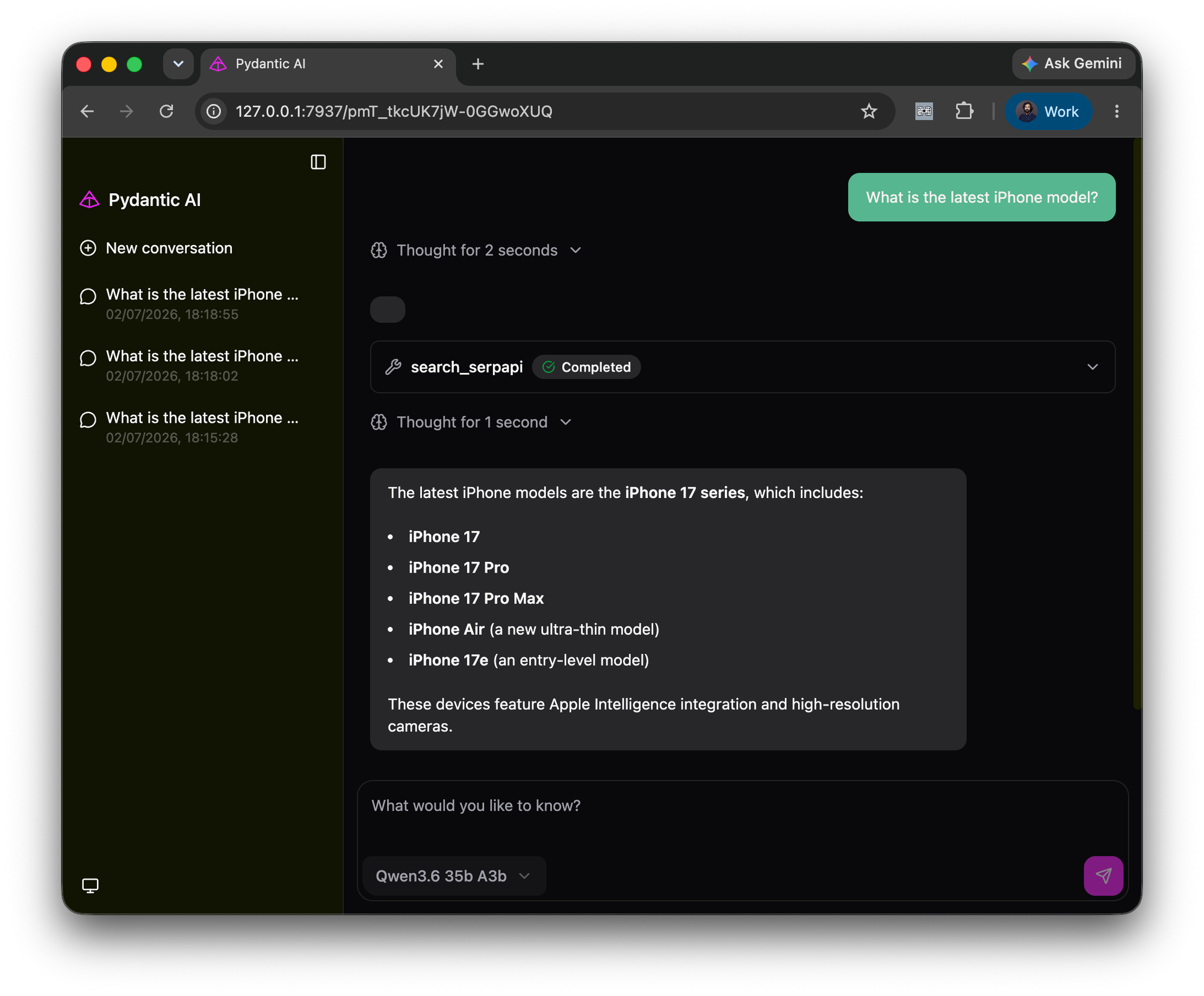
With the help of the search tool, the agent could provide a detailed answer that includes all the models in the latest lineup.
Equipped with SerpApi, the agent is even more helpful. For example, let's ask the model to find the prices of these models:
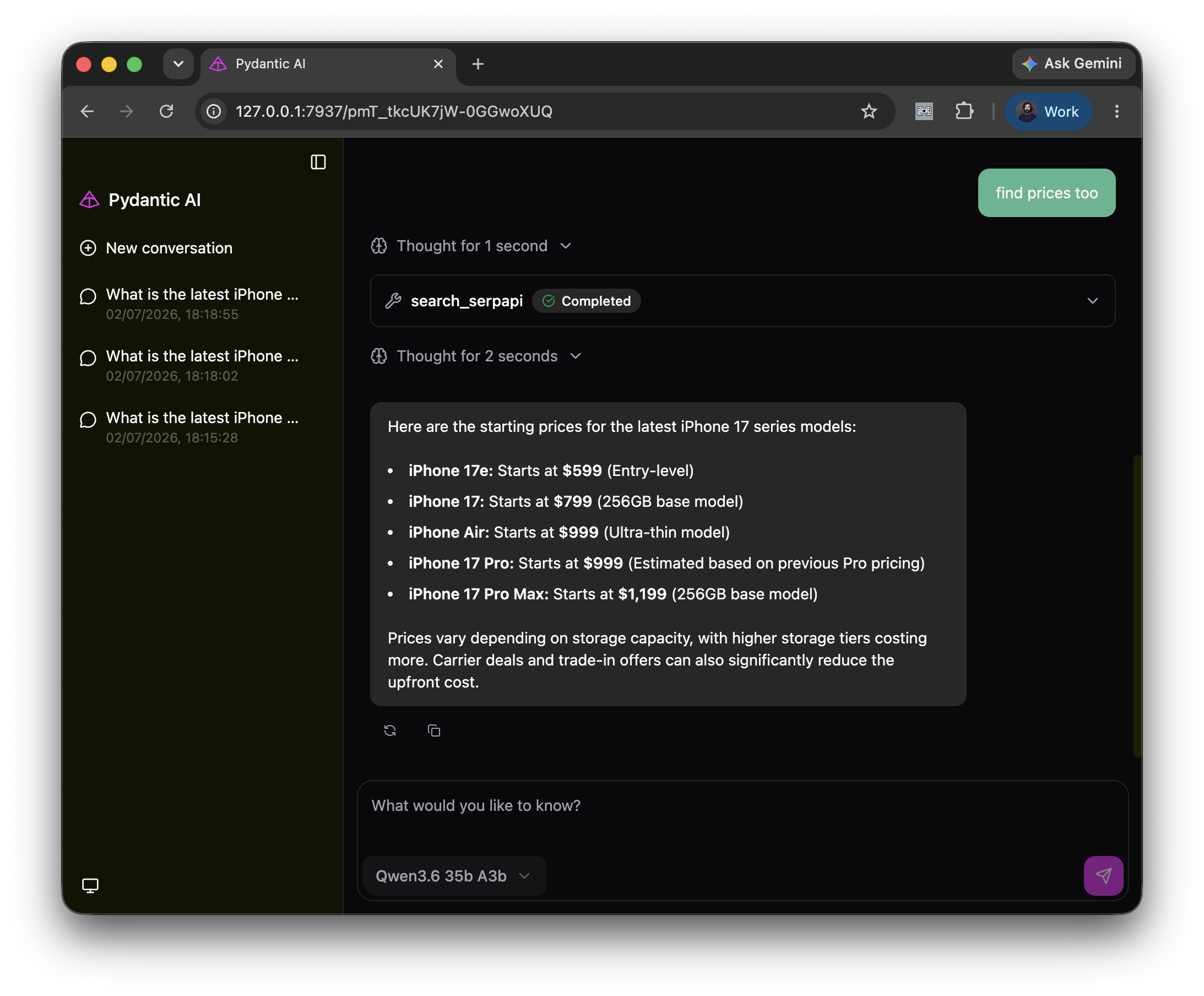
The final answers are now grounded in live search results instead of just the model's memory. This is the key idea behind tool-using agents: the model should not be expected to know everything. It should know when to ask for the right tool.
How to save AI token usage
When building search tools for agents, it is tempting to return the entire API response. That can make the agent worse by taking up too much of the context window.
Search API responses can be large. They can include metadata, pagination, related questions, ads, inline widgets, thumbnails, and other fields. If we pass everything to the model, we spend more tokens and make the useful parts harder to find.
For most agent workflows, a compact response is better:
return {
    "answer_box": data.get("answer_box"),
    "organic_results": [
        {
            "title": item.get("title"),
            "link": item.get("link"),
            "snippet": item.get("snippet"),
        }
        for item in data.get("organic_results", [])[:10]
    ],
}
This gives the model enough context to answer while keeping the tool output short and readable.
Instead of filtering on the client side, we can also use SerpApi's JSON Restrictor feature to fetch only the required fields from the API. To achieve a result similar to the above, add a json_restrictor param to the SerpApi request with the value: organic_results, answer_box, which will give us a clean response with other fields omitted.
The same principle applies to any agent tool:
- return the fields the model needs
- avoid large raw payloads
- keep the shape predictable
Good tool outputs are part of good prompt engineering.
Move from one search call to deep research
A single search call is useful for many questions. But some user requests need more coverage. For example:
Do deep research and find the best AI models for coding.
This type of query should not depend on one Google result. The agent should search across multiple engines, use different query terms, compare sources, and then summarize.
Pydantic AI capabilities are useful here. A capability can bundle instructions and tools into a reusable unit that can be attached to an agent.
Here is a deep_research capability:
from pydantic_ai.capabilities import Capability

deep_research = Capability(
    id="deep_research",
    description=(
        "Use for research tasks that need multiple live search calls across Google, Bing, "
        "Yahoo, Google news, and DuckDuckGo"
    ),
    instructions=(
        "For deep research, call serpapi_search several times before answering. You can "
        "call different engines as well as call the same engine multiple times with "
        "different queries and search params to get a variety of results. Useful engines "
        "include google, bing, yahoo, duckduckgo, google_news, duckduckgo_news, "
        "bing_news, and google_trends."
    ),
    defer_loading=True,
)
The important part is defer_loading=True.
This lets the agent keep the capability available without always loading all of its instructions and tools into every request. The model sees that the capability exists and can load it when the task needs deep research. This saves the model's context window.
Now we can define a search tool inside that capability:
from typing import Literal

SearchEngine = Literal[
    "google",
    "bing",
    "yahoo",
    "duckduckgo",
    "google_news",
    "duckduckgo_news",
    "bing_news",
    "google_trends",
]

@deep_research.tool_plain
def serpapi_search(
        query: str,
        engine: SearchEngine,
        location: str | None = None,
        gl: str | None = None,
        hl: str | None = None,
        page: int | None = None,
) -> dict:
    """Search one SerpAPI engine with optional search params and return compact results.

    page is a 1-based page number. gl and hl are mapped to each engine's SerpAPI
    locale parameters when supported.
    """
    params = _serpapi_params(query, engine, location, gl, hl, page)

    response = httpx.get("https://serpapi.com/search.json", params=params, timeout=20)
    response.raise_for_status()
    data = response.json()

    result_keys = (
        "organic_results",
        "shopping_results",
        "inline_shopping_results",
        "product_results",
        "news_results",
        "local_results",
    )
    results = {}
    for key in result_keys:
        compact_results = _compact_items(_items_for_result_key(data, key))
        if compact_results:
            results[key] = compact_results

    if engine == "google_trends":
        results.update(_compact_google_trends(data))

    return {
        "engine": engine,
        "query": query,
        "params_used": {key: value for key, value in params.items() if key != "api_key"},
        "results": results,
    }
This version is more flexible than the earlier search_serpapi() tool.
It allows the model to choose the search engine and optional parameters. It also handles multiple result types such as organic results, shopping results, product results, news results, and local results.
Then we attach the capability to the agent:
agent = Agent(
    model,
    capabilities=[deep_research],
    instructions=(
        "You are a careful research assistant. For simple questions, answer briefly. "
        "For deep research, call get_time to get current date/time and load the "
        "deep_research capability. "
        f"{TIME_SENSITIVE_INSTRUCTION}"
    ),
)
Now the agent can decide when the deep research workflow is needed.
For a simple question, it can answer briefly. For a research task, it can load the capability and call serpapi_search() several times before producing a final answer.
Let's test the capability. We can ask the agent to do a deep research to find the best AI coding model:
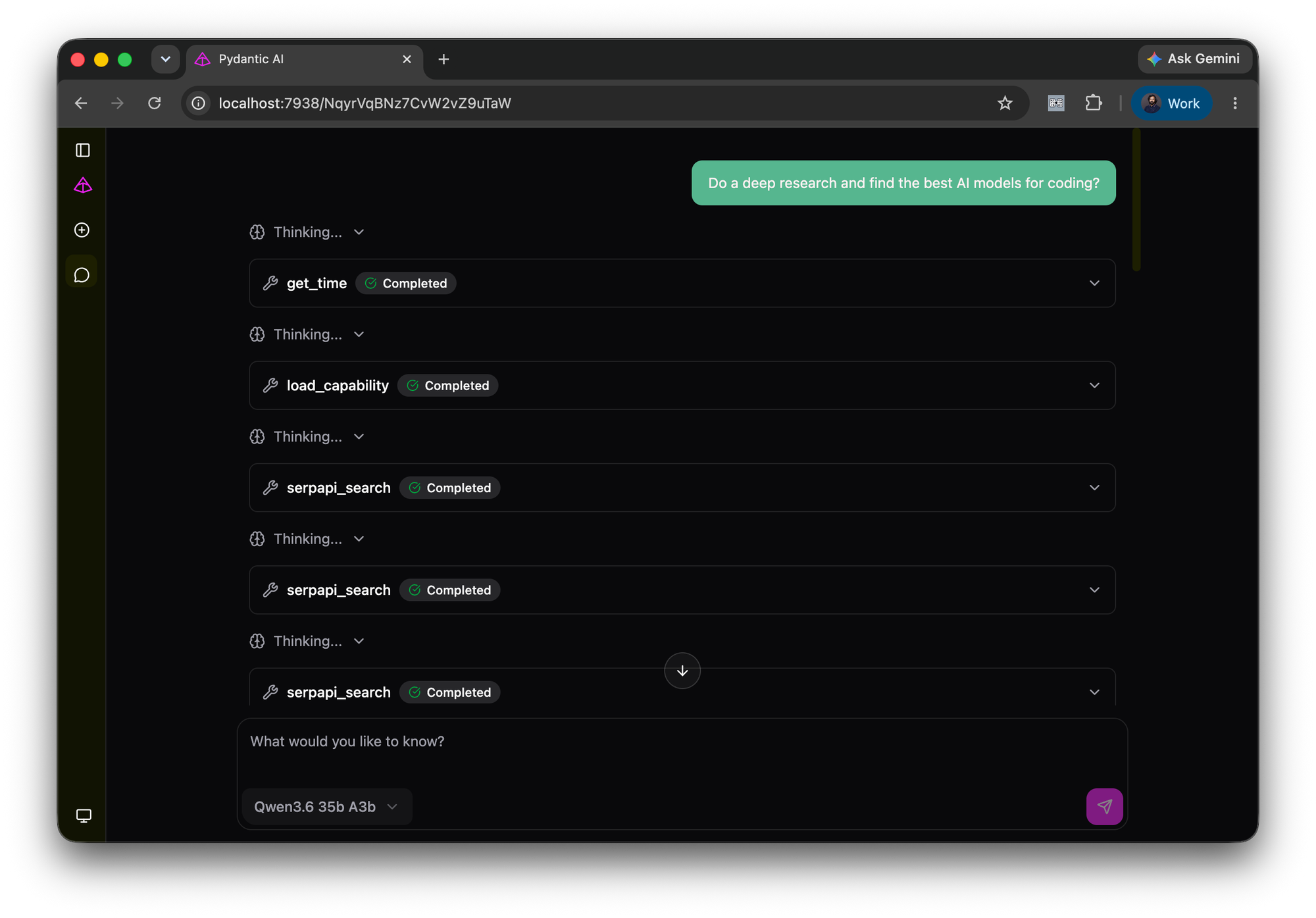
The model performs multiple search requests, using different search terms and on different SerpApi engines, so as to gather detailed information.
Using the search data, the Agent is able to accurately present the user with a range of options:
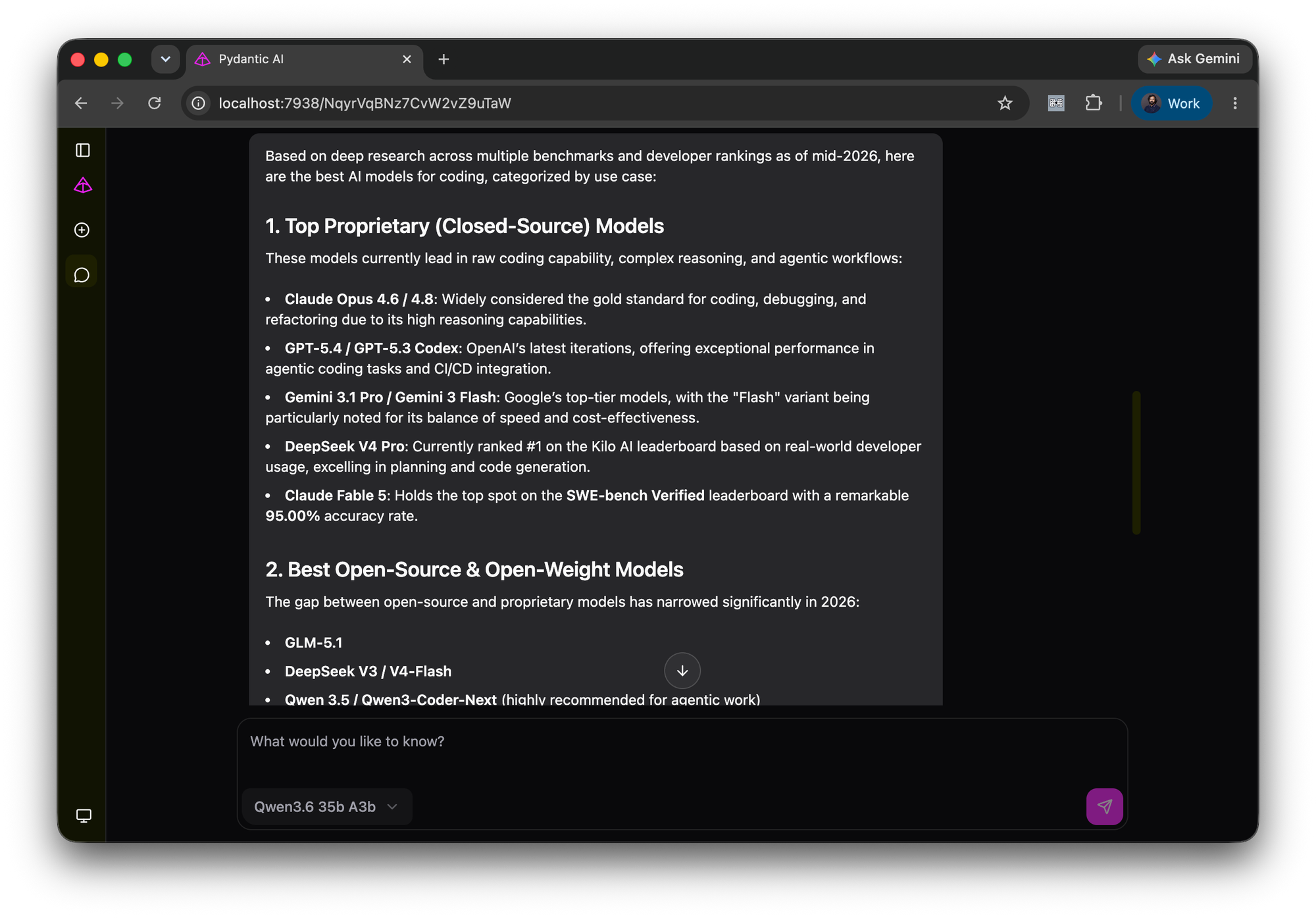
Using the search tool, the agent correctly identified and listed new models released well after the underlying model's knowledge cutoff.
Capabilities in Pydantic AI provide an important design pattern for agents. As the agent grows, we should not throw every tool and every instruction into the model context all the time. Instead, we should group related behavior into capabilities and load them when needed.
Use the right SerpApi engine for the task
Generic web search is useful, but agents become more powerful when they can choose specialized engines.
For example:
- Use
googleorgoogle_lightfor general web results - Use
google_news,bing_news, orduckduckgo_newsfor news - Use shopping engines for product prices
- Use engines like
google_hotels,google_flights, andtripadvisorfor travel planning - Use
google_trendsengines for popularity and interest over time
This matters because "search" is not one task.
If the user asks for the latest iPhone models, a general web search may be enough. If the user asks for prices, a shopping result is more useful. If the user asks for hotels in Goa next weekend, a hotel-specific engine is better than a normal web result.
That is why the deep research tool accepts an engine argument instead of hardcoding one search backend. The model can choose the right tool call for the job, and our code can keep the response structure compact.
Connect SerpApi through MCP
Custom tools are great when you want full control over behavior. But sometimes you do not want to define every tool yourself.
MCP, or Model Context Protocol, gives us a standard way to connect an agent to external tools and data sources. Instead of writing a Python wrapper for every search capability, we can connect the agent to an MCP server and let it discover the available tools.
The SerpApi MCP setup is short:
import os

from dotenv import load_dotenv
from pydantic_ai import Agent
from pydantic_ai.capabilities import MCP
from pydantic_ai.models.openai import OpenAIChatModel
from pydantic_ai.providers.openai import OpenAIProvider

load_dotenv()

serpapi_mcp_url = f"https://mcp.serpapi.com/{os.environ['SERPAPI_API_KEY']}/mcp"

model = OpenAIChatModel(
    "qwen/qwen3.6-35b-a3b",
    provider=OpenAIProvider(base_url="http://localhost:1234/v1"),
)

agent = Agent(
    model,
    capabilities=[MCP(url=serpapi_mcp_url)],
    instructions="You are a helpful assistant. Use available MCP search tools for current facts.",
)
With this setup, the agent can use the tools exposed by the MCP server.
This is useful for broader workflows. For example, a travel query may need hotel search first, then price lookup, then filtering by location or dates. If the MCP server exposes those tools, the agent can use them without us having to write each function in the client application.
Let's test this with a travel search query:
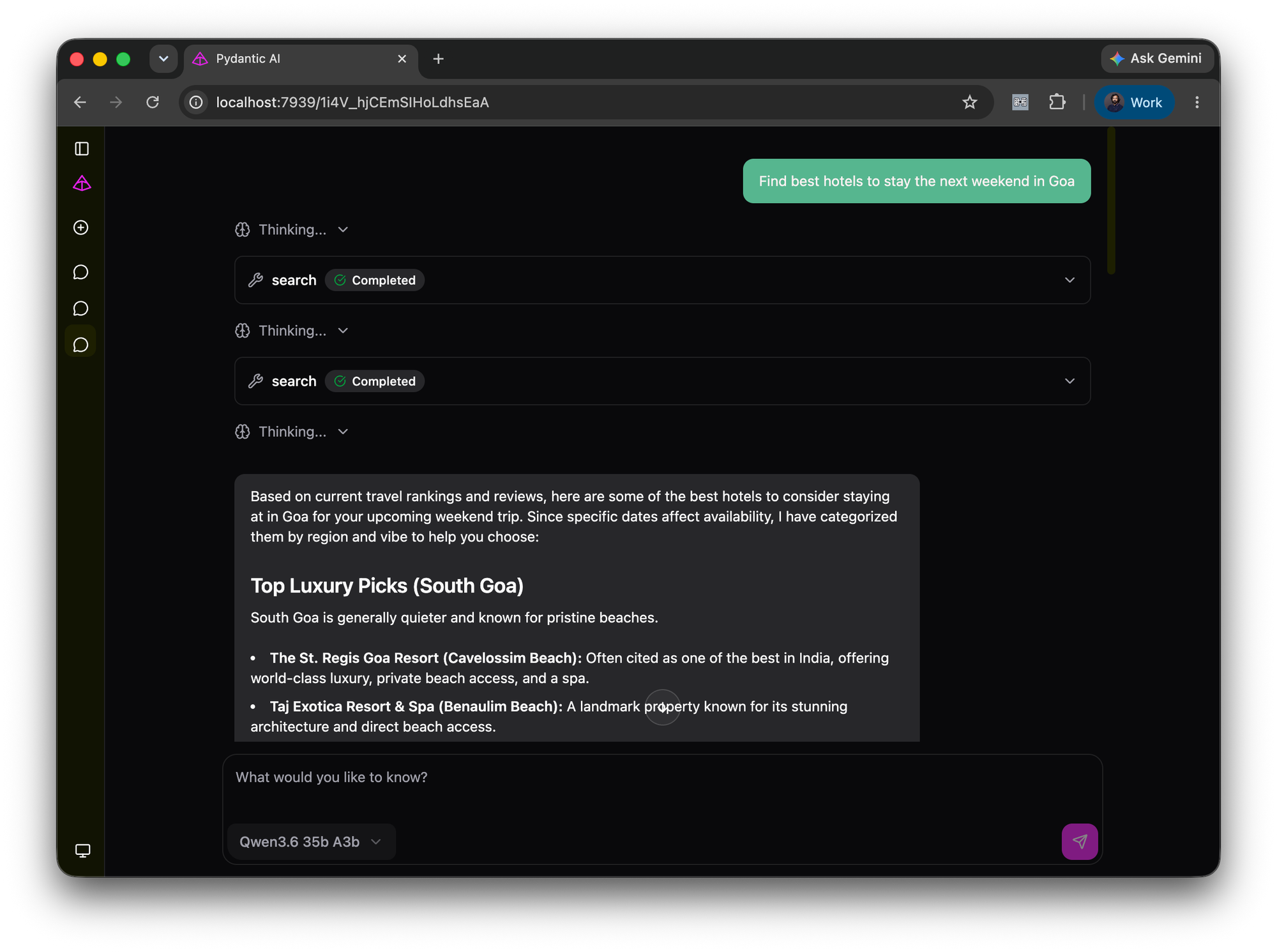
SerpApi MCP supports all SerpApi engines by default. So it can do tasks like travel searches, shopping research, news search, and more.
Here, the agent was able to provide Hotel suggestions based on the user's query.
It can successfully answer follow-up questions, for example, to get price details as well.
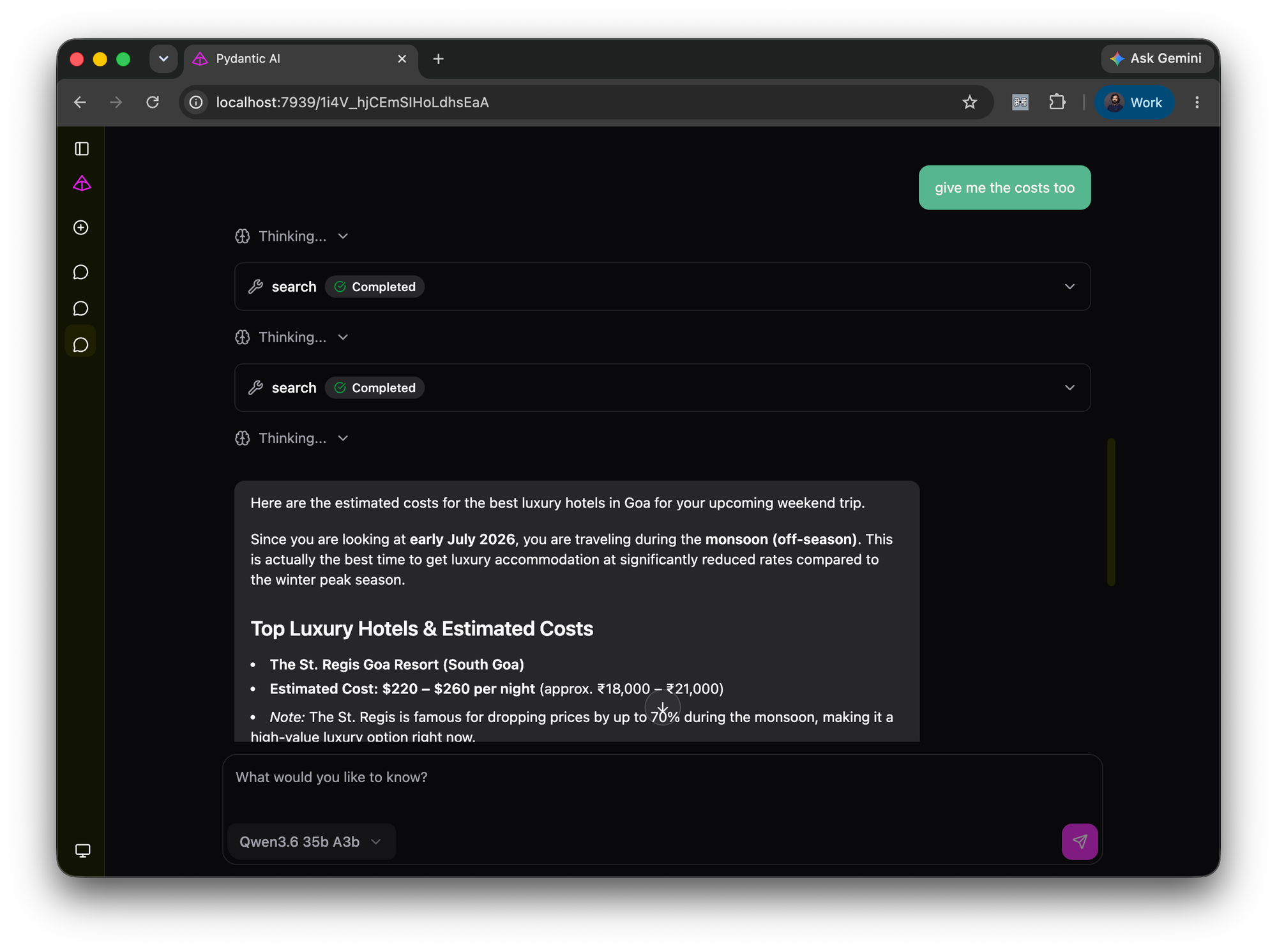
MCP makes it easier for the model to identify supported tools and call them as needed, and abstracts away the complexity from the user by avoiding tool definitions. As seen in the example above, the agent can obtain real-time results from multiple SerpApi-supported engines with minimal client-side configuration. The client-side code becomes smaller, while the agent still gets access to real-time data.
What improved in the final agent
We started with a simple Pydantic AI agent that could only answer based on the model's internal knowledge.
Then we added:
- a time tool for date-aware answers
- SerpApi search for live web results
- compact tool outputs to reduce context noise
- a deep research capability for multi-search tasks
- MCP support for reusable search integrations
The result is not just an agent that "knows more". It is an agent that has a better process.
When a query depends on current information, the agent can check the current time, search live sources, compare results, and then answer. That makes the answer more useful and reduces the chance of hallucination.
Notes for building reliable search agents
A few practical lessons from these examples:
- Give the model explicit instructions about when to use tools.
- Keep tool outputs compact and structured.
- Use specialized search engines when the task needs them.
- Use capabilities for creating reusable and lazy-loadable workflows that have their own tools and instructions.
- Use MCP when you want reusable tools without writing all client-side wrappers.
- Always test with questions where the answer changes over time.
The last point is important. A question like "What is the latest iPhone?" is a better test for a real-time agent than a static question like "What is Python?".
Static questions test the model. Current questions test the agent.
Summary
Pydantic AI gives us a clean way to build Python agents with typed tools, instructions, capabilities, web UI support, and MCP integrations.
On its own, an LLM is limited by its training data. With tools, it can call Python functions. With SerpApi, it can search live data. With Pydantic AI capabilities, it can load specialized workflows only when needed. With MCP, it can connect to reusable external tool servers.
That combination is what makes the agent smarter. Not because the model magically knows everything, but because the system around the model gives it the context and tools needed to answer better.
Related reading
Looking to learn more about building AI agents from scratch? You can refer to our introductory blog post for building Python AI agents:
 Adarsh Divakaran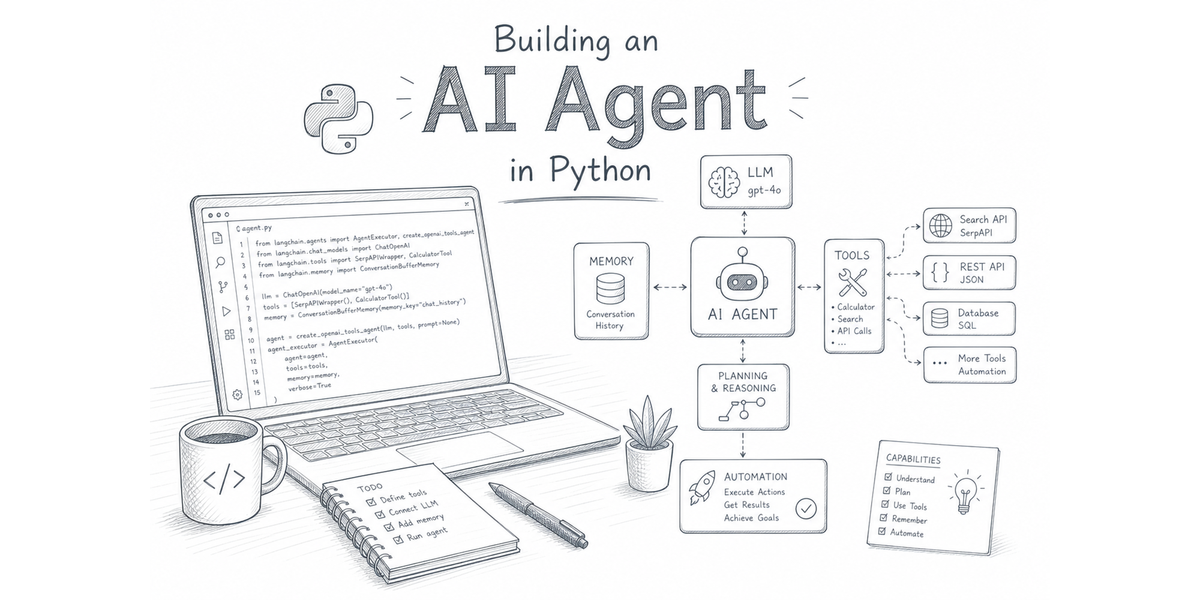
If you are interested in connecting local models with search data, refer the blog post below:
 Tomas Murua
Links
- To learn more about Pydantic AI, refer to Pydantic AI documentation.
- If you are interested in setting up local AI models, install LM Studio.
- All the agent examples used in this blog are available on our GitHub repo.