Ruby
Ruby
 Golang
 .Net
.Net
 MCP
MCP
 C++
C++

If you're building a web service or application with SerpApi, you might run into parsing errors, network problems, incorrect search engine parameters, or other issues. Here are some of the most common problems when integrating SerpApi's engines, and how to fix them in your project.
Error responses and messages
If there's a problem with the requested search engine or your API query, SerpApi (usually) still sends a JSON response. The response will just have a single error string, instead of the expected structured data, and sometimes one of several HTTP error codes.
If you make a request with an invalid or missing API key, you might get a response like this with a 401 HTTP status:
{
  "error": "Invalid API key. Your API key should be here: https://serpapi.com/manage-api-key"
}
There can also be cases where the API request works, but still returns an error message. If you request a search with the Google Search API, but Google had no matching results, the API response contains both a Success status and an error message:
{
  search_metadata: {
    status: 'Success',
    total_time_taken: 0.87,
    ...
  },
  search_parameters: {
    engine: 'google',
    q: 'example search query',
    google_domain: 'google.com',
    device: 'desktop'
  },
  search_information: {
    query_displayed: 'example search query',
    total_results: 0,
    time_taken_displayed: 0.21,
    organic_results_state: 'Fully empty',
    query_feedback: { title: 'Your search did not match any documents' }
  },
  error: "Google hasn't returned any results for this query."
}
You can handle these errors by simply checking for an error string in the response JSON, in combination with exception handling, like try/catch in JavaScript or begin/rescue in Ruby. Exception handling can also help you manage connection problems with the API.
Here's an example of a SerpApi request with more robust error handling, using Ruby with the official Ruby integration:
require 'serpapi'

begin
    client = SerpApi::Client.new(
        "api_key": ENV['SERPAPI_KEY'],
        "engine": "google",
        "q": "tron legacy movie"
    )
    results = client.search
    if results.dig(:error)
        # There's a response, but it contains an error
        puts "There was an error: #{results[:error]}"
    else
        # There's a response, with no errors
        puts "Google found #{results[:search_information][:total_results]} results."
    end
rescue => exception
    puts "There was an error: #{exception}"
end
Here's a similar example in JavaScript with Node.js, using the official JavaScript integration:
import { getJson } from 'serpapi';

try {
    const request = await getJson({
        api_key: process.env.SERPAPI_KEY,
        engine: "google",
        q: "tron legacy movie"
    });
    if (request?.error) {
        // There's a response, but it contains an error
        console.error(`There was an error: ${request.error}`);
    } else {
        // There's a response, with no errors
        console.log(`Google found ${request?.search_information?.total_results} results.`);
    }
} catch (e) {
    // The response contains an error, or didn't work at all
    console.error(e);
}
You can set up more detailed error handling by checking other strings in the JSON response. For example, if you're building a tool that checks many Google search queries for results, you could skip to the next query if organic_results is empty or missing from the JSON response, and queue the request again if there are temporary API errors.
Wrong API endpoint (usually Error 403)
If you receive an "Unauthorized" error or something like that, usually with an HTTP 403 status code, you might be using a similarly-named API. Make sure you are sending requests to a serpapi.com endpoint, like this:
https://serpapi.com/search?engine=googleYou can check the SerpApi API documentation for more examples. You can also use the official SerpApi integrations for Ruby, JavaScript, Go, Python, and other languages, which are wrappers around the same endpoints.
Wrong search parameter, or missing parameters
Each search engine in SerpApi uses different parameters and settings, usually based on the given engine's original parameters. For example, the real Google Search website uses q for the search string, gl for the geographic region, and hl for the display language:
https://www.google.com/search?q=hello+world&hl=en&gl=usThe Google Search API from SerpApi uses the same q, gl, and hl parameters, in addition to other options and SerpApi-specific settings, like the API key:
require 'serpapi'

client = SerpApi::Client.new(
    "api_key": ENV['SERPAPI_KEY'],
    "engine": "google",
    "q": "hello world",
    "hl": "en",
    "gl": "us"
)

puts "First result link: #{client.search[:organic_results][0][:link]}"
If you change the engine from google to yahoo for the Yahoo Search API, it wouldn't work without additional changes. That's because Yahoo uses p for the search string, vc for the geographic region, and vl for the display language.
For API requests missing the engine's required parameters, you might get an error like this:
{
  "error": "Missing query `q` parameter."
}
If you need to run a similar query across multiple engines, you just need to map them to the correct parameters for each engine. Here's an example in Ruby that returns search data from both Google and Yahoo:
require 'serpapi'

# Define the search query and parameters
search_data = {
    query: "hello world",
    country: "us",
    language: "en"
}
# Search with Google
google = SerpApi::Client.new(
    "api_key": ENV['SERPAPI_KEY'],
    "engine": "google",
    "q": search_data[:query],
    "hl": search_data[:language],
    "gl": search_data[:country]
)
# Search with Yahoo
yahoo = SerpApi::Client.new(
    "api_key": ENV['SERPAPI_KEY'],
    "engine": "yahoo",
    "p": search_data[:query],
    "vl": search_data[:language],
    "vc": search_data[:country]
)
# Print results
puts "Google's first result: #{google.search[:organic_results][0][:link]}"
puts "Yahoo's first result: #{yahoo.search[:organic_results][0][:link]}"
Check the full API list for each engine's documentation and which parameters are supported.
Running out of credits, or exceeding hourly limits
Your SerpApi plan has a maximum amount of searches each month, as well as a maximum hourly search throughput. When you run out, you might receive an error like this in the API response with a 429 HTTP status:
{
  "error": "Your account has run out of searches."
}
You can add more search credits and receive higher throughputs by upgrading your SerpApi plan. Your account dashboard also lists your monthly search quota, how many searches you have used already, and how many searches you have remaining.
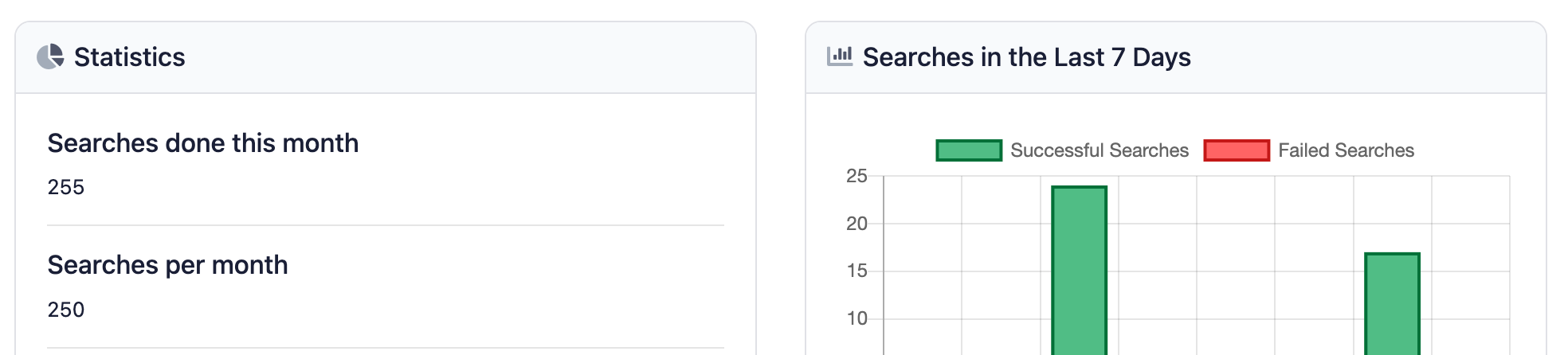
You can also use the SerpApi Account API to programmatically check your credits balance. For example, if you're building a tool that performs thousands or millions of searches, you can move searches to next month's queue when the value for plan_searches_left approaches zero.
API key in the wrong location
Requests to SerpApi should have the API key as the api_key parameter in the URL request. The key should not be in HTTP headers, form data, or anywhere else.
Here's an example request with cURL, with the API key as one of the parameters:
curl --get https://serpapi.com/search \
 -d engine="google" \
 -d q="international space station" \
 -d api_key="6bc7b542200c4c5aa629c50d52960de4"
This is the same example in Node.js, using the built-in fetch API to create the request:
const baseUrl = 'https://serpapi.com/search';
const params = new URLSearchParams({
    engine: "google",
    q: "international space station",
    api_key: "6bc7b542200c4c5aa629c50d52960de4"
});
const req = await fetch(`${baseUrl}?${params}`);
const data = await req.json();
console.log(data);
If you're using one of the official SerpApi integrations, the API key is just one of the strings in the JSON request, or a global variable. Here's the example request with the official JavaScript library:
import { getJson } from 'serpapi';

const request = await getJson({
    engine: "google",
    q: "international space station",
    api_key: "6bc7b542200c4c5aa629c50d52960de4"
});
console.log(request)
If you are publishing or sharing your code, make sure to store your API keys in environment variables or another safe location.
Wrong library
SerpApi has official integrations for Ruby, Python, JavaScript, PHP, and other programming languages. However, some projects and code examples use the older and deprecated versions, which can lead to some confusion in new projects.
For example, the original integration for JavaScript was the google-search-results-nodejs library, with classes like GoogleSearch and YahooSearch:
const SerpApi = require('google-search-results-nodejs')

const search = new SerpApi.GoogleSearch(API_KEY)
search.json({
 q: "apollo 11",
 location: "atlanta, ga"
}, (result) => {
  console.log(result)
})
That integration was deprecated and replaced with the serpapi package, which added TypeScript support, Promises, and other improvements:
const { getJson } = require("serpapi");

getJson({
  engine: "google",
  api_key: API_KEY,
  q: "apollo 11",
  location: "atlanta, ga",
}, (json) => {
  console.log(json["organic_results"]);
});
You can check the SerpApi website for a list of all the current libraries and integrations. Make sure you're using one of those options, and not a deprecated framework, or a library for another similarly-named service.
You can also make standard network requests to the API without one of the official libraries, using fetch() in Node.js, cURL in PHP, Net::HTTP.get_response in Ruby, and so on. The integrations are just wrappers around the API calls.
Blocked by CORS or document Content Security Policy
If you try to make requests to SerpApi from a web page, you might receive an error like this in the browser's console:
Fetch API cannot load https://serpapi.com/search?engine=google&q=tron+legacy+movie&api_key=key_goes_here. Refused to connect because it violates the document's Content Security Policy.The error could also look like this:
Access to fetch at 'https://serpapi.com/search?engine=google&q=tron+legacy+movie&api_key=key_goes_here' from origin 'https://example.com' has been blocked by CORS policy: No 'Access-Control-Allow-Origin' header is present on the requested resource.SerpApi does not support Cross-Origin Resource Sharing, which is required to use APIs in a browser environment, because your API key would be exposed.
 Hilman Ramadhan
If you are building a web app or service for web browsers using SerpApi, the code should be running on a server (like Node.js or Bun), with the results passed to the client. If you can hide the API key, a locally-running web app could still work with SerpApi requests running through a proxy server.