Ruby
Ruby
 Golang
 .Net
.Net
 MCP
MCP
 C++
C++

In modern e-commerce, pricing changes constantly across retailers and depends where you are located. This makes it difficult to track product value in real time. In this blog we'll review how to build a multi-store price tracking system across the globe, using SerpApi and Python.
Pull structured search data from Amazon, Walmart, Target, CVS, and more. Using this data you can monitor product prices, compare competitors, and maintain a continuously updated view of the market.
If you'd like to see how to build a price comparison app using Claude Code, watch the video here:
Getting Started with SerpApi
If you are new to SerpApi get started with this blog post:
 Hilman Ramadhan
Now that you are setup with SerpApi and have located your API key, let's take a look at SerpApi's libraries.
Libraries
In this example we will be using SerpApi's Python library.
To install the serpapi package, simply run the following command:
$ pip install serpapiYou can also make a simple GET request or for other programming languages, view our supported libraries here: https://serpapi.com/integrations.
SerpApi's Shopping APIs
Using SerpApi you can automatically gather product data across multiple stores and normalize it into a structured format. The goal is to build a tool that can:
- Track a product across multiple retailers (e.g., Amazon, Walmart, Target, etc.)
- Track a product across multiple locations
- Support use cases like alerts, dashboards, or competitive analysis
SerpApi offers many different shopping APIs. For this example we will be using:
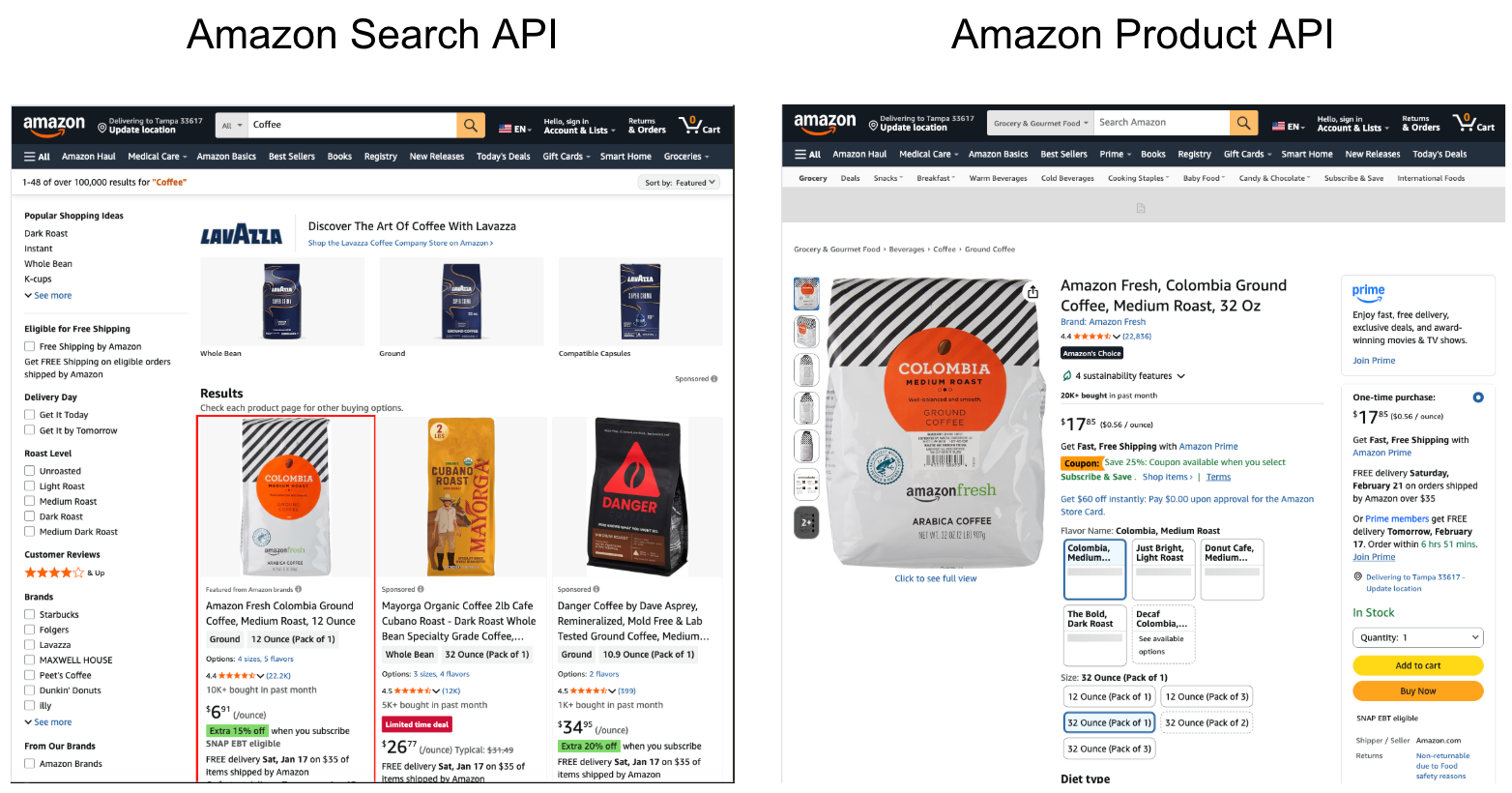
Amazon
- Amazon Search API
- Collect search results for a specific keyword.
- Each result has the
asinvalue for a specific product. - If you already have product
asinvalues, skip this step.
- Amazon Product API
- Scrape full product page for a specific product using the
asinvalue.
- Scrape full product page for a specific product using the
Walmart
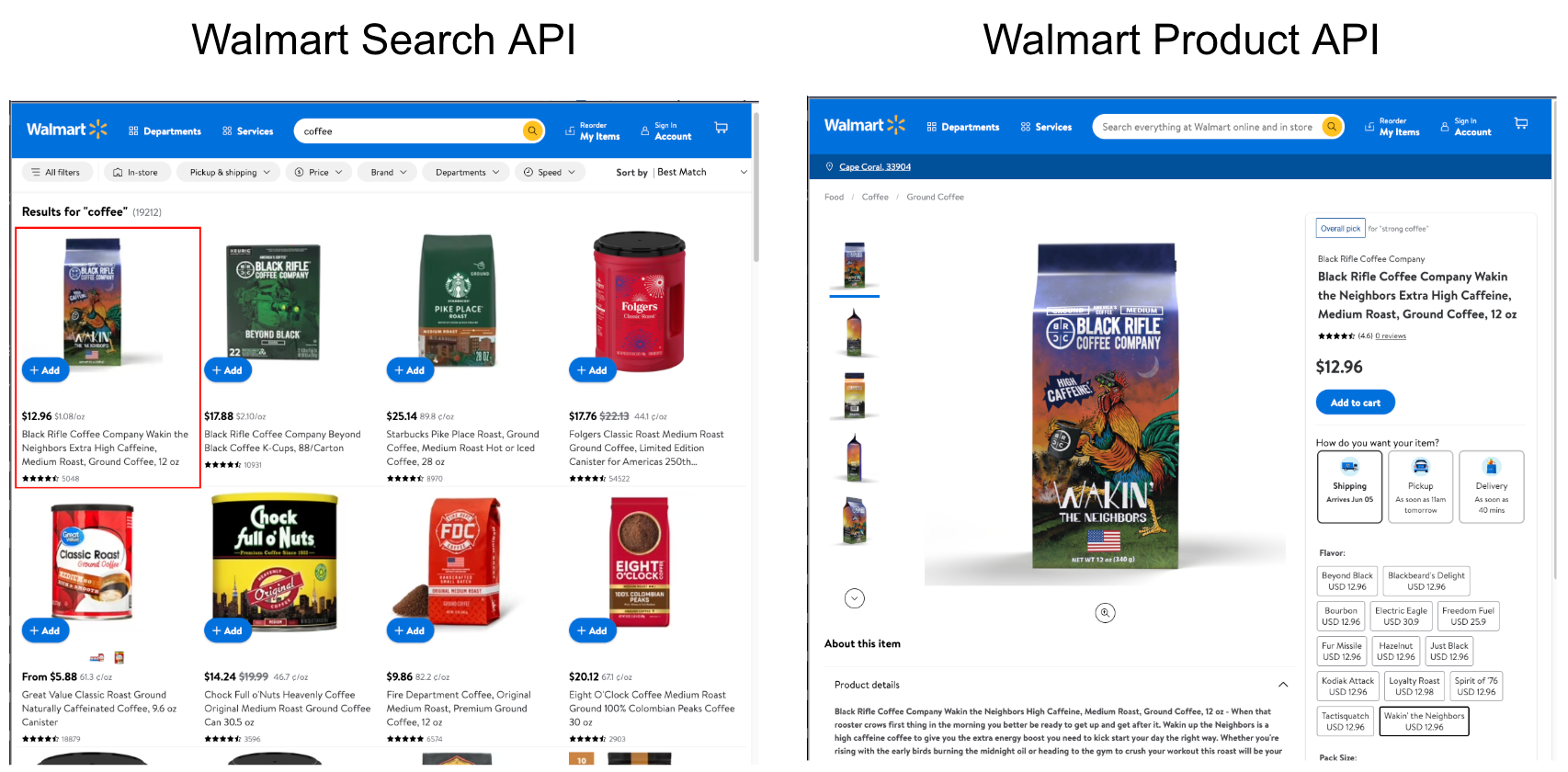
- Walmart Search API
- Collect search results for a specific keyword.
- Each result has the
product_idvalue for a specific product. - If you already have product
product_idvalues, skip this step.
- Walmart Product API
- Scrape full product page for a specific product using the
product_idvalue.
- Scrape full product page for a specific product using the
Google Shopping (Additional Retailers)
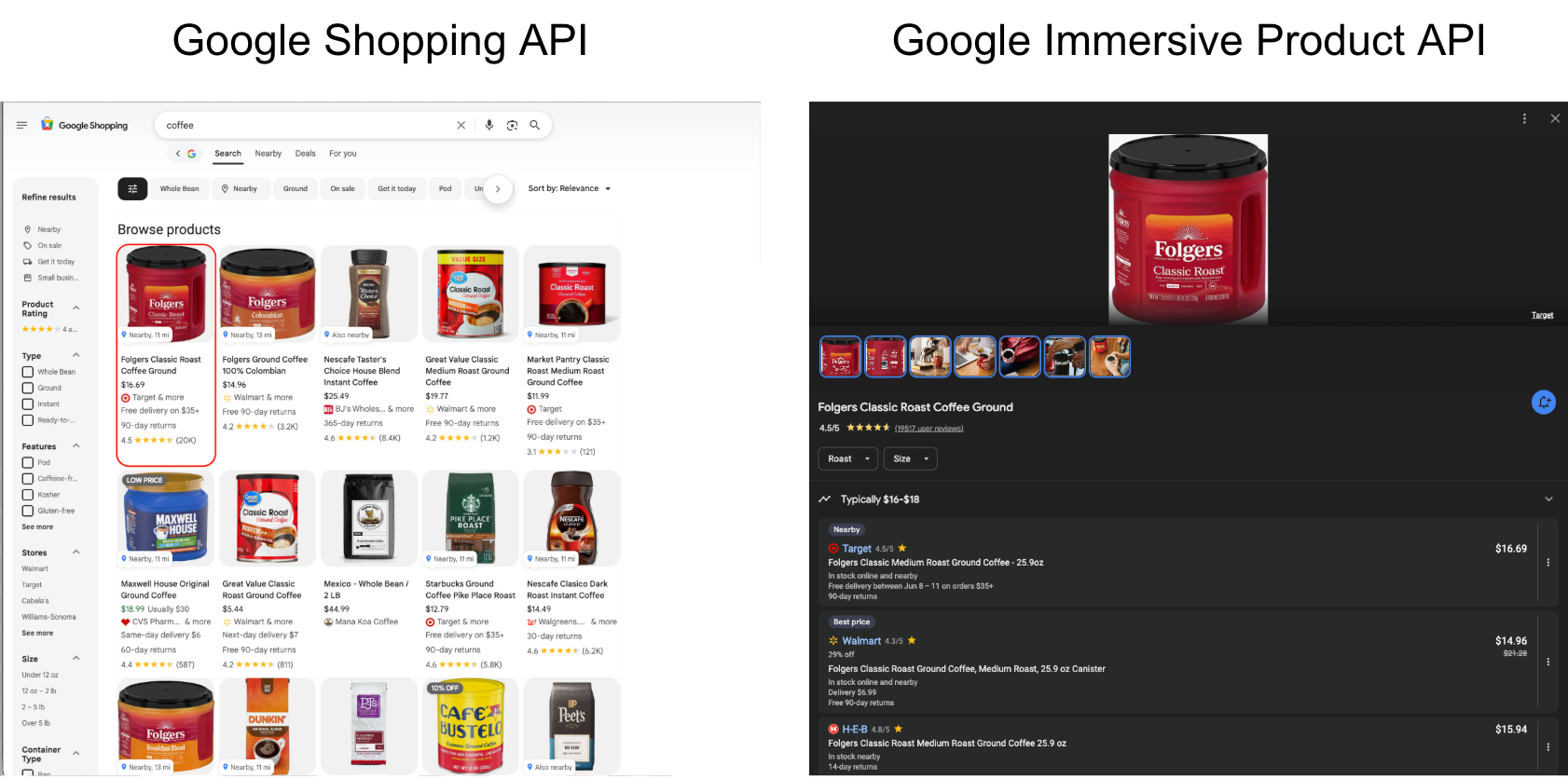
- Google Shopping API
- Collect search results for a specific keyword.
- Each result has the
immersive_product_page_tokenvalue for a specific product. - If you already have product
immersive_product_page_tokenvalues, skip this step.
- Google Immersive Product API
- There we can get the prices for many different stores.
Additional Shopping APIs
While SerpApi offers many additional APIs, this tutorial will focus on the three mentioned above.
For a complete list of available APIs, see the full documentation here:


Price Comparison Steps
In this example we already have a product selected, including the Amazon asin, Walmart product_id, and name. As well as the location details needed to track different areas.
1. Set Target Stores
We start by specifying a list of stores we want to monitor. This allows us to control coverage and easily expand or reduce retailer tracking. In this case we are tracking:
target_stores = ["amazon","walmart", "target", "walgreens", "cvs"]If you have additional target stores, you can easily add them to this list to track them as well.
2. Load Input Data
Read in a CSV file (products_input.csv) containing the Amazon asin, Walmart product_id, name, and location details.
My CSV:
name,asin,walmart_id,walmart_store,zip_code,state,country,country_code
M&M's Minis Milk Chocolate Candy Sharing,B09RBG3NWB,805902256,4554,78757,Texas,United States,US
M&M's Minis Milk Chocolate Candy Sharing,B09RBG3NWB,805902256,2568,91402,California,United States,US
M&M's Minis Milk Chocolate Candy Sharing,B09RBG3NWB,805902256,5293,11096,New York,United States,US
M&M's Minis Milk Chocolate Candy Sharing,B09RBG3NWB,805902256,5350,84117,Utah,United States,US
If you don't have your products' asin or walmart_id, you can collect these values using the Amazon Search API and the Walmart Search API.
Blogs to get started with either:
 Artur Chukhrai
3. Initialize Structured Store Data
For each product, we create a standardized stores dictionary structure per store, initializing fields like:
- price
- search_id
There are many other data pieces returned in the results we can also include, however in this example we are just looking at the pricing.
4. Query SerpApi Per Product/Store Combination
We loop through each product and query SerpApi to retrieve search results for each location and all the stores available.
- Amazon Product API - using the
asinvalue as input - Walmart Product API - using the Walmart
product_id - Google Shopping API - using the
name- Google Immersive Product API - iterate through all the stores and collect the data for the relevant sellers.
5. Export or Extend the Output
Finally, the processed data can be:
- Exported to CSV
- Stored in a database
- Used in dashboards
- Extended into alerting/monitoring systems
In this example we'll export to a new CSV with the timestamp in the title.
Code
import serpapi
import csv
from datetime import datetime

API_KEY = "YOUR_SECRET_API_KEY"

target_stores = ["amazon","walmart", "target", "walgreens", "cvs"]

# Query the Amazon Product API
# Input parameters from the input CSV including asin, zip, and country
# Return Search ID and price
def amazon_search(asin, zip, country):
	search_id = ""
	price = ""

	# Query Amazon Product API using the asin value
	params = {
		"api_key": API_KEY,
		"engine": "amazon_product",
		"asin": asin,
		"delivery_zip": zip,
		"shipping_location": country
	}

	results = serpapi.search(params).as_dict()

	# Check if required price fields are available
	if "product_results" in results:
		search_id = results["search_metadata"]["id"]
		amazon_product = results["product_results"]
		if "price" in amazon_product:
			price = amazon_product["price"]
		else:
			price = "Unavailable"

	return search_id, price


# Query the Walmart Product API
# Input parameters from the input CSV including the Walmart product ID and store ID
# Return Search ID and price
def walmart_search(walmart_id, store_id):
	search_id = ""
	price = ""
	# Query Walmart Product API using the product ID
	params = {
		"api_key": API_KEY,
		"engine": "walmart_product",
		"product_id": walmart_id,
		"store_id": store_id
	}

	walmart_results = serpapi.search(params).as_dict()

	# Check if required fields are available

	if "product_result" in walmart_results:
		search_id = walmart_results["search_metadata"]["id"]
		walmart_product = walmart_results["product_result"]
		if "price_map" in walmart_product:
			price = walmart_product["price_map"]["price"]
		else:
			price = "Unavailable"

	return search_id, price

# Query the Amazon Product API
# Input parameters from the input CSV including asin, zip, and country
# Set applicable values in the global stores dictionary
def google_shopping(product_name, location, country):
	addl_results = {}
	# Query the Google Shopping API using the product name extracted from the Walmart or Amazon Product APIs
	params = {
		"api_key": API_KEY,
		"engine": "google_shopping",
		"q": product_name,
		"location": location,
		"gl": country
	}

	shopping_results = serpapi.search(params).as_dict()

	# Verify there are shopping results available
	if "shopping_results" in shopping_results:
		google_shop_results = shopping_results["shopping_results"]

		if len(google_shop_results) > 0:

			# Set token to query the Google Immersive Product API from Google Shopping results
			immersive_product_token = shopping_results["shopping_results"][0]["immersive_product_page_token"]
			# Copy target stores to a set to track what we have found (already found Amazon and Walmart)
			remaining_stores = set(target_stores) - {"amazon", "walmart"}
			# Token for next page of store results for a product
			next_page = ""

			# Iterate through Google Immersive Product results until there are no more stores in the results or target
			while True:
				params = {
					"api_key": API_KEY,
					"engine": "google_immersive_product",
					"page_token": immersive_product_token,
					"more_stores": "true",
					"next_page_token": next_page
				}
				immersive_results = serpapi.search(params).as_dict()

				# Check if there are product results within the results
				if "product_results" in immersive_results:
					immersive_product = immersive_results["product_results"]

					# Check if there are stores within the product results
					if "stores" in immersive_product:
						stores_results = immersive_product["stores"]

						# Iterate through the stores available
						for store in stores_results:

							# Normalize and check if the store matches one of our target stores
							store_name = store["name"].lower().replace("'", "").replace(" ", "")
							match = next((s for s in remaining_stores if s in store_name), None)

							#If there's a match add the product details to our result dictionary
							if match:
								addl_results[match] = {
    								"price": store.get("price", "No Results"),
   									"search_id": immersive_results["search_metadata"]["id"]
								}
								# Remove match from the remaining target stores set
								remaining_stores.remove(match)

					# Assign next page token if it's available
					if "stores_next_page_token" in immersive_product:
						next_page = immersive_product["stores_next_page_token"]
					# Otherwise break out of the loop (no more stores in results)
					else:
						break
				else:
					break
				# Break out of the loop if there are no more target stores remaining
				if not remaining_stores:
					break
	return addl_results

# Write results out to a CSV file
def write_to_csv(rows, output_prefix="products_output"):
    flat_rows = []

    # Original input columns first
    input_columns = list(rows[0].keys())
    input_columns.remove("stores")

    # Store columns in desired order
    store_columns = []

    for store in target_stores:
        store_columns.extend([
            f"{store}_search_id",
            f"{store}_price"
        ])

    for row in rows:
        flat_row = {}

        # Add original CSV fields first
        for col in input_columns:
            flat_row[col] = row.get(col, "")

        # Add store fields in consistent order
        stores = row.get("stores", {})

        for store in target_stores:
            data = stores.get(store, {})

            flat_row[f"{store}_search_id"] = data.get("search_id", "")
            flat_row[f"{store}_price"] = data.get("price", "")

        flat_rows.append(flat_row)

    fieldnames = input_columns + store_columns

    timestamp = datetime.now().strftime("%Y%m%d_%H%M%S")
    output_file = f"{output_prefix}_{timestamp}.csv"

    with open(output_file, "w", newline="", encoding="utf-8") as outfile:
        writer = csv.DictWriter(outfile, fieldnames=fieldnames)
        writer.writeheader()
        writer.writerows(flat_rows)

def main():
	with open("products_input.csv", "r", newline="", encoding="utf-8") as infile:
		reader = csv.DictReader(infile)
		rows = list(reader)

		# Iterate through each row of the CSV
		for row in rows:
			stores = {
				store: { "price": "No Results", "unit": "No Results", "search_id": "" }
				for store in target_stores
			}
			search_id, price = amazon_search(row["asin"], row["zip_code"], row["country"])
			stores["amazon"] = {"price": price, "search_id": search_id}

			search_id, price = walmart_search(row["walmart_id"], row["walmart_store"])
			stores["walmart"] = {"price": price, "search_id": search_id}

			stores.update(google_shopping(row['name'], f"{row['zip_code']},{row['state']},{row['country']}", row["country_code"]))
			row["stores"] = stores
	write_to_csv(rows)

if __name__ == "__main__":
	main()
Result Values
Within the results you will see 3 different pricing options, including:
An actual price
- The product was found
- The product has pricing details for the specified locaton
- Ex: $3.58
"No Results"
- The product was not found
- The product doesn't have this seller listed in the location specified
"Unavailable"
- The item was found however there was no pricing available
- Ex: the product may not be available for sale in the selected location or sold out
For example in Amazon, this product was found however there is no pricing available for the specified location:
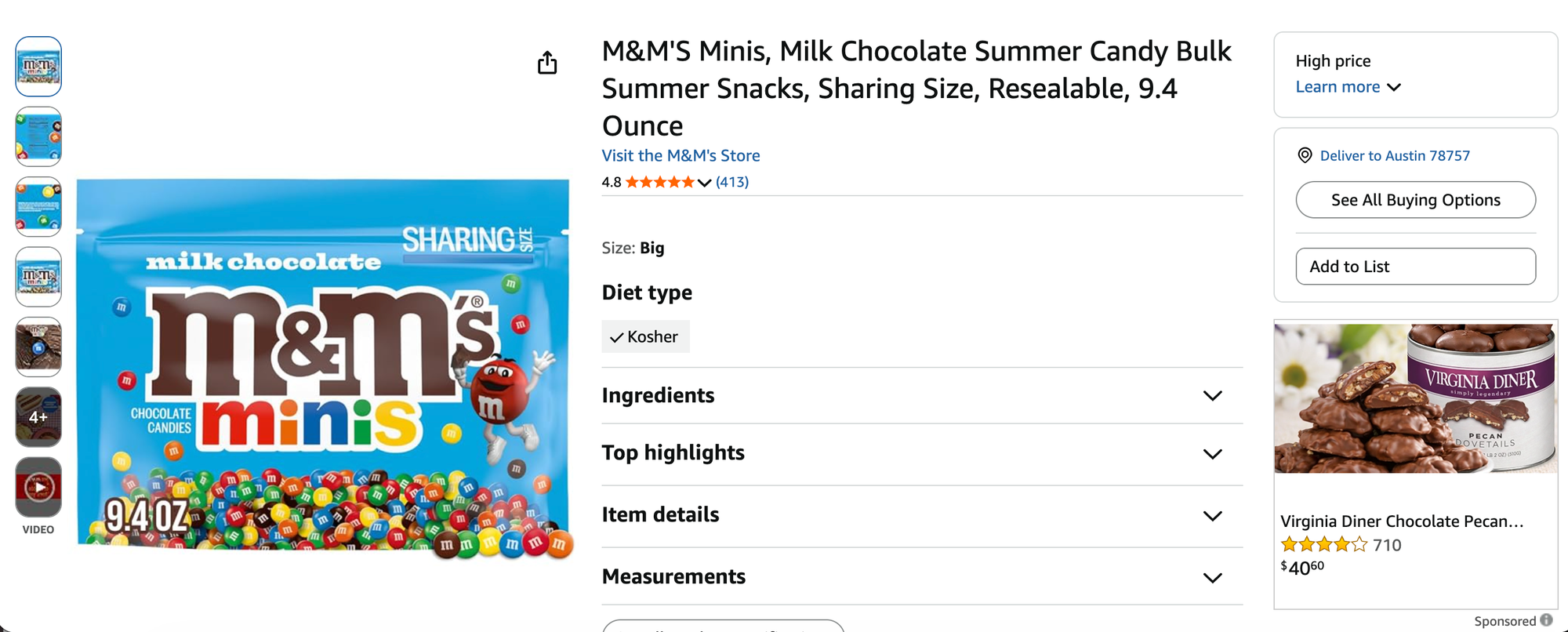
Now that we've identified the results structure, let's take a look at the results for this example.
Results
For visualization I have uploaded the returned CSV into Google Sheets with the input values highlighted gray and the price values highlighted yellow:
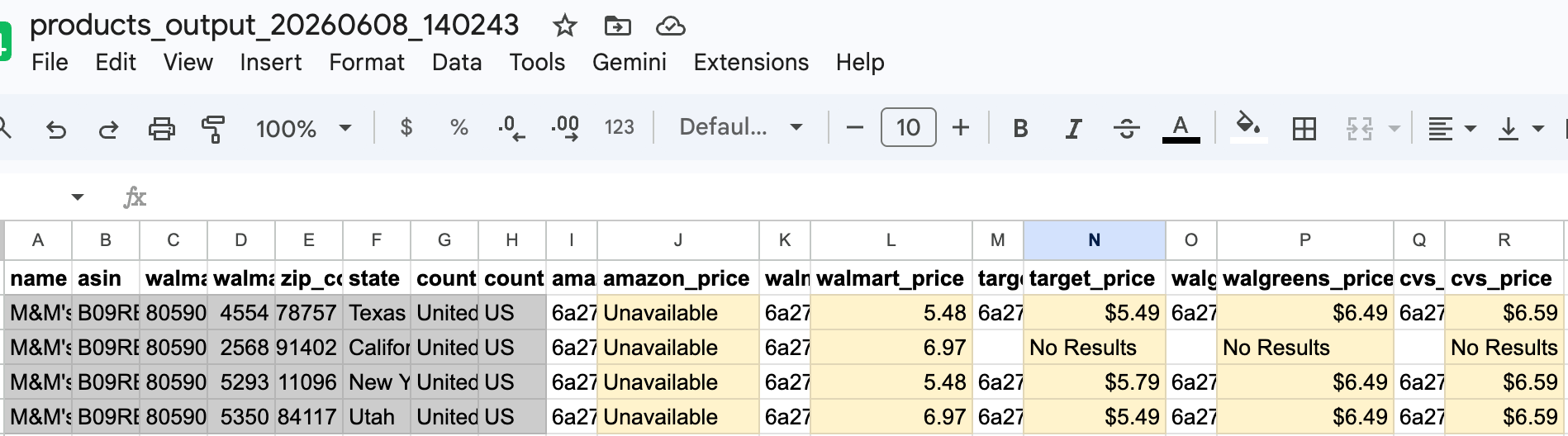
You can see the variance in pricing across stores and locations even for this 1 product across 4 different locations.
You can use this data to compare pricing across different locations, track competitor pricing, and much more!
Conclusion
Using SerpApi makes comparing product prices across different stores and locations effortless. While this example focused primarily on pricing data, the shopping / product APIs provide access to many other valuable data points, including product ratings, review counts, shipping details, availability, seller information, and more.
Additionally, the Google Immersive Product API supports a wide range of retailers outside of this target list, with available stores varying by country and region.
By combining data from multiple shopping sources and locations, organizations can build comprehensive price intelligence solutions, automate competitive analysis, and make more informed decisions based on real-time market data. Whether you're monitoring competitors, optimizing pricing strategies, conducting market research, or tracking product availability, SerpApi provides a flexible and scalable foundation for collecting and analyzing e-commerce data.
Related Blogs
- Product Market Research using Amazon Search API
- Product Research with Google Search
- How to Scrape Google Shopping Results and Details Product Data
- How to Scrape Home Depot Product Data with SerpApi
- Scraping Product Details from Walmart, Home Depot and Google Shopping with SerpApi