Ruby
Ruby
 Golang
 .Net
.Net
 MCP
MCP
 C++
C++

Amazon products are identified by an ASIN, short for Amazon Standard Identification Number. If you're building a product research tool, price monitoring system, competitor tracker, or an Amazon data workflow, the ASIN is usually the key identifier you need.
In this tutorial, we’ll learn how to:
- Search Amazon products by keyword.
- Extract the ASIN from Amazon search results.
- Use that ASIN to fetch detailed product information.
We’ll use two SerpApi APIs:
- Amazon Search API: to search Amazon and retrieve product results with ASINs.
- Amazon Product API: to look up detailed product data using an ASIN.

Video Tutorial
We also provide video tutorials for this guide.
Amazon Search Results Scraper:
Amazon Product Detail Scraper:
Why use an Amazon Search API?
Manually searching Amazon and copying product details is slow. Building your own scraper also means handling HTML changes, blocking, proxies, parsing, and maintenance.
With an API, you can programmatically look up products and get structured JSON data without the scraping headaches.
The Amazon Search API uses the endpoint https://serpapi.com/search?engine=amazon, and the query parameter is k, which works like a regular Amazon search query.
You can use this for:
- Product research
- Price monitoring
- Competitor tracking
- Marketplace analysis
- Product catalog enrichment
- Review and rating monitoring
- Amazon product matching
- AI shopping assistants
Step 1: Search Amazon products and get ASINs
We're using Python for the tutorial. You can use any programming language you want.
Install requests first:
pip install requests
Create a new main.py file. Let’s say we want to search for "coffee" in Amazon:
import requests
import json

SERPAPI_API_KEY = "YOUR_SERPAPI_API_KEY"

params = {
    "api_key": SERPAPI_API_KEY,
    "engine": "amazon",
    "amazon_domain": "amazon.com",
    "k": "coffee"
}

search = requests.get("https://serpapi.com/search", params=params)
response = search.json()

print(json.dumps(response, indent=2))
This sends a request to the Amazon Search API and returns Amazon search results in JSON format.
The k parameter defines the Amazon search query, and amazon_domain lets you choose the Amazon marketplace, such as amazon.com.
Here is the example result:
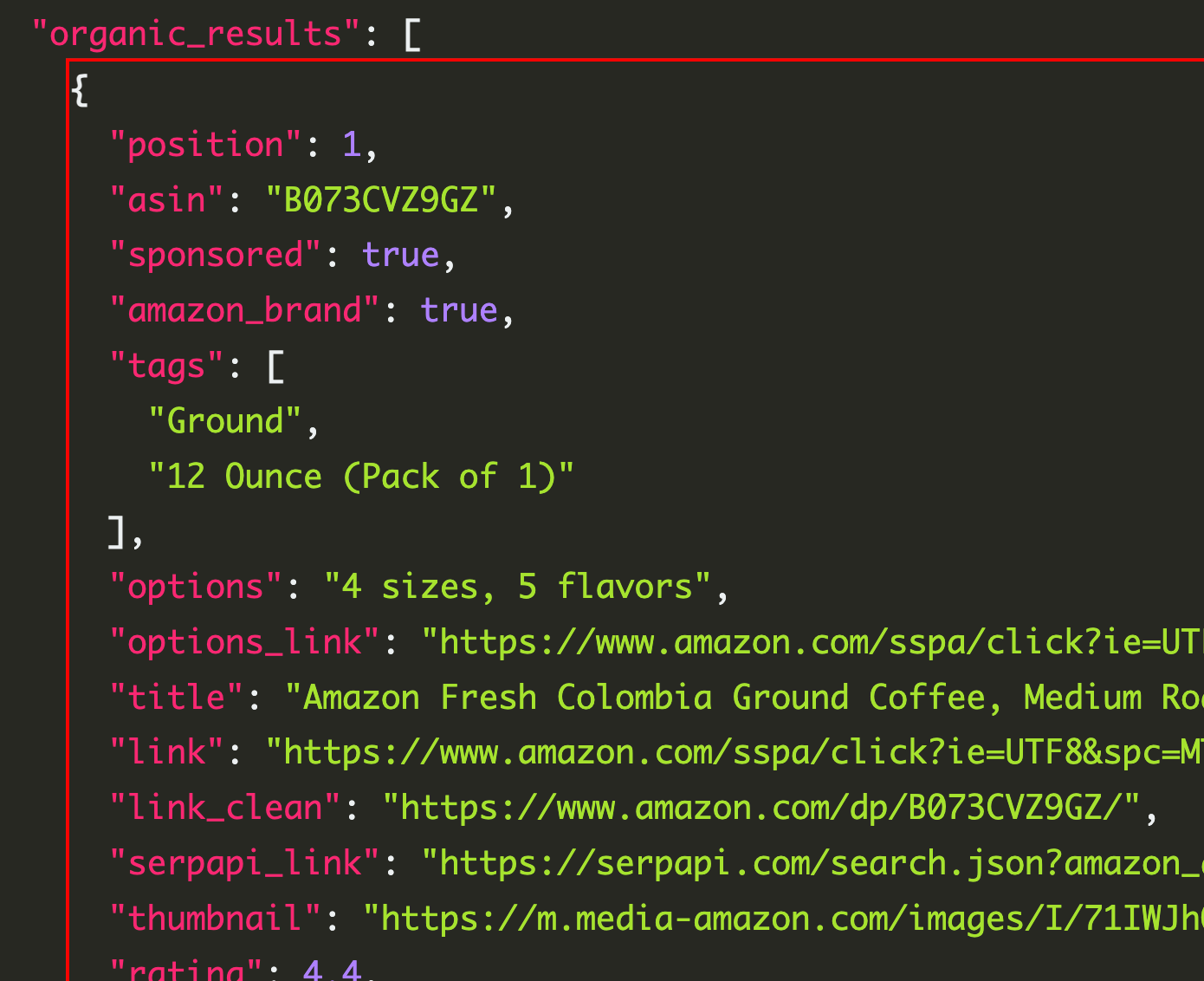
You can see that we receive the ASIN for each item.
Step 2: Extract ASINs from Amazon search results
Amazon Search API results can include product fields like title, link, thumbnail, rating, and reviews. Products inside Amazon results include an ASIN field and a serpapi_link pointing to the Amazon Product API lookup for that ASIN.
Let’s print a cleaner list of products:
import requests

SERPAPI_API_KEY = "YOUR_SERPAPI_API_KEY"

params = {
    "api_key": SERPAPI_API_KEY,
    "engine": "amazon",
    "amazon_domain": "amazon.com",
    "k": "coffee"
}

search = requests.get("https://serpapi.com/search", params=params)
response = search.json()

for product in response.get("organic_results", []):
    title = product.get("title")
    asin = product.get("asin")
    price = product.get("price")
    rating = product.get("rating")
    reviews = product.get("reviews")

    print(f"Title: {title}")
    print(f"ASIN: {asin}")
    print(f"Price: {price}")
    print(f"Rating: {rating}")
    print(f"Reviews: {reviews}")
    print("-" * 50)
Example output:
Title: Amazon Fresh, Colombia Ground Coffee, Medium Roast, 32 Oz
ASIN: B072MQ5BRX
Price: $15.31
Rating: 4.5
Reviews: 7823
--------------------------------------------------
Now we have the ASIN. Next, we can use it to get more complete product details.
Step 3: Look up product details by ASIN
The Amazon Product API uses engine=amazon_product and requires an asin parameter. The request returns a product_results object containing fields like asin, title, description, tags, badges, variants, brand, links, thumbnails, and more.
Here’s how to look up a product by ASIN:
import requests
import json

SERPAPI_API_KEY = "YOUR_SERPAPI_API_KEY"

params = {
    "api_key": SERPAPI_API_KEY,
    "engine": "amazon_product",
    "asin": "B072MQ5BRX"
}

search = requests.get("https://serpapi.com/search", params=params)
response = search.json()

print(json.dumps(response, indent=2))
Now let’s print only the most useful product details:
import requests

SERPAPI_API_KEY = "YOUR_SERPAPI_API_KEY"

params = {
    "api_key": SERPAPI_API_KEY,
    "engine": "amazon_product",
    "amazon_domain": "amazon.com",
    "asin": "B072MQ5BRX"
}

search = requests.get("https://serpapi.com/search", params=params)
response = search.json()

product = response.get("product_results", {})

print(f"Title: {product.get('title')}")
print(f"ASIN: {product.get('asin')}")
print(f"Brand: {product.get('brand')}")
print(f"Rating: {product.get('rating')}")
print(f"Reviews: {product.get('reviews')}")
print(f"Price: {product.get('price')}")
print(f"Link: {product.get('link')}")
Complete example: Search Amazon, get the first ASIN, then fetch product details
In many cases, you don’t already know the ASIN. You only have a keyword, a product name, a brand, or a category.
Here’s a complete workflow:
import requests

SERPAPI_API_KEY = "YOUR_SERPAPI_API_KEY"


def search_amazon_products(query):
    params = {
        "api_key": SERPAPI_API_KEY,
        "engine": "amazon",
        "amazon_domain": "amazon.com",
        "k": query
    }

    search = requests.get("https://serpapi.com/search", params=params)
    return search.json()


def get_amazon_product_by_asin(asin):
    params = {
        "api_key": SERPAPI_API_KEY,
        "engine": "amazon_product",
        "amazon_domain": "amazon.com",
        "asin": asin
    }

    search = requests.get("https://serpapi.com/search", params=params)
    return search.json()


search_results = search_amazon_products("coffee")

first_product = search_results.get("organic_results", [])[0]
asin = first_product.get("asin")

print(f"Found ASIN: {asin}")
print(f"Product title: {first_product.get('title')}")

product_details = get_amazon_product_by_asin(asin)
product = product_details.get("product_results", {})

print("\nProduct Details")
print(f"Title: {product.get('title')}")
print(f"Brand: {product.get('brand')}")
print(f"Price: {product.get('price')}")
print(f"Rating: {product.get('rating')}")
print(f"Reviews: {product.get('reviews')}")
JavaScript example
You can also do the same thing in JavaScript.
Install the SerpApi package:
npm install serpapi
Then create an index.js file:
const { getJson } = require("serpapi");

const API_KEY = "YOUR_SERPAPI_API_KEY";

async function searchAmazonProducts(query) {
  return new Promise((resolve, reject) => {
    getJson(
      {
        api_key: API_KEY,
        engine: "amazon",
        amazon_domain: "amazon.com",
        k: query,
      },
      (json) => {
        resolve(json);
      }
    );
  });
}

async function getAmazonProductByAsin(asin) {
  return new Promise((resolve, reject) => {
    getJson(
      {
        api_key: API_KEY,
        engine: "amazon_product",
        amazon_domain: "amazon.com",
        asin,
      },
      (json) => {
        resolve(json);
      }
    );
  });
}

async function main() {
  const searchResults = await searchAmazonProducts("coffee");

  const firstProduct = searchResults.organic_results?.[0];

  if (!firstProduct) {
    console.log("No product found.");
    return;
  }

  const asin = firstProduct.asin;

  console.log("Found ASIN:", asin);
  console.log("Product title:", firstProduct.title);

  const productDetails = await getAmazonProductByAsin(asin);
  const product = productDetails.product_results;

  console.log("\nProduct Details");
  console.log("Title:", product?.title);
  console.log("Brand:", product?.brand);
  console.log("Price:", product?.price);
  console.log("Rating:", product?.rating);
  console.log("Reviews:", product?.reviews);
}

main();
Useful parameters
For Amazon Search API:
{
  "engine": "amazon",
  "amazon_domain": "amazon.com",
  "k": "coffee"
}
Useful parameters include:
k: the Amazon search query.amazon_domain: the Amazon marketplace to use.language: the Amazon search language.delivery_zip: ZIP or postal code for shipping-based results.shipping_location: shipping country.s: sorting option.
The Amazon Search API supports sorting options such as featured, price low to high, price high to low, average customer review, newest arrivals, and best sellers.
What data can you get from an ASIN lookup?
Depending on the product and Amazon page, the Amazon Product API can return structured data such as:
- Product title
- ASIN
- Brand
- Description
- Product images
- Price
- Rating
- Reviews
- Badges
- Variants
- Product details
- Product features
- Buying options
- Other sellers
- Related products
Conclusion
An Amazon ASIN lookup workflow usually has two steps:
- Use the Amazon Search API to search Amazon and find product ASINs.
- Use the Amazon Product API to fetch detailed product information from a specific ASIN.
This makes it easier to build product research tools, price trackers, marketplace dashboards, AI shopping assistants, and catalog enrichment workflows without maintaining your own Amazon scraper.
You can try the APIs here: