Ruby
Ruby
 Golang
 .Net
.Net
 MCP
MCP
 C++
C++

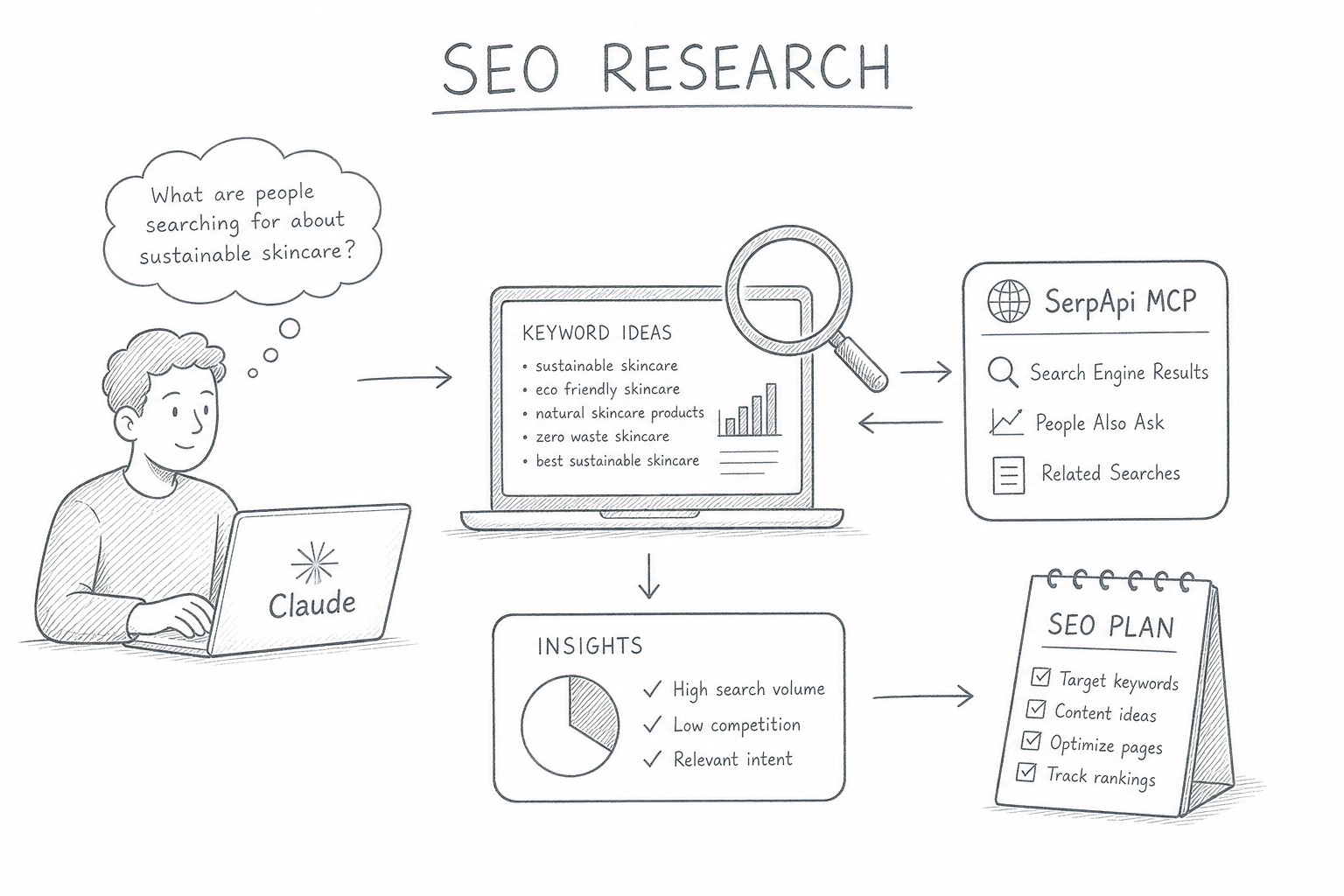
Most SEO research workflows feel like tab management. You open Ahrefs, Semrush, or any SEO tools for keyword data, flip to Google for SERP analysis, copy results into a doc, paste context back into your AI tool, and start over. Every tool switch breaks your chain of thought.
There's a better way. By connecting SerpApi's MCP server to Claude Desktop, you can run live SERP lookups, keyword research, competitor analysis, and content gap checks inside a single chat window, without touching a browser.
This post walks through how to set it up, the prompts that make it useful, and the SEO research workflows worth building into your daily routine.
Why ask Claude for SEO data when it makes up numbers?
If you've ever asked a chatbot for search volumes or "the top ranking pages" for a keyword, you've seen the problem: it answers confidently and it's often wrong. Language models don't have a live index. They approximate it by inventing volumes, guessing at competitors, and describing a SERP from months or years ago.
That's the gap the Model Context Protocol (MCP) closes. MCP lets Claude call external tools and pull real data into the conversation. Point it at the SerpApi MCP server and Claude stops guessing about Google and starts reading the actual results page for the organic positions, the People Also Ask box, autocomplete suggestions, AI Overview citations, and more. It's all fetched in real time, structured, and ready to reason over.
So the honest answer to "Is Claude good for SEO?" is: not on its own, but impressively so once it can see live data. The model is the analyst. SerpApi is the eyes.
Before You Start
Already have SerpApi MCP connected to Claude Desktop? Skip ahead.
If not, we've covered the full setup in Connecting Web Search to Claude Desktop with SerpApi MCP. It takes about five minutes. Come back here when you're ready.
SerpApi's free plan includes 250 searches per month. It's enough to run a complete research session on a keyword before you commit to a paid plan.
SEO Research Workflows with Claude
Before the workflow, one rule that separates useful AI research from the autopilot content that floods this space: Claude fetches and analyzes and you make the calls.
Search strategy is full of judgments that didn't survive automation: whether a SERP is winnable, when "high volume" is a trap because the results are all video or Reddit. If you let the model decide all of that unsupervised, you get average output that looks like everyone else's. Keep yourself in the loop at each decision point. The prompts below are written that way: they ask Claude to surface and structure, then hand the decision back to you.
Workflow 1: Organic SERP Analysis
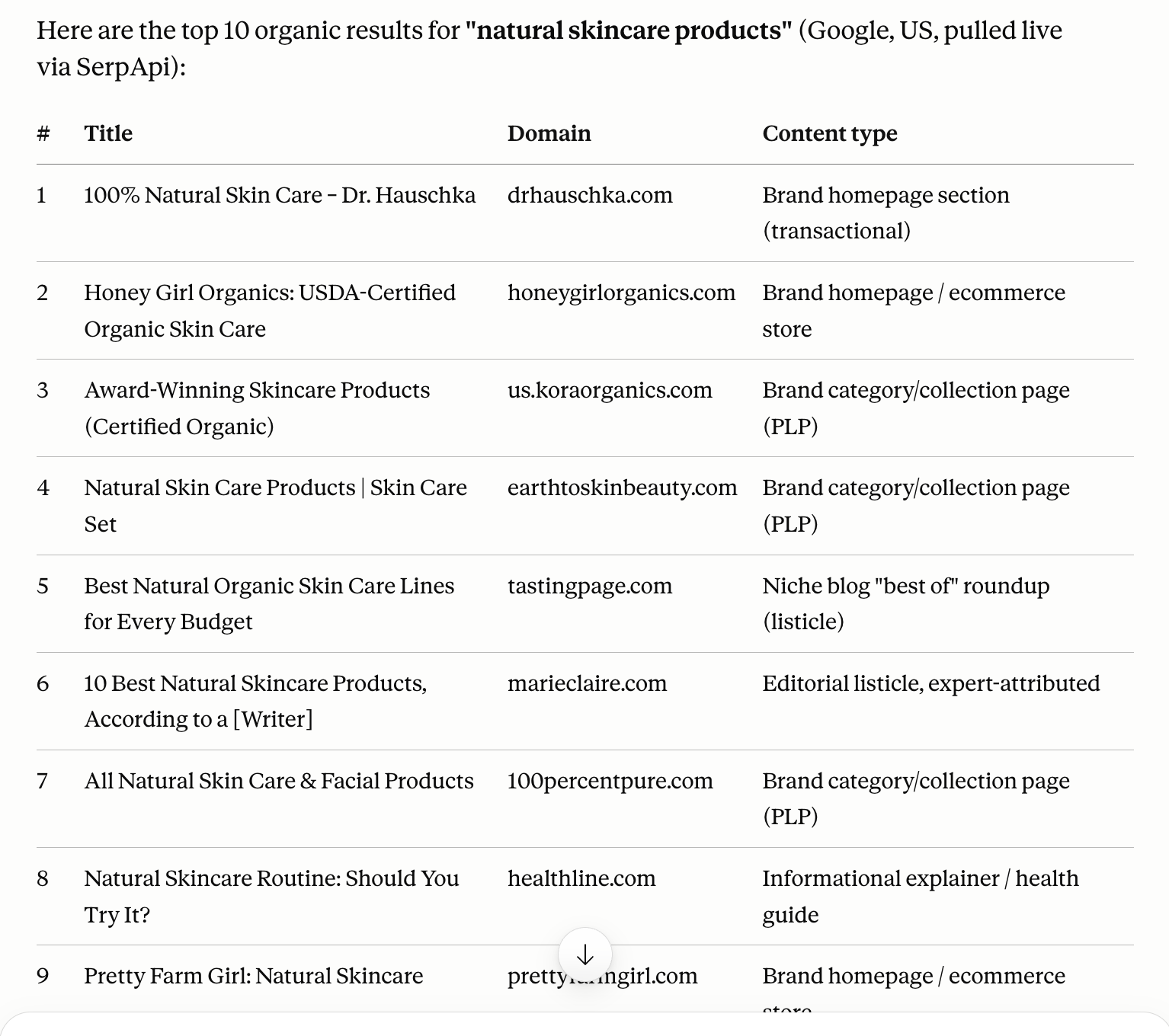
Start by reading the battlefield. You want to know who ranks, what format wins, and what intent Google is actually rewarding before you commit to an angle. This step leans on SerpApi's Google Search API.
Prompt:
Using the SerpApi MCP, run a Google search for [your keyword] and return the top 10 organic results. For each, give me the title, domain, and a one-line read on the content type (guide, tool, forum thread, video, etc.). Then summarize: what intent is Google rewarding, what formats dominate, and is there a content type that's missing?
Read the output like a competitor would. A few things to look for:
- Format of the winners. If the first page is mostly YouTube and Reddit, that's a signal that long-form may be underserved, which is an opening, not a wall.
- Intent mismatch. If you planned a product page but the SERP is all how-to guides, the SERP is telling you what it wants.
- Who owns the topic. A single authoritative guide ranking #1 is a different challenge than ten thin posts splitting the results.
Don't skip the reading and let Claude declare a winner. The pattern you notice here shapes everything downstream.
Workflow 2: Autocomplete for Keyword Clusters
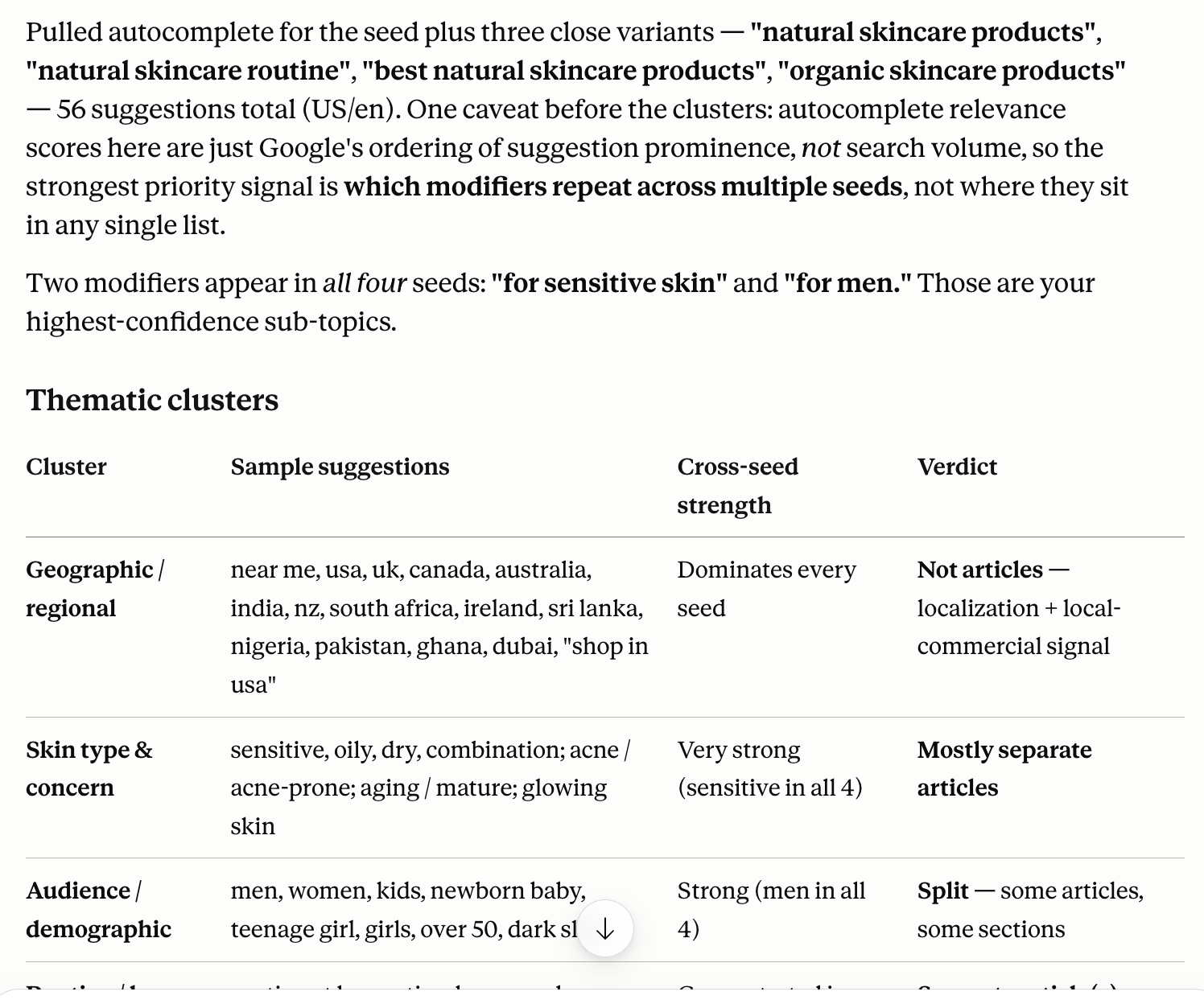
Google Autocomplete shows how people actually phrase their searches. It's where you find the modifiers, the long-tail variants, and the sub-intents worth their own sections. SerpApi exposes this through the Google Autocomplete API.
Prompt:
Using the SerpApi MCP autocomplete engine, pull suggestions for [your keyword] and 2–3 close variants. Group the results into thematic clusters (e.g. setup, comparisons, use cases, pricing). Flag which clusters look like separate articles versus sections within one piece.
The grouping is the value. A flat list of fifty suggestions is noise; three or four clusters are a content plan. Watch for the dominant modifiers; they tell you what shape of content the audience expects. (For a tooling topic, for instance, words like "skill," "prompt," "audit," and "agent" recurring across suggestions signal that people want repeatable workflows, not theory.)
Workflow 3: People Also Ask Mining
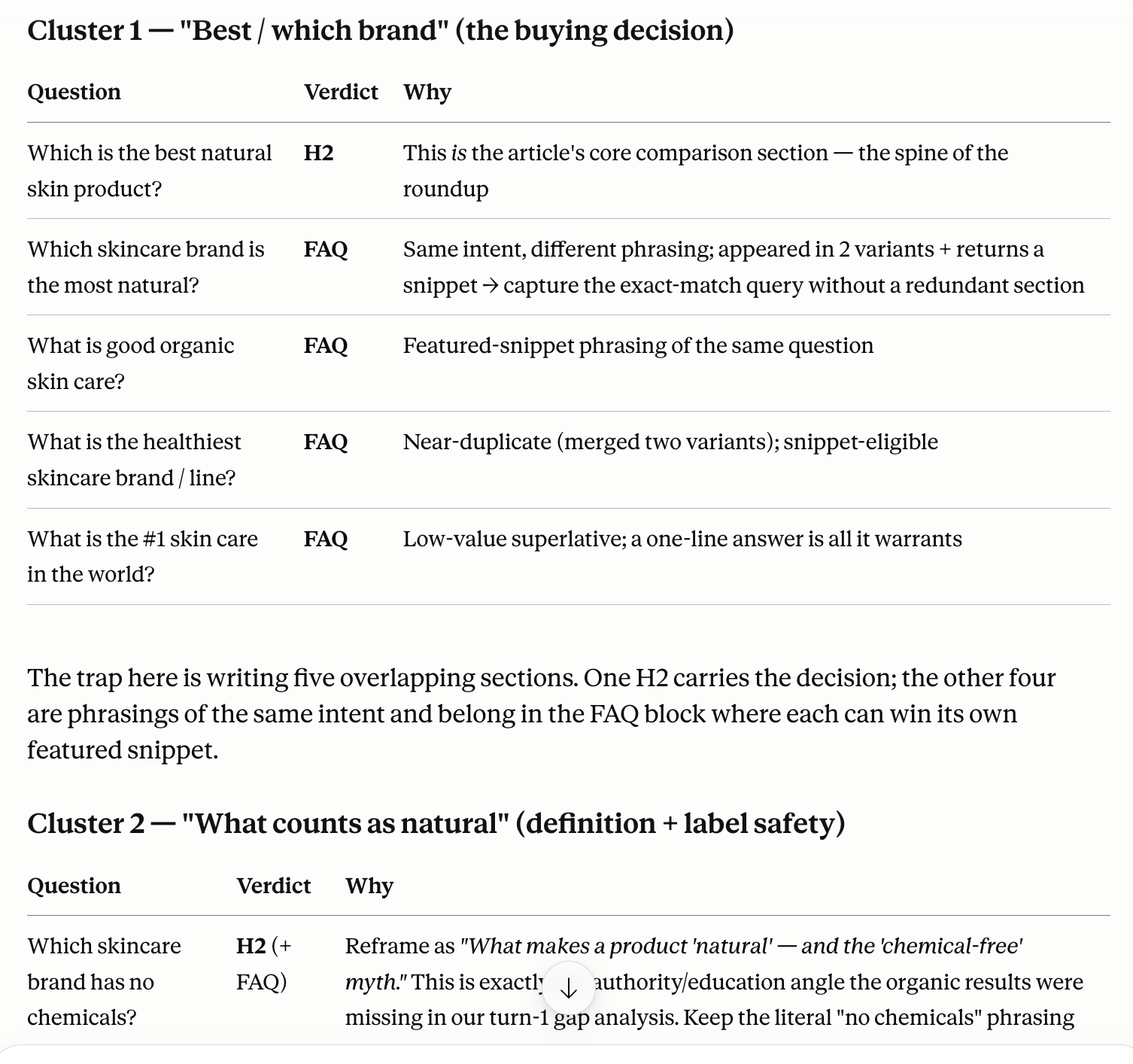
The People Also Ask (PAA) box is a direct readout of the questions Google associates with your topic and is available via the Google Related Questions API. Each one is a candidate subheading, an FAQ entry, or an answer block that can earn a featured snippet or an AI citation. Because PAA often surfaces content from pages ranking outside the top 10, it can put you on page one even when your main ranking isn't there yet.
Prompt:
Using the SerpApi MCP, pull the People Also Ask questions for [your keyword]. Group them by sub-theme, and for each, tell me whether it belongs as an H2 in the main article, an FAQ entry, or its own page.
Two things make PAA mining pay off.
- Answer the highest-intent questions early and plainly. A clean, self-contained answer near the top of your page is exactly what both featured snippets and AI Overviews pull from.
- Use the leftover questions to seed an FAQ section that mirrors how people actually ask, in their own words.
Workflow 4: Google Trends for Topic Momentum
Google Trends tells you when and whether the audience for your topic is growing or shrinking before you invest in it.
SerpApi exposes three Google Trends API data types that are useful at different stages of research.
- Google Trends Interest Over Time API: shows interest over time and answers questions such as "is this topic rising, peaking, or fading?"
- Google Trends Related Queries API: surfaces rising queries. For example, terms that have recently seen significant growth in search volume but don't yet have much content competing for them. That's where early-mover opportunities live.
- Google Trends Trending Now API: While
TIMESERIESandRELATED_QUERIESare strategic tools for planning ahead, Trending Now is tactical. It shows what's spiking in real time across Google Search, updated continuously, with search volume and the related queries driving each spike. For content teams, it's newsjacking radar.
Prompt for trend validation:
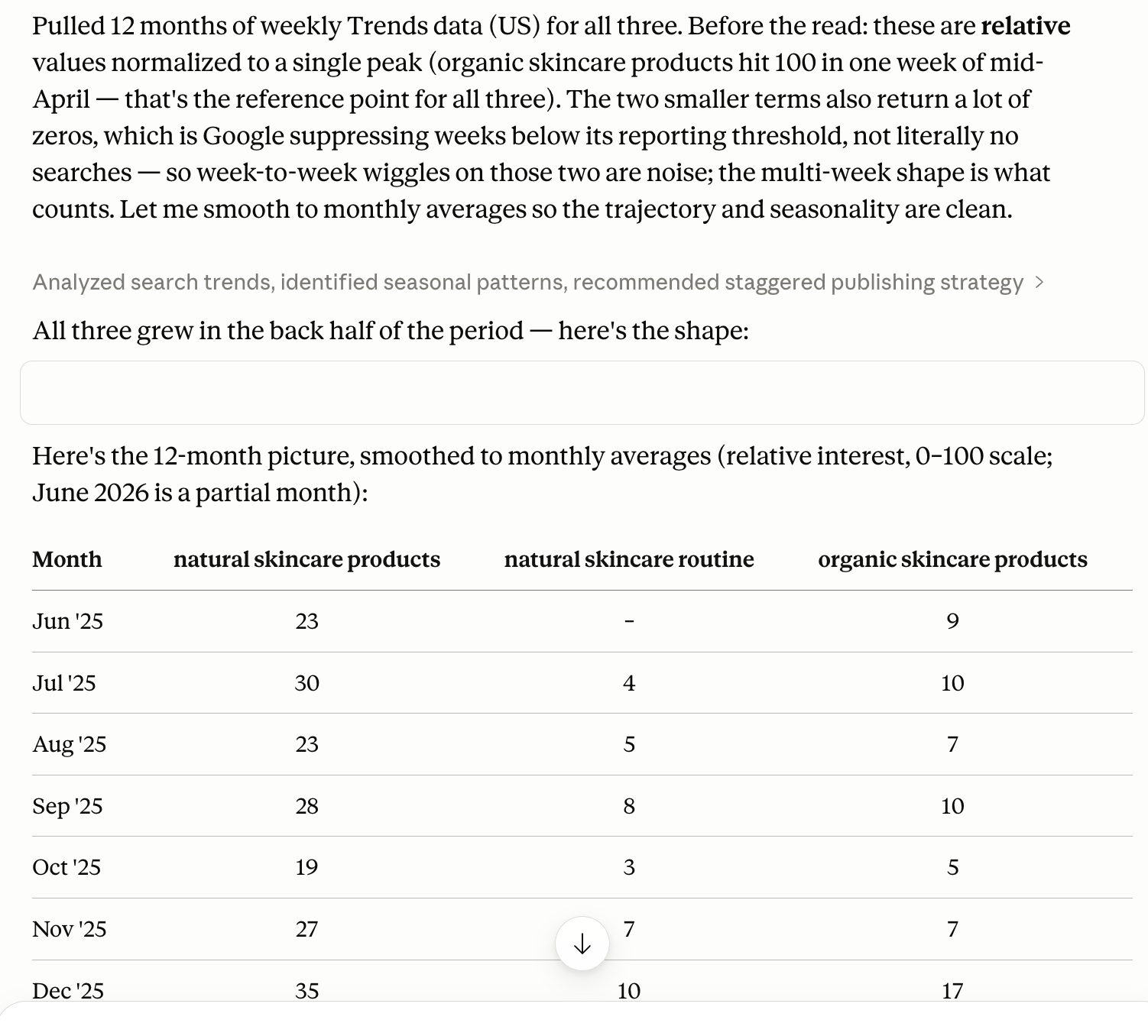
Using the SerpApi MCP with engine "google_trends" and data_type "TIMESERIES", compare these terms over the past 12 months: [your keyword], [close variant 1], [close variant 2]. Summarize the trajectory of each — is interest growing, flat, or declining? Are there seasonal patterns? Based on the pattern, what does the timing suggest for publishing?
What to look at in the output:
You want to know whether you're writing into a rising wave, a fading one, or a predictable seasonal cycle. A seasonal pattern is a publishing strategy. A declining trend is a reason to rethink the angle. Stable but flat means the audience exists — the question is whether you can take share.
Prompt for rising related queries:
Using the SerpApi MCP with engine "google_trends" and data_type "RELATED_QUERIES", pull rising queries for [your primary keyword] over the past 12 months. List the rising results separately from the top results, sorted by growth rate. For each, tell me whether it looks like a content opportunity, a competitor signal, or noise.
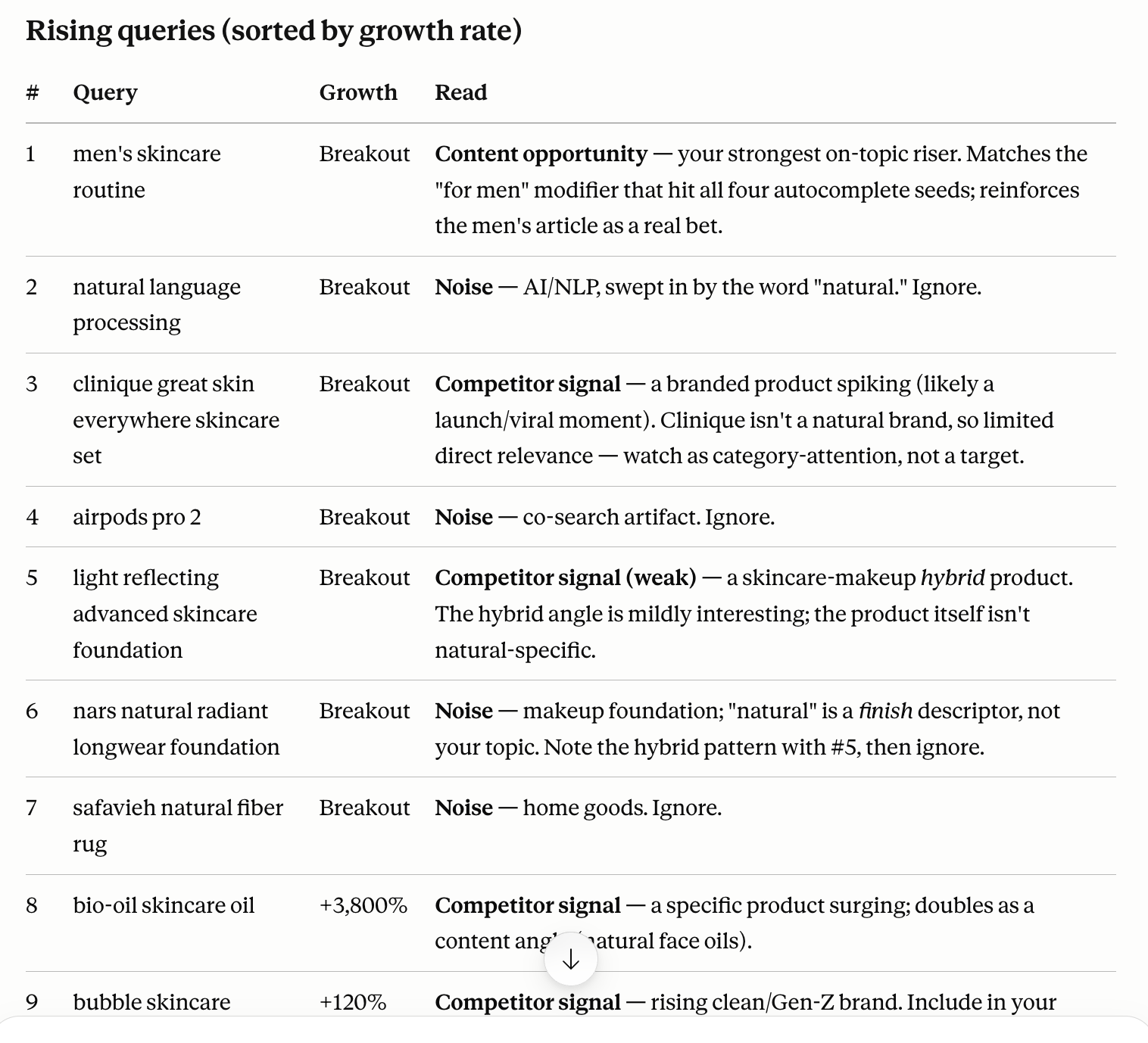
The rising list is your editorial calendar in early form. Terms growing 50–100% over 12 months represent topics your audience is just starting to search — meaning little content exists yet and ranking potential is high for whoever publishes first.
Prompt for real-time topics:
Using the SerpApi MCP with engine "google_trends_trending_now" and geo "US", return the top trending searches right now. For each trend, show the query, search volume, increase percentage, category, and the top 3 related breakdown queries. Flag any that are relevant to [your industry or topic] and suggest a reactive content angle for each.
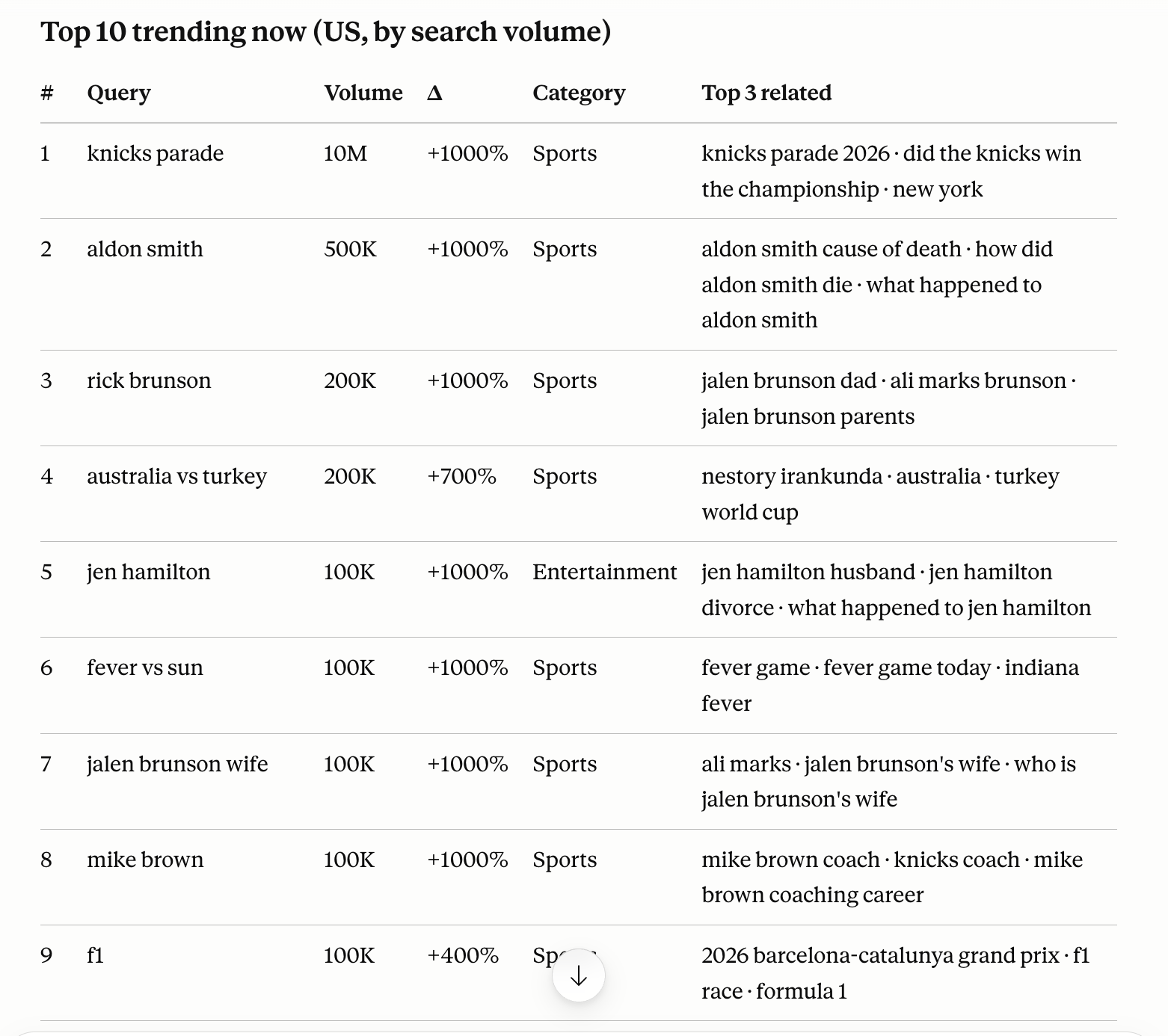
Trending Now is most useful when you have a content workflow that can publish the same day. What's trending at 9 a.m. may be gone by noon. It's less relevant for evergreen articles, but valuable for reactive pieces tied to product launches, seasonal events, or breaking news in your space.
Workflow 5: From Data to a Content Brief
Now synthesize. You've got the competitive landscape, the keyword clusters, the questions, and the trends signal. Hand it all back to Claude and ask it to build the brief.
Prompt:
Based on the organic results, autocomplete clusters, PAA questions, and Trends data we just pulled, draft a content brief: (1) a recommended angle that targets a gap in what currently ranks, (2) a suggested H1, (3) an outline of H2s that covers the clusters and answers the top questions, and (4) 3–5 supporting keywords to use naturally. For each recommendation, point to the specific data that justifies it.
The "justify it with the data" instruction matters. It keeps Claude grounded in what you pulled rather than drifting into generic SEO advice. You review, you adjust, you decide. The brief is a draft of your thinking, not a replacement for it.
If you've been following along with a real keyword, you'll notice this article was built with exactly this workflow. The process is reproducible, and you just watched it run.
Researching for the AI-search era (GEO/AEO)
Here's the part that's quietly becoming the whole game. Ranking in classic blue links is no longer the only target. You also want to be the source that AI Overviews, ChatGPT, Perplexity, and Claude itself cite when they answer a question. That discipline goes by a few names: generative engine optimization (GEO) or answer engine optimization (AEO).
SerpApi gives Claude something most setups can't here: access to Google AI Overview data, including which sources get cited for a query. (For the conversational side of AI search, there's also the Google AI Mode API.) That turns "how do I get cited?" from a guess into a research question.
Prompt:
Using the SerpApi MCP, pull the AI Overview for [your keyword] and list the sources it cites. What do those sources have in common — format, depth, structure? Then compare to my page at [URL] and tell me what's making them citeable that I'm missing.
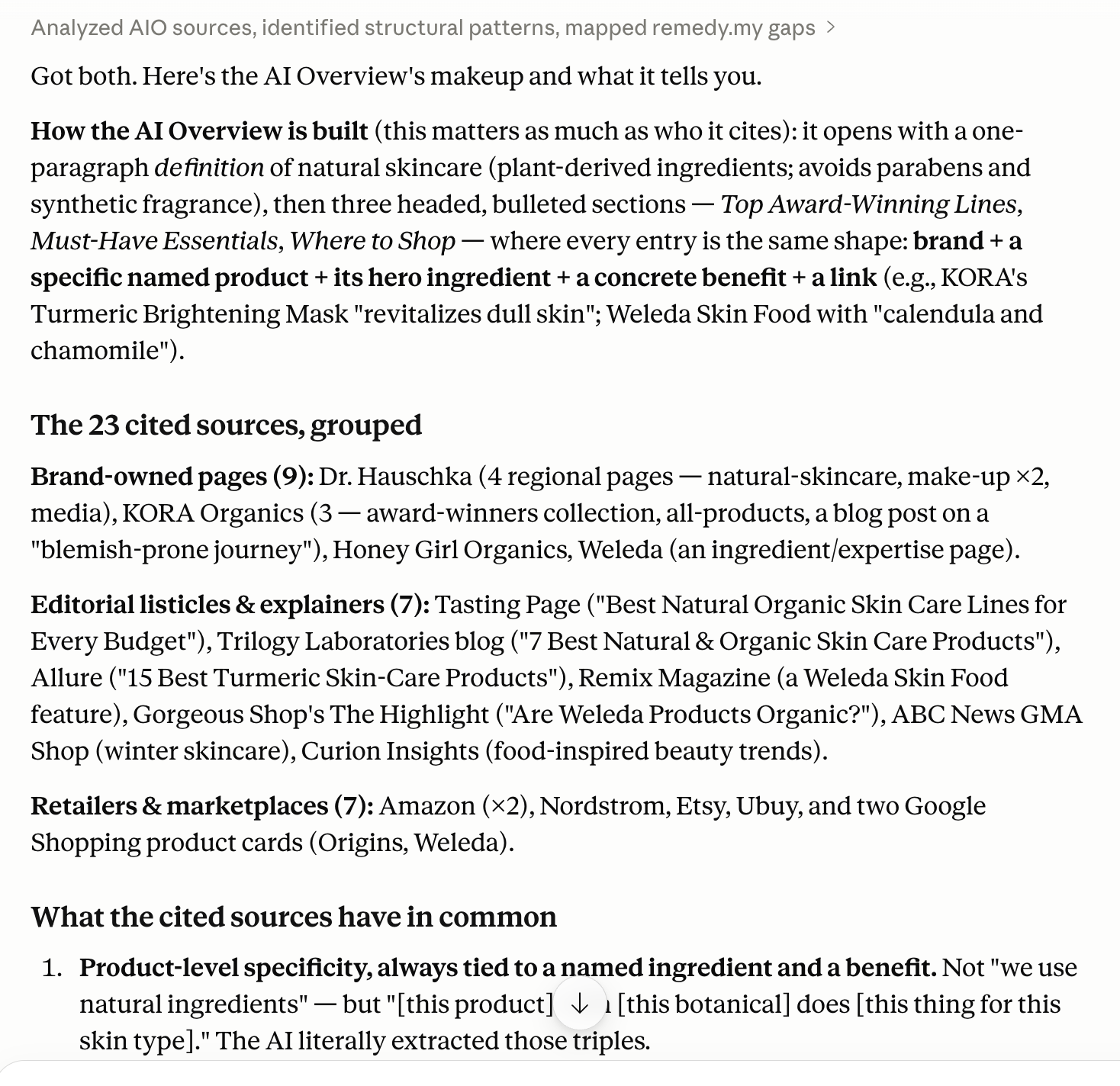
Citeable content tends to share traits: clear, self-contained answers; specific data; structure a model can parse. Researching the citation pattern for your own topics rather than reading generic GEO advice is where the real edge is, and it's a capability the video tutorials dominating this SERP can't easily demonstrate.
What This Replaces and What It Doesn't
This setup is excellent for: SERP analysis, content ideation, competitor research, PAA mining, trend monitoring, and building content briefs.
It doesn't replace dedicated keyword research tools like Ahrefs or Semrush for volume data, KD scores, and traffic potential. Those require a separate tool with their own indexed databases. The best workflow pairs both: use Ahrefs (or your preferred keyword tool) to validate search volume and difficulty, and use Claude + SerpApi for the qualitative SERP analysis that keyword tools don't give you.
The combination is a lean, powerful research stack that lives entirely inside Claude.
Going Further
This research workflow is one slice of what the connection makes possible. For more workflows in the same vein, see the top 5 practical use cases for the SerpApi MCP server. And when you're ready to move from a chat window to something automated such as a daily competitor-monitoring agent, the same MCP works in developer environments too: there are guides for integrating SerpApi MCP into a developer workflow and for building an AI agent with the Claude Agent SDK.
FAQ
Is Claude good for SEO? On its own, it's a strong writing and analysis partner, but an unreliable source of search data; it will approximate volumes and SERPs. Connected to live data through an MCP server like SerpApi, it becomes genuinely useful for research because it reasons over real results rather than guessing.
Which AI is best for SEO? There's no single winner; it depends on the job. Claude is particularly strong for long-context analysis, reading multiple competitor pages, transcripts, or large datasets in one pass, and for structured reasoning. What matters more than the model is whether it's connected to real SERP data and whether you keep your own judgment in the loop.
How do I use Claude specifically for SEO research? Connect it to a live data source via MCP, then run a structured session: read the organic SERP, mine autocomplete for clusters, pull People Also Ask questions, and synthesize those into a brief. Treat Claude as the analyst who fetches and structures, and make the strategic calls yourself.
Is SEO dead or evolving in 2026? Evolving, not dead. The demand for trustworthy, authoritative content hasn't gone anywhere. What's changed is that visibility now spans both traditional rankings and AI-generated answers. Research workflows that account for citeability, not just keywords, are how you stay visible.
Conclusion
Claude Desktop + SerpApi MCP turns a general-purpose AI assistant into a live SEO research tool. The setup takes five minutes. The prompts above cover the core research tasks you do before and during content creation. And because everything runs in one chat window, you keep the context that gets lost when you're jumping between tools.