Ruby
Ruby
 Golang
 .Net
.Net
 MCP
MCP
 C++
C++

OpenCode is an open-source, model-agnostic AI coding agent that runs locally on your machine. It can edit files, run terminal commands, and work across multiple repos at once. Because it's model-agnostic, a lot of developers pair it with local LLMs like Ollama or LM Studio, so their code and data never leave their machine.
But OpenCode can't search the web for live data unless you give it access. You can do that with the SerpApi OpenCode plugin. It gives OpenCode access to Google, YouTube, Amazon, Walmart, and dozens of other search engines through a single tool call.
What is an OpenCode Plugin?
Plugins and Skills sound similar, but they do different jobs. Skills automate boring workflows, tasks where you'd otherwise repeat the same instructions every time. Plugins give OpenCode a new capability it didn't have before, a new tool, feature, or integration with an outside service.
SerpApi has released one such plugin, giving OpenCode real-time web search. It provides access to multiple SerpApi engines like Google, Bing, Yahoo, YouTube, and many others. It also ships with skills that guide OpenCode in selecting appropriate engine and parameters for each query.
So when a task needs live web data, OpenCode reaches for the SerpApi plugin, runs the search, and returns the results. Say OpenCode needs to find a current public GitHub repository for a coding task. It searches for it with the SerpApi plugin instead of guessing from training memory.
Why Use SerpApi Opencode Web Search Plugin?
Without the plugin, giving OpenCode web access means building a separate API integration yourself: handling auth, setting parameters, and parsing responses.
The SerpApi OpenCode plugin replaces all of that with one integration. Install it once, and OpenCode gets dedicated access to specific engines and search verticals instead of just generic web search.
Here are some of the popular engines the plugin supports:
| Vertical | Supported engines | Use cases |
|---|---|---|
| Web Search | Google, Bing, DuckDuckGo, Yahoo, Yandex, Baidu, Naver | Full-featured web search with knowledge graph, ads, and SERP extras |
| AI Search | Google AI Mode, Google AI Overview, Bing Copilot, Brave AI Mode | AI search results, brand monitoring in AI results, and AI-generated summaries |
| Shopping | Amazon, Walmart, eBay, Google Shopping, Home Depot | Product search, listings, and pricing |
| Local | Google Maps | Local business listings and place reviews |
| News & Trends | Google News, Google Trends | Current news articles and search trend data |
| Media | Google Images, Google Videos, Google Lens, YouTube | Image search, video search, reverse image search, and video rankings |
| Travel | Google Flights, Google Hotels, Google Travel Explore | Flight deals, hotel reviews, and travel destination search |
| Jobs, Finance & Apps | Google Jobs, Google Finance, Google Play, Apple App Store | Job search, stock tracking, finance data analysis, and app store data |
| SEO | Google Autocomplete | Keyword research |
Each engine returns data shaped for the question you're asking. For instance, searching Amazon returns product listings and pricing in clean JSON. You also don't need to remember engine names or query formats. OpenCode picks the right engine and parameters based on the query.
Installing the OpenCode SerpApi Plugin
The OpenCode SerpApi plugin is available as an npm package, so setup is really just a config change plus an API key.
1. Add the plugin to your config
In your project root, open opencode.json (or opencode.jsonc). If neither file exists, create opencode.json. Then add opencode-serpapi to the plugin array:
{
  "$schema": "https://opencode.ai/config.json",
  "plugin": ["opencode-serpapi"]
}
Want it available across all your projects instead of just one? Add the same block to your global config at ~/.config/opencode/opencode.json instead.
OpenCode installs it automatically from npm the next time you run opencode in that project; doesn’t require a separate npm i command.
2. Set your SerpApi API key
Grab a key from your SerpApi dashboard and export it as an environment variable:
export SERPAPI_API_KEY="add_your_api_key"3. Start OpenCode
On startup, OpenCode caches the plugin and registers the serpapi_search tool for your session.
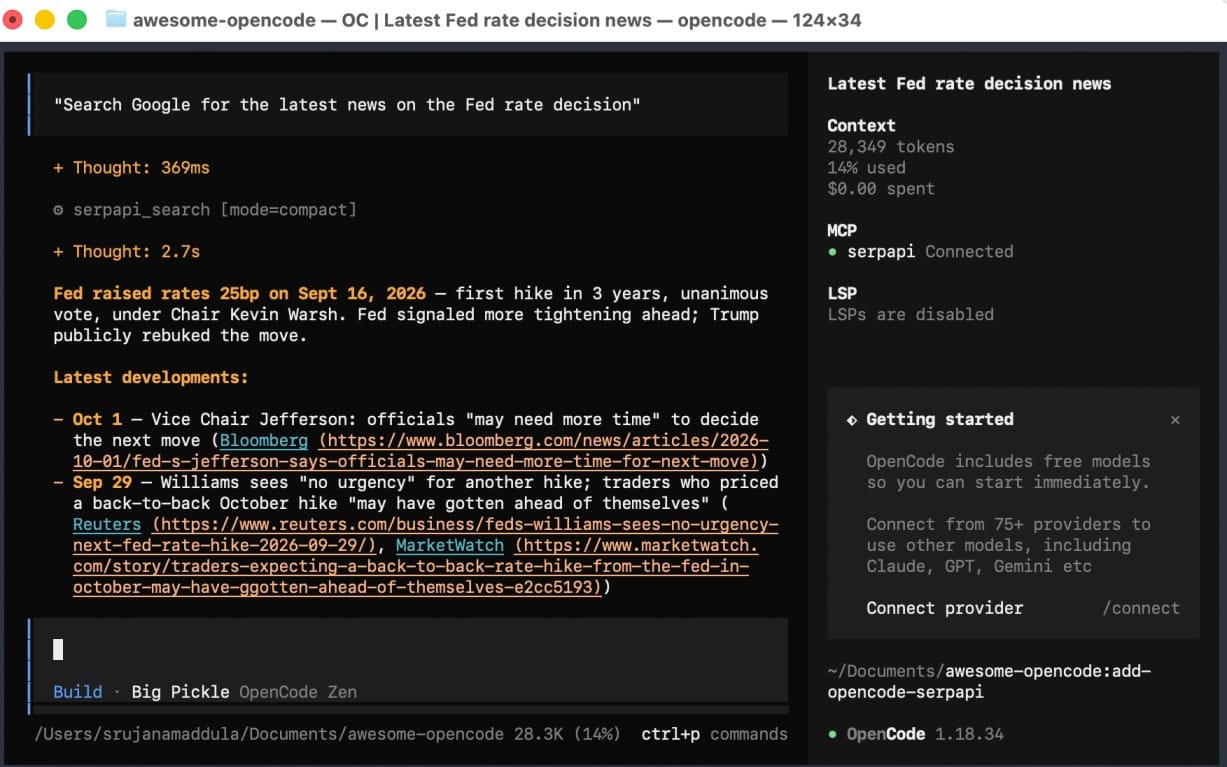
Ask OpenCode something that needs a live web search, e.g.:
"Search Google for the latest news on the Fed rate decision"
It returns live search results, as shown in the image below:
How OpenCode uses SerpApi under the hood?
The plugin has three parts, each with a clear job: a connection to SerpApi's MCP server, a native search tool as a backup, and a skill that tells OpenCode which search engine to use.
1. The MCP connection
When OpenCode starts, the plugin automatically registers SerpApi's hosted MCP server as a remote MCP server. You don't need to add it to your config by hand.
The plugin reads your SERPAPI_API_KEY environment variable and sends it as an Authorization: Bearer header with each request.
The server then checks the engine and its parameters, and runs the search. When OpenCode doesn't need the full JSON, it sets the engine's output parameter to Markdown, which uses about half the tokens for the same task.
2. The serpapi_search fallback
If the MCP server isn't available, OpenCode can still search. The plugin exposes a native serpapi_search tool that calls SerpApi's search.json endpoint directly, using the runtime's built-in fetch. The tool takes a single q argument and maps it to the field each engine expects.
3. The serpapi-web-search skill
The connection gives OpenCode access to various engines. The skill tells it which one fits the task, using bundled routing guidance and engine reference files.
Ask OpenCode to find standing desks under $300 on Walmart, and the skill points it to the Walmart engine and its parameters. Without it, OpenCode might run a generic Google search and get blog posts and ads instead of product listings.
Conclusion
This SerpApi plugin makes web search a native capability for OpenCode. It's open source, and setup just takes a config change and an API key.
Check out the GitHub repo if you want to see how it's built, report an issue, or request a feature.
We are continuing to expand SerpApi integrations to make sure AI can access live search data, whether that is through MCP, Claude Code, and many other AI integrations. If you dont find a SerpApi integration for the tool you work in, contact us at contact@serpapi.com