Ruby
Ruby
 Golang
 .Net
.Net
 MCP
MCP
 C++
C++

Homes for sale, rental properties, recently sold homes, open houses, foreclosures, price histories. If you need real estate data, chances are Zillow has it. This is useful for market research, property monitoring, investment analysis, rental discovery, and real estate applications. But what if you need easy access to Zillow structured data from your programs or AI agents?
The Zillow Search API from SerpApi lets you fetch live Zillow search results as structured JSON or Markdown with many natively supported SDKs or even a simple cURL call. SerpApi handles the page retrieval and parsing, so you can focus on the interesting part of filtering, analyzing, and storing all the property data. Or use SerpApi MCP and let your agents fetch what you need.
What can you scrape from Zillow?
Here are some of the types of data you can pull from Zillow using SerpApi:
- Homes for sale: Active listings, coming-soon properties, Zillow previews, pending homes, foreclosures, auctions, and new construction.
- Rental listings: Individual rental properties and apartment buildings, including prices, available units, pet policies, amenities, and availability dates when present.
- Recently sold homes: Sold prices, sold dates, property characteristics, and valuation data. Sold prices may not be available in non-disclosure states.
- Property details: Addresses, prices, bedrooms, bathrooms, square footage, lot size, home type, broker name, and the number of days on Zillow.
- Valuation data: Zestimate, Rent Zestimate, tax-assessed value, and recent price changes when Zillow provides them.
- Location data: Latitude and longitude for listings, as well as the geographic boundaries of the searched region.
- Listing media and features: Thumbnails, property images, open house schedules, 3D tour availability, videos, badges, and showcase status.
- Search information: The total number of results, results per page, total pages, region details, and pagination links.
- Nearby results: Relaxed results from surrounding areas when there are not enough exact matches for a search.
Getting started with SerpApi
You need a SerpApi account to use the Zillow Search API. If you have not already created one, register for a SerpApi account, verify your email address, and copy your private API key from the account dashboard.
Keep your API key out of public source code. Store it in an environment variable or a secrets manager, especially when publishing an application or sharing a repository. If a key is accidentally exposed, you can regenerate it from the SerpApi dashboard.
Install a SerpApi library
SerpApi provides official libraries for Python, JavaScript, Ruby, Java, and other languages. These libraries wrap the HTTP API and make it easier to pass parameters and work with the JSON response.
You can also call the API with a regular GET request using cURL, fetch() in Node.js, or any HTTP client. This guide covers both direct requests and several official integrations.
The Zillow Search API documentation lists all supported search parameters, filters, response fields, and code examples. You can also experiment with every parameter in the interactive playground before writing any code.
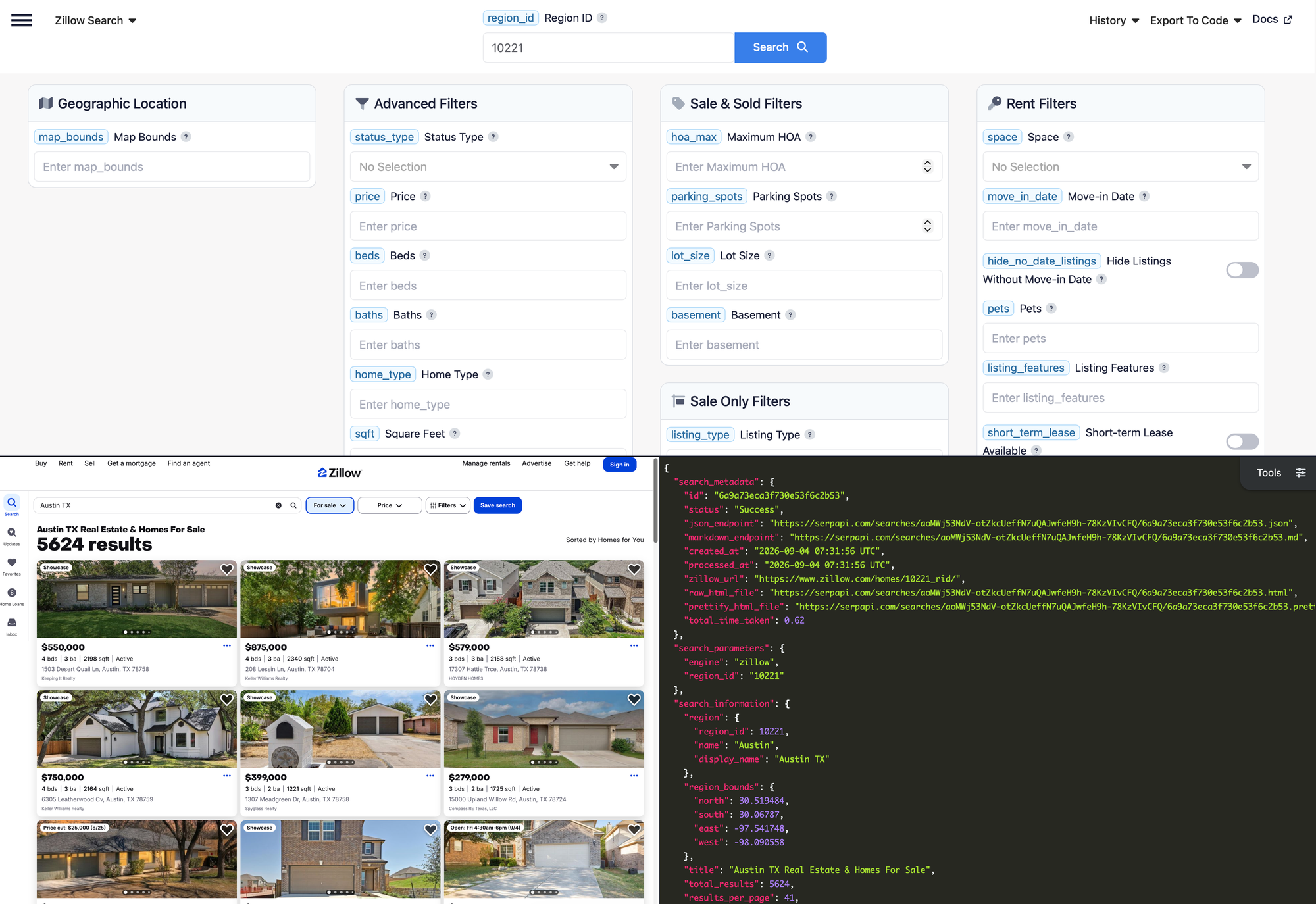
Finding the Zillow region ID
All searches on Zillow will need a location identifier. A Zillow region can represent a city, neighborhood, ZIP code, county, or state. To find its ID, search for the location on Zillow and look for the number before _rid in the resulting URL.
For example, this URL identifies Austin, Texas, with region ID 10221:
https://www.zillow.com/homes/10221_rid/
Newer Zillow URLs often use a readable slug such as https://www.zillow.com/austin-tx/ and hide the region ID. If you do not see _rid in the URL, open the page source and search for regionId, which appears in the embedded search state JSON.
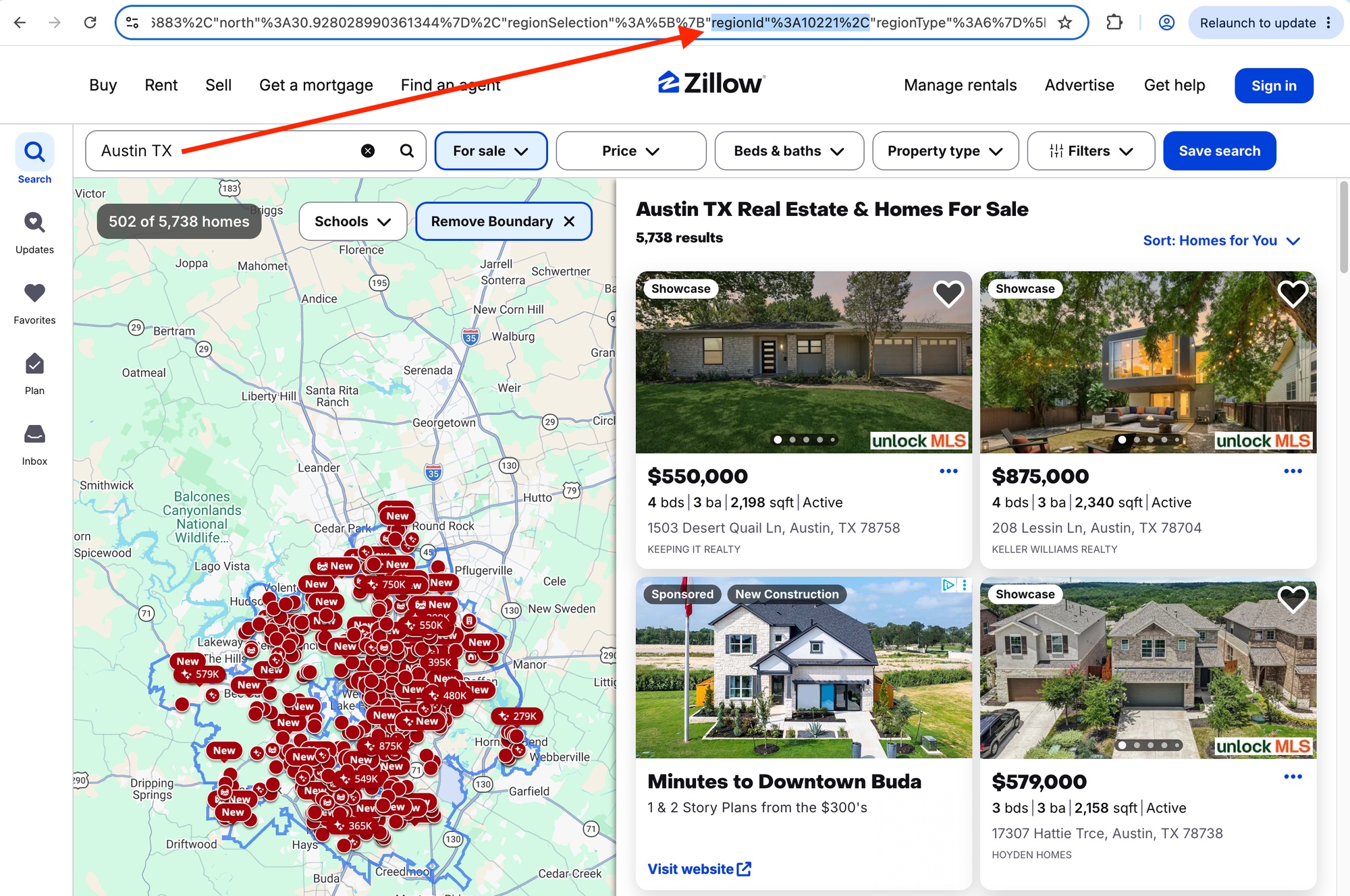
You can also confirm an ID by opening https://www.zillow.com/homes/<ID>_rid/, which redirects to the matching region page.
The API can also search an arbitrary map area. The map_bounds value contains four comma-separated coordinates in this order:
north,east,south,west
You can use region_id and map_bounds together to search only one portion of a larger region.
How to scrape Zillow search results
Once you have an API key and a region ID, you can start fetching property listings. The examples below search Austin, Texas, for houses and condos listed for sale between $300,000 and $800,000, with at least two bedrooms and two bathrooms.
The main parameters are:
region_id=10221for Austin, Texas.status_type=salefor properties currently for sale. This is the default, so it can be omitted.price=300000,800000for the minimum and maximum price.beds=2for two or more bedrooms.baths=2for two or more bathrooms.home_type=house,condoto include only houses and condos.sort_by=priceato sort by price from lowest to highest.
Remember that every request must include:
engine=zillowto select the Zillow Search API.api_keywith your private SerpApi API key.- At least one search area, using
region_id,map_bounds, or both.
GET request
You can make the search with a single GET request:
https://serpapi.com/search?engine=zillow®ion_id=10221&status_type=sale&price=300000,800000&beds=2&baths=2&home_type=house,condo&sort_by=pricea&api_key=YOUR_API_KEY
The response includes search metadata and an organic_results array containing the matching Zillow listings. An abridged response looks like this:
{
"search_information": {
"region": {
"region_id": 10221,
"name": "Austin",
"display_name": "Austin TX"
},
"total_results": 5830,
"results_per_page": 41,
"total_pages": 20
},
"organic_results": [
{
"position": 1,
"zpid": "29505949",
"title": "8536 Birmingham Dr, Austin, TX 78748",
"link": "https://www.zillow.com/homedetails/8536-Birmingham-Dr-Austin-TX-78748/29505949_zpid/",
"status": "FOR_SALE",
"price": "$439,000",
"extracted_price": 439000,
"beds": 3,
"baths": 3,
"square_feet": 1398,
"home_type": "SINGLE_FAMILY",
"gps_coordinates": {
"latitude": 30.181974,
"longitude": -97.806564
},
"broker_name": "Engel & Volkers Austin"
}
],
"serpapi_pagination": {
"current": 1,
"next": "https://serpapi.com/search.json?engine=zillow&page=2®ion_id=10221"
}
}
Use extracted_price for calculations and sorting in your application. The price field is the human-readable version displayed by Zillow.
Each response also carries search_metadata.status, which moves from Processing to Success or Error. If a search fails, the response includes an error message describing what went wrong.
lot_id instead of a Zillow property ID (zpid), and their results can include unit groups and a range of rents instead of one price.cURL
You can make the same request from the command line without installing a library:
curl --get https://serpapi.com/search \
  --data-urlencode engine="zillow" \
  --data-urlencode region_id="10221" \
  --data-urlencode status_type="sale" \
  --data-urlencode price="300000,800000" \
  --data-urlencode beds="2" \
  --data-urlencode baths="2" \
  --data-urlencode home_type="house,condo" \
  --data-urlencode sort_by="pricea" \
  --data-urlencode api_key="YOUR_API_KEY"
Python
Install the official SerpApi Python library:
pip install serpapi
This example performs the Austin search and prints a compact summary for each result:
import os
import serpapi

client = serpapi.Client(api_key=os.environ["SERPAPI_API_KEY"])
results = client.search({
    "engine": "zillow",
    "region_id": "10221",
    "status_type": "sale",
    "price": "300000,800000",
    "beds": "2",
    "baths": "2",
    "home_type": "house,condo",
    "sort_by": "pricea",
})

for listing in results.get("organic_results", []):
    print(
        f'{listing.get("title")} — {listing.get("price")} — '
        f'{listing.get("beds")} beds, {listing.get("baths")} baths'
    )
Using .get() is helpful because fields can vary between properties. A land listing might not have bedrooms, for example, while a rental building uses a different price structure from an individual home.
Ruby
Install the official SerpApi Ruby gem:
gem install serpapi
Then make the same search and print each property's address and price:
require "serpapi"

client = SerpApi::Client.new(
  engine: "zillow",
  region_id: "10221",
  status_type: "sale",
  price: "300000,800000",
  beds: "2",
  baths: "2",
  home_type: "house,condo",
  sort_by: "pricea",
  api_key: ENV.fetch("SERPAPI_API_KEY")
)

client.search.fetch(:organic_results, []).each do |listing|
  puts "#{listing[:title]} — #{listing[:price]}"
end
JavaScript and Node.js
Install the official JavaScript package:
npm install serpapi
This example fetches the listings and displays the address, price, and property URL:
import { getJson } from "serpapi";

const results = await getJson({
  engine: "zillow",
  region_id: "10221",
  status_type: "sale",
  price: "300000,800000",
  beds: "2",
  baths: "2",
  home_type: "house,condo",
  sort_by: "pricea",
  api_key: process.env.SERPAPI_API_KEY,
});

results.organic_results?.forEach((listing) => {
  console.log(`${listing.title} — ${listing.price}`);
  console.log(listing.link);
});
Other languages and no-code solutions
Any language that can send an HTTP GET request and parse JSON can use the Zillow Search API. SerpApi also integrates with tools such as Make, n8n, Google Sheets, and other workflow platforms, so you do not need to build a complete application to collect or process listing data.
How to search Zillow by map area
A region ID is useful for known cities, ZIP codes, counties, and neighborhoods. For a custom geographic area, use map_bounds instead.
The following request searches an area around downtown Denver. Remember that the coordinate order is north,east,south,west, rather than two conventional latitude-longitude coordinate pairs:
https://serpapi.com/search?engine=zillow&map_bounds=39.778,-104.940,39.716,-105.025&status_type=sale&api_key=YOUR_API_KEY
You can also combine the map with a region (11093 is Denver's region ID):
https://serpapi.com/search?engine=zillow®ion_id=11093&map_bounds=39.778,-104.940,39.716,-105.025&status_type=sale&api_key=YOUR_API_KEY
In that case, Zillow searches the portion of the specified region that falls inside the map boundaries. This can be useful for applications where users select an area on a map or where a city-wide search is too broad.
Here is the equivalent map search in Python:
import os
import serpapi

client = serpapi.Client(api_key=os.environ["SERPAPI_API_KEY"])
results = client.search({
    "engine": "zillow",
    "map_bounds": "39.778,-104.940,39.716,-105.025",
    "status_type": "sale",
})

for listing in results.get("organic_results", []):
    print(listing.get("title"), listing.get("price"))
How to scrape Zillow rental listings
Set status_type to rent to search for rental properties. Rental searches support additional filters such as:
spacefor an entire place or a room.move_in_datefor rentals available by a specific date.hide_no_date_listingsto exclude results without an availability date.petsfor cat and dog policies.listing_featuresfor 3D tours, Zillow applications, or instant tours.short_term_leasefor listings that offer short-term leases.- Rental-specific
amenities, including in-unit laundry, parking, elevators, fitness centers, and furnished units.
This request searches Seattle for rentals that allow cats and small dogs, have at least two bedrooms, and cost no more than $3,500 per month:
https://serpapi.com/search?engine=zillow®ion_id=16037&status_type=rent&price=,3500&beds=2&pets=cats,small_dogs&api_key=YOUR_API_KEY
The leading comma in price=,3500 means there is no minimum price and the maximum is $3,500. The same range format works with filters such as beds, baths, sqft, year_built, and lot_size.
Rental results can represent either an individual property or an apartment building. An apartment building can include fields such as:
{
  "title": "1800 S Jackson St, Seattle, WA",
  "status": "FOR_RENT",
  "building_name": "Pratt Park",
  "units": [
    {
      "price": "$1,622+",
      "beds": "0"
    },
    {
      "price": "$2,118+",
      "beds": "1"
    },
    {
      "price": "$2,555+",
      "beds": "2"
    }
  ],
  "available_units": 12,
  "min_base_rent": 1616,
  "max_base_rent": 3249,
  "lot_id": 1001476492
}
In Python, you can handle both kinds of results like this:
import os
import serpapi

client = serpapi.Client(api_key=os.environ["SERPAPI_API_KEY"])
results = client.search({
    "engine": "zillow",
    "region_id": "16037",
    "status_type": "rent",
    "price": ",3500",
    "beds": "2",
    "pets": "cats,small_dogs",
})

for listing in results.get("organic_results", []):
    name = listing.get("building_name") or listing.get("title")
    price = listing.get("price")
    if not price and listing.get("min_base_rent"):
        price = f'${listing["min_base_rent"]:,}+'
    if not price and listing.get("units"):
        price = listing["units"][0].get("price")
    print(name, price)
When processing rentals, check for zpid on individual listings and lot_id on rental buildings. Do not assume that every result has fixed values for price, beds, and baths.
How to scrape recently sold properties
Set status_type to sold to fetch recently sold homes. The response can include sold_date, and price represents the sale price when Zillow publishes it.
This request searches for recently sold properties in Boston with at least three bedrooms:
https://serpapi.com/search?engine=zillow®ion_id=44269&status_type=sold&beds=3&sort_by=days&api_key=YOUR_API_KEY
A sold result can look like this:
{
  "zpid": "59141370",
  "title": "32 Jewett St, Boston, MA 02131",
  "status": "SOLD",
  "price": "$832,950",
  "extracted_price": 832950,
  "sold_date": "2026-07-08",
  "zestimate": 982700,
  "rent_zestimate": 4766,
  "tax_assessed_value": 888900,
  "beds": 4,
  "baths": 3,
  "square_feet": 2047,
  "home_type": "SINGLE_FAMILY"
}
The Python version prints each sale date, address, and price:
import os
import serpapi

client = serpapi.Client(api_key=os.environ["SERPAPI_API_KEY"])
results = client.search({
    "engine": "zillow",
    "region_id": "44269",
    "status_type": "sold",
    "beds": "3",
    "sort_by": "days",
})

for listing in results.get("organic_results", []):
    print(listing.get("sold_date"), listing.get("title"), listing.get("price"))
Some U.S. states do not publicly disclose sale prices. For properties in those states, price and extracted_price may be missing even when the rest of the sold listing is available.
How to filter Zillow results
The Zillow Search API supports many of Zillow's property filters. You can combine them to refine a search for your use case.
For all listing statuses, useful filters include:
price,beds,baths, andsqftfor numeric ranges.home_typefor houses, condos, townhomes, apartments, land, manufactured homes, and other supported types.year_built,has_garage, andsingle_storyfor property characteristics.amenities,view, andkeywordsfor features such as pools, waterfront views, and terms in the listing.price_reductionandtime_on_zillowfor recently changed or newly listed properties.sort_byfor price, newest listings, bedrooms, bathrooms, square feet, lot size, and other available orders.
Sale and sold searches also support hoa_max, parking_spots, lot_size, and basement. Sale searches add listing_type, listing_status, and tours. The rent-only filters, such as pets and move_in_date, are covered in the rental section above.
For example, the following request finds Austin homes with a garage and a pool that were listed in the last seven days, then sorts the results from newest to oldest:
https://serpapi.com/search?engine=zillow®ion_id=10221&status_type=sale&has_garage=true&amenities=pool&time_on_zillow=7&sort_by=days&api_key=YOUR_API_KEY
In Python:
import os
import serpapi

client = serpapi.Client(api_key=os.environ["SERPAPI_API_KEY"])
results = client.search({
    "engine": "zillow",
    "region_id": "10221",
    "status_type": "sale",
    "has_garage": "true",
    "amenities": "pool",
    "time_on_zillow": "7",
    "sort_by": "days",
})

for listing in results.get("organic_results", []):
    print(listing.get("days_on_zillow"), listing.get("title"), listing.get("price"))
Some list parameters are complete selections rather than additions to Zillow's defaults. For example, listing_type=foreclosure,auction returns only foreclosures and auctions. Check the documentation before assuming that a value is added to a default list.
How to paginate through Zillow results
The page parameter selects a result page. Page 1 is the default, while page=2 requests the second page:
https://serpapi.com/search?engine=zillow®ion_id=10221&page=2&api_key=YOUR_API_KEY
The response contains two pagination objects:
paginationcontains links to pages on Zillow.serpapi_paginationcontains ready-to-use SerpApi links for the previous and next pages.
The search_information.total_pages field reports the total number of available pages. Here is a Python example that continues until there is no next page:
import os
import serpapi

client = serpapi.Client(api_key=os.environ["SERPAPI_API_KEY"])
params = {
    "engine": "zillow",
    "region_id": "10221",
    "status_type": "sale",
    "time_on_zillow": "7",
    "sort_by": "days",
    "page": 1,
}

while True:
    results = client.search(params)

    for listing in results.get("organic_results", []):
        print(listing.get("zpid"), listing.get("title"), listing.get("price"))

    if not results.get("serpapi_pagination", {}).get("next"):
        break

    params["page"] += 1
Zillow limits every search to about 20 result pages, no matter how many total results are reported. The first JSON example above shows 5,830 matching homes but only 20 reachable pages of 41 results each. To cover a large market completely, split it into smaller searches: query neighborhood or ZIP code region IDs, or tile the area with map_bounds rectangles, and deduplicate the merged results by zpid.
If a narrow search returns only a few exact matches, the final page can also contain relaxed_results from nearby areas. These entries have the same general structure as organic_results, but they do not strictly match the requested location. Process them separately if geographic precision matters to your application.
no_cache=true when you need immediate fresh results instead.How to reduce the Zillow API response size
SerpApi's JSON Restrictor can return only the fields your application needs. This reduces the response size and can simplify downstream processing.
For example, this request returns only each listing's Zillow ID, title, extracted price, and URL:
https://serpapi.com/search?engine=zillow®ion_id=10221&json_restrictor=organic_results[].{zpid,title,extracted_price,link}&api_key=YOUR_API_KEY
The Python client accepts the restrictor as a regular parameter:
import os
import serpapi

client = serpapi.Client(api_key=os.environ["SERPAPI_API_KEY"])
results = client.search({
    "engine": "zillow",
    "region_id": "10221",
    "json_restrictor": "organic_results[].{zpid,title,extracted_price,link}",
})

for listing in results.get("organic_results", []):
    print(listing.get("zpid"), listing.get("title"), listing.get("extracted_price"))
This can be especially useful when passing results to an LLM, storing frequent snapshots, or sending data through an automation platform with payload limits.
You can also request Markdown output with output=md, use the /search.md endpoint, or send an Accept: text/markdown header. Markdown output is optimized for LLM and AI-agent workflows.
Scraping real estate data
If you need more than data from Zillow, have a look at working with real estate data from Google Maps:
 Josef Strzibny
 Noraina Nordin
Conclusion
The Zillow Search API from SerpApi turns Zillow search pages into structured data for homes for sale, rentals, and recently sold properties. You can search with a Zillow region ID or map boundaries, combine property filters, sort results, and paginate through the available listings.
SerpApi handles retrieval and parsing, so you don't have to scrape these data yourself. Your application gets a consistent JSON response every time and can focus on the primary goals of your real estate business. And if you need more than real estate data, have a look at 100+ other APIs we support.