Ruby
Ruby
 Golang
 .Net
.Net
 MCP
MCP
 C++
C++

Hotel listings often contain dozens of images, but the details travelers care about are buried inside them. Do rooms have a proper desk, a bathtub, a balcony, or enough natural light? By automatically categorizing hotel images with vision models, we can turn messy photo galleries into searchable attributes, verify claims from listing descriptions, or detect misleading photos. In this post, we'll look how to find the right hotel photos using SerpApi hotel APIs and determine if they feature a coffee machine or not.
Finding the right things in hotel images
The hard part is not just asking “what is in this image?” but deciding what counts for a specific use case. A coffee machine in a hotel lobby might be useful, but it is not the same as a coffee machine in a private room. A desk in a restaurant does not mean the room is suitable for remote work. A beautiful exterior photo tells us nothing about whether the room has a kitchenette, balcony, or bathtub. Good image categorization therefore needs both visual detection and context classification; what object is visible, where it appears, and whether that scene is relevant to the traveler’s intent.
Once images are categorized this way, hotel search can become much more practical and transparent. Instead of relying only on amenities text or user reviews, we can attach evidence to every claim: "coffee machine visible on cabinet," "work desk next to bed," "balcony attached to guest room," or "kitchenette visible in suite." This makes it possible to build filters that are based on what is actually shown, highlight the best supporting photos, ignore misleading common-area images, and give travelers more confidence that the hotel has the exact room features they care about.
Building a Hotel Coffee Analyzer
To demonstrate this, we'll build a Hotel Coffee Analyzer that can find coffee machines in selected hotels. Here's a rough workflow:
- Find hotels from SerpApi's Google Hotels API.
- Fetch room-section photos via SerpApi's Google Hotels Photos API.
- Analyze each image URL with an LLM model using structured JSON response
- Accept coffee pictures if:
- Coffee machine is found
- If the scene is
guest_room,kitchenette, orsuite - Evidence fields are non-empty
- Model confidence is at least
0.80
- Display results
Prerequisites
We'll need to integrate two API providers to make our idea a reality. For hotel and hotel pictures' searches we'll use SerpApi, while for analyzing the images we'll use OpenAI and its models:
- For the SerpApi API key, head over to the SerpApi dashboard to copy your key.
- For the OpenAI API key, log into the OpenAI Platform and create a new key under Manage > API keys.
Note down both keys in an .env file in the project's root directory as we'll load these keys from there:
$ cat .env
SERPAPI_API_KEY=a9142c...
OPENAI_API_KEY=sk-proj-g0...How to find hotels using Google Hotels
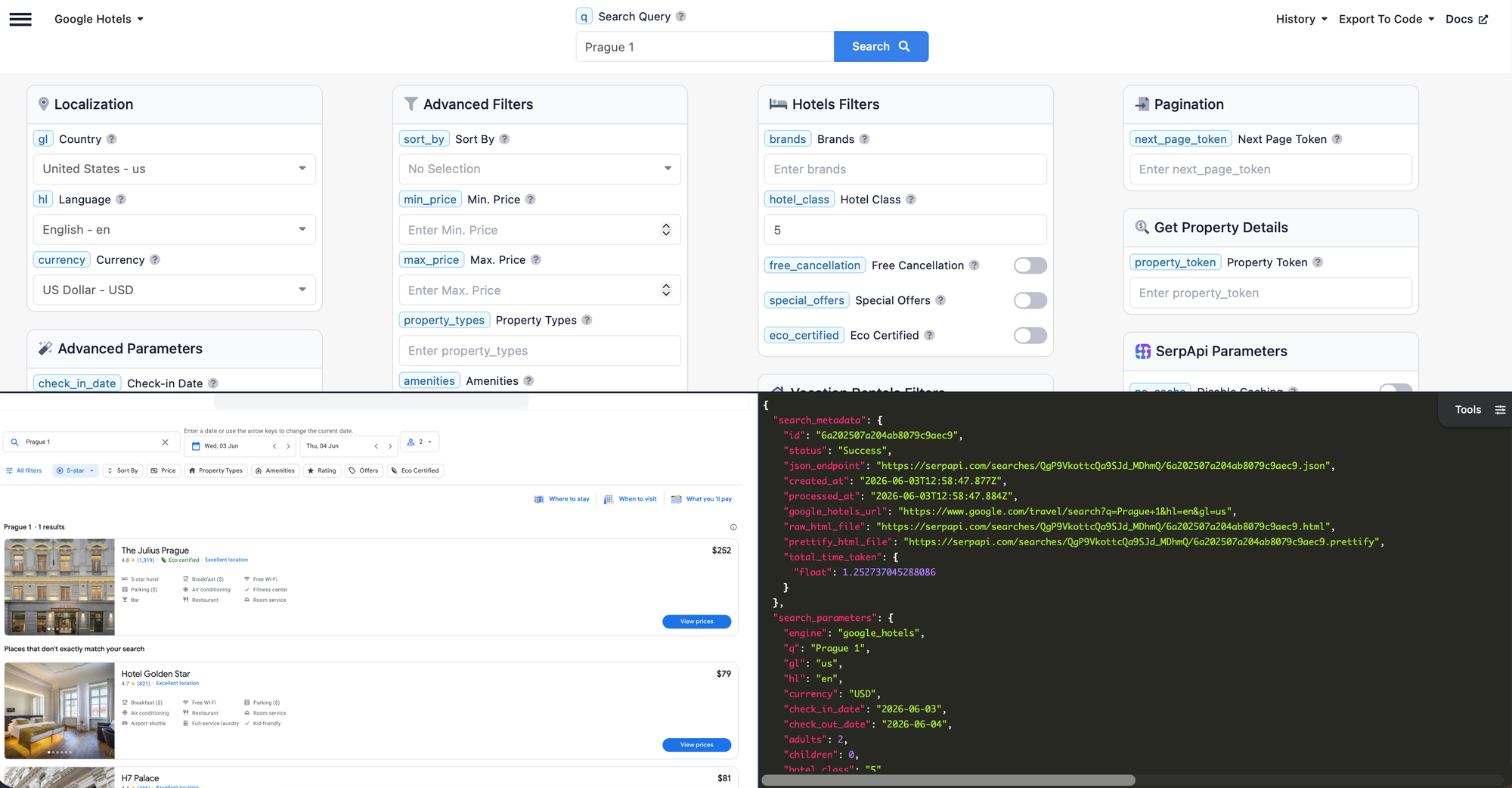
SerpApi has a Google Hotels Properties API which we can use for our base hotel search. We have to specify the location of the hotel as well as check-in and check-out dates in the YYYY-MM-DD format. Optionally we can ask for certain number of stars, for how many adults are we booking, or even if the property is eco-certified.
As a result, the API returns a list of properties matching our criteria including their name, rate_per_night, reviews, amenities and many more. One important thing we'll have to note down is the property token which is important to fetch the images in the next step. You can try this search first in the playground.
Using the SerpApi client
Once you see the hotels you would expect, you can translate this call into code. I'll use Ruby in this post, but you can pick one of the many other available SDKs like the one for JavaScript or Python.
First, we install the official Ruby library from RubyGems (or add it to Gemfile):
gem install serpapiThen we can require it and initialize the client with our API key.
require "serpapi"

client = SerpApi::Client.new(
  api_key: "..."
)
Once done, we are ready to call @client.search() with the parameters we want.
For generic hotel search, we specify the google_hotels engine, provide the destination as a query with q and narrow it down using check_in_date and check_out_date dates:
@client.search(
  engine: "google_hotels",
  q: "#{destination} hotels",
  check_in_date: check_in_date,
  check_out_date: check_out_date,
  adults: adults,
  hotel_class: hotel_class,
  gl: country,
  hl: "en"
)
This returns a list of hotels that may contain these top-level fields:
properties: an array of the primary hotel resultsads: an array of the sponsored hotel resultsnon_matching_properties: an array of additional hotel candidates Google returned even though they may not match the requested filters exactly
We can extract candidates from all three, with priority given to primary exact matches. I'll talk about all of these in more detail in the next section.
Using pagination
A single API request gives you one page of hotel results. If more results are available, SerpApi may return a pagination token that you can use to request the next page. You can find it under serpapi_pagination as next_page_token:
{
  "serpapi_pagination": {
    "next_page_token": "..."
  }
}
Here's how to grab it in Ruby:
next_page_token = results.dig("serpapi_pagination", "next_page_token")The follow-up search will have the exact same parameters except the newly provided next_page_token:
second_page = client.search(
  engine: "google_hotels",
  q: "Dresden hotels",
  check_in_date: "2026-06-10",
  check_out_date: "2026-06-11",
  adults: 2,
  hotel_class: 4,
  gl: "de",
  hl: "en",
  next_page_token: next_page_token
)
This way you can always get as many properties as needed or restart the search from a specific point.
How to find relevant hotels
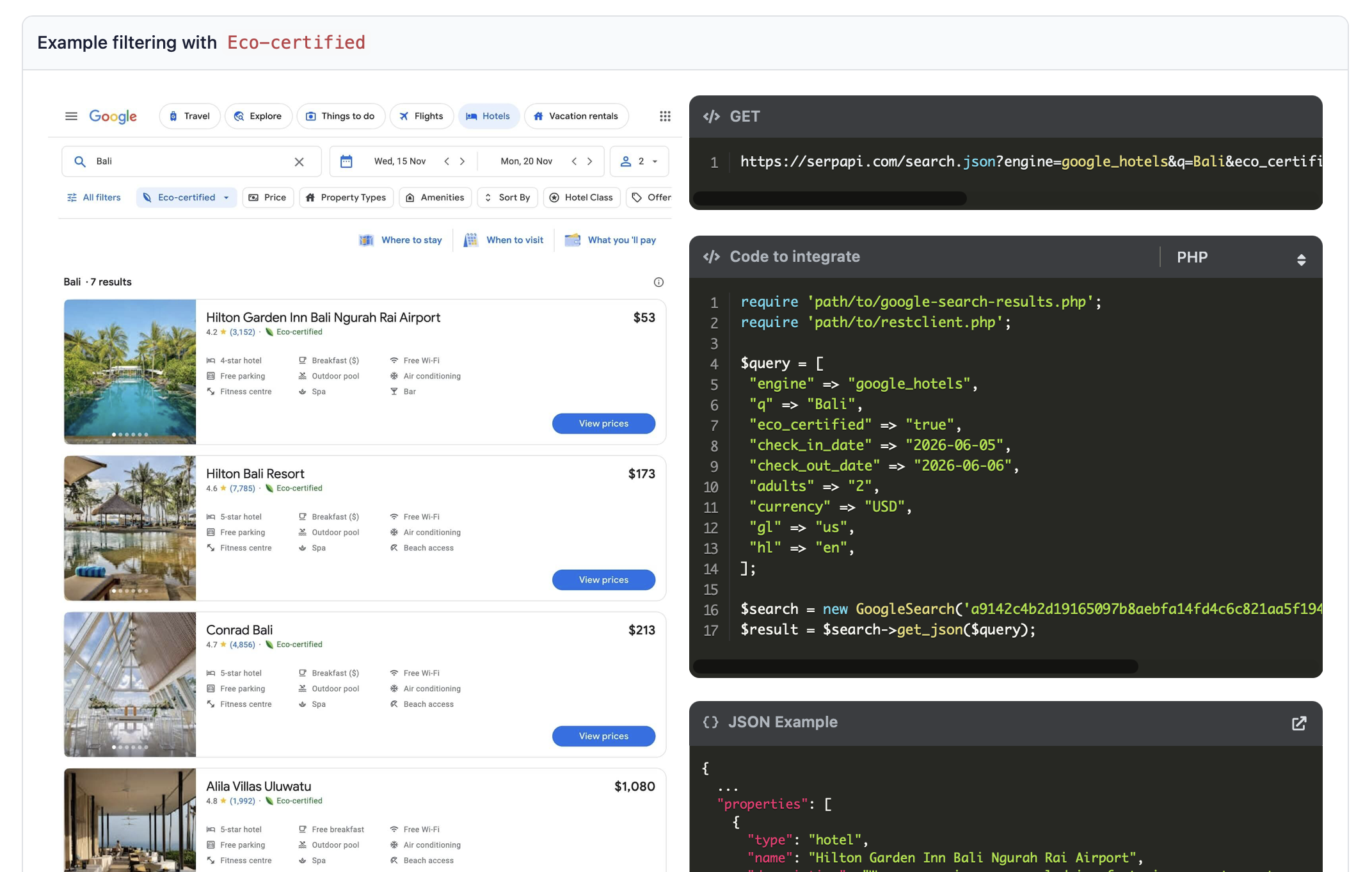
Let's look again at the responses we are getting from the google_hotels engine to find the right candidate hotels from the results involving three different groups.
Primary properties
The output JSON comes with three different sections. The properties array is the main Google Hotels results. Since we are interested in hotels, we should check that we are getting objects of type: "hotel".
We can also be interested in the following fields regarding the hotel's stars:
hotel_classis a text like4-star hotelor4 star hotelextracted_hotel_classas an assumed star number
Ads
The ads array is containing sponsored hotel listing. It's included only if they match the requested star class. This avoids mixing unrelated sponsored entries into the result list.
Non-matching properties
Finally, we also get the non_matching_properties array as a fallback for other hotel candidates after primary properties and matching ads. This is important because SerpApi's Google Hotels API can return only a small number of exact properties results for a star-class query while placing many useful hotel candidates in non_matching_properties.
Deduplication
Once you have your candidate hotels from these searches it's useful to deduplicate them using their property_token. The property_token is the only stable hotel identifier and is also needed later for google_hotels_photos.
Finding relevant hotels pictures
The next step is to download hotel images. Once we know which hotels we are interested in, we can fetch their pictures from the photo gallery using SerpApi's Google Hotels Photos API.
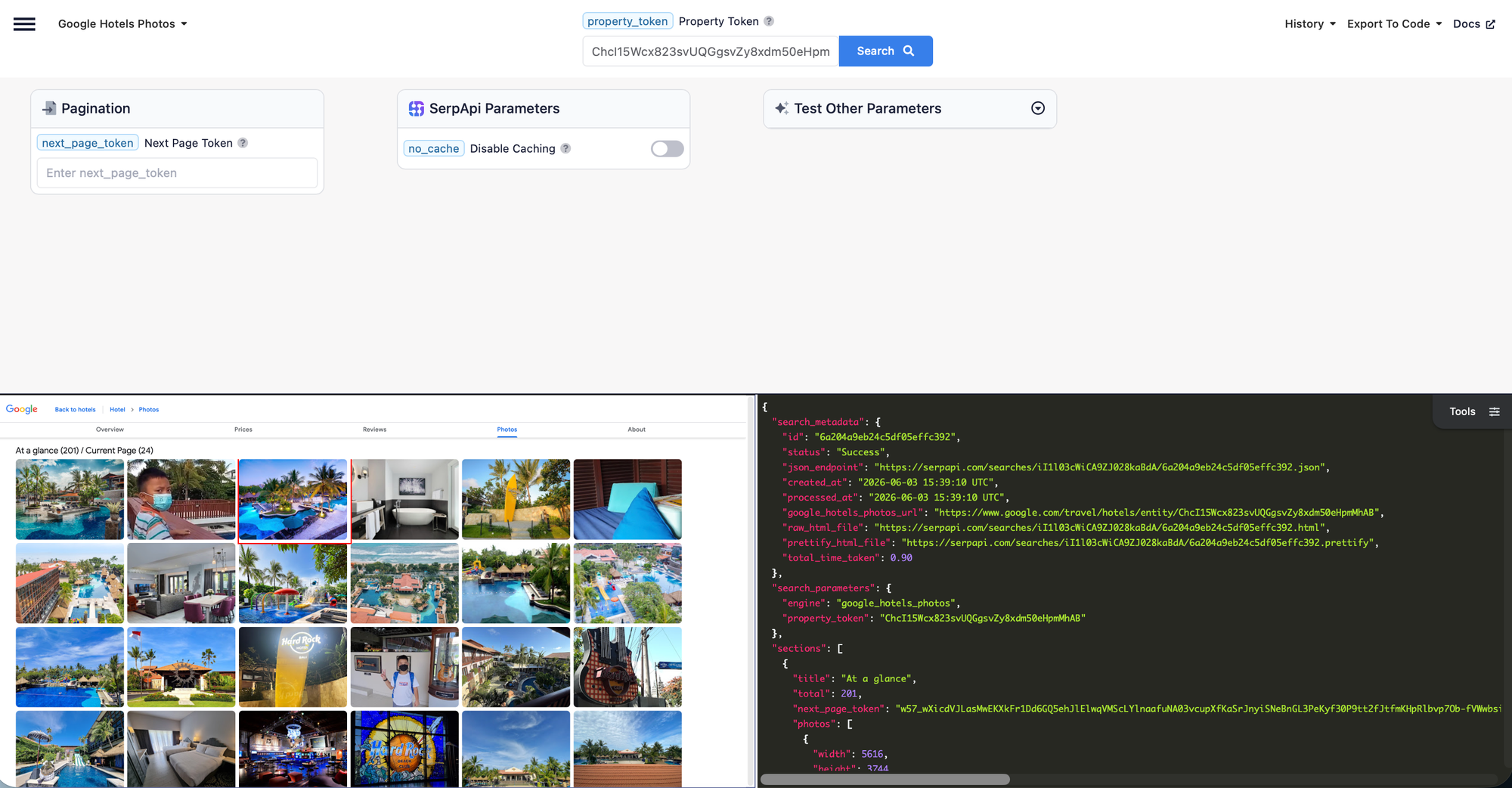
To run the search we can continue running a new search on the same @client we already initialized with our API key, just with a different engine parameter:
@client.search(
  engine: "google_hotels_photos",
  property_token: property_token
)
The API call only requires the hotel's property_token from the previous step. The response will looks like this:
{
   "search_metadata":{
      "id":"6a204a9eb24c5df05effc392",
      "status":"Success",
      "json_endpoint":"https://serpapi.com/searches/iI1l03cWiCA9ZJ028kaBdA/6a204a9eb24c5df05effc392.json",
      "created_at":"2026-06-03 15:39:10 UTC",
      "processed_at":"2026-06-03 15:39:10 UTC",
      "google_hotels_photos_url":"https://www.google.com/travel/hotels/entity/ChcI15Wcx823svUQGgsvZy8xdm50eHpmMhAB",
      "raw_html_file":"https://serpapi.com/searches/iI1l03cWiCA9ZJ028kaBdA/6a204a9eb24c5df05effc392.html",
      "prettify_html_file":"https://serpapi.com/searches/iI1l03cWiCA9ZJ028kaBdA/6a204a9eb24c5df05effc392.prettify",
      "total_time_taken":0.90
   },
   "search_parameters":{
      "engine":"google_hotels_photos",
      "property_token":"ChcI15Wcx823svUQGgsvZy8xdm50eHpmMhAB"
   },
   "sections":[
      {
         "title":"At a glance",
         "total":201,
         "next_page_token":"w57_wXicdVJLasMwEKXkFr1Dd6GQ5ehJlElwqVMScLYlnaafuNA03vcupXfKaSrJnyiSNeBnGL3PeKyf30P9tt2fJtfmKHpRlbvp7Ob-fVWwbsiWsU9BcfEAaaF7l-PHXQmRwmWHJVB30ZeJATnvrlw2fAIhy3KWUlsAIfMhgWPPMOnhIEZCUS1KnhG5eJSYgIR3NpE-hagaNZ97XEZd04uT3mgH8RhDqJ_pvL9BIS0ppEVx-bR4kkB3p16wxofh74fn181a3zpuO5j2WIqpanbRBT2iISzs_j8hxJWxREj7s7Gxm4S7J3DXuwQzpLHTGlbKxYu22HSpf1_bp8Ou3l_9A8jD2jE",
         "photos":[
            {
               "width":5616,
               "height":3744,
               "thumbnail_url":"https://lh3.googleusercontent.com/gps-cs-s/APNQkAHj65LO5BtfQGZwM_DuAG2ybjGRi3ZMc-uuByDtoMm941_3TX1RqL1MeTctAfalQyHaGVJABOQmcSnuWKHP-uiYxIr22t9ZsyaASieCzz92gtEotb787DzGis4ssgqDaxYnIkre0hLJbrBU=w253-h168-k-no",
               "source":"Owner Submitted",
               "photo_url":"https://lh3.googleusercontent.com/gps-cs-s/APNQkAHj65LO5BtfQGZwM_DuAG2ybjGRi3ZMc-uuByDtoMm941_3TX1RqL1MeTctAfalQyHaGVJABOQmcSnuWKHP-uiYxIr22t9ZsyaASieCzz92gtEotb787DzGis4ssgqDaxYnIkre0hLJbrBU=s5616",
               "posted_on":"2025-04-07",
               "source_url":"https://maps.google.com/maps/contrib/103108887507597475893"
            }
         ]
      }
   ]
}
Let's see next how to find the relevant data in there.
Gallery sections
The important part for us is sections. Depending on what you are trying to find, you can locale specific sections that categorize the hotel images into groups like:
roomsguest roomssuitesaccommodation
Apart from the section title, you should see a number of total pictures, next_page_token to fetch more photos and the photos array with the pictures themselves. Here's a simplified representation of that structure:
{
  "sections": [
    {
      "title": "Rooms",
      "total": 201,
      "next_page_token": "...",
      "photos": []
    },
    {
      "title": "Exterior",
      "total": 201,
      "next_page_token": "...",
      "photos": []
    },
    {
      "title": "Amenities",
      "total": 201,
      "next_page_token": "...",
      "photos": []
    }
  ]
}
Each image object then may contain one or more URL fields:
{
  "thumbnail": "https://...",
  "image": "https://...",
  "original_image": "https://..."
}
The best-quality image is usually under original_image, but we can also fallback to image or thumbnail.
Deduplication
Hotel photo galleries can contain repeated URLs or many near-duplicates, so it is useful to deduplicate provided URLs before processing.
Categorizing the images
Once we know how to find the right hotel images using SerpApi, we need a way to categorize them. For that, we can use a capable LLM model such as GPT-4.1 or GPT-4.1-mini. I will use GPT-4.1-mini in the examples as a faster and cheaper model, but you can try GPT-4.1 if you need better accuracy.
RubyLLM is a Ruby interface for LLM models with a beautiful APIs that also lets you build chat agents with custom tools. To set it up, we'll have to provide an OpenAI access key as part of its configuration:
RubyLLM.configure do |config|
  config.openai_api_key = ENV.fetch("OPENAI_API_KEY")
end

chat = RubyLLM.chat(model: "gpt-4.1-mini")
We'll also need classification system instructions that would determine what we are looking for. If we are looking for a coffee machine, we can write that directly inside the system prompt:
chat = chat.with_instructions(<<~PROMPT)
  Analyze the attached hotel image.

  Determine whether there is a real coffee machine visibly present.

  Do not infer from hotel name, amenities, or context.
  Only mark coffee_machine true if the machine is clearly visible.
  Reject kettles, cups, menus, minibars, lobbies, restaurants, bathrooms, and exterior photos.

  Also classify the scene type:
  guest_room, kitchenette, suite, reception, lobby, restaurant, exterior, bathroom, hallway, or other.
PROMPT
These instructions tell the model:
- what visual feature to look for
- what false positives to avoid
- which scene categories are allowed
- what kind of evidence is required
This simple prompt should already work, but if we want machine-readable results that would fill in things like the coffee_machine boolean above, we need to tell this to the model as well. Luckily, RubyLLM can request structured JSON output using with_schema which accepts a schema of the output:
schema = {
  name: "coffee_machine_detection",
  strict: true,
  schema: {
    type: "object",
    properties: {
      scene_type: {
        type: "string",
        enum: [
          "guest_room",
          "kitchenette",
          "suite",
          "reception",
          "lobby",
          "restaurant",
          "exterior",
          "bathroom",
          "hallway",
          "other"
        ]
      },
      suitable_room_photo: { type: "boolean" },
      room_evidence: { type: "string" },
      coffee_machine: { type: "boolean" },
      coffee_machine_evidence: { type: "string" },
      confidence: { type: "number" },
      reason: { type: "string" }
    },
    required: [
      "scene_type",
      "suitable_room_photo",
      "room_evidence",
      "coffee_machine",
      "coffee_machine_evidence",
      "confidence",
      "reason"
    ],
    additionalProperties: false
  }
}

chat = chat.with_schema(schema)
This step asks the model to return a predictable object instead of free-form prose. As you can see, we can define a return object, its properties, property types, and if a field is required. All of that is useful, if we want to work with that data later.
A final step for the categorization is asking RubyLLM to attach the hotel image and run the query which we can do by providing image URL in the with parameter:
response = chat.ask(
  "Analyze the attached image and return the structured detection result.",
  with: image_url
)
Building the Hotel Coffee Analyzer
Now that we understand how all of these APIs should work together, we can create a proper analyzer. Today we are analyzing rooms for coffee machines, so I am calling the class HotelCoffeeAnalyzer. A user is able to pass the arguments we talked about and get some interesting analysis back.
I am wrapping the analyzer in a runnable script so that we can see it in action immediately. The flow stays the same as in the beginning; finding the right hotels, getting the property ID, fetching the photos, and finally analyzing them. You can also grab the code on GitHub.
At the beginning, I am simply defining all the possible parameters, the extended prompt, the LLM response schema, and configuring clients. The main code is split into two classes. HotelCoffeeAnalyzer searches for the right hotel pictures and internally pass them to CoffeeMachineDetector which can run the LLM call.
require "json"
require "date"
require "fileutils"
require "dotenv/load"
require "serpapi"
require "ruby_llm"

# ------------------------------------------------------------
# Configuration
# ------------------------------------------------------------

SERPAPI_API_KEY = ENV.fetch("SERPAPI_API_KEY")
OPENAI_API_KEY  = ENV.fetch("OPENAI_API_KEY")

CHECK_IN_DATE = ENV.fetch("HOTEL_CHECK_IN_DATE") { (Date.today + 1).iso8601 }
CHECK_OUT_DATE = ENV.fetch("HOTEL_CHECK_OUT_DATE") { (Date.today + 2).iso8601 }
HOTEL_DESTINATION = ENV.fetch("HOTEL_DESTINATION", "Dresden")
HOTEL_COUNTRY = ENV.fetch("HOTEL_COUNTRY", "de")
HOTEL_ADULTS = ENV.fetch("HOTEL_ADULTS", "2")
HOTEL_CLASS = ENV.fetch("HOTEL_CLASS", "4")
HOTEL_RESULT_LIMIT = ENV.fetch("HOTEL_RESULT_LIMIT", "10").to_i
HOTEL_SEARCH_PAGES = ENV.fetch("HOTEL_SEARCH_PAGES", "1").to_i
HOTEL_PHOTO_LIMIT = ENV.fetch("HOTEL_PHOTO_LIMIT", "1").to_i
FETCH_HOTEL_PHOTOS = ENV.fetch("FETCH_HOTEL_PHOTOS", "1") == "1"
SERPAPI_DEBUG = ENV.fetch("SERPAPI_DEBUG", "1") != "0"
SERPAPI_DEBUG_STDOUT = ENV.fetch("SERPAPI_DEBUG_STDOUT", "0") == "1"
VISION_DEBUG = ENV.fetch("VISION_DEBUG", "1") != "0"
VISION_DEBUG_STDOUT = ENV.fetch("VISION_DEBUG_STDOUT", "0") == "1"
VISION_DEBUG_DIR = ENV.fetch("VISION_DEBUG_DIR", "vision_debug")

RubyLLM.configure do |config|
  config.openai_api_key = OPENAI_API_KEY
end

PROMPT = <<~PROMPT
  Analyze the attached image from a hotel listing.

  Determine whether there is a REAL coffee machine visibly present in the image.

  Important:
  - Do not infer from the hotel name, amenities, listing context, or likelihood.
  - If the image is an exterior/building facade, street view, reception area, front desk,
    lobby, restaurant, breakfast room, bar, bathroom, hallway, generic city photo, map,
    logo, or any image where no coffee machine is clearly visible, return coffee_machine: false.
  - Do not classify reception/front-desk/common-area photos as guest_room.
  - suitable_room_photo must be true only for a private guest room, suite, or in-room kitchenette.
    A suitable room photo should show private-room evidence such as a bed, bedside table,
    wardrobe, desk in a guest room, private kitchenette, or suite living area. If this evidence
    is missing, suitable_room_photo must be false.
  - Only return coffee_machine: true when a coffee machine itself is clearly visible inside a
    suitable private guest-room/suite/kitchenette context.

  Accept as coffee machines:
  - Nespresso machines
  - Espresso machines
  - Pod coffee makers
  - Drip coffee machines
  - Built-in coffee stations

  Reject:
  - Electric kettles
  - Tea kettles
  - Water boilers
  - Tea trays
  - Mini bars
  - Beverage menus
  - Cups only
  - Coffee served in a cup
  - Exterior hotel photos
  - Reception desks
  - Front desks
  - Lobby/common-area coffee service

  Return ONLY valid JSON:

  {
    "scene_type": "guest_room | kitchenette | suite | reception | lobby | restaurant | exterior | bathroom | hallway | other",
    "suitable_room_photo": true,
    "room_evidence": "Bed and bedside table are visible",
    "coffee_machine": true,
    "coffee_machine_evidence": "Black Nespresso machine visible on cabinet",
    "confidence": 0.95,
    "reason": "Black Nespresso machine visible on cabinet in a private guest room"
  }
PROMPT

COFFEE_MACHINE_SCHEMA = {
  name: "coffee_machine_detection",
  strict: true,
  schema: {
    type: "object",
    properties: {
      scene_type: {
        type: "string",
        enum: %w[guest_room kitchenette suite reception lobby restaurant exterior bathroom hallway other]
      },
      suitable_room_photo: { type: "boolean" },
      room_evidence: { type: "string" },
      coffee_machine: { type: "boolean" },
      coffee_machine_evidence: { type: "string" },
      confidence: { type: "number" },
      reason: { type: "string" }
    },
    required: %w[
      scene_type
      suitable_room_photo
      room_evidence
      coffee_machine
      coffee_machine_evidence
      confidence
      reason
    ],
    additionalProperties: false
  }
}.freeze

ROOM_SECTION_NAMES = [
  "rooms",
  "room",
  "guest rooms",
  "guest room",
  "suites",
  "suite",
  "accommodation"
].freeze

# ------------------------------------------------------------
# Coffee detector
# ------------------------------------------------------------

class CoffeeMachineDetector
  def self.detect(image_url)
    puts "Vision request image: #{image_url}"

    response =
      RubyLLM
        .chat(model: "gpt-4.1-mini")
        .with_instructions(PROMPT)
        .with_schema(COFFEE_MACHINE_SCHEMA)
        .ask(
          "Analyze the attached image and return the structured JSON detection result.",
          with: image_url
        )

    raw_response = response.content
    parsed_response = parse_response(raw_response)

    debug(image_url, raw_response, parsed_response)

    puts "Vision result: scene=#{parsed_response["scene_type"] || "unknown"}, " \
      "suitable_room_photo=#{parsed_response["suitable_room_photo"]}, " \
      "room_evidence=#{parsed_response["room_evidence"]}, " \
      "coffee_machine=#{parsed_response["coffee_machine"]}, " \
      "coffee_machine_evidence=#{parsed_response["coffee_machine_evidence"]}, " \
      "confidence=#{parsed_response["confidence"]}, " \
      "reason=#{parsed_response["reason"]}"

    parsed_response
  rescue JSON::ParserError => e
    puts "JSON parse failed: #{e.message}"
    debug(image_url, raw_response, nil, error: e)
    nil
  rescue => e
    puts "Vision request failed: #{e.class}: #{e.message}"
    debug(image_url, defined?(raw_response) ? raw_response : nil, nil, error: e)
    nil
  end

  def self.parse_response(response_content)
    parsed_response =
      case response_content
      when Hash
        response_content
      else
        JSON.parse(response_content.to_s)
      end

    stringify_keys(parsed_response)
  end

  def self.stringify_keys(value)
    case value
    when Hash
      value.each_with_object({}) do |(key, item), result|
        result[key.to_s] = stringify_keys(item)
      end
    when Array
      value.map { |item| stringify_keys(item) }
    else
      value
    end
  end

  def self.debug(image_url, raw_response, parsed_response, error: nil)
    return unless VISION_DEBUG

    FileUtils.mkdir_p(VISION_DEBUG_DIR)

    payload = {
      image_url: image_url,
      raw_response: raw_response,
      parsed_response: parsed_response,
      error_class: error&.class&.name,
      error_message: error&.message
    }

    debug_path = File.join(VISION_DEBUG_DIR, "vision_response_#{next_debug_index}.json")
    debug_json = JSON.pretty_generate(payload)

    File.write(debug_path, debug_json)
    puts "Vision debug saved to #{debug_path}"
    puts debug_json if VISION_DEBUG_STDOUT
  end

  def self.next_debug_index
    @debug_index ||= existing_debug_indices.max.to_i
    @debug_index += 1
  end

  def self.existing_debug_indices
    Dir.glob(File.join(VISION_DEBUG_DIR, "vision_response_*.json")).filter_map do |path|
      File.basename(path).match(/vision_response_(\d+)\.json/)&.[](1)&.to_i
    end
  end
end

# ------------------------------------------------------------
# Google Hotels analyzer
# ------------------------------------------------------------

class HotelCoffeeAnalyzer
  def self.analyze(api_key:, **params)
    new(api_key: api_key).analyze(**params)
  end

  def initialize(api_key:)
    @client = SerpApi::Client.new(api_key: api_key)
  end

  def analyze(
    destination:,
    country:,
    check_in_date:,
    check_out_date:,
    adults:,
    hotel_class:,
    result_limit:,
    search_pages:,
    photo_limit:,
    fetch_hotel_photos:,
    serpapi_debug:,
    serpapi_debug_stdout:,
    results_path: "coffee_machine_results.json"
  )
    result_limit = Integer(result_limit)
    search_pages = Integer(search_pages)
    photo_limit = Integer(photo_limit)

    validate_analysis_params(
      check_in_date: check_in_date,
      check_out_date: check_out_date,
      result_limit: result_limit,
      search_pages: search_pages,
      photo_limit: photo_limit
    )

    hotels =
      fetch_star_hotels(
        destination: destination,
        country: country,
        check_in_date: check_in_date,
        check_out_date: check_out_date,
        adults: adults,
        hotel_class: hotel_class,
        result_limit: result_limit,
        search_pages: search_pages,
        serpapi_debug: serpapi_debug,
        serpapi_debug_stdout: serpapi_debug_stdout
      )

    puts
    puts "Found #{hotels.size} hotel candidate(s) for #{hotel_class}-star search"
    puts

    results =
      hotels.map do |hotel|
        analyze_hotel(
          hotel,
          photo_limit: photo_limit,
          fetch_hotel_photos: fetch_hotel_photos
        )
      end

    puts
    puts "=" * 80
    puts "FINAL RESULTS"
    puts "=" * 80

    results_json = JSON.pretty_generate(results)
    puts results_json

    File.write(results_path, results_json)

    puts
    puts "Saved to #{results_path}"

    results
  end

  private

  def validate_analysis_params(check_in_date:, check_out_date:, result_limit:, search_pages:, photo_limit:)
    if Date.iso8601(check_out_date) <= Date.iso8601(check_in_date)
      raise ArgumentError, "check_out_date must be after check_in_date"
    end

    raise ArgumentError, "result_limit must be greater than or equal to 0" if result_limit.negative?
    raise ArgumentError, "search_pages must be greater than or equal to 0" if search_pages.negative?
    raise ArgumentError, "photo_limit must be greater than or equal to 0" if photo_limit.negative?
  end

  def fetch_star_hotels(
    destination:,
    country:,
    check_in_date:,
    check_out_date:,
    adults:,
    hotel_class:,
    result_limit:,
    search_pages:,
    serpapi_debug:,
    serpapi_debug_stdout:
  )
    puts "Fetching #{destination} #{hotel_class}-star hotels from #{check_in_date} to #{check_out_date}..."

    return [] if result_limit.zero?

    params = {
      engine: "google_hotels",
      q: "#{destination} hotels",
      check_in_date: check_in_date,
      check_out_date: check_out_date,
      adults: adults,
      hotel_class: hotel_class,
      gl: country,
      hl: "en"
    }

    hotels = []

    search_pages.times do |page|
      results = @client.search(params)
      debug_serpapi_response(
        results,
        page,
        serpapi_debug: serpapi_debug,
        serpapi_debug_stdout: serpapi_debug_stdout
      )

      matching_hotels = extract_hotels(results, hotel_class: hotel_class)

      puts "Page #{page + 1}: properties: #{values_array(results, :properties).size}, ads: #{values_array(results, :ads).size}, non-matching: #{values_array(results, :non_matching_properties).size}, extracted hotels: #{matching_hotels.size}"

      hotels.concat(matching_hotels)
      hotels = deduplicate_hotels(hotels)

      break if hotels.size >= result_limit

      next_page_token =
        dig_value(results, :serpapi_pagination, :next_page_token) ||
        value(results, :next_page_token)

      break if next_page_token.to_s.empty?

      params = params.merge(next_page_token: next_page_token)
    end

    selected_hotels = hotels.first(result_limit)

    puts "Collected #{hotels.size} hotel candidate(s); selected #{selected_hotels.size}."

    selected_hotels
  end

  def deduplicate_hotels(hotels)
    hotels.uniq do |hotel|
      value(hotel, :property_token) || value(hotel, :name)
    end
  end

  def extract_hotels(results, hotel_class:)
    properties = values_array(results, :properties)
    ads = values_array(results, :ads)
    non_matching_properties = values_array(results, :non_matching_properties)

    property_hotels = properties.select { |hotel| value(hotel, :type).to_s == "hotel" }
    exact_property_hotels = property_hotels.select { |hotel| matching_star_hotel?(hotel, hotel_class: hotel_class) }

    primary_hotels = exact_property_hotels.empty? ? property_hotels : exact_property_hotels
    ad_hotels = ads.select { |hotel| matching_star_hotel?(hotel, hotel_class: hotel_class) }
    fallback_hotels = non_matching_properties.select { |hotel| value(hotel, :type).to_s == "hotel" }

    deduplicate_hotels(primary_hotels + ad_hotels + fallback_hotels)
  end

  def value(hash, key)
    return nil unless hash.respond_to?(:key?)

    string_key = key.to_s
    symbol_key = key.to_sym

    if hash.key?(symbol_key)
      hash[symbol_key]
    elsif hash.key?(string_key)
      hash[string_key]
    end
  end

  def values_array(hash, key)
    Array(value(hash, key))
  end

  def dig_value(hash, *keys)
    keys.reduce(hash) do |current, key|
      value(current, key)
    end
  end

  def debug_serpapi_response(results, page, serpapi_debug:, serpapi_debug_stdout:)
    return unless serpapi_debug

    debug_path = "serpapi_response_page_#{page + 1}.json"
    debug_json = JSON.pretty_generate(results)

    File.write(debug_path, debug_json)
    puts "Full SerpApi response saved to #{debug_path}"
    puts debug_json if serpapi_debug_stdout
  end

  def matching_star_hotel?(hotel, hotel_class:)
    value(hotel, :extracted_hotel_class).to_i == hotel_class.to_i ||
      value(hotel, :hotel_class).to_i == hotel_class.to_i ||
      value(hotel, :hotel_class).to_s.match?(/\b#{Regexp.escape(hotel_class.to_s)}[ -]?star\b/i)
  end

  def analyze_hotel(hotel, photo_limit:, fetch_hotel_photos:)
    puts
    puts "-" * 80
    puts value(hotel, :name)
    puts "-" * 80

    photos = fetch_hotel_photos(hotel, photo_limit: photo_limit, fetch_hotel_photos: fetch_hotel_photos)

    puts "Photos selected for analysis: #{photos.size}"

    detections = []
    photos_scanned = 0

    photos.each do |photo_url|
      puts "Analyzing #{photo_url}"
      photos_scanned += 1

      detection = CoffeeMachineDetector.detect(photo_url)
      next if detection.nil?

      detection = detection.merge("image_url" => photo_url)
      detections << detection

      if positive_detection?(detection)
        puts "Coffee machine found with sufficient confidence; stopping photo analysis for this hotel."
        break
      end
    end

    positives = detections.select { |d| positive_detection?(d) }

    {
      hotel: value(hotel, :name),
      coffee_machine_present: positives.any?,
      highest_confidence: positives.map { |d| d["confidence"] }.max,
      positive_photos: positives.count,
      photos_scanned: photos_scanned,
      detections: detections,
      evidence: positives.first(3)
    }
  rescue => e
    {
      hotel: value(hotel, :name),
      error: e.message
    }
  end

  def positive_detection?(detection)
    detection["coffee_machine"] == true &&
      detection["suitable_room_photo"] == true &&
      suitable_scene_type?(detection["scene_type"]) &&
      detection["room_evidence"].to_s.strip != "" &&
      detection["coffee_machine_evidence"].to_s.strip != "" &&
      detection["confidence"].to_f >= 0.80
  end

  def suitable_scene_type?(scene_type)
    %w[guest_room kitchenette suite].include?(scene_type.to_s)
  end

  def fetch_hotel_photos(hotel, photo_limit:, fetch_hotel_photos:)
    photos = []

    if fetch_hotel_photos
      photos.concat(fetch_room_section_photos(value(hotel, :property_token)))
    end

    photos.concat(image_urls_from(value(hotel, :images)))
    photos.uniq.first(photo_limit)
  end

  def fetch_room_section_photos(property_token)
    return [] if property_token.nil?

    result =
      @client.search(
        engine: "google_hotels_photos",
        property_token: property_token
      )

    sections = values_array(result, :sections)

    room_sections =
      sections.select do |section|
        title = value(section, :title).to_s.downcase

        ROOM_SECTION_NAMES.any? do |name|
          title.include?(name)
        end
      end

    room_sections.flat_map do |section|
      image_urls_from(value(section, :images))
    end
  end

  def image_urls_from(images)
    Array(images).filter_map do |image|
      value(image, :original_image) ||
        value(image, :image) ||
        value(image, :thumbnail)
    end
  end
end

HotelCoffeeAnalyzer.analyze(
  api_key: SERPAPI_API_KEY,
  destination: HOTEL_DESTINATION,
  country: HOTEL_COUNTRY,
  check_in_date: CHECK_IN_DATE,
  check_out_date: CHECK_OUT_DATE,
  adults: HOTEL_ADULTS,
  hotel_class: HOTEL_CLASS,
  result_limit: HOTEL_RESULT_LIMIT,
  search_pages: HOTEL_SEARCH_PAGES,
  photo_limit: HOTEL_PHOTO_LIMIT,
  fetch_hotel_photos: FETCH_HOTEL_PHOTOS,
  serpapi_debug: SERPAPI_DEBUG,
  serpapi_debug_stdout: SERPAPI_DEBUG_STDOUT
)
The entry point is calling HotelCoffeeAnalyzer.analyze() with all the possible parameters. We validate them, run hotel and image searches with some deduplication and pass each photo for image detection. The script also comes with some debugging that comes handy when things go wrong.
Analyzing the results
An unsuccessful find will come with coffee_machine_present as false. We'll get the number of positive photos which will be 0 and the number of photos we considered as photos_scanned. We'll also get an array explaining each analyzed photo with its scene, confidence, and reasoning:
{
    "hotel": "Hotel Praga 1",
    "coffee_machine_present": false,
    "highest_confidence": null,
    "positive_photos": 0,
    "photos_scanned": 1,
    "detections": [
      {
        "scene_type": "restaurant",
        "suitable_room_photo": false,
        "room_evidence": "No private room elements like bed or kitchenette visible",
        "coffee_machine": false,
        "coffee_machine_evidence": "No coffee machine is visible in the image, only cups of coffee and other breakfast items",
        "confidence": 1,
        "reason": "Image shows a breakfast table with food and drinks but no coffee machine is visible; setting is a restaurant or breakfast room, not a guest room",
        "image_url": "https://lh3.googleusercontent.com/gps-cs-s/APNQkAFIsweeBnY-BfjyDnLLCnjjecnZw33k40xzQ9--UurxZMSiYNTCAN3_FzCJPSGkCmja9ANOSbPjipi2OgCiih_lv7Y1S-VO4CU098hhiToUQ8r6rQNs87WxJKelO9_r6BPw-IEKe9RGXKgC=s10000"
      }
    ],
    "evidence": []
  },
Here we only got one picture from the restaurant which we have to disqualify.
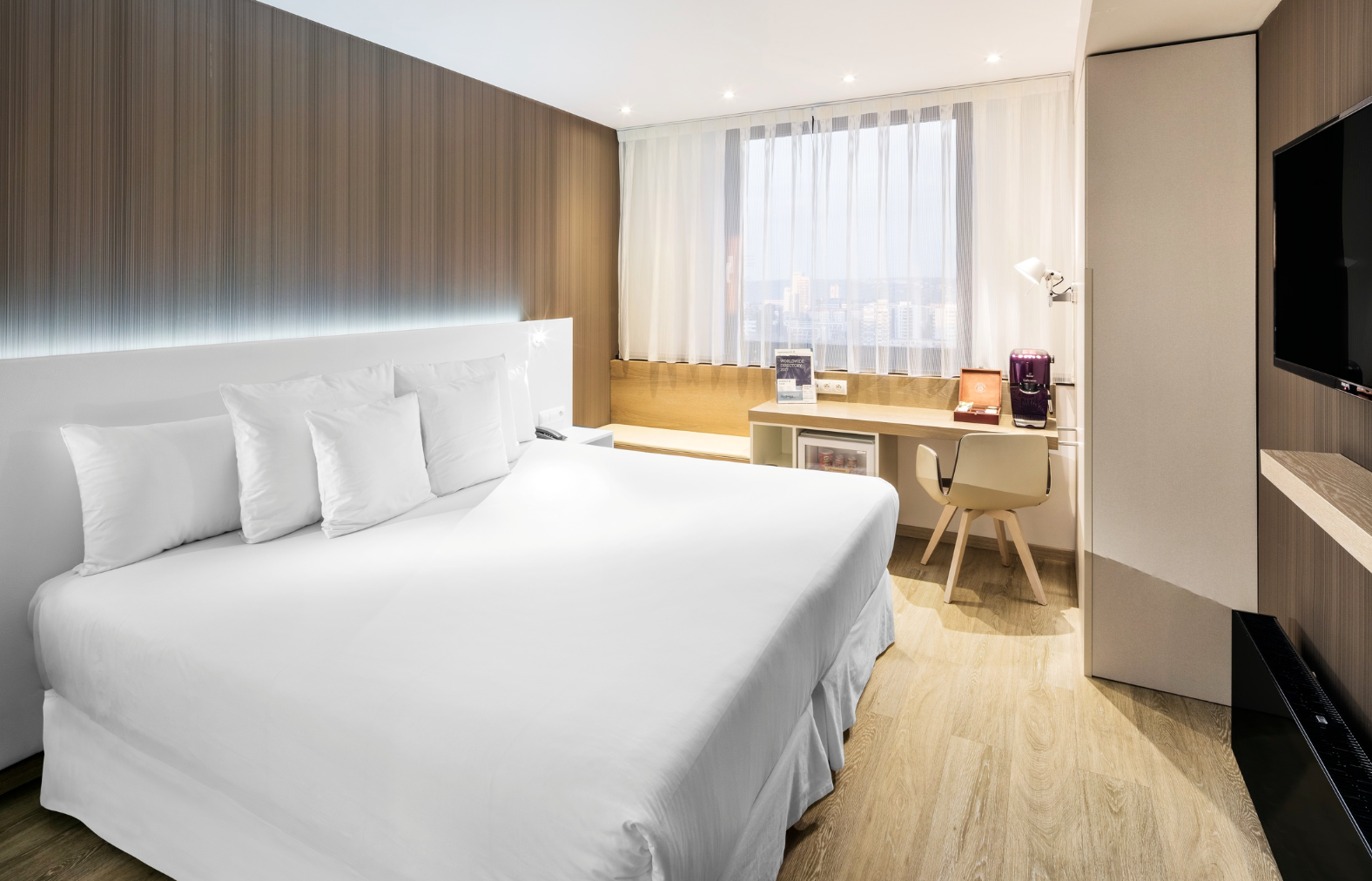
A successful find will come with coffee_machine_present as true as well as detections and evidence entries which will have scene_type set to guest_room (since we aren't interested in shared areas) and coffee_machine as true with high enough confidence score:
{
    "hotel": "Occidental Praha",
    "coffee_machine_present": true,
    "highest_confidence": 0.95,
    "positive_photos": 1,
    "photos_scanned": 1,
    "detections": [
      {
        "scene_type": "guest_room",
        "suitable_room_photo": true,
        "room_evidence": "Bed with pillows and bedside table visible",
        "coffee_machine": true,
        "coffee_machine_evidence": "Purple pod coffee maker visible on the desk",
        "confidence": 0.95,
        "reason": "A purple pod coffee maker is clearly visible on the desk in a private guest room with a bed",
        "image_url": "https://lh3.googleusercontent.com/gps-cs-s/APNQkAEjlZ7oYYUjR1y-VAYYPz0VuftzxVS4aeqFN1hKphaUgs8Up5nT83-km8ksQgR27Q0-ywkr9IKQYgzmVozuSDe76keTb8dw91SzrrmtgsdmiqlDTUo9Re-TI7s6kp9XeWFLufZZ=s10000"
      }
    ],
    "evidence": [
      {
        "scene_type": "guest_room",
        "suitable_room_photo": true,
        "room_evidence": "Bed with pillows and bedside table visible",
        "coffee_machine": true,
        "coffee_machine_evidence": "Purple pod coffee maker visible on the desk",
        "confidence": 0.95,
        "reason": "A purple pod coffee maker is clearly visible on the desk in a private guest room with a bed",
        "image_url": "https://lh3.googleusercontent.com/gps-cs-s/APNQkAEjlZ7oYYUjR1y-VAYYPz0VuftzxVS4aeqFN1hKphaUgs8Up5nT83-km8ksQgR27Q0-ywkr9IKQYgzmVozuSDe76keTb8dw91SzrrmtgsdmiqlDTUo9Re-TI7s6kp9XeWFLufZZ=s10000"
      }
    ]
  }
We'll also get a text-based reasoning as reason. The analyzed image itself is referenced in image_url and so it's easy to be opened in a browser and rechecked manually. In this case, we can confirm we have a match:
Conclusion
SerpApi's Google Hotels and Google Hotels Images APIs are a great way to find property images to analyze. They let you find the hotels, room availability, and their images for your applications with a simple API call. Today we went through analyzing hotel images to hunt for coffee machines, but thanks to RubyLLM and OpenAI models you can easily categorize hotels based on any visual metric.
Do more with hotel APIs
Analyzing images isn't the only thing you can do with SerpApi. Have a look at our other posts on Google Hotels APIs for inspiration on what you can build:
 Alex Barron
 Sonika Arora