Ruby
Ruby
 Golang
 .Net
.Net
 MCP
MCP
 C++
C++

Chat-based agents are augmented LLM interfaces with access to a list of predefined tools. RubyLLM Agents are reusable AI assistants implemented as models with their configuration, runtime context, and prompt conventions. Let's see how we can start implementing custom OpenAI chat agents with access to SERP tools with the help of the RubyLLM gem.
Simple chats vs agents
RubyLLM is a Ruby gem and an AI interface for GPT, Claude, Gemini, and many other providers to give us an easy way to run LLM chat inside a Ruby application. It allows us to avoid writing JSON and lets us work with AI using beautiful Ruby DSL.
A regular RubyLLM chat is a conversation. A user sends a message, the model responds, and the exchange continues back and forth. It works but it's limited to what the model can do. Today's models can do way more than before as they often search the web and find up-to-date information. However, they still do a lot of guessing and cannot access your internal data. This means we need to be very specific and provide a lot of context for the LLM to understand our request.
Imagine we ask an LLM something more complex with a simple sentence:
# Choose any model you like, just make sure to set up
# the API key in config/initializers/ruby_llm.rb
chat = RubyLLM.chat(model: "gpt-5.4-mini")
chat.ask "Is our 'Aeropress Coffee Maker' at $39.99 competitive?"
How could this LLM model know the answer?
Perhaps the agent could search our pages as well as our competitors' to gain a full understanding of our request. This usually requires some back and forth to ensure the LLM has all the context needed to give an accurate response. If we want more precision, access to application data, and better results, we need to give the chat agent access to the tools we control.
Now imagine what would happen if the chat agent has access to a local database and Google Shopping:
chat = RubyLLM.chat(model: "gpt-5.4-mini")
chat.with_tools(LookupProduct, SearchGoogleShopping)
chat.ask "Is our 'Aeropress Coffee Maker' competitively priced?"

# => "Your Aeropress Coffee Maker is listed at $39.99. Here are current
#     Google Shopping prices:
#     1. Amazon — $34.95
#     2. Target — $37.99
#     3. Walmart — $33.49
#     4. Williams Sonoma — $41.95
#     5. REI — $39.95
#
#     You're on the higher end. Three out of five retailers are under $38.
#     Consider adjusting to ~$36-37 to stay competitive."
Suddenly it has everything it needs to answer such an ambiguous question. It can search for competitors products on Google Shopping and compare it with data we have in our product catalog. Not bad at all.
The concept of using tools is simple. We describe a set of tools to the model, each with a name, parameters, and what it does. When the model determines it needs specific information or wants to perform an action, it returns a structured tool call
instead of plain text which looks like JSON below (shown here in OpenAI’s Chat Completions format):
{
  "role": "assistant",
  "content": null,
  "tool_calls": [
    {
      "id": "call_abc123",
      "type": "function",
      "function": {
        "name": "lookup_product",
        "arguments": "{\"name\":\"Aeropress Coffee Maker\"}"
      }
    }
  ]
}
Our code now needs to execute this function call and feed the result back which is all handled by RubyLLM in the background. The model then continues reasoning with the new information.
This loop which reasons, acts, and observes is what turns a language model into something that can actually get work done. And even better, we can wrap it all in a reusable agent class thanks to the RubyLLM Agents support. But first, let's implement the tools.
Tools
RubyLLM tools are interfaces for runnable code we control in an LLM chat. Both LookupProduct and SearchGoogleShopping tools would be implemented as Ruby classes inherited from RubyLLM::Tool. We name them using description, provide a set of acceptable params using parameter, and implement the execute method.
Here's an example of how this could look when searching a local product catalog for LookupProduct:
class LookupProduct < RubyLLM::Tool
  description "Looks up a product in our catalog by name"
  parameter :name, description: "Product name to search for"

  def execute(name:)
    Product.where("name ILIKE ?", "%#{name}%")
           .select(:name, :price, :sku, :category)
           .map(&:attributes)
  end
end
And here's the code for SearchGoogleShopping that works with Google Shopping using SerpApi:
class SearchGoogleShopping < RubyLLM::Tool
  description "Searches Google Shopping for current market prices of a product"
  parameter :query, description: "The product to search for"

  def execute(query:)
    client = SerpApi::Client.new(engine: "google_shopping", api_key: ENV.fetch("SERPAPI_API_KEY"))
    results = client.search(q: query)
    client.close

    (results[:shopping_results] || []).first(5).map do |r|
      { title: r[:title], price: r[:price], source: r[:source] }
    end
  end
end
You can see that RubyLLM does all the heavy lifting, allowing us to write code as usual.
Agents
Once we have our tools ready, we can introduce them to the chat using the chat.with_tools call. We can also go one step further and wrap this up as a reusable class in an agent thanks to the RubyLLM::Agent interface.
An agent in this context is a class that couples instructions with a set of tools:
class PriceMonitorAgent < RubyLLM::Agent
  model "gpt-5.4-mini"

  instructions <<~PROMPT
      You are a pricing analyst. You help the merchandising team keep our product
      catalog competitively priced. You can look up our products, check current
      Google Shopping prices, and find products where we are significantly overpriced.
      Always show specific numbers when comparing prices.
    PROMPT

  tools LookupProduct, SearchGoogleShopping, FindUndercut
end
A PriceMonitorAgent like the one above could help the shop's merchandising team find products that are overpriced on the current market:
agent = PriceMonitorAgent.new
agent.ask "Which of our coffee products are priced more than 15% above market?"

# => "I found 3 coffee products above the 15% threshold:
#
#     1. Baratza Encore Grinder — Our price: $179.99, Market avg: $149.80 (20.2% over)
#     2. Fellow Stagg Kettle — Our price: $94.99, Market avg: $79.60 (19.3% over)
#     3. Chemex 6-Cup — Our price: $54.99, Market avg: $44.97 (22.3% over)
#
#     The Aeropress ($39.99 vs $37.48 avg) and Hario V60 ($11.99 vs $11.20 avg)
#     are within range and look fine."
Depending on the question, the agent can pick one tool to generate a response or use an additional tool from the list to find the right answer. Combining internal data with live SERP data is incredibly powerful.
Debugging
Sometimes we might not be sure if the agents are using our tools in the way we expected. Luckily, chats in RubyLLM let us see all the tool calls that were done:
agent.messages.each do |m|
  m.tool_calls&.each_value do |tc|
    puts "#{tc.name}  #{tc.arguments.inspect}"
  end
end
We can also run something before a tool call like this:
agent = PriceMonitorAgent.new
agent.before_tool_call { |tc| puts "#{tc.name}  #{tc.arguments.inspect}" }
agent.ask "Which of our coffee products are priced more than 15% above market?"
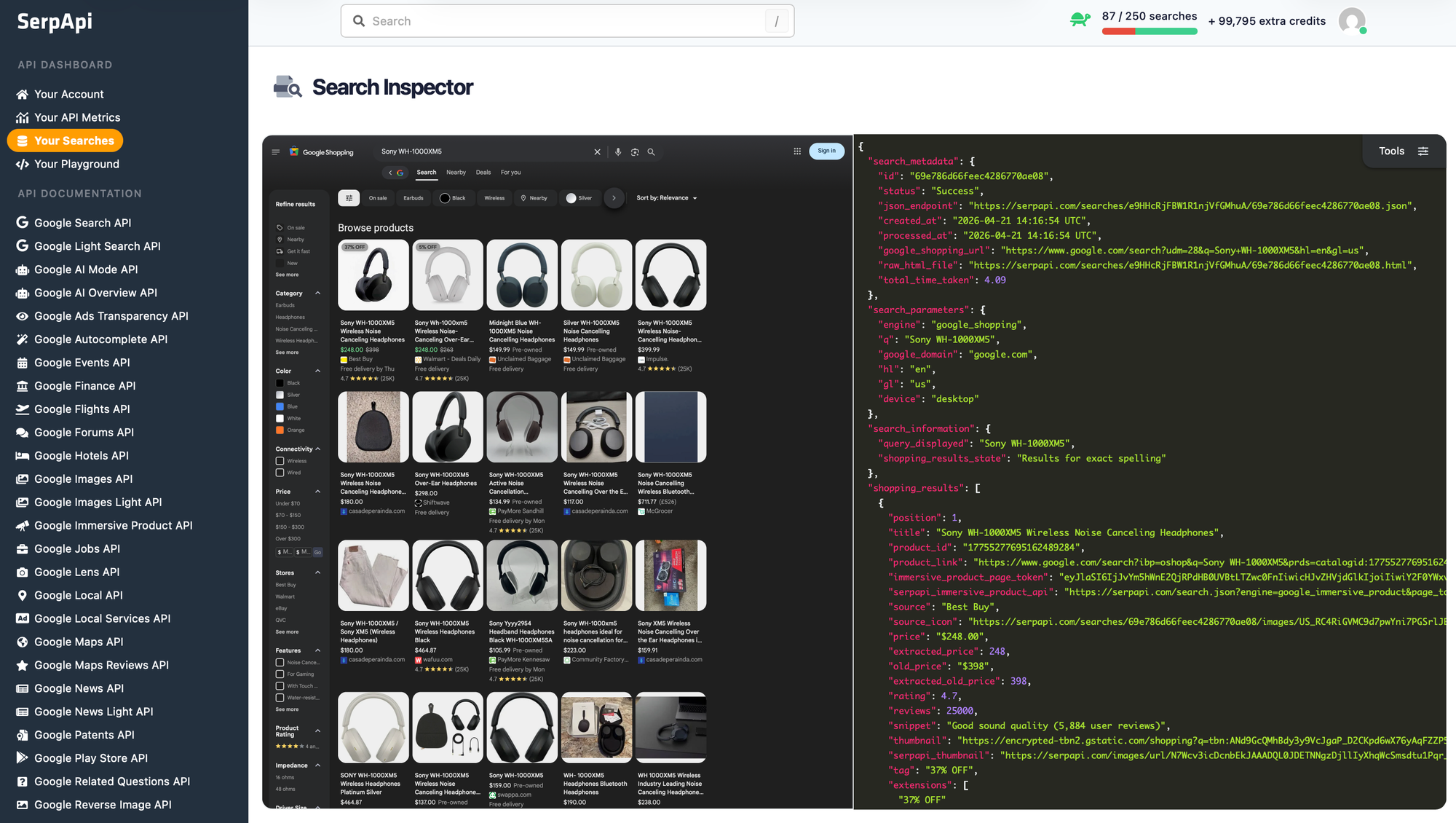
If we want to specifically recheck what search queries were run using SerpApi, we can head to serpapi.com/searches after logging in, and find the searches that were done. We'll get a full Search Inspector including the returned page and JSON:
Conclusion
SerpApi makes it super easy to integrate search data from Google, Amazon, Bing, and other search engines into your application. And RubyLLM makes it easy to expose this API as a tool for your agents. Give SerpApi a try with 250 free searches/month.