Ruby
Ruby
 Golang
 .Net
.Net
 MCP
MCP
 C++
C++

Tripadvisor aggregates millions of user-generated reviews, giving businesses and developers valuable insight into customer experiences, sentiment, and trends.
You can perform sentiment analysis to better understand customer satisfaction, monitor brand reputation across different locations, or identify common strengths and pain points mentioned in reviews. Developers may use this data to build travel recommendation engines, enrich applications with real-time review content, or create internal dashboards for competitive analysis. It can also be used for training AI models, market research, or tracking changes in customer feedback over time.
In this guide, we’ll explore how to use SerpApi to scrape Tripadvisor reviews efficiently. We’ll walk through common use cases, break down the response structure, and show how you can integrate this data into your workflows with minimal setup.
Setting up SerpApi
Are you new to SerpApi? We'll walk you through the steps from sign up to integrating with SerpApi.
Getting Started with SerpApi
To get started with SerpApi, I recommend following the steps in this blog post:
 Hilman Ramadhan
Integrations / Libraries
Some examples below will include our SerpApi libraries. If you would like to use one of our SerpApi libraries, we offer instructions for each language here:


Getting Started with Tripadvisor
Before you can start scraping the Tripadvisor Reviews API, you must first start with scraping the Tripadvisor Search API, in order to scrape locations and their place_id. We'll use the place_id to scrape reviews for a specific place.
Let's do a quick example using the SerpApi Python library so we have place_id values to use for the Tripadvisor Reviews API.
For this example, we're setting the engine to "tripadvisor" for the Tripadvisor Search API, the API key to your api key, and for the q (search parameter), we'll use "Rome".
Python (using SerpApi library)
import serpapi

params = {
  "engine": "tripadvisor",
  "api_key": "YOUR_SECRET_API_KEY",
  "q": "Rome"
}

search = serpapi.search(params)
results = search.as_dict()
There are many results, but let's take a look at the first result:
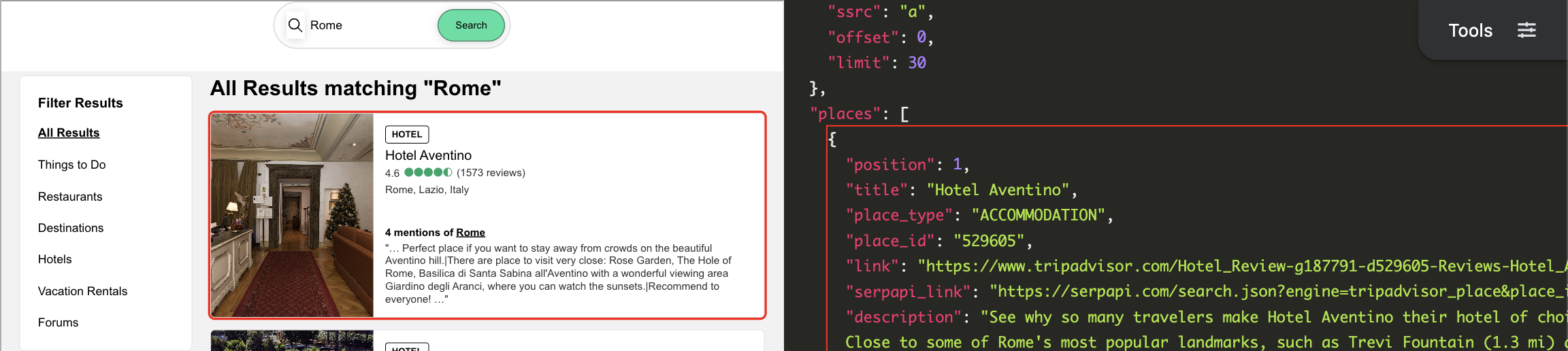
You can see the place_id for the first result, "Hotel Aventino", is "529605".
Now that we have collected a place_id value from the TripAdvisor Search API, we can take a look at the Tripadvisor Reviews API.
Tripadvisor Reviews API Documentation
We recommend familiarizing yourself with the available parameters and details in the Tripadvisor Reviews API documentation here:
 SerpApi
Now you should be set up with SerpApi and familiar with the Tripadvisor Reviews API.
How to Scrape Tripadvisor Reviews API using SerpApi
You can use any programming language in order to call our APIs. The parameters and results we reviewed above will not differ between the request methods, however the syntax used to call the APIs may differ.
You will see across the examples the engine is always set to "tripadvisor_reviews", the api_key will be set to your API key, and we include the place_id (search parameter) in every query to tell the engine what place we want to collect reviews for. In this example we are going to search for the place_id = 529605. This place_id is under "Rome: Colosseum" from the example in the blog post above.
GET Request
The syntax for the actual GET request between languages will of course vary between programming languages.
However, the URL used each time is consistent. When you are sending a GET request in any language you will use this URL to make the request:
https://serpapi.com/search.json?engine=tripadvisor_reviews&api_key=YOUR_SECRET_API_KEY&place_id=529605Python (using SerpApi library)
import serpapi

params = {
  "engine": "tripadvisor_reviews",
  "api_key": "YOUR_SECRET_API_KEY",
  "place_id": "529605"
}

search = serpapi.search(params)
results = search.as_dict()
cURL
curl --get https://serpapi.com/search \
 -d engine="tripadvisor_reviews" \
 -d api_key="YOUR_SECRET_API_KEY" \
 -d place_id="529605"
No Code
Google Sheets
To connect your code with Google Sheets first follow this blog post:
 Hilman Ramadhan
=SERPAPI_RESULT("engine=tripadvisor_reviews&place_id=529605")Make.com
While not every API we offer is on Make.com, there is a Universal Module where you can use any API.
Review this blog post to get started:
 Alex Barron
N8N
Similar to Make.com, not every API is currently included in N8N. However, you can use the HTTP Request node to still call any of our APIs.
To get started review this blog post:
 Alex Barron
SerpApi Results
After running any of the above commands, you can now scrape the full reviews for that location. For example, here is the first review listed:
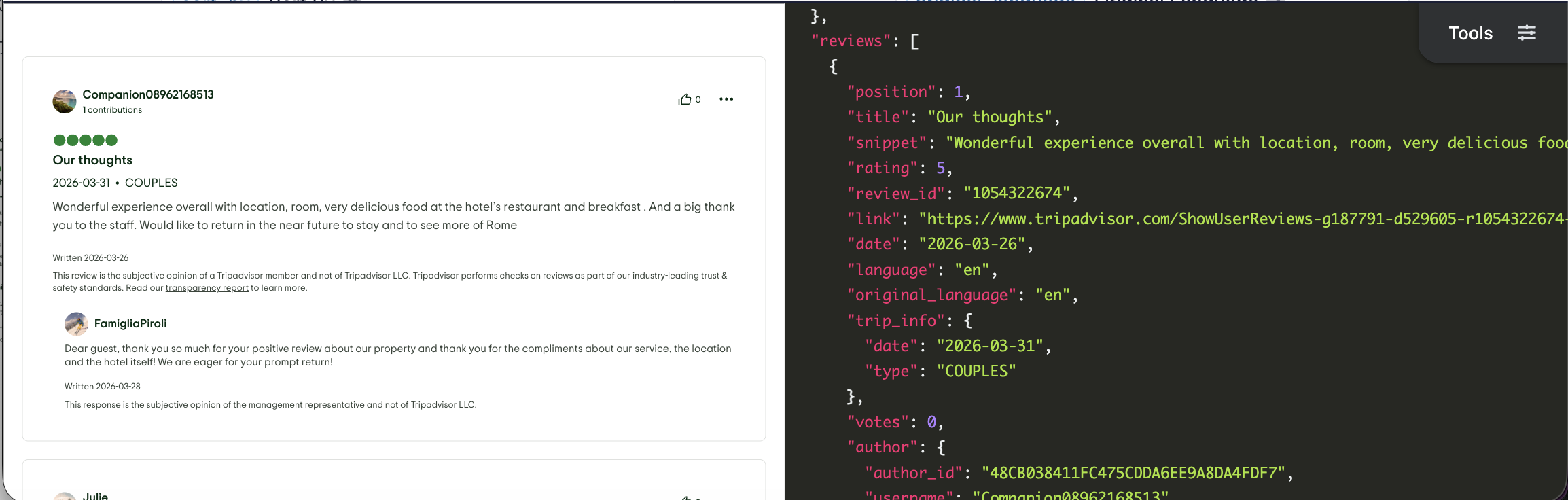
You can see the HTML rendering on the left and the JSON details you'll be receiving on the right.
Here is the full result structure to show what data you will receive from the Tripadvisor Reviews API:
{
  "search_information": {
    "total_reviews": "Integer - Total number of reviews for the place"
  },
  "reviews": [
    {
      "position": "Integer - Position of the review in the Tripadvisor page",
      "title": "String - Title of the review",
      "snippet": "String - Snippet of the review",
      "rating": "Integer - Overall rating given by the reviewer (1 to 5)",
      "additional_ratings": [
        {
          "label": "String - Label for the additional rating (e.g., 'Value', 'Service')",
          "rating": "Integer - Rating for the specific label (1 to 5)"
        },
        ...
      ],
      "review_id": "String - Unique identifier for the review",
      "link": "String - URL link to the original review on Tripadvisor",
      "date": "String - Date when the review was posted",
      "language": "String - Language code of the review (e.g., 'en' for English)",
      "original_language": "String - Original language code of the review, different from 'language' if translate was applied",
      "trip_info": {
        "date": "String - Date of the trip related to the review",
        "type": "String - Type of visit (e.g., 'COUPLES', 'FAMILY')"
      },
      "tips": "Array of Strings - Tips provided by the reviewer",
      "images": "Array of Strings - URLs of images included in the review",
      "votes": "Integer - Number of helpful votes received by the review",
      "author": {
        "author_id": "String - Unique identifier for the author",
        "username": "String - Username of the author on Tripadvisor",
        "display_name": "String - Display name of the author",
        "link": "String - URL link to the author's profile on Tripadvisor",
        "avatar": "String - URL link to the author's avatar image",
        "contributions": "Integer - Number of contributions made by the author on Tripadvisor",
        "hometown": "String - Hometown of the author"
      },
      "response": {
        "snippet": "String - Snippet of the response from the business owner, if available",
        "date": "String - Date when the response was posted",
        "author": {
          "display_name": "String - Display name of the responder",
          "link": "String - URL link to the responder's profile on Tripadvisor",
          "avatar": "String - URL link to the responder's avatar image",
          "connection": "String - Connection of the responder to the business (e.g., 'Marketing', 'Owner')"
        }
      }
    },
    "serpapi_pagination": {
      "next": "String - URL for the next page of reviews if available",
      "previous": "String - URL for the previous page of reviews if available"
    }
  ]
}
Conclusion
By using SerpApi's Tripadvisor Reviews API, you can easily retrieve full detail reviews including the rating, date, title, image, and more!
Together, these APIs provide a scalable, reliable way to access Tripadvisor reviews data without managing scraping infrastructure.
If you haven’t created an account with SerpApi yet, you can sign up and receive 250 free credits per month to get started here: https://serpapi.com/users/sign_up.
If you have any questions, feel free to reach out at contact@serpapi.com
Hope you find this useful 🙂