









 Ruby
Ruby
 Golang
 .Net
.Net
 MCP
MCP
 C++
C++

Welcome to the first part of our guide to understanding APIs!
If you’ve ever felt like the tech world speaks a completely different language, you are not alone. Terms like "API," "HTTP," and "JSON" get thrown around constantly, but at their core, they represent incredibly simple concepts.
To understand what an API is and why it's useful to you, we first need to look at something you do dozens of times a day: loading a website in your web browser.
The Digital Handshake: Requests and Responses
Every time you type a website address (like google.com) into your browser and hit Enter, you are kicking off a high-speed digital conversation.
This conversation is built on a framework called HTTP (Hypertext Transfer Protocol), which is really just a fancy term for "the rules of the internet's postal service."
This conversation always happens in two distinct steps:
1. The Request
Your web browser (the Client) sends a digital letter across the internet to a massive computer where the website lives (the Server). This letter says: "Hey, someone just asked to look at your homepage. Can you send it over?"
2. The Response
The server receives the letter, processes it, and sends a package back across the internet to your laptop or phone (and therefore your browser). This package is the Response, and it contains all the raw ingredients needed to build that website on your screen.
What’s Inside the Response Package?
When the server sends its response, it doesn't send a fully formed, beautiful webpage. It sends a package of raw materials.
If you could peak inside that digital package, you would find three main types of files:
- HTML (The Skeleton): This is the raw text and structure. It tells the browser where the headings are, where the paragraphs go, and where a button should exist.
- CSS (The Makeup): This is the "design code". It tells your browser what colour the background should be, where each part of text should live, what fonts to use, how big the images should look.
- Assets (The Media): These are the logos, image files, and videos that need to be dropped into the page.
Your web browser is essentially a highly advanced translator. It takes this package of raw ingredients, reads the instructions, and instantly builds the visual page you see on your screen.
How Humans Navigate the Web: Visual Cues
As humans, we rely entirely on the browser's translation to make sense of information. We don't read the raw code; we read the design.
When you look at a Google search result page, your brain instantly decodes the information based on visual cues:
- Big, Blue Text: Your brain says, "Ah, that's a clickable link to a website."
- Small, Grey Text below it: Your brain says, "That’s a summary of what the website is about."
- Positioning: Because a specific link is at the very top of the page, your brain knows, "This is the number one result - this is the most important."
Web page with CSS & Images:
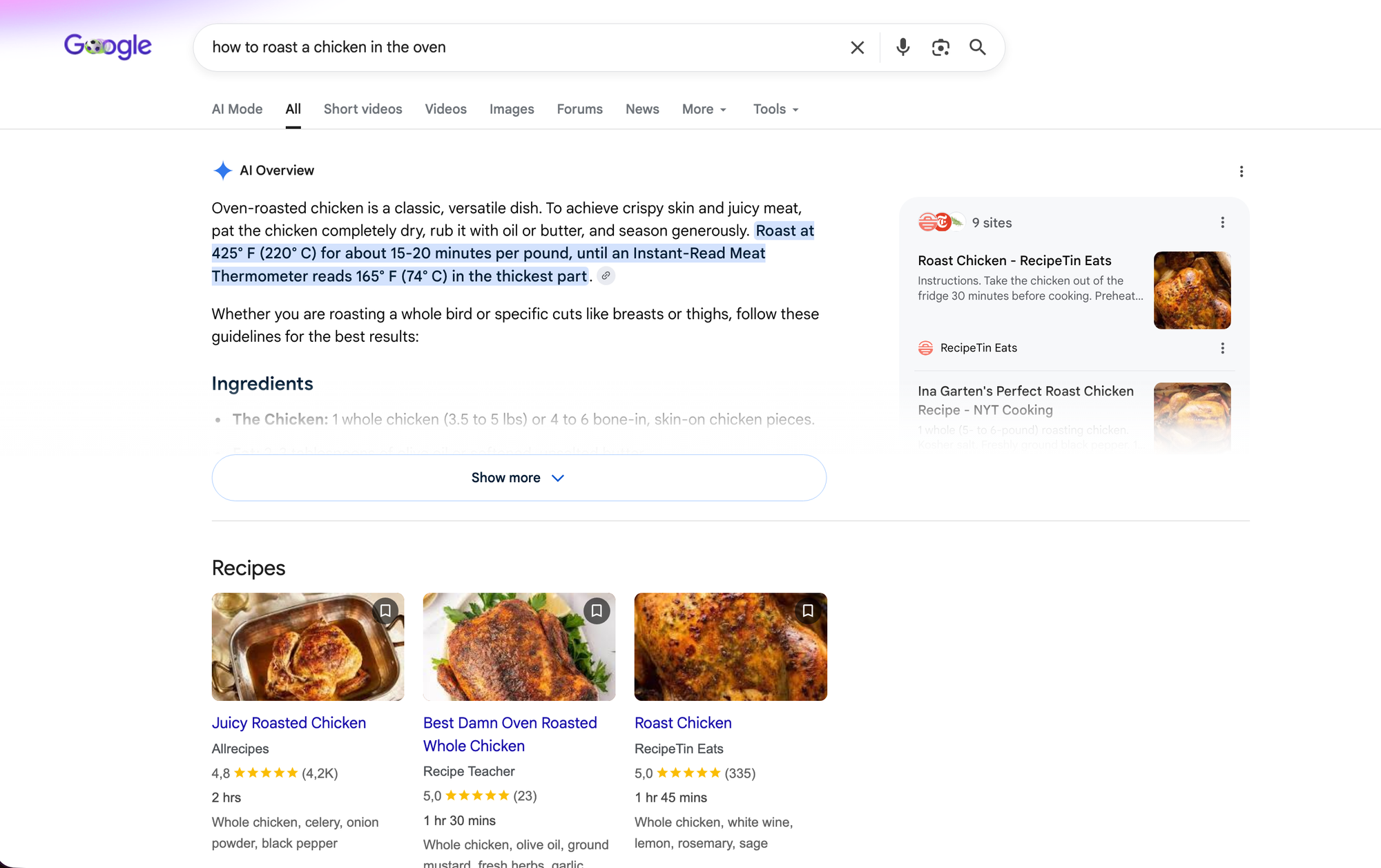
We need layouts, spacing, fonts & colours to help us sort through data and find what we are looking for.
If you took away the design and just looked at the raw code, it would take you ages to find a single phone number or headline.
Web page without presentation elements:
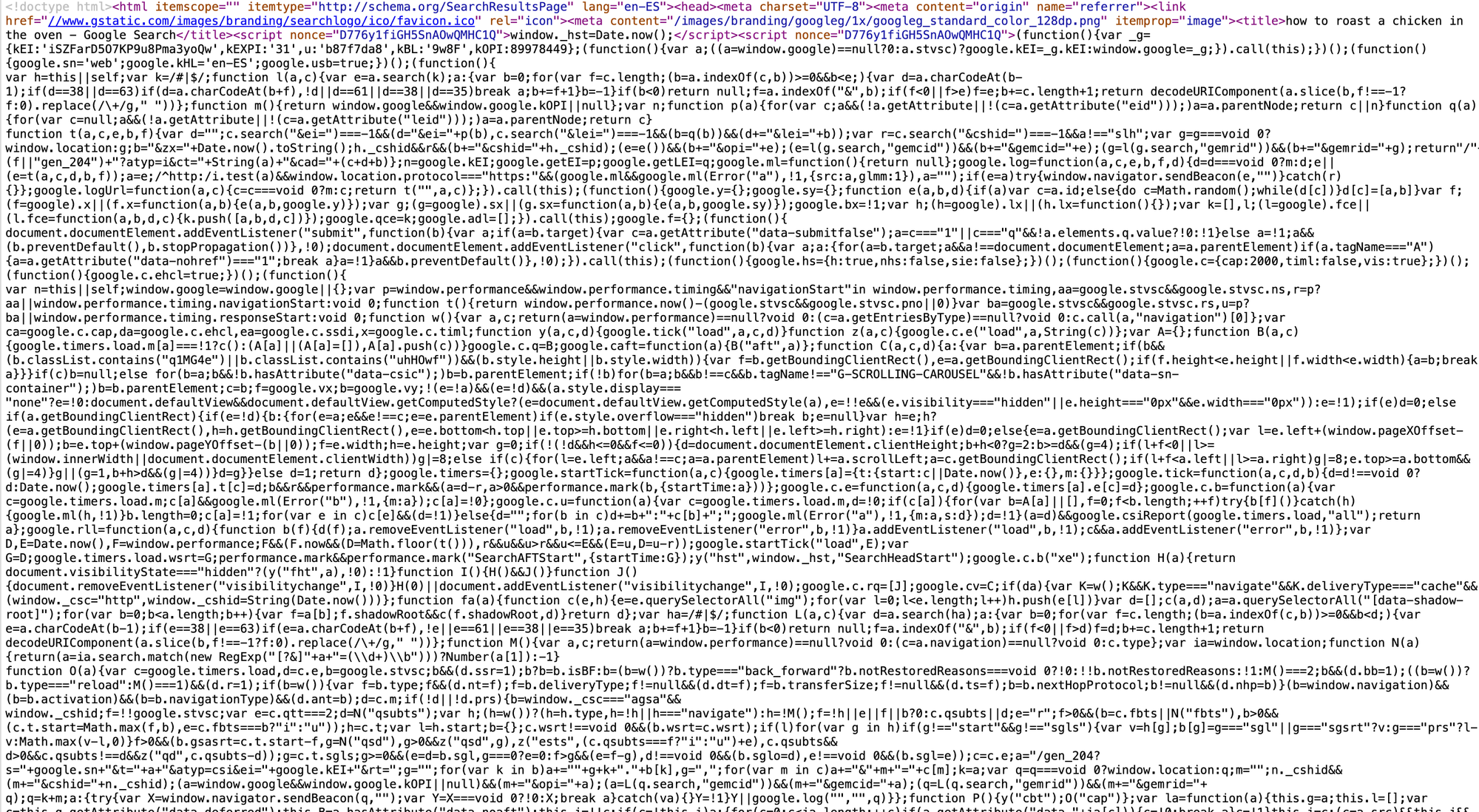
Machines Don't Have Eyes
Now, let's look at this from a different perspective. What if you want a computer program (like a spreadsheet, a tracking tool, or an automation app) to read a Google search result for you?
A computer won't pay attention to a sleek logo. Using the Helvetica font won't help it read more clearly. Furthermore, it won't intuitively understand which piece of text is more important than another simply by the colour used, or the fact that it has a red border around it.
In fact, all of that layout and design code just gets in the machine's way, when it comes to understanding information. For a computer, trying to extract information from a standard webpage is like trying to read a book where someone has pasted random magazine cutouts and glitter all over the words.
Machines don't need a User Interface or UI (a design built for human eyes). They need an Application Programming Interface. An API.
💡 REMEMBER: you can think of an API as simply a version of a website that strips away all the visual fluff (the CSS, the logos, the layout instructions) and delivers only the raw, organised data.
What's Next?
Now that you know how a browser requests & receives information, and why humans need visual designs to understand it, we can look at how machines do the exact same thing using a text format called JSON.
In Part 2: Feeding the Machine JSON, we will pull back the curtain on JSON, show you how it organises data into digital filing cabinets, and teach you how to read it without breaking a sweat!