Ruby
Ruby
 Golang
 .Net
.Net
 MCP
MCP
 C++
C++

Web scraping is the process of pulling out structured data from websites. If you're familiar with Ruby, you're in luck. Ruby has excellent tools you can use to scrape the web. From HTTP libraries to fast HTML parsers, Ruby tools cover all concerns of scraping. Paired with its developer-friendly syntax and productive frameworks, it's a great option for small scripts as well as complex applications.
Ruby as a language for web scraping
Ruby is a practical language for web scraping because it is good at the unglamorous parts of it all. The small scripts, readable objects, HTTP requests, background jobs, parsing JSON, databases, writing CSV files and glueing everything together. Some other languages might be more common for web scraping, but Ruby is an amazing choice too.
If you already work with Sinatra, Hanami, Ruby on Rails, Sidekiq, Active Job, or plain Ruby scripts, staying with Ruby for your scraping needs makes the most sense. You can scrape a page, parse the data, store it in your database, schedule a job, and expose the result in your web application without crossing language boundaries or adding a separate data pipeline just for web scraping.
What will we learn
When it comes to web scraping, it's important to choose the right approach for the page in front of you. A static HTML page, a JavaScript-rendered interface, a form with cookies, a JSON endpoint, and a full website crawl are all different problems. Treating them as the same problem is where most scraping projects get messy.
This guide will take you through it all. We will map the main ways to scrape websites with Ruby and choose the right tools for each job. Then we will build up from HTML scraping to JavaScript-rendered pages, browser automation, crawling, JSON APIs, and data export. Finally, we touch production concerns like reliability and performance.
The main ways to scrape websites with Ruby
Not every scraping is the same. Sometimes the data is already in the HTML, and a simple Faraday and Nokogiri script is enough. Sometimes the page is rendered by JavaScript and you need a browser tool like Selenium, Ferrum, Capybara, or Watir. Other times the approach is not to scrape HTML at all, but to call the same JSON endpoint the frontend uses.
Before picking a gem, figure out what kind of page you are dealing with. The best Ruby web scraping tool depends on where the data lives, how the page loads, and how much of the site you need to collect. A static product page, a React search interface, a login form, a JSON endpoint, and a full-site crawl can all fall under "web scraping," but they should not all be solved the same way.
1. Fetching a single static HTML page
This is the simplest case where you want to request and process one individual server rendered page. You send an HTTP request, receive HTML, parse the response, and extract the fields you need.
Use this when:
- the data is already present in the initial HTML
- you only need one page or a known list of URLs
- you do not need to click, scroll, log in, or run JavaScript
Good Ruby tools for this job:
This is the best starting point for most Ruby scrapers. It is fast, simple, and easy to debug.
2. Scraping JavaScript-rendered pages
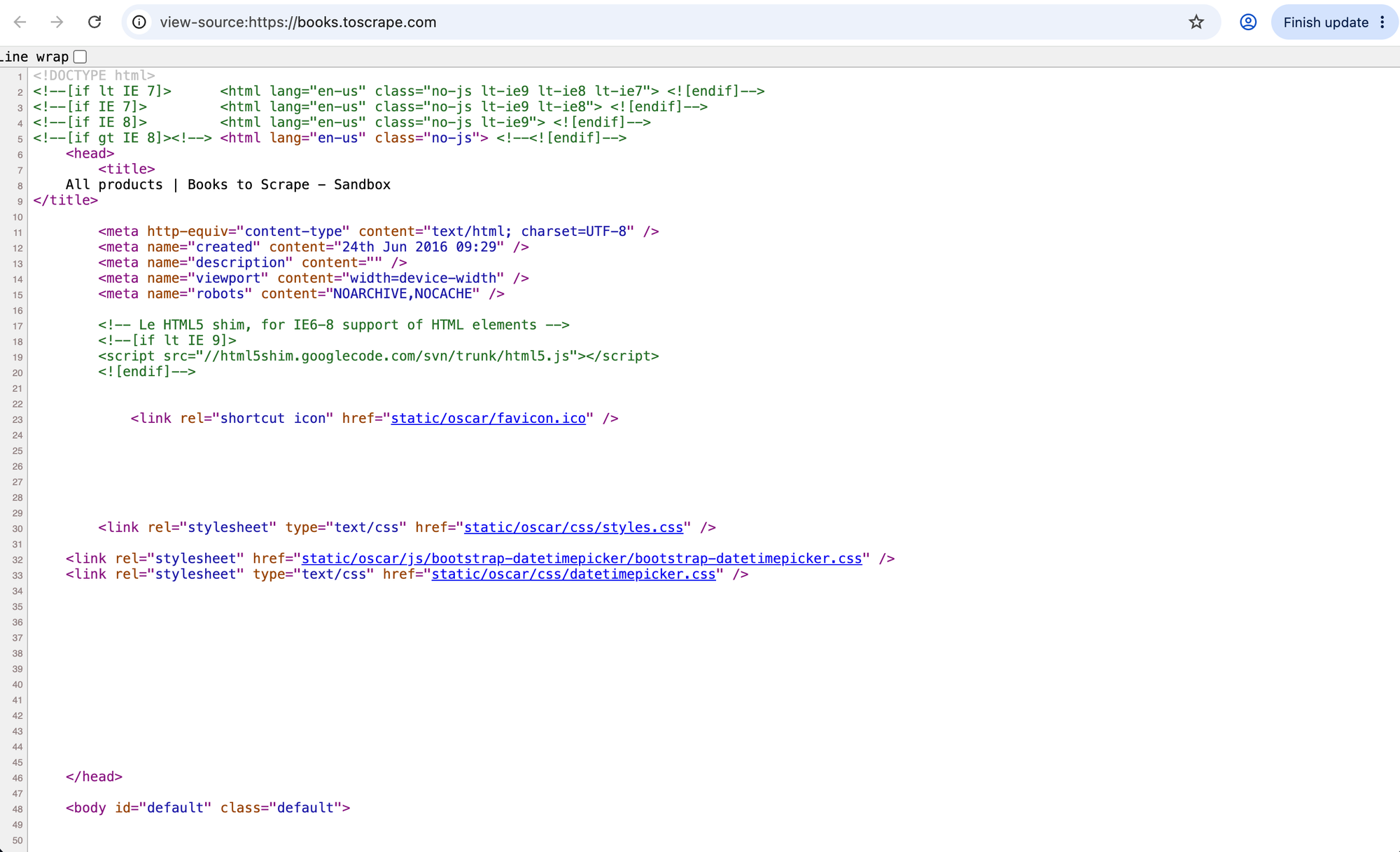
Some pages return very little useful HTML at first. The browser loads JavaScript, calls APIs, updates the DOM, and only then displays the data you want. In that case, a plain HTTP request may not be enough. Nokogiri can only parse the HTML you give it to it as it cannot run JavaScript.
Use this when:
- the data is missing from browser's "View Source"
- the site uses React, Vue, Svelte, Angular, or another frontend framework
- content appears only after the browser loads, waits, scrolls, or clicks
Good Ruby tools for this job:
- Selenium for full browser automation driver
- Ferrum for rendering pages in headless Chrome
- Cuprite for using headless Chrome through Capybara
Before reaching for a browser, check the Network tab. Many JavaScript-heavy pages get their data from JSON endpoints you can request directly.
3. Using a headless or visible browser
A headless browser is a real browser without a visible window. It runs JavaScript, stores cookies, follows redirects, loads dynamic content, and behaves much more like a human browsing session than a plain HTTP client.
Use a headless browser when:
- JavaScript rendering is required
- you need to wait for elements to appear
- you need browser APIs, cookies, local storage, or client-side navigation
- the page behaves differently outside a browser
Use a visible browser when:
- you are developing or debugging a scraper
- you need to watch what the page is doing
- popups, consent banners, or complex interactions are getting in the way
Good Ruby tools for this job:
- Selenium when you want direct control over Chrome or another browser
- Ferrum when you want direct control over headless Chrome through the Chrome DevTools Protocol
- Capybara when you want a higher-level DSL for visits, clicks, forms, waits, and screenshots
- Watir when you want a readable browser automation API built around WebDriver
Browser automation is powerful, but it is also slower and heavier. If a simple Faraday request can get the same data, do not use a browser.
4. Submitting forms, keep cookies, and work with sessions
Some sites require state. You might need to submit a search form, keep cookies, follow redirects, or use an authenticated session you are allowed to access.
Use this when:
- the site has regular HTML forms
- you need cookies or session persistence
- you need to follow links like a browser
- you need login-style behavior without JavaScript rendering
Good Ruby tools for this job:
- Mechanize for forms, links, cookies, and redirects
- Faraday with cookie support for custom HTTP flows
- Selenium, Capybara, or Watir when JavaScript is part of the interaction
Mechanize is often the right tool for older, form-based sites. It is much lighter than running a browser, but it will not execute JavaScript.
5. Calling JSON endpoints instead of scraping HTML
Sometimes the page is mostly a frontend for an API. If you open the Network tab and inspect Fetch/XHR requests, you may find a clean JSON response containing the data you need.
Use this when:
- the frontend loads data from a JSON endpoint
- the HTML is hard to parse but the JSON is structured
- the endpoint is public and permitted for your use case
Good Ruby tools for this job:
- httparty for quick JSON requests in small scripts
- Faraday for structured API requests with headers, timeouts, and retries
- Ruby's built-in
JSONlibrary for parsing responses
This can be faster and more reliable than parsing HTML. But be careful with private, undocumented, or authenticated endpoints. Just because your browser can see a request does not automatically mean you can reuse it freely.
6. Crawling a website instead of scraping one page
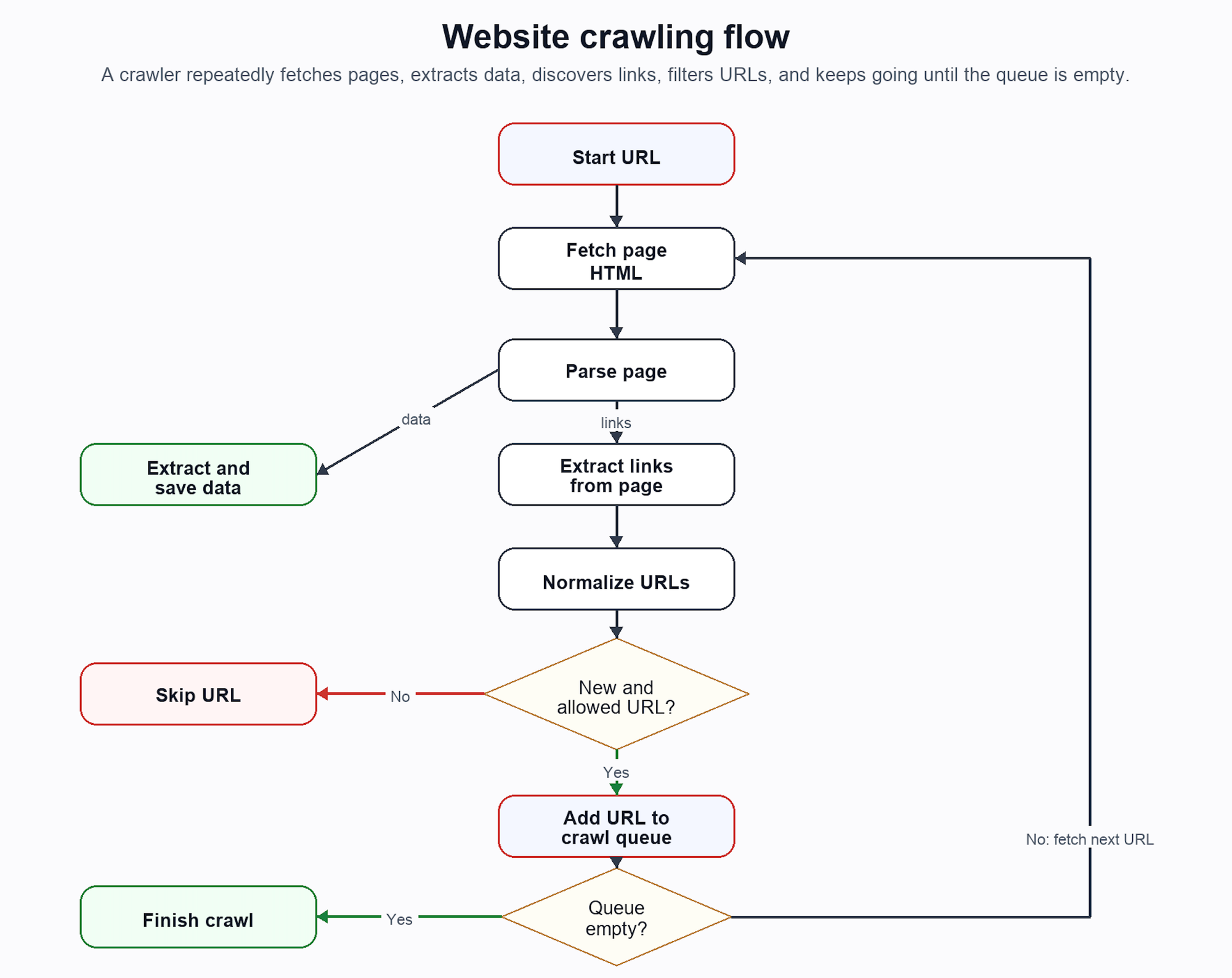
Scraping means extracting data. Crawling means discovering pages. If you already know the URLs, you probably do not need a crawler. But if the job is to find pages, follow links, avoid duplicates, and keep going until a limit is reached, you are building one.
Use this when:
- you need to scrape many pages
- you do not know every URL upfront
- you need to follow internal links
- you need depth limits, deduplication, queues, or sitemap discovery
Good Ruby tools for this job:
- Spidr for quick site crawling
- Anemone for spidering workflows
- Addressabe for safer URL handling
- a custom queue when you need production-level control
Small crawlers can live in memory. Larger crawlers usually need persistence, retries, rate limits, and a database or queue so they can resume after a failure.
Choosing the right Ruby web scraping tool
The rule of thumb is to use the lightest tool that can reliably get the data. Start with HTTP and Nokogiri. Move to Mechanize if you need forms, cookies, and sessions without JavaScript. Move to Selenium, Ferrum, Capybara, or Watir when you need JavaScript rendering or real browser interactions. Use a crawler when you need to discover pages, not just scrape known URLs.
| Situation | Best approach | Ruby tools |
|---|---|---|
| Data is in the initial HTML | HTTP + parser | Faraday + Nokogiri |
| You need a quick request script | Simple HTTP helper | HTTParty |
| You need forms, cookies, redirects, and links without JavaScript | Browser-like HTTP automation | Mechanize |
| You need JavaScript rendering | Headless browser | Ferrum, Selenium |
| You need clicks, waits, screenshots, or testing-style flows | Browser automation DSL | Capybara, Watir |
| Data comes from a JSON endpoint | API request | Faraday, JSON |
| You need to discover many pages | Crawler | Spidr, Anemone, custom queue |
| You are scraping inside a Rails app | Background job | ActiveJob, Sidekiq, Solid Queue |
This decision matters because every step up adds cost. Browsers are slower than HTTP requests. Crawlers are more complex than one-page scrapers. Authenticated sessions are more fragile than public pages. The best scraper is usually the simplest one that still works reliably.
Scraping static HTML pages with Ruby
Static scraping is the simplest way to scrape a website. It works when the data you need is already present in the HTML returned by the server. If you fetch the page with an HTTP client, the product names, prices, links, article text, or other fields are already sitting in a response body.
If the page loads an empty shell and fills it in later with React, Vue, Svelte, or a browser-side API request, parsers like Nokogiri will not see the rendered content. Nokogiri parses HTML and it does not run JavaScript. That makes static scraping way faster but not always possible as opposed to JavaScript-rendered scraping.
A quick way to check: open "View Source" in your browser and search for the text you want to scrape. If the text is there, a static scraper is probably enough. If it only appears in the Elements panel after JavaScript runs, you may need a browser or a JSON API endpoint instead.
For static pages, you usually need two pieces:
- an HTTP client to download the page
- an HTML parser to extract data from the response
In Ruby, the most practical default stack is:
FaradayFaraday for HTTP requestsNokogirifor parsing HTML
Ruby ships with Net::HTTP, but Faraday usually lead to clearer scraper code. There is also the HTTParty gem, which is a good fit for quick scripts. I prefer Faraday for long-lived scrapers because its middleware model makes retries, adapters, headers, logging, and timeouts easier to manage as the scraper grows.
Set up a Ruby scraping project
Install the required libraries with gem install or write a Gemfile for better maintenance of the scraper:
# Gemfile
source "https://rubygems.org"

ruby ">= 3.2"

gem "faraday"
gem "faraday-retry"
gem "nokogiri"
gem "csv"
Then install dependencies:
bundle install
Fetch HTML with Faraday
Here is a minimal HTTP example:
require "faraday"

response = Faraday.get("https://books.toscrape.com/")

puts response.status
puts response.body[0, 200]
Before parsing a page, check that the request succeeded:
require "faraday"

response = Faraday.get("https://books.toscrape.com/")

unless response.success?
  abort "Request failed with status #{response.status}"
end

html = response.body
For anything more than a throwaway script, create a reusable connection with timeouts and headers:
require "faraday"

conn = Faraday.new(url: "https://books.toscrape.com") do |f|
  f.options.timeout = 10
  f.options.open_timeout = 5
end

response = conn.get("/") do |req|
  req.headers["User-Agent"] = "RubyStaticScraper/1.0"
  req.headers["Accept"] = "text/html"
end

unless response.success?
  abort "Request failed with status #{response.status}"
end

html = response.body
Parse HTML with Nokogiri
Once you have the HTML response, parse it with Nokogiri:
require "nokogiri"

doc = Nokogiri::HTML(html)

puts doc.at_css("title")&.text&.strip
at_css returns the first matching element. css returns all matching elements.
Extract text, links, and attributes
Now let's scrape book titles, prices, and URLs from books.toscrape.com:
require "faraday"
require "nokogiri"
require "uri"

BASE_URL = "https://books.toscrape.com/"

response = Faraday.get(BASE_URL)
raise "Request failed: #{response.status}" unless response.success?

doc = Nokogiri::HTML(response.body)

books = doc.css(".product_pod").filter_map do |book|
  link = book.at_css("h3 a")
  href = link&.[]("href")

  next unless link && href

  {
    title: link["title"],
    price: book.at_css(".price_color")&.text&.delete("^0-9."),
    url: URI.join(BASE_URL, href).to_s
  }
end


puts books
Notice a few details:
link["title"]extracts an attribute.link&.[]("href")avoids crashing if the link is missing.filter_mapskips incomplete records and returns only complete book hashes.URI.jointurns relative links into absolute URLs.delete("^0-9.")strips the currency symbol from the price.
Save the scraped data to CSV
For static pages, CSV is often the simplest useful output:
require "csv"

CSV.open("books.csv", "w", write_headers: true, headers: %w[title price url]) do |csv|
  books.each do |book|
    csv << [book[:title], book[:price], book[:url]]
  end
end
This gives you a spreadsheet-friendly file while keeping the scraper small and easy to run.
Faraday vs HTTParty
Both Faraday and HTTParty gems are good enough to build a scraper. Pick one based on how much structure the scraper needs:
| Tool | Best for | Tradeoff |
|---|---|---|
Faraday |
Long-lived scrapers, retries, middleware, custom adapters | Slightly more setup |
HTTParty |
Quick scripts and simple requests | Less flexible for advanced HTTP workflows |
A quick HTTParty version looks like this:
require "httparty"
require "nokogiri"

response = HTTParty.get("https://books.toscrape.com/")
doc = Nokogiri::HTML(response.body)

puts doc.css(".product_pod h3 a").map { |a| a["title"] }
For a one-off script, that is hard to beat. For a scraper that will run every day, use the structure and middleware you get from Faraday.
CSS selectors and XPath with Nokogiri
Nokogiri is the default HTML and XML parser in the Ruby ecosystem. If you search for web scraping with Ruby and Nokogiri, this is the gem you will see everywhere. As mentioned before, Nokogiri is not a browser and it cannot fetch web pages or execute JavaScript. It parses HTML or XML you already have.
CSS selectors in Nokogiri
CSS selectors are usually the easiest way to find elements:
doc.css(".product_pod").each do |product|
  title = product.at_css("h3 a")&.[]("title")
  price = product.at_css(".price_color")&.text&.strip

  puts "#{title}: #{price}"
end
Common selector patterns:
doc.at_css("h1")              # first h1
doc.css("a")                  # all links
doc.css(".price")             # elements with class price
doc.css("#content")           # element with id content
doc.css("article.product a")  # links inside product articles
XPath in Nokogiri
XPath is more verbose, but it can express queries that are awkward with CSS:
doc.xpath("//a").each do |link|
  puts link["href"]
end
For example, XPath is useful when you need text matching or more complex conditions:
# Find links containing specific text
links = doc.xpath("//a[contains(text(), 'Next')]")

# Find elements with a class fragment
prices = doc.xpath("//*[contains(@class, 'price')]")
In most Ruby web scrapers, CSS selectors are enough. Reach for XPath when CSS gets too clumsy.
Nokogiri vs Nokolexbor
Nokogiri is the safe default. It is mature, well documented, and widely used library that you most likely already know. For most projects, choosing Nokogiri is enough. But if you need to parse a large number of elements by CSS or XPath, nokolexbor is worth learning about.
The Nokolexbor gem from SerpApi is a parser based on Lexbor which focuses on fast HTML 5 parsing using at_css and at_xpath selectors.
| Tool | Best for | Notes |
|---|---|---|
Nokogiri |
Most Ruby scraping projects | Mature, CSS/XPath support, widely used ecosystem |
Nokolexbor |
Performance-heavy HTML5 parsing | Consider when parsing speed matters |
You do not have to optimize for this early on, but Nokolexbor can save you when you'll need it. Network requests and browser automation are usually much slower than parsing the response.
Static scraping is the fastest and most reliable option when it works. If your selectors return nothing, check whether the page is rendering data with JavaScript or fetching it from a JSON endpoint before assuming Nokogiri is broken.
Choosing the right HTTP client for scraping
Faraday and httparty are not the only Ruby HTTP clients. They are just convenient choices for a web scraping tutorial: Faraday gives you structure, middleware, retries, and adapters; HTTParty gives you a very small API for quick scripts.
Ruby has several other HTTP libraries worth knowing about:
- Ruby ships with
Net::HTTP, which avoids an extra dependency but is unnecessarily verbose. - HTTPX is a modern option worth considering for high-throughput scrapers, especially if you care about HTTP/2, persistent connections, and concurrent requests.
- http.rb has a pleasant request-chaining API
- Excon is a solid lower-level client used in parts of the Ruby ecosystem.
For most static scraping tasks, the HTTP client is not the hard part. Fetch the page reliably, then spend most of your effort on parsing, retries, rate limits, and maintenance. Use Faraday for the examples in this guide unless you have a reason not to. Use HTTParty for tiny scripts. Look at HTTPX when performance, concurrency, or HTTP/2 become important.
Scraping JavaScript-rendered pages with Ruby
If a Nokogiri scraper returns empty results, do not assume your selector is wrong. The data may not be in the original HTML at all. That is the classic example of Nokogiri JavaScript not working. Nokogiri parses the HTML response, but it does not run JavaScript. Let's see what we can do about it.
First check whether you really need JavaScript
Before using Selenium or Ferrum, inspect the page.
- Open the page in your browser.
- Open Developer Tools.
- Go to the Network tab.
- Filter by
Fetch/XHR. - Reload the page.
- Look for JSON responses containing the data.
If you find a public JSON endpoint, you may be able to call it directly with Faraday. That is usually faster and more reliable than running a browser.
Use a headless browser only when:
- The data is generated client-side and no usable API is available.
- The page requires clicks, scrolling, or browser state.
- You need to test exactly what a browser sees.
Scrape a dynamic page with Selenium
Selenium is the most widely known browser automation tool. It can control Chrome, Firefox, and other browsers.
Add it to your Gemfile as:
gem "selenium-webdriver"
Here's a minimal headless Selenium example using Chrome:
require "selenium-webdriver"
require "nokogiri"

options = Selenium::WebDriver::Chrome::Options.new
options.add_argument("--headless=new")
options.add_argument("--disable-gpu")

browser = Selenium::WebDriver.for(:chrome, options: options)

begin
  browser.navigate.to("https://quotes.toscrape.com/js/")

  wait = Selenium::WebDriver::Wait.new(timeout: 10)
  wait.until { browser.find_elements(css: ".quote").any? }

  doc = Nokogiri::HTML(browser.page_source)

  quotes = doc.css(".quote").map do |quote|
    {
      text: quote.at_css(".text")&.text&.strip,
      author: quote.at_css(".author")&.text&.strip
    }
  end

  puts quotes
ensure
  browser.quit
end
The important part is the wait. Avoid blind sleep calls when you can wait for a specific element.
Scrape a dynamic page with Ferrum
Ferrum controls Chrome or Chromium through the Chrome DevTools Protocol. It is a good Ruby-native choice for headless Chrome scraping.
Add it to your Gemfile:
gem "ferrum"
Example of using Ferrum to load a website and parsing the body with Nokogiri:
require "ferrum"
require "nokogiri"

browser = Ferrum::Browser.new(timeout: 10)

begin
  browser.go_to("https://quotes.toscrape.com/js/")
  browser.network.wait_for_idle

  doc = Nokogiri::HTML(browser.body)

  quotes = doc.css(".quote").map do |quote|
    {
      text: quote.at_css(".text")&.text&.strip,
      author: quote.at_css(".author")&.text&.strip
    }
  end

  puts quotes
ensure
  browser.quit
end
Ferrum is especially nice when you want headless Chrome without the full Selenium stack.
Selenium vs Ferrum
Both Selenium and Ferrum will get a job done. Here's a small comparison on how they differ:
| Tool | Best for | Tradeoff |
|---|---|---|
Selenium |
Cross-browser automation, widely supported, familiar ecosystem | Heavier and needs browser/driver setup |
Ferrum |
Headless Chrome via Chrome DevTools Protocol | Chrome/Chromium-focused |
If you need cross-browser behavior or already know Selenium, use Selenium. If you want a Ruby-friendly headless Chrome tool for scraping, try Ferrum.
Browser automation with Capybara and Watir
Selenium and Ferrum are lower-level browser control tools. Capybara and Watir provide nicer APIs for browser-like workflows. Think of them as higher-level tools closer to your application code.
Use Capybara and Watir when your scraper needs to behave like a user:
- fill in fields
- click buttons
- wait for elements
- navigate flows
- save screenshots
- work with sessions
Use Capybara for scraping workflows
Capybara is best known for Rails system tests, but it can also automate external websites in general. Here's such an example:
require "capybara"
require "capybara/dsl"
require "selenium-webdriver"

Capybara.register_driver :selenium_chrome_headless do |app|
  options = Selenium::WebDriver::Chrome::Options.new
  options.add_argument("--headless=new")

  Capybara::Selenium::Driver.new(app, browser: :chrome, options: options)
end

Capybara.default_driver = :selenium_chrome_headless
Capybara.run_server = false
Capybara.default_max_wait_time = 10

include Capybara::DSL

visit "https://quotes.toscrape.com/js/"

all(".quote").each do |quote|
  puts quote.find(".text").text
end

page.save_screenshot("quotes.png")
Capybara's waiting behavior is one of its biggest advantages. find and has_css? wait for elements instead of failing immediately. Note the include Capybara::DSL like which makes this DSL possible.
Take screenshots with Capybara
Screenshots are useful when debugging browser scrapers. If an element is missing, a cookie banner blocks the page, or the page looks different in headless mode, saving a screenshot shows you what the browser actually saw.
With Capybara, screenshots are straightforward:
page.save_screenshot("page.png")
You can also save screenshots with dynamic names:
page.save_screenshot("screenshots/product-#{product_id}.png")
Just make sure the target directory exists before saving:
require "fileutils"

FileUtils.mkdir_p("screenshots")
page.save_screenshot("screenshots/page.png")
Screenshots work in headless mode too which makes them especially helpful in background jobs, CI, or production debugging.
This is not too different to what a typical Rails system test setup looks like.
Screenshots for JavaScript websites
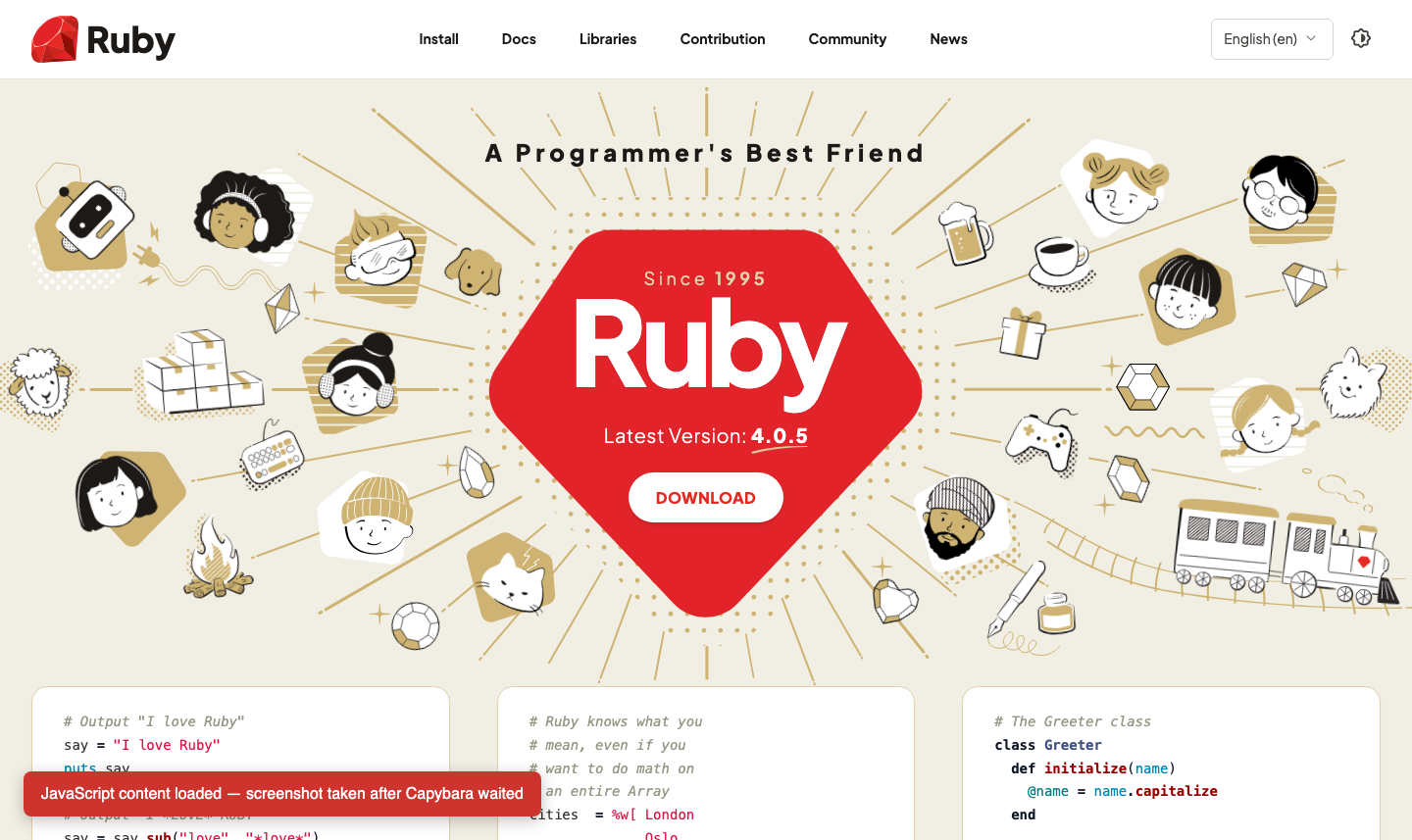
However, if you make a screenshot too quickly, it might like dynamic elements, like in this case for the Ruby official website.
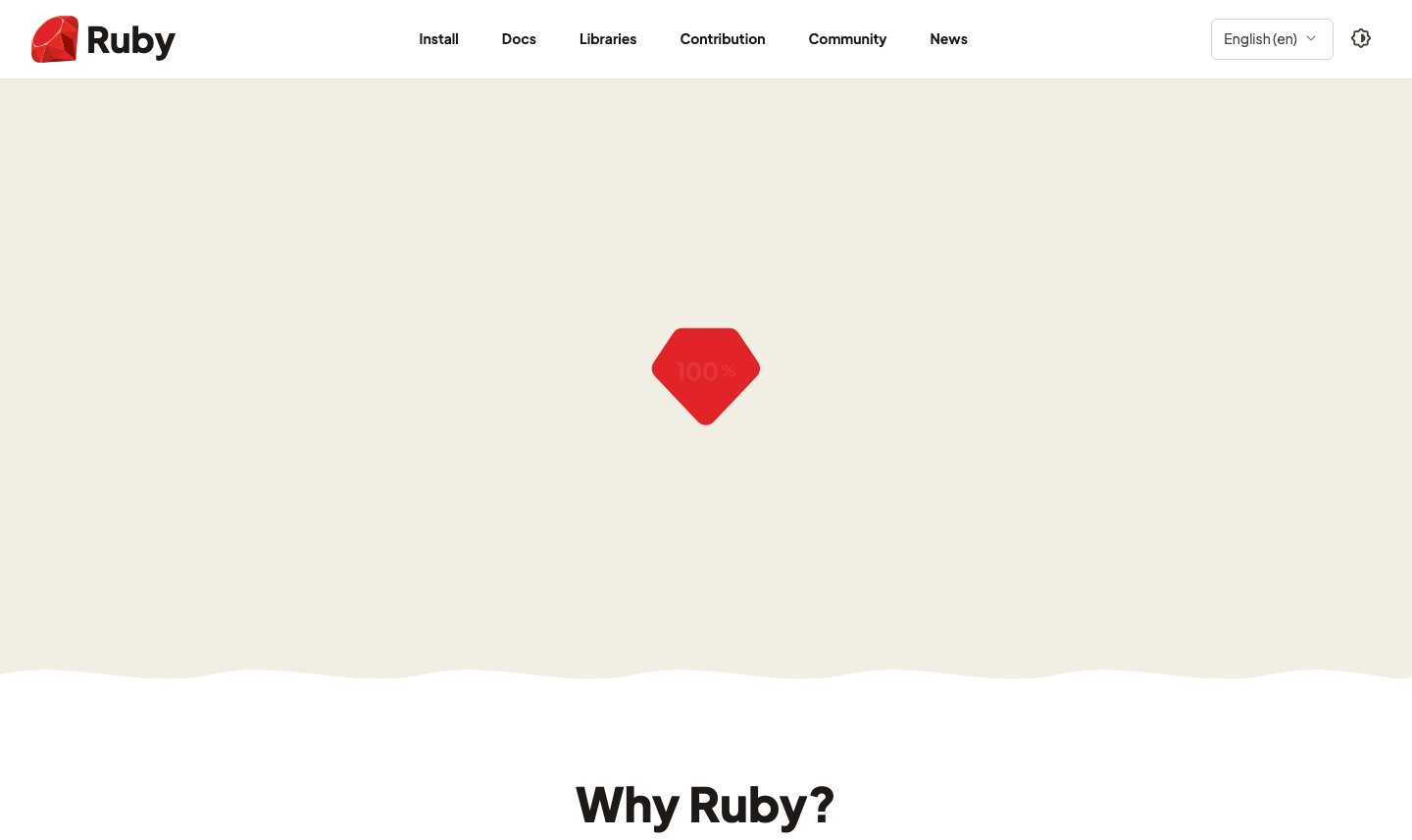
To fix it, you'll need to wait using the setTimeout function. For this cases, run execute_script (again from the Capybara DSL):
visit "https://www.ruby-lang.org/en/"

# ruby-lang.org is mostly static, so this creates a small visible marker
# after a delay to demonstrate waiting for JavaScript-rendered content.
execute_script(<<~JS)
  window.setTimeout(function () {
    var marker = document.createElement("div");
    marker.id = "capybara-js-ready";
    marker.textContent = "JavaScript content loaded — screenshot taken after Capybara waited";
    marker.style.position = "fixed";
    marker.style.left = "24px";
    marker.style.bottom = "24px";
    marker.style.zIndex = "999999";
    marker.style.padding = "14px 18px";
    marker.style.background = "#cc342d";
    marker.style.color = "white";
    marker.style.font = "16px sans-serif";
    marker.style.borderRadius = "8px";
    marker.style.boxShadow = "0 4px 16px rgba(0,0,0,0.25)";
    document.body.appendChild(marker);
  }, 2000);
JS

find "#capybara-js-ready", wait: 10
save_screenshot "ruby.png"
Now you should be able to see the site in all its glory:
Use Watir for browser-like automation
Watir is another readable browser automation library built around WebDriver.
require "watir"

browser = Watir::Browser.new(:chrome, headless: true)

begin
  browser.goto("https://quotes.toscrape.com/js/")

  browser.divs(class: "quote").each do |quote|
    puts quote.span(class: "text").text
  end
ensure
  browser.close
end
Watir is pleasant when you want your scraper code to read like browser instructions.
Capybara vs Watir
| Tool | Best for | Tradeoff |
|---|---|---|
Capybara |
Rails-style flows, waiting DSL, screenshots, system-test familiarity | Originally designed for testing |
Watir |
Human-readable browser automation | Another abstraction over WebDriver |
If you already write Rails system tests, Capybara will feel natural. If you want a direct browser automation API, Watir is easy to read.
Scraping forms, cookies, and sessions with Mechanize
Mechanize is a classic Ruby gem for automated web interaction. It can follow links, submit forms, store cookies, handle redirects, and keep history. It does not execute JavaScript which is the main limitation. Use Mechanize when you need browser-like HTTP behavior without a browser.
When Mechanize is better than Selenium
Mechanize is often better than Selenium when:
- The site is mostly static.
- You need to submit normal HTML forms.
- You need cookies and sessions.
- You do not need JavaScript rendering.
- You want speed and lower resource usage.
Selenium is better when JavaScript is required.
Submit a form with Mechanize
Here's a short example of submitting a search form:
require "mechanize"

agent = Mechanize.new
agent.user_agent_alias = "Mac Safari"

page = agent.get("https://example.com/search")

form = page.form_with(action: "/search")
form["q"] = "ruby"

results = agent.submit(form)

puts results.search("h2").map(&:text)
Mechanize pages can be searched with Nokogiri-style methods because Mechanize uses Nokogiri internally.
Mechanize vs Selenium
Both Mechanize and Selenium are excellent tools but they both have their ideal use-case as shown in the table below:
| Tool | Best for | Tradeoff |
|---|---|---|
Mechanize |
Forms, links, cookies, sessions without JavaScript | Does not execute JavaScript |
Selenium |
JavaScript, real browser interactions, complex UI flows | Slower and heavier |
If you search for Mechanize Ruby login, you will find many examples because this is exactly where Mechanize shines; handling old-school form-based websites.
Crawling multiple pages with Ruby
If you already know every URL, you do not need a crawler. Just loop through the URLs and scrape each page. However, you need crawling when you want to discover URLs by following links you find along the way.
Scraping one page vs crawling a site
A scraper extracts data from a page. A crawler finds pages. And most production systems are both. Here's an example of a scraping workflow involving crawling:
- Start with one or more seed URLs.
- Fetch a page.
- Extract data.
- Extract links.
- Normalize links.
- Skip links already visited.
- Repeat until a depth, count, or domain limit is reached.
We already talked plenty about scraping itself, now let's talk about crawling.
Crawl links with Spidr
Spidr is a very popular Ruby web spidering library. It comes with a small DSL that gives us an option to work with every individual page like this:
require "spidr"

Spidr.site("https://example.com/") do |spider|
  spider.every_page do |page|
    puts page.url
  end
end
This is useful for quick site crawling and link discovery.
Crawl links with Anemone
Anemone is another Ruby crawling library with similar DSL:
require "anemone"

Anemone.crawl("https://example.com/") do |anemone|
  anemone.on_every_page do |page|
    puts page.url
  end
end
Both libraries are useful, but for serious scraping you may eventually want a custom queue so you control retries, persistence, rate limits, priorities, and deduplication.
Spidr vs Anemone vs custom queue
Here's a short comparison of Spidr vs Anemone libraries:
| Approach | Best for | Tradeoff |
|---|---|---|
Spidr |
Quick site crawling | Less custom architecture |
Anemone |
Spidering workflows | Older ecosystem feel |
| Custom queue | Production control | More code |
For a small Ruby web crawler, a gem is fine. For a production crawler, a custom queue backed by a database or Redis can be better.
Scraping JSON APIs instead of HTML
Getting data directly from JSON requests is insanely easier as the data already comes in the format you likely want. Before writing a complex browser scraper, check whether the page gets its data from JSON.
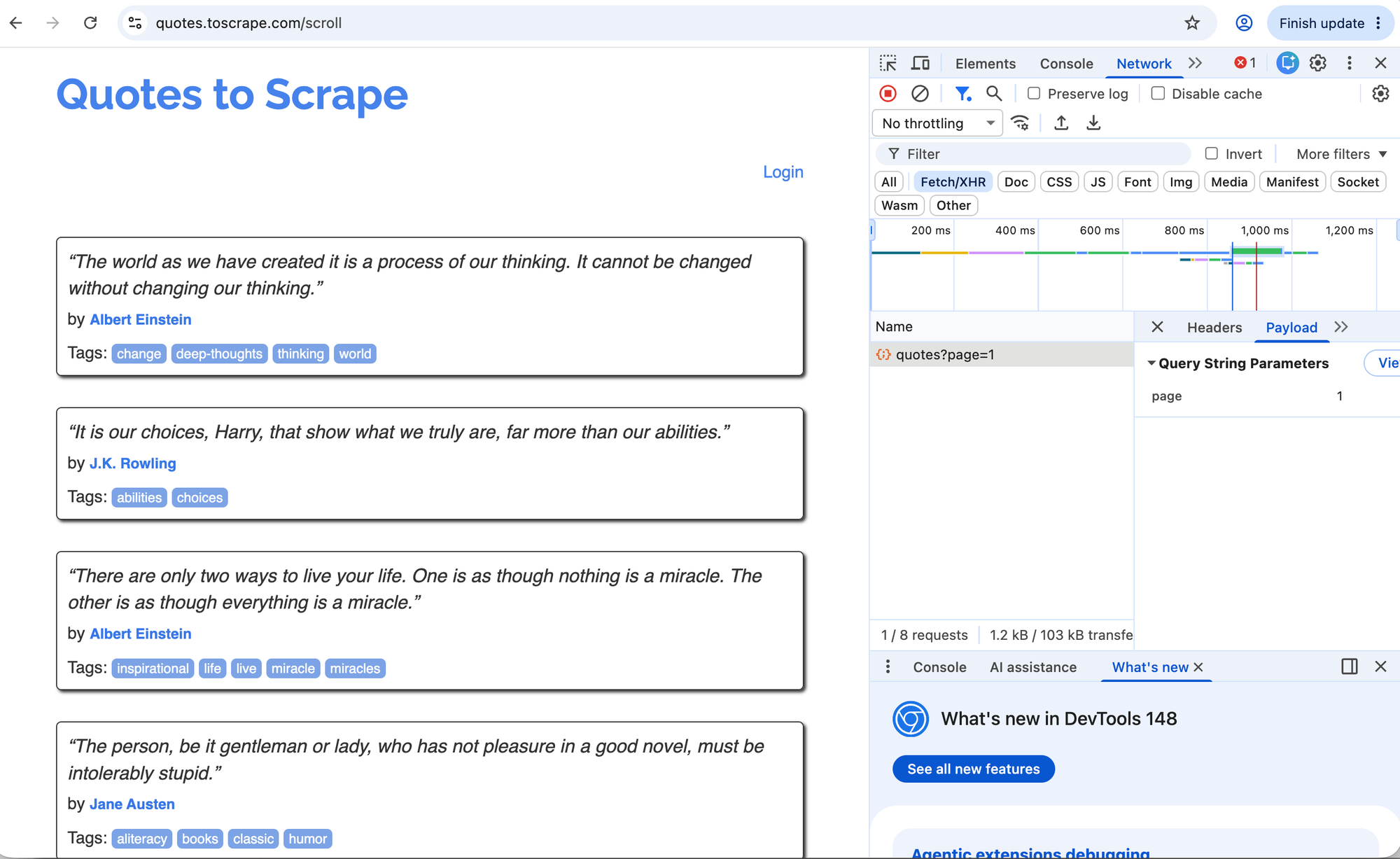
This is how you can do so in Chrome or Firefox:
- Open Developer Tools.
- Go to Network.
- Filter by
Fetch/XHR. - Reload the page.
- Click requests and inspect responses.
If you find the data in JSON, you can often skip HTML parsing entirely.
Request JSON with Faraday
If you can find such requests, you can then fetch the respective JSON using Faraday (or alternative):
require "faraday"
require "json"

response = Faraday.get("https://api.example.com/products") do |req|
  req.headers["Accept"] = "application/json"
end

raise "Request failed: #{response.status}" unless response.success?

data = JSON.parse(response.body)

puts data
API scraping vs HTML scraping
Most scraping is done with fetching full HTML pages, but if you can avoid it consider scraping the API calls:
| Approach | Pros | Cons |
|---|---|---|
| JSON/API | Structured, easier to parse, often more stable | May require auth, may be private, may be unsupported |
| HTML | Works when no API exists | Selectors break more often |
Be careful with private or undocumented endpoints. Just because your browser can see a request does not automatically mean you can use it freely for commercial scraping. Check terms and permissions.
Reliability: Timeouts, retries, errors, and logging
The difference between a demo scraper and a scraper you'll run for a long time is reliability. Websites go down. Networks fail. HTML changes. Requests time out. Selectors break. Your code should expect that.
Set connection timeouts
Never let a scraper hang on a connection forever. Set connection times like these for Faraday:
conn = Faraday.new(url: "https://books.toscrape.com") do |f|
  f.options.timeout = 10
  f.options.open_timeout = 5
end
Retry temporary failures
You should try retried temporary failures. For Faraday, you can use faraday-retry for transient problems:
require "faraday"
require "faraday/retry"

conn = Faraday.new(url: "https://books.toscrape.com") do |f|
  f.request :retry,
    max: 3,
    interval: 0.5,
    backoff_factor: 2,
    retry_statuses: [429, 500, 502, 503, 504]

  f.options.timeout = 10
  f.options.open_timeout = 5
end
Retry carefully. Retrying 429 Too Many Requests immediately and aggressively is a good way to make the problem worse. Consider adding backoff and reducing request rate.
Handle HTTP status codes
Don't forget that requests don't just end in 200 status codes. You might want to fetch another page on redirect, stop at forbidden and not found pages, retry later for rate limiting and investigate on 500 server errors. Here's the reminder of the main status codes:
200: success301/302: redirect403: forbidden404: not found429: rate limited500+: server error
An example handler could look like this example:
response = conn.get("/catalogue/page-1.html")

case response.status
when 200
  parse(response.body)
when 404
  logger.warn("Page not found")
when 429
  logger.warn("Rate limited")
else
  logger.error("Unexpected status: #{response.status}")
end
Avoid crashing on missing elements
Selectors break and optional elements disappear. Always parse defensively using the &. operator:
def text_at(node, selector)
  node.at_css(selector)&.text&.strip
end

price = text_at(product, ".price_color")
If a field is required, you can raise a clear error, but your scraper should likely be able to continue.
Add logging
Ruby's standard Logger is enough for many scrapers:
require "logger"

logger = Logger.new($stdout)
logger.info("Starting scrape")
logger.warn("Missing price for product")
logger.error("Request failed")
A scheduled scraper with no logs is painful to debug.
Cache pages during development
When building selectors, save sample HTML locally. This avoids hitting the target site repeatedly while you tune parsing code.
You can use:
- plain saved
.htmlfixtures VCRgemWebMockgem- a local cache directory
Parser tests against saved HTML fixtures are one of the best ways to keep scrapers maintainable.
Performance: Concurrency, batching, and rate limits
Scraping performance is not just about making requests as fast as possible. A good scraper should finish in a reasonable time without overwhelming the target site, wasting local resources, or triggering rate limits.
The goal is controlled throughput when enough concurrency avoids waiting on the network all day, but not so much that you create failures for yourself or for the site you are scraping.
Use concurrency for HTTP, not everything
Static HTTP scraping is usually I/O-bound. Most of the time is spent waiting for the network, so Ruby threads can help even if the Ruby code itself is not CPU-heavy.
Browser scraping is different. A headless browser uses much more CPU and memory than a plain HTTP request. Running many browser sessions at once can overload your machine or server.
Parallel scraping with Ruby threads
For static pages, a small thread pool is often enough. Put URLs into a queue, let a few workers fetch and parse them, and collect the results in another queue:
require "thread"

urls = [
  "https://books.toscrape.com/catalogue/page-1.html",
  "https://books.toscrape.com/catalogue/page-2.html",
  "https://books.toscrape.com/catalogue/page-3.html"
]

queue = Queue.new
urls.each { |url| queue << url }

results = Queue.new
workers = 3.times.map do
  Thread.new do
    loop do
      url = queue.pop(true)
      results << scrape_page(url)
    rescue ThreadError
      break
    end
  end
end

workers.each(&:join)
This pattern gives you controlled concurrency. You can increase or decrease the number of workers based on the target site, your machine, and how much rate limiting you see.
In production, combine this with timeouts, retries, rate limits, and logging. Do not spawn 100 threads just because you can.
Add rate limits and delays
A small delay between requests can make a scraper much more polite:
pages.each do |url|
  scrape_page(url)
  sleep 1
end
For more advanced setups, use adaptive throttling. Slow down when responses take longer, error rates increase, or you start seeing 429 Too Many Requests.
Avoid browser automation unless needed
A headless browser can take seconds to start and hundreds of megabytes of memory to run. A plain HTTP request may take milliseconds and use almost no memory. Use browsers for browser-only problems; JavaScript rendering, clicks, scrolling, screenshots, or workflows that require real browser state.
Parse efficiently
Most scraper performance issues come from the network or browser automation, but parsing can still matter on large pages or large batches.
A few practical tips:
- Scope selectors to a container instead of searching the whole document repeatedly.
- Avoid parsing the same HTML more than once.
- Write output incrementally for large scrapes instead of keeping everything in memory.
Ruby web scraping FAQ
What is the best Ruby gem for web scraping?
There is no single best gem. For most static pages, use Faraday and Nokogiri. For simple scripts, HTTParty is fine. For forms and cookies without JavaScript, use Mechanize. For JavaScript-rendered pages, use Selenium, Ferrum, Capybara, or Watir.
Can Nokogiri scrape JavaScript?
No. Nokogiri parses HTML and XML. It does not execute JavaScript. If the content is rendered by JavaScript, use a headless browser or find the JSON endpoint the page uses.
Is Ruby better than Python for web scraping?
Python has a larger scraping and data ecosystem, especially around Scrapy, Playwright, Pandas, and machine learning workflows. Ruby is excellent if you already work in Ruby or Rails, want readable automation scripts, or need scraping inside a Ruby application.
Should I use Selenium or Ferrum?
Use Selenium if you need cross-browser automation or want the most widely documented browser tool. Use Ferrum if you want a Ruby-friendly headless Chrome tool using the Chrome DevTools Protocol.
Should I use Mechanize or Nokogiri?
They solve different problems. Nokogiri parses HTML. Mechanize fetches pages, follows links, submits forms, and manages cookies, using Nokogiri under the hood. For simple parsing, use Nokogiri. For non-JavaScript form workflows, consider Mechanize.
How do I scrape multiple pages in Ruby?
If you know the URLs, loop through them with Faraday and parse each response with Nokogiri. If you need to discover URLs, use a crawler like Spidr, Anemone, or a custom queue that extracts and deduplicates links.
How do I avoid getting blocked while scraping with Ruby?
Scrape responsibly. Respect terms, robots.txt, and rate limits. Add delays. Set timeouts. Avoid unnecessary requests. Do not scrape private data or bypass access controls. If you receive 429, slow down.
Can I scrape websites from Rails?
Yes, but do it in background jobs, not controller actions. Put scraping logic in service objects, run it with ActiveJob, Sidekiq, or Solid Queue, and store results with ActiveRecord.
Conclusion
Web scraping with Ruby can be as simple as using Faraday with Nokogiri, but real-world scraping is broader than fetching one page and parsing a few tags.
The best Ruby web scraper starts with the right approach:
- Use HTTP and Nokogiri for static HTML.
- Use JSON endpoints when the site already exposes structured data.
- Use Mechanize for forms, cookies, and non-JavaScript sessions.
- Use Selenium, Ferrum, Capybara, or Watir when you need a real browser.
- Use a crawler or queue when you need many pages.
- Add retries, timeouts, logging, tests, and rate limits before calling it production-ready.
Ruby gives you all the pieces: clean HTTP clients, mature parsers, browser automation, background jobs, CSV/JSON support, and Rails integration. The trick is not finding a magic scraping gem. The trick is choosing the smallest reliable tool for the page in front of you.