Ruby
Ruby
 Golang
 .Net
.Net
 MCP
MCP
 C++
C++

Prompt Engineering focuses on shaping a model call, while Loop Engineering focuses on what happens after that call: how an agent observes the result, updates its state, chooses the next action, and decides whether to continue.
The difference sounds simple. But it is hard to feel until you build something where the model has to keep going:
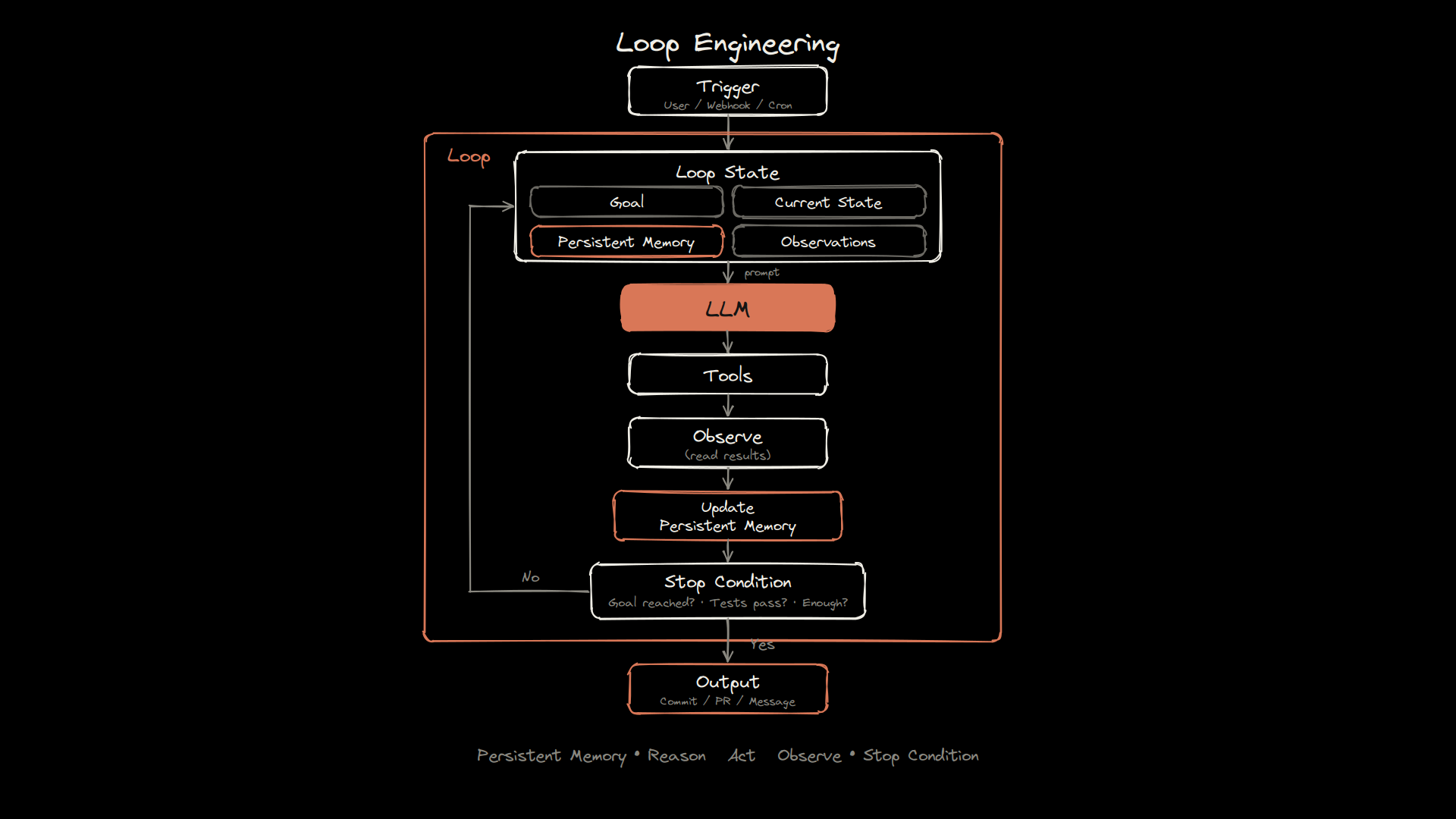
The easiest way to understand a loop is to watch one unfold.
So I built a small World Cup fan demo with Codex and SerpApi to make Loop Engineering visible.
The product idea is intentionally simple: a fan starts with one match, and the agent follows the journey from there. It identifies an interesting player, discovers related matches, searches for highlights, reads fan debates, and keeps deciding what to explore next.
Eventually, it produces a trace showing how the entire journey unfolded. But under the surface, this is not just a football app. The fan journey is the agent loop.
Every discovery becomes a new context. Every action changes the state. And every result influences what the agent does next.
The Demo
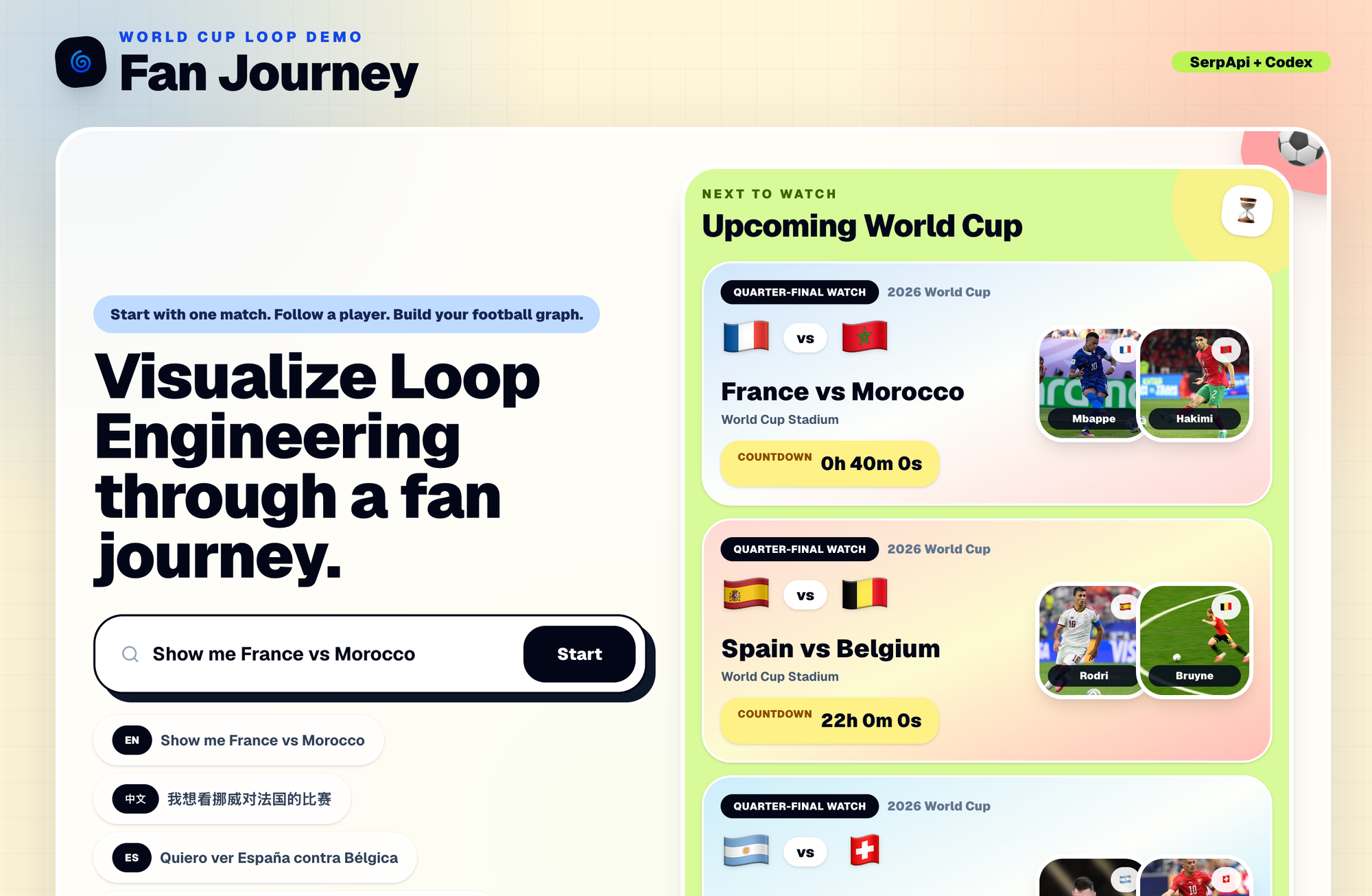
The demo is called World Cup Fan Journey, and the full source code is available in the Github repository.
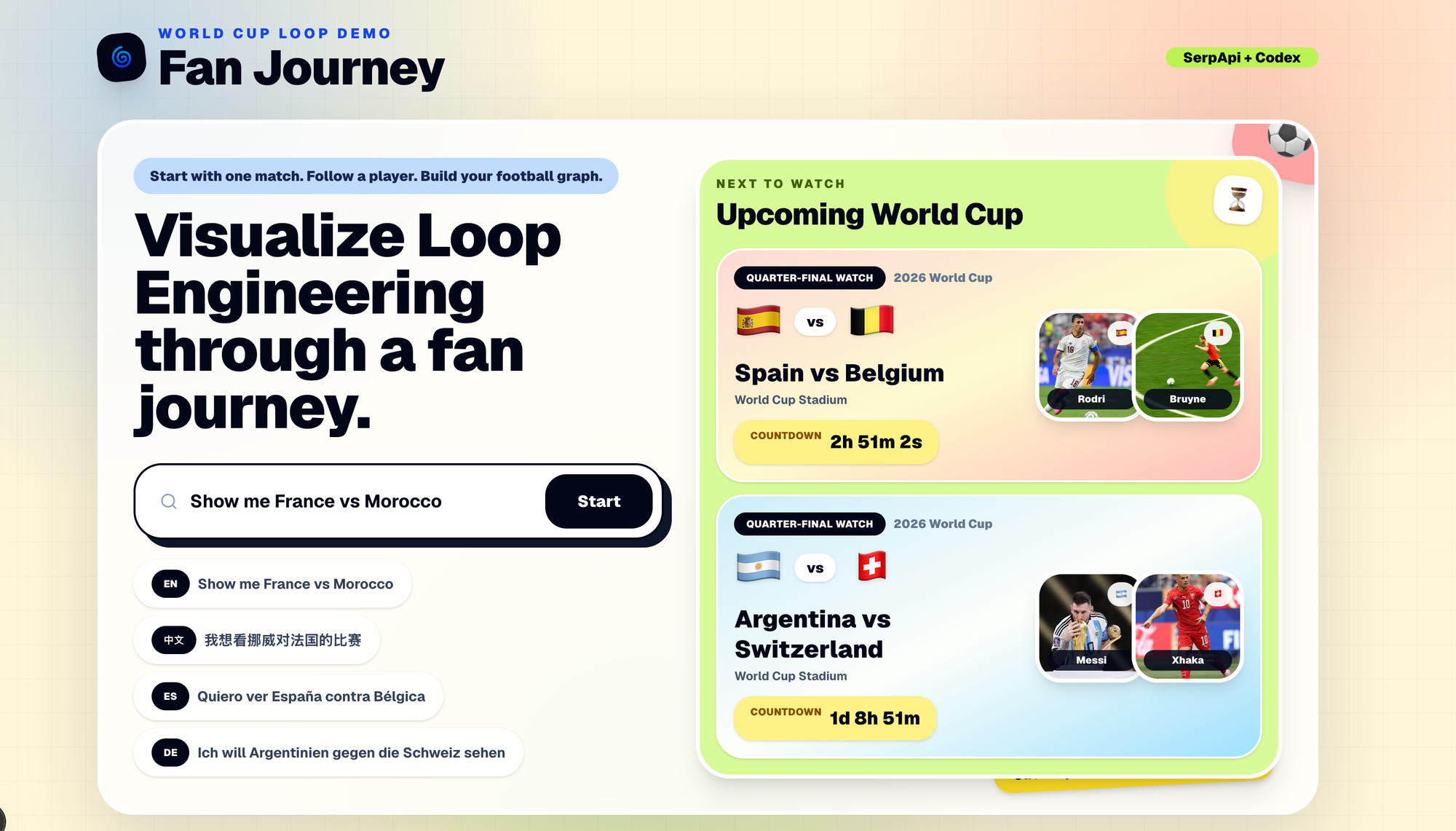
The journey starts with a simple natural-language request:
Show me France vs Morocco
or in Chinese:
我想看挪威对法国的比赛
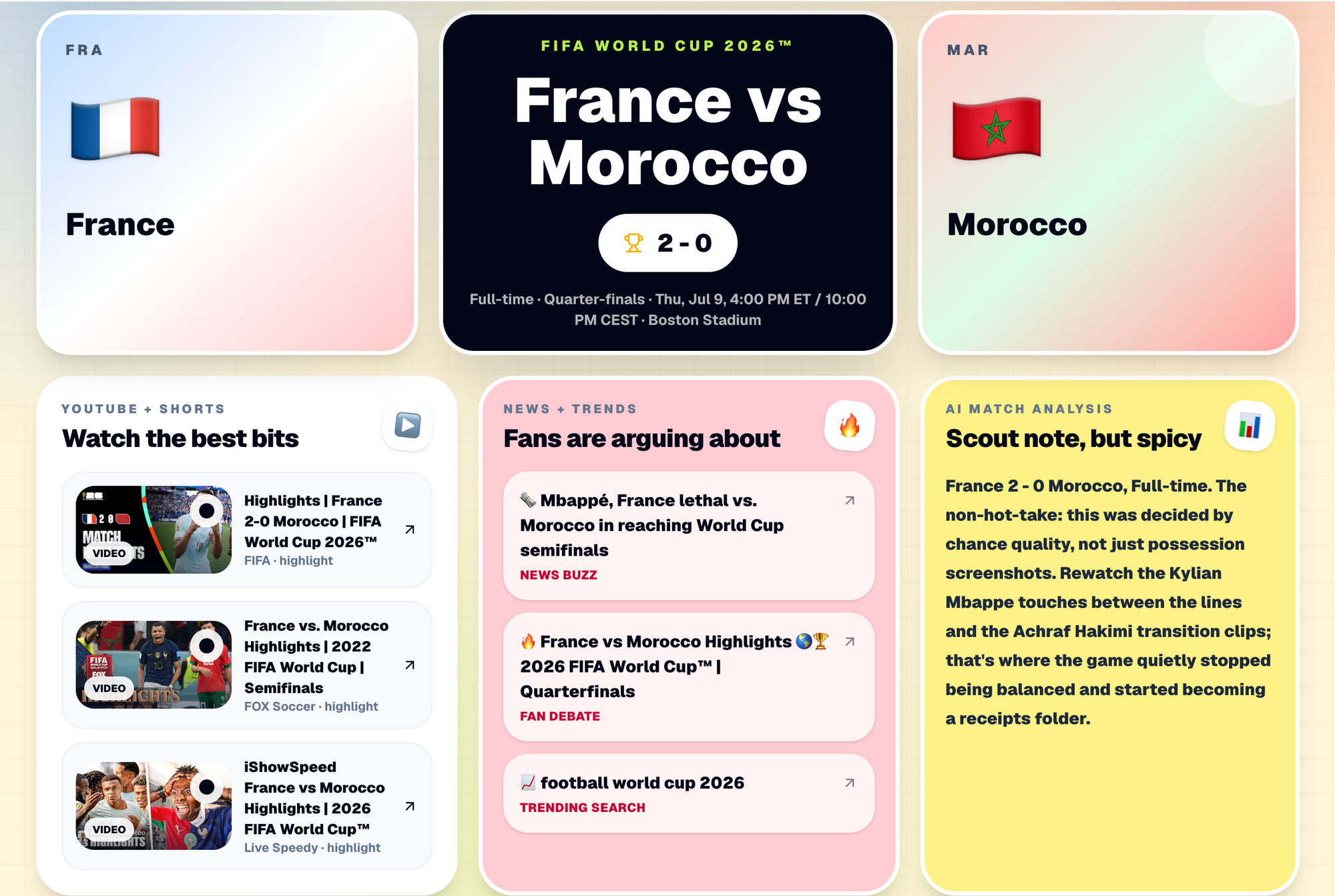
The app interprets the request, identifies the football matchup, and initializes the first journey state. From there, the agent starts building a fan pack around the match:
- Live match context and upcoming games
- Highlights and social content
- Fan debates and trending stories
- Related players and AI-generated match analysis
The important interaction is what happens after the user clicks a player.
For example, if the user follows Kylian Mbappé, the goal changes. The app no longer needs to explain only France vs Morocco. It now needs to explore Mbappé’s football trail: recent matches, videos, debates, memes, and related players.
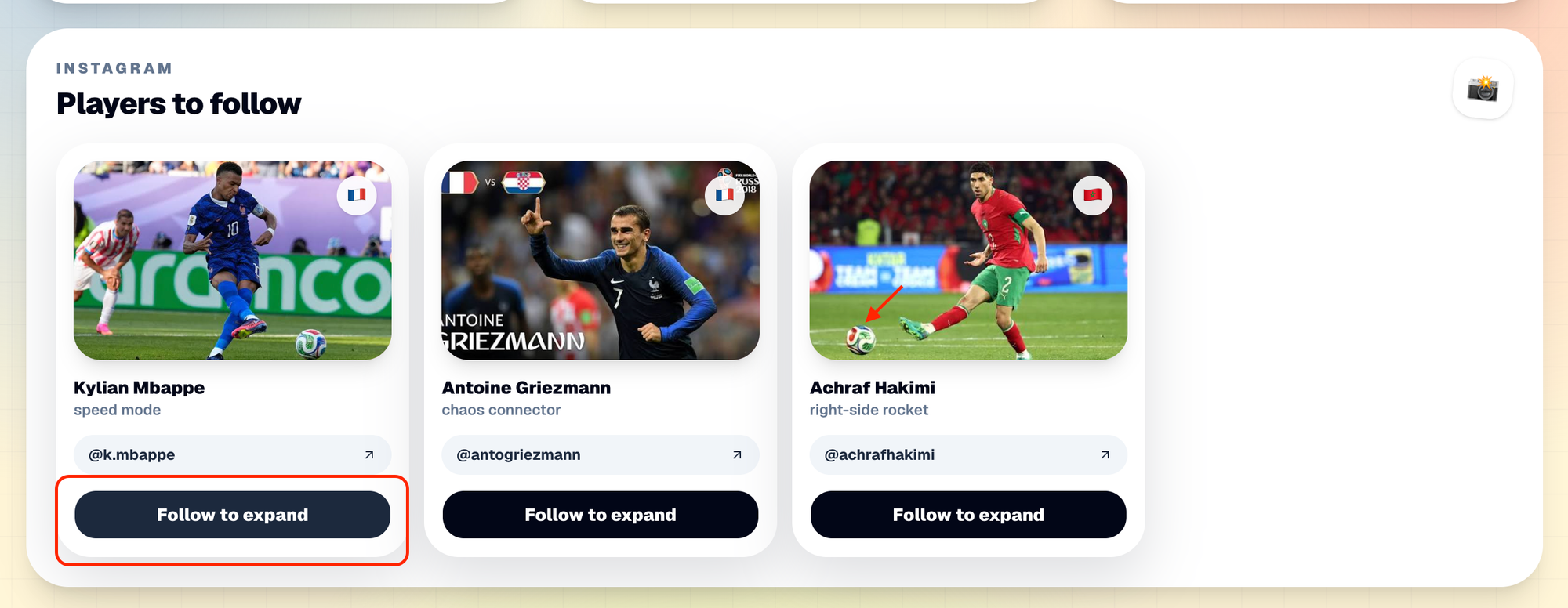
The player clicks to update the goal. From there, the agent enters another loop: it searches, observes the results, updates the journey state, and decides what to retrieve next.
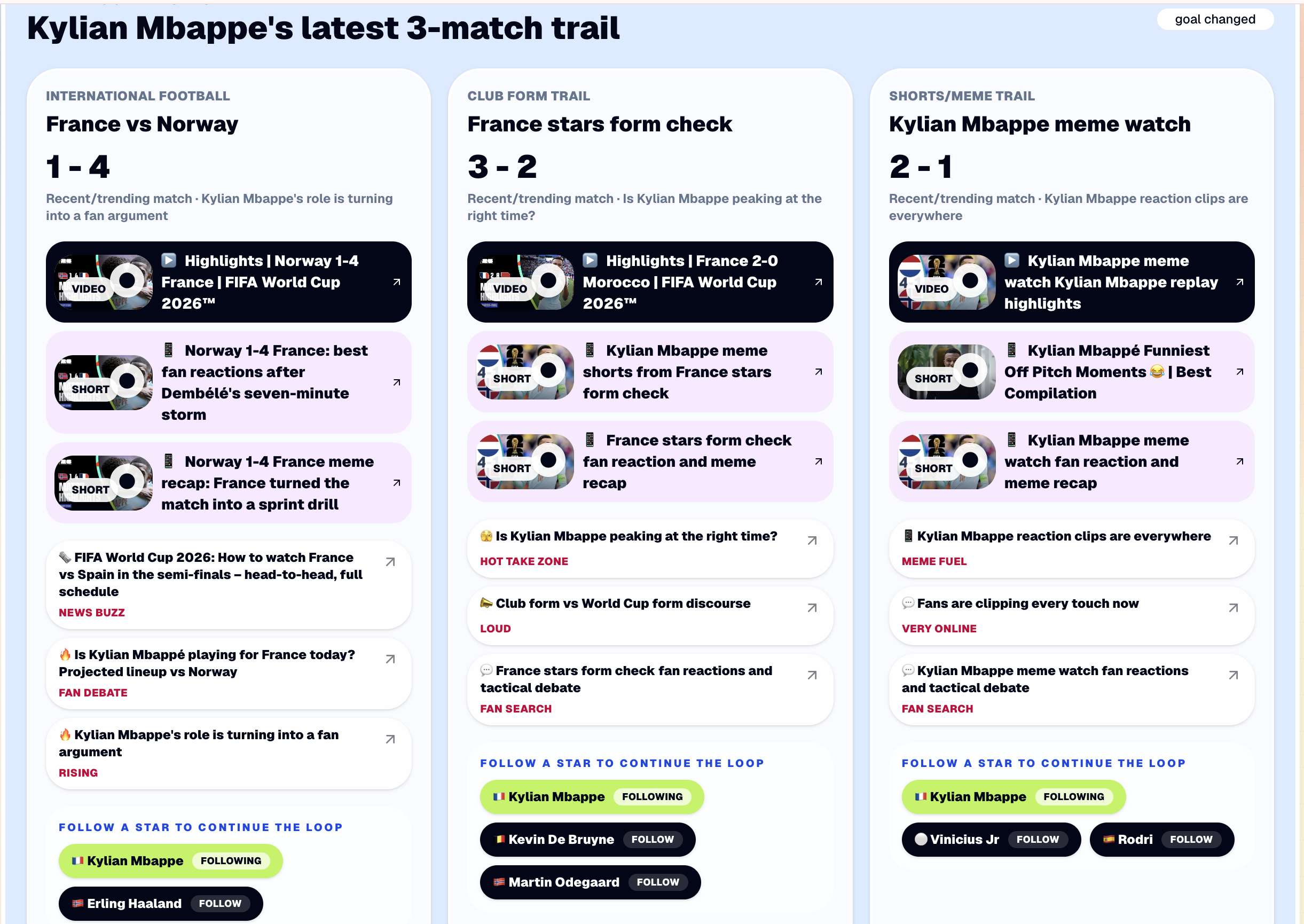
The user chooses the direction. The loop handles the exploration.
Finally, when the user clicks Generate my football graph, the demo stops exploring and turns the accumulated journey into a Loop Engineering trace.
That final output is not meant to be a normal social graph. It is meant to answer:
What did the agent know, what did it observe, what did it do next, and why?
Pipeline vs Loop
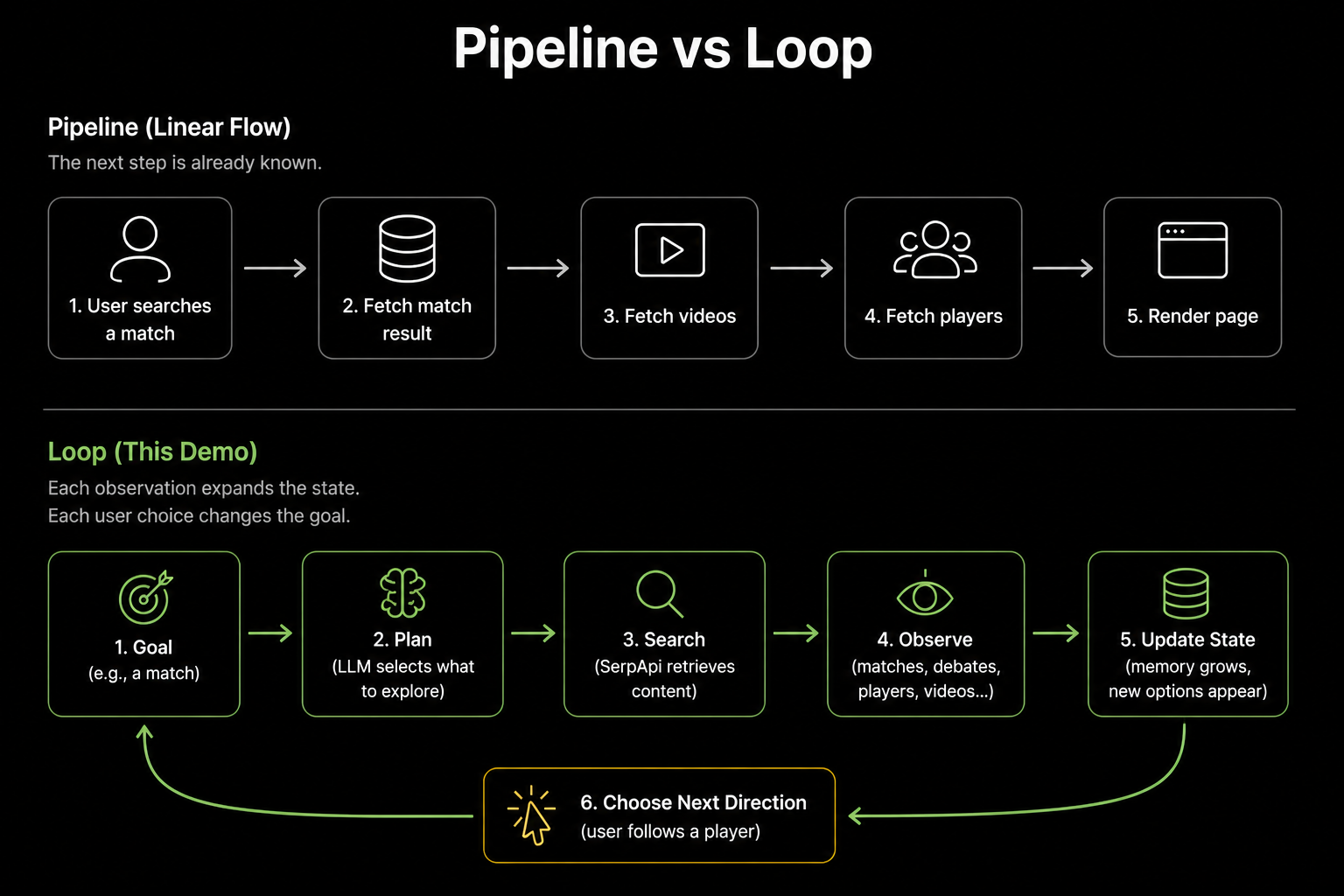
A normal pipeline follows a predefined path:
Fetch the match → fetch videos → fetch players → render the page.
The next step is already known. However, this demo works differently.
The agent starts with a goal and builds a journey state around it. Search results introduce new matches, debates, and related players. These observations expand the state and create new directions the journey can take.
If the user follows Mbappé, the goal changes. The agent plans which of Mbappé's matches to explore, retrieves related football content, and adds new players and observations to the journey. The user can then follow another player, changing the goal again.
The loop continues:
Goal → Plan → Search → Observe → Update State → Choose Next Direction → Goal Changes → Plan Again
This is a human-in-the-loop agent loop. The agent handles planning and exploration, while the user decides which direction is worth following.
A pipeline says:
Do A, then B, then C.
This loop asks:
Given the current goal and journey state, what should we explore next?
Mapping the Demo to the Loop
The easiest way to map the demo to the loop is to follow it iteration by iteration.
Each iteration starts with a trigger and a goal. The agent plans what to explore, calls tools, observes the results, and updates the journey state.
In this demo, the next iteration begins when the user chooses a new direction.
Trigger → Goal → Plan → Tools → Observe → Update State → Next Trigger
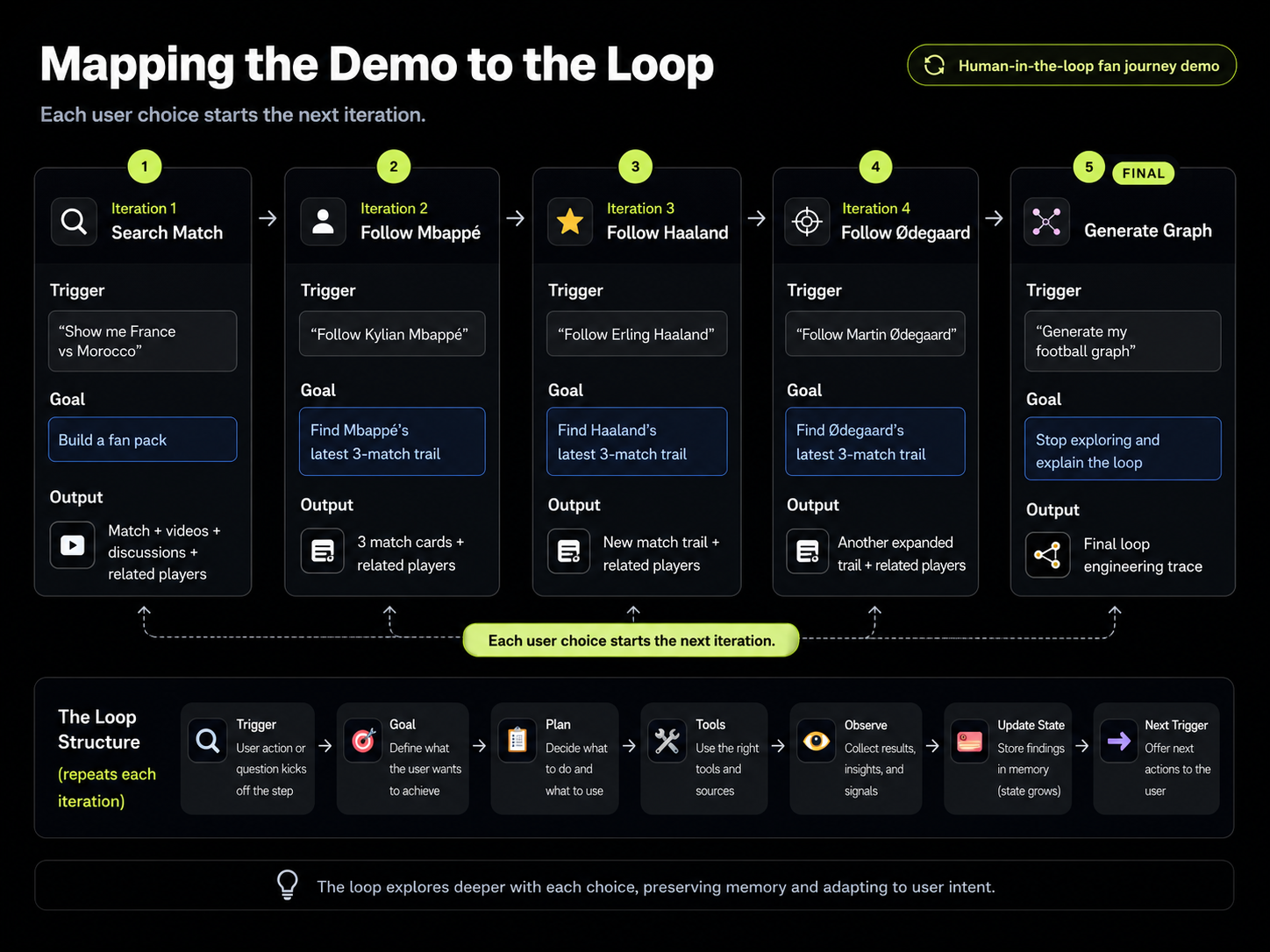
Iteration 1: Start with a Match
The first trigger is the user's search:
Show me France vs Morocco.
The goal is:
Build a fan pack for France vs Morocco.
The app parses the request and uses sports, YouTube, news, trends, and player data to assemble the first fan journey.
The resulting observations include the match status, score, available videos, discussions, and related players. Those results become the current journey state.
At the end of the first iteration, the system has not just rendered a page. It has created possible directions for the next iteration.
Iteration 2: Following Mbappé Changes the Goal
The user clicks Follow Kylian Mbappé. That click becomes the next trigger. In the code, this action starts a new planning step:
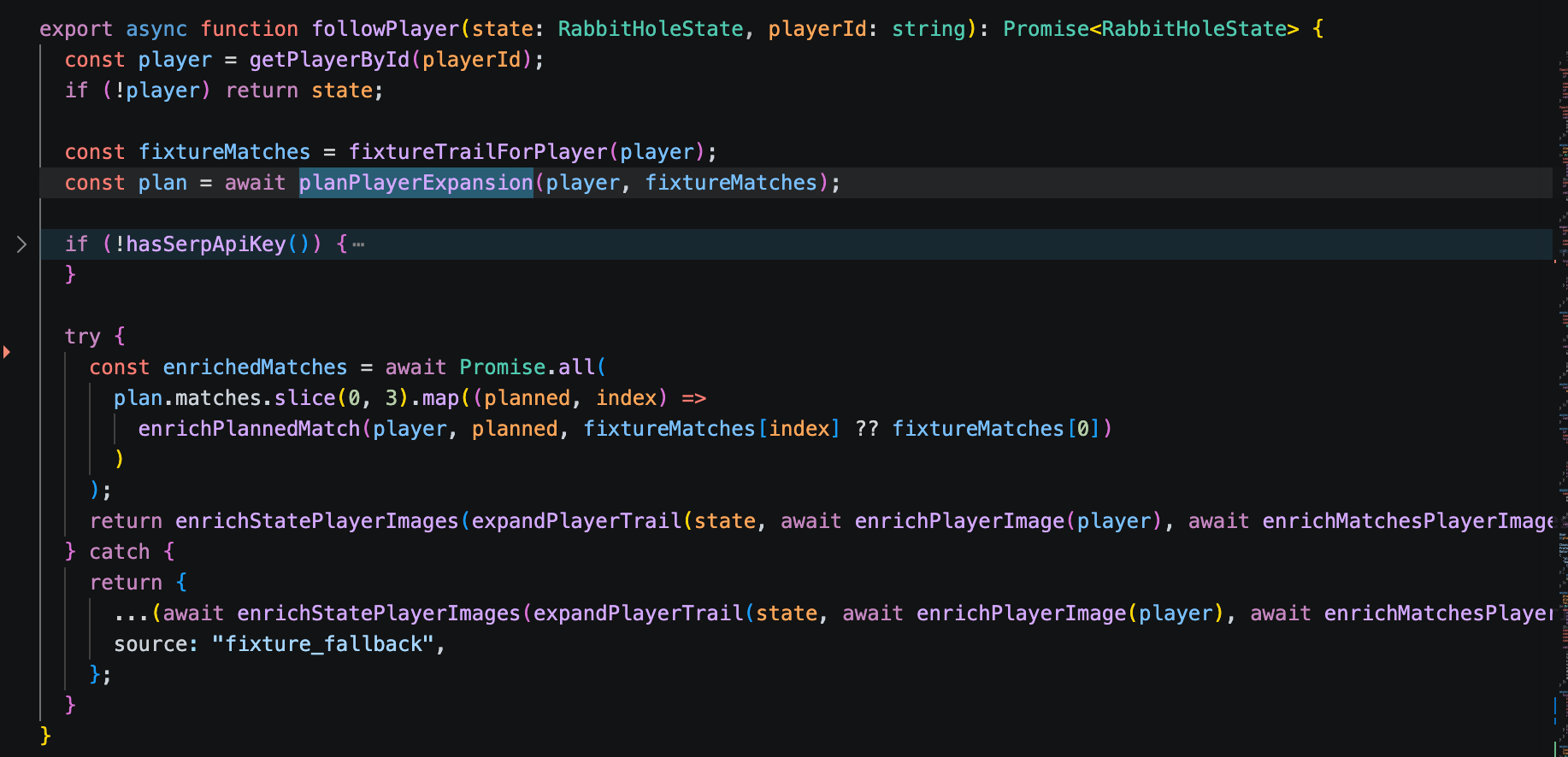
followPlayer() flow turns a user click into a new plan, enriches the selected matches, and expands the current journey state.The LLM decides which three recent or trending matches are worth exploring:
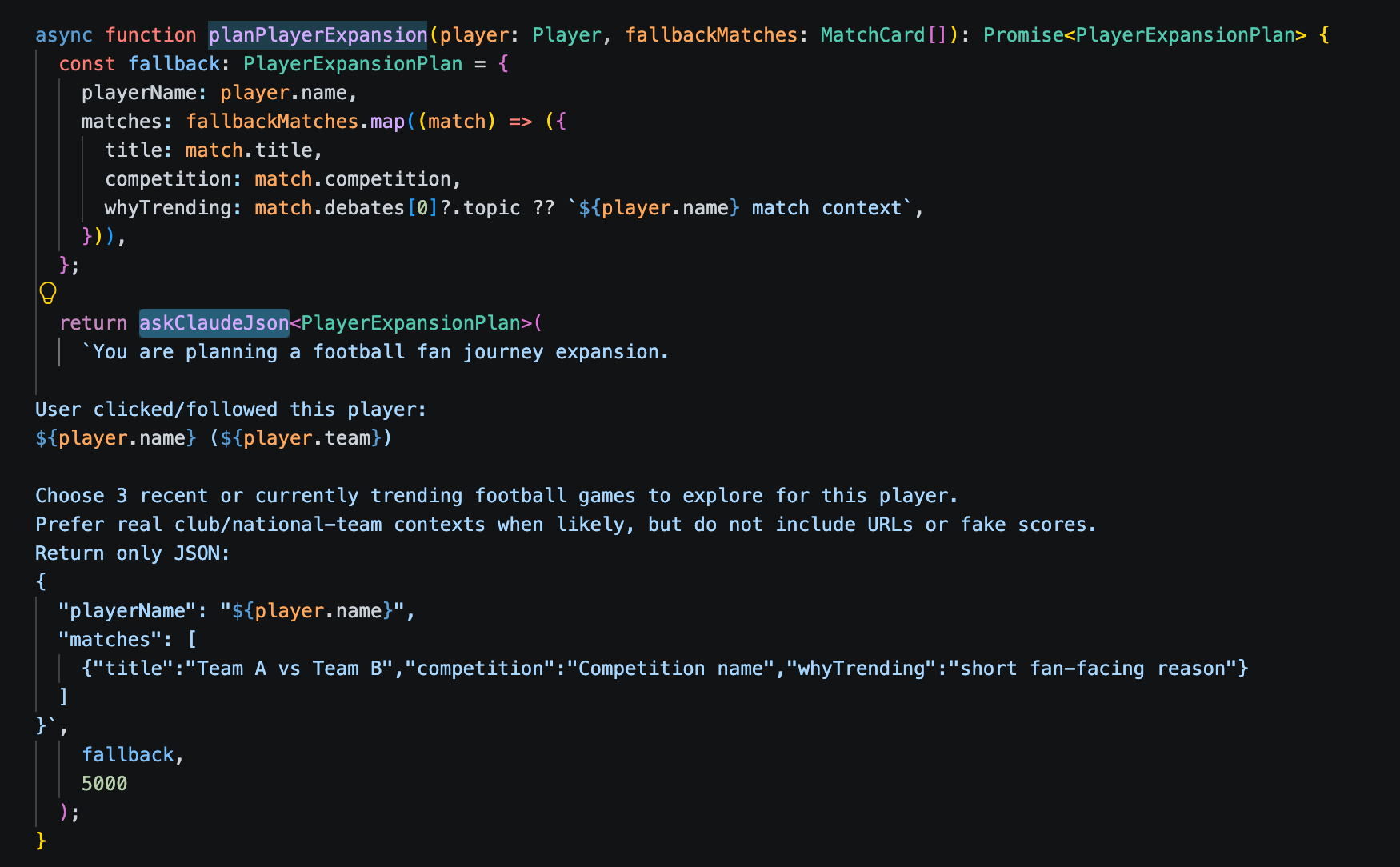
planPlayerExpansion() asks the LLM to select three recent or trending matches for the followed player and return them as a structured exploration plan.The plan is then grounded with external search data by SerpApi. It retrieves the surrounding sports results, videos, news, and trends.
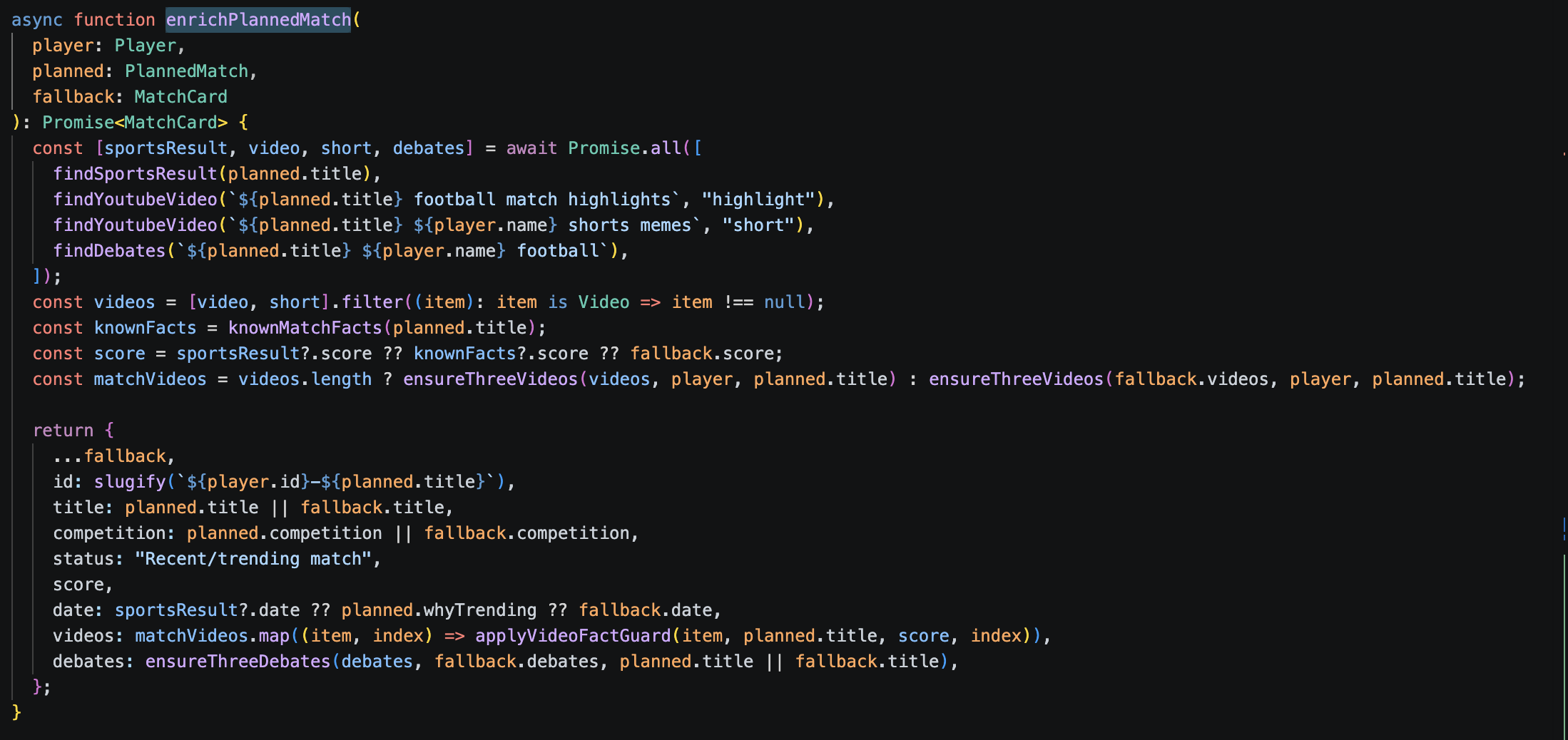
enrichPlannedMatch() grounds the LLM’s plan with sports results, videos, and discussions from SerpApi before adding the new match trail to the journey state.The agent observes three new match trails and discovers more related players. The state expands. Now the user has another set of possible directions.
The user chooses the direction. The agent explores it.
Iteration 3: The Loop Continues
Suppose the user follows Erling Haaland.
The same loop structure runs again, but with a different goal and a different state.
The agent plans Haaland's match trail, retrieves new context, observes the results, and adds new match and player nodes to the journey.
This is why the demo is not a fixed pipeline. The structure repeats, but the content of each iteration depends on the current goal and accumulated state.
Iteration 4: Another Direction, Same Loop
The user follows Martin Odegaard.
Again:
New trigger → new goal → new plan → new observations → expanded state
The loop structure stays stable. The journey does not.
By this point, the system has accumulated multiple player trails, discovered matches, and possible next actions.
Final Iteration: Stop and Generate the Trace
The user clicks:
Generate my football graph.
This becomes the stop condition.
The agent stops exploring and turns the accumulated journey into a Loop Engineering trace.
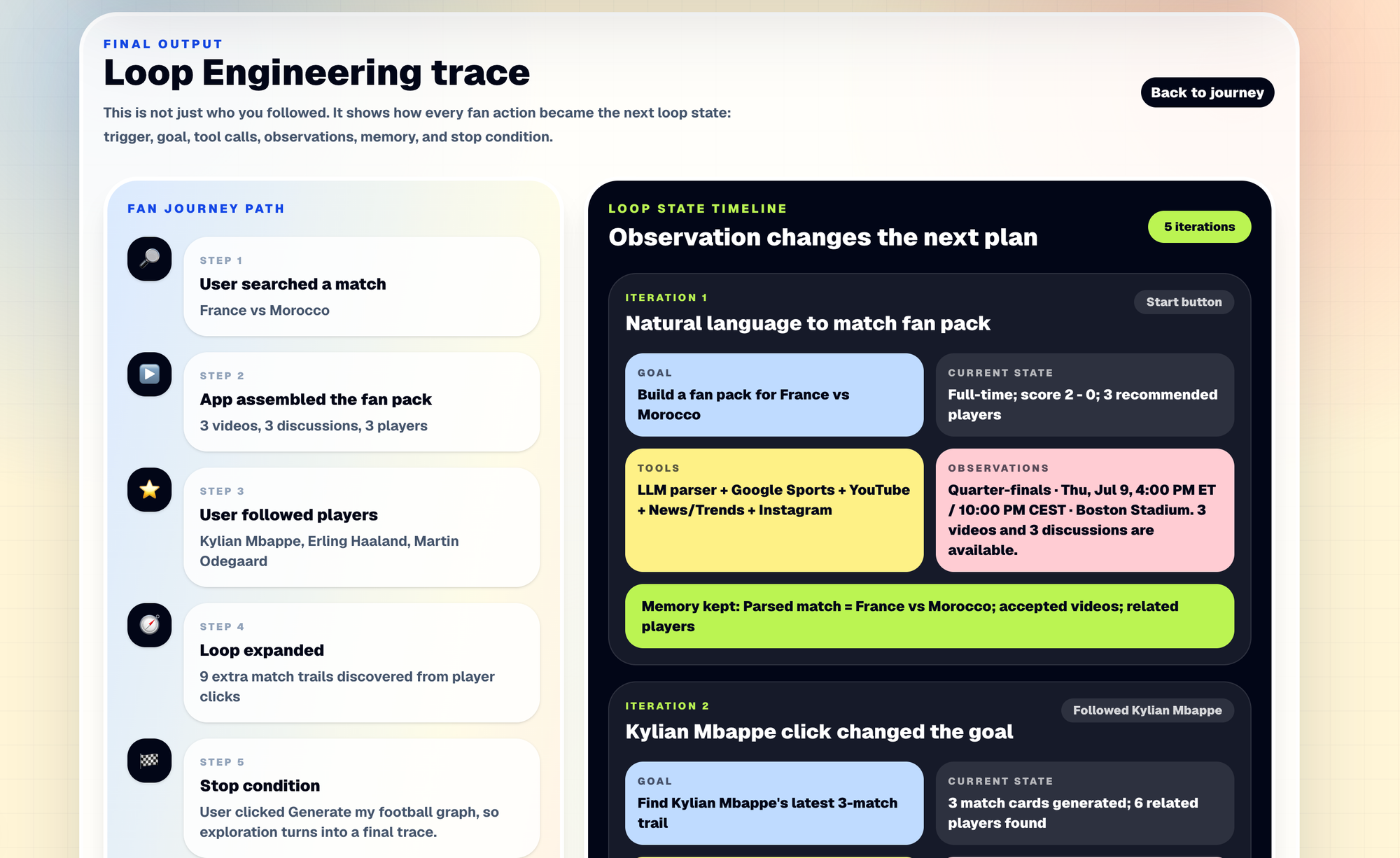
The final output shows how each iteration changed:
- the goal
- the current state
- the tools used
- the observations
- the memory carried forward
The graph is therefore not just a record of which players the user followed.
It is a visualization of how the loop changed from one iteration to the next.
Why SerpApi is Useful
For this demo, SerpApi acts as the observation layer. The LLM can plan what to explore, but the football world keeps changing: match status and scores change, new videos appear, and news and fan discussions evolve.
The loop needs a way to observe that external world.
SerpApi provides that context through several search APIs:
- Google Sports API: match scores, status, stage, venue, and time
- YouTube Search API: highlights and shorts
- Google News API and Google Trends API: debates, narratives, and rising topics
- Instagram Profile API: player profile context
- Google Images API: player photos and visual fallbacks
The LLM decides what to explore. SerpApi gives the loop fresh context from the outside world.
Building It with Codex
I built this demo with Codex, but the hardest part was not writing the code.
At the beginning, even the product goal was vague.
I knew I wanted to build a World Cup demo that made Loop Engineering visible. I did not yet know what that experience should look like.
The first version reflected that uncertainty.
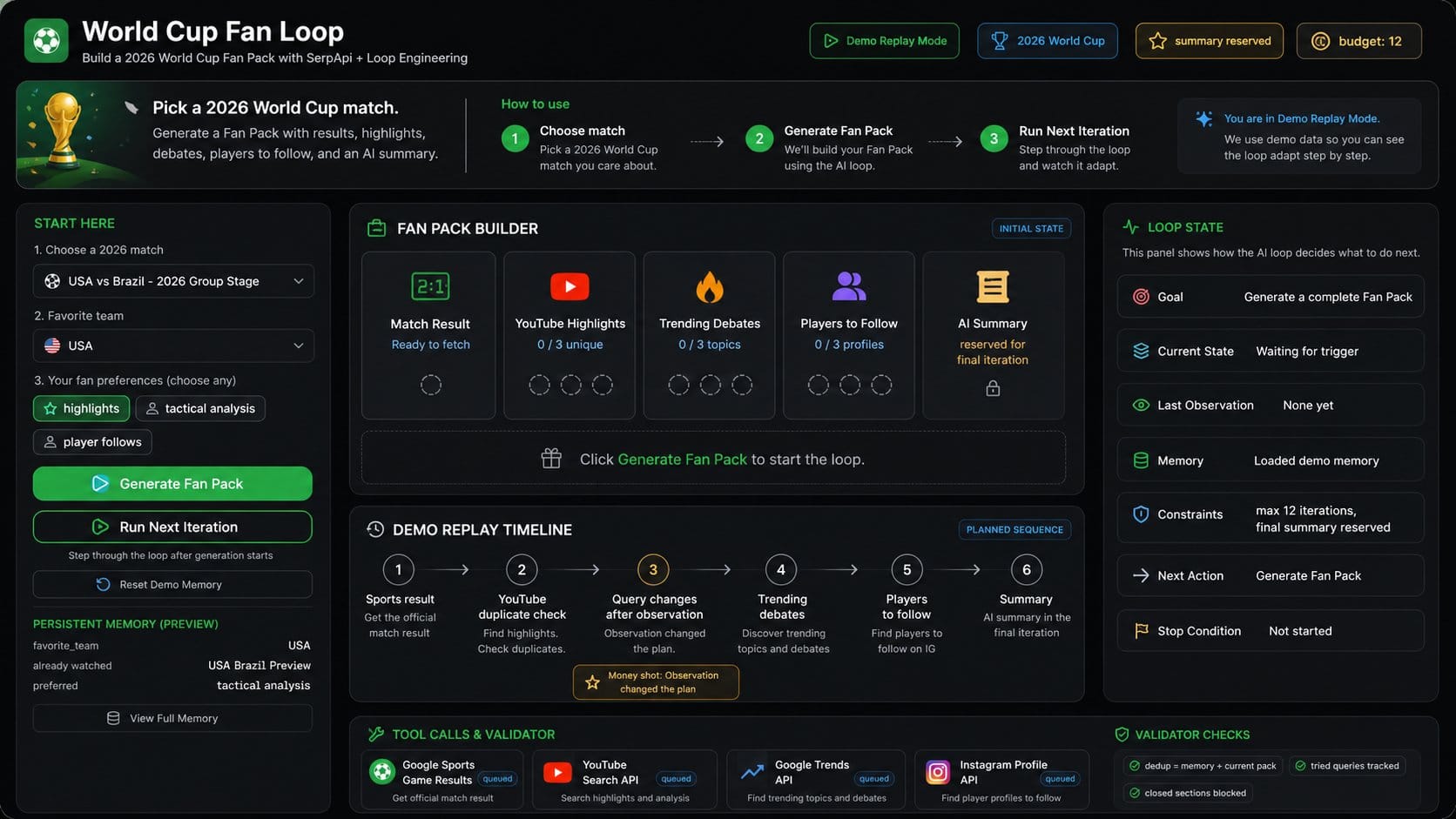
It exposed almost every engineering concept directly: loop state, observations, memory, constraints, tool calls, validators, and a replay timeline.
Technically, the ideas were there. But as a product, it was painful to use.
A user had to understand Loop Engineering before they could understand the demo. The interface was explaining the architecture instead of letting the user experience it.
So the development process became iterative.
I would inspect the UI, explain what felt confusing, and ask Codex to change the product around that observation. Codex would read the existing codebase, make a targeted change, run the build, and give me another version to react to.
Build → Observe → Rethink the goal → Patch → Verify → Repeat
After several iterations, the product idea became much clearer.
Instead of showing the loop as an engineering dashboard, the demo would hide most of the machinery behind a simple fan journey:
Start with a match. Follow a player. Discover another match. Follow another player.
The user experiences the loop first.
Only at the end does the app reveal the Loop Engineering trace and show how each action changed the goal, state, observations, and next iteration.
That shift changed the entire interface.
The interesting part is that Codex was not simply implementing a finished specification. The specification itself became clearer through the implementation loop.
Every version gave me a new observation. Those observations changed what I asked Codex to build next.
The workflow itself became loop-shaped.
Two Failures That Made the Loop Clearer
The most useful lessons came from the parts that did not work. Some were ordinary UI bugs. Others exposed weaknesses in how I was thinking about the loop itself.
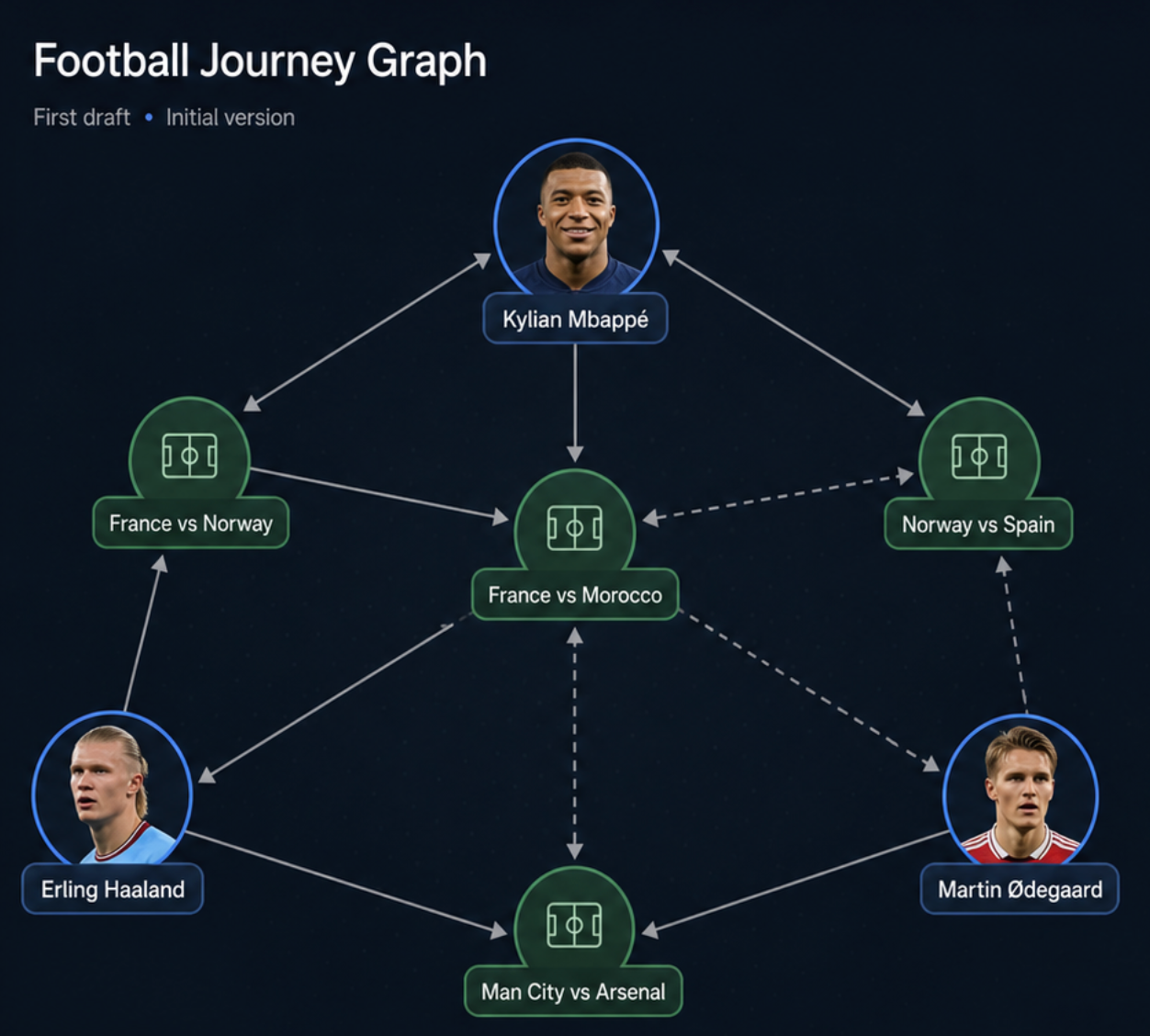
1. The First Graph Showed Relationships, Not Iterations
My first version ended with a graph of players and matches. It showed that Mbappé, Haaland, and Ødegaard were connected to different matches, but it did not explain why the journey moved from one player to the next.
It showed relationships, but not:
- What triggered each iteration
- How the goal changed
- What the agent observed
- What state was carried forward
It was a relationship graph, not a loop trace.
So I redesigned the final output around iterations. The new trace shows the goal, current state, tools, observations, and memory for each step.
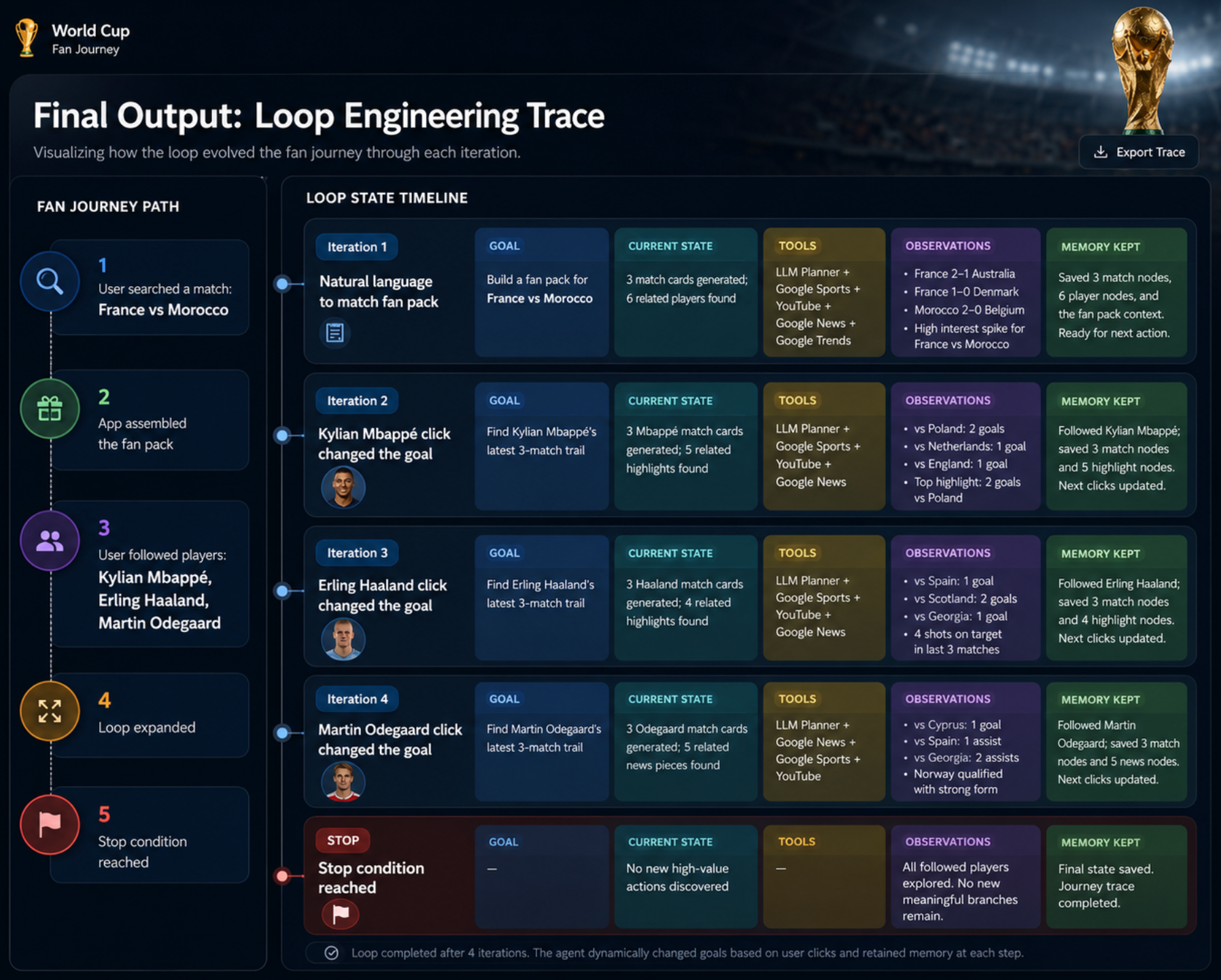
A visualization should explain the concept, not just decorate the data.
This change also clarified the product itself. The fan journey was only the surface. The real output was the sequence of state transitions underneath it.
2. Search Relevance Is Not Factual Correctness
At one point, a video title implied that Mbappé had scored in a match where he had not.
The player-trail search included his name:
findYoutubeVideo(
  `${planned.title} ${player.name} shorts memes`,
  "short"
);
That made sense for retrieval. The goal was to find content related to Mbappé. But a relevant title could still imply incorrect facts, such as the wrong score or a goal he never scored.
The bug was simple:
The application treated search-derived copy as verified sports data.
I added a deterministic fact guard before displaying those titles. Sports data verifies the score and match events; search and the LLM only shape how the content is presented.
Sports data owns the facts. Search and the LLM shape the narrative.
The broader Loop Engineering lesson is:
A relevant observation is not always trustworthy enough to update factual state.
What I Would Improve Next
The demo makes the loop visible, but it is still a prototype. If I wanted to harden it, I would focus on three things.
1. Unify the Loop State Model
The demo currently has two state models because the product evolved in stages.
The earlier replay-mode prototype derives a display snapshot from SessionState and PersistentMemory:
const snapshot = buildLoopStateSnapshot(session, memory);The final fan journey uses RabbitHoleState as its main application state:
const [state, setState] =
  useState<RabbitHoleState | null>(null);
This split reflects the development history: the replay dashboard came first, and the fan journey came later.
If I hardened the project, I would unify both flows around one sequence of loop-state transitions. The fan UI, execution logic, and final trace should all read from the same underlying history instead of adapting between separate representations.
The trace should come from the loop that actually ran, not from a parallel model built to explain it.
That would make each iteration easier to inspect, persist, and replay.
2. Add Production Guardrails
The demo mostly relies on the user to decide when to stop.
A production loop should also enforce operational limits, including maximum iterations, API timeouts, retry budgets, and graceful fallback behavior when a tool fails.
Instead of retrying forever, the loop should be able to stop and return the best partial result available.
A stop condition is also a reliability boundary.
3. Persist the Journey Across Sessions
Right now, the fan journey is mainly session-based.
I would persist followed players, expanded trails, accepted content, and other useful memory so that a new session does not start from zero. That would let the loop carry context across a longer fan journey, rather than only across interactions on one page.
The Main Takeaway
Everyone is talking about Loop Engineering right now, but people do not always mean exactly the same thing. Some use the term to describe the iteration inside a single AI agent: observe, update state, choose the next action, and repeat. Others use it at a higher level to describe systems that coordinate multiple agent runs over time.
Neither view is necessarily wrong. They are looking at the same idea from different levels of abstraction.
In this demo, I focused on the micro view. The loop is human-in-the-loop: the user chooses a direction, the agent explores it, new observations expand the state, and the next user action starts another iteration.
The hard part is not making the model act once. It is designing how goals, observations, state, and decisions evolve from one iteration to the next.
That was also why football turned out to be such a useful example. The outside world keeps changing. A match moves from upcoming to live to full-time. Scores change. New videos appear. News and fan discussions evolve. The model cannot simply remember that world correctly. The loop has to be observed again.
For this demo, SerpApi's Google Sports API became the main source of match state: scores, match status, teams, schedules, and other sports context. That fresh data could then be written back into the loop state before the next iteration continued.
Calling a tool is not enough. The result has to become a new observation, and that observation has to update the state the next iteration will use.
If you are building an AI agent or workflow around live sports data, try the SerpApi Google Sports API and see what kind of loop you can build around changing match state.