Ruby
Ruby
 Golang
 .Net
.Net
 MCP
MCP
 C++
C++

OpenAI's Decisions API lets us ask questions and receive answers in fixed formats that our code can use directly.
OpenAI released the Decisions API in public beta on October 6, 2026. It accepts text and images and returns a probability, a choice, or a score. The current model is gpt-6-luna, and OpenAI reports responses about ten times faster than through the Responses API. We can ask several independent questions about the same input in one request.
We explored a similar approach in our Jev tutorial, where we built a fact checker that evaluates claims using search results.

We will use the Decisions API with SerpApi to build a remote job finder. We will fetch job listings using SerpApi's google_jobs engine and send them to OpenAI with our preferences to filter out roles that don't match.
How the Decisions API works
A traditional LLM API, such as OpenAI’s Responses API, lets us send a prompt and ask the model to generate text. It could write code, draft a cover letter, or explain a topic.
The Decisions API returns answers in fixed formats. It cannot write a free-form response like a paragraph or a code snippet. We pass text or images in the input and describe what we want to know in questions.
There are three question types:
| Type | How it works | Main output |
|---|---|---|
| Predicate | Checks whether a condition is true, expressed as a probability. | probability, from 0 to 1. |
| Choice | Selects one option from a set of choices we provide. | choice and confidence. |
| Score | Rates the input using ordered levels we define. | score and confidence. |
What our remote job finder will do
We will use SerpApi to search for SerpApi remote jobs and fetch up to five listings. For this example, we’re looking for full-time, fully remote Python Developer Advocate roles. We will send each listing to the Decisions API with the following requirements:
Full-time Python developer advocacy, including tutorials and example projects. Fully remote. Full-time contract roles are acceptable.
For each listing, we will ask three questions.
Predicate: “Does this listing allow fully remote work without required office visits?”
Choice: “Does this job meet the stated preferences?” We will define these options:
shortlist: The listing supports all our required preferences.skip: The listing clearly conflicts with a requirement.needs_review: There is no clear conflict, but a required detail is missing or unclear.
Score: “How closely do the job’s duties and skills match the requested role?” We will use weak, partial, and strong as our levels.
You can change the query and preferences to look for another role. If you need to work from a particular country or time zone, include that in your preferences too.
Set up the project
You need Python 3.10 or newer, uv, a SerpApi account, and an OpenAI API key.
You can find the full code on GitHub. Clone the repository, navigate to the tutorial folder, and install the dependencies:
git clone https://github.com/serpapi/tutorials.git
cd tutorials/python_projects/openai-decisions-remote-job-finder
uv sync --locked
The example uses the official SerpApi Python package and OpenAI Python SDK. For an existing uv project, install them with:
uv add serpapi "openai>=3.26.0,<4"
The Decisions API requires OpenAI Python SDK version 3.26.0 or later. The script reads SERPAPI_API_KEY and OPENAI_API_KEY from your environment. If either is missing, it asks for that key through a hidden terminal prompt. You can find your SerpApi key from the dashboard.
Fetch job listings with SerpApi
SerpApi's Google Jobs API returns job titles, company names, descriptions, and application links. We will use the JSON restrictor to request only jobs_results.
import serpapi

def search_jobs(query, key, country="us", location=None, limit=5):
    params = {
        "engine": "google_jobs",
        "q": query,
        "gl": country,
        "hl": "en",
        "json_restrictor": "jobs_results",
    }
    if location:
        params["location"] = location

    client = serpapi.Client(api_key=key, timeout=60)
    data = client.search(params)
    if data.get("error"):
        raise RuntimeError("SerpApi could not return job results for this search.")

    return data.get("jobs_results", [])[:limit]
q is our search query, and gl selects the search country. You can also pass location to set a search origin. The employer's hiring restrictions still need to be checked against your preferences.
We will send each listing to OpenAI so it can compare the job’s responsibilities and working arrangement with our preferences.
Define the decision questions
We will ask OpenAI whether to shortlist the job, whether it allows fully remote work, and how closely its duties match our preferences.
Choose which jobs to shortlist
Our main question uses Choice. We describe when to return shortlist, skip, or needs_review:
MATCH_QUESTION = {
    "type": "choice",
    "name": "match",
    "instructions": (
        "Does this job meet the stated preferences? Check the duties, employment type, "
        "remote work, and any requested country or time zone. "
        "Choose skip for a clear conflict, even if other details are missing. "
        "Otherwise, use needs_review if a requirement cannot be checked from the listing."
    ),
    "choices": [
        {
            "value": "shortlist",
            "description": "The listing explicitly supports all required preferences.",
        },
        {
            "value": "skip",
            "description": "The listing clearly conflicts with a required preference.",
        },
        {
            "value": "needs_review",
            "description": (
                "There is no clear conflict, but a required detail is missing or unclear."
            ),
        },
    ],
}
type selects Choice. We use name="match" to identify this question's answer later. instructions describes the assessment, and choices contains the allowed values and their definitions.
The needs_review option is useful when a listing is incomplete. If you require a full-time role and the listing does not state the hours, the model can return that option instead.
Check remote work and role fit
We will add a Predicate question for remote work and a Score question for the job duties. Both use the same listing, so we can send them with the Choice question in one request.
REMOTE_QUESTION = {
    "type": "predicate",
    "name": "fully_remote",
    "instructions": "Does this listing allow fully remote work without required office visits?",
}

FIT_QUESTION = {
    "type": "score",
    "name": "role_fit",
    "instructions": (
        "Rate how closely the listed duties and skills match the requested role. "
        "Evaluate role content only, independently of location and working arrangements."
    ),
    "levels": [
        {"label": "weak", "description": "Different work, or too little role detail to assess."},
        {"label": "partial", "description": "Some relevant duties, but the main focus differs."},
        {"label": "strong", "description": "The main duties and skills match the requested role."},
    ],
}

QUESTIONS = [REMOTE_QUESTION, MATCH_QUESTION, FIT_QUESTION]
Our Score levels run from 0 for weak to 2 for strong. The returned score can fall between them.
Send a listing to OpenAI
Now we can send a job to OpenAI. We put the preferences and listing details in a dictionary, then convert it to a JSON string.
import json
from openai import OpenAI

client = OpenAI()

decision = client.decisions.create(
    model="gpt-6-luna",
    input=json.dumps({"preferences": preferences, "job": job}),
    questions=QUESTIONS,
)
json.dumps() converts our dictionary into the text input accepted by the Decisions API.
Read the answers
OpenAI returns an answers list. We store each answer under its question name, then read the answer to our match question:
answers = {}
for answer in decision.answers:
    answers[answer.name] = answer.model_dump()

match = answers.get("match", {})

if match.get("type") == "choice":
    print("Decision:", match["choice"])
    print("Confidence:", match["confidence"])
else:
    print("This listing needs manual review.")
The choice field contains the decision, such as shortlist or skip. The script uses that choice as the job's status. If the API refuses this question or does not return an answer, the script marks the job as needs_review.
Run the remote job finder
Let's run the script with our SerpApi job search and Python developer advocacy preferences:
uv run job_finder.py "SerpApi remote jobs" \
  --country us \
  --preferences "Full-time Python developer advocacy, including tutorials and example projects. Fully remote. Full-time contract roles are acceptable."
The default limit is five jobs from the first search page. Add --limit 10 to assess up to ten, or --json > results.json to save the listings and answers to a file.
Results
For a sample SerpApi remote jobs search, the results had five listings with SerpApi as the employer. Here are two examples from the run:
| SerpApi role | Decision | Confidence |
|---|---|---|
| Python Developer Advocate | shortlist |
0.85 |
| Public Relations Manager | skip |
0.97 |
OpenAI shortlisted the Python Developer Advocate role and skipped the Public Relations Manager role. The Python role also received a role-fit score of 1.96 out of 2.
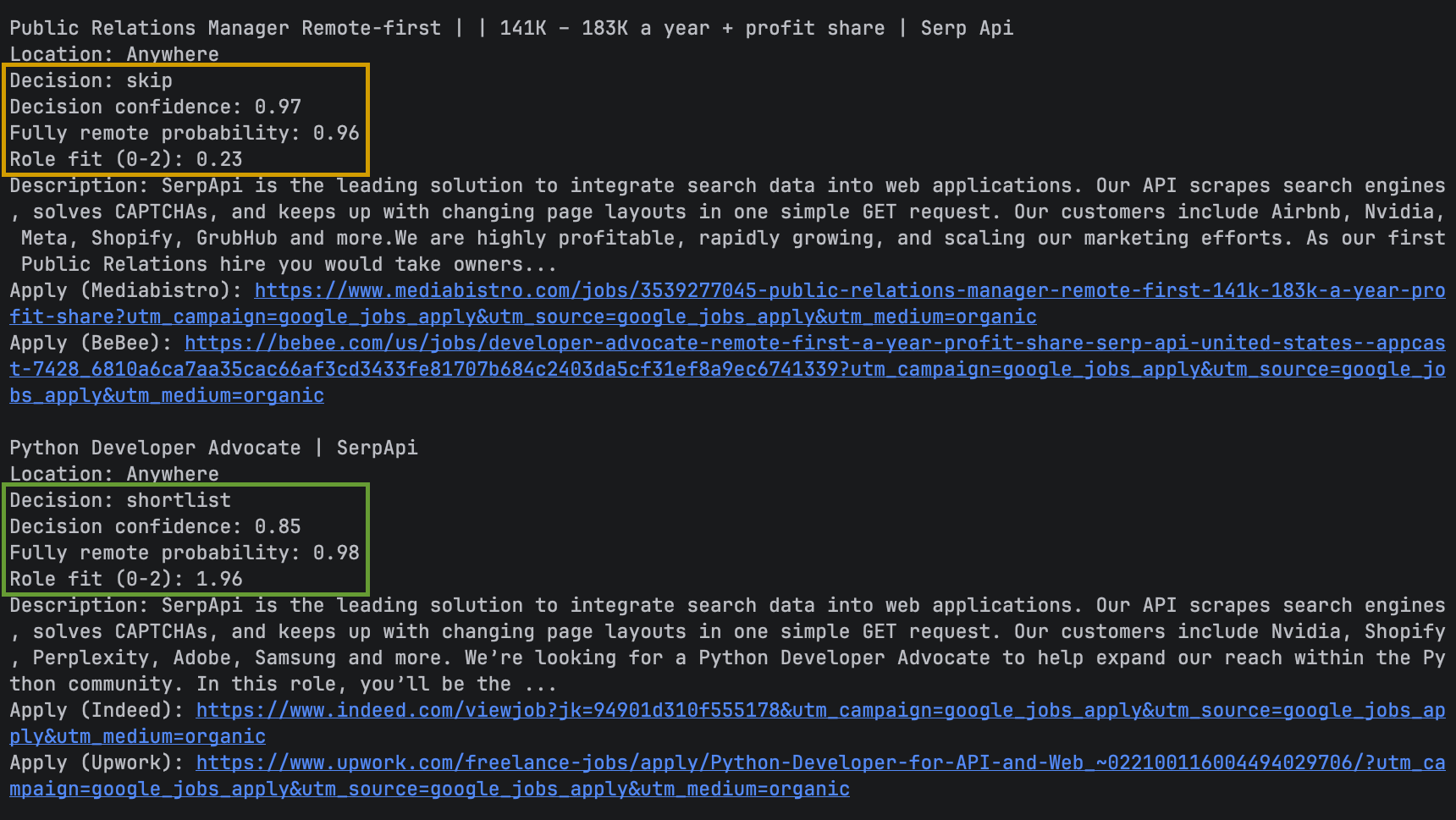
These results match the preferences we sent: full-time, fully remote Python developer advocacy focused on tutorials and example projects.
You can use the same script to look for other roles by changing the search query and preferences. The Decisions API will then evaluate each listing against your updated requirements.
More things to build with Decisions and SerpApi
The same types of questions work with other SerpApi results. You could check whether a news story concerns a company you follow or whether a shopping listing matches the product you want.
Filter competitor news
Use SerpApi's Google News API to collect stories about a company. A Predicate can check whether a story refers to the company you track. A Choice can classify relevant stories as product launches, funding announcements, or leadership changes before your application selects alerts.
Match products before comparing prices
Fetch listings through SerpApi's Google Shopping API. Ask a Choice question whether each listing matches the product model and condition you want. Your code can compare prices among the matches and keep ambiguous listings for review.
Further reading
If you’d like to explore a similar project, read our tutorial on building a fact checker with Jev and SerpApi. It uses search results and a decision model to evaluate factual claims.
 Adarsh Divakaran
To learn more about fetching job listings, see the Google Jobs API documentation. Our guide to Jobs search query operators also explains how to refine searches for specific titles, skills, and locations.
 Sonika Arora
To start with the remote job finder, get the full example on GitHub, create a SerpApi account, and try a search for the role you want next.