Ruby
Ruby
 Golang
 .Net
.Net
 MCP
MCP
 C++
C++

Customer reviews are one of the most valuable sources of product insight. They reveal real-world feedback, highlight product strengths and weaknesses, and help businesses understand customer sentiment.
In this post, we'll explore how to collect product reviews from Home Depot using SerpApi's Home Depot Product Reviews API. By the end, you'll be able to fetch product reviews data such as ratings, titles, and comments for analysis and monitoring.
Why Scrape Reviews?
Home Depot is one of the largest home improvement retailers in the United States. Product reviews on its site provide valuable insights for:
- Competitive analysis — Understand how competing products are perceived.
- Sentiment analysis — Identify common praise or complaints.
- Market research — Learn what customers value most.
- Product development — Discover improvement opportunities.
Instead of manually collecting reviews, SerpApi lets you retrieve them programmatically and with many no code options.
What Type of Data Can You Extract?
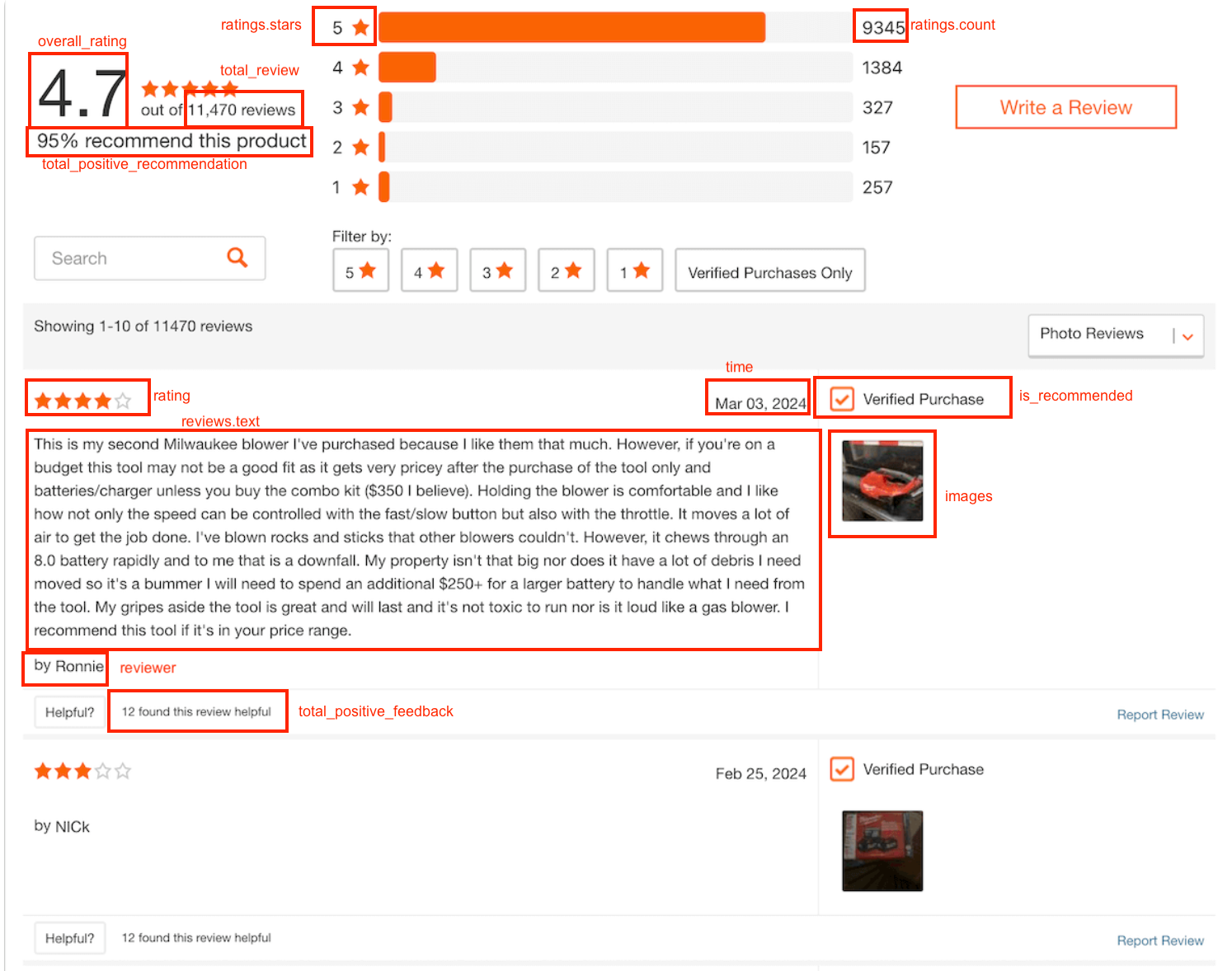
The Home Depot Product Reviews API scrapes reviews for products from Home Depot and provides them in JSON format. Here are some prominent fields from the review object:
id— Unique identifier for the review.title— Short headline summarizing the reviewer’s opinion.text— Full written content of the customer review.rating— Numeric score given by the reviewer (typically on a 1–5 scale).badges— Indicates badges on products like verifiedPurchaser.reviewer.name— Display name of the person who wrote the review.time— Timestamp showing when the review was published.original_source.name— Website where the review originally appeared.images.link— URLs of photos included in the review.total_positive_feedback— Number of users who found the review helpful.total_negative_feedback— Number of users who found the review unhelpful.
Read the documentation page here:
 SerpApi
Here's an example in our playground:
SerpApiSetting up SerpApi
Are you new to SerpApi? We'll walk you through the steps from sign up to integrating with SerpApi.
Getting Started with SerpApi
To get started with SerpApi, I recommend following the steps in this blog post:
 Hilman Ramadhan
Home Depot Product Reviews API Documentation
We recommend familiarizing yourself with the available parameters and details in the documentation here:
SerpApiIntegrations / Libraries
Some examples below will include our SerpApi libraries. If you would like to use one of our SerpApi libraries, we offer instructions for each language, such as Python, Node.js, Ruby, PHP, Java, Go, and more:


Scraping Home Depot Product Reviews
You can use any programming language in order to call our APIs. The parameters and results we reviewed above will not differ between the request methods, however the syntax used to call the APIs may differ.
You will see across the examples the engine is always set to home_depot_product_reviews, the api_key will be set to your API key, and we include the product_id in every query. In this example we are going to look for reviews for product with ID: 302752040
GET Request
The syntax for the actual GET request between languages will vary between programming languages. However, the URL used each time is consistent. When you are sending a GET request in any language you will use this URL to make the request:
https://serpapi.com/search.json?engine=home_depot_product_reviews&product_id=302752040Feel free to explore more parameters here, and add any that are relevant to your use case.
An Example With Our Python Library
- Install SerpApi's new Python
serpapilibrary in your environment:
pip install serpapiserpapi is our new Python library. You can use this library to scrape search results from any of SerpApi's APIs.More About Our Python Libraries
We have two separate Python libraries serpapi and google-search-results, and both work perfectly fine. We are in the process of deprecating google-search-results, so I recommend using serpapi as that is our latest python library.
You may encounter issues if you have both libraries installed at the same time. If you have the old library installed and want to proceed with using our new library, please follow these steps:
- Uninstall
google-search-resultsmodule from your environment. - Make sure that neither
serpapinorgoogle-search-resultsare installed at that stage. - Install
serpapimodule, for example with the following command if you're usingpip:pip install serpapi
Now, let's take a look at the code:
import serpapi

client = serpapi.Client(api_key=<YOUR_API_KEY>)

results = client.search({
  "engine": "home_depot_product_reviews",
  "product_id": "302752040"
})
Replace the placeholder with your API key.
An Example With cURL
curl --get https://serpapi.com/search \
 -d api_key="YOUR_SECRET_API_KEY" \
 -d engine="home_depot_product_reviews" \
 -d product_id="302752040"
No Code Options
Google Sheets
To connect your code with Google Sheets first follow this blog post:
 Hilman Ramadhan
=SERPAPI_RESULT("engine=home_depot_product_reviews&product_id=302752040", "reviews.0.text")Make.com
While not every API we offer is on Make.com, there is a Universal Module where you can use any API.
Review this blog post to get started:
 Alex Barron
N8N
Similar to Make.com, not every API is currently included in N8N. However, you can use the HTTP Request node to still call any of our APIs.
To get started review this blog post:
 Alex Barron
Conclusion
Scraping product reviews can unlock valuable insights about customer behavior and product performance. With the Home Depot Product Reviews API, you can retrieve structured review data in just a few lines of code.
I hope you find this useful. If you have any questions, feel free to reach out at contact@serpapi.com
Relevant Links
Related Blogs
Ryan Schafer Mikhail Zub
 Artur Chukhrai