Ruby
Ruby
 Golang
 .Net
.Net
 MCP
MCP
 C++
C++

Airbnb's platform, where hosts rent out their residences as places to stay during trips, is commonly used by travelers to find the place best suited for their needs. The website helps narrow down options based on preferences like location, dates, prices, and amenities.
We've recently added a new search API for scraping home rental listings, the Airbnb Search API. You can now gather Airbnb listing names, number of reviews, badges, and price all through one simple endpoint.
What Can You Scrape from Airbnb?
Here are some of the types of data you can pull from Airbnb using SerpApi:
- Listing name: the title the host gave the property
- Listing type and location: the property type and area (for example “Home in Austin”), plus GPS coordinates for mapping
- Price: the total price for the stay, shown as displayed (
price) and as a number you can calculate with (extracted_price) - Price breakdown: discounts, taxes, and fees where Airbnb shows them
- Rating and review count: the guest rating and how many reviews it’s based on
- Badges: highlights such as Guest favorite
- Rooms and capacity: bedrooms, beds, and bathrooms
- Photos: a thumbnail and the listing’s images
- Listing link: a direct link to the property on Airbnb
- Cancellation details: information such as free cancellation, when offered
- Search information: the total number of results, plus pagination links for the next pages
Which fields appear depends on the listing and the region, so new listings may have no rating or reviews yet.
Getting Started with SerpApi
To use the Airbnb Search API, you need a SerpApi account. If you don’t have one yet, register, verify your email address, and copy your private API key from your dashboard.
Keep your API key out of public source code. Instead, set an environment variable to provide your API key (listed on your dashboard) by running export SERPAPI_KEY="YOUR_API_KEY" for Mac and $env:SERPAPI_KEY="YOUR_API_KEY" for Windows. If a key is accidentally exposed, you can regenerate it from the SerpApi dashboard.
Install a SerpApi Library
SerpApi provides official libraries for Python, JavaScript, Ruby, and other languages. These libraries wrap the HTTP API and make it easier to pass parameters and work with the JSON response.
You can also call the API with a regular GET request using cURL, fetch() in Node.js, or any HTTP client. This guide covers both direct requests and several official integrations.
The Airbnb Search documentation lists all supported search parameters, filters, response fields, and code examples. You can also experiment with every parameter in the interactive playground before writing any code.
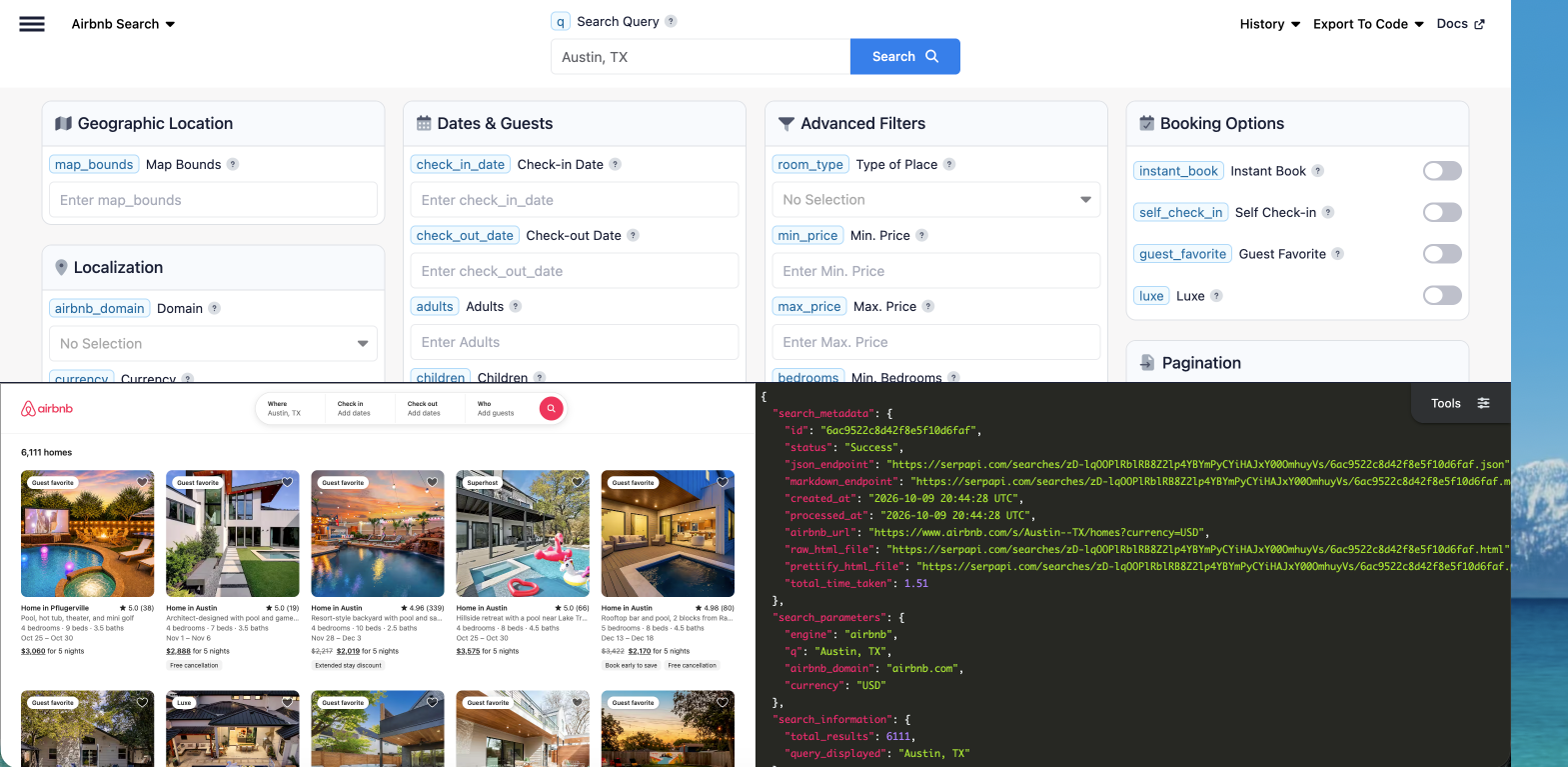
How to Scrape Airbnb Search Results
This API is available through engine=airbnb. Send a request, and you can get the listing data back as JSON, HTML, or Markdown, depending on what best suits your workflow.
Use q to set a destination or map_bounds to search a map area.
Note:qtakes in a city name, neighborhood, or landmark.map_boundstakesnorth,east,south,westcoordinates, such as30.30,-97.70,30.24,-97.78for downtown Austin.
Refine searches further with check_in_date and check_out_date to limit the time frame of the results. Use adults, children, infants, and pets to set the number of each kind of guest.
For even more specific results, add advanced filters such as price, room type, amenities, and host languages.
GET Request
You can make the search with a single GET request:
https://serpapi.com/search?engine=airbnb&q=Austin&api_key=YOUR_API_KEYThe response includes search metadata and an organic_results array containing the matching Airbnb listings. An abridged response looks like this:
{
"search_metadata": {
    "id": "6acd2768f61b7d442ac399a3",
    "status": "Success",
    "json_endpoint": "https://serpapi.com/searches/AGx0jk5ynTmy1jj6VzobZ5zpJIfQnbrrJWU_yQA5vbg/6acd2768f61b7d442ac399a3.json",
    "markdown_endpoint": "https://serpapi.com/searches/AGx0jk5ynTmy1jj6VzobZ5zpJIfQnbrrJWU_yQA5vbg/6acd2768f61b7d442ac399a3.md",
    "created_at": "2026-10-12 18:31:04 UTC",
    "processed_at": "2026-10-12 18:31:04 UTC",
    "airbnb_url": "https://www.airbnb.com/s/Austin/homes?currency=USD",
    "raw_html_file": "https://serpapi.com/searches/AGx0jk5ynTmy1jj6VzobZ5zpJIfQnbrrJWU_yQA5vbg/6acd2768f61b7d442ac399a3.html",
    "prettify_html_file": "https://serpapi.com/searches/AGx0jk5ynTmy1jj6VzobZ5zpJIfQnbrrJWU_yQA5vbg/6acd2768f61b7d442ac399a3.prettify",
    "total_time_taken": 1.6
  },
  "search_parameters": {
    "engine": "airbnb",
    "q": "Austin",
    "airbnb_domain": "airbnb.com",
    "currency": "USD"
  },
  "search_information": {
    "total_results": 6053,
    "query_displayed": "Austin"
  },
  "organic_results": [
    {
      "position": 1,
      "listing_id": "1516344059006265040",
      "title": "Home in Austin",
      "name": "5BR Downtown Luxury Oasis: Pool, Spa & Rooftop Bar",
      "description": "Rooftop bar and pool, 2 blocks from Rainey",
      "link": "https://www.airbnb.com/rooms/1516344059006265040?check_in=2026-12-13&check_out=2026-12-18",
      "rating": 4.98,
      "reviews": 80,
      "badges": [
        "Guest favorite"
      ],
      "price": "$2,170",
      "extracted_price": 2170,
      "old_price": "$3,422",
      "extracted_old_price": 3422,
      "price_qualifier": "for 5 nights",
      "price_breakdown": [
        {
          "description": "5 nights x $684.40",
          "price": "$3,422.00",
          "extracted_price": 3422.0
        },
        {
          "description": "Early booking discount",
          "price": "-$1,252.00",
          "extracted_price": -1252.0
        },
        {
          "description": "Price after discount",
          "price": "$2,170.00",
          "extracted_price": 2170.0
        }
      ],
      "check_in_date": "2026-12-13",
      "check_out_date": "2026-12-18",
      "details": [
        "5 bedrooms",
        "8 beds",
        "4.5 baths"
      ],
      "bedrooms": 5,
      "beds": 8,
      "bathrooms": 4.5,
      "highlights": [
        "Book early to save",
        "Free cancellation"
      ],
      "free_cancellation": true,
      "gps_coordinates": {
        "latitude": 30.25496,
        "longitude": -97.73195
      },
      "thumbnail": "https://a0.muscache.com/im/pictures/hosting/Hosting-U3RheVN1cHBseUxpc3Rpbmc6MTUxNjM0NDA1OTAwNjI2NTA0MA==/original/7985df88-309e-42af-be71-627b166288c6.jpeg",
      "images": [
        "https://a0.muscache.com/im/pictures/hosting/Hosting-U3RheVN1cHBseUxpc3Rpbmc6MTUxNjM0NDA1OTAwNjI2NTA0MA==/original/7985df88-309e-42af-be71-627b166288c6.jpeg",
        "https://a0.muscache.com/im/pictures/hosting/Hosting-1516344059006265040/original/1e02dd3a-2911-475b-8566-8288da327efa.jpeg",
        "https://a0.muscache.com/im/pictures/hosting/Hosting-1516344059006265040/original/06ed5786-c9b7-4db1-ae2c-80847b0e935a.jpeg",
        "https://a0.muscache.com/im/pictures/hosting/Hosting-1516344059006265040/original/f9668fbe-9e38-492e-8fb9-f7d392ae4ef8.png",
        "https://a0.muscache.com/im/pictures/hosting/Hosting-1516344059006265040/original/be4d045f-2c94-4c6e-be48-94883fe33347.jpeg",
        "https://a0.muscache.com/im/pictures/hosting/Hosting-U3RheVN1cHBseUxpc3Rpbmc6MTUxNjM0NDA1OTAwNjI2NTA0MA==/original/f437317c-dcc5-41ab-904e-83fb987ed261.png"
      ]
    }, ...
cURL
You can make the same request from the command line without installing a library:
curl --get https://serpapi.com/search \
  --data-urlencode engine="airbnb" \
  --data-urlencode q="Austin" \
  --data-urlencode api_key="YOUR_API_KEY"
Python
Install the official SerpApi Python library inside a virtual environment:
pip install serpapi
This example performs the Austin search and prints a compact summary for each result:
import os
import serpapi

client = serpapi.Client(api_key=os.environ["SERPAPI_KEY"])
results = client.search({
    "engine": "airbnb",
    "q": "Austin",
})

for listing in results.get("organic_results", []):
    print(
        f'{listing.get("name")} | {listing.get("rating")} ★ | {listing.get("price")}'
    )
Ruby
Install the official SerpApi Ruby gem:
gem install serpapi
Then make the same search and print each property's name, rating, and price:
require "serpapi"

client = SerpApi::Client.new(
  engine: "airbnb",
  q: "Austin",
  api_key: ENV.fetch("SERPAPI_KEY").strip
)

results = client.search

results[:organic_results].each do |listing|
  puts "#{listing[:name]} | #{listing[:rating]} ★ | #{listing[:price]}"
end
JavaScript and Node.js
Install the official JavaScript package:
npm install serpapi
This example fetches the listings and displays the listing name, rating, and price:
import { getJson } from "serpapi";

const results = await getJson({
  engine: "airbnb",
  q: "Austin",
  api_key: process.env.SERPAPI_KEY,
});

results.organic_results?.forEach((listing) => {
  console.log(`${listing.name} | ${listing.rating} ★ | ${listing.price}`);
});
Other Languages and No-Code Solutions
Any language that can send an HTTP GET request and parse JSON can use the Airbnb Search API. SerpApi also integrates with tools such as Make, n8n, Google Sheets, and other workflow platforms, so you do not need to build a complete application to collect or process listing data.
Why Scrape Airbnb
Gathering this data is useful beyond just trip planning.
Price monitoring. It can help you track how stay totals change across dates, seasons, and neighborhoods. By collecting listing prices over time, you can see when rates climb or dip, spot patterns around holidays and local events, and understand how pricing varies from one area to the next.
Use:check_in_dateandcheck_out_dateto hold the dates constant,extracted_pricefor numeric comparisons, andprice_breakdownto see discounts and fees.
Market research. Listings also reveal the status of a destination's rental market. Comparing supply, pricing, and review volume across cities or neighborhoods shows where demand is strong, where competition is thin, and how one market stacks up against another.
Use:map_boundsto compare specific neighborhoods,search_information.total_resultsfor a rough indicator of supply, andreviewsandratingfor demand and quality.
Travel and booking tools. If you're building for travelers, live listing data gives your product something real to work with. Comparison sites, itinerary planners, and recommendation apps can all surface current options instead of relying on stale or manually gathered information.
Use: the guest parameters (adults,children,infants,pets) to match each traveler's party,thumbnailandimagesfor display,gps_coordinatesfor maps, andlinkto send users to the listing.
Investment and host analysis. Anyone thinking about listing a property can use this data to see how similar places are priced and positioned. Looking at comparable listings, their rates, and their review counts helps hosts and potential investors set realistic expectations before they commit.
Use:room_type,bedrooms, andamenitiesto find true comparisons, andbadges, such as Guest favorite, to see what top performers offer.
AI and data projects. Structured, up-to-date listings are also a strong input for dashboards, models, and LLM workflows. The Markdown output is especially handy here, since it drops cleanly into prompts and pipelines without extra formatting work.
Use:output=mdfor token-efficient input to prompts and agents, andjson_restrictorto trim the response to just the fields you need.
Additional Features for Querying the Airbnb API
Choose the time frame.
Add check_in_date and check_out_date to limit results to the dates you care about. This is useful for comparing prices across seasons or checking availability for a specific trip.
Note: Dates should be in YYYY-MM-DD format.
require "serpapi"

client = SerpApi::Client.new(
  engine: "airbnb",
  q: "Austin",
  check_in_date: "2026-12-01",
  check_out_date: "2026-12-07",
  api_key: ENV.fetch("SERPAPI_KEY").strip
)

results = client.search

results[:organic_results].each do |listing|
  puts "#{listing[:name]} | #{listing[:rating]} ★ | #{listing[:price]}"
end
Decide the number of guests.
Use adults, children, infants, and pets to filter listings by the number of each kind of guest. Only include the parameters that apply to your search.
Note: Adults are 13+, children 2 to 12, and infants under 2. Setting pets only shows pet-friendly places.require "serpapi"
client = SerpApi::Client.new(
engine: "airbnb",
q: "Austin",
check_in_date: "2026-12-01",
check_out_date: "2026-12-07",
adults: 2,
children: 1,
infants: 1,
pets: 1,
api_key: ENV.fetch("SERPAPI_KEY").strip
)
results = client.search
results[:organic_results].each do |listing|
puts "#{listing[:name]} | #{listing[:rating]} ★ | #{listing[:price]}"
endExplore more with advanced features.
For finer control, the API supports more specific filters, including price, type of room, amenities, and host languages. Combine them with the parameters above to narrow results to exactly what you need, then loop through the response to pull out the details you want.
Note: room type acceptsentire_homeorprivate_roomand amenities supports all those included in our Airbnb amenities page.
require "serpapi"

client = SerpApi::Client.new(
  engine: "airbnb",
  q: "Austin",
  check_in_date: "2026-12-01",
  check_out_date: "2026-12-07",
  adults: 2,
  room_type: "entire_home",
  amenities: "wifi,pool",
  guest_favorite: true,
  max_price: "2000",
  api_key: ENV.fetch("SERPAPI_KEY").strip
)

results = client.search

results[:organic_results].each do |listing|
  puts "#{listing[:name]} | #{listing[:rating]} ★ | #{listing[:price]}"
end
Go further with pagination.
A single request returns up to 18 listings. To collect more, use the page parameter. Airbnb returns up to 15 pages per search.
require "serpapi"

client = SerpApi::Client.new(
  engine: "airbnb",
  q: "Austin",
  api_key: ENV.fetch("SERPAPI_KEY").strip
)

listings = (1..3).flat_map do |page|
  client.search(page: page)[:organic_results]
end

puts "Collected #{listings.length} listings"Change(1..3)to(1..15)to collect every page available for a search. Keep in mind that this caps out at 270 listings (18 per page × 15 pages), even whentotal_resultsis much higher. To collect more of a large market, split it into smaller searches, such as individual neighborhoods usingmap_bounds, or narrow with filters likemax_priceorroom_type, and combine the results.
Get results as Markdown.
Add Markdown output to any request to get Markdown instead of JSON. It carries the same data in a format built for LLMs and AI agents, using roughly half the tokens of JSON on average. There are three ways to request it:
The output=md parameter:
curl "https://serpapi.com/search?engine=airbnb&q=Austin&output=md&api_key=YOUR_API_KEY"The /search.md endpoint:
curl "https://serpapi.com/search.md?engine=airbnb&q=Austin&api_key=YOUR_API_KEY"An Accept: text/markdown header:
curl -H "Accept: text/markdown" "https://serpapi.com/search?engine=airbnb&q=Austin&api_key=YOUR_API_KEY"For when to choose Markdown over JSON, and how to trim responses further with json_restrictor, see our guide: Introducing SerpApi's New Markdown Output.
Start Building
Ready to try it? Head to the Airbnb Search API documentation to see the full list of parameters and example responses, then run your first query in the playground. We'd love to hear what you build.
Looking for hotel data instead? Read our guide:
 Terry Tan