









 Ruby
Ruby
 Golang
 .Net
.Net
 MCP
MCP
 C++
C++

Google recently announced the biggest set of changes to their core search in years. Google's AI Mode is now powered by Gemini 3.5 Flash and the new search agents which will run in the background to monitor the web for you. Google search results is becoming dynamic. They will include AI-generated content with citations, shopping cards, tables, code blocks, and more. Here is what changed at Google's Latest I/O conference and how to parse these new search results with SerpApi once they're officially rolled out.
What Google Announced
A few highlights that matter most for anyone working with SERP data:
Gemini 3.5 Flash is the new default in AI Mode
AI Mode passed one billion monthly users a year after launch, and queries have more than doubled every quarter since.
A Redesigned Search Box
The new search box now accepts text, images, files, videos, and even Chrome tabs as input. It expands as you type and suggests how to phrase your question.
Search Agents
AI agents will scan the web for things you care about, like apartment listings or electronic deals, and send you a curated update. Agentic booking is expanding to local services, and Google will even call businesses on your behalf.
Google seems to be moving Search away from a standard results page listing. Instead, it's a generated answer which changes based on both the user and their specific query.
What This Changes
Every one of these changes makes SERP harder to read or parse with generic scrapers. The visible result for a single query might include a paragraph of AI-generated text, a table, a shopping carousel, three citations, a video, and a code block. And the next user asking the same question might see something entirely different.
For SEO teams, brand monitors, developer platforms or anyone building on top of Google results, you'll need two things:
- A reliable way to capture what Google actually shows
- A structured response you can store, query, and compare over time
Our two APIs cover both the AI Overview block that appears above standard, organic results and the full AI Mode experience that Google plans to make as the default experience.
Parsing AI Overview
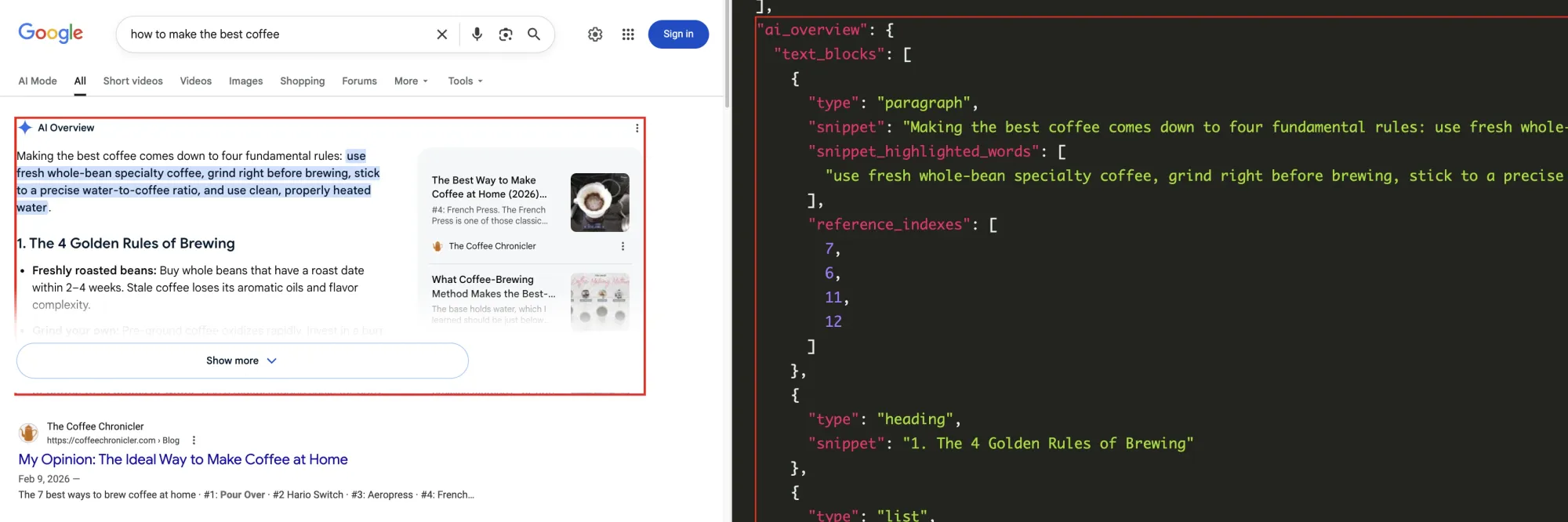
Our Google AI Overview API returns the AI-generated summary that appears at the top of many Google results pages. You get the text, the cited references, and the inline media in a clean JSON structure.
Use it for things like tracking which sources Google cites for your brand, watching how often AI Overview appears for a given query, and seeing how fast information changes now that Gemini 3.5 Flash is the model behind it all.
As an example, a basic search result returning an AI Overview section:
Parsing AI Mode
Google's AI Mode is the full conversational experience, and it is what they just put at the core of their search results. We already parse this data with our Google AI Mode API.
Our Google AI Mode API endpoint is:
https://serpapi.com/search?engine=google_ai_mode
The returned response is structured into several key parts:
text_blocksreturns paragraphs, headings, lists, tables, and code blocks. Each block is typed and includesreference_indexesthat map back to the source citations.referencesreturns the cited sources with title, link, snippet, and source domain.reconstructed_markdownis a top-level field that gives you the full answer as clean markdown. Useful for storage, diffing across time, or feeding it directly into your own LLM.shopping_results,local_results,inline_videos, andinline_imagesshow up depending on the query instance.
Here is a simple call (with localization):
curl "https://serpapi.com/search?engine=google_ai_mode&q=steakhouse&location=Austin,Texas&gl=us&hl=en&api_key=YOUR_API_KEY"
Multi-Turn Conversations
Google is pushing users to ask follow-up questions instead of running new searches. You can mirror that flow with our API's continuable parameter. Set it to true and SerpApi will return a subsequent_request_token you can pass back to continue the conversation with a follow-up question that includes the prior exchange as context.
# First request
curl "https://serpapi.com/search?engine=google_ai_mode&q=best+coffee+beans&continuable=true&api_key=YOUR_API_KEY"

# Follow-up using the token from the first response
curl "https://serpapi.com/search?engine=google_ai_mode&q=which+ones+are+single+origin&subsequent_request_token=TOKEN_HERE&api_key=YOUR_API_KEY"
Multimodal Input
Google's new Search box accepts images. So does our AI Mode API. Simply pass in the image_url parameter and that image will be used as additional context for the AI to generate a response.
require "serpapi"

client = SerpApi::Client.new(
  engine: "google_ai_mode",
  q: "What is this?",
  image_url: "https://www.kikkoman.it/fileadmin/_processed_/b/e/csm_1101-recipe-page-Authentic-Japanese-soy-sauce-ramen_mobile_c83e83c70c.webp",
  api_key: "YOUR_API_KEY"
)

results = client.search
text_blocks = results[:text_blocks]
Things You Can Build Today
Here are 3 things you can already build today using SerpApi's AI Mode and AI Overview APIs:
1. Citation monitoring for your brand. Pull AI Mode and AI Overview responses for a list of queries, extract the references array, and track all the citations over time. With Gemini 3.5 Flash as the new default, the sources Google trusts are likely to update frequently.
2. Price and product details. The shopping_results block exposes product titles, prices, ratings, and thumbnails for each individual result. With Google pushing more shopping results into AI Mode, this is where competitive pricing data is moving.
3. Multi-turn or follow-up answers. Use continuable=true to simulate a real user's follow-up flow. Useful for legal, medical, and finance teams where confidence in AI summaries is critical.
What's Next?
Google's latest announcements point toward a search experience that's moving away from static results and more toward agentic, conversational, generated content. This summer will bring more changes, like generative UI, mini-apps, and information agents for Google AI Pro and Ultra subscribers.
Our parsers already handle tables, code blocks, and interactive product modules, and we'll keep extending coverage as Google adds new block types. We're also watching how outputs are impacted by information agents and what becomes parseable for our users as that rolls out.