Ruby
Ruby
 Golang
 .Net
.Net
 MCP
MCP
 C++
C++

Almost all major e-commerce players already scrape each other’s sites, and they feed that data straight into pricing intelligence, inventory stocking and supply chain optimization. If you don't do it, you’re behind.
In this guide, I’ll show you how ecommerce web scraping works and which data is worth scraping. Even if you can’t pull entire catalogs, you’ll learn the two signals everyone should collect at a minimum. You’ll also get a working script that scrapes a popular e-commerce site in Python. And if you have another marketplace like Amazon or Walmart in mind, I have a solution for that too.
What Ecommerce data is worth scraping?
You can scrape almost anything from an online store. The question is what’s worth the effort. In this section, the first two give you a rich dataset, and the last two are the minimum every store should be scraping.
Product detail pages
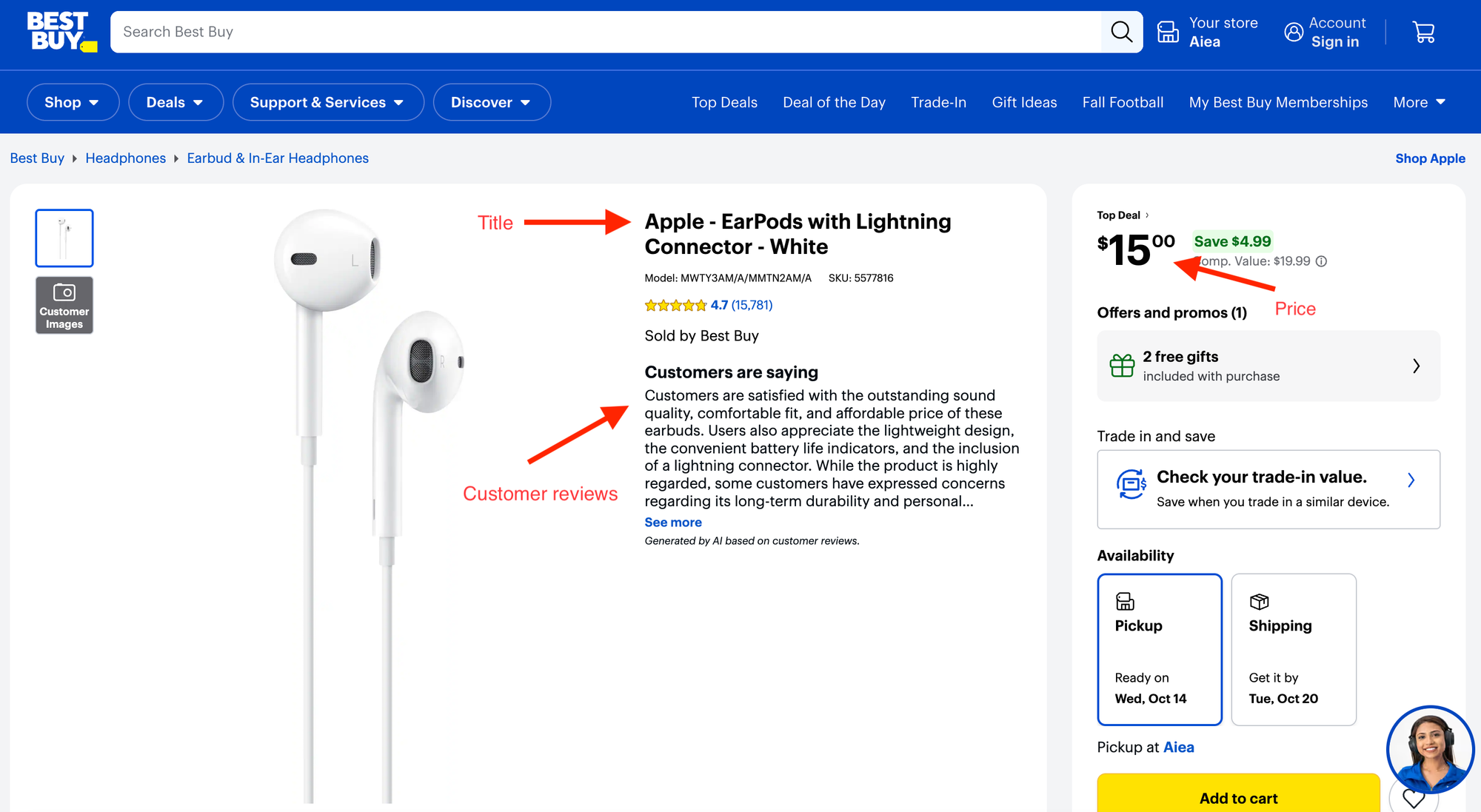
By scraping single product pages, you get title, brand, category, price, availability, customer reviews, product description, and much more about an item.
Start with how they sell their best sellers. That means compare the descriptions of their top products with their slow movers. Note which features they lead with and which claims they repeat. Then test those same moves on your own listings.
The product detail page also carries the customer reviews. Reviews tell you which features buyers care about, what breaks or disappoints them, and whether they felt the price was fair. If the same phrase keeps showing up, like “too expensive for what it is,” a better-priced alternative could win those buyers. If reviews keep praising a product as “great value for the price,” you learn what shoppers consider fair and can position your own products around it.
And here’s the clever part. You’ll never see a competitor’s real sales numbers. But review counts are a decent stand-in. When a product that usually gets a handful of reviews a week suddenly gets dozens, something has happened: a sales spike, a promotion or a product going viral on TikTok. Spotting it early tells you what’s about to be in demand.
You’ll also see which category/department each product belongs to. Compare them with your own catalog to fix misclassified products and to spot the categories and products you’re missing.
Search results listings
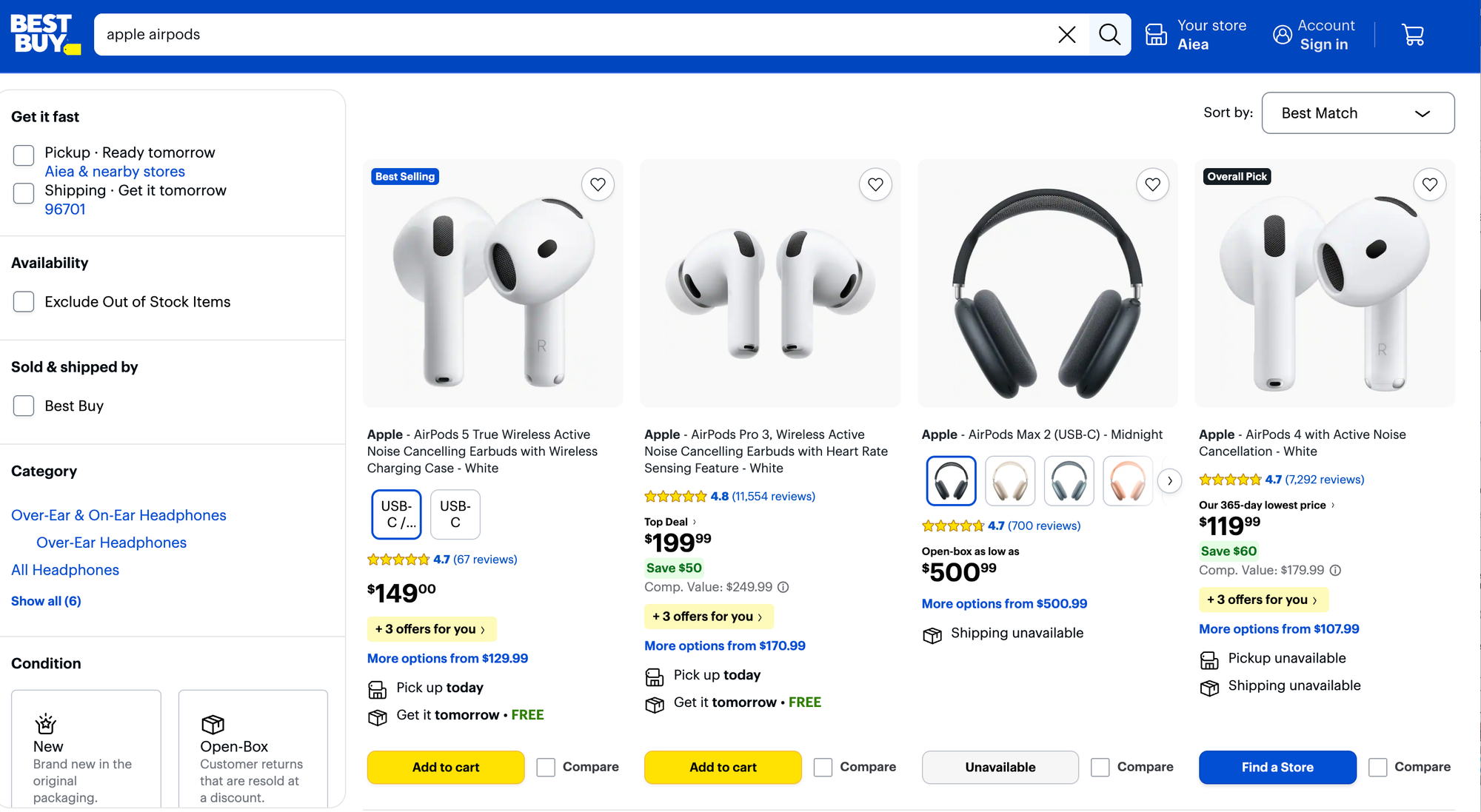
When shoppers search for a product on a marketplace, the results page shows what the platform thinks is relevant to their query. Those listings are worth scraping.
You can collect product titles, images, prices, rankings, and other listing details for a search query. This shows how competitors position their products for different search terms, so you can benchmark your own listings, sharpen your titles and descriptions, and spot gaps in your assortment.
For example, say Amazon's top results for "cordless drill 20V" include bestseller brands or models that Walmart doesn't have. That could be a buying opportunity: stock those products or consider a comparable alternative under your own brand.
Search results also tells you how a marketplace interprets a query. If the top results for "air fryer" mostly feature large-capacity models, that's a clue about what shoppers may expect to find for that search. If your site keeps surfacing irrelevant products for the same query, you identified to fix a search-relevance problem.
The above two broad categories: product pages and search results are the two richest datasets. But if you're a smaller retailer and don't need that much data, or don't have the budget to build a comprehensive competitor dataset yet? Start with the price and stock data fields that are useful to almost every e-commerce business.
Product prices
Price is the first thing a shopper weighs before buying, and it’s the most tracked field. In a June 2024 letter to Walmart and Amazon, Senator Sherrod Brown pointed out that some retailers using pricing algorithms change their prices more than 2,000 times a day.
So scrape their prices regularly, and decide in time whether to match a drop, offer a better deal, or hold your price because your margins matter more. Over time, that price history also shows you how they run promotions, so you can plan your own pricing instead of only reacting to theirs. If you only get to track one thing, track this.
Stock availability
When a competitor runs out of a product people want, those shoppers look somewhere else. If you’re watching, that somewhere else can be you. Restock it, feature it, or sharpen your price while they’re empty, and you catch the demand they couldn’t serve.
Why is Ecommerce web scraping difficult?
Ecommerce sites are some of the most heavily defended sites on the web. Basic defenses like IP rate limiting and User-Agent blocking are common across the web. But ecommerce sites often go further, using advanced browser fingerprints and other signals to spot automated traffic.
Big retailers rely on bot-protection services like Akamai, DataDome and Cloudflare, which look far beyond your IP. They check whether your connection really looks like Chrome, whether your browser has the quirks a normal one would, and whether you scroll, click and pause like a person. A script that loads page after page at perfect intervals stands out right away.
And even when you get that far, a CAPTCHA can stop you in your tracks. Sites use these challenges when they suspect a visitor is a bot, sometimes alongside other checks that run in the background.
So a generic automation script won't help pass such sophisticated defense systems. Even if you try to build the first class scraper yourself, you have to spend on proxies and IPs. To remove that hassle, you can try the below simple API call approach to get any e-commerce data regularly.
Scraping an Ecommerce website in Python
You can send any public URL to SerpApi's Extract API and get the page back as structured JSON or Markdown. In this example, you’ll start from a Best Buy search results page, find the products on it, and pull each product’s title, price and stock status into clean JSON.
Prerequisites
You’ll need:
- Python 3.8 or later
- A code editor like VS Code, or a Jupyter notebook
- A SerpApi account, which comes with 250 free searches per month.
Set up SerpApi
Sign up at serpapi.com and copy your API key from the dashboard.
Install the SerpApi Python client:
pip install serpapi
Then save your API key as an environment variable, so it never ends up in your code:
export SERPAPI_API_KEY="your_api_key"Choose your target site and the data you want
In this case, it is Best Buy’s search results for the search term "samsung galaxy": https://www.bestbuy.com/site/searchpage.jsp?id=pcat17071&st=samsung%20galaxy
The search page shows a grid of products, but the details you want live on each product’s own page. So the script works in two passes:
- Fetch the search page and collect the product links.
- Visit each product page and pull out the data.
For each product, you’ll collect:
- Title
- Product URL
- Price
- Stock availability
Unlike CSS-selector based ecommerce data scraping, you don’t need to open DevTools and hunt for class names. The Extract API reads the page for you, including the structured product data most big stores embed for Google.
Build the Ecommerce web scraper
Create a file called best_buy_scraper.pyand add the below code we discuss in each step.
1. Import the packages and set your target
import html
import json
import os
import sys
from urllib.parse import urlsplit, urlunsplit

import serpapi


PRODUCT_LIMIT = 3
SEARCH_PAGE_URL = "https://www.bestbuy.com/site/searchpage.jsp?id=pcat17071&st=samsung%20galaxy"
PRODUCT_LIMIT sets how many products you want back. SEARCH_PAGE_URL is your search term result page of Best Buy. To track another keyword listings, change st=samsung%20galaxy to any search term.
2. Filter the product links
def bestbuy_product_links(data):
    links = []
    seen = set()
    headings = {
        item.get("position"): html.unescape(item["title"])
        for item in data.get("headings", [])
        if isinstance(item, dict)
        and isinstance(item.get("position"), int)
        and isinstance(item.get("title"), str)
    }
    for item in data.get("inline_links", []):
        if not isinstance(item, dict) or not isinstance(item.get("link"), str):
            continue
        parsed = urlsplit(item["link"])
        hostname = (parsed.hostname or "").lower()
        if parsed.scheme not in ("http", "https"):
            continue
        if hostname != "bestbuy.com" and not hostname.endswith(".bestbuy.com"):
            continue
        if not parsed.path.lower().startswith("/product/"):
            continue

        link = urlunsplit((parsed.scheme, parsed.netloc, parsed.path, parsed.query, ""))
        if link not in seen:
            seen.add(link)
            links.append({
                "link": link,
                "title": item.get("title") or headings.get(item.get("position")),
            })
    return links
Here’s what each check does:
parsed.scheme: drops anything that isn’t a regular web link, like mailto: or javascript: links.hostname: keeps only links on bestbuy.com or its subdomains, so ads pointing to other sites are out.parsed.path.startswith("/product/"): keeps only product pages. Every Best Buy product URL follows this pattern.urlunsplit(...)andseen: strips the #fragment from each URL and skips duplicates. The same product often appears twice on a page, once on its image and once on its title.headings: if a link has no title of its own, the function borrows the title from the nearest heading on the page.
If you adapt this script for another store, this is the function to change. Amazon product URLs, for example, contain /dp/ instead of /product/.
Since the Extract API is a generic API for all web pages, you need to parse Best Buy URLs to find product links and then parse the JSON output to extract the required fields.
However, if you want to scrape major retailers, SerpApi provides dedicated Walmart, Amazon, and eBay APIs, along with specialized APIs for other platforms. A single call to any of these retail APIs returns structured JSON with fields like price, title, product ID, and much more, making the data much easier to work with.
SerpApi's 250 free searches per month give you access to all these APIs. Check out these guides to scraping Walmart and Amazon data.
3. Pull out price and stock
This function takes the Extract API’s response for one product page and returns the output:
def extract_prices(data, result):
    if (
        data.get("error")
        or data.get("search_metadata", {}).get("status") == "Error"
    ):
        raise RuntimeError(
            data.get("error") or "SerpApi Extract request failed"
        )

    product = next(
        (
            item for item in data.get("json_ld", [])
            if isinstance(item, dict) and item.get("@type") == "Product"
        ),
        {},
    )
    offer = product.get("offers") or {}
    if isinstance(offer, list):
        offer = offer[0] if offer else {}
    if not isinstance(offer, dict):
        offer = {}

    page_offer = next(
        (
            item for item in data.get("price_offers", [])
            if isinstance(item, dict)
            and item.get("extracted_price") is not None
        ),
        {},
    )
    current_price = offer.get("price")
    if current_price is None:
        current_price = page_offer.get("extracted_price")

    currency = offer.get("priceCurrency") or page_offer.get("currency")
    if current_price is not None and currency:
        amount = str(current_price)
        if amount.endswith(".00"):
            amount = amount[:-3]
        symbol = "$" if currency == "USD" else f"{currency} "
        current_price = f"{symbol}{amount}"

    availability = offer.get("availability") or page_offer.get("availability")
    if availability:
        availability = str(availability).rsplit("/", 1)[-1]
        availability = {
            "instock": "In stock",
            "outofstock": "Out of stock",
        }.get(availability.lower(), availability)

    return {
        "title": (
            product.get("name")
            or (data.get("page_information") or {}).get("title")
            or result.get("title")
        ),
        "url": result["link"],
        "regular_price": current_price,
        "availability": availability,
    }
The function looks for the price in two places
json_ld: most large stores embed structured product data in their pages so Google can show prices in search results. The function finds the item marked"@type": "Product"and reads the price, currency and stock status from its offers. This is the most reliable source, because it’s built for machines to read.price_offers: if the structured data has no price, the function falls back to the prices the Extract API found in the visible page content.
4. Handle failed pages and extract successful product pages
When you scrape many pages, a few may fail: a timeout, a removed product, a blocked request. Handle them like below:
def error_detail(error):
    if isinstance(error, serpapi.HTTPError):
        return f"HTTP {error.status_code}: {error.error}"
    return str(error) or "request timed out"


def extract_product(client, product):
    try:
        data = client.search({"engine": "extract", "url": product["link"]})
        return extract_prices(data, product)
    except (serpapi.HTTPError, serpapi.TimeoutError, RuntimeError) as error:
        print(f"Skipping {product['link']}: {error_detail(error)}", file=sys.stderr)
        return None
extract_product() fetches each product page with one Extract API call per product. If anything goes wrong, it prints which URL failed and returns None, so the main loop can skip it.
5. Run the ecommerce scraper
Run the scraper: python best_buy_scraper.py
Here’s the output:
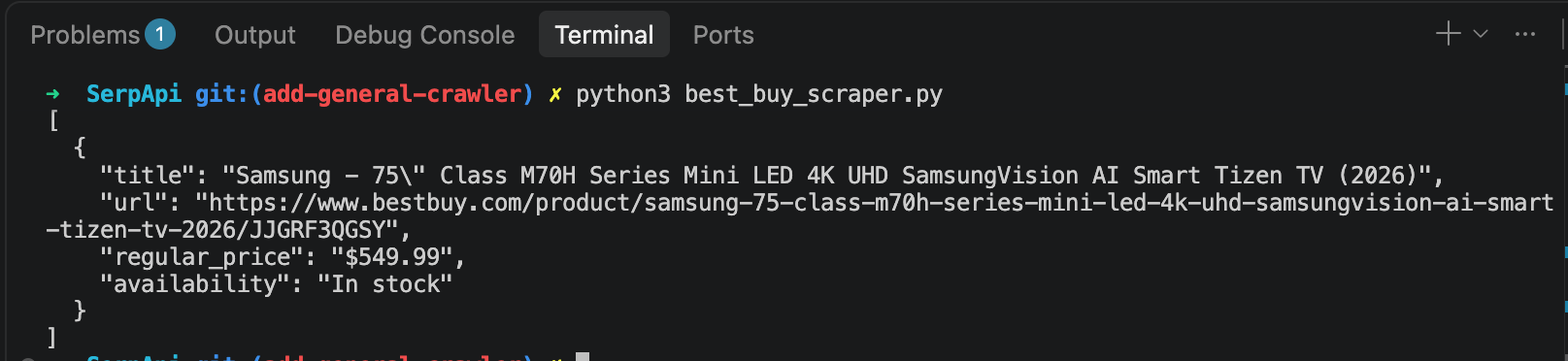
You can each product's title, url, price, and availability, ready to save to a file, load into a spreadsheet or feed into a price tracker. Run it on a schedule and compare each day’s results with the last, and you have a basic competitor price and stock monitor.
Key takeaways
Ecommerce data scraping is now the cost of staying competitive. Dynamic pricing is a baseline, catalogs adapt to customer demand, and shoppers have plenty of alternatives, so working from stale competitor data costs you sales.
The hard part isn’t writing the scraper, it’s the infra to maintain. Ecommerce sites are among the hardest to scrape, handling proxies, blocks and parsers that break whenever a page changes cost you engineering overload and resource drains.
As the code in this guide shows, you send a simple request to SerpApi and get structured data back into your pipeline, with none of that infrastructure to maintain. It includes 250 free searches a month, so try it out on your competitor site.