Ruby
Ruby
 Golang
 .Net
.Net
 MCP
MCP
 C++
C++

SerpApi already has APIs for retrieving search results from Google, Bing, and other popular search engines, as well as APIs for fetching data from platforms like Amazon, Google Maps, and the Apple App Store. That's not always enough information for your application or AI agent, though. What if it needs to see the full page linked from a search result, check prices on other online stores, or fetch posts from niche web forums?
We're excited to announce the Extract API, a new engine for fetching any public web page as Markdown format, ready for any large language model (LLM). It can also be used to crawl entire websites, and retrieve metadata from individual pages.
Parse page contents and metadata
To get started, all you need is a free SerpApi account and your API key. Then you can request information about a page, using extract as the engine and your page as the url parameter:
https://serpapi.com/search.json?engine=extract&url=https://wiki.archlinux.org/title/NVIDIAIn the response, you get a page_information object with the title, language, and other basic information, and a meta_tags object if any are found:
"page_information": {
  "title": "NVIDIA - ArchWiki",
  "final_url": "https://wiki.archlinux.org/title/NVIDIA",
  "language": "en"
},
"meta_tags": {
  "generator": "MediaWiki 1.46.2",
  "robots": "max-image-preview:standard"
},
The page's text content converted to Markdown format is available in the markdown object:
"markdown": "Toggle the table of contents\n\n# NVIDIA\n\nThis article covers the official [NVIDIA](https://www.nvidia.com/) graphics card drivers. For the community open-source driver, see [Nouveau](https://wiki.archlinux.org/title/Nouveau). If you have a laptop with hybrid graphics, see also [NVIDIA Optimus](https://wiki.archlinux.org/title/NVIDIA_Optimus).\n\n## Installation\n\n**Warning** Avoid installing the NVIDIA driver through the package provided from the NVIDIA website. Installation through [pacman](https://wiki.archlinux.org/title/Pacman) allows upgrading the driver together with the rest of the system...",You also get the anchor text and URL for every inline link, including the API endpoints to search that page with another API request:
"inline_links": [
  {
    "position": 1,
    "link": "https://archlinux.org/",
    "displayed_link": "archlinux.org",
    "internal": false,
    "serpapi_extract_link": "http://serpapi.com/search.json?device=desktop&engine=extract&url=https%3A%2F%2Farchlinux.org%2F"
  },
  {
    "position": 2,
    "title": "Packages",
    "link": "https://archlinux.org/packages/",
    "displayed_link": "archlinux.org",
    "internal": false,
    "serpapi_extract_link": "http://serpapi.com/search.json?device=desktop&engine=extract&url=https%3A%2F%2Farchlinux.org%2Fpackages%2F"
  },
  {
    "position": 3,
    "title": "Forums",
    "link": "https://bbs.archlinux.org/",
    "displayed_link": "bbs.archlinux.org",
    "internal": false,
    "serpapi_extract_link": "http://serpapi.com/search.json?device=desktop&engine=extract&url=https%3A%2F%2Fbbs.archlinux.org%2F"
  },
  ...
]
There's also a list of every embedded image, video, or audio file, as well as any RSS/Atom feeds:
"inline_images": [
  {
    "source": "https://wiki.archlinux.org/images/4/4e/View-refresh-red.svg"
  },
  {
    "source": "https://wiki.archlinux.org/images/4/4e/View-refresh-red.svg"
  },
  {
    "source": "https://wiki.archlinux.org/images/4/4e/View-refresh-red.svg"
  },
  ...
],
"feeds": [
  {
    "title": "ArchWiki Atom feed",
    "source": "https://wiki.archlinux.org/index.php?title=Special:RecentChanges&feed=atom",
    "type": "application/atom+xml"
  }
]
For more details and all the supported settings, check out the Extract API documentation. You can also test it out in the Playground.
The all-in-one web search solution
If you combine the Extract API with SerpApi's existing web search engines, your application, automation, or AI agent can perform web searches and view the pages behind each result. They aren't limited to the contents of the result's title or snippet, the Knowledge Graph card, or the AI Overview.
The best part is that all engines at SerpApi use the same account system, libraries and integrations, and search credits. You don't need to combine two or more separate services to get the job done. If you request a URL that already has a supported engine in SerpApi, like a YouTube video or Amazon product, the response will automatically use that engine's API.
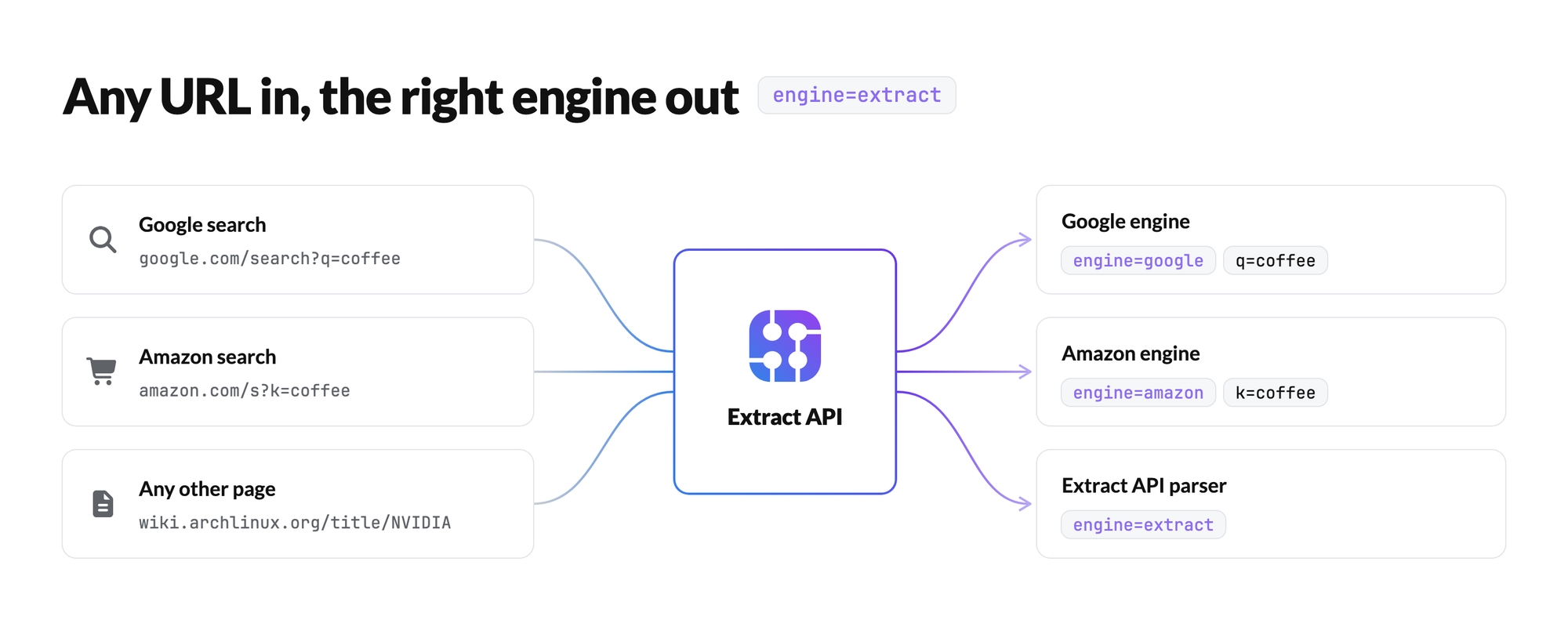
Let's say you're doing ecommerce research, and you want to check which products are linked in buying guides for a given keyword. Here's how you could use SerpApi's JavaScript library in a Node.js project to fetch the top five results, and then display all links in each result:
import { getJson } from 'serpapi';

let googleSettings = {
  engine: "google_light",
  api_key: YOUR_KEY_GOES_HERE,
  q: "best bluetooth headphones 2026",
  hl: "en",
  gl: "us"
}

let extractSettings = {
  engine: "extract",
  api_key: YOUR_KEY_GOES_HERE
}

let search = await getJson(googleSettings);

for (let result of search.organic_results) {
  let page;
  extractSettings.url = result.link;
  try {
    page = await getJson(extractSettings);
  } catch (e) {
    console.log(`\n${result.title}\n[ ${result.link} ]\n======\nError: ${e}`);
    continue;
  }
  if (page.error) {
    console.log(`\n${result.title}\n[ ${result.link} ]\n======\nError: ${page.error}`);
    continue;
  }
  // Show information for this page
  const title = page?.page_information?.title || page?.title;
  const url = page?.page_information?.final_url || page?.title;
  console.log(`\n${title}\n[ ${url} ]\n======`);
  // Show each external link
  if ("inline_links" in page) {
    for (let link of page?.inline_links) {
      // Show the link's text if available, or just the URL as a fallback
      link?.title ? console.log(link.title) : console.log(link.link);
    }
  }
}
The output for that script might look like this:
Best Bluetooth headphones for 2026
[ https://www.crutchfield.ca/S-NO8LeF23BSt/learn/best-wireless-bluetooth-headphones.html ]
======
Skip to main content
Sony WH-1000XM6
Bose QC Ultra Earbuds (Gen 2)
JBL Endurance Peak 4
Sennheiser HDB 630
Sennheiser Momentum TW 5
Apple AirPods Pro 3
JBL Live Beam 3
Anker Soundcore Space One
Bluetooth headphones

Best headphones in 2026 including earbuds and over-ear headphones | Stuff
[ https://www.stuff.tv/features/best-headphones/ ]
======
Skip to content
Latest
1. Sony WH-1000XM6
8. Bowers & Wilkins PX7 S3
3. Sennheiser Momentum 4 Wireless
4. Sony WF-1000XM5
5. Sennheiser Momentum True Wireless 3
6. Bose Noise Cancelling Headphones 700
7. Apple AirPods Pro (2nd gen)
8. Bose QuietComfort Earbuds II
9. Beats Fit Pro
10. Ultimate Ears / Logitech Fits
11. Focal Bathys
12. Apple AirPods Max

...
You could also save the entire contents of each page, either as the original HTML code with output=html in your API request, or as Markdown with output=markdown.
By combining the Extract API with our engines for Google, Bing, DuckDuckGo, Yahoo, and other search providers, you can solve problems that require browsing the web, instead of just searching the web.
Crawl entire domains
The Extract API can also be used to crawl entire websites, making it an excellent tool for web archival, e-commerce, competitive analysis, and much more. The Map Mode gives you a list of all discovered URLs for a domain, which you can then use with the regular page extraction, or use with Crawl Mode to automatically fetch all connected pages in one request.
You might want an automation that checks the prices for all products on a store, or all products in a certain category. This example will use the Wi-Fi products on UniFi's online store.
First, you can use SerpApi JavaScript library to generate a URL map of all products from that category page, and filter out the results that aren't product pages:
import { getJson } from 'serpapi';

let search = await getJson({
  engine: "extract",
  api_key: YOUR_KEY_GOES_HERE,
  url: "https://store.ui.com/us/en/category/all-wifi",
  mode: "map",
  max_pages: 50
});
let productUrls = [];
for (let result of search.urls) {
  if (result.url.includes("/products/")) {
    productUrls.push(result.url);
  }
}
Next, you can send an Extract API request for each product URL. This website includes product information in a JSON-LD object, which the Extract API includes as json_ld in the result. This will read the JSON-LD objects for each page, including the variations of each product, and display its information:
for (let product of productUrls) {
  let thisPage = await getJson({
    engine: "extract",
    api_key: YOUR_KEY_GOES_HERE,
    url: product
  })
  // Get all product options if there are multiple variants
  const productOptions = thisPage?.json_ld?.[0]?.hasVariant || thisPage?.json_ld || [];
  // Display each product's name and price
  for (let option of productOptions) {
    console.log(`${option.name} - $${option?.offers?.priceSpecification?.price}\n======\n${option?.description}\n`);
  }
}
The script would output something like this:
UniFi Express 7 / US Version / 2-Pack - $379
======
Mesh-scalable, super-compact 10G Cloud Gateway with integrated 6 GHz WiFi 7. Plug-and-play Whole-Home WiFi with true 10G Multi-Link Operation, intelligent placement guidance, and effortless mesh expansion with additional nodes.

UniFi Express 7 / US Version / Single Unit - $199
======
Mesh-scalable, super-compact 10G Cloud Gateway with integrated 6 GHz WiFi 7. Plug-and-play Whole-Home WiFi with true 10G Multi-Link Operation, intelligent placement guidance, and effortless mesh expansion with additional nodes.

Access Point E7 - $499
======
Enterprise-grade indoor access point with 10-stream WiFi 7 performance, a 10 GbE uplink, and a redundant GbE port for high availability.
The exact method of extracting prices will depend on the store, and how the Extract API is able to parse its contents. In some cases, you might be able to parse the price from the Markdown output of the main page or category page, or with the Price Offers normalized output.
Perfect for agents
SerpApi's MCP server, CLI application, regular GET requests, and other official integrations already give AI agents the ability to search the web and read the results. With the Extract API, they can also fetch the actual pages behind each result, giving them even more context to accomplish tasks and answer questions.
Page contents are always delivered in Markdown format. If you request the API in Markdown output mode, no extra work is needed. If you're using the JSON output, the same text is in the markdown object, along with some additional page metadata in other objects.
# NVIDIA

Related articles

- [NVIDIA/Tips and tricks](https://wiki.archlinux.org/title/NVIDIA/Tips_and_tricks)
- [NVIDIA/Troubleshooting](https://wiki.archlinux.org/title/NVIDIA/Troubleshooting)
- [Nouveau](https://wiki.archlinux.org/title/Nouveau)
- [NVIDIA Optimus](https://wiki.archlinux.org/title/NVIDIA_Optimus)
- [PRIME](https://wiki.archlinux.org/title/PRIME)
- [Bumblebee](https://wiki.archlinux.org/title/Bumblebee)
- [nvidia-xrun](https://wiki.archlinux.org/title/Nvidia-xrun)
- [Vulkan](https://wiki.archlinux.org/title/Vulkan)

This article covers the official [NVIDIA](https://www.nvidia.com/) graphics card drivers. For the community open-source driver, see [Nouveau](https://wiki.archlinux.org/title/Nouveau). If you have a laptop with hybrid graphics, see also [NVIDIA Optimus](https://wiki.archlinux.org/title/NVIDIA_Optimus).

## Installation

**Warning** Avoid installing the NVIDIA driver through the package provided from the NVIDIA website. Installation through [pacman](https://wiki.archlinux.org/title/Pacman) allows upgrading the driver together with the rest of the system.

...
The NVIDIA page on the Arch Linux Wiki converted to Markdown
The possibilities are endless, especially when using the Extract API in conjunction with the other APIs provided by SerpApi.
Ethical crawling and scraping
The Extract API follows the robots.txt industry standard for managing web crawlers, using the serpapi user agent. If a website already blocks certain pages (or entire domains) from all crawlers using a User-agent: * rule, the Extract API will not parse those pages.
If a website wants to explicitly block the Extract API, while still allowing other web crawlers, these lines can be added to the robots.txt file:
User-agent: serpapi
Disallow: /
Map Mode leaves out disallowed URLs and sitemaps, and Crawl Mode doesn't follow disallowed links.
Try it today
The Extract API is now available for all SerpApi users. You can create an account to receive 250 free search credits each month, which can be used with any of our engine APIs.
For more information about the Extract API, check out the full documentation, and try it out in our Playground environment.