 Google Local Services API
 Google Travel Explore API
 Baidu Search API
 Bing Search API
 DuckDuckGo Search API
 eBay Search API
 Naver Search API
 The Home Depot Search API
 Tripadvisor Search API
 Walmart Search API
 Ruby
Ruby
 Golang
 .Net
.Net
 C++
C++

When you search on Google using the “Forums” tab, Google provides results specifically from online discussion boards, communities, and Q&A sites. This allows users to find conversations, advice, and shared experiences on specific topics from real people, rather than standard websites or articles.
Using SerpApi to scrape forum results enables you to automate the collection of relevant conversations across multiple forums, monitor trends, and identify emerging issues or opportunities. Marketing teams can analyze discussions around competitors or products, customer support teams can spot common pain points, and data analysts can extract structured insights for reports. All in real time and at scale, without worrying about the limitations of manual scraping and CAPTCHAs.
SerpApi offers a Google Forums API that allows you to scrape this data and receive results in a structured JSON format. Let's take a look at what this looks like.
What can you scrape?
You can scrape a lot of valuable data using the Google Forums API such as the title, link, thumbnail, related searches, and much more!
Let's take a look at the JSON structure overview to see what information is returned and how it is structured:
{
  ...
  "organic_results": [
    {
      "position": "Integer - Position of the organic result on the search page",
      "title": "String - Title of the organic result",
      "link": "String - Link of the organic result",
      "redirect_link": "String - Redirect link of the organic result",
      "displayed_link": "String - Displayed link of the organic result",
      "displayed_meta": "String - Displayed meta content of the organic result",
      "thumbnail": "String - Thumbnail of the organic result",
      "date": "String - Date of the organic result",
      "favicon": "String - Favicon of the organic result",
      "snippet": "String - Snippet of the organic result",
      "snippet_highlighted_words": [
        "String - Snippet highlighted word of the organic result",
      ],
      "sitelinks": {
        "expanded": [
          {
            "title": "String - Title of the expanded sitelink",
            "link": "String - Link of the expanded sitelink",
            "snippet": "String - Snippet of the expanded sitelink"
          },
        ],
        "list": [
          {
            "title": "String - Title of the list sitelink",
            "link": "String - Link of the list sitelink",
            "snippet": "String - Snippet of the list sitelink"
          },
        ]
      },
      "about_this_result": {
        "source": {
          "icon": "String - Icon of the about_this_result of the organic result"
        },
      },
      "source": "String - Source of the organic result",
      "answers": [
        {
          "link": "String - Link of the answer",
          "answer": "String - Answer of the answer",
          "top_answer": "Boolean - Is the top answer",
          "votes": "Integer - Votes of the answer"
        }
      ],
    }
  ],
  "related_searches": [
    {
      "block_position": "Integer - Index of related search container",
      "query": "String - Query of the related search",
      "link":  "String - Link to the Google Forums search",
      "serpapi_link":  "String - SerpApi Link of the Google Forums search",
    },
  ],,
  "serpapi_pagination": {
    "current": "Integer - Current page number",
    "next": "String - Link to the query for the next SerpApi Google Forums results page",
    "previous": "String - Link to the query for the previous SerpApi Google Forums results page",
  }
  ...
}
This gives you an idea of what information you can obtain from the SerpApi results and how the data is structured.
Let's now take a look at what we need to do to get started.
Getting Started with SerpApi
Before we jump into the Google Forums API we must first make sure we are set up to use SerpApi.
Step 1: Create a free account
If you already have an account you can skip this step. Otherwise sign up at this link: https://serpapi.com/users/sign_up.
Verify your email and phone number and click "Subscribe".
Step 2: Find your API Key
Once you have created and verified your free account you can next find your API key. This will be located at this link: https://serpapi.com/manage-api-key.
You can regenerate your API key from the same link, otherwise it will not change.
Step 3: Install SerpApi library (Optional)
I recommend installing the SerpApi library for ease of use, we offer many libraries in different languages. Review the full list of languages with instructions for each, here: https://serpapi.com/integrations.
You can also use a simple GET request in any language if you prefer that to installing the library, we will be reviewing both for the Google Forums API.
Step 4: Review the Google Forums API documentation
We include a full documentation page for each of our APIs. Let's take a look at Google Forums API:
 SerpApi
Within the documentation you can quickly identify what information you'll need.
The SerpApi parameters are parameters that we offer, today we will be using the top 2 that are required:
engine(Required): Set to google_forums to use the Google Forums API.device(Optional): Desktop, tablet, or mobileapi_key(Required): Parameter defines the SerpApi private key to use.no_cache(Optional): Require SerpApi to fetch fresh results (not cached).async(Optional):- False (default): Keep HTTP connection open until you got your results
- True: submit search to SerpApi and retrieve later (Searches Archive API)
zero_trace(Optional): Enterprise only, skip storing search dataoutput(Optional): json for structured JSON or html for raw htmljson_restrictor(Optional): The fields you want to restrict in the outputs for smaller, faster responses
Next we'll look at the parameters that are available for the Google Forums API itself:
q(Required): Query you would like to searchlocation/uule(Optional): Where you want the search to originate fromgl(Optional): Country codehl(Optional): Languagestart(Optional): used for paginationnfpr(Optional): Exclusion of results from an auto-corrected queryfilter(Optional): Filters for 'Similar Results' and 'Omitted Results'
In this example we will be using the 3 required parameters including engine (google_forums), api_key (Your secret API key) and q ("SerpApi" for this example).
How to Scrape Google Forums
You can use any programming language in order to call our APIs. The parameters and results we reviewed above will not differ between the request methods, however the syntax used to call the APIs may differ.
You will see across the examples the engine is always set to google_forums, the api_key will be set to your API key, and we include the q (search parameter) in every query. In this example we are going to look for forums related to "SerpApi". This means the q will be set to "SerpApi" to look up forums regarding SerpApi.
GET Request
The syntax for the actual GET request between languages will of course vary between programming languages.
However, the URL for the GET request will be the same regardless of the programming language or tool used:
https://serpapi.com/search.json?engine=google_forums&api_key=YOUR_SECRET_API_KEY&q=SerpApiPython (using SerpApi library)
import serpapi

params = {
  "engine": "google_forums",
  "q": "SerpApi",
  "api_key": "YOUR_SECRET_API_KEY"
}

search = serpapi.search(params)
results = search.as_dict()
cURL
url --get https://serpapi.com/search \
 -d engine="google_forums" \
 -d q="SerpApi" \
 -d api_key="YOUR_SECRET_API_KEY"
Using our APIs is not limited to any of these methods or languages. These are some examples to help you get started.
Additional Programming Languages
Each of our documentation pages offers examples with code blocks. You can toggle between the programming languages in the top right corner of the code block for the SerpApi integration.
Here is a link to the documentation page first example for the Google Forums API where you can see the code examples and where to select the programming language:
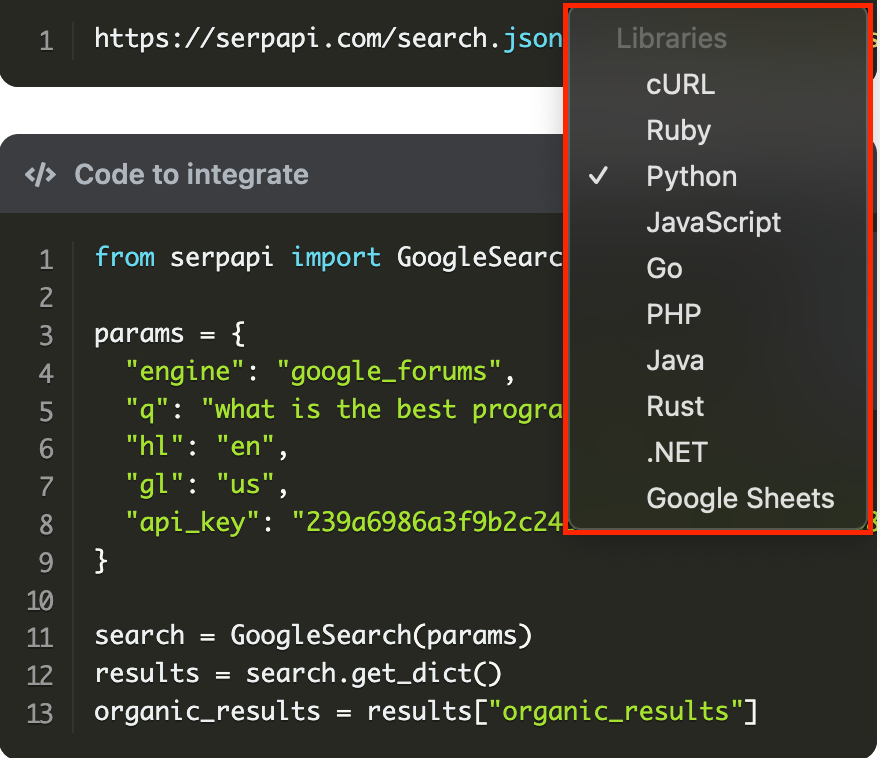
Utilize our documentation pages for more examples, different languages, and a full break down of the parameters.
No Code
We also offer no code options, where you don't need to write a single line of code! This includes Google Sheets, Make.com, and N8N. Now let's take a look at how to get started.
Google Sheets
To connect your code with Google Sheets first follow this blog post:
 Hilman Ramadhan
=SERPAPI_RESULT("engine=google_forums&q=what is the best programming language&hl=en&gl=us", "organic_results.0.title")FINISH
Make.com
While not every API we offer is on Make.com, there is a Universal Module where you can use any API.
Review this blog post to get started:
 Alex Barron
N8N
Similar to Make.com, not every API is currently included in N8N. However, you can use the HTTP Request node to still call any of our APIs.
To get started review this blog post:
 Alex Barron
Conclusion
SerpApi offers a suite of APIs to easily scrape search engine results, from Google Forums API to Amazon API to many more. Utilize the Google Forums API to scrape results including discussion boards, communities, and much more. Receive results in a structured JSON format for any of your data needs.
You can scrape using any programming language that you can make a GET request in, use our SerpApi libraries, or a no code option.
You can test any of our APIs in the Playground, here is the link for the Google Forums API: https://serpapi.com/playground?engine=google_forums.