Ruby
Ruby
 Golang
 .Net
.Net
 MCP
MCP
 C++
C++

When comparing SerpApi vs Firecrawl, you're not comparing two solutions to the same problem. You're comparing two fundamentally different data extraction philosophies that happen to both involve web scraping.
Firecrawl is a website content scraper. You point it at a URL, techcrunch.com/article/some-news and it returns clean, LLM-ready markdown of that article. It crawls links, extracts text, converts HTML to structured formats, and handles JavaScript rendering. It's designed for AI applications that need to ingest website content for RAG systems, knowledge bases, or training data.
SerpApi is a search engine scraper. You query it with "best CRM software" and it returns what Google (and other top search engines) shows for that query: the top 10 organic results, the paid ads, the featured snippet, the "People Also Ask" box, and the local map pack. It doesn't scrape the content of those websites. It scrapes the search results themselves, the metadata, rankings, prices, ratings, and visibility signals that search engines display.
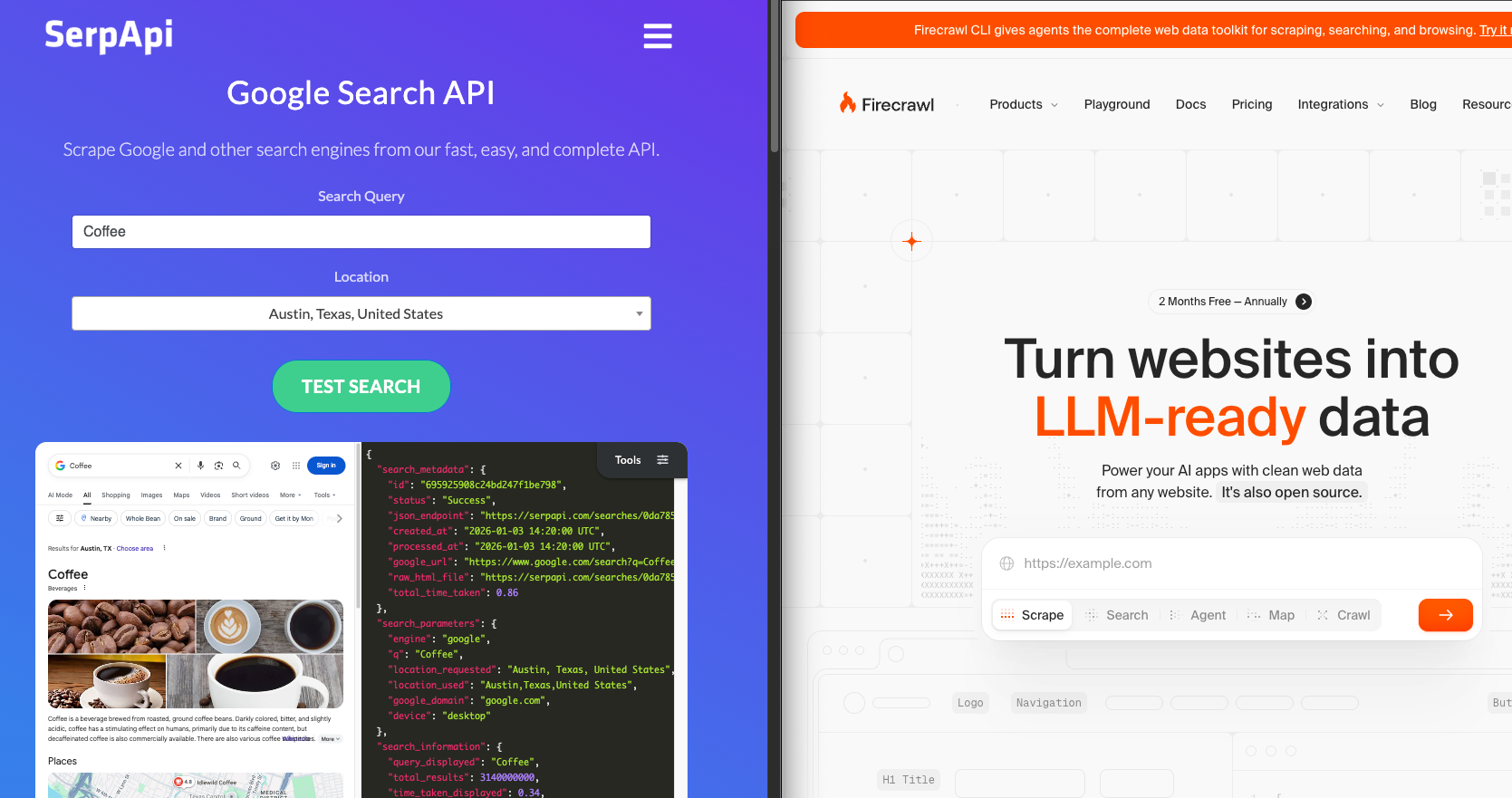
For generic content extraction like "Get me all blog posts from this competitor's site," Firecrawl works fine and is purpose-built for that task. But for business intelligence questions like "Who's ranking for this keyword?" or "What's the average price for this product across retailers?", Firecrawl is categorically the wrong tool.
The core issue isn't that Firecrawl is bad at what it does. It's that Firecrawl and SerpApi solve opposite problems. If your business depends on understanding search visibility, competitive positioning, or what consumers actually see when they search, then scraping individual websites doesn't give you that data. You need to scrape the search engines themselves.
The Search Intelligence Gap: What Firecrawl Cannot Do
While Firecrawl recently added a /search endpoint that can perform basic web searches—including basic location customization—it fundamentally differs from true SERP scraping. Search engine results change drastically depending on the user. SerpApi provides an extensive range of parameters (like granular geolocation, device type, and language settings) to fetch fully customized results exactly as your target audience sees them.
Furthermore, Firecrawl's search returns only simple result metadata like URLs, titles, and descriptions. It cannot extract the structured SERP features that drive business intelligence: paid ad blocks, featured snippets as structured objects, Knowledge Graph panels, People Also Ask sections, local pack results, shopping carousels, or any Google-specific SERP elements.
As Firecrawl's own documentation clarifies: "SERP APIs specifically scrape and reformat data from existing search engines like Google or Bing. All SERP APIs are Search APIs, but not all Search APIs are SERP APIs."
This eliminates entire categories of use cases:
- SEO rank tracking with SERP features: While Firecrawl provides position numbers in search results, they don't extract structured SERP features (Featured Snippets, People Also Ask, Knowledge Graphs) as separate objects for comprehensive rank tracking
- Local SEO analysis: You cannot extract Google Maps data, local pack rankings with review counts, or business verification status
- Price comparison: You cannot scrape Google Shopping SERP features or compare prices across retailers as displayed in search
If your product roadmap includes any feature that starts with "Show me what appears when I search for," Firecrawl is not the tool. SerpApi is.
Read moe: SerpApi vs other Web Search API alternatives.
The Structured Data Problem
Even with Firecrawl's basic search capability, you get raw result lists without the rich structured data that powers business applications.
SerpApi returns JSON with specific parsers for each SERP feature. When you query "pizza near me", SerpApi's response includes structured fields for rating, review counts, position ranking, hours of operation, and price indicators. Firecrawl returns basic fields like title, URL, and description.
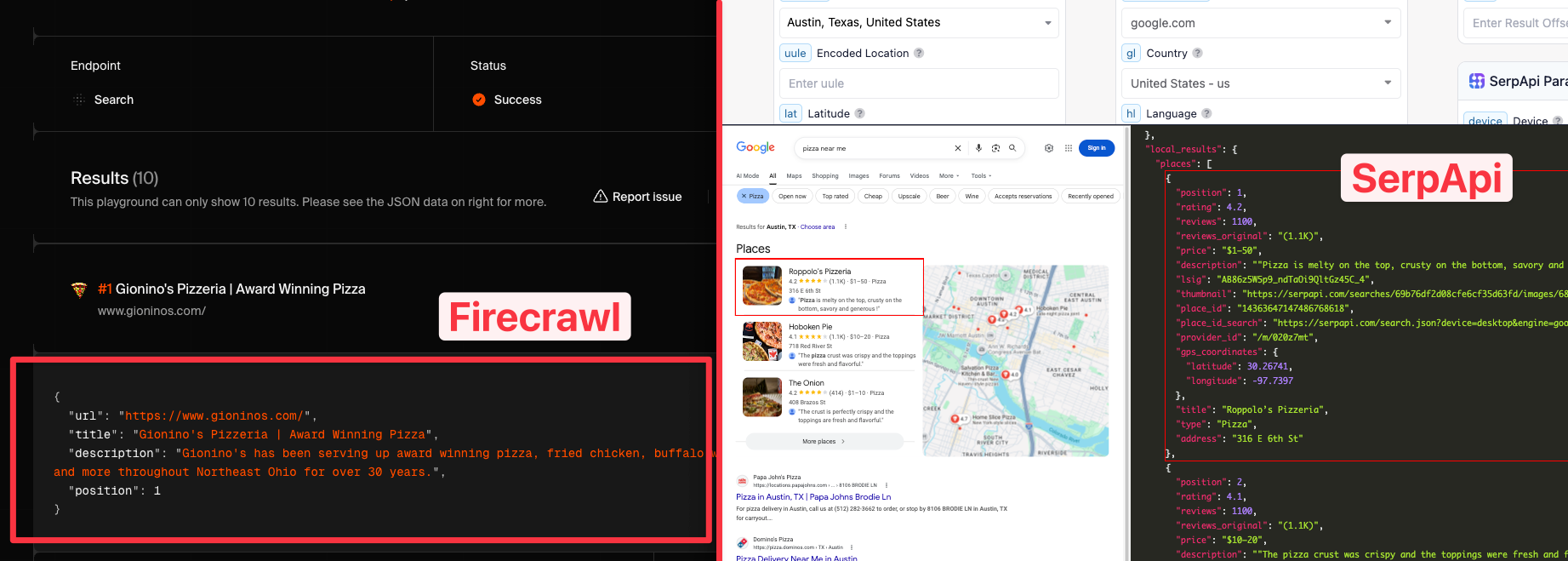
You'd have to build your own parser for these SERP-specific data points, which is exactly what SerpApi has industrialized across many platforms including Google, Bing, YouTube, Amazon, with 100+ API endpoints.
Website Scraping vs. Search Scraping: A Concrete Example
Here's a real-world scenario that clarifies the distinction:
Use Case: You're building a competitive intelligence dashboard for e-commerce brands. Your users want to know:
- Which competitors rank for their target keywords
- What prices competitors show in Google Shopping
- Which products have featured snippets or rich results
- What ad copy competitors use in paid search
Using Firecrawl:
You could scrape your competitors' product pages to extract their prices and descriptions. But you have no way to know which competitors to scrape because you don't know who ranks for your keywords. You'd need a pre-existing list of competitor URLs. Even with that list, you wouldn't see their Google Shopping prices (which often differ from their website prices), their ad copy, or their SERP rankings.
Using SerpApi:
You query SerpApi's Google Shopping API with your target product keyword. You get back every retailer showing prices for that product in Google Shopping, their exact prices, their ratings, their shipping costs, and their position in the results. You access ad data to see which competitors are bidding on that keyword and what ad copy they're using. All structured data, one API call per query.
The first approach gives you website content. The second gives you market intelligence.
The "LLM-Ready" Misconception
Firecrawl markets itself heavily on returning "LLM-ready markdown." That's true, and for content ingestion use cases, it's valuable. If you're building a chatbot that needs to answer questions about your company's documentation, Firecrawl can crawl your docs and return clean markdown.
But "LLM-ready" doesn't mean "search-intelligence-ready." If your LLM-powered application needs to answer questions like "What are the top 5 CRM tools according to Google?" or "Which hotels in Miami are under $200 tonight?", the LLM needs search results data, not website content.
SerpApi's JSON responses are just as "LLM-ready" as Firecrawl's markdown, arguably more so because they're pre-structured. When you integrate SerpApi with OpenAI's Assistant API, your LLM can query real-time search data and receive structured answers that Firecrawl simply cannot provide because it doesn't access Google Maps or structured search results.
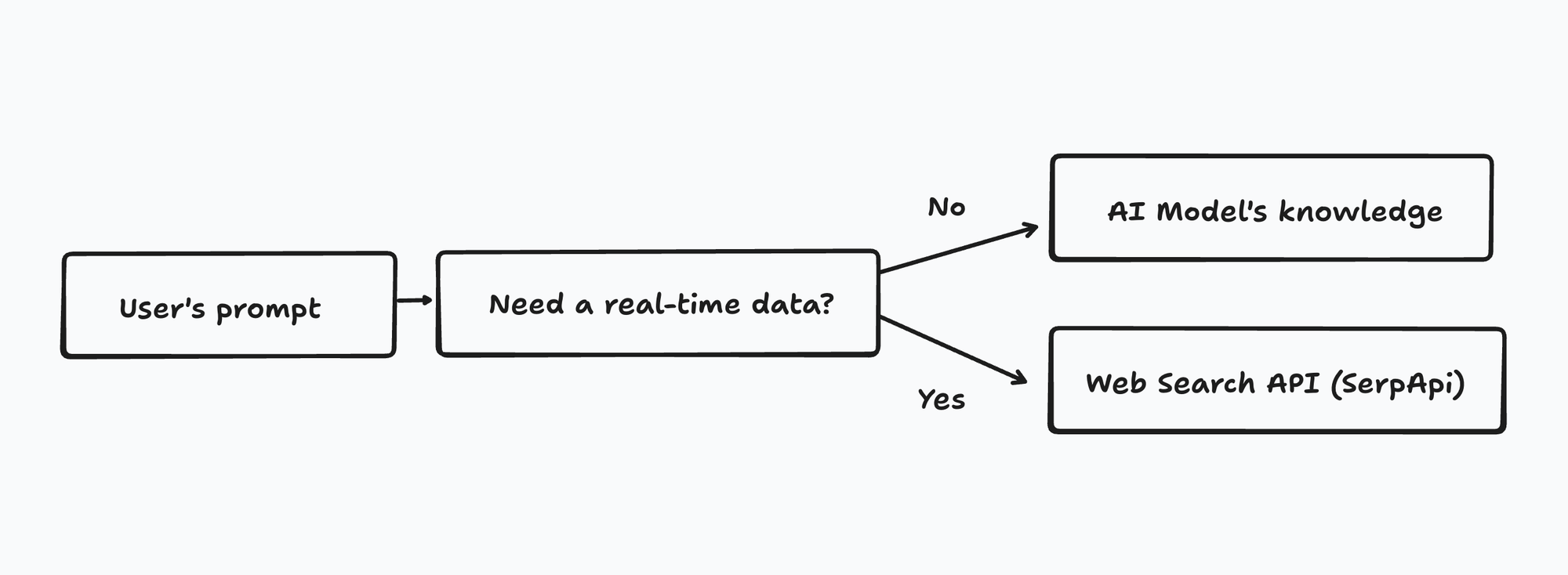
See how SerpApi can be integrated with various LLMs.
SerpApi vs Firecrawl: Feature-by-Feature Comparison
Here's how SerpApi vs Firecrawl stack up across the dimensions that matter for search intelligence:
| Feature | SerpApi | Firecrawl |
|---|---|---|
| Primary Function | Scrapes search engine results pages (Google, Bing, etc.) | Scrapes individual website content |
| Data Type | Search rankings, ads, prices, local results, SERP features | Website text, markdown, HTML content |
| Search Engine Access | 17+ platforms, 100+ API endpoints | Basic search endpoint (not true SERP scraping) |
| Ranking Data | Full organic and paid ranking positions | Not applicable |
| Shopping Data | Google Shopping prices, sellers, reviews, positions | Must scrape individual retailer sites |
| Local Business Data | Google Maps with reviews, hours, photos, Q&A | Must scrape business websites individually |
| SERP Features | Featured snippets, People Also Ask, Knowledge Graph, 40+ feature types | Not applicable |
| LLM Integration | Structured JSON for AI consumption | Markdown optimized for LLMs |
| Response Time | ~0.73-1.75 seconds with Ludicrous Speed | Varies by page complexity |
| Pricing Model | Per search query (starts at $25/month for 1,000 searches) | Per page crawled (starts at $16/month for 3,000 credits) |
| Use Case Focus | Competitive intelligence, SEO, market research | Content extraction, documentation |
Understanding the Pricing Models
The pricing structures reflect the fundamental difference in what each tool does. SerpApi charges per search query because each query hits a search engine and extracts structured results. A single query like "best CRM software" can return many data points (10 organic results, ads, related questions, etc.).
Firecrawl charges per page crawled because it's extracting content from individual URLs. A single-page scrape returns the markdown content of that one page.
They're not comparable on price because they're not comparable on function. If you need SERP data, you cannot use Firecrawl regardless of its pricing.
On top of that, SerpApi gets cheaper as you scale.
When to Use Each Tool
Choose Firecrawl when:
- Your data lives on specific websites, and you know the URLs
- You need full-text content for LLM consumption
- You're building content aggregation or documentation scrapers
- Your use case is "scrape these websites"
Choose SerpApi when:
- Your data lives in search engine results, and you need to query by keyword
- You need search visibility metrics, rankings, or SERP features
- You're building SEO tools, price monitoring, or competitive intelligence
- Your use case is "what does Google show when I search for X"
Conclusion: Choose Based on Your Data Source
The decision between SerpApi vs Firecrawl isn't about which is "better." It's about which data source your application requires.
The web has two distinct data layers: the content that lives on websites, and the metadata that search engines display about that content. Firecrawl accesses the first. SerpApi accesses the second. For business intelligence, competitive analysis, and understanding market dynamics, the second layer is what matters.
If you're building SEO tools, price monitoring, competitive intelligence, or local business analysis, you need search engine data. That's where SerpApi operates, and that's why it's the tool of choice for developers who need to understand not just what exists on the web, but what search engines choose to show their users.
Ready to build with real search intelligence? Start your free trial and access the data that drives business decisions.
Next Steps
After understanding the fundamental differences between SerpApi and Firecrawl, here are practical ways to get started with real-world search data:
Explore Search Data Types: Try SerpApi's interactive playground to see structured results from Google Search, Google Shopping, Google Maps, and many other platforms. Compare how different search engines structure their results.
Build Rank Tracking: Follow our guide to create a SERP tracking API and monitor keyword positions across locations.
Extract Competitive Intelligence: Learn to scrape Google Ads data to analyze competitor ad copy and bidding strategies. Track Google Shopping results for real-time price intelligence.
Integrate with AI Applications: Connect SerpApi to OpenAI's Assistant API for real-time search capabilities, or build an AI-powered SEO research agent that analyzes search trends automatically.
Access Local Business Data: Master Google Maps scraping for local SEO analysis and competitive research. Build location-based intelligence tools that track reviews, ratings, and local pack rankings.
Also, check various SerpApi's use cases.