Google Local Services API
 Google Travel Explore API
 Baidu Search API
 Bing Search API
 DuckDuckGo Search API
 eBay Search API
 Naver Search API
 OpenTable Reviews API
 The Home Depot Search API
 Tripadvisor Search API
 Walmart Search API
 Ruby
Ruby
 Golang
 .Net
.Net
 MCP
MCP
 C++
C++

The problem with monitoring news feeds isn’t finding news; it’s wasting time chasing what’s actually relevant. Refreshing feeds, re-running the same searches, skimming overlapping headlines across numerous tabs and apps, clicking into the same article 10 times before realizing you’ve already read it — it’s exhausting.
Let’s flip that script: you decide exactly which topics and outlets you care about, how many items you want per topic, and how often you want them, and a small, API-only Rails service pulls fresh Naver News results via SerpApi and quietly delivers a single, fully customized digest straight to your inbox.
Sound intriguing? Let’s build it.
What is Naver?
Naver is South Korea’s flagship search portal, and is central to how millions of Koreans discover news, content, and services. Historically dominant in domestic search, Naver remains especially strong on mobile and tablet usage, even as Google has taken the lead on desktop.
For recent market-share context, see StatCounter’s Korea page.
Why SerpApi for Naver News?
Naver’s HTML can change frequently; scraping the page directly is difficult and costly to maintain. SerpApi handles the tricky parts for you:
- Stable, normalized JSON
Thenews_resultsarray returned by SerpApi remains consistent and predictable, even as Naver’s frontend changes. - Proxy and CAPTCHA handling
No need to manage IP rotation or deal with CAPTCHAs. - Smart caching
Identical searches return cached results for free. (Cache expires after 1 hour. You can disable caching by settingno_cache=true. Learn more) - First-class Ruby library
An official Ruby Library by SerpApi that is easy-to-use, well-documented, and consistent in behavior.
Using SerpApi lets you focus on what you want to build, rather than on keeping your scraper alive.
Try it First
Before writing any code, you can explore Naver News Results in the SerpApi Playground. Inspect the exact JSON structure returned by SerpApi, test advanced filtering parameters likeperiodandsort_by, and confirm which fields you want to use.
Check out the Documentation for examples and additional details.
What We’ll Build
Follow along as we build an API-only Rails 8 app that:
- Fetches Naver News Results via SerpApi for your keywords watchlist
- Filters results in memory
- Emails a single daily digest with your desired number of items
- Leverages SerpApi’s free caching to minimize API credit usage
This tutorial demonstrates a concrete example of a lightweight news monitoring service. For a broader overview and other patterns, see SerpApi’s News Monitoring Services use case page.
End Result
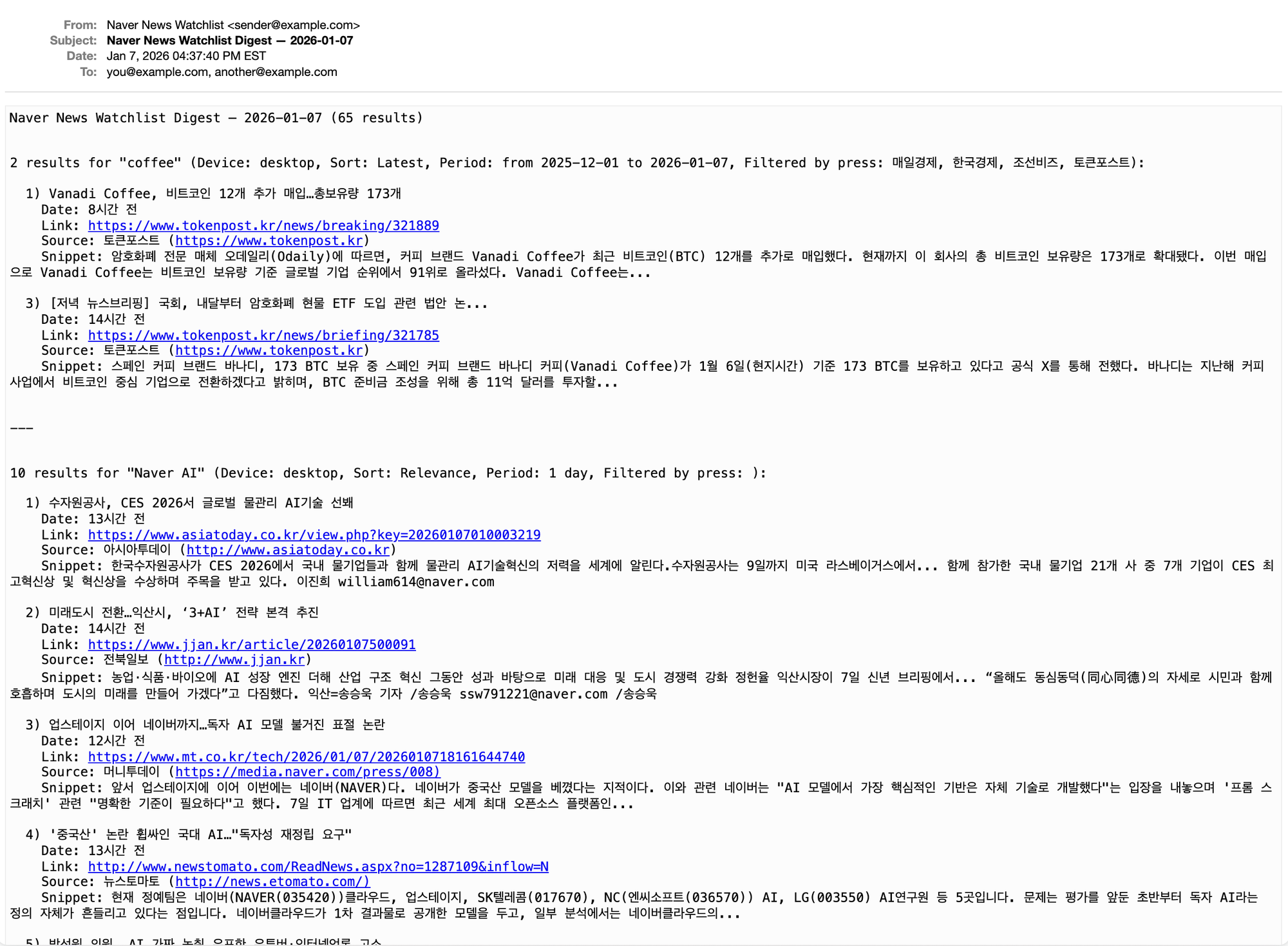
Here’s an example of what the email digest will look like when we’re finished:
Prerequisites
- Most recent versions of Ruby and Rails (as of the time of this writing):
- Ruby 4.0.0 (newly released December 25, 2025)
- Rails 8.1.1
- Bundler 4.0.3
- A SerpApi account and API key
- SerpApi’s official Ruby Library
- Basic familiarity with Ruby on Rails
Sample JSON Result
To see what we’ll be working with, here’s a partial sample of a single item from the news_results array returned by SerpApi’s Naver News Results:
{
  "position": 1,
  "title": "[기고] 애그테크로 여는 전북농업의 대전환, 지금이 골든타임",
  "link": "https://www.jjan.kr/article/20260107500290",
  "thumbnail": "https://search.pstatic.net/common/?src=https%3A%2F%2Fimgnews.pstatic.net%2Fimage%2Forigin%2F5335%2F2026%2F01%2F07%2F311174.jpg&type=ofullfill208_208_dominantcolor&expire=2&refresh=true",
  "news_info": {
    "news_date": "11시간 전",
    "press_name": "전북일보",
    "press_link": "http://www.jjan.kr",
    "press_icon": "https://search.pstatic.net/common/?src=https%3A%2F%2Fmimgnews.pstatic.net%2Fimage%2Fupload%2Foffice_logo%2F5335%2F2024%2F05%2F30%2Flogo_5335_18_20240530182450.png&type=f54_54&expire=24&refresh=true"
  },
  "snippet": "“AI가 설계하고, 데이터가 실행하며, 사람이 완성한다.” 전북이 그 중심에 설 수 있는 시간은 바로 지금이다. 지금이 골든타임이다. 김창길 서울대 아시아연구소 방문학자 · 전 한국농촌경제연구원장 이준서 기자 /이준서 imhendsome@naver.com /이준서"
}
We’ll use the following:
position→ the rank of the news article in the resultstitle→ the headline of the news articlelink→ the URL for the news articlesnippet→ a brief excerpt from the articlenews_info.news_date→ human-readable time of when the article was publishednews_info.press_name→ the name of the outletnews_info.press_link→ URL to the outlet’s page on Naver News
Building the App
1. Create an API-only Rails app
We don’t need a frontend for this app, so we’ll use the API-only template, with no database:
rails new naver_news_watchlist --api --skip-active-record
cd naver_news_watchlist
Optional
If you want to include a database so you can persist news results, simply omit--skip-active-record.
2. Add the SerpApi gem
Next, add the SerpApi gem to your app and install it with:
bundle add serpapi3. Store your API key
Retrieve your API key from your SerpApi dashboard and store it securely in Rails credentials:
rails credentials:editAdd:
serpapi:
  api_key: YOUR_API_KEY
Close the file to save it. Now you can securely access your API key anywhere in your app with:
Rails.application.credentials.dig(:serpapi, :api_key)4. Service: Naver News Fetcher
We’ll isolate all SerpApi interaction into a single service object. This keeps API concerns out of jobs and models, makes testing easier, and gives us a single place to tune default parameters (period, sort_by, etc.) later.
Create the file for the service object:
mkdir app/services
touch app/services/naver_news_fetcher.rb
Then paste this into the file you just created:
class NaverNewsFetcher
  DEFAULT_PARAMS = {
    engine: "naver",
    where: "news",
    sort_by: DailyWatchlistJob::SORT_MAP[:relevance], # Relevance
    period: "1d" # 1 day
  }.freeze

  attr_reader :base_params

  def initialize(query:, **options)
    @base_params = DEFAULT_PARAMS.merge(options).merge(query:)
  end

  def self.call(page: 1, **args)
    new(**args).call(page:)
  end

  def call(page: 1)
    client = SerpApi::Client.new(api_key: serpapi_key)
    client.search(page:, **base_params)
  end

  private

  def serpapi_key
    Rails.application.credentials.dig(:serpapi, :api_key)
  end
end
We’ll create the DailyWatchlistJob with SORT_MAP a bit later. By default, we’re sorting results by relevance, and we’re using period: "1d" to limit results to the last 1 day. You can override these defaults per watchlist item later, or by passing explicit keyword arguments when initializing NaverNewsFetcher. Any other supported SerpApi parameters (e.g., device, no_cache, etc.) can be passed via the options hash and will be merged into the request.
For a full list of supported values forsort_byandperiod, see the Advanced Filters Documentation for SerpApi’s Naver Search API.
5. Email digest with Action Mailer
Once the news results are fetched, we assemble a short digest and send it somewhere you’ll actually see it. For this example, we’ll send a simple email digest.
First, update your ApplicationMailer in app/mailers/application_mailer.rb:
class ApplicationMailer < ActionMailer::Base
  default from: "Naver News Watchlist <#{Rails.application.credentials.dig(:smtp, :user_name)}>"
  layout false
end
Note
Thedefault from:address will be pulled from your encrypted Rails credentials, which we’ll configure in the next step.
Then generate the daily digest mailer:
rails g mailer daily_digestPaste the following into the generated app/mailer/daily_digest_mailer.rb:
class DailyDigestMailer < ApplicationMailer
  def digest_email(recipient_email, sections)
    @sections = sections

    digest_date = Time.zone.today.strftime("%F")
    @title = "Naver News Watchlist Digest — #{digest_date}"

    mail(
      to: recipient_email,
      subject: @title,
      charset: "UTF-8", # ensures Korean text is rendered correctly
    )
  end
end
Create a plain-text template:
touch app/views/daily_digest_mailer/digest_email.text.erbAnd add:
<%= @title %> (<%= pluralize(@sections.sum { it[:items].size }, "result") %>)

<% sections_list = @sections.map do |section|
  items         = section[:items]
  results_count = items.size

  section_title = "#{pluralize(results_count, 'result')} for \"#{section[:query]}\""

  device = section.fetch(:device, "desktop")
  sort   = DailyWatchlistJob::SORT_MAP.key(section.fetch(:sort_by, 0)).to_s.titleize

  period = section.fetch(:period, "1d")

  period = if (match = period.match(/from(\d{8})to(\d{8})/))
    begin
      from_date, to_date = match.captures.map(&:to_date)
      "from #{from_date} to #{to_date}"
    rescue Date::Error
      'unknown period'
    end
  else
    DailyWatchlistJob::PERIOD_MAP.fetch(period, 'unknown period')
  end

  filtered_by_press = section[:press_names]&.join(', ')

  meta_parts = { device:, sort:, period:, filtered_by_press: }.compact_blank.map { |key, value| "#{key.to_s.humanize}: #{value}" }
  section_details = " (#{meta_parts.join(", ")})"

  punctuation = results_count.zero? ? "." : ":"

  header = [ section_title, section_details, punctuation ].join

  body = items.map do |item|
    [
      "  #{item[:position]}) \"#{item[:title]}\"",
      "    Date:    #{item[:news_date]}",
      "    Link:    #{item[:link]}",
      (
        "    Source:  #{[
          item[:press_name].presence,
          item[:press_link].present? ? " (#{item[:press_link]})" : nil
        ].compact.join}" if item[:press_name].present? || item[:press_link].present?
      ),
      ("    Snippet: \"#{item[:snippet]}\"" if item[:snippet].present?)
    ].compact.join("\n")
  end.join("\n\n")

  [ header, body ].join("\n\n")
end %>

<%= sections_list.join("\n\n\n---\n\n\n") %>
It looks like there’s a lot going on here, but all we’re really doing is iterating through @sections (which are grouped by keyword, i.e., query), formatting each item so it can be printed neatly, and rendering each keyword as its own section. Take a look at the source code on GitHub to see how I extracted much of the formatting logic to a DailyDigestSectionFormatter class.
6. Configure an email delivery method
To keep it simple, we’ll use Gmail SMTP with our credentials stored in Rails encrypted credentials.
Step 1: Generate a Gmail App Password
Gmail does not allow SMTP access using your normal account password. Instead, you must create an App Password.
- Go to your Google Account security page:
https://myaccount.google.com/security - Ensure 2-Step Verification is enabled (App Passwords are unavailable without it)
- Create an App Password:
https://myaccount.google.com/apppasswords
Assign it a memorable name, like “Rails Naver News Watchlist.” - Google will generate a 16-character password. Copy it or write it down now — you will not be able to see it again.
This password will be used by Rails to authenticate with Gmail’s SMTP server.
Step 2: Store SMTP credentials in Rails credentials
Run:
rails credentials:editAdd the following:
smtp:
  user_name: YOUR_EMAIL@gmail.com
  password: YOUR_APP_PASSWORD
Replace YOUR_EMAIL@gmail.com with your gmail address and YOUR_APP_PASSWORD with the app password obtained in the previous step. The ApplicationMailer we modified above will automatically use smtp.user_name as the sender address.
Step 3: Configure Action Mailer
Configure Action Mailer to work in production by setting the following in config/environments/production.rb:
config.action_mailer.delivery_method = :smtp

config.action_mailer.smtp_settings = {
  user_name: Rails.application.credentials.dig(:smtp, :user_name),
  password: Rails.application.credentials.dig(:smtp, :password),
  address: "smtp.gmail.com",
  port: 587,
  authentication: :plain,
  enable_starttls_auto: true
}

config.action_mailer.perform_deliveries = true
config.action_mailer.raise_delivery_errors = true
To test our emails locally, we’ll use the letter_opener gem. Run this command to add the gem:
bundle add letter_opener --group developmentThen edit config/environments/development.rb:
config.action_mailer.delivery_method = :letter_opener
config.action_mailer.perform_deliveries = true
Now when you try to send emails in development, letter_opener will now automatically open them in your default browser. Next, let’s create the job to actually send the emails.
7. Create the Daily Watchlist Job
Generate the job:
rails g job daily_watchlistThis creates a new job in app/jobs/daily_watchlist_job.rb. This job will coordinate the entire flow:
- Fetch news for each watchlist item
- Filter duplicates and unwanted press names
- Group items by keyword into separate sections
- Build a readable digest
- Send the email
Paste the following into app/jobs/daily_watchlist_job.rb:
class DailyWatchlistJob < ApplicationJob
  queue_as :default

  RECIPIENT_EMAILS = [ "you@example.com", "another@example.com" ].freeze # replace with desired emails
  RESULTS_PER_PAGE = 10 # Naver News shows 10 results per page
  MAX_PAGES = 5

  SORT_MAP = {
    relevance: 0, # default
    latest: 1,
    oldest: 2
  }.freeze

  PERIOD_MAP = {
    "all" => "all time", # default
    "1h"  => "1 hour",
    "2h"  => "2 hours",
    "3h"  => "3 hours",
    "4h"  => "4 hours",
    "5h"  => "5 hours",
    "6h"  => "6 hours",
    "1d"  => "1 day",
    "1w"  => "1 week",
    "1m"  => "1 month",
    "3m"  => "3 months",
    "6m"  => "6 months",
    "1y"  => "1 year"
  }.freeze

  WATCHLIST = [
    {
      # Industry trends
      query: "coffee",
      press_names: [
        "매일경제",   # Maeil Business Newspaper
        "한국경제",   # Korea Economic Daily
        "조선비즈",   # Chosun Biz
        "토큰포스트"  # TokenPost
      ], # filter by specific press sources
      max: Float::INFINITY, # set max to Float::INFINITY to allow unlimited results up to MAX_PAGES
      sort_by: SORT_MAP[:latest], # sort by latest news
      period: "from20251201to20260105" # custom date range
    },
    {
      # Topical news
      query: "Naver AI",
      press_names: [], # set press_names to `[]` to allow all press sources
      max: RESULTS_PER_PAGE # set max to RESULTS_PER_PAGE to fetch only the first page
    },
    {
      # Competitor monitoring
      query: "Kakao Enterprise",
      press_names: nil, # set press_names to `nil` to allow all press sources
      max: RESULTS_PER_PAGE * 2, # set max greater than RESULTS_PER_PAGE to fetch multiple pages
      sort_by: SORT_MAP[:latest],
      period: "1m",
      device: "tablet"
    },
    {
      # Technology updates
      query: "AI semiconductor",
      # omit press_names to allow all press sources
      # omit max to allow unlimited results up to MAX_PAGES
      sort_by: SORT_MAP[:latest],
      period: "3m"
    },
    {
      # Fresh breaking news with a shorter time frame
      query: "Generative AI",
      max: nil, # set max to `nil` to allow unlimited results up to MAX_PAGES
      sort_by: SORT_MAP[:latest],
      period: "3h",
      device: "mobile" # simulate mobile device results
    }
  ].freeze

  def perform
    sections = sections_for_watchlist
    sections = empty_sections if sections.all? { |section| section[:items].empty? }

    post_digest sections
  end

  def sections_for_watchlist
    WATCHLIST.map { |item| build_section(item) }
  end

  private

  def build_section(item)
    {
      **item.without(:max),
      items: fetch_and_select(item)
    }
  end

  def empty_sections
    [
      {
        query: nil,
        items: []
      }
    ]
  end

  def fetch_and_select(item)
    seen = []
    selected = []

    limit = item[:max] || Float::INFINITY
    page = 1

    while selected.size < limit && page <= MAX_PAGES
      options = item.without(:max, :press_names).merge(page:)

      api_response = NaverNewsFetcher.call(**options)

      results = api_response[:news_results].to_a
      break if results.empty?

      results.each do |result|
        break if selected.size >= limit

        link = result[:link].to_s
        next if link.blank? || link.in?(seen)

        seen << link

        press_name = result.dig(:news_info, :press_name).to_s
        next unless item[:press_names].blank? || press_name.in?(item[:press_names])

        rank = result[:position].to_i + (page - 1) * RESULTS_PER_PAGE # calculate rank across pages

        selected << {
          position: rank,
          title: result[:title].to_s,
          snippet: result[:snippet].to_s,
          link:,
          news_date: result.dig(:news_info, :news_date).to_s,
          press_name:,
          press_link: result.dig(:news_info, :press_link).to_s
        }.compact
      end

      page += 1
    end

    selected
  end

  def post_digest(sections)
    DailyDigestMailer.digest_email(RECIPIENT_EMAILS, sections).deliver_later
  end
end
Scheduling
To run the watchlist automatically every day, you can use a scheduler likecronor thewhenevergem to run the job at your desired time.
8. Error Handling & Reporting
To ensure you’re notified of any issues during the job execution, we’ll add some simple error handling and email reporting.
Step 1: Add an Error Email Method and Template
First, update app/mailers/daily_digest_mailer.rb to include an error email method:
class DailyDigestMailer < ApplicationMailer
  # existing digest_email method...

  def error_email(recipient_email, error_payload)
    @error_class = error_payload[:class]
    @error_message = error_payload[:message]
    @error_backtrace = Array(error_payload[:backtrace])

    @error_time = Time.zone.now.strftime("%F %R %Z")
    @title = "Naver News Watchlist Error — #{@error_time}"

    mail(
      to: recipient_email,
      subject: @title,
      charset: "UTF-8",
    )
  end
end
Create the corresponding view template app/views/daily_digest_mailer/error_email.text.erb:
<%= @title %>

<%
  lines = [
    "Time: #{@error_time}",
    "Error: #{@error_class} - #{@error_message}",
    "",
    "Backtrace:"
  ]

  backtrace_lines = @error_backtrace.map { "  #{it}" }

  body = (lines + backtrace_lines).join("\n")
%>

<%= body %>
Step 2: Update Naver News Fetcher with Error Handling
Update the call method in app/services/naver_news_fetcher.rb to report errors when an error occurs:
class NaverNewsFetcher
  # existing code...

  def call(page: 1)
    client = SerpApi::Client.new(api_key: serpapi_key)
    client.search(page:, **base_params)
  rescue => error
    # Ignore "no results" errors
    return empty_payload if error.message.include? "Naver hasn't returned any results for this query"

    Rails.error.report(
      error,
      handled: false,
      severity: :error,
      context: {
        source: self.class.name,
        page:,
        **base_params.without(:engine, :where)
      }.compact
    )
    raise error
  end

  private

  # existing code...

  def empty_payload
    {
      search_metadata: { status: "Success" },
      news_results: []
    }
  end
end
Step 3: Update Daily Watchlist Job for Error Handling
Update the perform method in app/jobs/daily_watchlist_job.rb to handle exceptions and send error emails:
class DailyWatchlistJob < ApplicationJob
  # existing code...

  def perform
    sections = sections_for_watchlist
    sections = empty_sections if sections.all? { |section| section[:items].empty? }

    post_digest sections
  rescue => error
    Rails.error.report(
      error,
      handled: false,
      severity: :error,
      context: {
        job: self.class.name,
        watchlist_queries: WATCHLIST.pluck(:query),
        recipients: RECIPIENT_EMAILS
       }
    )

    error_payload = {
      class: error.class.name,
      message: error.message,
      backtrace: error.backtrace
    }

    DailyDigestMailer.error_email(RECIPIENT_EMAILS, error_payload).deliver_later
    raise error
  end

  # existing code...
end
Update the fetch_and_select method and add ensure_serpapi_success! in app/jobs/daily_watchlist_job.rb to raise errors when SerpApi responses indicate failure:
class DailyWatchlistJob < ApplicationJob
  # existing code...

  def fetch_and_select(item)
    # existing code...

    while selected.size < limit && page <= MAX_PAGES
      options = item.without(:max, :press_names).merge(page:)

      api_response = NaverNewsFetcher.call(**options)
      ensure_serpapi_success! api_response, options[:query], page # <-- add this line

      results = api_response[:news_results].to_a
      break if results.empty?

      results.each do |result|
        # existing code...
      end

      page += 1
    end

    selected
  end

  def ensure_serpapi_success!(api_response, query, page)
    status = api_response.dig(:search_metadata, :status)
    return if status == "Success"

    error_message = api_response[:error] || "Unknown SerpApi error"
    error = StandardError.new(
      "SerpApi Naver search failed (query=#{query.inspect}, page=#{page}): " \
      "status=#{status || 'unknown'} error=#{error_message}"
    )

    Rails.error.report(
      error,
      handled: false,
      severity: :error,
      context: {
        source: "SerpApi:NaverNews",
        query:,
        page:,
        serpapi_status: status,
        serpapi_error_message: error_message
      }
    )

    raise error
  end

  # existing code...
end
9. Run & Test
You can run the following commands in the Rails console to test each part of the system:
Fetch news results:
results = NaverNewsFetcher.call(query: "coffee")
news_results = results[:news_results]
Generate watchlist sections:
sections = DailyWatchlistJob.new.sections_for_watchlistRun the full job:
DailyWatchlistJob.perform_nowletter_opener will automatically open the digest email in your default browser. It should look something like this:
Naver News Watchlist Digest — 2026-01-07 (25 results)


2 results for "coffee" (Device: desktop, Sort: Latest, Period: from 2025-12-01 to 2026-01-07, Filtered by press: 매일경제, 한국경제, 조선비즈, 토큰포스트):

  1) Vanadi Coffee, 비트코인 12개 추가 매입…총보유량 173개
    Date: 7시간 전
    Link: https://www.tokenpost.kr/news/breaking/321889
    Source: 토큰포스트 (https://www.tokenpost.kr)
    Snippet: 암호화폐 전문 매체 오데일리(Odaily)에 따르면, 커피 브랜드 Vanadi Coffee가 최근 비트코인(BTC) 12개를 추가로 매입했다. 현재까지 이 회사의 총 비트코인 보유량은 173개로 확대됐다. 이번 매입으로 Vanadi Coffee는 비트코인 보유량 기준 글로벌 기업 순위에서 91위로 올라섰다. Vanadi Coffee는...

  3) [저녁 뉴스브리핑] 국회, 내달부터 암호화폐 현물 ETF 도입 관련 법안 논...
    Date: 13시간 전
    Link: https://www.tokenpost.kr/news/briefing/321785
    Source: 토큰포스트 (https://www.tokenpost.kr)
    Snippet: 스페인 커피 브랜드 바나디, 173 BTC 보유 중 스페인 커피 브랜드 바나디 커피(Vanadi Coffee)가 1월 6일(현지시간) 기준 173 BTC를 보유하고 있다고 공식 X를 통해 전했다. 바나디는 지난해 커피 사업에서 비트코인 중심 기업으로 전환하겠다고 밝히며, BTC 준비금 조성을 위해 총 11억 달러를 투자할...


---


10 results for "Naver AI" (Device: desktop, Sort: Relevance, Period: 1 day, Filtered by press: ):

  1) 수자원공사, CES 2026서 글로벌 물관리 AI기술 선봬
    Date: 11시간 전
    Link: https://www.asiatoday.co.kr/view.php?key=20260107010003219
    Source: 아시아투데이 (http://www.asiatoday.co.kr)
    Snippet: 한국수자원공사가 CES 2026에서 국내 물기업들과 함께 물관리 AI기술혁신의 저력을 세계에 알린다.수자원공사는 9일까지 미국 라스베이거스에서... 함께 참가한 국내 물기업 21개 사 중 7개 기업이 CES 최고혁신상 및 혁신상을 수상하며 주목을 받고 있다. 이진희 william614@naver.com

  2) 미래도시 전환…익산시, ‘3+AI’ 전략 본격 추진
    Date: 12시간 전
    Link: https://www.jjan.kr/article/20260107500091
    Source: 전북일보 (http://www.jjan.kr)
    Snippet: 농업·식품·바이오에 AI 성장 엔진 더해 산업 구조 혁신 그동안 성과 바탕으로 미래 대응 및 도시 경쟁력 강화 정헌율 익산시장이 7일 신년 브리핑에서... “올해도 동심동덕(同心同德)의 자세로 시민과 함께 호흡하며 도시의 미래를 만들어 가겠다”고 다짐했다. 익산=송승욱 기자 /송승욱 ssw791221@naver.com /송승욱

  3) 업스테이지 이어 네이버까지…독자 AI 모델 불거진 표절 논란
    Date: 10시간 전
    Link: https://www.mt.co.kr/tech/2026/01/07/2026010718161644740
    Source: 머니투데이 (https://media.naver.com/press/008)
    Snippet: 앞서 업스테이지에 이어 이번에는 네이버(NAVER)다. 네이버가 중국산 모델을 베꼈다는 지적이다. 이와 관련 네이버는 "AI 모델에서 가장 핵심적인 기반은 자체 기술로 개발했다"는 입장을 내놓으며 '프롬 스크래치' 관련 "명확한 기준이 필요하다"고 했다. 7일 IT 업계에 따르면 최근 세계 최대 오픈소스 플랫폼인...

...
Note
The two results for the “coffee” query are ranked 1 and 3 because other results were filtered out based on the specifiedpress_namesin theWATCHLIST.
Where to Go Next
From here, you can easily extend the system:
- Set up a scheduler to run the
DailyWatchlistJobautomatically every day. - Translate the Korean text to another language automatically using a translation API.
- Send digests to other destinations (e.g., Slack, Discord) via webhooks.
- Enhance filtering with keywords or sentiment analysis to highlight the news that’s most relevant to you.
Even without any of that, this watchlist does exactly what it needs to do — it delivers relevant and timely news results, without distractions.
Links
- Explore the full source code for this example on GitHub
- Read the official SerpApi Naver News Results documentation
- Experiment with live queries in the Naver News Results Playground
- Report issues or request features on the SerpApi Public Roadmap
Related Blog Posts
Check out some of our other blog posts about SerpApi’s Naver Search API:
 Justin O’Hara
 Dmitriy Zub
 Alaa Abdulridha
 Alaa Abdulridha
 Alaa Abdulridha