 Google Local Services API
 Google Travel Explore API
 Baidu Search API
 Bing Search API
 DuckDuckGo Search API
 eBay Search API
 Naver Search API
 The Home Depot Search API
 Tripadvisor Search API
 Walmart Search API
 Ruby
Ruby
 Golang
 .Net
.Net
 C++
C++

AI applications are only as good as the information they rely on, and most models are limited by a built-in knowledge cutoff. They can’t naturally access fresh data, real-time events, or the constantly changing web. That’s where a Web Search API becomes essential. By connecting AI systems to live, structured, and accurate search results, developers can break past the model’s static knowledge and build applications that stay current, relevant, and truly intelligent.
Therefore, many AI platforms now provide a “Web Search Tool” to overcome this limitation.
What is a Web Search Tool?
A Web Search Tool is a component—often an API—that allows an application to query the internet and retrieve fresh, structured information. Instead of relying on an AI model’s frozen knowledge, a Web Search Tool acts like an external bridge to the live web. It pulls in data from search engines, news sources, websites, and online platforms, then returns the results in formats that are easy for AI systems to parse and reason about.
In practical terms, it gives your AI app the ability to:
- Look up real-time information
- Validate or fact-check model responses
- Access data that didn’t exist at the time the model was trained
- Power workflows that depend on accuracy and freshness
Without a Web Search Tool, AI models operate in a closed world. With it, they can see what’s happening right now.
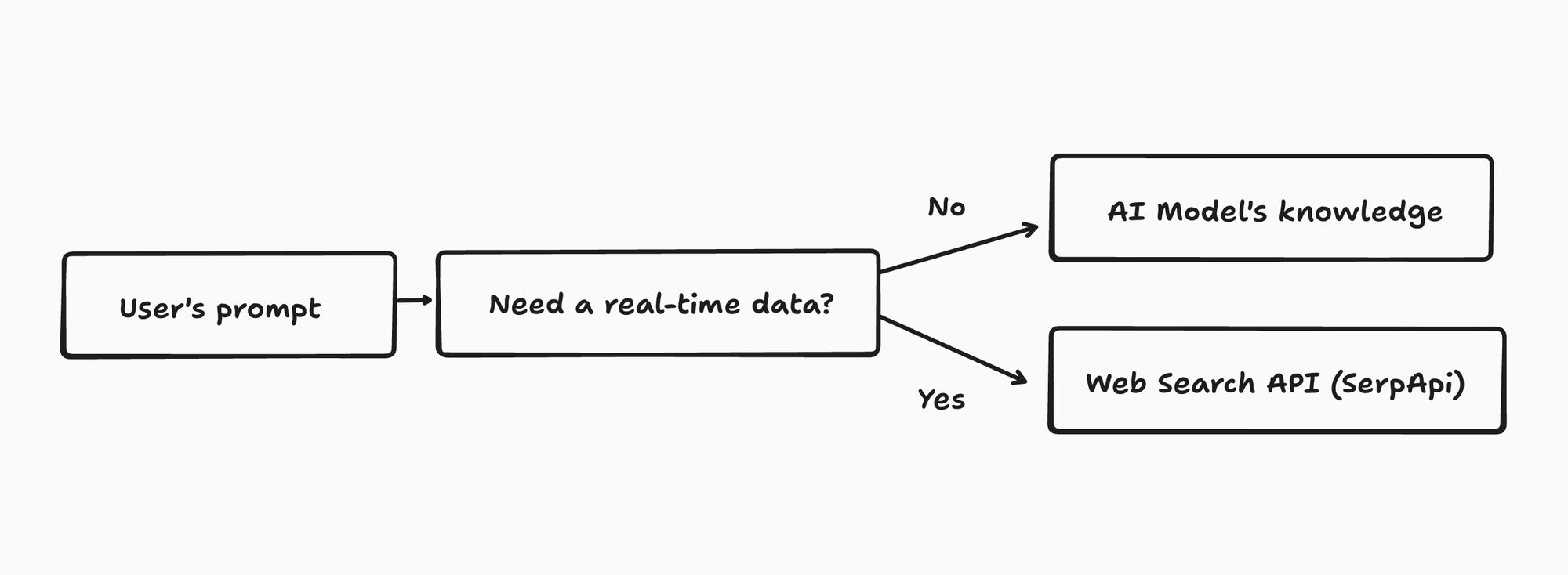
How Does a Web Search Tool Work Behind the Scenes?
Behind the scenes, a Web Search Tool acts as a smart middleware layer between your AI application and the open web. When the AI detects that it needs fresh information—such as recent news, product data, or facts beyond its knowledge cutoff—it sends a search query to the tool. The tool then performs several steps:
- Receives the query from the AI
The model generates a search request (e.g., “latest iPhone price in Singapore”) and hands it off to the Web Search Tool. - Fetches results from search engines or multiple sources
The tool doesn’t just “look up” results like a human—it makes structured requests to search engines and online platforms, retrieves the data, and cleans it up. - Parses and structures the data
Instead of messy HTML, the tool converts web results into clean JSON: titles, snippets, URLs, prices, reviews, summaries, etc. - Sends the structured results back to the AI
The AI can then analyze the data, reason over it, summarize it, or use it to generate more accurate responses.
What is Web Search API?
If you’ve ever tried building your own Web Search Tool, you know the hardest part isn’t the AI prompt—it’s the scraping. Search engines change their layouts, add anti-bot protections, rate-limit aggressively, and require constant maintenance just to keep your data flowing. For most teams, this becomes a never-ending cycle of fixes, breakages, and engineering overhead.
That’s precisely where a Web Search API provider like SerpApi becomes indispensable.
SerpApi handles all the messy, time-consuming parts of scraping for you: navigating search engine HTML, bypassing blocks, rotating proxies, managing CAPTCHAs, parsing results, and turning them into clean JSON. Instead of building and maintaining a complex scraping pipeline, developers can simply call one API endpoint and get structured, reliable, real-time search data.
So, if you want the benefits of a Web Search Tool—but don’t want to deal with the scraping challenge, feel free to register at serpapi.com and explore our Search APIs!
Why Use a Web Search API Instead of a Built-In Web Search Tool?
Many AI models now offer their own built-in Web Search Tool, but these tools are usually designed for general usage, not for developers building custom logic. A Web Search API gives you far more flexibility and control. Here are the key advantages:
1. Full Control Over Logic and Workflow
Built-in tools hide most of the decision-making behind the model.
With a custom Web Search API, you decide:
- How queries are generated
- How many sources to retrieve
- How to filter, rank, or enrich the results
- When to store or re-use data
- How to combine search data with your own business logic
This makes it ideal for AI agents, automation systems, research pipelines, and enterprise applications.
2. Consistent, Repeatable Output
Model-based tools often produce slightly different results each time or rely on hidden internal parameters. A Web Search API returns deterministic, structured JSON. No guessing what the model “decided” to search.
3. Freedom to Use Any Model
If your search capability depends on an AI model’s built-in tool, you’re locked into that provider. A Web Search API is model-agnostic, so you can:
- switch models anytime
- Run the same search pipeline across multiple models
- Use open-source or local models
- avoid ecosystem lock-in
Your search layer becomes portable.
4. Scalable and Cost-Efficient
Web Search APIs are designed for:
- high volumes
- parallel queries
- predictable pricing
This is a big advantage over built-in tools that may throttle, rate limit, or get expensive as your usage grows.
5. Better Data Ownership and Observability
With a Web Search API, you see exactly:
- What was queried
- What data was returned
- When it was fetched
- How it was processed
Examples using Web Search API on AI applications
We wrote several tutorials on how to connect SerpApi, as the web search API provider, with different AI tools, AI agents, and LLMs:
 Hilman Ramadhan
 Hilman Ramadhan
 Hilman Ramadhan
 Hilman Ramadhan
Please find some use case examples below:
 Hilman Ramadhan
 James Collins
 James Collins
 Nathan Skiles
 Noraina Nordin
I hope it helps. Improve your AI agents, applications, and LLMs using a Web Search API!