Google Local Services API
 Google Travel Explore API
 Baidu Search API
 Bing Search API
 DuckDuckGo Search API
 eBay Search API
 Naver Search API
 OpenTable Reviews API
 The Home Depot Search API
 Tripadvisor Search API
 Walmart Search API
 Ruby
Ruby
 Golang
 .Net
.Net
 MCP
MCP
 C++
C++

Baidu is the dominant search engine in China, and Baidu News is a critical source for understanding media coverage, brand sentiment, and trending topics in the Chinese market. However, scraping Baidu directly is notoriously difficult due to aggressive bot detection, regional constraints, and frequent HTML changes.
In this post, we’ll walk through how to scrape Baidu News using SerpApi.
Why Use SerpApi To Scrape News From Baidu
If you’ve tried scraping Baidu directly, you’ve likely run into issues such as a dynamic HTML, frequent layout changes, javaScript-rendered elements, Chinese - specific quirks (encodings, redirects, tracking parameters). For production use cases, brand monitoring, market research, competitive intelligence, DIY scraping quickly becomes impractical.
That’s where SerpApi’s Baidu News API comes in. It's a structured API, which returns a clean JSON response. SerpApi manages the intricacies of scraping and returns structured JSON results. This allows you to save time and effort by avoiding the need to build your own Baidu scraper using generic web scraping frameworks like BeautifulSoup which require constant maintenance. We do all the work to maintain all of our parsers and adapt them to respond to changes on search engines. By taking care of this for you on our side, we eliminate a lot of time and complexity from your workflow.
About Baidu News API
Baidu News API returns structured news data from Baidu News pages. The API returns structured fields such as title, link, source, date, and snippet.
At a minimum, you need the following parameters:
engine- set tobaidu_newsq(search query) - set to your queryapi_key- set to your private API key
Here is an example of the information the API scrapes:
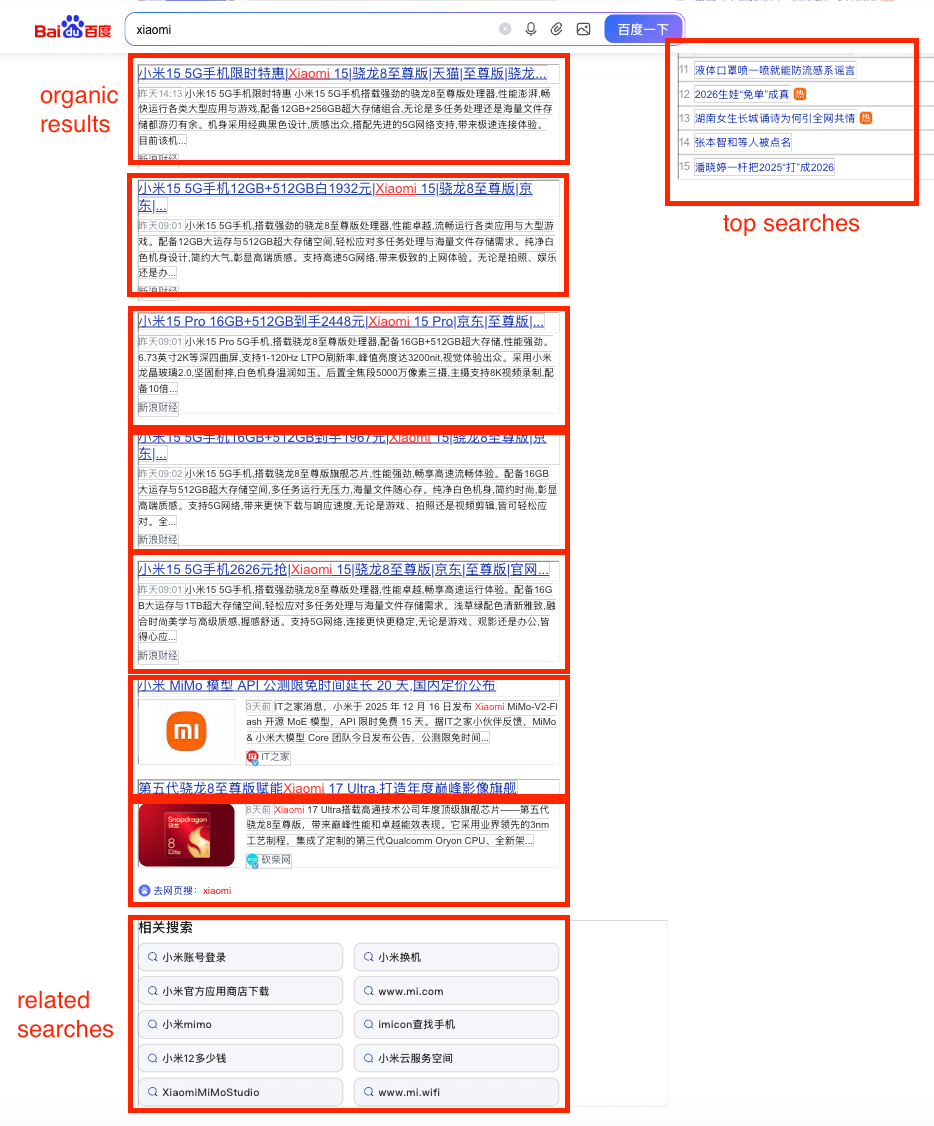
Get results using a simple GET request
https://serpapi.com/search.json?engine=baidu_news&q=Artificial+Intelligence&api_key=YOUR_API_KEYThis request searches the Baidu News search engine for Artificial Intelligence and provides JSON results. Try it out on our playground:
 SerpApi
An Example Use Case
Let's write some code to extract Baidu News results for Phones and write them to a CSV.
Setup your environment
Ensure you have the necessary libraries installed.
pip install google-search-resultsgoogle-search-results is our Python library. You can use this library to scrape search results from any of SerpApi's APIs.More About Our Python Libraries
We have two separate Python libraries serpapi and google-search-results, and both work perfectly fine. However, serpapi is a new one, and all the examples you can find on our website are from the old one google-search-results. If you'd like to use our Python library with all the examples from our website, you should install the google-search-results module instead of serpapi.
For this blog post, I am using google-search-results because all of our documentation references this one.
You may encounter issues if you have both libraries installed at the same time. If you have the old library installed and want to proceed with using our new library, please follow these steps:
- Uninstall
google-search-resultsmodule from your environment. - Make sure that neither
serpapinorgoogle-search-resultsare installed at that stage. - Install
serpapimodule, for example with the following command if you're usingpip:pip install serpapi
Get your SerpApi API key
To begin scraping data, first, create a free account on serpapi.com. You'll receive 250 free search credits each month to explore the API.
- Get your SerpApi API Key from this page.
- [Optional but Recommended] Set your API key in an environment variable, instead of directly pasting it in the code. Refer here to understand more about using environment variables. For this tutorial, I have saved the API key in an environment variable named "SERPAPI_API_KEY" in my .env file.
Using Baidu News API
First, we'll write a simple function to get news results from the Baidu News API:
def get_baidu_news(q):
    params = {
        "engine": "baidu_news",
        "q": q,
        "api_key": os.environ["SERPAPI_API_KEY"],
    }

    results = GoogleSearch(params).get_dict()
    return results.get("organic_results", [])
Writing Results To a CSV
Then, we can write a simple script to call this function and write the news results to CSV:
if __name__ == "__main__":
    q = "Phones"
    output_file = "baidu_news_results.csv"

    header = ["position", "title", "link", "date", "snippet", "source", "thumbnail"]

    with open(output_file, "w", encoding="UTF8", newline="") as f:
        writer = csv.writer(f)
        writer.writerow(header)

        results = get_baidu_news(q)
        for r in results:
            writer.writerow([
                r.get("position", ""),
                r.get("title", ""),
                r.get("link", ""),
                r.get("date", ""),
                r.get("snippet", ""),
                r.get("source", ""),
                r.get("thumbnail", "")
            ])
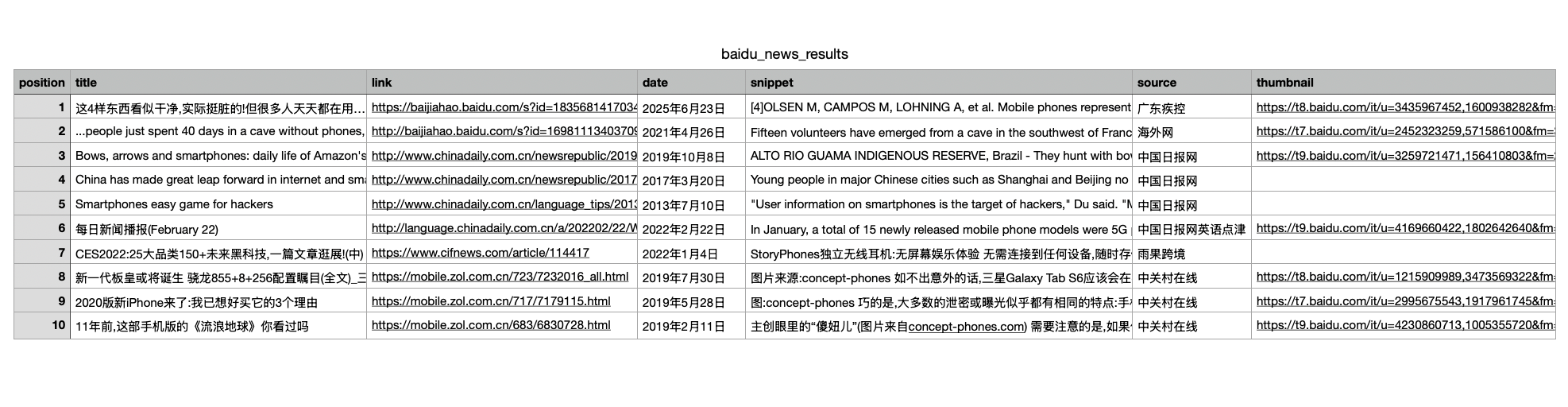
You can run this script to fetch Baidu News results for the query “Phones.” Then, this creates a CSV file called baidu_news_results.csv and writes a header row that defines each column. You can then call get_baidu_news to retrieve the results and loop through them. For each result, it safely extracts the fields and writes them as rows in the CSV file.
Results
Here's what the results look like:
Adding Localization
Use the ct parameter to control the language of the results returned. Set this when you want to restrict results to a specific Chinese language variant.
1— All languages (default)2— Simplified Chinese3— Traditional Chinese
Adding Pagination
Use the pn, rn parameters together to control paging and result count. Use pn and rn together to paginate through large result sets.
Result Offset
- The
pnparameter defines how many results to skip, and is used to move through pages of results. - Examples:
pn=0→ first page (default)pn=10→ second pagepn=20→ third page
Results per Page
- Use the
rnparameter defines the maximum number of results to return. (max: 50) - Examples:
rn=10→ return 10 results (default)rn=30→ return 30 resultsrn=50→ return 50 results
A Couple of Advanced Parameters
Sorting the results
The rtt parameter controls how results are ordered. Set this to a particular value when freshness matters more than relevance or vice versa.
1— Sort by attraction/relevance (default)4— Sort by time (most recent first)
Medium Filter
Filters results by content source using the medium parameter. Use this to limit results to specific publisher types or platforms.
0— No filtering (default)1— Only medium-authority sites2— Only Baijiahao sources (baijiahao.baidu.com)
All of these parameters are optional, but combining localization, pagination, and filters gives you precise control over the Baidu News results you receive.
Conclusion
Scraping Baidu News directly is fragile and time-consuming. I hope this tutorial helped you understand how to use SerpApi’s Baidu News API to get clean, structured news data with production-ready reliability.
If you’re building anything that depends on Chinese news visibility, this is the fastest and easiest way to get started.
Feel free to reach out to us at contact@serpapi.com for any questions.
Relevant Links
Documentation
Related Posts
 Justin O’Hara
 Hilman Ramadhan