 Google Local Services API
 Google Travel Explore API
 Baidu Search API
 Bing Search API
 DuckDuckGo Search API
 eBay Search API
 Naver Search API
 OpenTable Reviews API
 The Home Depot Search API
 Tripadvisor Search API
 Walmart Search API
 Ruby
Ruby
 Golang
 .Net
.Net
 MCP
MCP
 C++
C++

Getting reliable route information programmatically shouldn't require complex web scraping or browser automation. Whether you're building a delivery route optimizer, a travel planning app, or analyzing transportation patterns, having instant access to Google Maps directions data can transform hours of manual work into a simple API call that delivers structured, ready-to-use route information including distances, durations, and step-by-step navigation details.
We're going to use a simple API by SerpApi: Google Maps Directions API.
Step-by-step on scraping directions route from Google Maps
Get your API Key
First, ensure you register at serpapi.com to get your API Key. You can get 250 free searches per month. You can use this API Key to access all of our APIs, including the Google Maps Directions API.
cURL Implementation
Here is the basic implementation in cURL:
curl --get https://serpapi.com/search \
 -d engine="google_maps_directions" \
 -d start_addr="Austin-Bergstrom+International+Airport" \
 -d end_addr="5540+N+Lamar+Blvd,+Austin,+TX+78756,+USA" \
 -d api_key="YOUR_API_KEY"
Parameter explanation:
start_addr : Parameter defines the address of the starting point for the direction you want to search.
end_addr : Parameter defines the address of the ending point for the direction you want to search.
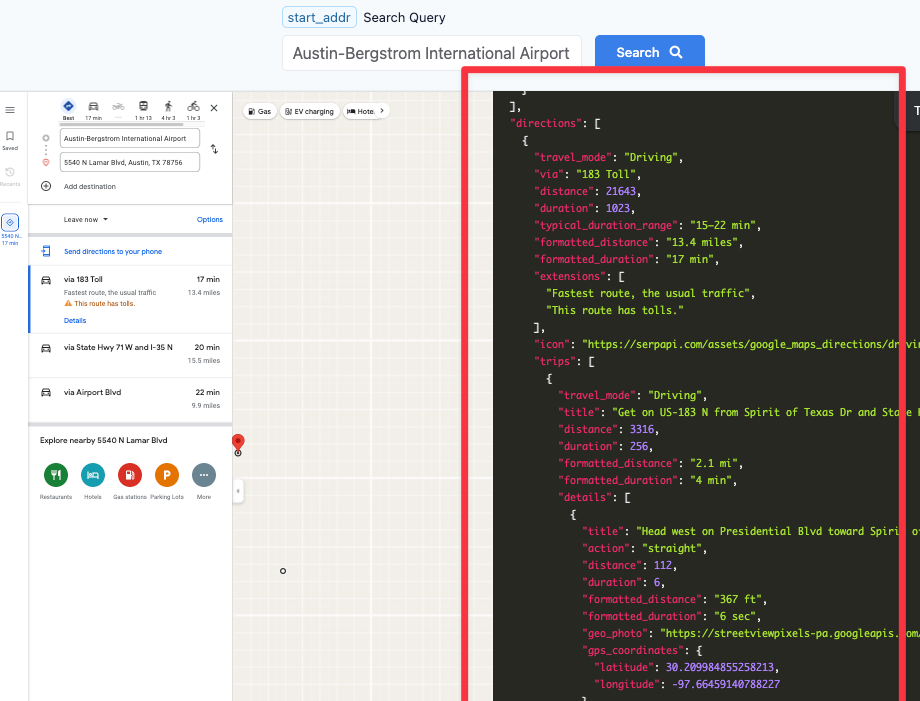
Please see the example response below:
Python tutorial
Next, let's see how to scrape the Maps direction search results in Python.
Preparation for accessing the SerpApi API in Python
- Create a new
main.pyfile - Install requests with:
pip install requestsHere is what the basic setup looks like:
import requests
SERPAPI_API_KEY = "YOUR_REAL_SERPAPI_API_KEY"

params = {
    "api_key": SERPAPI_API_KEY, #replace with your real API Key
    # soon
}

search = requests.get("https://serpapi.com/search", params=params)
response = search.json()
print(response)
With these few lines of code, we can access all of the search engines available at SerpApi, including the Google Maps Directions API
import requests
SERPAPI_API_KEY = "YOUR_SERPAPI_API_KEY"

params = {
    "api_key": SERPAPI_API_KEY,
    "engine": "google_maps_directions",
    "start_addr": "Austin internation airport",
    "end_addr": "Lamar Blvd street",
}

search = requests.get("https://serpapi.com/search", params=params)
response = search.json()
print(response)
To make it easier to see the response, let's add indentation to the output.
import json

# ...
# ...
# all previous code

print(json.dumps(response, indent=2))
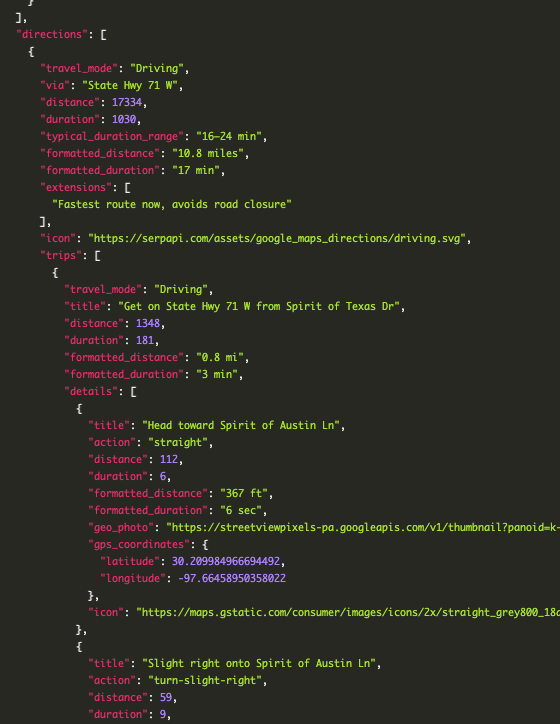
Running this Python file should show you the directions information complete with the durations:
Loop the travel mode
Here is an example on pricing specific fields only by each travel modes:
...

search = requests.get("https://serpapi.com/search", params=params)
response = search.json()
# print(json.dumps(response, indent=2))

if "directions" in response:
    for direction in response["directions"]:
        print(f"Travel Mode: {direction['travel_mode']}")
        print(f"Distance: {direction['formatted_distance']}")
        print(f"Duration: {direction['formatted_duration']}")
        print(f"Route: {direction.get('via', 'N/A')}")
        print("-" * 50)
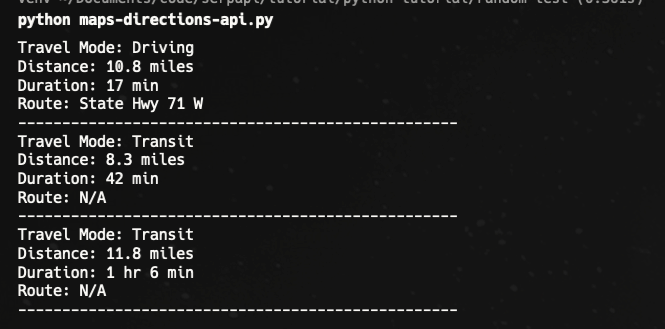
Result:
Switch Travel mode option
The API provides a parameter to change the travel mode:
travel_mode : Available options:6 - Best (Default)0 - Driving9 - Two-wheeler3 - Transit2 - Walking1 - Cycling4 - Flight
We also have the parameter to help us narrow the search further, like avoiding specific route, choosing preferred transit options, and more.
What You Can Build
With this API, you can create:
- Route optimization tools for logistics and delivery
- Travel planning apps with multi-modal transport comparison
- Carbon footprint calculators comparing driving vs transit
- Real estate tools showing commute times to major destinations
- Fitness apps with elevation profiles for hiking and cycling
- Price comparison tools for rideshare vs transit costs
If you like this blog, you can read: