 Google Local Services API
 Google Travel Explore API
 Baidu Search API
 Bing Search API
 DuckDuckGo Search API
 eBay Search API
 Naver Search API
 OpenTable Reviews API
 The Home Depot Search API
 Tripadvisor Search API
 Walmart Search API
 Ruby
Ruby
 Golang
 .Net
.Net
 MCP
MCP
 C++
C++

If you're an e-commerce builder gearing up for the holiday season, you already know the pressure. Competition spikes, ad costs climb, and everyone is racing to create the most irresistible shopping experience. You’re not just shipping code -you're trying to help shoppers make decisions faster, discover products they’ll love, and convert that intent into actual sales.
But step into your customer’s shoes for a moment: Holiday shopping often falls into two frustrating categories. People either know exactly what they want but spend forever hunting for the best deal, or they have no idea at all and scroll endlessly hoping inspiration strikes.
In this tutorial, we’ll explore how to build an AI powered Gift Buying Catalog. We'll use SerpApi's Bing Copoliot API to generate high quality, trending gift ideas based on the customer's persona and then use SerpApi's Bing Shopping API to instantly find the best prices and actual buying links for items suggested by Bing Copilot.
Why SerpApi
SerpApi streamlines the process of web-scraping. We take care of proxies and any CAPTCHAs that might be encountered, so that you don't have to worry about your searches being blocked. If you were to implement your own scraper using tools like BeautifulSoup and Requests, you'd need to determine your own solution for this. SerpApi manages the intricacies of scraping and returns structured JSON results. This allows you to save time and effort by avoiding the need to build your own scraper or rely on other web scraping tools.
We also do all the work to maintain all of our parsers and adapt them to respond to changes on Bing's side. This is important, as Bing is constantly experimenting with new layouts, new elements, and other changes. By taking care of this for you on our side, we eliminate a lot of time and complexity from your workflow.
Getting Started
Setup your environment
Ensure you have the necessary libraries installed.
pip install google-search-resultsgoogle-search-results is our Python library. You can use this library to scrape search results from any of SerpApi's APIs, not just Google APIs.More About Our Python Libraries
We have two separate Python libraries serpapi and google-search-results, and both work perfectly fine. However, serpapi is a new one, and all the examples you can find on our website are from the old one google-search-results. If you'd like to use our Python library with all the examples from our website, you should install the google-search-results module instead of serpapi.
For this blog post, I am using google-search-results because all of our documentation references this one.
You may encounter issues if you have both libraries installed at the same time. If you have the old library installed and want to proceed with using our new library, please follow these steps:
- Uninstall
google-search-resultsmodule from your environment. - Make sure that neither
serpapinorgoogle-search-resultsare installed at that stage. - Install
serpapimodule, for example with the following command if you're usingpip:pip install serpapi
Get your SerpApi API key
To begin scraping data, first, create a free account on serpapi.com. You'll receive 250 free search credits each month to explore the API.
- Get your SerpApi API Key from this page.
- [Optional but Recommended] Set your API key in an environment variable, instead of directly pasting it in the code. Refer here to understand more about using environment variables. For this tutorial, I have saved the API key in an environment variable named "SERPAPI_API_KEY" in my .env file.
Generate ideas with Bing Copilot API
Standard search engines give you links to Top 10 articles. Bing Copilot is different - it will give us a direct answer with gift ideas in bullet points with the right prompt.
Here's what this would look like:
def generate_ideas_with_bing_copilot(query):
    params = {
    "engine": "bing_copilot",
    "q": query,
    "api_key": os.environ["SERPAPI_API_KEY"]
    }

    search = GoogleSearch(params)
    result = search.get_dict()
    return result
Let's use the query "Christmas gift ideas for a tech savvy teenager in 2025 who likes smart home gadgets and gaming". And, let's tell Bing Copilot to give us 5 shopping item ideas in bullet points numbered 1-5. We can test this function with a simple but specific query:
query = "Christmas gift ideas for a tech savvy teenager in 2025 who likes smart home gadgets and gaming. Provide 5 shopping item ideas in bullet points numbered 1-5."You can try this in our playground:
 SerpApi
This outputs a list of gift ideas:
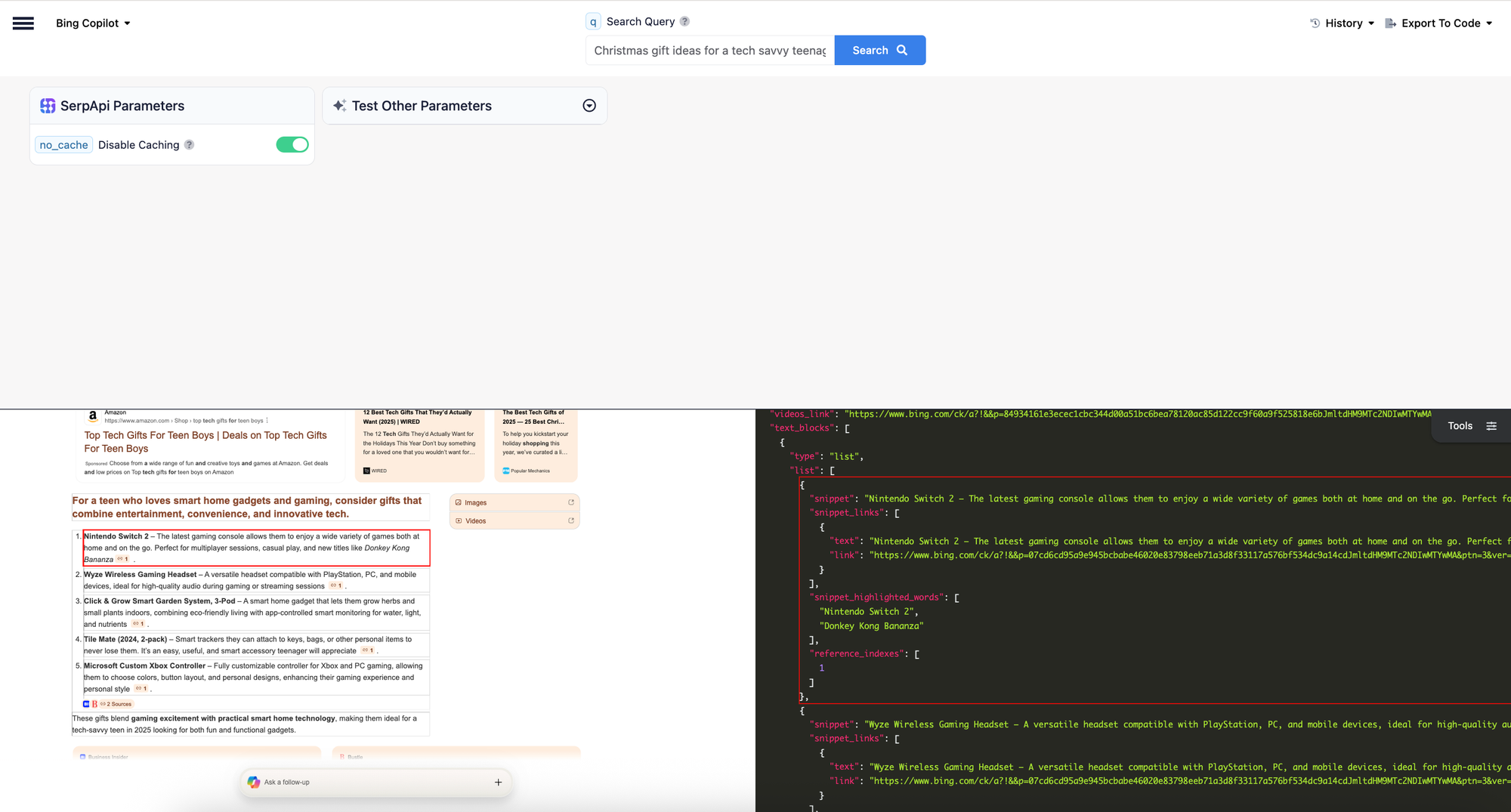
Find Products using Bing Shopping API
Now that we have a list of ideas (eg: "Nintendo Switch 2"), we need to turn them into concrete buying options. We will use the Bing Shopping engine to get the top result for each idea. Let's write a reusable function to get the shopping results for each product:
def get_shopping_results_with_bing_shopping(query):
    params = {
    "engine": "bing_shopping",
    "q": query,
    "api_key": os.environ["SERPAPI_API_KEY"]
    }

    search = GoogleSearch(params)
    result = search.get_dict()
    return result
For example, let's try using this with the "Nintendo Switch 2" suggestion in our playground:
 SerpApi
Here are the results:

Building A Buying Catalog
Now, let's combine the two parts above and write a simple script to get suggestions from Bing Copilot API and query Bing Shopping API with those to get product suggestions and build a catalog with it:
if __name__ == "__main__":

    # Define the persona
    persona_query = "Christmas gift ideas for a tech savvy teenager in 2025 who likes smart home gadgets and gaming"
    copilot_result = generate_ideas_with_bing_copilot(persona_query)

    # Create the CSV header
    header = ["title", "external_link", "price", "seller"]
    with open("bing_shopping_results.csv", "w", encoding="UTF8", newline="") as f:
        writer = csv.writer(f)
        writer.writerow(header)

    # Collect gift ideas from Copilot result
    gifts_suggested_by_bing_copilot = []
    for item in copilot_result.get("text_blocks", []):
        if item.get("type") == "list":
            for bullet in item.get("list", []):
                snippet = bullet.get("snippet", [])
                #Bing often formats the gift idea with a dash or colon after the main idea
                gift_idea = re.split(r'[–:]', snippet, maxsplit=1)[0].strip()
                gifts_suggested_by_bing_copilot.append(gift_idea)

    # Get shopping results based on gift ideas and write them to CSV
    shopping_result = get_shopping_results_with_bing_shopping_and_write_to_csv(gifts_suggested_by_bing_copilot)
The script generates Christmas gift ideas using Bing Copilot, extracts the ideas, and then fetches related shopping results to save into a CSV filce.
We first define a search persona query and then call a function to generate ideas using Bing Copilot API. Then, we create a CSV file with the headers for product info. We then loop through Copilot’s response, pull list items and extract the gift idea text before dashes/colons in copilot's answer. After that, we can search for products based on the extracted ideas and write them into the CSV.
The Results
Once we run the script, it generates a Buying Catalog, a CSV of possible gift options anyone can directly buy from using the direct links.
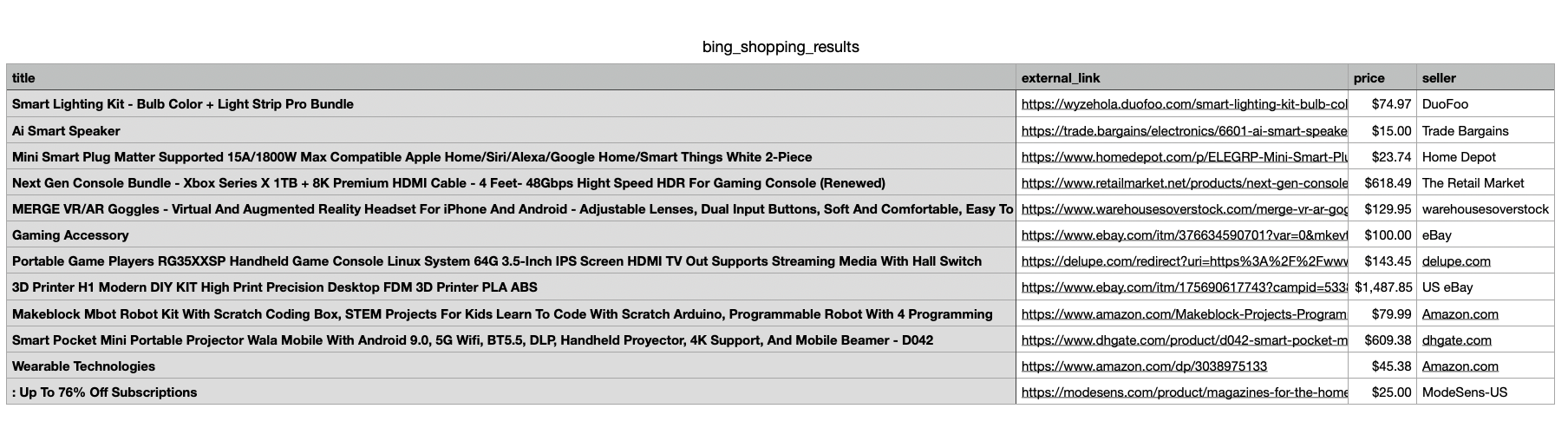
Conclusion
I hope this blog post was helpful in understanding how to you can use SerpApi's Bing Copoliot API to generate high quality, trending gift ideas and use SerpApi's Bing Shopping API to instantly find the best prices and actual buying links for those products.
You can find all the code used in this blog post here:
 sonika-serpapi
If you have any questions, don't hesitate to reach out to me at sonika@serpapi.com.
Relevant Links
Documentation
Related Posts
 James Collins
 Andy L