 Google Local Services API
 Google Travel Explore API
 Baidu Search API
 Bing Search API
 DuckDuckGo Search API
 eBay Search API
 Naver Search API
 OpenTable Reviews API
 The Home Depot Search API
 Tripadvisor Search API
 Walmart Search API
 Ruby
Ruby
 Golang
 .Net
.Net
 MCP
MCP
 C++
C++

If you're tracking competitors, one of the most valuable signals is when they launch a new page and it shows up in search results. New pages that companies add often reveal:
- New product launches
- New feature pages
- New landing pages targeting keywords
- New content marketing strategies
Manually checking for changes can take quite some time, and repetitive work as pages are updated often. Instead of manually checking competitor sites, you can automate this process using:
- SerpApi (Google Search API)
- Slack Webhook
- Python's schedule library
In this tutorial, we’ll build a simple system that checks search results using the SerpApi's Google Search API to detect when a new competitor domain URL is noticed in search results and then sends an alert to a Slack channel.
Setting Up
This system will work in four steps:
- Send in a request to SerpApi's Google Search API with a relevant query
- Extract all indexed pages
- Compare them with previously stored URLs
- Send alerts to Slack for new pages detected
We'll run this job every day using the Python schedule library. You can set the schedule as you like.
To start, you’ll need a SerpApi account, a Slack workspace (and a Slack Incoming Webhook URL), and Python installed.
Create a Slack Webhook
- Go to Slack → Apps
- Search for Incoming Webhooks
- Create a webhook for your channel
You will get a Webhook URL like: https://hooks.slack.com/services/XXXX/XXXX/XXXX
Save this, as we'll need it later.
Code Related Setup Steps
For this tutorial, we're going to use SerpApi's new Python library to get results from Google Search.
- Install SerpApi's new Python
serpapilibrary, the python-dotenv library, and the schedule library in your environment:
pip install serpapi python-dotenv scheduleserpapi is our new Python library. You can use this library to scrape search results from any of SerpApi's APIs.More About Our Python Libraries
We have two separate Python libraries serpapi and google-search-results, and both work perfectly fine. We are in the process of deprecating google-search-results, so I recommend using serpapi as that is our latest python library.
You may encounter issues if you have both libraries installed at the same time. If you have the old library installed and want to proceed with using our new library, please follow these steps:
- Uninstall
google-search-resultsmodule from your environment. - Make sure that neither
serpapinorgoogle-search-resultsare installed at that stage. - Install
serpapimodule, for example with the following command if you're usingpip:pip install serpapi
- To begin scraping data, create a free account on serpapi.com. You'll receive 250 free search credits each month to explore the API. Get your SerpApi API Key from this page.
- [Optional but Recommended] Set your API key in an environment variable, instead of directly pasting it in the code. Refer here to understand more about using environment variables. For this tutorial, I have saved the API key in an environment variable named "SERPAPI_API_KEY" in my .env file.
- [Optional but Recommended] Set up your Slack Webhook URL as an an environment variable as well. In your
.envfile, this will look like this:
SERPAPI_API_KEY=<YOUR PRIVATE API KEY>
SLACK_WEBHOOK_URL=<YOUR PRIVATE WEBHOOK URL>- Import classes needed for this project at the beginning of your code file and set up some constants we'll use later on:
import os
import serpapi
import requests
import json
import schedule
import time
from dotenv import load_dotenv
load_dotenv()

SERPAPI_KEY = os.environ["SERPAPI_API_KEY"]
DOMAIN = "company.com"
DB_FILE = "known_urls.json"
SLACK_WEBHOOK = os.environ["SLACK_WEBHOOK_URL"]
Fetch All Indexed Pages For Competitor
Let's create a script competitor_page_monitor.py where we use SerpApi 's Google Search API to get all pages which show up in search results for a particular company.
def get_all_pages():
   urls = set()
   client = serpapi.Client(api_key=apikey)

   for start in range(0, 100, 10):

       results = client.search({
           'engine': 'google',
           "q": f"site:{DOMAIN} -site:forum.{DOMAIN} -site:{DOMAIN}/blog -site:{DOMAIN}/careers -site:{DOMAIN}/release-notes",
           "start": start,
       })

       if "organic_results" not in results:
           break

       for result in results["organic_results"]:
           urls.add(result["link"])

   return urls
site:company.com -site:forum.company.com -site:company.com/blog -site:company.com/careers -site:company.com/release-notes" to ignore the blog, forum and career pages.Conversely, you can also choose to target specific areas such as blogs and get notified what exactly your competitors are writing about publicly.
Feel free to change the maximum pagination as you'd like. I've set start to a max value of 100 which means we'll see data from up to 10 pages (since each page usually has 10 results).
Now that we have all the pages for that domain, we need to find the newly added ones since our last check.
Save Known URLs
For the purpose of this example, let's assume the file known_urls.json stores all previously stored pages in JSON format. So, we now need to compare with the URLs in this file to find newly added ones.
known_urls.json file will be empty. Next time, when you use the script, you'll only see the new ones added. Let's write some code to load the URLs from the file and save the new URLs to the file which we can use later on:
def load_urls():
    try:
        with open(DB_FILE) as f:
            return set(json.load(f))
    except:
        return set()

def save_urls(urls):
     with open(DB_FILE, "w") as f:
          json.dump(list(urls), f)
Send Slack Alerts
Let's write a simple function to send slack alerts. We'll use this later.
SLACK_WEBHOOK = "YOUR_SLACK_WEBHOOK"

def send_slack_alert(urls):
   if urls:
       message = {
           "text": f"🚨 New competitor pages detected: \n{'\n'.join(urls)}"
       }
   else:
       message = {
           "text": "✅ No new competitor pages detected."
       }
   requests.post(SLACK_WEBHOOK, json=message)
SLACK_WEBHOOK variable. It looks something like this: https://hooks.slack.com/services/XXXX/XXXX/XXXX.Detect New Pages
Now let's work on code to specifically detect new pages by looking at already stored ones in known_urls.json.
def check_new_pages():
    print("Checking for new pages...")

    known_urls = load_urls()
    current_urls = get_all_pages()
    new_pages = current_urls - known_urls

    send_slack_alert(new_pages)

    new_seen_set = known_urls.union(current_urls)
    save_urls(new_seen_set)
Run the Bot on a Schedule
Now the only thing left is to schedule this so it runs once everyday.
To do this, we'll use Python's schedule library.
schedule.every().day.at("09:00").do(check_new_pages)
print("Competitor monitoring bot running...")

while True:
    schedule.run_pending()
    time.sleep(60)
To keep the tasks running even after you close your terminal or IDE, you can choose to run the script as a persistent background process. For linux/macOS, use nohup or disown to detach the script from the terminal, e.g., python3 script.py & disown.
What The Alert Looks Like
Once this is set up, your Slack channel will receive alerts like this once a day:
🚨 New competitor pages detected:
https://competitor.com/products/ai-assistant
https://competitor.com/features/fast-mode
I ran the code twice for the domain serpapi.com. The first time, I got some new pages and the next time, since all the webpages were already seen, I got a message letting me know that no new pages were detected. These were the alerts I received:
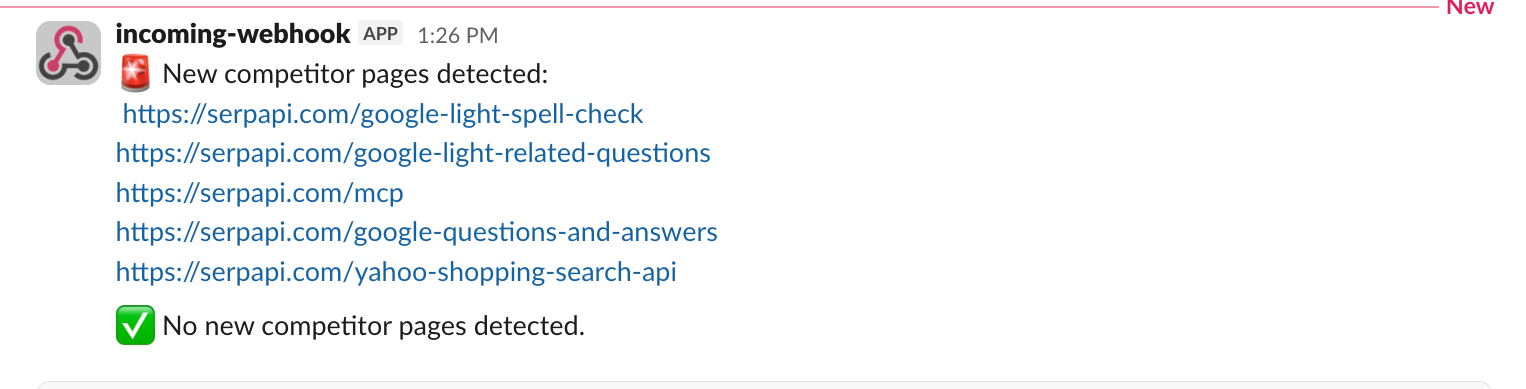
This lets you instantly spot new product launches, new feature releases, and new landing pages which are showing up in search results for any company.
Conclusion
With about 50 lines of Python, you now have a bot that monitors all indexed pages of a competitor, detects new launches, and sends instant Slack alerts.
This is one of the simplest ways to build a competitive intelligence system using search data. You can also use this tutorial to setup any other recurring tasks and send notifications to the slack channel.
You can find the entire code here:
 serpapi
Feel free to reach out to us at contact@serpapi.com for any questions.