 Google Local Services API
 Google Travel Explore API
 Baidu Search API
 Bing Search API
 DuckDuckGo Search API
 eBay Search API
 Naver Search API
 OpenTable Reviews API
 The Home Depot Search API
 Tripadvisor Search API
 Walmart Search API
 Ruby
Ruby
 Golang
 .Net
.Net
 MCP
MCP
 C++
C++

If you’re using SerpApi with more than one person (or more than one environment), the “one shared API key” approach gets messy fast.
- Someone rotates a key and breaks production.
- Finance needs invoices, but you don’t want to share your login.
- You want to track usage by project, but everything is mixed together.
That’s why we launched the Team Management feature: it helps you invite teammates, separate access, and keep visibility—without turning account management into a full-time job.
Once you're logged in, you can access our team feature page.
What can you do
1) Use multiple API keys (per person or per environment)
Instead of one key for everyone, you can generate unique API keys for each team member or even for each environment (like dev, staging, prod). That keeps things cleaner and safer.
2) Share one account (plans + billing stay in one place)
Your team can collaborate under a single shared account—so searches, plans, and billing don’t end up scattered across separate personal accounts.
3) Monitor usage by team member
When each person (or environment) has their own API key, you can see usage more clearly and track performance metrics like response times.
4) Transfer ownership when roles change
When someone leaves the company or switches responsibilities, you can transfer ownership to another team member, so the account doesn’t get stuck with one person forever.
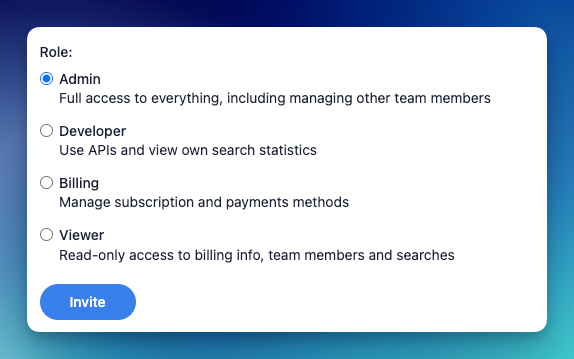
Roles: give the right access to the right people
Team Management is easier when people only see (and control) what they need. Here are the roles available:
Admin
Full access to everything, including managing other team members.
Best for: team owners, engineering leads, whoever manages account settings.
Developer
Use APIs and view their own search statistics.
Best for: engineers building and testing integrations.
Billing
Manage subscription and payment methods.
Best for: finance/ops teammates who handle invoices and payments.
Viewer
Read-only access to billing info, team members, and searches.
Best for: stakeholders who need visibility but shouldn’t change anything.
Common setups (simple and practical)
Setup A: One product team
- Admin: Engineering lead
- Developers: Engineers
- Billing: Finance
- Viewer: PM or founder
Setup B: Multiple environments
- Create separate API keys for
dev,staging, andprod - Give developers access to
dev/staging - Keep
prodtightly controlled (admin-owned)
Setup C: Agency/client work
- One team account
- Separate keys per client/project*
- Viewer role for clients who want transparency
*At the moment, all team members will use the same credits resource, so you need to create another layer to distribute or control the credit for each clients.
I hope it helps. Just let us know if your team has any other needs! Please reach out to contact@serpapi.com