Google Local Services API
 Google Travel Explore API
 Baidu Search API
 Bing Search API
 DuckDuckGo Search API
 eBay Search API
 Naver Search API
 The Home Depot Search API
 Tripadvisor Search API
 Walmart Search API
 Ruby
Ruby
 Golang
 .Net
.Net
 C++
C++

OpenTable is one of the most influential platforms for restaurant reservations and diner feedback. Whether you're doing sentiment analysis, building a restaurant discovery app, or tracking customer satisfaction, accessing review data can be incredibly valuable.
SerpApi’s OpenTable Reviews API allows you to scrape OpenTable reviews reliably and at scale.
In this post, we’ll walk through:
- What the SerpApi OpenTable Reviews API is and what data you can extract
- How to integrate it using Python
- Pagination and Localization
Why Use SerpApi?
SerpApi streamlines the process of web-scraping. We take care of proxies and any CAPTCHAs that might be encountered, so that you don't have to worry about your searches being blocked. If you were to implement your own scraper using tools like BeautifulSoup and Requests, you'd need to determine your own solution for this. SerpApi manages the intricacies of scraping and returns structured JSON results. This allows you to save time and effort by avoiding the need to build your own OpenTable scraper or rely on other web scraping tools.
We also do all the work to maintain all of our parsers and adapt them to respond to changes on search engines. This is important, as search engines like OpenTable are constantly experimenting with new layouts, new elements, and other changes. By taking care of this for you on our side, we eliminate a lot of time and complexity from your workflow.
About the OpenTable Reviews API
OpenTable Reviews API returns structured review data from OpenTable restaurant pages.
The API returns structured review fields such as Reviewer name, Review date, Attached Images, Rating, Text content, Rating and AI summary, and Pagination tokens.
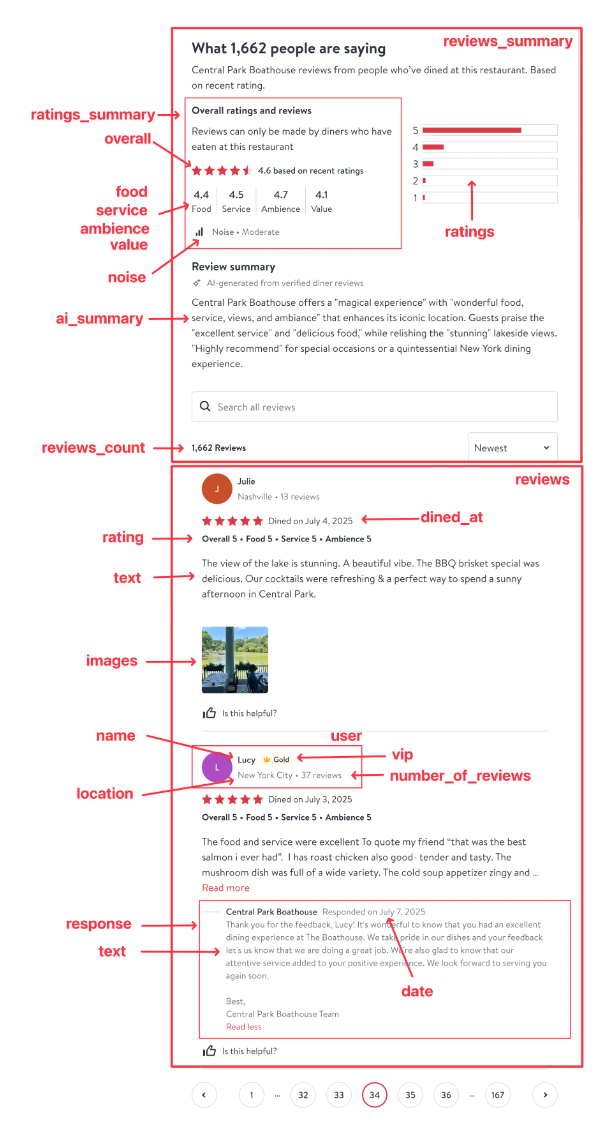
You can try it out in our playground, where you can visualize the response with various parameters:
 SerpApi
An Example Use Case
Let's write some code to extract OpenTable reviews for Nobu Palo Alto and write them to a CSV.
Setup your environment
Ensure you have the necessary libraries installed.
pip install google-search-resultsgoogle-search-results is our Python library. You can use this library to scrape search results from any of SerpApi's APIs.More About Our Python Libraries
We have two separate Python libraries serpapi and google-search-results, and both work perfectly fine. However, serpapi is a new one, and all the examples you can find on our website are from the old one google-search-results. If you'd like to use our Python library with all the examples from our website, you should install the google-search-results module instead of serpapi.
For this blog post, I am using google-search-results because all of our documentation references this one.
You may encounter issues if you have both libraries installed at the same time. If you have the old library installed and want to proceed with using our new library, please follow these steps:
- Uninstall
google-search-resultsmodule from your environment. - Make sure that neither
serpapinorgoogle-search-resultsare installed at that stage. - Install
serpapimodule, for example with the following command if you're usingpip:pip install serpapi
Get your SerpApi API key
To begin scraping data, first, create a free account on serpapi.com. You'll receive 250 free search credits each month to explore the API.
- Get your SerpApi API Key from this page.
- [Optional but Recommended] Set your API key in an environment variable, instead of directly pasting it in the code. Refer here to understand more about using environment variables. For this tutorial, I have saved the API key in an environment variable named "SERPAPI_API_KEY" in my .env file.
Using OpenTable Reviews API
First, we'll write a simple function to get reviews from the OpenTable Reviews API:
def get_opentable_reviews(place_id):
    params = {
        "engine": "open_table_reviews",
        "place_id": place_id,
        "api_key": os.environ["SERPAPI_API_KEY"],
    }

    results = GoogleSearch(params).get_dict()
    return results.get("reviews", [])
Writing Results To a CSV
First, we need to get the place_id for Nobu Palo Alto. This identifier can be found in the URL of the restaurant's page on OpenTable, immediately following /r/.
For Nobu Palo Alto, the URL is https://www.opentable.com/r/nobu-palo-alto , and so the ID is nobu-palo-alto.
Then, we can write a simple script to call this function and write the reviews to CSV:
if __name__ == "__main__":
    place_id = "nobu-palo-alto"
    output_file = "opentable_reviews.csv"

    header = ["submitted_at", "id", "user_name", "rating", "content"]

    with open(output_file, "w", encoding="UTF8", newline="") as f:
        writer = csv.writer(f)
        writer.writerow(header)

        reviews = get_opentable_reviews(place_id)
        for r in reviews:
            writer.writerow([
                r.get("submitted_at", ""),
                r.get("id", ""),
                r.get("user", {}).get("name", ""),
                r.get("rating", {}).get("overall", ""),
                r.get("content", "")
            ])
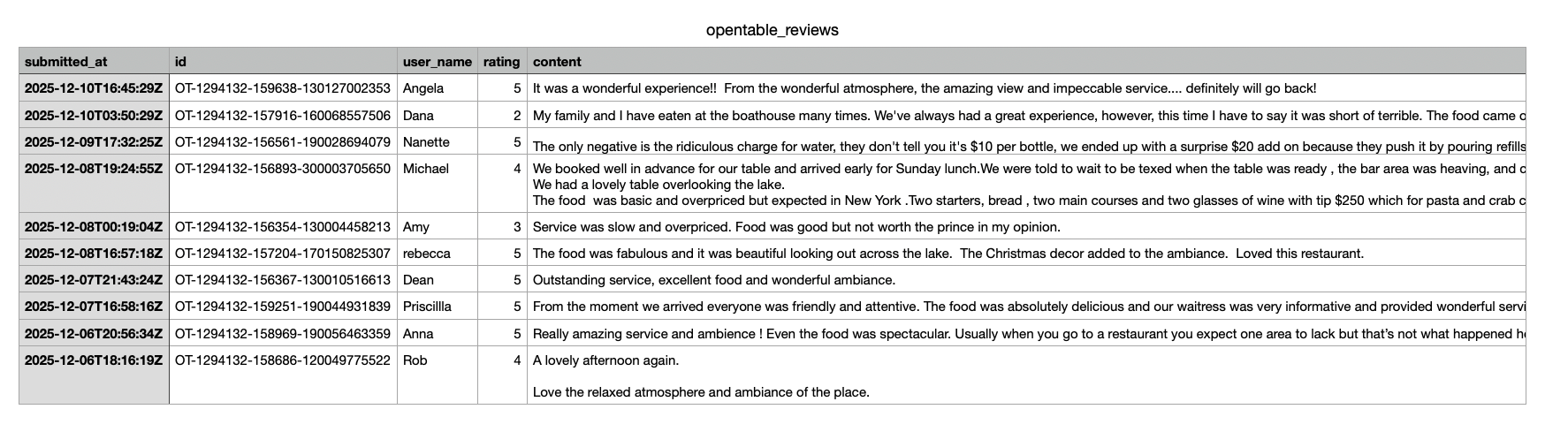
This block runs only when the script is executed directly. We set the place_id and create a new CSV file with the appropriate header. We then fetch the OpenTable reviews using get_opentable_reviews(), and for each review, we write a row to the CSV. We safely extract fields like the submission date, review ID, username, rating, and content so the script won’t break if any data is missing.
Results
Here's what the results look like:
Pagination with page
OpenTable has more reviews than those served on the first page with our Reviews API. We can use the parameter page for further data retrieval and page navigation.
This parameter defines the page number. 1 (default) is the first page of 10 results, 2 is the 2nd page, etc. To get more results beyond the ones we just got, you can make the same request with page set to 2, 3 and so on depending on the number of reviews available and the number of reviews you want to retrieve.
Localization
The open_table_domain parameter defines the OpenTable domain to use. You can localize the request if you are looking for results from another domain for Opentable besides www.opentable.com.
You can view the OpenTable domains page for a full list of supported OpenTable domains.
Conclusion
Using the SerpApi OpenTable Reviews API simplifies the process of collecting high-quality, structured review data. Instead of spending time building and maintaining a fragile scraper, you get to focus on the valuable part: analyzing the customer sentiment and insights hidden within the reviews.
I hope this blog post was helpful in understanding how to you can write a simple script to scrape reviews from OpenTable. If you have any questions, don't hesitate to reach out to me at sonika@serpapi.com.
Relevant Links
Documentation
Related Posts
Scrape reviews from other search engines like Google Maps and Yelp:
 Hilman Ramadhan
 Hilman Ramadhan
 Sonika Arora