 Google Local Services API
 Google Travel Explore API
 Baidu Search API
 Bing Search API
 DuckDuckGo Search API
 eBay Search API
 Naver Search API
 The Home Depot Search API
 Tripadvisor Search API
 Walmart Search API
 Ruby
Ruby
 Golang
 .Net
.Net
 C++
C++

SerpApi is the most performant, production-ready search results extraction API on the market. By using SerpApi, you're already skipping months of infrastructure setup, proxy management, handling request interruptions and verification challenges, and parsing headaches. You've made the sensible decision to offload the heavy lifting of web scraping to a team with industry-leading expertise and years of experience overcoming these challenges. SerpApi is also ahead of the competition when it comes to fast response times, high success rates, and detail rich results - which means you are too.
However, if you want to minimize latency for your live integration, perform bulk data collection, or optimize based on just the exact information you need for your use case, SerpApi includes a number of features to further enhance performance. In this guide, we'll walk through everything you can do to streamline your integration for your specific needs when scraping Google (and other search engines) with SerpApi.
- Light APIs offer a quick win for minimizing latency
- Enable Ludicrous Speed / Max for the best real-time UX
- Use JSON Restrictor to reduce payload and parsing time
- Use async=true to maximize throughput for batch jobs
Why Performance Matters in SERP Scraping
Whether you're powering a live user experience or collecting search data for later processing, response time is always a critical factor. A performant scraping API can make the difference between a smooth UX and a sluggish one, or between a fast, predictable data pipeline and one that constantly backs up under load.
Improved performance also has a direct impact on infrastructure cost. Avoiding timeouts, reducing latency, and minimizing payload size all help reduce the amount of work your systems must do. Better SERP performance means your workers stay busy doing useful work instead of waiting, retrying, or parsing oversized responses. By optimizing for speed and efficiency with SerpApi, you can reduce CPU usage, lower worker counts, and ultimately shrink your cloud compute bill.
Many SerpApi competitors, and nearly all DIY solutions can’t handle high concurrency or fast throughput without breaking, throttling, or making the user manage complex proxy infrastructure. SerpApi eliminates that operational burden by giving you high-concurrency, low-latency infrastructure that works reliably out of the box.
-Requesting full payloads when only a subset is needed
-Using synchronous requests for large batch jobs
-Not matching speed mode to use case
-Using full (standard) APIs when a light API would suffice
Light APIs
For many use cases, the cheapest, easiest way to improve your performance with SerpApi is to use one of our Light APIs. Many of the APIs (Google Search, Google Shopping, Google Images, Google Videos, Google News, and DuckDuckgo Search) have a light version that can be used to retrieve the most crucial elements of search results at faster speeds. This includes:
- Google Light Search API
- Google Shopping Light API
- Google Images Light API
- Google Videos Light API
- Google News Light API
- DuckDuckgo Light API
How to Use Light APIs
All SerpApi plans include access to all APIs, so there is no additional cost for switching to the light version of an API. Naming conventions and JSON structure are also by and large the same, so this change requires minimal adjustment to your code.
You can use a light API just by updating the engine parameter to specify you want the light version of the engine. Consult the documentation to ensure the correct parameter value, but it's usually [[engine]]_light.
To switch to the Google Search Light API, just replace engine: google with engine: google_light.
Here's what a GET request might look like:
https://serpapi.com/search.json?engine=google_light&q=Coffee&location=Austin,+Texas,+United+States&google_domain=google.com&hl=en&gl=usOr in Python using our supported library:
from serpapi import GoogleSearch

params = {
  "engine": "google_light",
  "q": "Coffee",
  "location": "Austin, Texas, United States",
  "google_domain": "google.com",
  "hl": "en",
  "gl": "us",
  "api_key": "YOUR_API_KEY"
}

search = GoogleSearch(params)
results = search.get_dict()
organic_results = results["organic_results"]
Why use a Light API?
The "Light" versions of SerpApi's APIs retrieve only basic elements from the search results pages, sacrificing some of the more feature rich results in order to improve response times and overall performance.
You should use the light varient of an API if you don't care about more specialized result types, and only need the basic results. Details vary by API, so it's always best to consult the documentation or try an example in the Playground to determine if you should switch to the light endpoint.
For example, if you are using the Google Search API, and you are only interested in the Organic Results, you can significantly improve response times by switching to the Google Light Search API.
At the time of writing, the average response time for the Google Light Search API is 1.38 seconds, compared to 2.29 seconds for the regular Google Search API.
You can try an example of the Google Light Search API here, and determine whether the data points your use case requires are included:
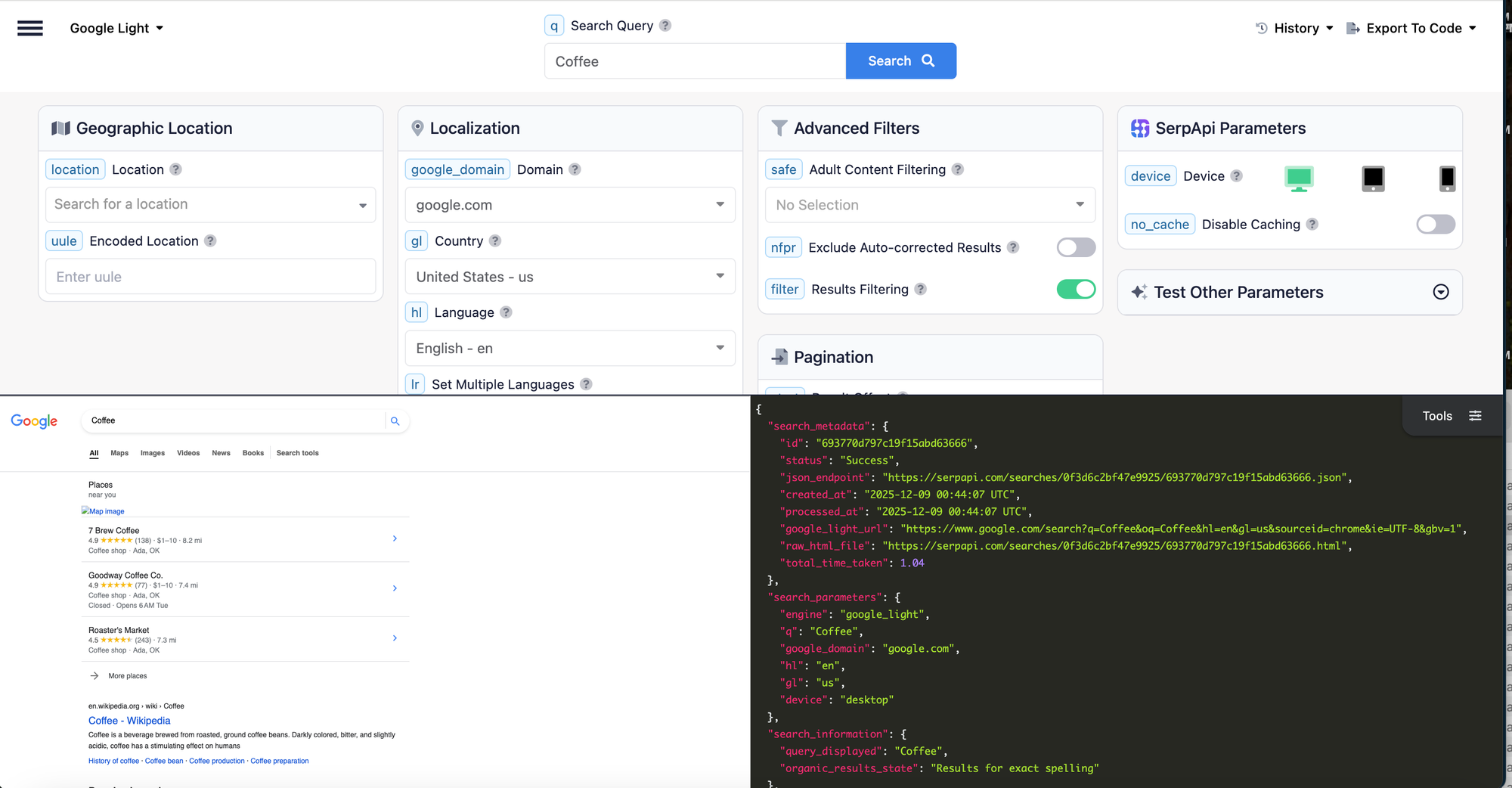
To call the Google Light Search API instead of the standard Google Search API, just change the engine parameter from google to google_light.
Optimize for your Use Case by Selecting a Speed Mode
You can directly boost performance by increasing the server resources used to perform each search. SerpApi offers direct control over this via speed mode options, which include Best Effort, Ludicrous Speed, and Ludicrous Speed Max.
Best Effort
Best Effort speed mode is currently enabled on all accounts by default. This is the most budget friendly option, if having the fastest responses times is less importatn for your use case.
Ludicrous Speed
Ludicrous Speed provides faster response times by using twice as many server resources per request. To explain more about how this works, for each request sent to our APIs, SerpApi creates multiple parallel requests and uses the fastest returning option to complete the search and return your results. Ludicrous Speed creates even more parallel requests than Best Effort, leading to much faster response times. The last official benchmark demonstrated speed improvements of 2.2x on average, and 4.2x faster for p99.
Ludicrous Speed Max
Ludicrous Speed Max uses the same strategy as Ludicrous Speed, but utilizes twice again as many resources (4 times what is used for Best Effort searches) to accomplish blazing fast response times. This is ideal for real-time, user facing integration scenarios, where you need to ensure your customer is never left hanging waiting for a search to complete. Our last official benchmark showed Ludicrous Speed Max on average returns 9.6% faster than Ludicrous Speed, and 35.4% faster than p99 ratings.
How to Enable Ludicrous Speed or Ludicrous Speed Max
Ludicrous Speed and Ludicrous Speed Max are easy to enable and don't require any changes to your code base. They can be activated from the Change Plan page, after signing in to your SerpApi account.

Upgrade to Ludicrous Speed any time.
JSON Restrictor
Another simple but highly effective way to improve performance is to reduce the size of the response payload using the JSON Restrictor. By default, SerpApi returns a comprehensive JSON response that includes all available data for a search result. While this is useful for flexibility, many use cases only require a subset of that data.
The json_restrictor parameter enables you to limit the response to only the fields you need for your use case. Besides basic convenience, this can reduce:
- response size
- network transfer time
- JSON parsing overhead
For example, if you only need organic results, you can restrict the response to just that portion of the JSON rather than retrieving the full dataset.
This is especially impactful at scale, where even small reductions in payload size can significantly decrease total processing time and infrastructure usage.
How to Use the JSON Restrictor
The JSON Restrictor can be enabled by using the json_restrictor parameter in your requests. It uses syntax similar to jq to allow you to specify specific fields you want to be included in the response.
At it's simplest, you can return just one element type:
json_restrictor: organic_results
But the jq-like syntax also allows for much more complex speficications.
You can find a straightforward overview of the JSON Restrictor and it's supported operators here:


Async Requests
For large scale bulk data collection use cases, where real-time responses are not necessary, our asynchronous request mode is the most effective way to maximize efficiency.
With async enabled, searches are queued and processed in the background rather than requiring your application to wait for each response. This allows you to:
- send large batches of requests in parallel
- avoid blocking your application
- dramatically increase total throughput
How to Enable Async Processing
To make your requests asynchronously, simply add async=true as a URL parameter. You will then receive a response right away containing only the search_metadata array. Collect the search_metadata.id for each search in a batch. After the batch completes, you can request the full responses using the Search Archive API.
Use Cases
Here’s a quick reference to help guide your setup to optimize based on your needs:
Use Case Category #1: Real-Time User-Facing Application
Examples include chatbots, dashboards, and live search features, but this applies to any use case where the API call is triggered as part of a realtime user interaction, and your user is expecting an immediate response.
- Ludicrous Speed / Ludicrous Speed Max — minimize latency and improve consistency
- Light APIs — faster responses when full data isn’t required
- JSON Restrictor — reduce payload size for additional latency gains
Use Case Category #2: High-Volume Data Collection
Examples include keyword tracking, SEO monitoring, and large-scale data pipelines.
- Async requests (
async=true) - maximize throughput via parallel processing - Light APIs - improve speed and efficiency per request when full data isn’t required
- JSON Restrictor - reduce processing overhead at scale
Use Case Category #3: Cost-Optimized Workflows
Use this approach for internal tools, batch jobs, and non-time-sensitive use cases where you want to minimize infrastructure and compute usage.
- Best Effort speed mode - lowest cost option
- Light APIs - faster responses with less compute when full data isn’t required
- JSON Restrictor - minimize payload and parsing costs
Conclusion
Using the options discussed above, you can tailor SerpApi to deliver exactly the level of performance your use case demands, whether you're optimizing for latency, throughput, or cost.