 Google Local Services API
 Google Travel Explore API
 Baidu Search API
 Bing Search API
 DuckDuckGo Search API
 eBay Search API
 Naver Search API
 OpenTable Reviews API
 The Home Depot Search API
 Tripadvisor Search API
 Walmart Search API
 Ruby
Ruby
 Golang
 .Net
.Net
 MCP
MCP
 C++
C++

Introduction
This is the third post in our series about the retired Bing Search APIs and you may be searching for a suitable replacement.
The first post covered how to transition to our Bing Search API web search, while this post will cover how to transition to our Bing Images API.
Many of the initial steps will be the same as in the post on web search, so you will be directed to reference portions of the earlier post from time to time.
Step 1: SerpApi Account
If you don't already have an account with us, your first step is going to be signing up for an account (we offer a free account with 250 free searches per month).
Once you have signed up and verified your account, you will need to take note of your SerpApi API key found on your dashboard so that you can use it in the following steps.
Step 2: Endpoint and Authentication
You can follow the entirety of the Bing Web Search: Endpoint and Authentication step, but instead of setting 'engine': 'bing' you will need to set 'engine': 'bing_images' to ensure you're using the Bing Images API.
The following is an overly simplified example of the changes you would need to make:
  # environment
- subscription_key = 'AZURE-SUBSCRIPTION-KEY'
+ subscription_key = 'SERPAPI-API-KEY'
- endpoint = 'https://api.bing.microsoft.com/v7.0/images/search'
+ endpoint = 'https://serpapi.com/search.json'

  # search params
  query = 'Mt Rainier'
  mkt = 'en-US'
- headers = { 'Ocp-Apim-Subscription-Key': subscription_key }
- params = { 'q': query, 'mkt': mkt }
+ params = { 'engine': 'bing_images', 'q': query, 'mkt': mkt, 'api_key': subscription_key }

  # request
  response = requests.get(endpoint, headers=headers, params=params)
  response.raise_for_status()

  print("\nJSON Response:\n")
  pprint(response.json())
Step 3: Header Functionality
The official Bing Image Search API uses the same headers that the official Bing Search API (web) does, so you can follow the Bing Web Search: Header Functionality step in its entirety.
Step 4: Query Parameters
Much like the Bing Search API, the following query parameters behave the same in both the official API and our API, so you don't need to adjust these when transitioning from the Bing Images API:
q- The search query termmkt- The market for the search resultscc- The country for the search resultscount- The number of results to returnsafeSearch- The mode to use for safe search
The following query parameter behaves the same, but has a different name in our API:
offset- The number of results to skip before returning search results. This is calledfirstin our API
The following query parameters have the same name in our API, but use slightly different values:
aspect- Filters images by named aspect ratios.- Value
Squarebecomessquare - Value
Widebecomeswide - Value
Tallbecomestall - Value
Allin the official API is the same as not providing theaspectparameter at all in our API
- Value
license- Filters images by license type.- Value
AnybecomesType-Any - Value
PublicbecomesL1 - Value
SharebecomesL2_L3_L4_L5_L6_L7 - Value
ShareCommerciallybecomesL2_L3_L4 - Value
ModifybecomesL2_L3_L5_L6 - Value
ModifyCommerciallybecomesL2_L3 - Value
Allin the official API is the same as not providing thelicenseparameter at all in our API
- Value
The following query parameters can be supported through alternate means in our API:
color- Filters images by colors used. This can be used with thecolor2parameter in our API with the following values:- Value
ColorOnlybecomescolor - Value
Monochromebecomesbw - Value
BlackbecomesFGcls_BLACK - Value
BluebecomesFGcls_BLUE - Value
BrownbecomesFGcls_BROWN - Value
GraybecomesFGcls_GRAY - Value
GreenbecomesFGcls_GREEN - Value
OrangebecomesFGcls_ORANGE - Value
PinkbecomesFGcls_PINK - Value
PurplebecomesFGcls_PURPLE - Value
RedbecomesFGcls_RED - Value
TealbecomesFGcls_TEAL - Value
WhitebecomesFGcls_WHITE - Value
YellowbecomesFGcls_YELLOW
- Value
size- Filters images by named sizes. This can be used with theimagesizeparameter in our API with the following values:- Value
Smallbecomessmall - Value
Mediumbecomesmedium - Value
Largebecomeslarge - Value
Wallpaperbecomeswallpaper - Value
Allin the official API is the same as not providing theimagesizeparameter at all in our API
- Value
imageType- Filters images by named types. This can be used with thephotoparameter in our API with the following values:- Value
AnimatedGifbecomesanimatedgif - Value
AnimatedGifHttpsbecomesanimatedgifhttps - Value
Clipartbecomesclipart - Value
Linebecomeslinedrawing - Value
Photobecomesphoto - Value
Shoppingbecomesshopping - Value
Transparentbecomestransparent
- Value
imageContent- Filters images by their content. This can be used with thefaceparameter in our API with the following values:- Value
Facebecomesface - Value
Portraitbecomesportrait
- Value
freshness- Filters images by their age (how long since Bing has discovered them). This can be used with theageparameter in our API with the following values:- Value
Daybecomeslt1440(past 24 hours) - Value
Weekbecomeslt10080(past 7 days) - Value
Monthbecomeslt43200(past month) - Year (unsupported by official API) becomes
lt525600(past year)
- Value
The following image size related query parameters are unsupported in our API but you can achieve a similar result programmatically by filtering on the size property (e.g. "1000x300") found on all items within the images_results response array:
height- Exact height of image results. You will need to filter by matching the right side of thexin thesizevalue exactlyminHeight- Minimum height of image results. You will need to filter by ensuring the right side of thexin thesizevalue is equal to or greater than your desired minimum heightmaxHeight- Maximum height of image results. You will need to filter by ensuring the right side of thexin thesizevalue is lesser than or equal to your desired maximum heightwidth- Exact width of image results. You will need to filter by matching the left side of thexin thesizevalue exactlyminWidth- Minimum width of image results. You will need to filter by ensuring the left side of thexin thesizevalue is equal to or greater than your desired minimum widthmaxWidth- Maximum width of image results. You will need to filter by ensuring the left side of thexin thesizevalue is lesser than or equal to your desired maximum width
The following query parameter is unsupported in our API but you can achieve a similar result using another supported parameter:
setLang- Language to use for the interface returned. You can not directly set this in our API, instead we infer it from themktcode provided
The remaining query parameters relate to the file size of images in the results and are unsupported in our API:
minFileSize- Minimum file size for image resultsmaxFileSize- Maximum file size for image results
If filtering on file size is a requirement for you, then you will need to programmatically fetch each image file using the original property found on all items within the image_results response array and use a HEAD request to examine the Content-Length header value or download each file in its entirety to filter; neither of which will be particularly difficult, however, they may introduce undesirable complexity to your system.
Example Query Parameter Changes
Here is an example to help illustrate where a variety of query parameters have been used with the official API:
params = {
  'q': 'Bing Image API',
  'mkt': 'en-US',
  'offset': 10,
  'count': 5,
  'freshness': 'Month',
  'color': 'Blue',
  'maxWidth': 800,
  'maxHeight': 600,
}
All of the above query parameters, with the exception of maxWidth and maxHeight can be used as-is or ported to use with our API.
Here are the changes that would need to be made to the example to achieve this:
  params = {
    'q': 'Bing Image API',
    'mkt': 'en-US',
-   'offset': 10,
+   'first': 10,
    'count': 5,
-   'freshness': 'Month',
+.  'age': 'lt43200',
-   'color': 'Blue',
+.  'color2': 'FGcls_BLUE',
-   'maxWidth': 800,
-   'maxHeight': 600,
  }
Step 5: Response Format
The responses from the official Bing Image Search API did have the potential for significantly more complexity in them when compared to our Bing Images API and, as such, the changes to the response format handling can involve a bit of effort depending on what you were using from the official APIs when they were available.
I'm going to cover the primary use case example in this section for the sake of brevity; if you were relying on portions of the response not directly related to the image results such as suggested searches, refined searches, or related searches, you can browse through our Bing Images API documentation to see how it differs.
Image Results
Returned in the value key (an array of image results) in the official API, our API returns the equivalent in the top level image_results key (an array of image results).
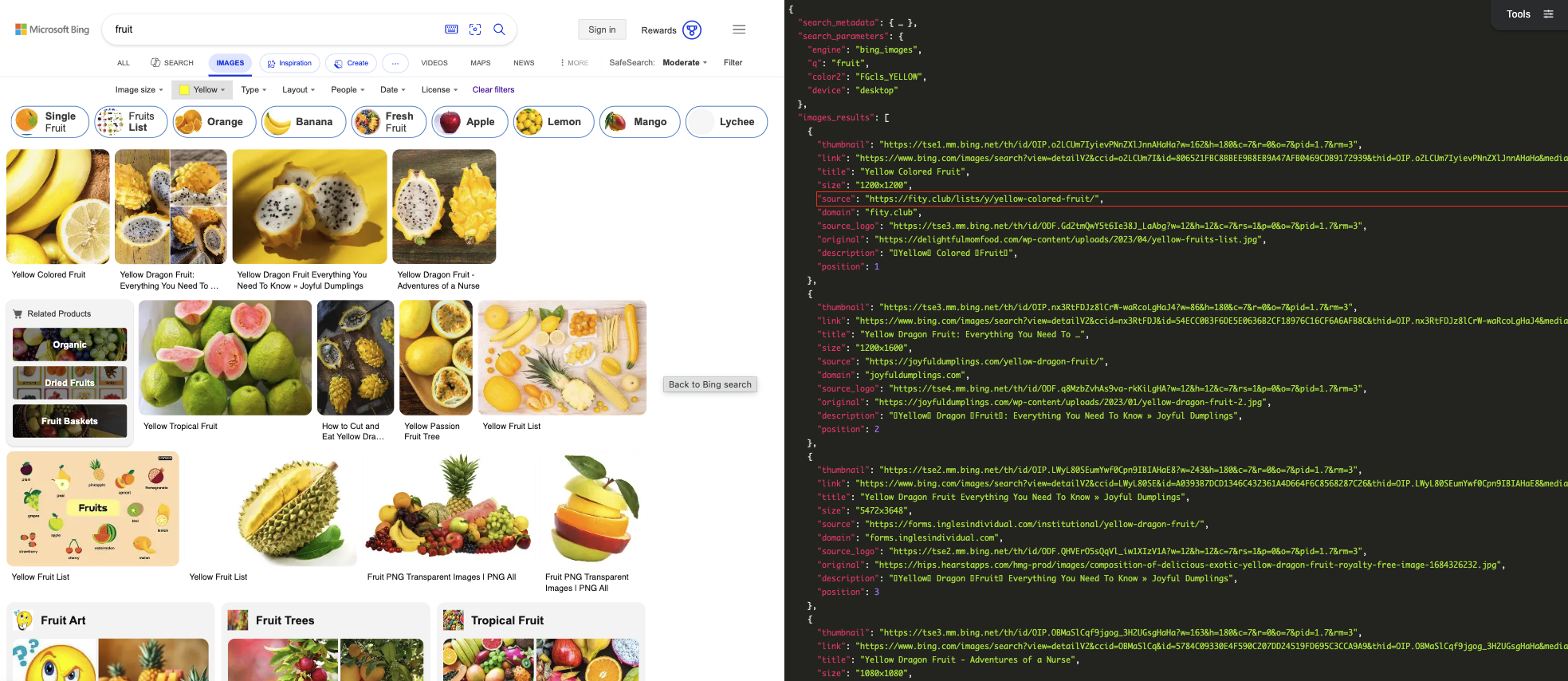
The Bing Images search URL that would be found under webSearchUrl in the official API can be found under search_metadata.bing_images_url in our API.
Image Result Mapping
The following attributes on the web page result objects can be mapped and used without change:
webSearchUrl- URL for the Bing Images search. Becomeslinkon our APIname- Name of the web page. Becomestitleon our APIthumbnailUrl- URL to the image thubmnail. Becomesthumbnailon our APIcontentUrl- URL to the full image. Becomesoriginalon our APIhostPageUrl- URL to the page the image was found on. Becomessourceon our API
The following attributes can be extracted using other properties available in our API:
width- Width of the full image. Can be extracted by selecting the left side of thexfrom thesizeproperty in our API (e.g."800x600"would bewidthof800)height- Height of the full image. Can be extracted by selecting the right side of thexfrom thesizeproperty in our API (e.g."800x600"would beheightof600)
The following attributes are not available in our API and have no equivalent:
datePublished- ISO 8601 timestamp of when the image was publishedisFamilyFriendly- Boolean flag to indicate if the image is family friendly or notcontentSize- File size of the full image (e.g."125000 B")encodingFormat- The file type of the image (e.g."jpeg"). May be possible to infer via the file extension in the image URL found in theoriginalpropertyhostPageDisplayUrl- Pretty URL (no scheme, truncated URL) used for displaythumbnail- Object containingwidthandheightof thumbnailimageInsightsToken- Token used for calls in the official Bing Visual Search APIinsightsMetadata- Counts for insight related metadataimageId- Unique ID for the imageaccentColor- Hex code (without a leading#) to indicate primary color
What's Next
Most users of the official Bing Image Search API shouldn't have any (or at least many) next steps from here in terms of making the move.
If you can count yourself in that, congratulations! If you still have more to go, please head over to our Bing Images API documentation to fill in the rest of the puzzle.
You can also head over to our Bing Images Playground to see our API in action.