 Google Local Services API
 Google Travel Explore API
 Baidu Search API
 Bing Search API
 DuckDuckGo Search API
 eBay Search API
 Naver Search API
 OpenTable Reviews API
 The Home Depot Search API
 Tripadvisor Search API
 Walmart Search API
 Ruby
Ruby
 Golang
 .Net
.Net
 MCP
MCP
 C++
C++

If you've ever tracked a brand or product using Google Trends and wondered why the numbers looked off (or why two markets show completely different trend lines for the same thing), you may have been using a search term when you should have been using a topic.
Levelling Up with Google Trends
Google Trends is a powerful real-time data visualisation tool, but most people only ever use its most basic input. Understanding the distinction between search terms and topics can fundamentally change the quality of the insights you extract from it.
If you're working with Google Trends and you care about any of the following, this article is going to greatly increase the value you're currently getting out of Google Trends - by helping you understand the difference between a search term and a topic:
- International trend analysis
- Multilingual markets
- Global product launches
- Brand salience/awareness & growth
- Product ecosystems
- Semantic interest
- User intent signals
- Franchise equity
- Product Line Lifecycle
Once we're clear on the power of topics, we'll look at how you can use SerpApi's Google Trends Autocomplete API to help you find Google Knowledge Graph entity IDs, and then use them in conjunction with our Google Trends API for enhanced search intent tracking.
Consider the following Google Trends search for "coffee":
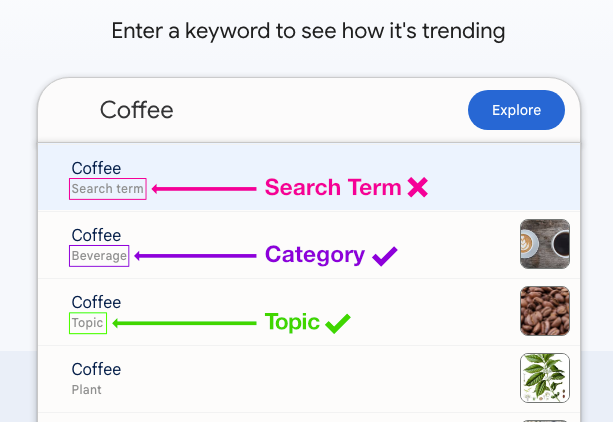
We can see in the screenshot above, that underneath the keyword in lighter grey is a label, which will be one of the following:
- Search term
- Category
- Topic
Let's examine each of those to see what each means, and what the implications are for our searches.
Search Term
Our search term is the literal text we typed in for our query. It's very specific - so in our example, only the exact word "coffee" will be matched. This means that if someone searches "espresso" or "latte", it is not counted here.
Another example - a search for apple watch will not automatically include:
Apple Watch Series 9reloj Applemontre AppleApple smartwatch
Category
Categories are specific, pre-defined classifications. In this case, since we're using a classification to describe a drink, we filter out things like "coffee tables" or "coffee beans" (if they aren't meant for drinking).
Categories are useful when you want to scope trends to a specific domain, but they're out of scope for this article, which focuses on topics. We include them here so you recognise the label if you encounter it.
Topic
Topics are an AI-grouped cluster of related terms in any language. This includes "coffee", "café", and "kaffee", treating them all as the same "idea" or "concept".
Topics correspond to entities in the Google Knowledge Graph - so searching a topic captures semantic interest, not just keyword usage. This makes topic data closer to user intent signals.
A topic aggregates multiple related search queries across languages and variations. So if we consider the apple watch example from before, the topic for this term can include:
- Apple Watch
- reloj Apple Watch
- Apple Watch Series 9
- Apple smartwatch
- Apple Watch price
- Apple watch series 11 release date
- Apple Watch Ultra
Firstly, we see that topics automatically aggregate across languages which helps avoid language bias, and makes international trend analysis, or global product launches much easier to track. You'd also catch slang variations, where relevant.
Topics also automatically capture product versions: something a basic search term would likely overlook.
So the reach for a topic is certainly wider than the equivalent search term, but are there other benefits? Of course there are!
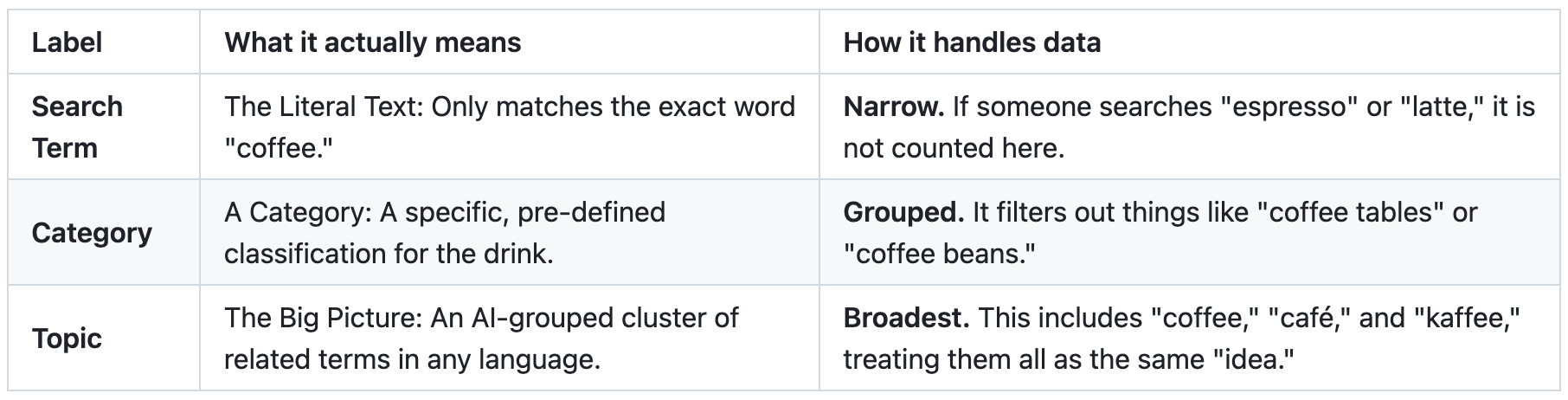
But first, here's a handy table to summarise what we've covered so far:
Benefits of using Topics with Google Trends
Let's take a look at the advantages working with topics can bring us:
Reducing Keyword Fragmentation
Search demand is often split across many variants. Let's take a look at an example using the popular video game "Fortnite". A search for the topic fortnite can include:
- fortnite
- fortnite game
- fortnite battle royale
- how to play fortnite
- fortnite download
By encompassing all of these related, but certainly different terms, we can see that a topic will aggregate the whole interest cluster.
Topics Are Better For Long-Term Trend Analysis
When you care about things like brand awareness, growth, or product ecosystems, topics can help you by capturing related searches. Consider a topic search for OpenAI, which would net the following:
- OpenAI
- ChatGPT company
- OpenAI API
- OpenAI pricing
Compared to the search term openai, which would miss those related variations!
Finding Google Knowledge Graph Entity IDs
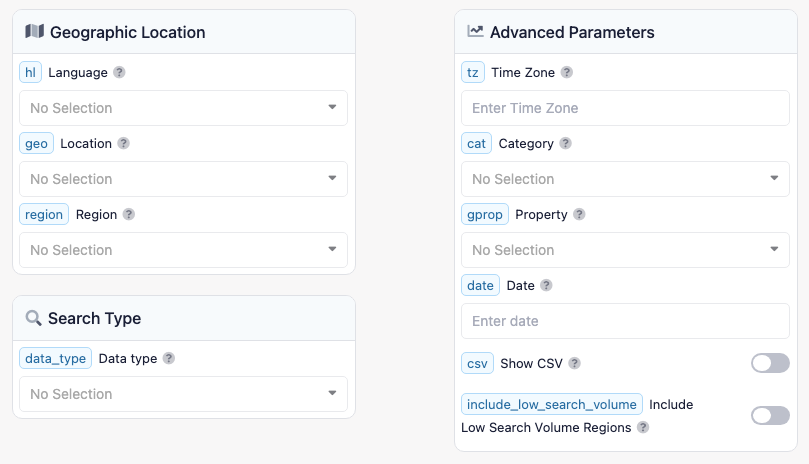
So you're convinced that you need to start using topics (or categories) and you're ready to start looking for them via SerpApi's Google Trends API.
However, once you get there, you don't see any parameters to specifically choose "Topic" or "Category":
Unfortunately, you can't even get cute and add "topic" to the search query - otherwise you get this:
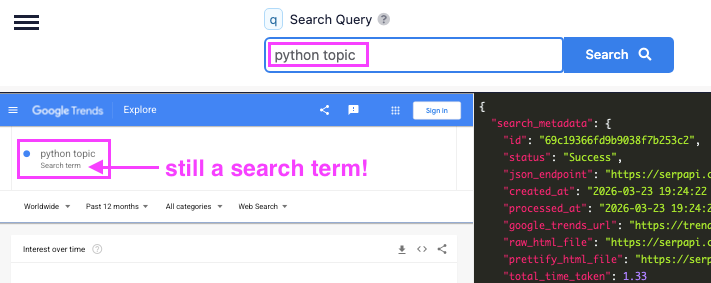
This isn't a limitation imposed by SerpApi - Google Trends will exhibit the same behaviour if you search directly:
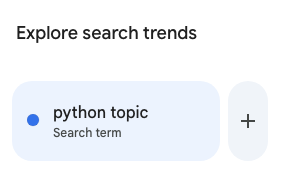
So we need some way of looking up topics, so that we can search with them. And this, my friends, is where the Google Trends Autocomplete API comes to the rescue!
SerpApi's Google Trends Autocomplete API
Let's take the example of Meta, formerly Facebook. Meta is an excellent example because, depending on context and geography, the word can mean very different things. This makes true intent inference genuinely difficult.
However, this is a tech blog and let's face it - many of us now associate the word "Meta" with the company formerly known as "Facebook". That is, until 2021 when Facebook rebranded as Meta.
Which means, if you are interested in viewing Google Trends data for Meta (the company), and you're using the search term, you'll see something like this:
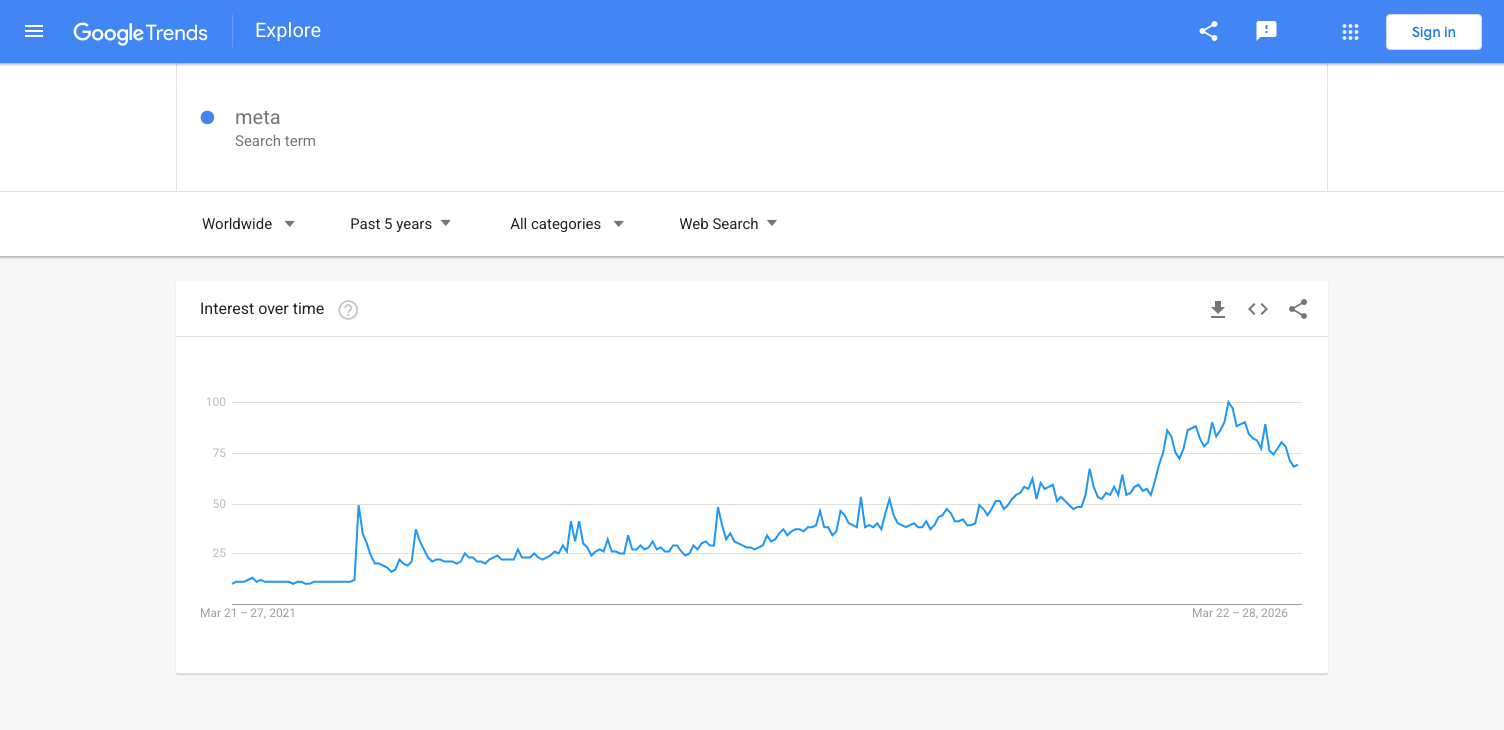
However, when we look at the same filters using the topic for "Meta", it should look more like this:
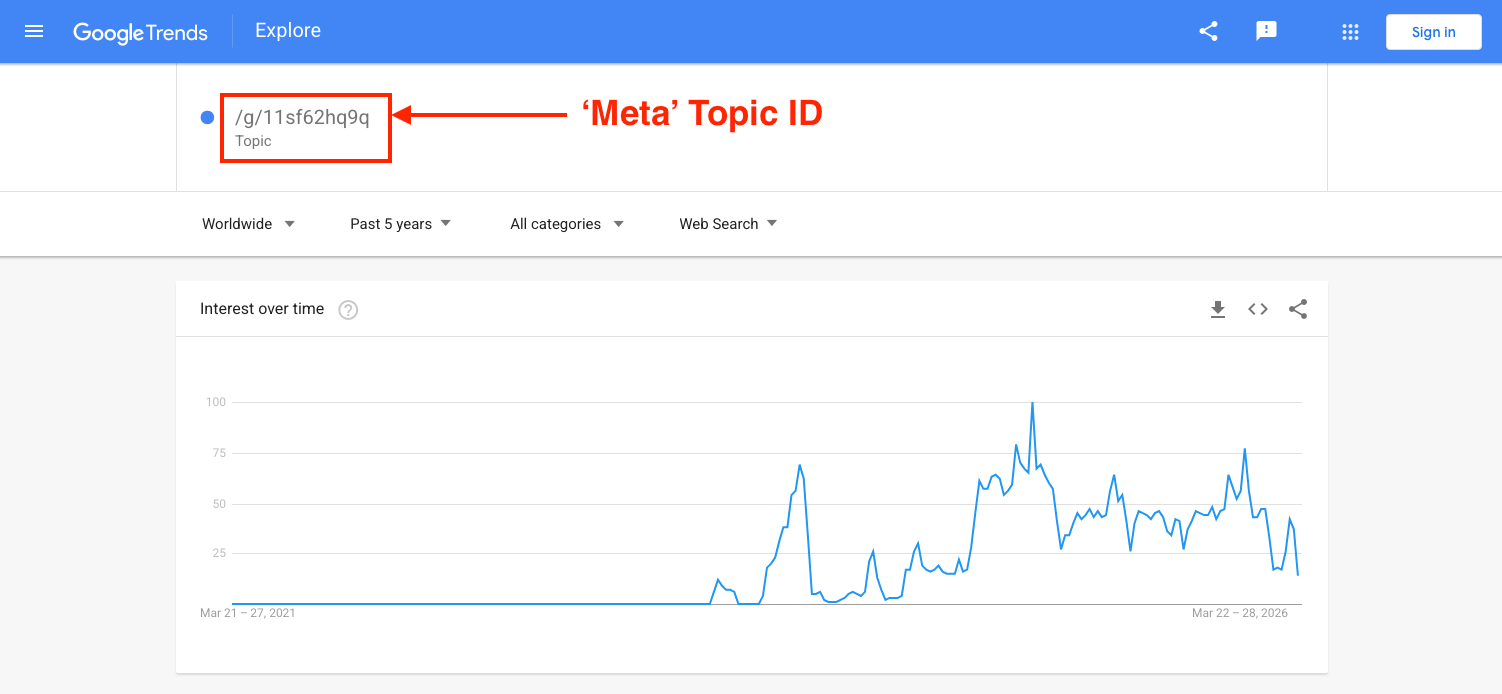
That's a huge difference! See how interest in the term using the topic much more clearly reflects the interest in "Meta" growing after the point in time when the rebrand would have happened.
(Note: not all topics provide such startlingly-different results thanks to Google's use of personalisation techniques to infer intent, normalise spelling and group minor variations).
So where did /g/11sf62hq9q come from - and how do we know it's related to "Meta"?
Just as Google showed a topic option in the dropdown when we searched "coffee" (complete with its Knowledge Graph entity), the Autocomplete API exposes that same entity ID programmatically.
Using the following parameters:
"search_parameters": {
  "engine":"google_trends_autocomplete",
  "q":"meta",
  "hl":"en"
}
You can try this in SerpApi's Playground, which returns the following response:
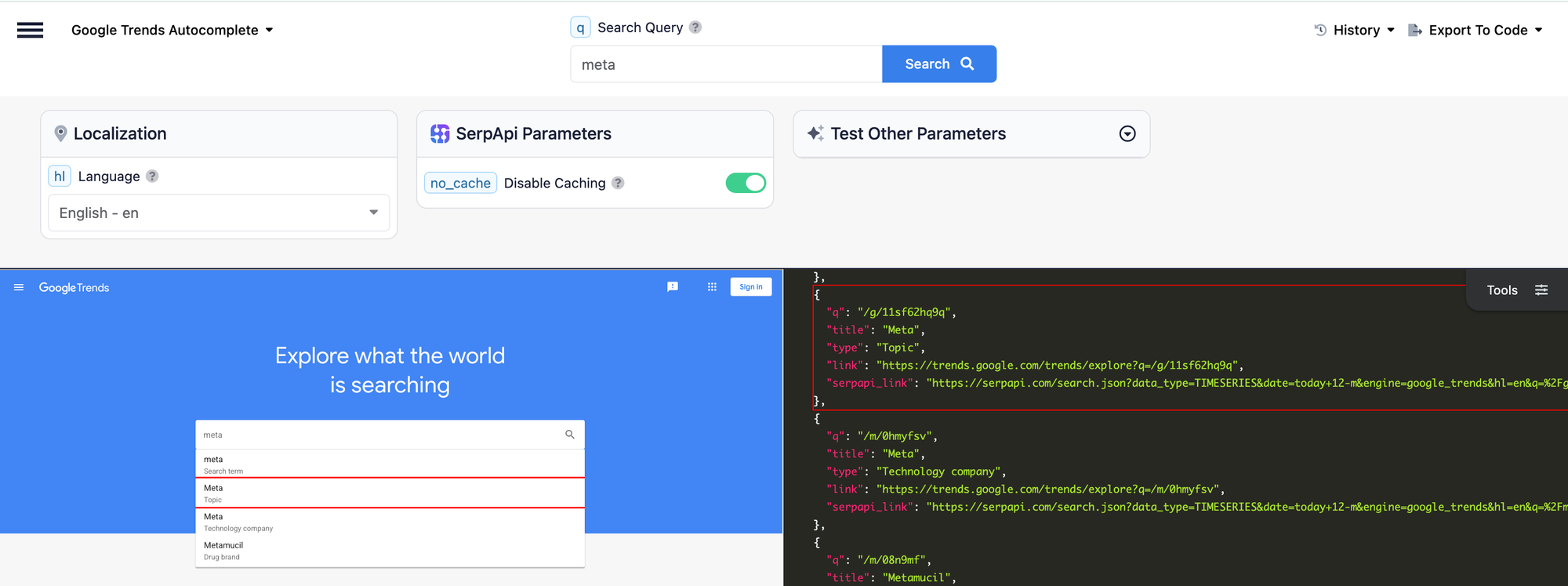
The response returns a list of autocomplete suggestions. Each entry has a title, a descriptive type, and crucially, a q field for entities that exist in the Knowledge Graph.
That q value is your entity ID.
In this case, the entry for Meta (the technology company) returns a q of /g/11sf62hq9q. That's the value we pass to the Google Trends API.
Using a Topic ID with the Google Trends API
Now that we have the entity ID, we can use it directly in SerpApi's Google Trends API via the q parameter:
"search_parameters": {
	"engine":"google_trends",
	"q":"/g/11sf62hq9q",
	"hl":"en",
	"date":"today 5-y",
	"tz":"420",
	"data_type":"TIMESERIES",
	"include_low_search_volume":"true"
}
This tells Google Trends to return data for the topic (not just the literal word) and the result is what we saw earlier: a clean signal for Meta the company, rather than noise from every other meaning of the word.
Wrapping Up
The difference between a search term and a topic in Google Trends is the difference between counting mentions of a word and measuring genuine interest in a concept.
- Search terms are fast and simple, but fragmented across languages, spellings, and variants.
- Topics are tied to Knowledge Graph entities, aggregate intent across all related queries, and are far more reliable for anything involving international markets, long-term brand tracking, or product ecosystems.
The workflow is straightforward:
- Use SerpApi's Google Trends Autocomplete API to look up your query and find the Knowledge Graph
qfor the relevant entity. - Pass that
qinto SerpApi's Google Trends API as theqparameter. - Get cleaner, broader, and more meaningful trend data.
It's a small change to your parameters — but a significant upgrade to the quality of your insights.
Hope this helps your workflow! If you have any feedback or questions, please reach out to us at contact@serpapi.com ❤️