Ruby
 Golang
 .NET
 MCP
 C++






Scraping Google Hotels for hotels data can be valuable to your business. These data can be used for:
- Analysis: Data such as pricing, availability, ratings, and reviews could be useful for market analysis, competitive research, and understanding pricing trends.
- Price Comparison: Compare prices across various platforms or to monitor hotel price changes over time. This can be particularly useful for travel agencies or price comparison websites.
- Feature Extraction: Gather data such as amenities, location, room types, and more.
- Sentiment Analysis: One can conduct sentiment analysis to gauge customer satisfaction and reputation of hotels from the users’ reviews.
- Machine Learning Model Training: Train machine learning models for various purposes like predictive pricing, recommendation systems, or to understand customer preferences.
In this blog post, we will be using Google Hotels API to scrape Google Hotels.
Playground

We have a playground for the API that you can test out. Playground allows you to visualize the data that you can get from our API and compare it with the data shown in Google Hotels itself.
The data contains: "type", "name", "check_in_time", "check_out_time", "price_source", "lowest_price", "rating", "images", and more.
Step-by-step on scraping Hotels data from Google
Get your API Key
First, ensure you register at serpapi.com to get your API Key. You can get 250 free searches per month. You can use this API Key to access all of our APIs, including the Google Hotels API.
cURL Implementation
Here is the basic implementation in cURL:
curl --get https://serpapi.com/search \
 -d engine="google_hotels" \
 -d q="Bali+Resorts" \
 -d check_in_date="2025-10-31" \
 -d check_out_date="2025-11-01" \
 -d adults="2" \
 -d currency="USD" \
 -d gl="us" \
 -d hl="en" \
 -d api_key="YOUR_API_KEY"
Feel free to check all of the available parameters here on the Google Hotels API documentation.
Python tutorial - Google Hotels Data Scraper
Next, let's see how to scrape the Google Hotels data search results in Python.
Preparation for accessing the SerpApi API in Python
- Create a new
main.pyfile - Install requests with:
pip install requestsHere is what the basic setup looks like:
import requests
SERPAPI_API_KEY = "YOUR_REAL_SERPAPI_API_KEY"

params = {
    "api_key": SERPAPI_API_KEY, #replace with your real API Key
    # soon
}

search = requests.get("https://serpapi.com/search", params=params)
response = search.json()
print(response)
With these few lines of code, we can access all of the search engines available at SerpApi, including the Google Hotels API.
import requests
SERPAPI_API_KEY = "YOUR_SERPAPI_API_KEY"

params = {
  "engine": "google_hotels",
  "q": "Bali Resorts",
  "check_in_date": "2025-10-31",
  "check_out_date": "2025-11-01",
  "adults": "2",
  "currency": "USD",
  "gl": "us",
  "hl": "en",
  "type": "asr",
}

search = requests.get("https://serpapi.com/search", params=params)
response = search.json()
print(response)
Export hotel listing data to a CSV file
You can store Google Hotels Results JSON data in databases or export it to a CSV file.
# ... continue from previous code

search = requests.get("https://serpapi.com/search", params=params)
response = search.json()

properties = response.get("properties", [])

import csv

header = ["type", "name", "check_in_time", "check_out_time", "price_source", "lowest_price", "rating", "images"]

with open("google_hotels_results.csv", "w", encoding="UTF8", newline="") as f:
    writer = csv.writer(f)
    writer.writerow(header)
    for item in properties:
        writer.writerow([item.get('type'), item.get('name'), item.get('check_in_time'), item.get('check_out_time'), item.get('prices', [{}])[0].get('source'), item.get('total_rate', {}).get('lowest'), item.get('overall_rating'), item.get('images')])

JavaScript tutorial - Google Hotels Data Scraper
Next, let's see how we can do this in JavaScript.
Install the serpapi package:
npm install serpapiRun a basic query:
import { getJson } from "serpapi"

const SERPAPI_KEY = "..." // Get your API_KEY from https://serpapi.com/manage-api-key

const googleHotelsParams = {
  api_key: SERPAPI_KEY,
  engine: "google_hotels",
  q: "Bali Resorts",
  check_in_date: "2026-01-20",
  check_out_date: "2026-01-25",
  adults: 2,
}
const googleHotelsResponse = await getJson(googleHotelsParams)
Code Explanation
We set the required parameters for the Google Hotels API. A list of parameters and their detailed explanation can be found in our documentation.
q is hotel search query that can be anything available in Google Hotels like Iceland, New York. For this demo, we are scraping the Bali Resorts hotels data.
const googleHotelsParams = {
  api_key: SERPAPI_KEY,
  engine: "google_hotels",
  q: "Bali Resorts",
  check_in_date: "2024-01-20",
  check_out_date: "2024-01-25",
  adults: 2,
}
Once parameters are defined, everything else will be taken care of by the library, for example, making the actual API request. Calling getJson to make the API request and JSON data will be returned and assigned it to googleHotelsResponse.
const googleHotelsResponse = await getJson(googleHotelsParams)Output:
The total number of results per page is about 20. The data includes hotel name, price data, customer reviews, amenities and other hotel details.
console.log(googleHotelsResponse)"properties": [
{
"type": "hotel",
"name": "Sol Benoa Bali - All Inclusive",
"description": "Chic hotel opposite a private area of beach, plus dining, bars, a spa & an outdoor pool.",
"logo": "https://www.gstatic.com/travel-hotels/branding/icon_49.png",
"sponsored": true,
"gps_coordinates": {
"latitude": -8.78685,
"longitude": 115.22636500000002
},
"check_in_time": "3:00 PM",
"check_out_time": "12:00 PM",
"rate_per_night": {
"lowest": "$103",
"extracted_lowest": 103,
"highest": "$124",
"extracted_highest": 124
},
"prices": [
{
"source": "Sol Benoa Bali - All Inclusive",
"logo": "https://www.gstatic.com/travel-hotels/branding/icon_49.png",
"rate_per_night": {
"lowest": "$103",
"extracted_lowest": 103,
"highest": "$124",
"extracted_highest": 124
}
}
],
"nearby_places": [
{
"name": "Nusa Dua 2",
"transportations": [
{
"type": "Walking",
"duration": "9 min"
}
]
},
{
"name": "I Gusti Ngurah Rai International Airport",
"transportations": [
{
"type": "Taxi",
"duration": "18 min"
},
{
"type": "Public transport",
"duration": "30 min"
}
]
},
{
"name": "九九港式海鲜火锅 nine resturant",
"transportations": [
{
"type": "Walking",
"duration": "2 min"
}
]
}
],
"hotel_class": "5-star hotel",
"extracted_hotel_class": 5,
"images": [
{
"thumbnail": "https://lh5.googleusercontent.com/p/AF1QipM2c6Pq3LHe0_vVOawTPwExOyVgljaM6XtRWbYB=s287-w287-h192-n-k-no-v1",
"original_image": "https://lh5.googleusercontent.com/p/AF1QipM2c6Pq3LHe0_vVOawTPwExOyVgljaM6XtRWbYB=s10000"
},
....
],
"overall_rating": 4.5,
"reviews": 1288,
"location_rating": 3.4,
"reviews_breakdown": [
{
"name": "Nature",
"description": "Nature and outdoor activities",
"total_mentioned": 173,
"positive": 127,
"negative": 23,
"neutral": 23
},
...
],
"amenities": [
"Breakfast ($)",
"Free Wi-Fi",
"Free parking",
"Outdoor pool",
"Air conditioning",
"Fitness centre",
"Spa",
"Beach access",
"Bar",
"Restaurant",
"Room service",
"Full-service laundry",
"Accessible",
"Business centre",
"Child-friendly",
"Smoke-free property"
]
},
...
]Pagination example:
import { getJson } from "serpapi"

const SERPAPI_KEY = "..." // Get your API_KEY from https://serpapi.com/manage-api-key

const googleHotelsParams = {
  api_key: SERPAPI_KEY,
  engine: "google_hotels",
  q: "Bali Resorts",
  check_in_date: "2024-01-20",
  check_out_date: "2024-01-25",
  adults: 2,
  next_page_token: "CBI="
}
const googleHotelsResponse = await getJson(googleHotelsParams)
How to paginate the results
When there is next page results, our API will return serpapi_pagination. The next_page_token can be used to retrieve the next page results.
{
"current_from": 1,
"current_to": 20,
"next_page_token": "CBI=",
"next": "https://serpapi.com/search.json?adults=2&check_in_date=2024-01-20&check_out_date=2024-01-25&children=0¤cy=USD&engine=google_hotels&gl=us&hl=en&next_page_token=CBI%3D&q=Bali+Resorts"
}How to get specific property information
We can use the same API along with property_token that we got from regular search to get full detailed information about a specific property.
For example:
params = {
    "api_key": SERPAPI_API_KEY,
    "engine": "google_hotels",
    "q": "Singapore",
    "check_in_date": "2025-11-10",
    "check_out_date": "2025-11-20",
    "property_token": $TOKEN_YOU_GET_FROM_ORIGINAL_SEARCH
}
Output:

Are you interested in scraping the reviews? Here is a blog post for it:
 Alex Barron

How to get autocomplete result
We can use the Google Hotels Autocomplete API to see all autocomplete suggestions where you can get the property_token and serpapi_google_hotels_link for each suggestion.
Not finding the hotels you're looking for using the general results? Not to worry, because SerpApi also offers an API to get all autocomplete suggestions for queries, and provides the property_token and serpapi_google_hotels_link for all properties returned in the autocomplete, as well as other information, such as value, type, location, thumbnail, highlighted_words, autocomplete_suggestion, kgmid, data_cid and serpapi_link.
To use it, we just need to set engine to "google_hotels_autocomplete" and provide a query using the parameter q, such as "New York".
params = {
  "engine": "google_hotels_autocomplete",
  "q": "New York",
  "api_key": "YOUR_API_KEY"
}
No-code solution for scraping hotel data
Non-developers who want to use the Google Hotels API without writing code also have the option of using it with several tools below. However, the use of a programming language is usually encouraged for greater flexibility and better support.
- SerpApi Google Sheets Extension
- N8N - for more powerful integration
 Alex Barron

Introducing Google Hotels Price Calendar API
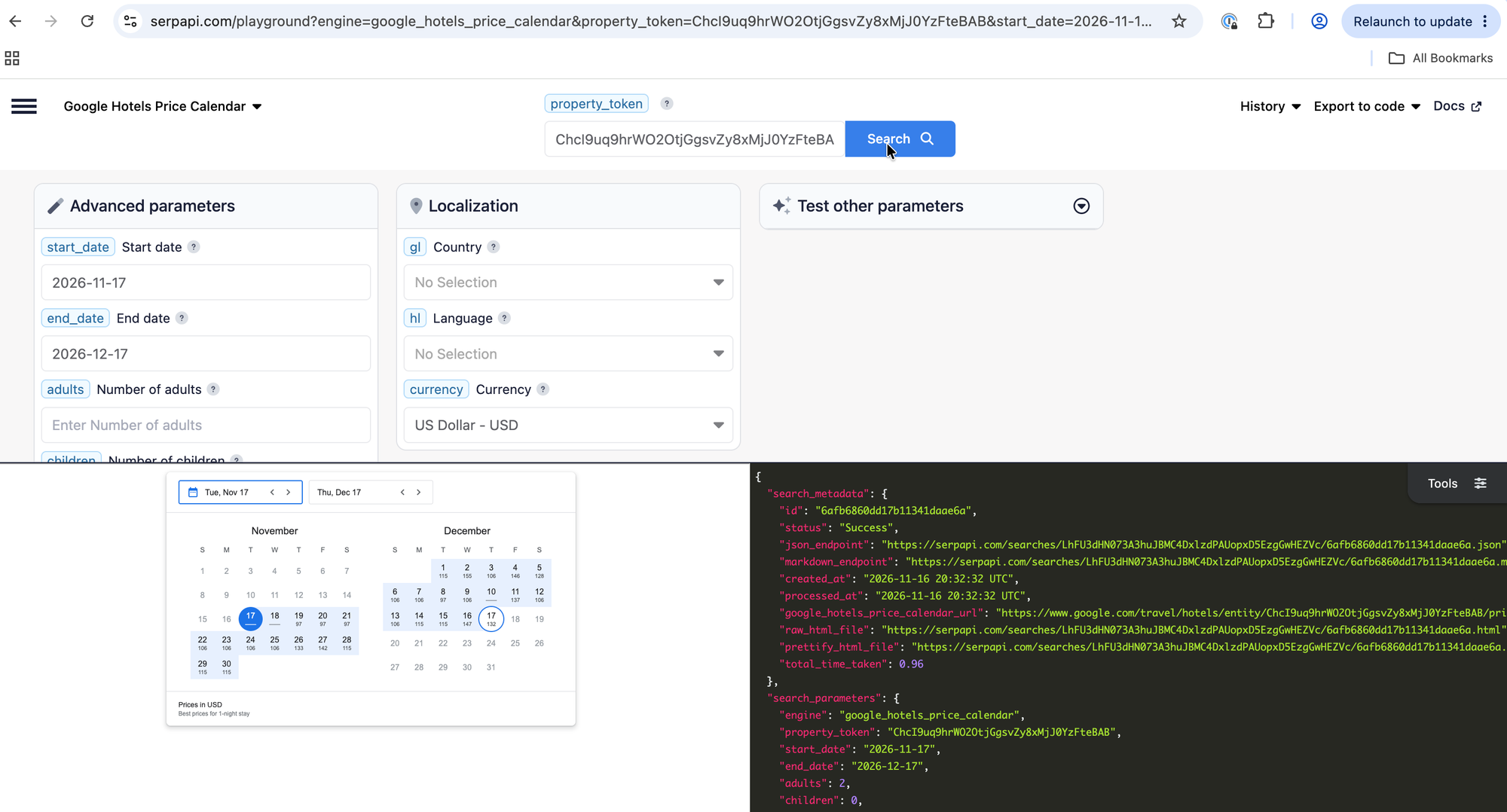
Ever wanted to store per-night-prices from the Google Hotels tool in your own code? SerpApi's Google Hotels Price Calendar API returns the rates for specific calendar ranges. You give it a property and a date range, and it gives you the best available price for a one-night stay starting on each date.
In this tutorial, we'll look at what the API returns, make our first request in the Playground, and then call it with cURL, Python, and JavaScript. We'll also cover the parameters you can use to customize the results.
What data does the Google Hotels Price Calendar API return?
Each entry in the prices array is one check-in date with the best one-night price Google Hotels shows for it. These are the fields documented for each entry:
date: the check-in date of the one-night stay, inYYYY-MM-DDformatdisplay_price: the best price for the night, formatted with the currency (for example"$278")extracted_display_price: the same price as a number (for example278)before_taxes_fees/extracted_before_taxes_fees: the price before taxes and feesafter_taxes_fees/extracted_after_taxes_fees: the price after taxes and feescurrency: the currency of the prices (for example"USD")
Here's a trimmed example of the shape, based on the documentation's sample response:
{
  "prices": [
    {
      "date": "2026-10-21",
      "display_price": "$278",
      "extracted_display_price": 278,
      "before_taxes_fees": "$278",
      "extracted_before_taxes_fees": 278,
      "after_taxes_fees": "$337",
      "extracted_after_taxes_fees": 337,
      "currency": "USD"
    }
  ]
}
A few things worth knowing before you build on it:
display_pricefollows the country used for the Google Hotels search (theglparameter). Just like on Google Hotels, it may include or exclude taxes and fees depending on that country's standard approach.before_taxes_feesandafter_taxes_feesonly appear when Google Hotels also provides a price without taxes and fees. The documentation's EUR example, for instance, returns onlydisplay_price,extracted_display_price, andcurrency, so read these two fields defensively.- Future dates may be omitted if Google Hotels hasn't listed prices for them yet.
You can find the full list of fields in the API documentation.
Get your property_token first
The API works on one property at a time, identified by a property_token. You can find it with SerpApi's Google Hotels API, which is a separate API. In this tutorial, we'll use the example property: ChcI9uq9hrWO2OtjGgsvZy8xMjJ0YzFteBAB (Hilton Bali Resort).
Try it in the Playground
The quickest way to see the API in action is the Playground. Open the Google Hotels Price Calendar API in the Playground. It's pre-filled with the example property_token.
The Playground link doesn't include dates, because fixed dates expire. Pick your own start_date and end_date in the Playground, then run the search.
Get your API key
To run the API outside the playground, you need a SerpApi API key.
Make sure your account is registered and API key stored as an environment variable following the steps mentioned in the previous API.
Make a GET request
The endpoint is https://serpapi.com/search, with engine=google_hotels_price_calendar. Besides engine and api_key, three parameters are required:
property_token: the property to look upstart_date: the first date of the calendar, inYYYY-MM-DDformatend_date: the last date of the calendar, inYYYY-MM-DDformat. It can't be more than 3 years from now.
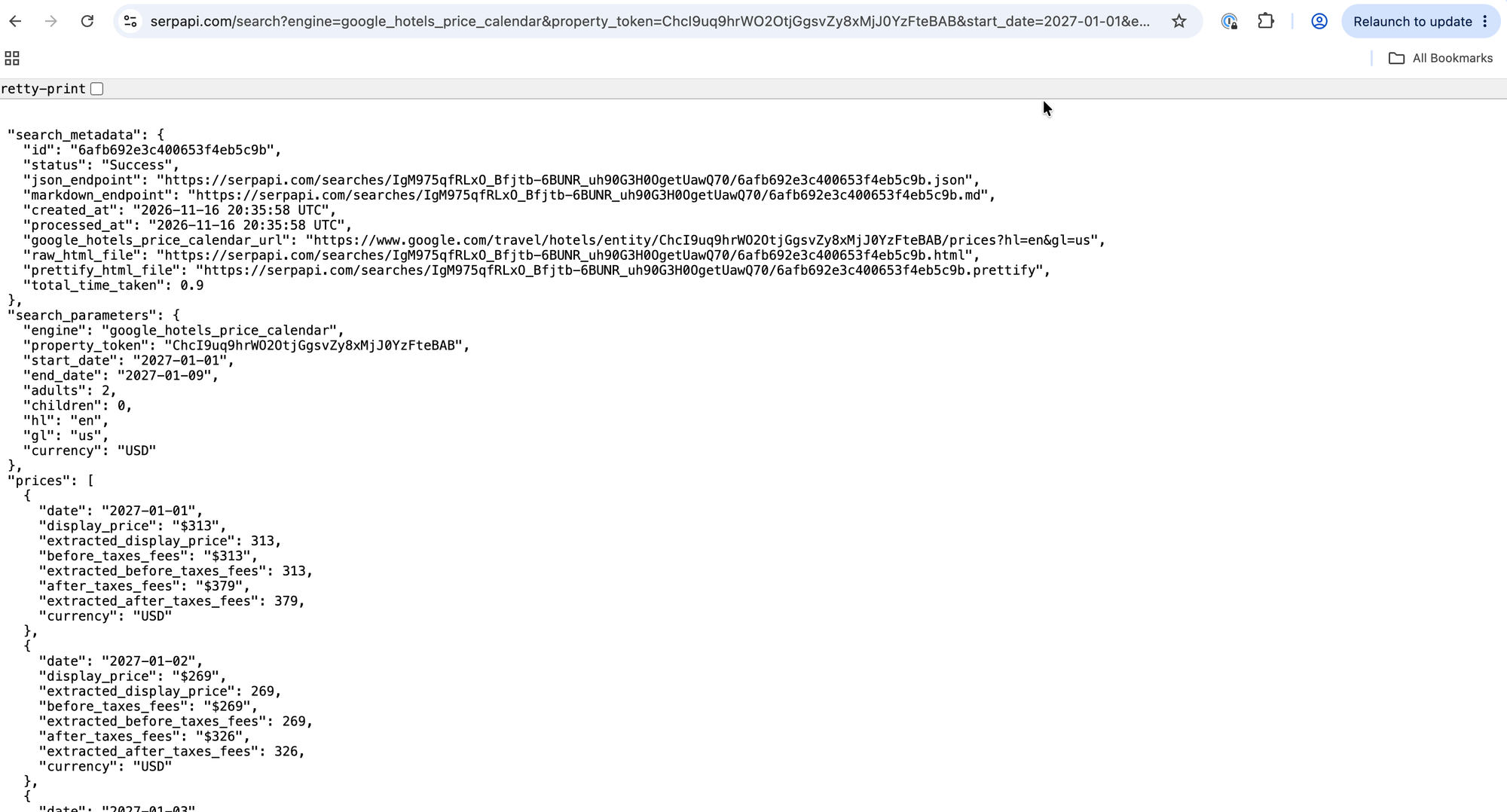
Here's a plain GET request. JSON is the default output:
https://serpapi.com/search?engine=google_hotels_price_calendar&property_token=ChcI9uq9hrWO2OtjGgsvZy8xMjJ0YzFteBAB&start_date=2027-01-01&end_date=2027-01-09&api_key=YOUR_SERPAPI_API_KEY
Replace YOUR_SERPAPI_API_KEY with your own key.
The dates above are the documentation's example range, so swap in dates that are still in the future when you try it yourself.
Get the results as Markdown
Add output=md to get a Markdown version of the same results:
https://serpapi.com/search?engine=google_hotels_price_calendar&property_token=ChcI9uq9hrWO2OtjGgsvZy8xMjJ0YzFteBAB&start_date=2027-01-01&end_date=2027-01-09&output=md&api_key=YOUR_SERPAPI_API_KEY
The Markdown output is a curated, token-efficient view of the results, which makes it handy for LLMs and AI agents. It's a readable summary, not a full copy of the JSON.
When you need exact field access in code (like in the Python and JavaScript examples below), stick with JSON. You can also request Markdown with the /search.md endpoint or an Accept: text/markdown header.
cURL
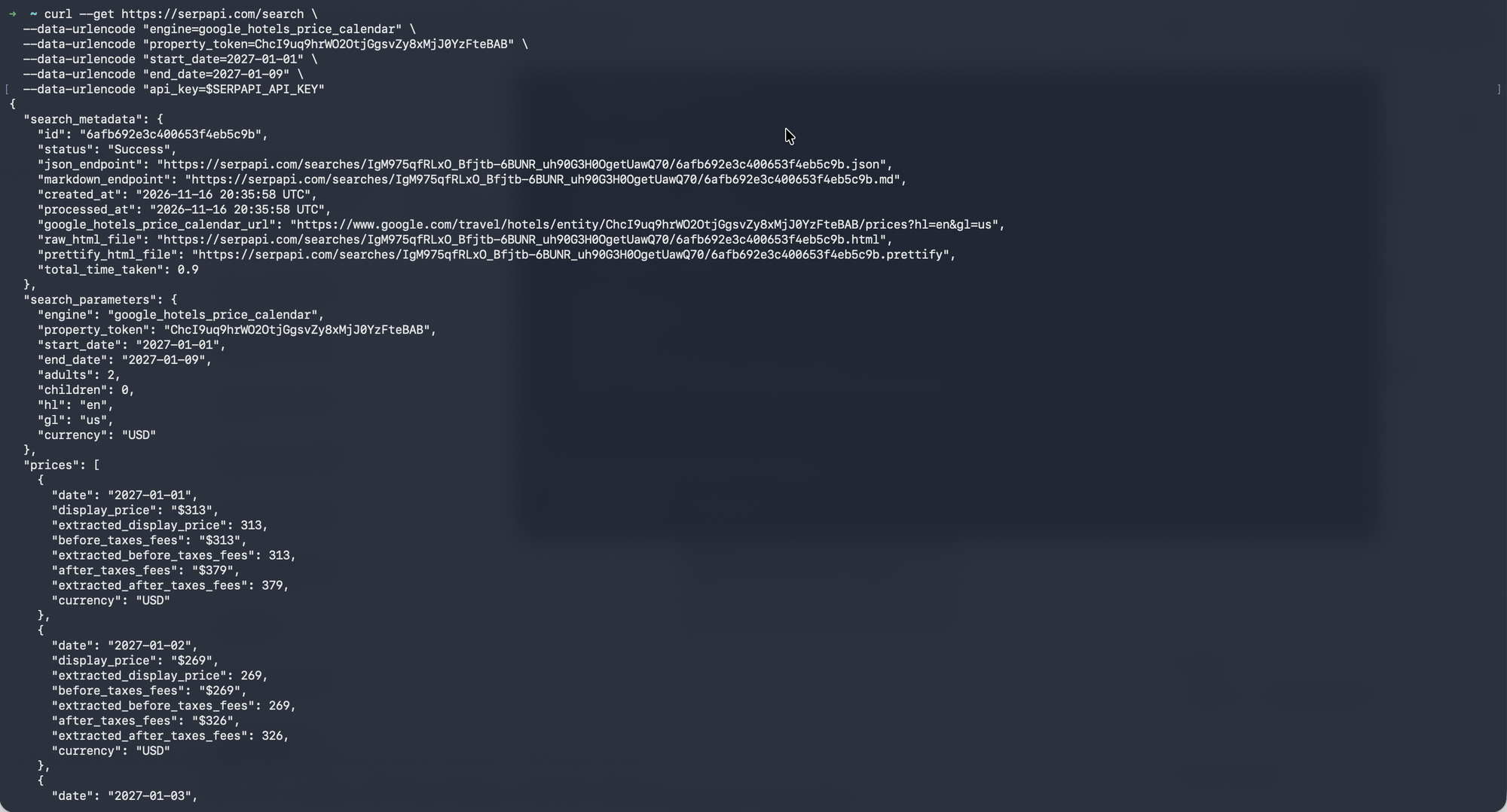
Here's the equivalent request in cURL:
curl --get https://serpapi.com/search \
  --data-urlencode "engine=google_hotels_price_calendar" \
  --data-urlencode "property_token=ChcI9uq9hrWO2OtjGgsvZy8xMjJ0YzFteBAB" \
  --data-urlencode "start_date=2027-01-01" \
  --data-urlencode "end_date=2027-01-09" \
  --data-urlencode "api_key=$SERPAPI_API_KEY"
Results should look like:
Python
Next, let's call the API from Python with the official SerpApi Python library.
- Create a new
hotels_price_cal.pyfile. - Install the library:
pip install serpapi
- Set your API key as an environment variable. Replace
YOUR_SERPAPI_API_KEYwith your real key:
export SERPAPI_API_KEY="YOUR_SERPAPI_API_KEY"
- Add this code to
main.py:
import os

import serpapi

client = serpapi.Client(api_key=os.environ["SERPAPI_API_KEY"], timeout=60)

results = client.search({
    "engine": "google_hotels_price_calendar",
    "property_token": "ChcI9uq9hrWO2OtjGgsvZy8xMjJ0YzFteBAB",
    "start_date": "2027-01-01",
    "end_date": "2027-01-09",
})

if "error" in results:
    raise SystemExit("SerpApi returned an error for this search.")

prices = results.get("prices", [])
if not prices:
    print("No prices were returned for this date range.")

for day in prices:
    print(f'{day["date"]}: {day.get("display_price")} ({day.get("currency")})')
- Run it:
python hotels_price_cal.py
The client returns a dictionary-like result, so we can read prices directly. We loop over it and print the date, the formatted price, and the currency. The timeout is in seconds. If the key is missing, os.environ["SERPAPI_API_KEY"] raises an error right away, and the library raises its own exceptions for HTTP and timeout failures.

JavaScript
Now the same request with the official SerpApi JavaScript library.
- Create a new
hotels_price_cal.jsfile. - Install the library:
npm install serpapi
- Add this code to
hotels_cal_price.js:
async function main() {
  const { getJson } = await import("serpapi");

  const apiKey = process.env.SERPAPI_API_KEY;
  if (!apiKey) {
    console.error("Set the SERPAPI_API_KEY environment variable first.");
    process.exit(1);
  }

  try {
    const results = await getJson({
      engine: "google_hotels_price_calendar",
      api_key: apiKey,
      property_token: "ChcI9uq9hrWO2OtjGgsvZy8xMjJ0YzFteBAB",
      start_date: "2027-01-01",
      end_date: "2027-01-09",
    });

    if (results.error) {
      console.error("SerpApi returned an error for this search.");
      process.exit(1);
    }

    const prices = results.prices ?? [];
    if (prices.length === 0) {
      console.log("No prices were returned for this date range.");
      return;
    }

    for (const day of prices) {
      console.log(`${day.date}: ${day.display_price} (${day.currency})`);
    }
  } catch (error) {
    console.error("The request failed or was rejected. Check your API key and parameters.");
    process.exit(1);
  }
}

main();
- Run it with the same
SERPAPI_API_KEYenvironment variable set:
node hotels_price_cal.js
Results should look like:

Other programming languages
You can call the API with a plain GET request from any language. SerpApi also has ready-to-use libraries for other languages on the integrations page.
How to customize the search
A few optional parameters change what you get back:
- Guests:
adults(defaults to2),children(defaults to0), andchildren_ages. Ages go from1to17, and children under 1 count as1. Separate multiple ages with commas (for example5,8,10), and make sure the number of ages matcheschildren. - Currency:
currencysets the currency of the returned prices. It defaults toUSD. See the Google Travel Currencies page for supported codes. - Country and language:
glis the two-letter country code for the Google Hotels search, andhlis the two-letter language code. Remember thatglalso affects whetherdisplay_priceincludes taxes and fees.
For example, to look up prices in euros for a country-specific search, based on the documentation's EUR example, add these parameters:
¤cy=EUR&gl=fr
To ask for a family of two adults and one child aged 5 (an example built from the documented parameter rules), add these to the Python client.search({...}) call:
    "adults": 2,
    "children": 1,
    "children_ages": "5",
    "currency": "EUR",
    "gl": "fr",
The async, no_cache, and json_restrictor parameters are also available, and you can find all of them and their uses in the documentation.
Conclusions
Scraping Google Hotels data can be valuable in terms of pricing strategy, pricing trends, market research, sentiment analysis, predictive analysis and etc. In future, we will be covering more in-depth hotel data, follow our public roadmap to get up to date information. In SerpApi, we provide an easy and fast API for our customers so they can focus the resources on their core of the business.
If you'd like to dive deeper into Hotel Pricing research or looking for an example in Python, here is the related blog post:
 Hilman Ramadhan

If you have any questions, please feel free to reach out to me.
Add a Feature Request💫 or a Bug🐞