 Google Local Services API
 Google Travel Explore API
 Baidu Search API
 Bing Search API
 DuckDuckGo Search API
 eBay Search API
 Naver Search API
 The Home Depot Search API
 Tripadvisor Search API
 Walmart Search API
 Ruby
Ruby
 Golang
 .Net
.Net
 C++
C++

The Model Context Protocol (MCP) makes it possible for AI assistants to call external tools in a structured, standardized way. If you’re new to MCP, we recommend starting with our overview: Model Context Protocol (MCP): A Unified Standard for AI Agents and Tools.
SerpApi’s MCP server already exposes a unified search tool that can query dozens of SerpApi engines - Google Search, News, Flights, Shopping, and more. Now, we’ve introduced a major upgrade: engine schemas are exposed as MCP resources.
This means that for every SerpApi engine, you can now programmatically discover exactly which parameters it accepts, their types, and how they’re meant to be used - directly from MCP. This unlocks a new level of accuracy, reliability, and automation for AI-powered developer workflows.
In this post, we’ll explain how engine schemas work, why they matter, and how to use them in practice - including a hands-on example using Google Flights from VS Code.
Quick recap: SerpApi MCP in your workflow
SerpApi MCP lets you connect AI tools (like Claude Desktop, Cursor, VS Code MCP-compatible extensions or your custom AI agents) directly to SerpApi’s live search infrastructure.
Once configured, your AI assistant can:
- Discover available search engines
- Call the
searchtool with structured parameters - Receive normalized JSON results
If you haven’t set it up yet, you’ll need a SerpApi API key. You can obtain one at here.
Then add SerpApi MCP to your MCP configuration:
{
  "mcpServers": {
    "serpapi": {
      "url": "https://mcp.serpapi.com/YOUR_SERPAPI_API_KEY/mcp"
    }
  }
}
Once connected, your AI assistant can immediately start interacting with SerpApi tools and resources.
What’s new: Engine schemas as MCP resources
Previously, the LLM had to guess which parameters each SerpApi engine accepted or rely on hardcoded knowledge.
Now, each engine exposes its own schema as an MCP resource.
What this means
With the new feature, MCP exposes:
- A list of available engines
- A detailed parameter schema for each engine
Conceptually, this looks like:
serpapi://engines→ lists all supported enginesserpapi://engines/google_flights→ returns the schema for Google Flightsserpapi://engines/google_shopping→ returns the schema for Google Shopping
Each schema describes:
- Parameter names
- Data types
- Optional vs required fields
- Parameter descriptions
This gives AI agents a real-time contract for every engine.
How engine schemas improve tool call quality
This upgrade solves several real-world problems when building AI-powered integrations.
1. No more guessing parameter names
Instead of inventing fields like origin or destination, the agent can see the real API fields such as:
departure_idarrival_iddeparture_date
2. Engine-specific optimization
Each SerpApi engine has its own unique features. Schemas allow the assistant to:
- Use flight-specific filters for Google Flights
- Use price ranges for Google Shopping
- Use topic tokens for Google News
3. Fewer failed requests
When parameters are generated directly from the schema:
- Invalid arguments are avoided
- Missing required fields are detected earlier
- Requests become deterministic and repeatable
4. Better developer experience
In IDEs like VS Code, schemas unlock:
- Better prompt grounding
- Smarter auto-completion
- Self-documenting integrations
Example: Using Google Flights with MCP engine schemas
Let’s walk through a real example.
Imagine you want your AI assistant to search for round-trip flights from San Francisco (SFO) to New York (JFK).
Step 1: Discover available engines
The assistant can query the engine index resource:
serpapi://engines
This returns a list including:
- google_search
- google_news
- google_shopping
- google_flights
The agent selects google_flights.
Step 2: Load the Google Flights schema
Next, the assistant fetches:
serpapi://engines/google_flights
This returns a schema describing supported parameters such as:
- departure_id
- arrival_id
- departure_date
- return_date
- currency
- travel_class
Now the assistant knows exactly what Google Flights accepts.
Step 3: Make a structured search call
Using the schema, the AI can generate a correct MCP tool call:
{
  "name": "search",
  "arguments": {
    "params": {
      "engine": "google_flights",
      "departure_id": "SFO",
      "arrival_id": "JFK",
      "departure_date": "2026-03-15",
      "return_date": "2026-03-20",
      "currency": "USD"
    }
  }
}
Because the parameters match the schema:
- The request is valid
- No field guessing is involved
- Results are returned immediately
The response contains structured flight data including prices, airlines, durations, and layovers.
Example: Shopping search with Google Shopping
Schemas are just as powerful for product search.
Let’s say you want to find wireless earbuds under $100.
Load the engine schema
serpapi://engines/google_shopping
You’ll discover parameters such as:
- q
- min_price
- max_price
- gl
- hl
Perform the search
{
  "name": "search",
  "arguments": {
    "params": {
      "engine": "google_shopping",
      "q": "wireless earbuds",
      "min_price": 10,
      "max_price": 100,
      "gl": "us",
      "hl": "en"
    }
  }
}
The schema ensures:
- The right filter fields are used
- The query structure matches the engine
- The response is clean and predictable
Using schemas inside VS Code
VS Code is one of the most popular environments for MCP-powered workflows.
With SerpApi MCP configured:
- Your AI assistant can dynamically load engine schemas
- Generate valid tool calls
- Iterate on search logic without switching tabs
This enables workflows like:
- "Find the cheapest flights under $500"
- "Track shopping price drops"
- "Monitor breaking news by topic
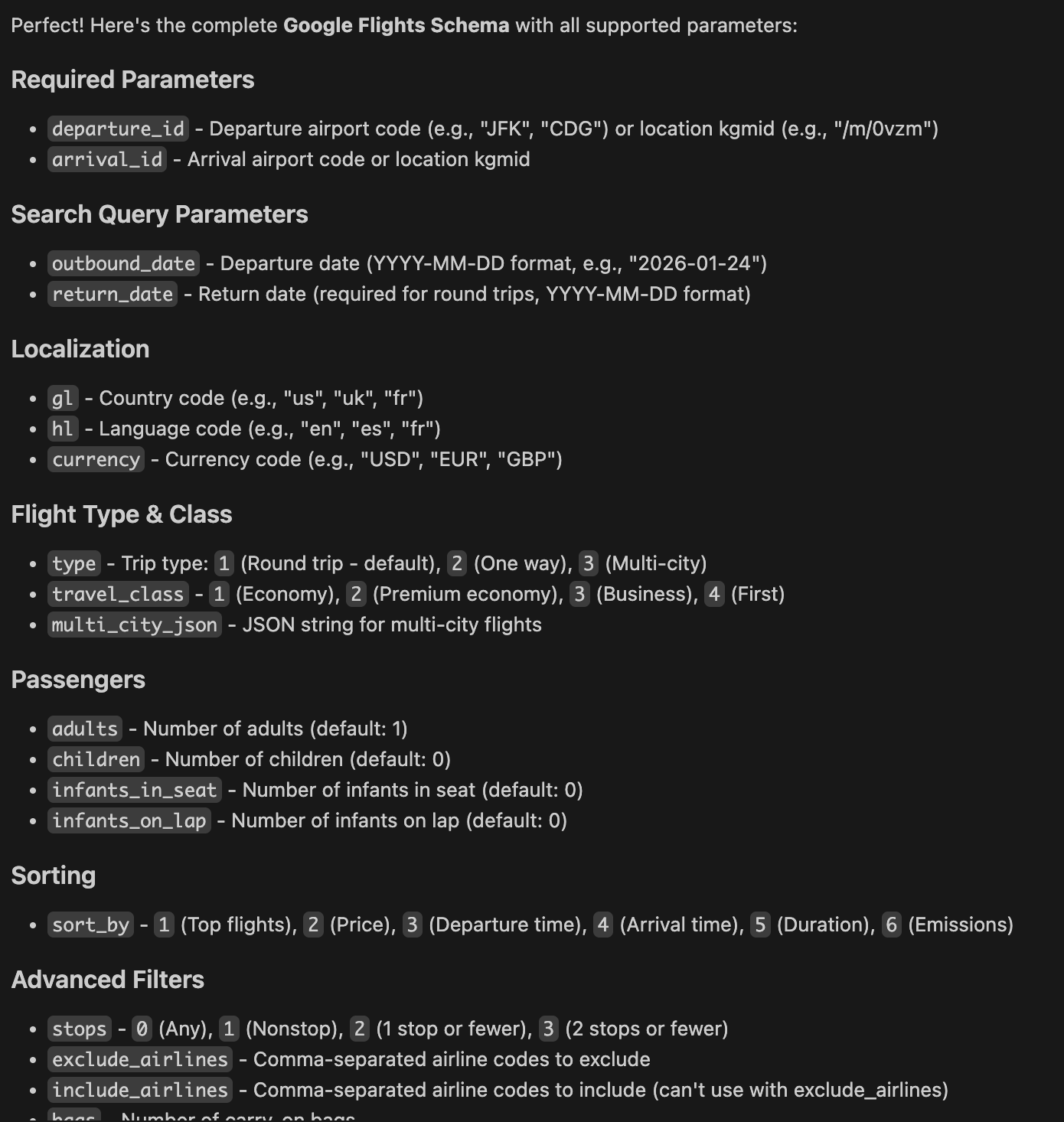
VS Code could generate a curl request to retrieve the appropriate schema. Expected output ("can you explain google flights schema params"):
Summary: Why this feature matters
By exposing engine schemas as MCP resources, SerpApi MCP becomes:
- More reliable
- More developer-friendly
- More automation-ready
You get:
- Accurate parameter generation
- Engine-aware AI behavior
- Lower error rates
- Faster integration cycles
This turns SerpApi MCP into a self-describing API layer for AI agents.
Get started today
To try engine schemas with SerpApi MCP:
- Create a SerpApi account: https://serpapi.com
- Enable MCP using your API key
- Connect from VS Code, Claude Desktop, or Cursor
- Start exploring
serpapi://engines
If you’re building AI-powered tools that rely on search, shopping data, travel data, or news intelligence - engine schemas will dramatically improve the quality and reliability of your integrations.