 Google Local Services API
 Google Travel Explore API
 Baidu Search API
 Bing Search API
 DuckDuckGo Search API
 eBay Search API
 Naver Search API
 The Home Depot Search API
 Tripadvisor Search API
 Walmart Search API
 Ruby
Ruby
 Golang
 .Net
.Net
 C++
C++



YouTube is the world's largest online video-sharing platform. It is the second-most visited website, with more than one billion monthly users who collectively watch more than one billion hours of video each day.

YouTube hosts a vast array of content, and videos are indexed by search engines, so content creators can leverage search engine optimization(SEO) techniques to rank their videos. Furthermore, scraping YouTube videos can provide critical insights, upcoming trends, competitive analysis, and content ideas.
YouTube created a healthy platform for content creators. They applied cutting-edge technology to deter fake users from fake video view counts. Scraping YouTube videos is never easy. But with SerpApi, you don't need to worry about this. You just need to pick up our YouTube solution and grow your business.
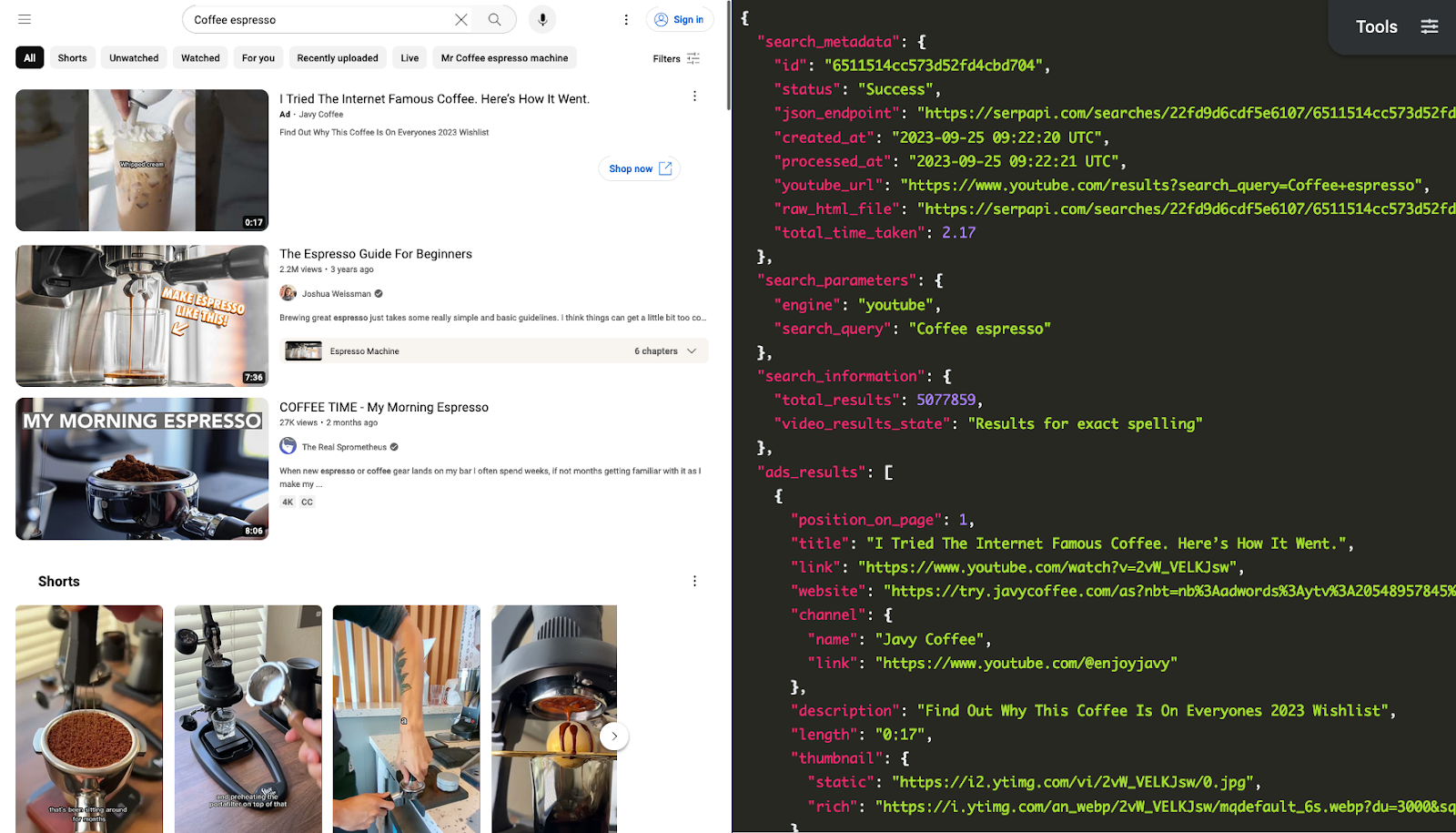
Setting up a SerpApi account
SerpApi offers a free plan for newly created accounts. Head to the sign-up page to register an account and complete your first search with our interactive playground. When you want to do more searches with us, please visit the pricing page.
Once you are familiar with all results, you can use the SERP APIs with your API Key.
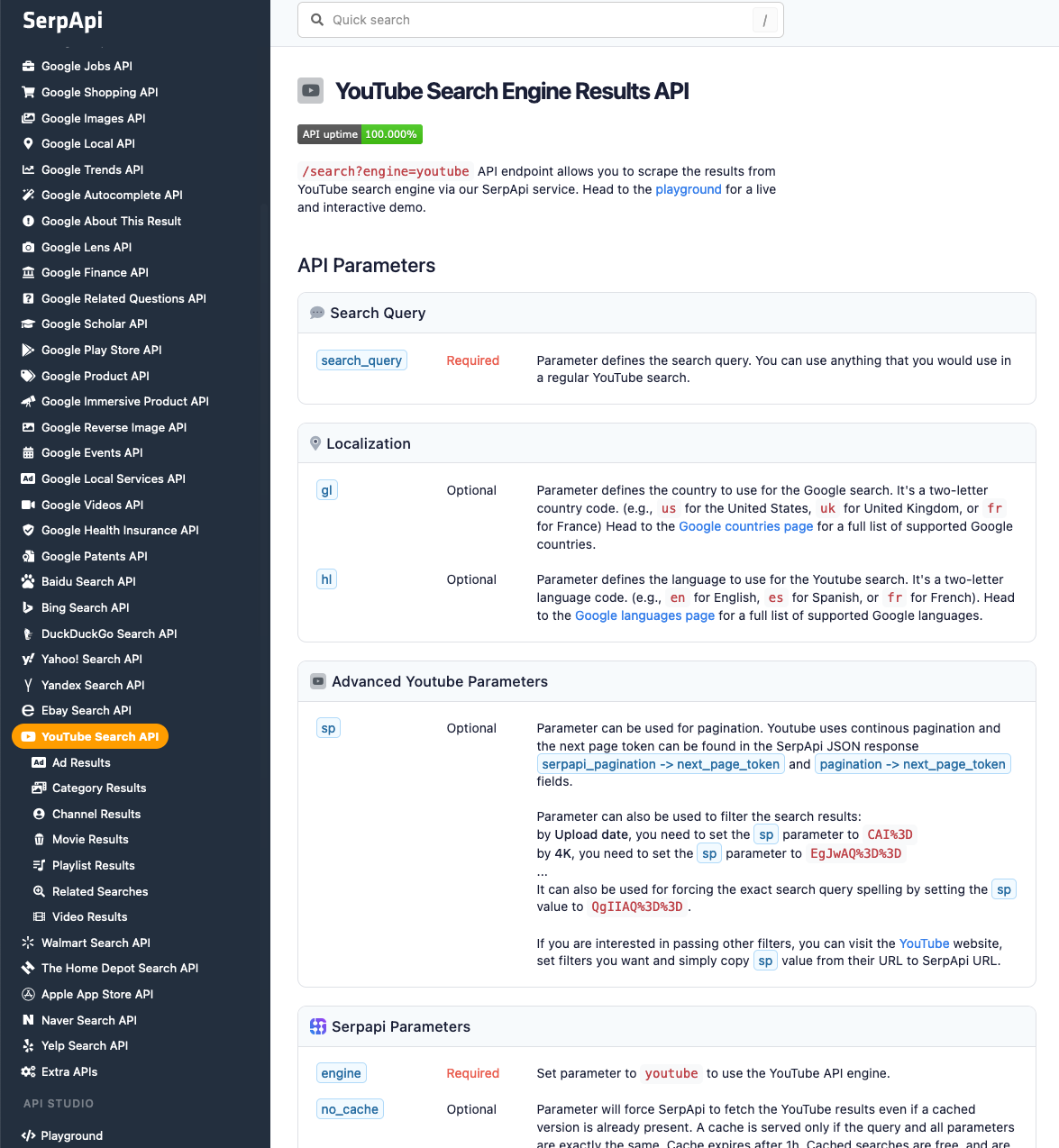
Scrape your first YouTube Video Results with SerpApi
Head to the YouTube Video results in the SerpApi documentation for details.
Python Tutorial
In this section, we will use Python to scrape and extract all coffee videos from the YouTube search results. The data contains: "position", "title", "link", "views", "channel_name", "description", "thumbnail", "published_date", and more. You can also scrape more information with SerpApi.
First, install the SerpApi client library.
pip install google-search-resultsSet up the SerpApi credentials and search.
from serpapi import GoogleSearch
import os, json

params = {
    'api_key': 'YOUR_API_KEY',         # your serpapi api
    'engine': 'youtube',               # SerpApi search engine
    'search_query': 'Coffee'           # query
}
To retrieve the YouTube video results for a given search query, you can use the following code:
results = GoogleSearch(params).get_dict()['video_results']You can store YouTube video results JSON data in a database or export it to a CSV file.
import csv

header = ['position', 'title', 'link', 'views', 'channel_name', 'description', 'thumbnail']

with open('youtube_video_results.csv', 'w', encoding='UTF8', newline='') as f:
    writer = csv.writer(f)

    writer.writerow(header)

    for item in results:
        print(item)
        writer.writerow([item.get('position_on_page'), item.get('title'), item.get('link'), item.get('views'), item.get('channel', {}).get('name'), item.get('description'), item.get('thumbnail', {}).get('static'), item.get('published_date')])
JavaScript Tutorial (Node.js)
You can also scrape YouTube video results using SerpApi's YouTube Video Results API with Node.js.
Just like the Python example above, you'll get structured JSON data without needing browser automation, custom parsers, or CSS selectors that may change over time. Your request won't be blocked as suspicious, and you can easily iterate through the results to extract what you need.
First, install google-search-results-nodejs package:
npm i google-search-results-nodejsAfter installing the package. Set up your SerpApi credentials and define the search parameters:
const SerpApi = require("google-search-results-nodejs");
const search = new SerpApi.GoogleSearch(process.env.YOUR_API_KEY);

const params = {
  engine: "youtube",
  search_query: "star wars",
};
Next, we wrap the SerpApi search method in a promise so that we can work with the results asynchronously:
const getJson = () => {
  return new Promise((resolve) => {
    search.json(params, resolve);
  });
};
With this in place, you can retrieve all video results, including paginated results, by checking for the next_page_token and requesting additional pages:
const getResults = async () => {
  const allVideos = [];
  while (true) {
    const json = await getJson();

    if (json.video_results) {
      allVideos.push(...json.video_results);
    } else break;

    if (json.serpapi_pagination?.next_page_token) {
      params.sp = json.serpapi_pagination.next_page_token;
    } else break;
  }
  return allVideos;
};
In this line of code allVideos.push(...json.video_results), we use spread syntax to split the video_resultsthe array from result that was returned from the getJsonto function into elements and add them at the end of allVideos array.
Finally, you can display the collected results:
getResults().then(console.log);Output
Here's the output in JSON format:
[
  {
    "title": "Star Wars Battlefront 2 - Funny Moments Order #66",
    "link": "https://www.youtube.com/watch?v=LquShRk_3sw",
    "channel": {
      "name": "Jongo Phett",
      "link": "https://www.youtube.com/c/JongoPhett",
      "thumbnail": "https://yt3.ggpht.com/ytc/AKedOLR-k_Ubr0aJgzNu91jAQCc-vnCOpyIkASWxIbm7rQ=s68-c-k-c0x00ffffff-no-rj"
    },
    "publishedDate": "16 hours ago",
    "views": "12K views",
    "length": "10:39",
    "description": "episode 66 of Star Wars Battlefront 2 Funny Moments, a montage of the funniest star wars clips in battlefront II. edited together by ...",
    "extensions": ["New"],
    "thumbnail": "https://i.ytimg.com/vi/LquShRk_3sw/hq720.jpg?sqp=-oaymwEcCOgCEMoBSFXyq4qpAw4IARUAAIhCGAFwAcABBg==&rs=AOn4CLAFNjI-rEeq5mmDL6I4nXgxZyId3Q"
  },
  {
    "title": "The Most Powerful Character In All of Star Wars",
    "link": "https://www.youtube.com/watch?v=JTTv8mmxoTE",
    "channel": {
      "name": "The Stupendous Wave",
      "link": "https://www.youtube.com/c/TheStupendousWave",
      "thumbnail": "https://yt3.ggpht.com/ytc/AKedOLQ0T0u6VqryQ-Z5efb1qVTcUHthiH8EamJMKDAE=s68-c-k-c0x00ffffff-no-rj"
    },
    "publishedDate": "10 hours ago",
    "views": "29K views",
    "length": "12:22",
    "description": "For all sponsorship and business inquiries please contact: thestupendousscrub@gmail.com Business: ...",
    "extensions": ["New"],
    "thumbnail": "https://i.ytimg.com/vi/JTTv8mmxoTE/hqdefault.jpg?sqp=-oaymwEcCOADEI4CSFXyq4qpAw4IARUAAIhCGAFwAcABBg==&rs=AOn4CLBdHe_wWjGruLfxz1acr-3jP0YltA"
  }
  ...and other results
]
Check out our Paginating, Sorting, and Filtering with the YouTube API post to learn more about the YouTube sp parameter to achieve more advanced functionality with the YouTube Search API.
Interesting scraping YouTube Shorts videos? Check out our How to Scrape YouTube Shorts videos results post.
If you have any questions, please feel free to contact us.