 Google Local Services API
 Google Travel Explore API
 Baidu Search API
 Bing Search API
 DuckDuckGo Search API
 eBay Search API
 Naver Search API
 OpenTable Reviews API
 The Home Depot Search API
 Tripadvisor Search API
 Walmart Search API
 Ruby
Ruby
 Golang
 .Net
.Net
 MCP
MCP
 C++
C++

The xAI Grok API provides access to powerful frontier models like Grok 4 series, supporting chat completions (text + vision), image generation, tool calling (function calling + built-in tools like web search), and more advanced features.
Quick Intro
- Sign up at https://x.ai/api
- Generate an API key from the console
- Install: pip install xai-sdk
- Set env var: export XAI_API_KEY="your_key_here"
- Models list: https://docs.x.ai/developers/models
I'll share some samples in Python.
Basic Chat API Call
Let's first prepare our project before making the API call
- Install the xai-sdk
pip install xai-sdk- Set env var: export XAI_API_KEY="your_key_here" or use .env file
Now, create a new file and this basic setup:
import os
from xai_sdk import Client
from xai_sdk.chat import user, system

from dotenv import load_dotenv
load_dotenv()
XAI_API_KEY =  os.environ.get("XAI_API_KEY")

client = Client(api_key=XAI_API_KEY)
Ensure you can print out your XAI_API_KEY correctly at this stage.Next, let's call the chat function
...
model = "grok-4-1-fast-non-reasoning"
chat = client.chat.create(model=model)
chat.append(system("You are Grok, a highly intelligent, helpful AI assistant."))
chat.append(user("How can I be a good developer?"))

response = chat.sample()
print(response.content)
Feel free to switch the model based on your needs or preferences.
Here is an example output:
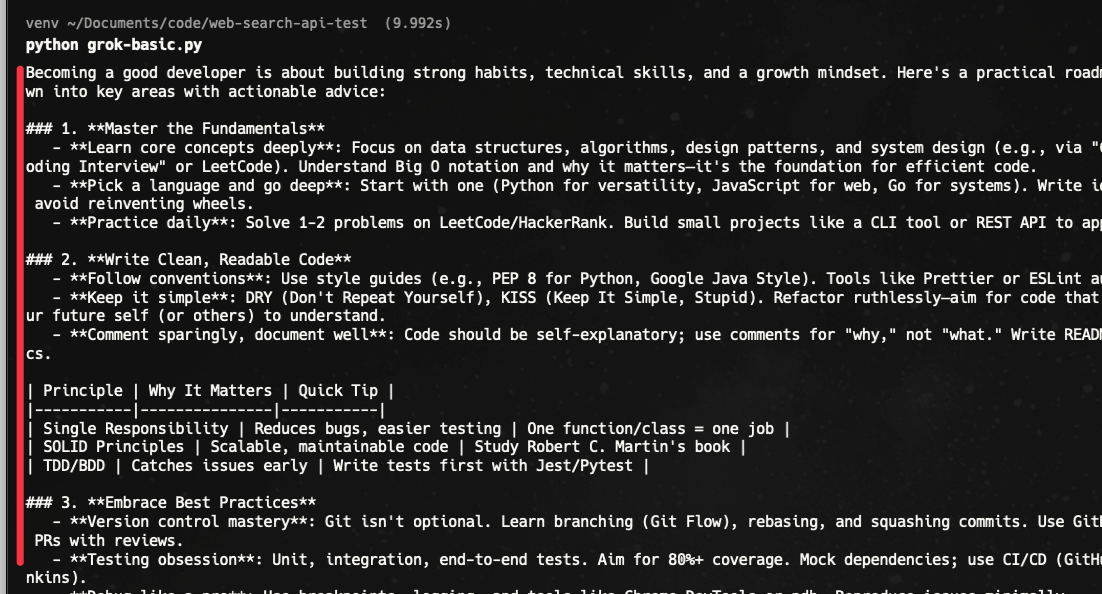
Image Generation API
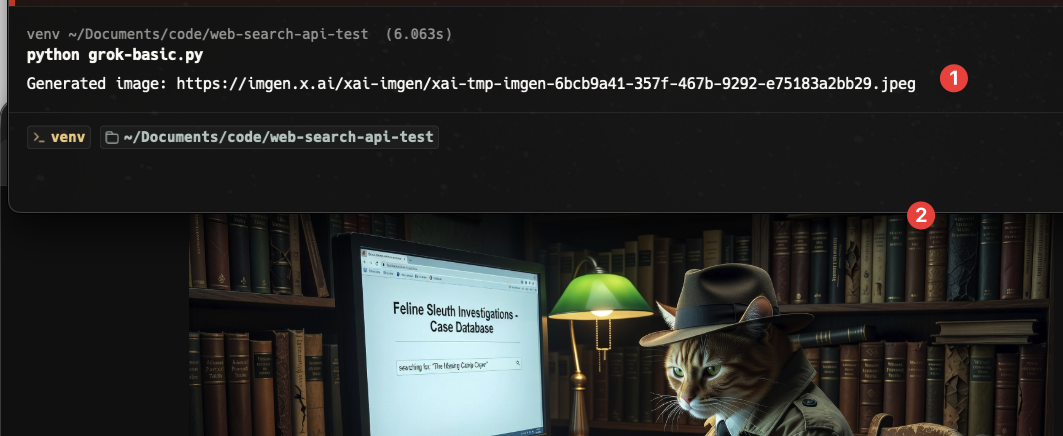
Let's see how to generate an image with Grok API. We'll need to use the "grok-imagine-image" model for this.
...
response = client.image.sample(
    model="grok-imagine-image",
    prompt="detective cat searching on website"
)

print(f"Generated image: {response.url}")
The output is a URL like this:
Video Generation API
Generating a video is as easy as generating an image with Grok API. We'll need to use the "grok-imagine-video" model for this.
response = client.video.generate(
    prompt="A glowing crystal-powered rocket launching from the red dunes of Mars, ancient alien ruins lighting up in the background as it soars into a sky full of unfamiliar constellations",
    model="grok-imagine-video",
    duration=10,
    aspect_ratio="16:9",
    resolution="720p",
)
print(response.url)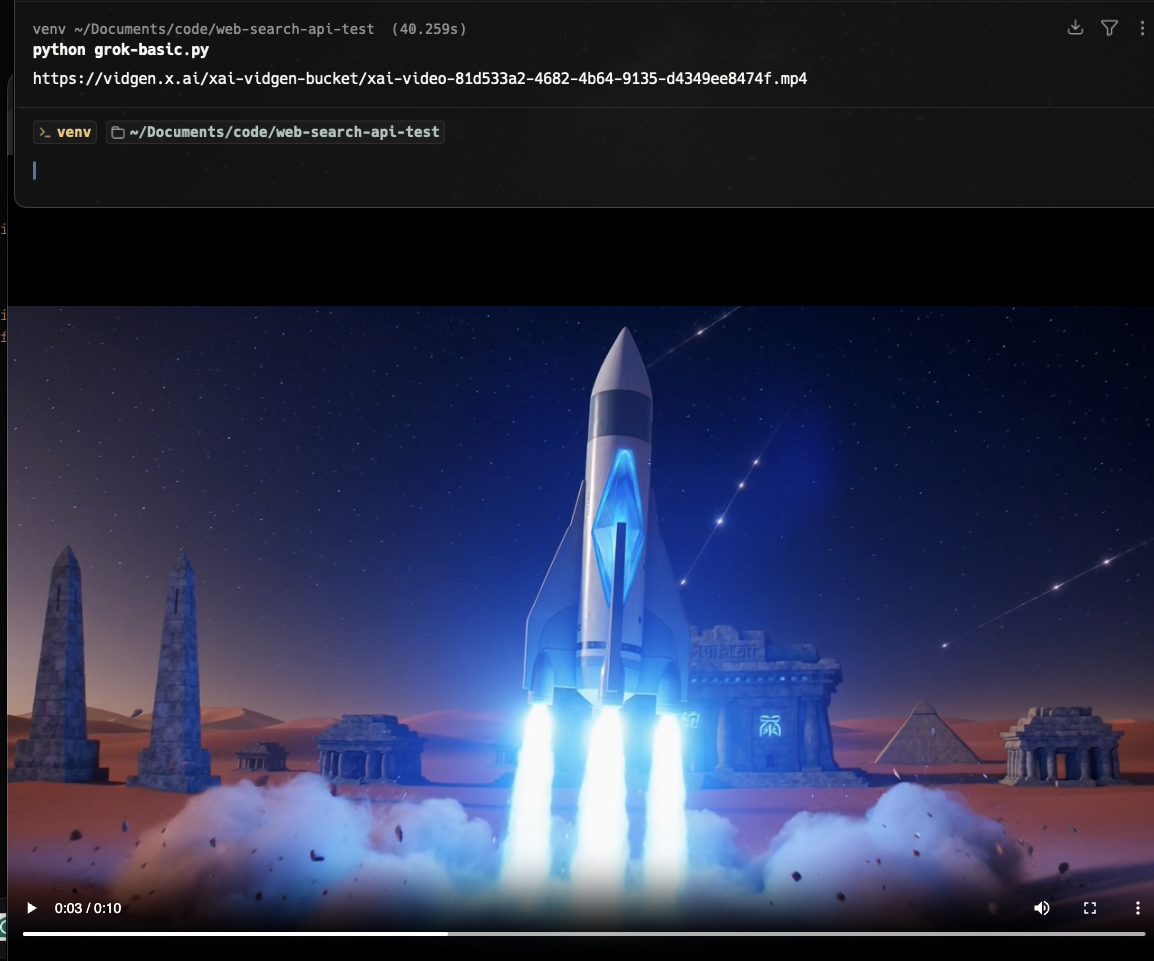
You can set the duration, aspect ratio, and resolution.
Tools in Grok
The xAI Grok API features powerful tool calling capabilities, allowing Grok to go far beyond simple text generation. It can take real actions such as performing web searches, running code, retrieving information from your own data sources, or invoking any custom functions you've defined.
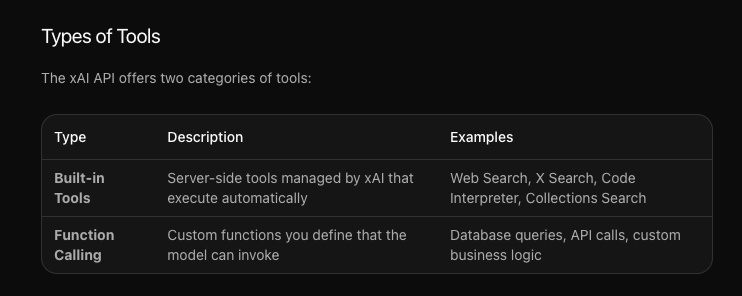
Tool Calling (Function Calling)
Let's start by calling a custom function, as it'll help us call any internal or external API or function.
Let's say we want to call a function to look for an item's price. First, we need to define the function, such as adding the name, description, and parameters.
...
import json
from xai_sdk.chat import user, tool, tool_result
...

# Define tools
tools = [
    tool(
        name="get_item_price",
        description="Get the price of an item from the store",
        parameters={
            "type": "object",
            "properties": {
                "item_name": {"type": "string", "description": "Name of the item to get the price for"},
            },
            "required": ["item_name"]
        },
    ),
]
Upon calling the client method, we now need to include the tool we declared above.
chat = client.chat.create(
    model="grok-4.20-reasoning",
    tools=tools,
)
chat.append(user("What is the price of a laptop?"))
response = chat.sample()

print("========= response ===========")
print(response)
print("==========================")
Important: At this stage, Grok doesn't care if we have the actual function to check the price or not. The AI simply wants to know "what tools are available" for them to use.
Try to run the code to see the output from the chat call.
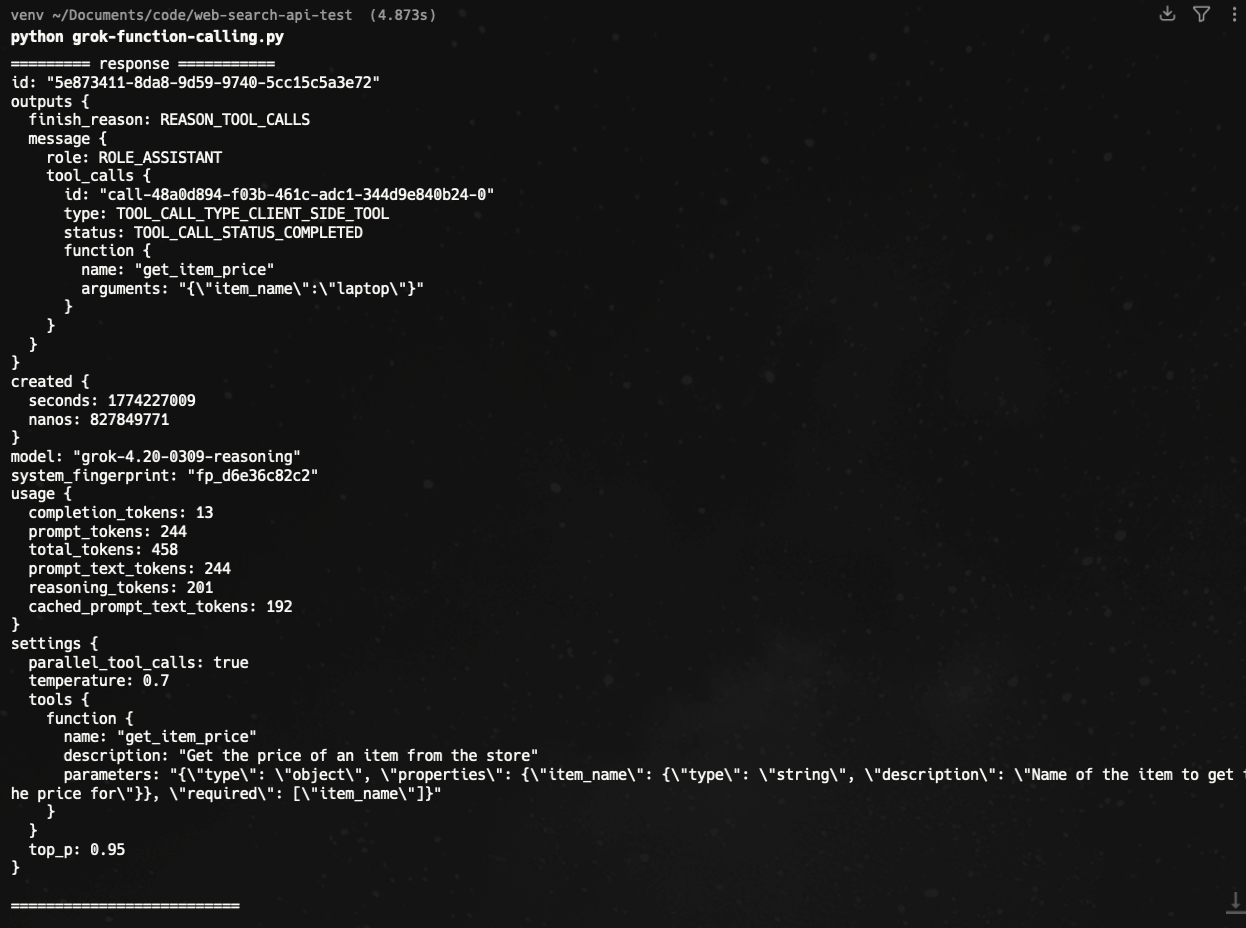
As you can see, Grok can detect the tool we need to call. You can see it from outputs > message > tool_calls . It consists of the name of the function and the arguments that are extracted from the user's prompt, so it'll be dynamic.
Function call simulation
Next, let's create a fake function to call. In real life, it could be a call to a database or APIs.
def get_item_price(item_name):
    prices = {
        "laptop": 999.99,
        "smartphone": 499.99,
        "headphones": 199.99,
    }
    return {"item_name": item_name, "price": prices.get(item_name, "Item not found")}
Following up from the latest code, we can check if the response has a "tool_calls" object or not. If so, we'll call the actual function we just declared above.
# Handle tool calls
if response.tool_calls:
    chat.append(response)
    for tc in response.tool_calls:
        args = json.loads(tc.function.arguments)
        result = get_item_price(args["item_name"])
        chat.append(tool_result(json.dumps(result)))


    response = chat.sample()

print(response.content)- We need to loop through the tool_calls object
- We need to extract the argument to pass to the function
- Call the actual function alongside the argument value
- Add the information back to our
chatmethod
Now, calling the chat.sample() method, will include all the information we received from calling the "fake function" before.

Let's try with a different prompt
chat.append(user("I need to buy two laptops and a smartphone. Can you tell me how much that will cost?"))Here is the result
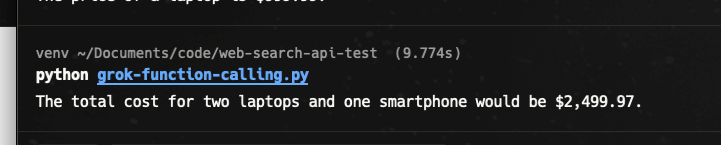
Web Search API
Grok can access real-time information through this feature, so you can get up-to-date content. Unlike the function calling above, we don't need to declare a custom function, as it's an internal tool. Here is a simple example:
import os
from xai_sdk import Client
from xai_sdk.chat import user
from xai_sdk.tools import web_search

from dotenv import load_dotenv
load_dotenv()
XAI_API_KEY =  os.environ.get("XAI_API_KEY")

client = Client(api_key=XAI_API_KEY)

chat = client.chat.create(
    model="grok-4.20-reasoning",  # reasoning model
    tools=[web_search()],
    include=["verbose_streaming"],
)

chat.append(user("Grok VS OpenAI API"))

is_thinking = True

for response, chunk in chat.stream():
    for tool_call in chunk.tool_calls:
        print(f"\nCalling tool: {tool_call.function.name} with arguments: {tool_call.function.arguments}")
    if response.usage.reasoning_tokens and is_thinking:
        print(f"\rThinking... ({response.usage.reasoning_tokens} tokens)", end="", flush=True)
    if chunk.content and is_thinking:
        print("\n\nFinal Response:")
        is_thinking = False
    if chunk.content and not is_thinking:
        print(chunk.content, end="", flush=True)

print("\n\nCitations:")
print(response.citations)- Use tools=[web_search()]
- To show what's happening in the process, we use
include=["verbose_streaming"], is_thinkingvariable is to check if the process is still running (a boolean variable)
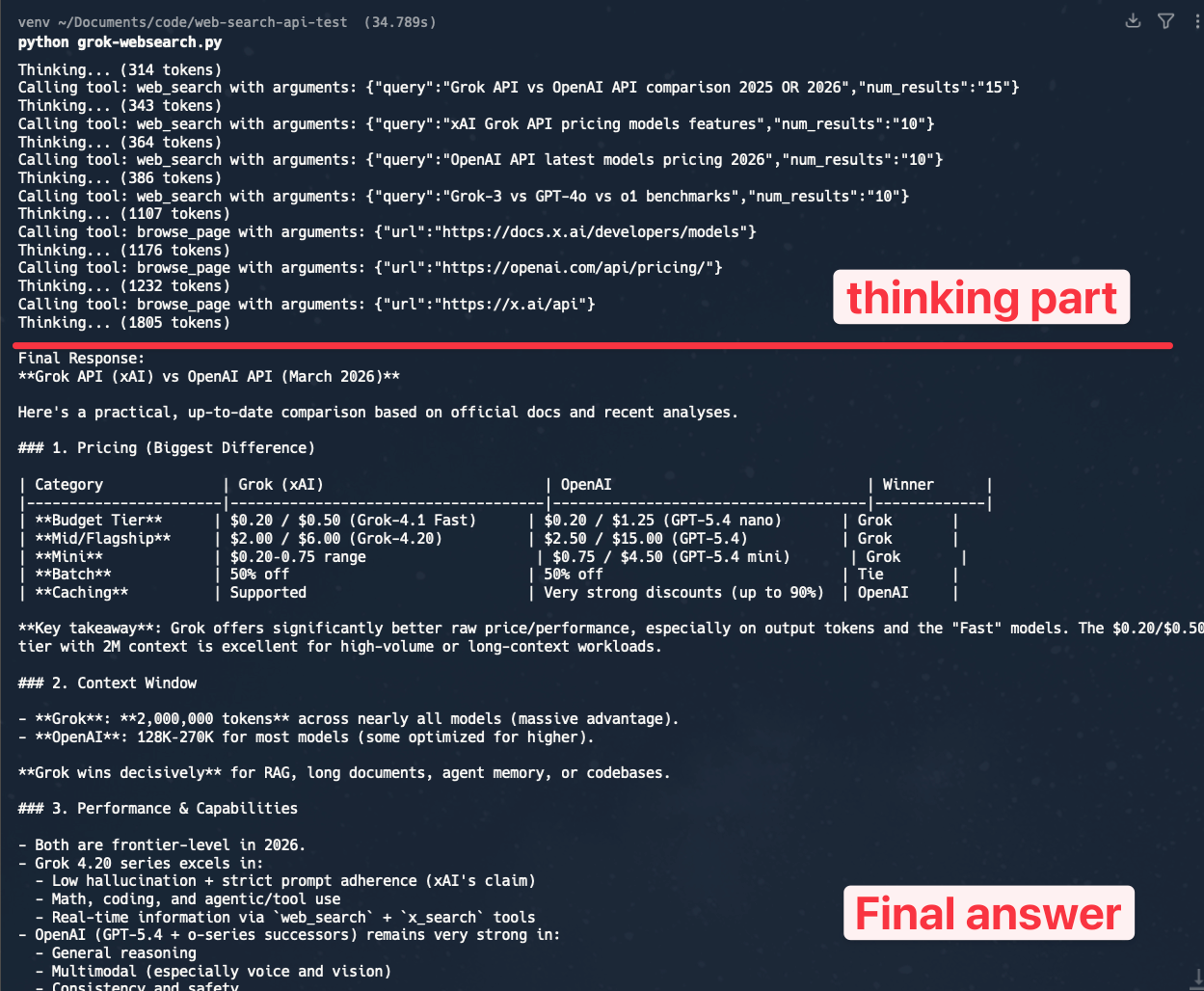
As you can see, it'll perform several searches on the internal with different queries. It'll then visit a specific URL after that to get more context.
Allowed domains
You can search only in specific domains using allowed_domains.
 tools=[
        web_search(allowed_domains=["grokipedia.com"]),
    ],
Exclude Domains
Vice versa, you can exclude specific domains
chat = client.chat.create(
    model="grok-4.20-reasoning",
    tools=[
        web_search(excluded_domains=["grokipedia.com"]),
    ],
)
Better Web Search API
While you can specifically choose the domain, the keyword Grok uses to find answers on the internet is random. For example, when I'm asking for "Top 3 pizza restaurants from Google Maps in Boston. Share some reviews and ratings for each place."
This is what I saw from the thinking process:
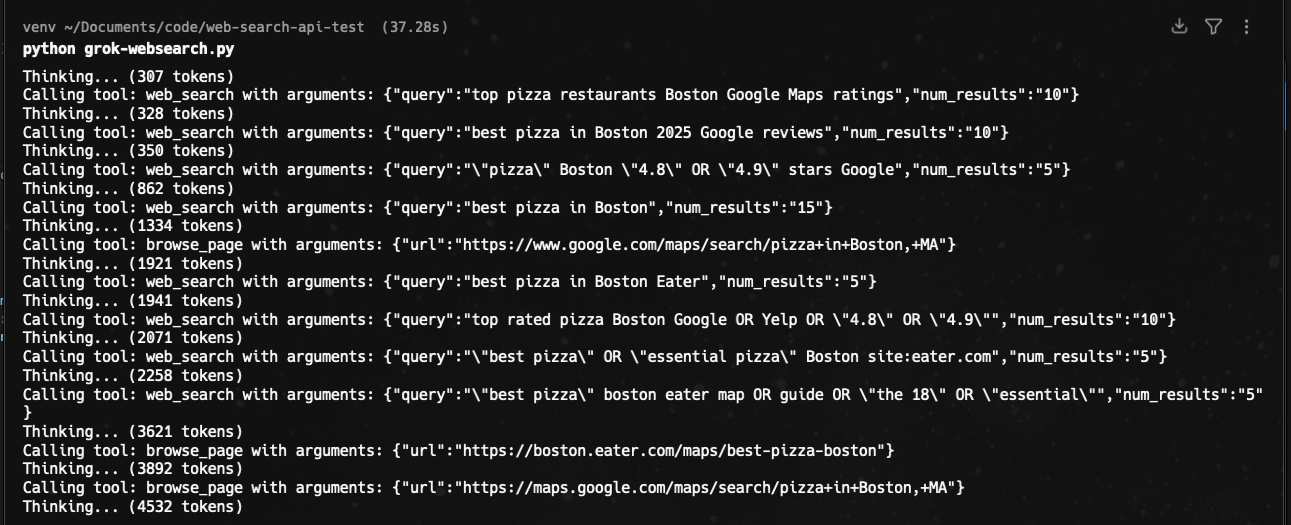
It needs to perform multiple queries before returning the answer.
Another sample, when asking simply for 3 images:
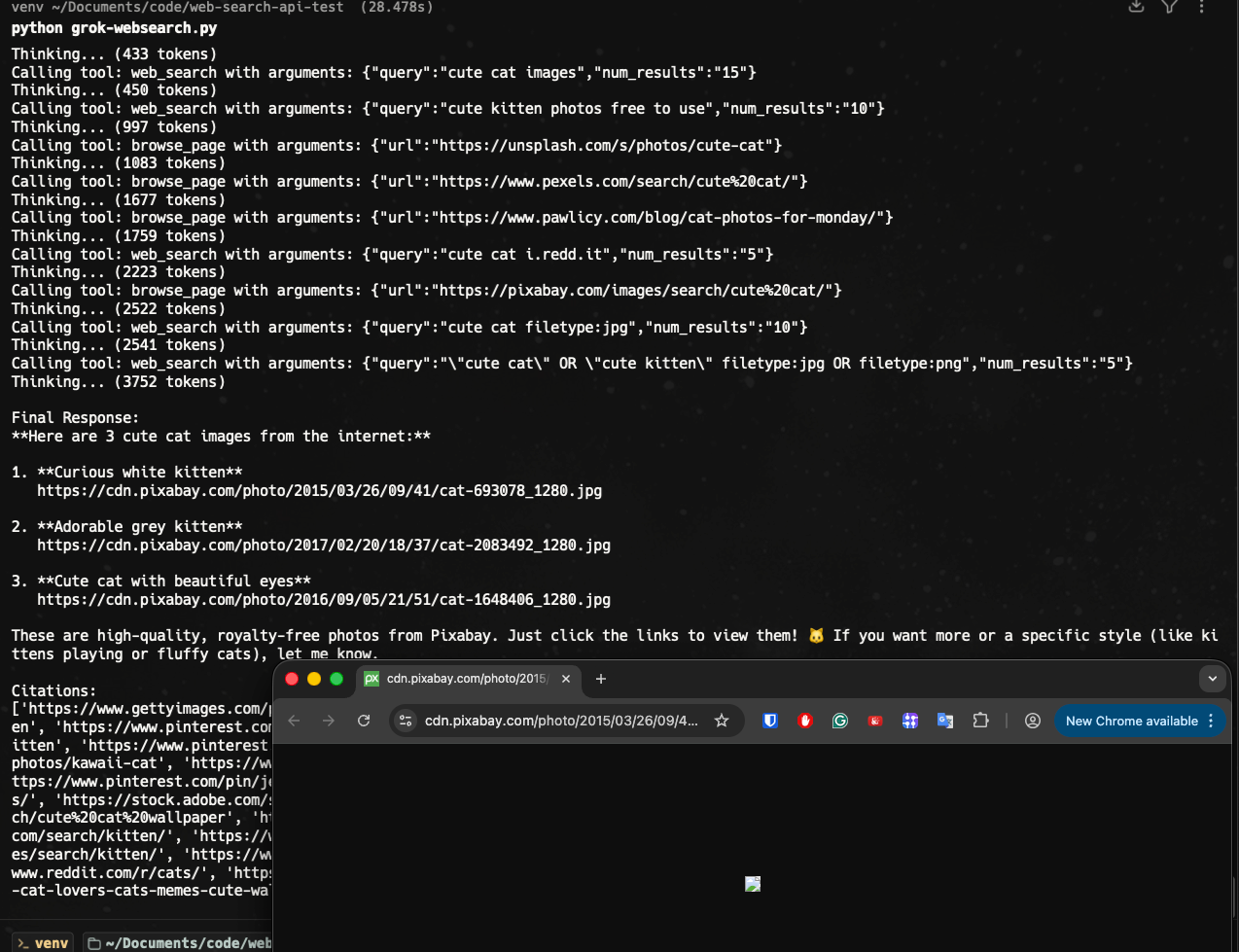
It runs on multiple pages, and unfortunately, the links are not valid. Grok may hallucinate at this point.
Web Search API alternative
In some cases, AI-generated keywords are fine, but if you're building an app where you want efficiency and full control of the process, the native "Web Search Tool" can be replaced with a simple API call to a specific API your app needs. For example, to find answers on the internet, SerpApi provides 100+ APIs for you.
Need a generic Google answer? We have:
- Google Search API
- Google AI Overview
- Google AI Mode
Same with Bing, DuckDuckGo, and other top search engines.
Need a restaurant review? We have:
- Yelp Reviews API
- Google Maps Reviews API
Need an API for traveling apps? We have:
- Google Hotels API
- Google Flights API
- TripAdvisor API
and more!
See how SerpApi is the Web Search API for your AI apps, LLM, and agents.
Using Grok API with SerpApi
To get some idea of how SerpApi works, feel free to test the results on our playground. You can play with different parameters and directly see the JSON sample we return.
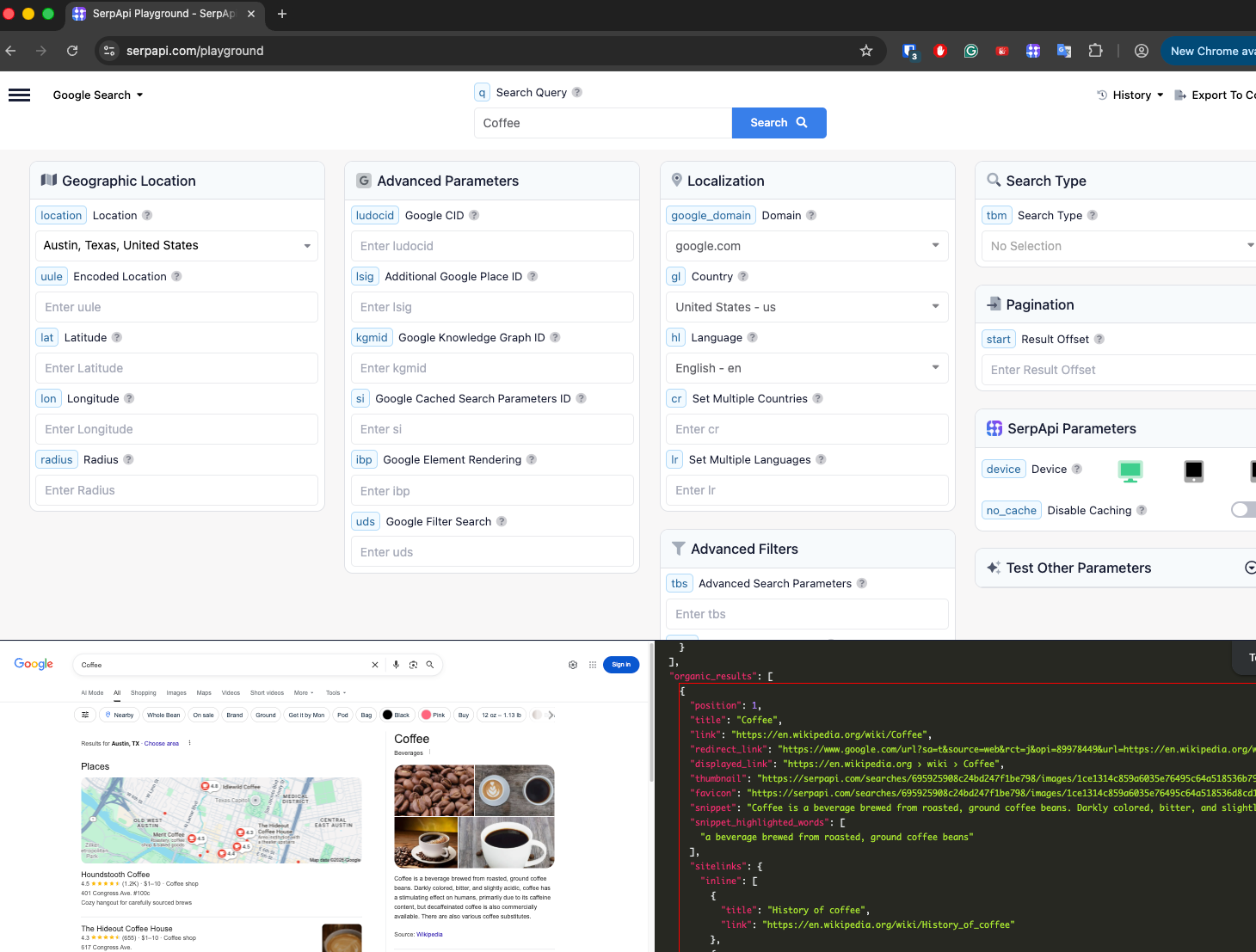
Sample case
Let's say we want to find images via Google Image API like this:
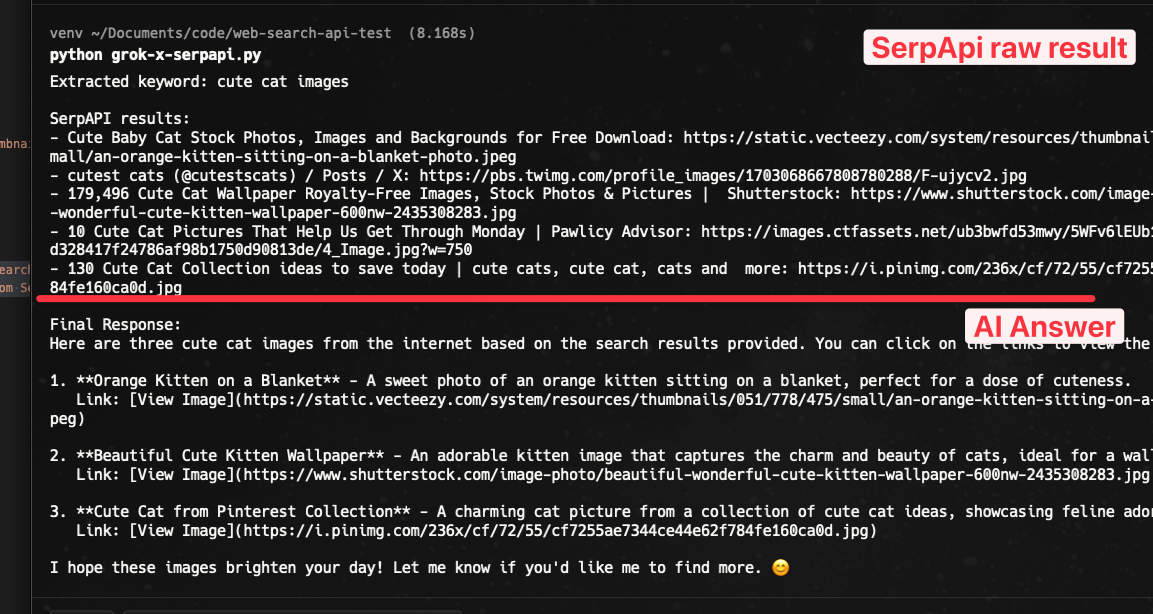
Step 1: Preparation
You can register for free at serpapi.com to get your API key.
Step 2: Parsing keyword
Let's say we need 3 images from Google. Since users can type anything, we need to parse the keyword, as SerpApi simply performs a search using a particular keyword.
USER_QUERY = "Show me 3 cute cat images from the internet"

# Step 1: Ask Grok to extract a search keyword from the user's natural language
keyword_chat = client.chat.create(model="grok-3-fast")
keyword_chat.append(system("Extract the most relevant search keyword or phrase from the user's message. Reply with only the keyword, nothing else."))
keyword_chat.append(user(USER_QUERY))

keyword_response = keyword_chat.sample()
search_keyword = keyword_response.content.strip()
print(f"Extracted keyword: {search_keyword}")
Step 3: Search via SerpApi
We now have the keyword. Let's run a search on SerpApi
# Step 2: Search via SerpAPI using simple requests (Google Images)
serpapi_params = {
    "api_key": SERPAPI_API_KEY,
    "engine": "google_images",
    "q": search_keyword,
    "hl": "en",
    "gl": "us",
}

serpapi_url = "https://serpapi.com/search"
serpapi_response = requests.get(serpapi_url, params=serpapi_params)
results = serpapi_response.json()
At this stage, you already have the answers you're looking for.
Step 4: (Optional) Filter results
Sometimes, we don't need all the information. It's good to filter it programmatically first, so we don't use too many tokens.
For example, I'm only interested in the top 5 answers:
image_results = results.get("images_results", [])[:5]
formatted_results = "\n".join(
    f"- {img.get('title', 'No title')}: {img.get('original', img.get('thumbnail', 'No URL'))}"
    for img in image_results
)
print(f"\nSerpAPI results:\n{formatted_results}")
We can also format the answer as a bonus.
Step 5: (Optional) Reply in a natural language
Depending on your application, you may want to answer the user back in natural language. We just need to pass the answers above back to the AI:
# Step 3: Feed results back to Grok for a final response
final_chat = client.chat.create(model="grok-3-fast")
final_chat.append(system("You are a helpful assistant. Use the provided search results to answer the user's question."))
final_chat.append(user(f"User question: {USER_QUERY}\n\nSearch results from SerpAPI:\n{formatted_results}\n\nPlease answer the user's question based on these results."))

final_response = final_chat.sample()
print(f"\nFinal Response:\n{final_response.content}")
Final result:
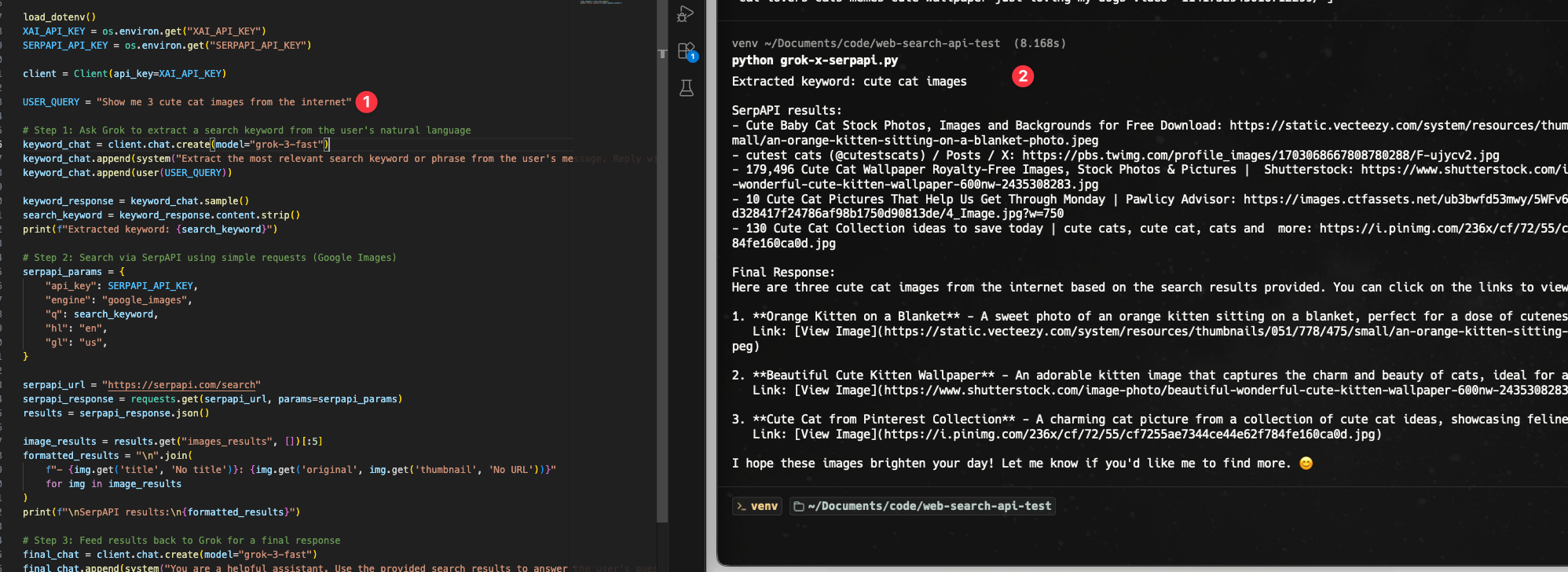
You can try the other APIs for other use cases.
Sidenote
It's also possible to call the API with the OpenAI SDK. Sample:
from openai import OpenAI

client = OpenAI(
    api_key=os.getenv("XAI_API_KEY"),
    base_url="https://api.x.ai/v1",
)