 Google Local Services API
 Google Travel Explore API
 Baidu Search API
 Bing Search API
 DuckDuckGo Search API
 eBay Search API
 Naver Search API
 OpenTable Reviews API
 The Home Depot Search API
 Tripadvisor Search API
 Walmart Search API
 Ruby
Ruby
 Golang
 .Net
.Net
 MCP
MCP
 C++
C++

Context switching is the silent killer of developer productivity. You are deep in a Linear ticket or debugging a Slack thread, you hit a technical question, and suddenly you are in a browser tab reading through Stack Overflow and pasting links back to your team. Multiply that by every developer on your team, several times a day, and you start to see how much focused time disappears.
What if the tools you already use could do that research for you?
In this tutorial, we build a cross-platform Research Agent — a single Python backend that plugs into both Slack and Linear. You can mention it in a channel or assign it to a ticket, and it will search the web using SerpApi, synthesize the results with an LLM, and post a cited answer directly in your workspace. No tab switching required. We will mostly focus on Linear example since that's where the assignment happens explicitly, but Slack extension is supported as well.
Table of Contents
- Why Build a Workspace Research Agent
- Architecture: One Backend, Two Platforms
- The Research Engine: SerpApi + LLM
- Connecting to Slack
- Connecting to Linear’s Agent API
- Running It Locally
- Seeing It in Action
- Conclusion
Why Build a Workspace Research Agent
Project management tools and chat apps are excellent at tracking internal context — who owns a task, what the status is, what decisions were made. But they have a blind spot when it comes to external information: updated documentation, recent CVEs, syntax examples, framework comparisons, or trending approaches to a problem.
Developers bridge that gap manually, dozens of times a day, mostly submitting propmts to the LLM and then coming back and hour later to pick up on the necessary context. There is no task -> in progress -> done update loop here.
An AI research agent solves this by bringing live web data into the conversation. Instead of leaving Slack or Linear, a developer tags the agent with a question. The agent fetches structured search results via SerpApi, passes them to an LLM for synthesis, and posts a concise, cited answer right where the question was asked.
The key insight is that SerpApi returns clean, structured JSON — titles, snippets, links — rather than raw HTML. Our agent never scrapes or parses web pages. It reasons over high-quality, normalized data from Google, Google Scholar, YouTube, and dozens of other engines. The output is a complete research with references and an extendable engine to back it.
Architecture: One Backend, Two Platforms
Building a cross-platform bot means dealing with different platform lifecycles. Slack requires you to acknowledge an event within 3 seconds. Linear’s Agent API requires your agent to emit a “thought” activity within 10 seconds of receiving an assignment. If you miss either deadline and the platform marks your bot as unresponsive.
To handle this cleanly, we built a single FastAPI server with two webhook endpoints — /slack/events and /linear/webhooks — and a shared research engine behind them. Both endpoints immediately satisfy their platform’s timeout constraint and then hand the actual work to a background task.
Here is what the flow looks like:
- Ingest: A webhook arrives from Slack (app mention) or Linear (agent session event).
- Acknowledge: The endpoint responds instantly — Slack Bolt calls
ack()automatically; the Linear handler returns HTTP 200 and spawns a background coroutine. - Search: The research engine calls SerpApi with the user’s query and gets structured JSON results.
- Synthesize: An LLM reads the search results and produces a markdown summary with source citations.
- Respond: The answer is posted back — as a threaded Slack message or a Linear agent activity.
The entire backend is async Python. FastAPI handles routing, Slack Bolt’s AsyncApp handles Slack-specific event parsing, and a lightweight httpx-based client handles Linear’s GraphQL API. Everything shares the same perform_research() function, platform-specific code only exists at the edges.
The Research Engine: SerpApi + LLM
The core of the agent is surprisingly simple. Two functions do all the work: one fetches search results, the other synthesizes them.
For search, we use SerpApi’s Python client. The agent automatically picks the right engine based on the query. For this article, we keep the search loop simple, but you can read about more advanced approaches on the prior blog posts. If someone asks about a “research paper,” it routes to Google Scholar; if they want a “video tutorial,” it routes to YouTube; otherwise it defaults to Google Search:
client = serpapi.Client(api_key=settings.serpapi_api_key)

results = client.search({"q": query,  "engine": _pick_engine(query),  "num": 5})
Because SerpApi returns normalized JSON regardless of the engine, the rest of the pipeline does not need to care which search backend was used. We extract title, snippet, and link from each result and format them into a context block.
For synthesis, we pass those results to an LLM with a system prompt that enforces citation discipline, summarize the findings, always cite sources using the provided URLs, never fabricate beyond what the search results contain:
response =  await openai_client.chat.completions.create(
  model="gpt-5.4",
  messages=[
    {"role": "system",  "content": RESEARCH_SYSTEM_PROMPT},
    {"role": "user",  "content": f"Answer this query: {query}\n\nSearch results:\n{context}"},
  ],
  temperature=0.3,
)
The low temperature keeps the output factual. SerpApi handles proxy rotation, CAPTCHA solving, and result parsing behind the scenes, so our code never touches raw HTML.
Connecting to Slack
For Slack, we use the Slack Bolt framework. Bolt handles event parsing, signature verification, and the 3-second acknowledgment automatically — we just write a handler for the app_mention event:
@app.event("app_mention")
async  def  handle_mention(event, say):
  thread_ts = event.get("thread_ts", event["ts"])

  await  say("Researching...",  thread_ts=thread_ts)

  answer =  await  perform_research(_extract_query(event["text"]))

  await  say(_slack_format(answer),  thread_ts=thread_ts)
When someone types @ResearchBot What is the best way to handle database migrations in Django?, the handler strips out the bot mention to get the raw question, posts a “Researching…” message so the user knows something is happening, runs the SerpApi + LLM pipeline, and replies in the same thread with the cited answer.
One detail worth noting: Slack uses its own link format (<url|text>) instead of standard markdown. Since our research engine always outputs standard markdown, we convert links at the boundary with a simple regex. The engine itself stays platform-agnostic.
Connecting to Linear’s Agent API
Linear’s Agent API is the more interesting integration. Unlike a basic webhook that creates comments, Linear’s agent system gives your bot a first-class identity in the workspace. It shows up in the assignee dropdown, it can be @mentioned in issues and documents, and its responses appear as structured agent activities with visible thinking states, not just plain comments.
When a user assigns your agent to an issue or mentions it in a comment, Linear creates an AgentSession and sends a webhook to your server. Your agent communicates back through typed activities:
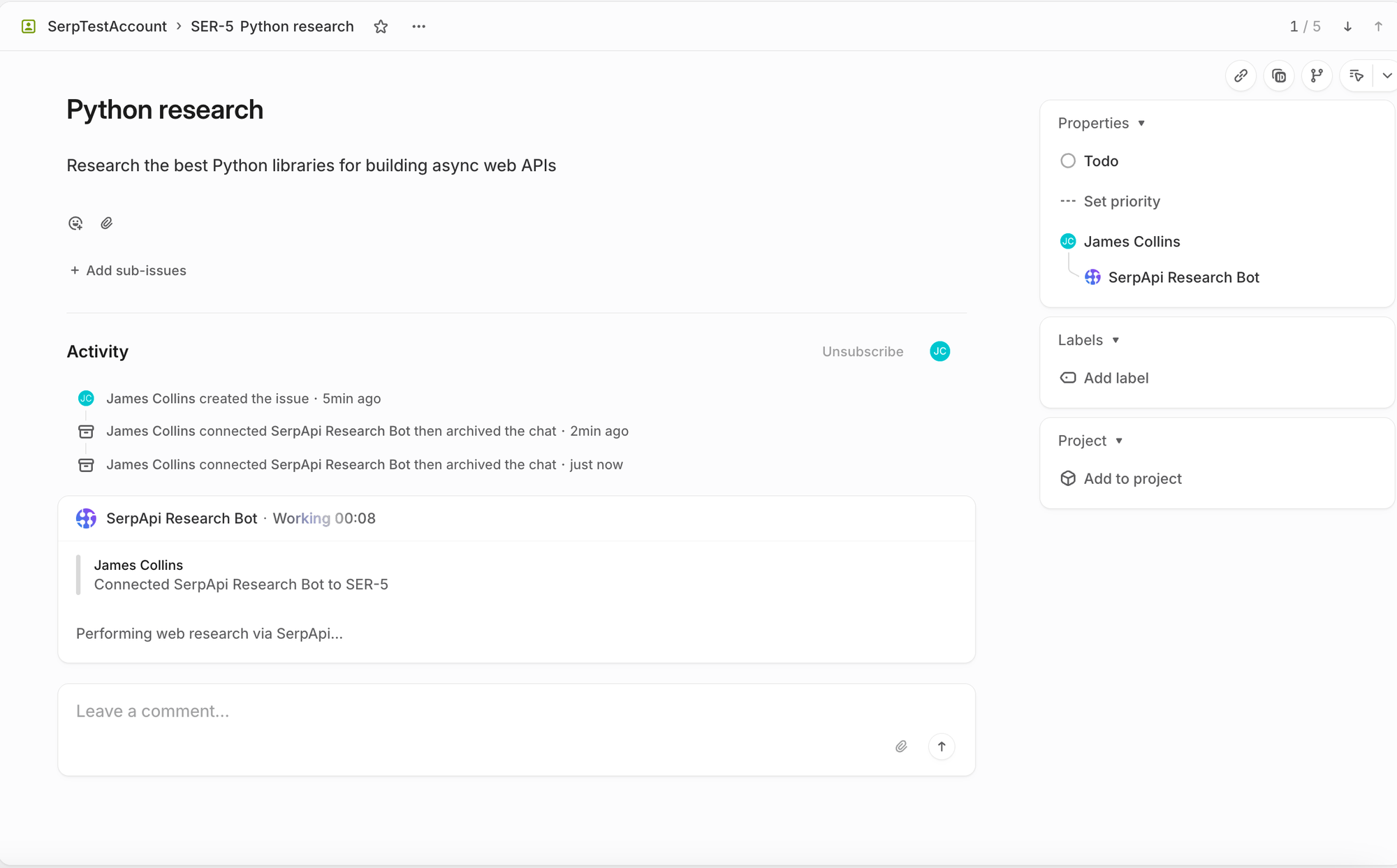
- thought: Shows a thinking indicator (e.g., “Performing web research via SerpApi…”)
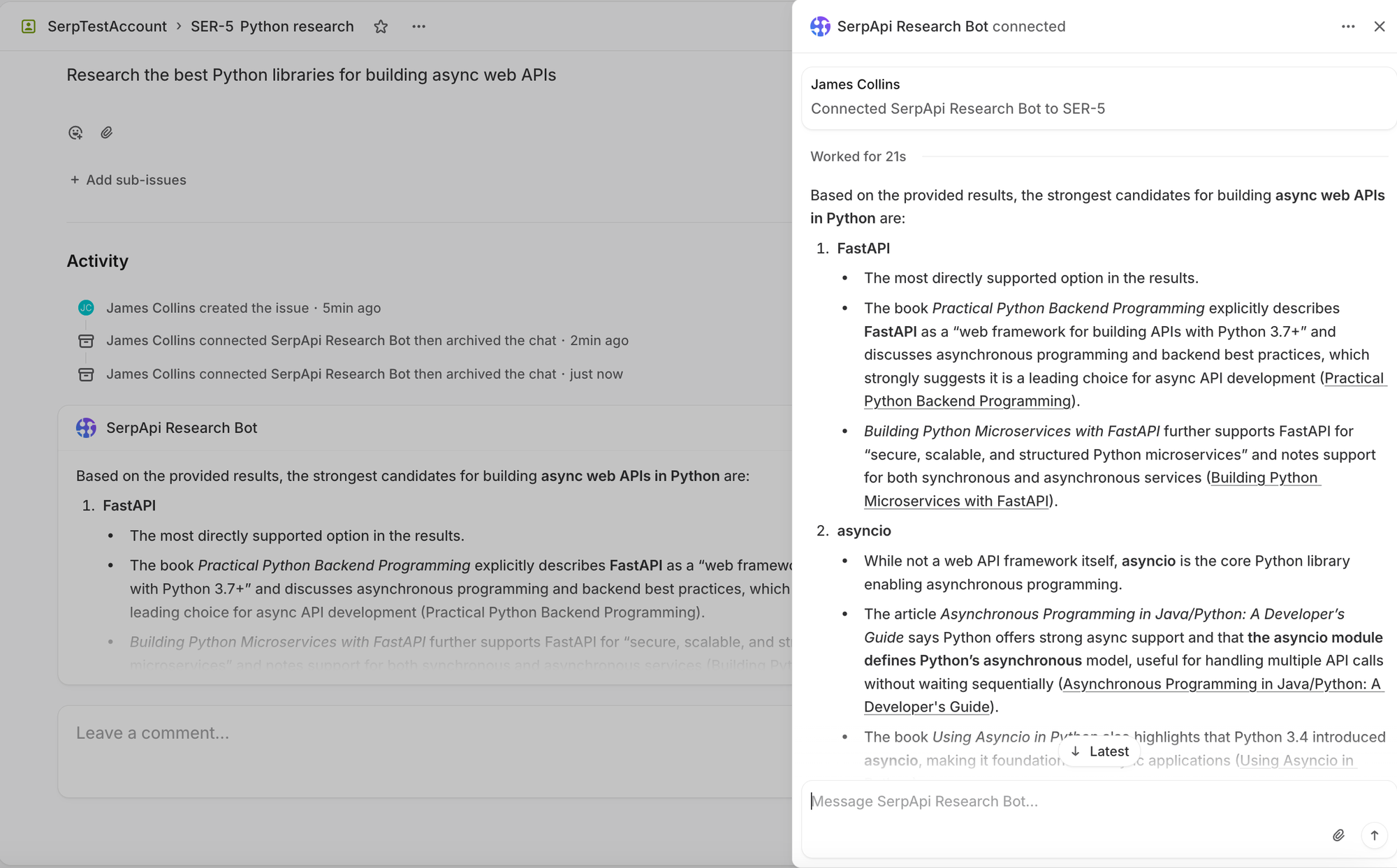
- response: The final answer, rendered as rich markdown in the issue
- error: Displayed with error styling if something goes wrong
The webhook handler needs to respect two constraints: return HTTP 200 within 5 seconds, and emit a thought within 10 seconds. We handle this by returning immediately and spawning the research work as a background coroutine:
if event_type ==  "AgentSessionEvent"  and action in  ("created",  "prompted"):
  asyncio.create_task(_handle_session(payload))
  return  Response(status_code=200)
The background task sends the thought activity right away — well within the 10-second window — then runs the research pipeline and posts the result as a response. The query is extracted from Linear’s promptContext field, which contains the issue title, description, and any relevant context:
await linear_client.send_thought(session_id,  "Performing web research via SerpApi...")

answer =  await perform_research(query)

await linear_client.send_response(session_id, answer)
For GraphQL communication, we wrote a thin async client using httpx rather than pulling in a full GraphQL library. All we need are two mutations — agentActivityCreate for posting activities and agentSessionUpdate for managing session state — so raw query strings are more than sufficient.
Linear also signs every webhook with HMAC-SHA256, which we verify against the raw request body before processing anything. And if a user sends a follow-up message within an existing session, Linear dispatches a prompted event (instead of created), making the interaction conversational, the agent picks up the new message and researches again.
Running It Locally
Both Slack and Linear support private development without any app directory submission or review process. You can have the full end-to-end flow running in minutes.
The project uses uv for dependency management and Python 3.12+:
git  clone  https://github.com/serpapi/serpapi-research-agent.git
cd  serpapi-research-agent
uv  sync
cp  .env.example  .env
Fill in your .env with API keys for SerpApi, OpenAI, and the Slack/Linear credentials from your dev app configurations. Then start the server and expose it via ngrok:
uv  run  uvicorn  serpapi_research_agent.main:app  --reload  --port  3000

# In another terminal:
ngrok  http  3000
Point your Slack Event Subscriptions Request URL and Linear app webhook URL to the ngrok tunnel, and you are ready to test. For Slack, invite the bot to a channel and mention it. For Linear, create an issue and assign the agent as a delegate.
Seeing It in Action
We will focus on Linear example, since it is more interesting and has a better Agent integration, but setting up Slack is straightforward as well.
Linear
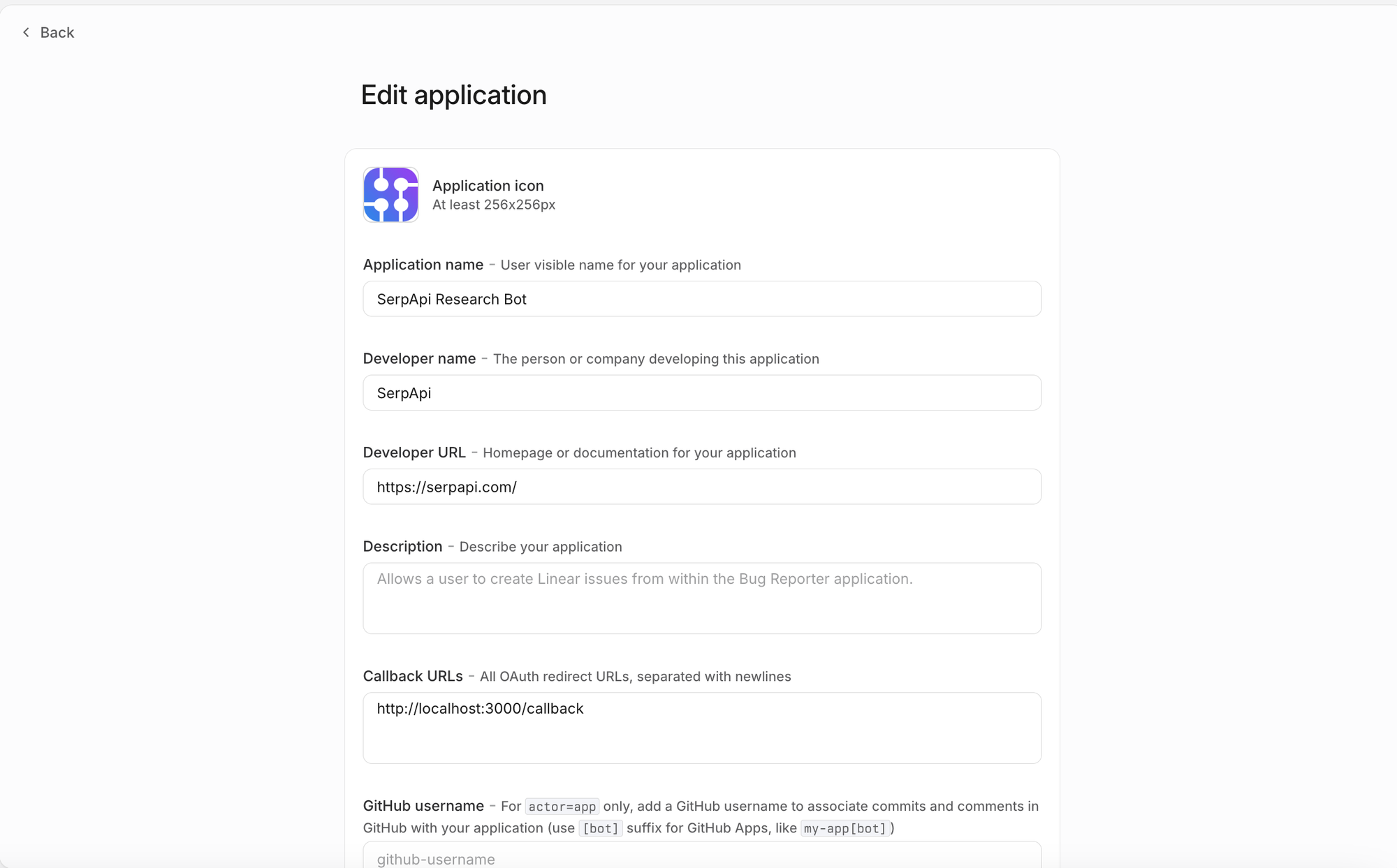
For Linear, first we will need to create a new Linear Oauth app. Sample settings below, you get the URL from ngrok, add /linear/webhooks to it, and add it to the webhook section. You will also need to get a Linear ouath access token, you can take it be submitting a request with your client ID, client secret, and grant_type=client_credentials (note that client credentials must be enabled during the auth) setup. Then save all the received credentials into the .env file.
Once the agent is properly configured and everything is running, you can open a ticket and assign it an issue. The Research Bot will appear as a first-class Linear member:
And once the research is actually complete, then the agent will follow with a response activity and a full response content.
Conclusion
By integrating SerpApi and an LLM directly into Slack and Linear, we built a research assistant that meets developers exactly where they work. The architecture is deliberately simple — a single FastAPI server with a shared research engine and thin platform-specific adapters at the edges.
SerpApi handles the hard parts of web search: proxy rotation, CAPTCHA solving, and result normalization across multiple engines. The LLM handles synthesis and citation. And the platform integrations handle the last mile — getting the answer back into the right thread or ticket, formatted correctly, within each platform’s timeout constraints.
The full source code is available on GitHub. You can have it running against your own Slack workspace and Linear instance in under 15 minutes.
Ready to build your own workspace agent? Create a free SerpApi account to get started.